Voice Cloning AI Free: How to Clone Any Voice Online in Minutes

Trang Tran
November 8, 2026
Try voice cloning AI free with 1min.AI. Upload a 5-second clip, pick an ElevenLabs model, choose from 32 languages, and turn text to speech in your own voice.
You have a script, a deadline, and a voice you wish you could reuse without booking another recording session. Voice cloning AI free options exist, and you can go from a short audio clip to a finished voiceover in a few minutes.
This guide compares the two main free routes (online tools and local apps), then walks you through the exact workflow in 1min.AI Voice Cloning, which runs on ElevenLabs models.
Quick answer: To clone a voice with AI for free, upload a clean audio sample of at least 5 seconds, type your script, and generate speech in the cloned voice. Online tools are fastest for one-off projects. Local open-source apps suit people who want offline use and don’t mind installing software. On 1min.AI, you can try Voice Cloning free in your browser. You don’t need to register.
Key takeaways
- Online tools need only a short sample and a browser. Local apps need installation and a capable computer.
- 1min.AI Voice Cloning uses ElevenLabs models (Eleven Flash v2.5 and Eleven Turbo v2.5) and supports 32 languages.
- Audio quality matters more than length. A clean 5-second clip beats a noisy 30-second one.
Voice Cloning AI Free: Online Tools vs Local Apps
Most people searching for free voice cloning want one of two things: a quick result in the browser, or a setup they can run on their own computer. Here is how the routes compare.
| Online voice cloning | Local open-source apps | |
|---|---|---|
| Best for | Quick projects, creators, marketers | Offline use, technical users |
| Setup | Open a browser, upload a clip | Download app and AI models |
| Hardware | Any device with a browser | A capable computer |
| Typical sample | 3 to 15 seconds | Varies by model |
| Languages | Often many, depending on the model | Depends on the model you install |
Online Voice Cloning for Quick Results
Online tools handle processing in the cloud. You upload a sample, type your text, and download the audio. That makes them the practical choice for social videos, podcasts, ads, and course narration.
Local Open-Source Apps for Offline Use
Local apps keep everything on your machine and can run offline after the models download. The trade-off is setup time and hardware requirements. If you want results this afternoon, online is simpler.
Where 1min.AI Fits
1min.AI is the online route. You open Voice Cloning, upload a clip, and run it. You don’t need to register for this tool. Voice Cloning also sits alongside the rest of the AI for Audio suite, including Text to Speech, Speech to Text, and Voice Changer.
How to Clone a Voice Free with 1min.AI
Here is the full workflow. It takes a few minutes the first time.
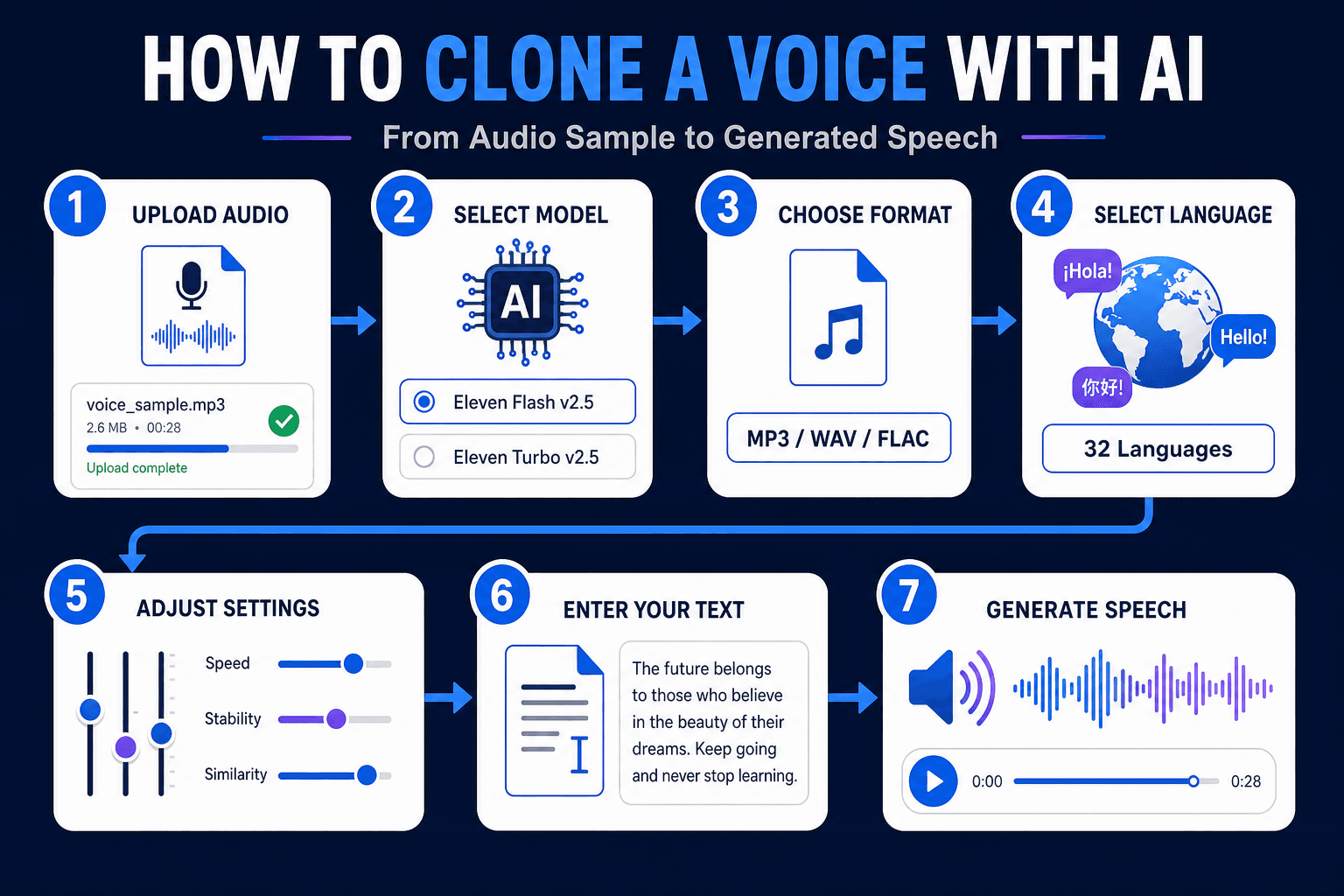
- Upload your audio: Drag and drop a single MP3, M4A, OGG, WAV, or FLAC file.
- Select Voice Cloning - ElevenLabs: This is the engine for the tool.
- Choose an output format: The default is mp3_44100_128. Options run from mp3_22050_32 (smallest file) to mp3_44100_192 (highest quality).
- Pick a model: Choose Eleven Flash v2.5 or Eleven Turbo v2.5.
- Select a language from 32 options.
- Adjust the voice settings (explained below).
- Type your text and click Run.
Want to see it in action first? Watch the walkthrough:
Clone Voice From an Audio File Free: Requirements
- Formats: MP3, M4A, OGG, WAV, FLAC
- File size: up to 11MB, one file at a time
- Minimum length: 5 seconds
What Each Voice Setting Does
| Setting | Range | What it changes |
|---|---|---|
| Remove Background Noise | Enable / Disable | Cleans the sample before cloning |
| Speed | 0.7 to 1.2 | Slows down or speeds up delivery |
| Stability | 0 to 1 | Lower is more expressive. Higher is more consistent |
| Similarity Boost | 0 to 1 | Higher stays closer to the original voice |
| Style | 0 to 1 | Increases or reduces the speaker’s stylistic exaggeration |
| Speaker Boost | Enable / Disable | Strengthens resemblance to the original speaker |
A good starting point is Remove Background Noise enabled, moderate Stability, and high Similarity Boost. Then generate a short test line and adjust one slider at a time.
ElevenLabs Voice Cloning Inside 1min.AI
Many people search for “elevenlabs voice cloning” because the technology has become a reference point for realistic synthetic speech. 1min.AI brings those models into one workspace, so you can use them without setting up separate tools. You can also explore the wider ElevenLabs voice changer, cloner, and text to speech tools on 1min.AI.
ElevenLabs Instant Voice Cloning Explained
Instant voice cloning means the system builds a voice from a short sample without a long training process. You upload a few seconds of speech, and the model captures timbre, pitch, and speaking rhythm. Then it applies them to new text. This is the approach behind the 5-second minimum in 1min.AI.
Eleven Flash v2.5 vs. Eleven Turbo v2.5
Both models are available in the tool, so you can match the model to the job.
- Eleven Flash v2.5: Built for speed. A good fit for quick drafts and short social clips.
- Eleven Turbo v2.5: A strong fit when you want to compare delivery quality across takes.
If you’re unsure, generate the same sentence with both and keep the one that sounds closer to your goal.
ElevenLabs Voice Cloning Text to Speech
Once your sample is uploaded, the text box works like a text to speech field. Type or paste your script, press Run, and the cloned voice reads it. Punctuation guides the rhythm, so use commas and full stops deliberately.
ElevenLabs Voice Cloning Review: What Stands Out
Users generally value three things in ElevenLabs-based cloning: natural intonation, short sample requirements, and fine-grained controls like Stability and Similarity Boost. Those are the same controls you get in 1min.AI.
ElevenLabs Voice Cloning API, Price, and Reddit Questions
- API: Developers who need to build voice cloning into their own app can review ElevenLabs’ official API documentation. 1min.AI is designed for no-code use in the browser.
- Price: Plan details change over time, so check the official pages for current figures. To see how the output sounds, you can try 1min.AI Voice Cloning first.
- Reddit: Discussion threads commonly focus on sample quality, consistency across long scripts, and consent. The tips below address the first two, and the responsible use section covers the third.
Tips for a Better Voice Clone
Start With a Clean Sample
Record in a quiet room, keep the microphone at a steady distance, and speak at a natural pace. Avoid music and other voices. If your recording has noise, run it through the AI Voice Isolator first, then upload the cleaned file.
Match the Sample to Your Goal
If you want a warm podcast tone, read your sample in that tone. The clone follows the energy of the source.
Test Short, Then Go Long
Generate one or two sentences, tune the sliders, and only then run your full script.
Languages and Use Cases
Hindi and 31 Other Languages
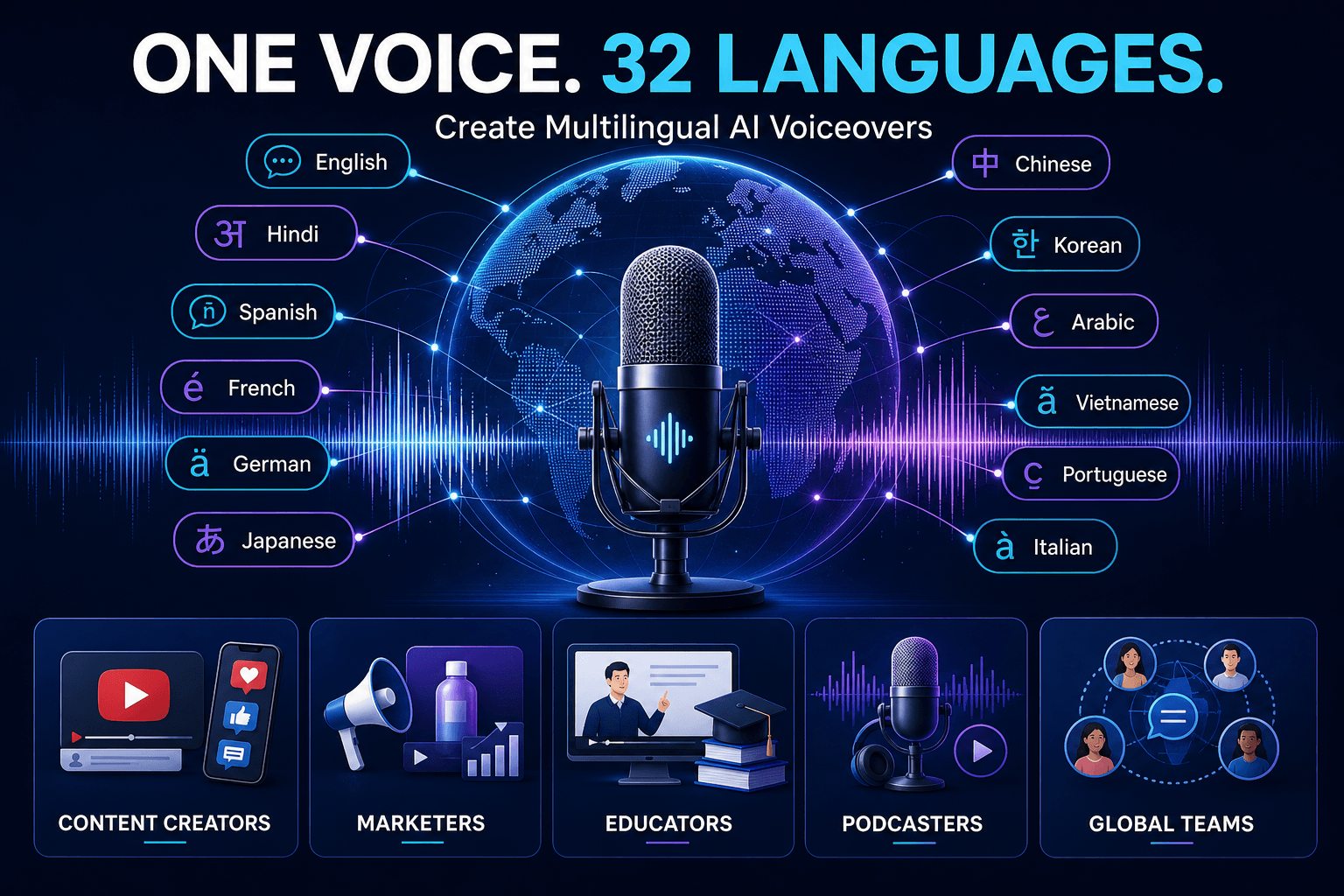
The tool supports English, Hindi, Spanish, French, German, Japanese, Chinese, Korean, Arabic, Vietnamese, Portuguese, Italian, Russian, Indonesian, Turkish, and many more, 32 in total. One voice sample can narrate in multiple languages, which helps with localization.
Who Uses Voice Cloning
- Content creators: Consistent voiceovers for YouTube, Shorts, and Reels
- Marketers: Ad narration and product explainers without studio time
- Educators: Course lessons in the instructor’s own voice
- Podcasters: Fix a line or add an intro without re-recording
- Global teams: Multilingual updates in one recognizable voice
Need a voice that doesn’t belong to anyone? Create one from a text description with AI Voice Design. If your goal is transforming an existing recording rather than generating new speech, a voice changer is the better fit. This comparison explains the difference:
Responsible Use of Voice Cloning
Only clone your own voice or a voice you have clear permission to use. Don’t impersonate real people, mislead listeners, or bypass identity checks. For commercial projects, keep a record of consent and the source of your audio.
FAQ: Voice Cloning AI Free
Can I clone a voice with AI for free?
Yes. You can try 1min.AI Voice Cloning free in your browser. Upload a clip of at least 5 seconds, enter your text, and click Run.
How long should the audio sample be?
At least 5 seconds. Clean, clear speech matters more than extra length.
Can I clone a voice from an audio file?
Yes. Upload one MP3, M4A, OGG, WAV, or FLAC file up to 11MB.
Does it support text to speech in other languages?
Yes. You can choose from 32 languages, including Hindi, Spanish, Arabic, Japanese, and Vietnamese.
Is it the same as a voice changer?
No. Voice cloning generates new speech from text in a target voice. A voice changer transforms an existing recording.
Can I clone singing voices?
1min.AI Voice Cloning is built for speech from text. For music, explore the Music Generator in the AI for Audio suite.
Is my voice data handled responsibly?
Use only audio you have the rights to. Review the 1min.AI Terms of Service and Privacy Policy for details on data handling.
Start Cloning Your Voice
A short clip, a few settings, and one click are all it takes to hear your script in a cloned voice. Open the tool, upload a sample, and try it yourself.
- #Commerce
Alternatives
Discover the best alternatives to 1minAI and compare features, pricing, and use cases.

1min.AI vs OpenRouter
1min.AI vs. OpenRouter: Compare the ready-to-use AI creation product against the technical API tool. Find out if you need a zero-code creative studio or a coding infrastructure hub.
 Ngoc Hong
1minAI vs Postbeam for LinkedIn Content
Looking for a Postbeam alternative? Compare 1minAI vs Postbeam for AI LinkedIn content creation, research, image generation, scheduling, and B2B workflows.
 Tram Ta
1minAI vs Buffer for LinkedIn Content Creation
Looking for a Buffer alternative? Compare 1minAI vs Buffer for LinkedIn content creation, AI writing, image generation, scheduling, and automation.
Tram TaAI Tools
Discover the best AI tools to boost productivity, creativity, and everyday work.
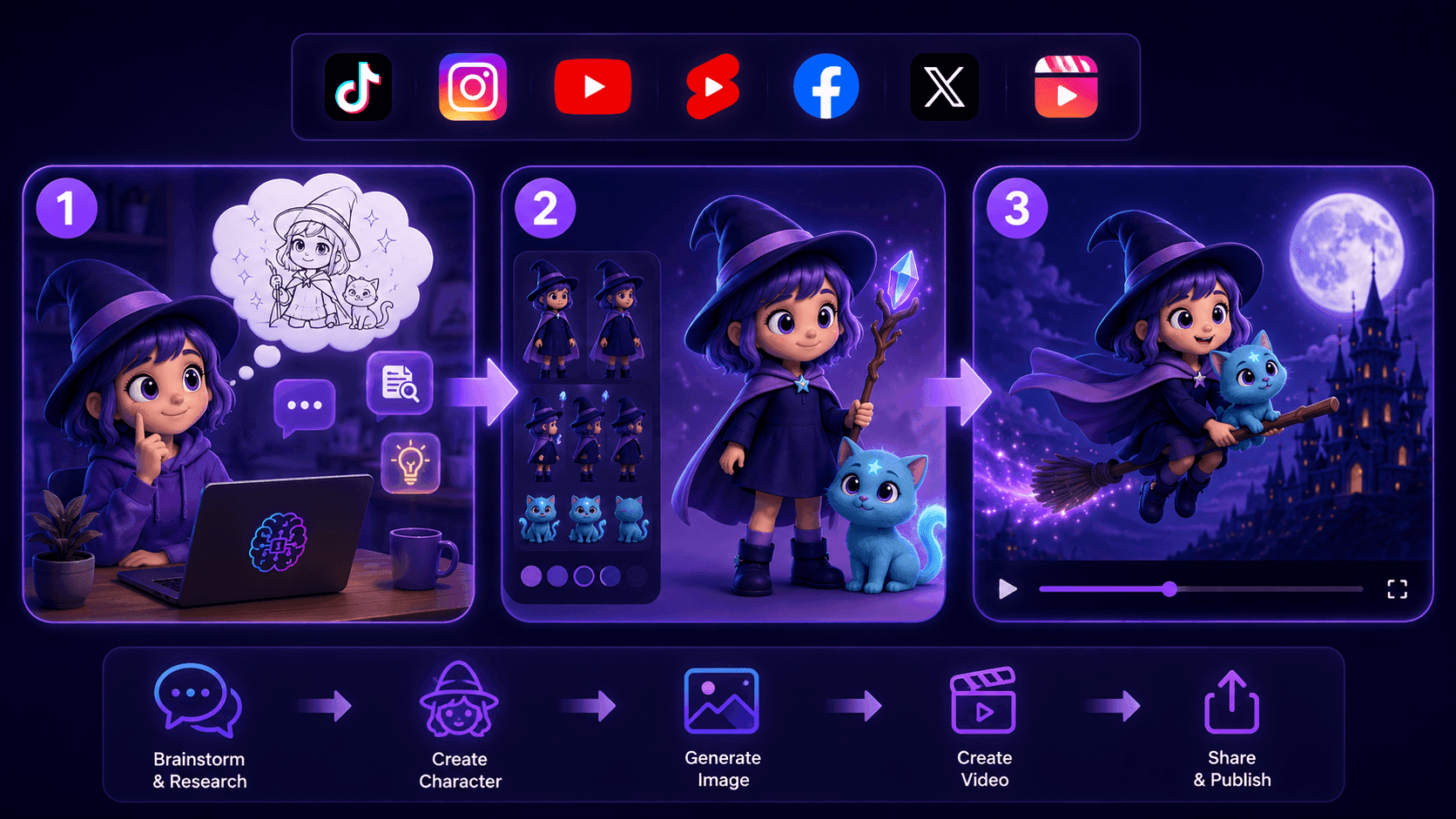
Create Consistent Cartoon Content in Just a Few Steps
Create engaging cartoon videos for TikTok and Reels with 1min.AI. Research ideas, create characters, and turn images into animated videos in 3 simple steps.
 Lien Anh Vu
One Product, 10 UGC Creatives: How AI Makes Content Testing Easier
Create more authentic UGC with an AI UGC video generator, test more creative angles and scale affiliate content without filming every version.
Lien Anh Vu
Top 4 Affordable AI Tools for Startup Founders
Discover the top 4 affordable AI tools for startup founders to validate ideas, build products, create content, and launch faster without overspending.
Tram TaAI Features
Comprehensive AI features that streamline workflows, improve efficiency, and empower teams to achieve more.
Create Consistent Cartoon Content in Just a Few Steps
Create engaging cartoon videos for TikTok and Reels with 1min.AI. Research ideas, create characters, and turn images into animated videos in 3 simple steps.
Lien Anh VuOne Product, 10 UGC Creatives: How AI Makes Content Testing Easier
Create more authentic UGC with an AI UGC video generator, test more creative angles and scale affiliate content without filming every version.
Lien Anh Vu
1minAI: Free AI Grammar Checker
Check grammar for free with 1minAI’s AI grammar checker. Find grammar, spelling, and writing mistakes, improve clarity, and polish your content in seconds.
Tram TaAI Use Cases
A curated collection of AI use cases for business, productivity, and industry-specific applications.
Create Consistent Cartoon Content in Just a Few Steps
Create engaging cartoon videos for TikTok and Reels with 1min.AI. Research ideas, create characters, and turn images into animated videos in 3 simple steps.
Lien Anh VuOne Product, 10 UGC Creatives: How AI Makes Content Testing Easier
Create more authentic UGC with an AI UGC video generator, test more creative angles and scale affiliate content without filming every version.
Lien Anh Vu
Best Time to Post on Instagram: A Practical Guide for Better Engagement
Discover the best time to post on Instagram, including the best days and times for different audiences, plus tips to find the ideal posting schedule for your account.
Tram TaAI Tutorials
Learn how to use AI with practical, step-by-step tutorials.

Black Friday AI Tool Deals in 2026
Discover what Black Friday AI tool deals 2026 has to offer. Find out how to secure the 1min.AI lifetime deal via AppSumo, Dealify, Stack Social, and verify on Trustpilot, Slashdot, and Software Advice.
 Hang Nguyen
Create Consistent Cartoon Content in Just a Few Steps
Create engaging cartoon videos for TikTok and Reels with 1min.AI. Research ideas, create characters, and turn images into animated videos in 3 simple steps.
Lien Anh Vu
[Seedance 2.5 New] Better AI Product Videos, Less Rework in 1min.AI
Use Seedance 2.5 image to video on 1min.AI to create more consistent AI product videos, reduce failed generations, save credits, and improve UGC workflows.
Lien Anh VuAI Guides
Learn AI faster with practical guides, real-world examples, and actionable best practices.

Safely Buy AI Tools Online: 2026 Black Friday Guide
Discover how to find and secure the best Black Friday AI deals online. Learn expert strategies to avoid scams, combat subscription fatigue, and verify software.
Hang NguyenCreate Consistent Cartoon Content in Just a Few Steps
Create engaging cartoon videos for TikTok and Reels with 1min.AI. Research ideas, create characters, and turn images into animated videos in 3 simple steps.
Lien Anh Vu[Seedance 2.5 New] Better AI Product Videos, Less Rework in 1min.AI
Use Seedance 2.5 image to video on 1min.AI to create more consistent AI product videos, reduce failed generations, save credits, and improve UGC workflows.
Lien Anh VuAI Solutions
Browse the best AI solutions for automation, coding, research, productivity, customer support, marketing, and business workflows.
Safely Buy AI Tools Online: 2026 Black Friday Guide
Discover how to find and secure the best Black Friday AI deals online. Learn expert strategies to avoid scams, combat subscription fatigue, and verify software.
Hang NguyenCreate Consistent Cartoon Content in Just a Few Steps
Create engaging cartoon videos for TikTok and Reels with 1min.AI. Research ideas, create characters, and turn images into animated videos in 3 simple steps.
Lien Anh VuOne Product, 10 UGC Creatives: How AI Makes Content Testing Easier
Create more authentic UGC with an AI UGC video generator, test more creative angles and scale affiliate content without filming every version.
Lien Anh VuAI Models
Explore the world's leading AI models in one place.
Create Consistent Cartoon Content in Just a Few Steps
Create engaging cartoon videos for TikTok and Reels with 1min.AI. Research ideas, create characters, and turn images into animated videos in 3 simple steps.
Lien Anh VuOne Product, 10 UGC Creatives: How AI Makes Content Testing Easier
Create more authentic UGC with an AI UGC video generator, test more creative angles and scale affiliate content without filming every version.
Lien Anh Vu[Seedance 2.5 New] Better AI Product Videos, Less Rework in 1min.AI
Use Seedance 2.5 image to video on 1min.AI to create more consistent AI product videos, reduce failed generations, save credits, and improve UGC workflows.
Lien Anh VuAI Comparisons
Compare AI tools, models, and platforms to find the best fit for your needs.
Kling AI Vs Veo 3: Which Model Wins?
Kling AI vs Veo 3: compare motion, native audio, pricing & free tiers to see which AI video generator wins for your project - try both on 1min.AI.
 Trang Tran
[Seedance 2.5 New] Better AI Product Videos, Less Rework in 1min.AI
Use Seedance 2.5 image to video on 1min.AI to create more consistent AI product videos, reduce failed generations, save credits, and improve UGC workflows.
Lien Anh Vu
DeepSeek V4 Pro vs Flash Comparison
Compare DeepSeek V4 Pro vs DeepSeek V4 Flash metrics. Optimize your agentic apps and improve AI fact checking on 1min.ai today.
Ngoc HongAI Integrations
Seamlessly integrate AI with the tools you already use to automate work and boost productivity.
POV: You Have 10+ Posts to Make Every Day
Learn how to build an AI content workflow that helps content creators produce 10+ social media posts a day faster with AI brainstorming, image generation, and content creation.
Lien Anh Vu
How to Use an AI Fashion Video Generator for Fashion Week 2026
Turn Fashion Week 2026 ideas into stunning fashion videos with AI. Learn how to brainstorm, create visuals, and transform images into videos with one simple workflow.
Lien Anh Vu
Stop Switching Between AI Apps: How AI Integration Transforms Employer Branding
Discover how AI integration helps HR teams streamline employer branding by combining AI writing, documents, images, video, and multiple AI models into one workspace.
Tram TaAI for Industries
Find the best AI tools and workflows for healthcare, finance, education, legal, manufacturing, retail, real estate, and more
Text To Video AI Free Without Watermark Online
Create text to video AI free without watermark online with 1min.AI. Pick top models, turn prompts into HD clips, and download clean videos fast. Try it free.
Trang Tran
Free AI Image Editor With Prompt No Restrictions
Looking for a free AI image editor with prompt no restrictions? Edit backgrounds, objects and text by typing, no watermark. Try 1min.AI’s flexible editor now.
Trang Tran
Claude Personal Finance Setup and Safety Guide
Claude personal finance explained: how Personal Finance in Claude works and what Claude finance can see. Plus a safe CSV method for non-US users.
Trang TranAI Agents
Discover and run AI agents to automate tasks across your work and daily life.
1minAI: Free AI Grammar Checker
Check grammar for free with 1minAI’s AI grammar checker. Find grammar, spelling, and writing mistakes, improve clarity, and polish your content in seconds.
Tram Ta
AI Agents for Facebook
Use an AI Agent for Facebook to create content, generate images, schedule posts, and publish from your documents and conversations.
Ngoc Hong
AI Agent vs AI Assistant: Which One Actually Saves Designers More Time?
Learn the difference between AI Agent vs AI Assistant and discover which solution helps designers automate repetitive work, reduce revisions, and save more time.
Lien Anh VuAI Workflows
Explore ready-to-use AI workflows for productivity, marketing, sales, support, and more.
Create Consistent Cartoon Content in Just a Few Steps
Create engaging cartoon videos for TikTok and Reels with 1min.AI. Research ideas, create characters, and turn images into animated videos in 3 simple steps.
Lien Anh VuOne Product, 10 UGC Creatives: How AI Makes Content Testing Easier
Create more authentic UGC with an AI UGC video generator, test more creative angles and scale affiliate content without filming every version.
Lien Anh VuPOV: You Have 10+ Posts to Make Every Day
Learn how to build an AI content workflow that helps content creators produce 10+ social media posts a day faster with AI brainstorming, image generation, and content creation.
Lien Anh VuNewsletter
Weekly AI Innovations with 1minAI

🔮 Weekly AI Innovations #144: LinkedIn Content Agent: Complete B2B Publishing Pipeline
Scale B2B influence with the LinkedIn Content Agent on 1min.ai. Discover an end-to-end 4-stage pipeline with zero redundant token burn and 1-click publishing.
Hang Nguyen
🔮 Weekly AI Innovations #143: Update GPT-6, GPT-6.1 & Ideogram 4.0
Access GPT-6 Sol, Luna, GPT-6.1 Sol, and Ideogram 4.0 on 1min.ai. Boost typography accuracy to 98.4% and cut reasoning latency by 45% in one platform.
Hang Nguyen
🔮 Weekly AI Innovations #142: Grok 4.7, Opus 5.5 & Sonnet 5.5 on 1min.ai
Access Grok 4.7, Claude Opus 5.5, and Sonnet 5.5 on 1min.ai. Cut subscription costs by up to 70% and process millions tokens in a single unified workspace.
Hang Nguyen