
Hailuo AI Image To Video Free - No Watermark

Trang Tran
November 8, 2026

Try Hailuo AI image to video free online on 1min.AI. Upload a photo, add a motion prompt, and download an MP4 with no watermark. No apk needed.
Hailuo AI image to video turns one still photo into a short, high-definition clip with natural motion, expressive faces, and cinematic camera moves. Upload an image, describe what should move, and download an MP4. On 1min.AI, you can run it online in your browser, so there is no apk to install and no watermark on your finished video.
Hailuo AI, developed by MiniMax, is known for realistic physics and lifelike character movement. This guide shows how to use it inside 1min.AI, which model to pick, and a simple prompt formula that makes still photos come alive. If you want to explore more image to video AI options afterward, they are one click away.
Key takeaways
- Input: one photo plus a short motion prompt
- Output: MP4 video, up to 1080p with Hailuo image to video v2
- Models on 1min.AI: v1, v1 (Live), v1 (Director Mode), and v2
- Downloads come with no watermark
What Is Hailuo AI Image to Video?
Hailuo AI image to video is a feature of the Hailuo video generator that animates a static photo. Instead of describing a whole scene, you provide a reference image and a motion prompt. The model keeps your subject recognizable while adding movement, depth, and camera motion.
Creators choose it for four reasons:
- Lifelike motion: hair, fabric, water, and body movement look more believable.
- Expressive faces: portraits gain natural expressions instead of a frozen stare.
- Camera control: push-ins, pans, and tilts can be guided in the prompt.
- Ready to share: the result is a standard MP4 for social posts, ads, or websites.
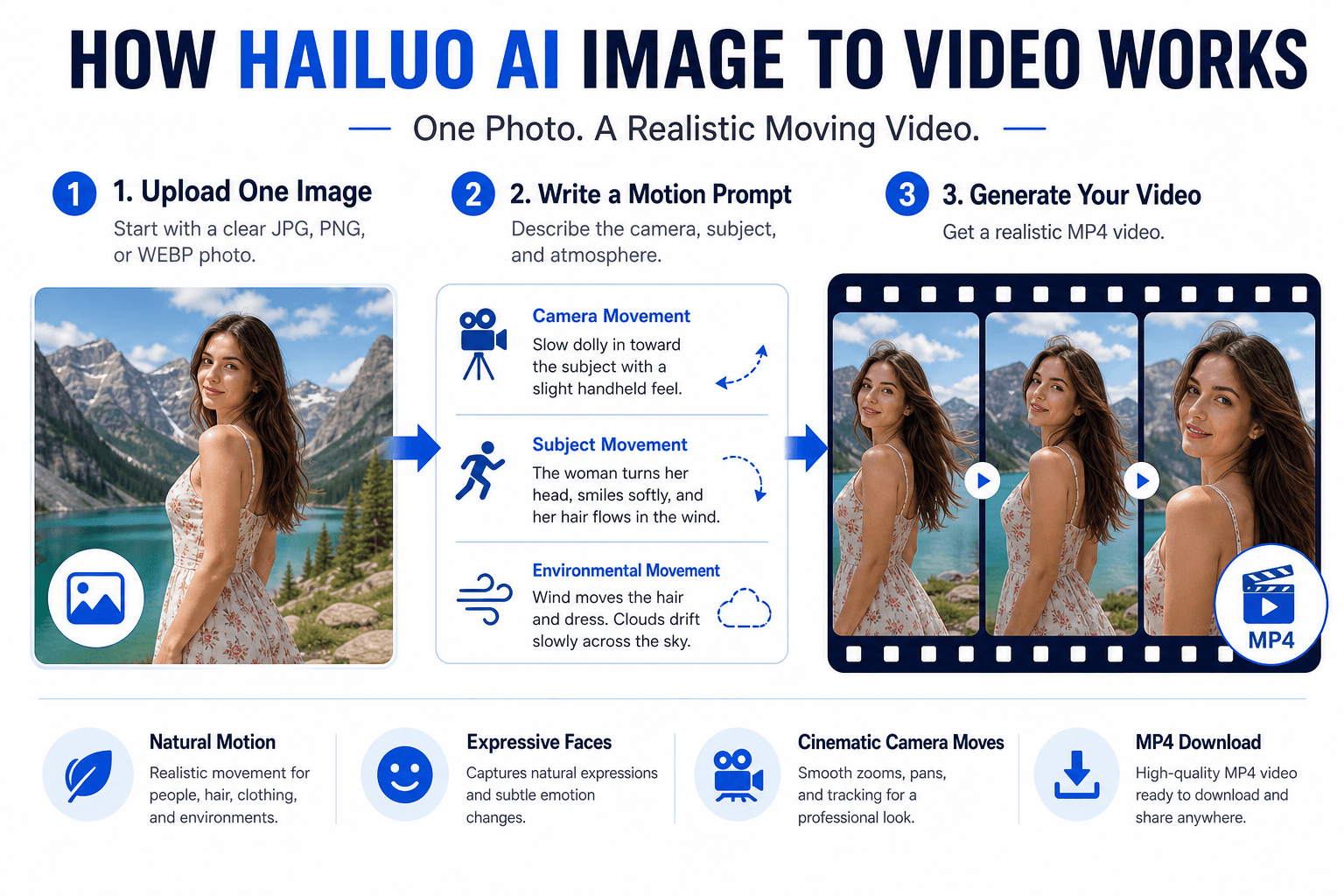
How to Use Hailuo AI Image to Video Online on 1min.AI
Everything runs in your browser. Follow these steps:
- Open the tool: Go to 1min.AI Image to Video.
- Upload one photo: Pick a clear image with a strong subject and good lighting. JPG, PNG, and WEBP are the safest formats.
- Choose a Hailuo model: Select Image to video v1, v1 (Live), v1 (Director Mode), or v2.
- Set your options: Tick or untick Expand Prompt. On v2, also pick a duration and resolution.
- Write your motion prompt and click Run: Describe the camera, the subject, and the mood.
- Preview and download: Save the MP4 with no watermark and post it anywhere.
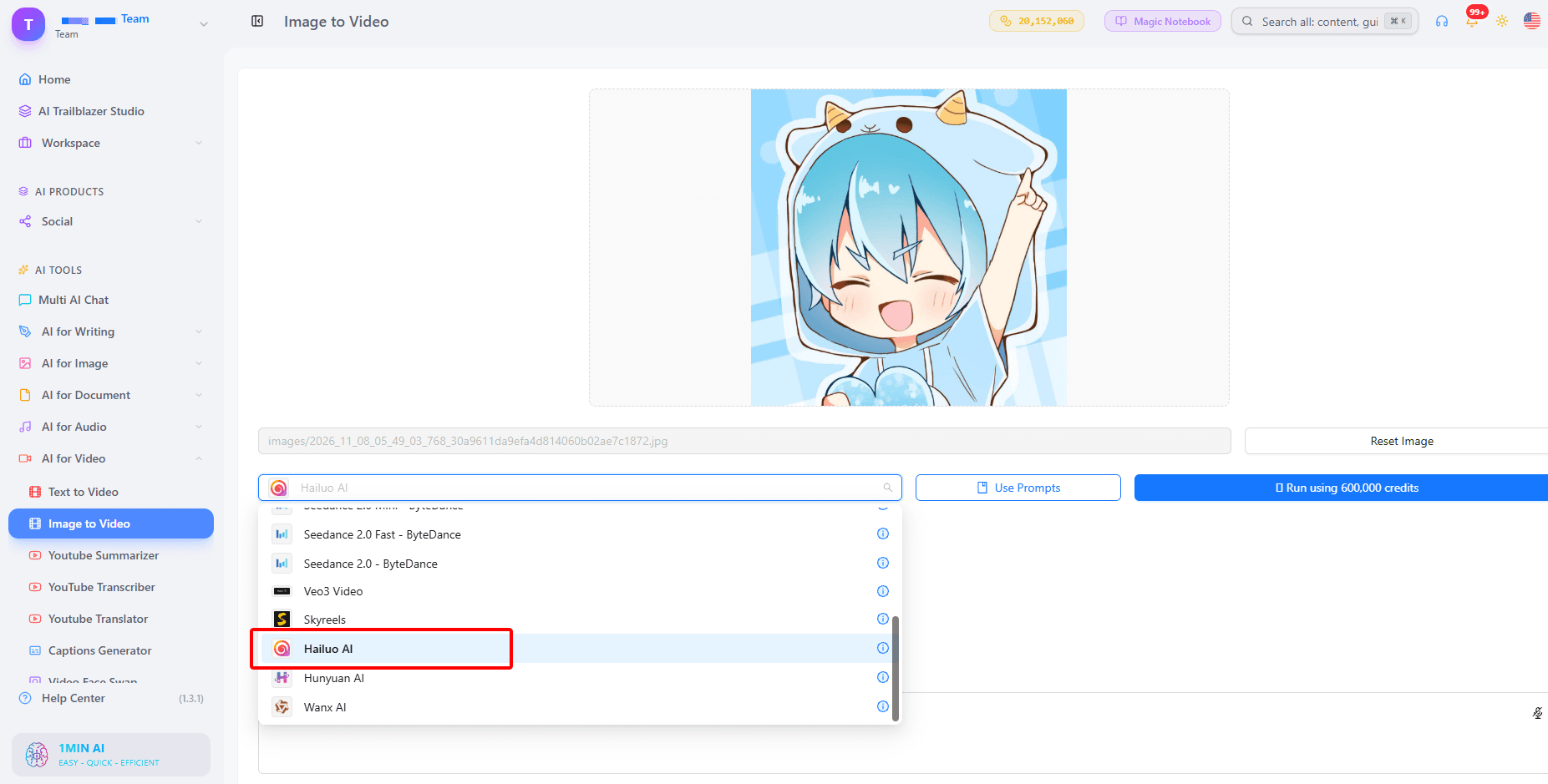
Hailuo Image to Video v2 Settings Explained
- Duration: 6 seconds suits quick social loops. 10 seconds gives more room for a story beat.
- Resolution: 768p works for fast tests. 1080p is the choice for your final cut.
- Expand Prompt: when ticked, your short prompt is expanded into a fuller description. It helps when you only have a rough idea.
Which Hailuo Image to Video Model Should You Choose?
| Model | Best for | Settings |
|---|---|---|
| Image to video v1 | Everyday photo animation | Expand Prompt option |
| Image to video v1 (Live) | Quick generation with Hailuo Live Mode | Expand Prompt option |
| Image to video v1 (Director Mode) | Camera moves written directly in the prompt | Expand Prompt option |
| Image to video v2 | Longer clips and sharper output | 6 or 10 seconds, 768p or 1080p, Expand Prompt option |
Pick v1 (Director Mode) when camera movement matters most, and v2 when you want 1080p detail.
The Motion Prompt Formula for Better Hailuo Results
A photo becomes a convincing video when your prompt says exactly what moves. Combine four parts in one sentence.
The Four-Part Prompt Formula
| Part | What to describe | Example |
|---|---|---|
| Camera | How the shot moves | slow push-in, gentle orbit |
| Subject | What the subject does | smiles and turns toward the lens |
| Environment | What moves around them | light rain, rising steam, drifting petals |
| Mood | The look and feel | warm golden hour, soft cinematic focus |
Example: “Gentle orbit around the chef as steam rises from the pan, soft kitchen light, shallow depth of field.”
Prompt Ideas by Photo Type
- Portrait: “Camera tilts up slowly, her hair moves in a light breeze, calm cinematic mood.”
- Product: “Slow push-in on the bottle as droplets slide down the glass, clean studio lighting.”
- Landscape: “Parallax drift across the mountains while clouds roll past, soft morning light.”
- Family photo: “Everyone smiles and leans closer, a soft breeze moves the curtains, warm and nostalgic.”
Best Ways to Use Hailuo AI Image to Video
Product Photos and Social Ads
Turn a still product shot into a short motion ad for TikTok, Reels, or Shorts. One photo, one camera move, and clean lighting is often enough.
Portraits and Family Photos
A Hailuo AI family photo clip adds a smile, a head turn, or a gentle breeze to a treasured picture. For consistent characters across several clips, Hailuo Subject Reference is also available in 1min.AI, and it needs a human face in the input.
Real Estate and Travel Images
Sweeping camera moves make rooms and landscapes feel like real footage. Watch this walkthrough on turning photos into cinematic AI videos:
AI Art and Generated Images
No photo yet? Generate the starting image first with an AI image generator in 1min.AI, then bring it to life with Hailuo. Prefer to start with words only? Hailuo also supports text to video.
Tips for Smooth, Natural Motion
- Use a sharp photo with one clear subject.
- Ask for one main movement at a time. Too many actions can make motion messy.
- Name the camera move in every prompt.
- Keep the prompt specific, or tick Expand Prompt for extra detail.
- Test with a short duration, then render the final version at 1080p with v2.
- Save winning prompts in Prompt List and keep your uploads in Asset List for quick reuse.
You can open the 1min.AI workspace and start right away. Features like History and Shared Zone need an account, so your past videos stay easy to find.
Hailuo AI Image to Video FAQ
Can I try Hailuo AI image to video free on 1min.AI?
Yes. Open the Image to Video tool, upload a photo, and generate your first clip to see the result yourself. For more ideas, browse this free AI video generator from image page.
Is there a Hailuo AI image to video apk?
You do not need one. Hailuo image to video on 1min.AI runs online in your browser, so there is nothing to download or install.
Does the video have a watermark?
No. Videos you download from 1min.AI come without a watermark.
How long can the video be, and in what resolution?
With Image to video v2, you can choose 6 or 10 seconds and 768p or 1080p.
Can I use text instead of a photo?
Yes. Hailuo also supports text to video in 1min.AI, so you can start from a written scene.
Start Animating Your Photos with Hailuo on 1min.AI
Hailuo AI image to video makes it easy to turn a single picture into a cinematic clip. 1min.AI puts four Hailuo models, simple settings, and a clean MP4 download in one place. Upload a photo, write one clear motion prompt, and watch your image move.
This guide is based on the Hailuo image to video models and settings available in 1min.AI. 1min.AI is recognized as Top Business Software on SourceForge and Slashdot, rated Excellent on Trustpilot, and listed on Capterra, Software Advice, and GetApp.
- #Commerce
Alternatives
Discover the best alternatives to 1minAI and compare features, pricing, and use cases.

1min.AI vs OpenRouter
1min.AI vs. OpenRouter: Compare the ready-to-use AI creation product against the technical API tool. Find out if you need a zero-code creative studio or a coding infrastructure hub.
 Ngoc Hong
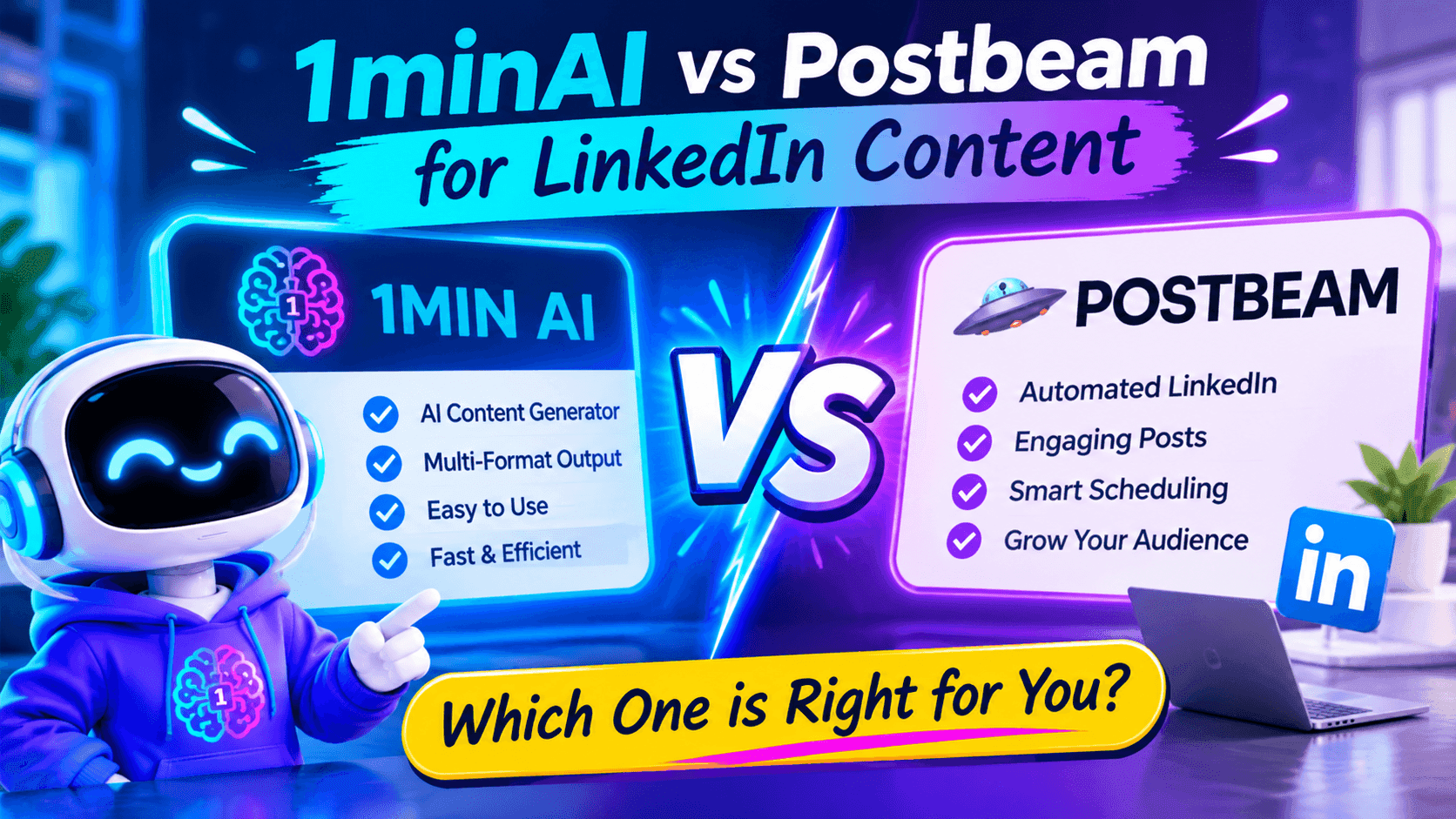
1minAI vs Postbeam for LinkedIn Content
Looking for a Postbeam alternative? Compare 1minAI vs Postbeam for AI LinkedIn content creation, research, image generation, scheduling, and B2B workflows.
 Tram Ta

1minAI vs Buffer for LinkedIn Content Creation
Looking for a Buffer alternative? Compare 1minAI vs Buffer for LinkedIn content creation, AI writing, image generation, scheduling, and automation.
Tram TaAI Tools
Discover the best AI tools to boost productivity, creativity, and everyday work.
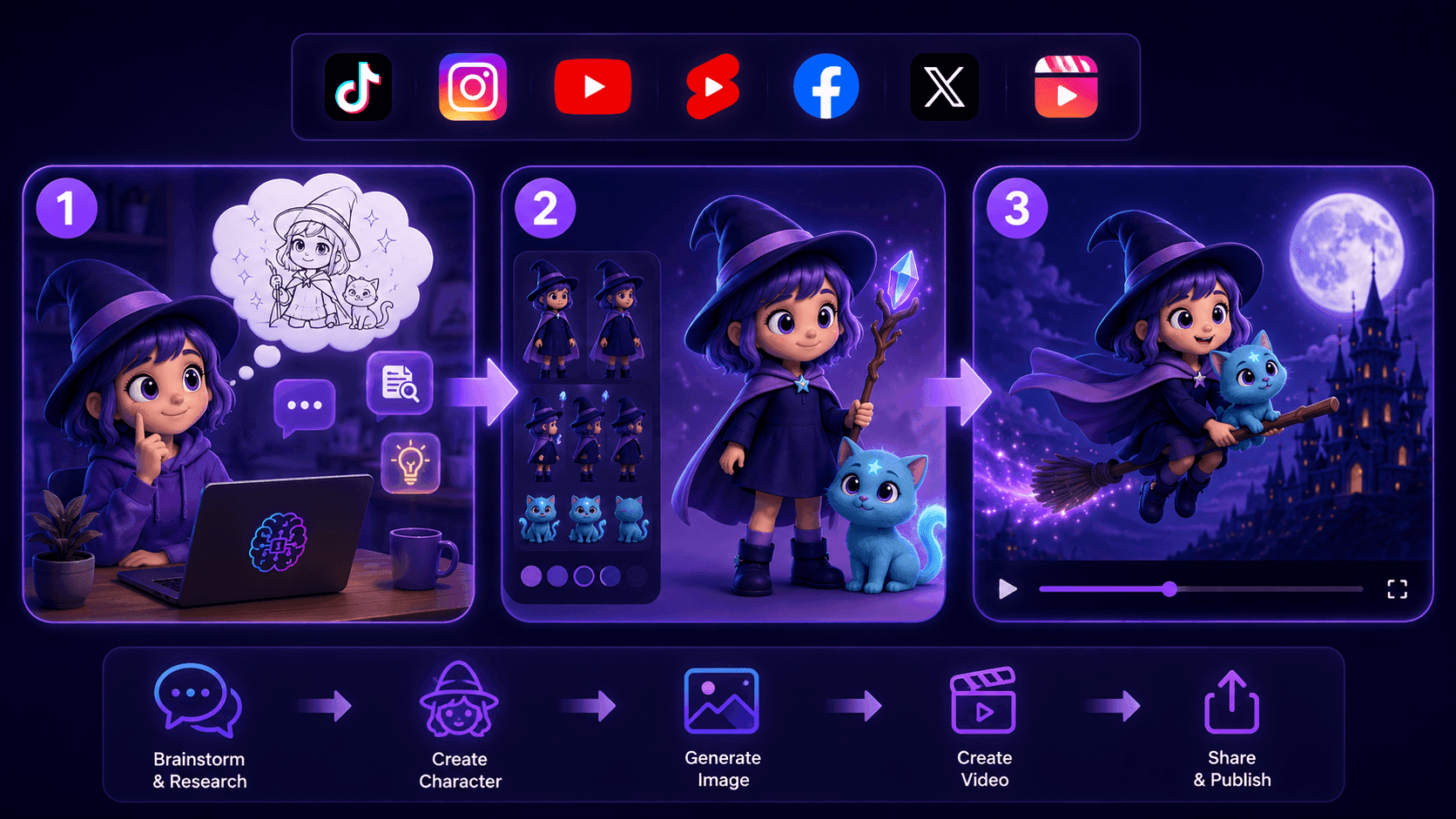
Create Consistent Cartoon Content in Just a Few Steps
Create engaging cartoon videos for TikTok and Reels with 1min.AI. Research ideas, create characters, and turn images into animated videos in 3 simple steps.
 Lien Anh Vu
One Product, 10 UGC Creatives: How AI Makes Content Testing Easier
Create more authentic UGC with an AI UGC video generator, test more creative angles and scale affiliate content without filming every version.
Lien Anh Vu
Top 4 Affordable AI Tools for Startup Founders
Discover the top 4 affordable AI tools for startup founders to validate ideas, build products, create content, and launch faster without overspending.
Tram TaAI Features
Comprehensive AI features that streamline workflows, improve efficiency, and empower teams to achieve more.
Create Consistent Cartoon Content in Just a Few Steps
Create engaging cartoon videos for TikTok and Reels with 1min.AI. Research ideas, create characters, and turn images into animated videos in 3 simple steps.
Lien Anh VuOne Product, 10 UGC Creatives: How AI Makes Content Testing Easier
Create more authentic UGC with an AI UGC video generator, test more creative angles and scale affiliate content without filming every version.
Lien Anh Vu
1minAI: Free AI Grammar Checker
Check grammar for free with 1minAI’s AI grammar checker. Find grammar, spelling, and writing mistakes, improve clarity, and polish your content in seconds.
Tram TaAI Use Cases
A curated collection of AI use cases for business, productivity, and industry-specific applications.
Create Consistent Cartoon Content in Just a Few Steps
Create engaging cartoon videos for TikTok and Reels with 1min.AI. Research ideas, create characters, and turn images into animated videos in 3 simple steps.
Lien Anh VuOne Product, 10 UGC Creatives: How AI Makes Content Testing Easier
Create more authentic UGC with an AI UGC video generator, test more creative angles and scale affiliate content without filming every version.
Lien Anh Vu
Best Time to Post on Instagram: A Practical Guide for Better Engagement
Discover the best time to post on Instagram, including the best days and times for different audiences, plus tips to find the ideal posting schedule for your account.
Tram TaAI Tutorials
Learn how to use AI with practical, step-by-step tutorials.

Black Friday AI Tool Deals in 2026
Discover what Black Friday AI tool deals 2026 has to offer. Find out how to secure the 1min.AI lifetime deal via AppSumo, Dealify, Stack Social, and verify on Trustpilot, Slashdot, and Software Advice.
 Hang Nguyen
Create Consistent Cartoon Content in Just a Few Steps
Create engaging cartoon videos for TikTok and Reels with 1min.AI. Research ideas, create characters, and turn images into animated videos in 3 simple steps.
Lien Anh Vu
[Seedance 2.5 New] Better AI Product Videos, Less Rework in 1min.AI
Use Seedance 2.5 image to video on 1min.AI to create more consistent AI product videos, reduce failed generations, save credits, and improve UGC workflows.
Lien Anh VuAI Guides
Learn AI faster with practical guides, real-world examples, and actionable best practices.

Safely Buy AI Tools Online: 2026 Black Friday Guide
Discover how to find and secure the best Black Friday AI deals online. Learn expert strategies to avoid scams, combat subscription fatigue, and verify software.
Hang NguyenCreate Consistent Cartoon Content in Just a Few Steps
Create engaging cartoon videos for TikTok and Reels with 1min.AI. Research ideas, create characters, and turn images into animated videos in 3 simple steps.
Lien Anh Vu[Seedance 2.5 New] Better AI Product Videos, Less Rework in 1min.AI
Use Seedance 2.5 image to video on 1min.AI to create more consistent AI product videos, reduce failed generations, save credits, and improve UGC workflows.
Lien Anh VuAI Solutions
Browse the best AI solutions for automation, coding, research, productivity, customer support, marketing, and business workflows.
Safely Buy AI Tools Online: 2026 Black Friday Guide
Discover how to find and secure the best Black Friday AI deals online. Learn expert strategies to avoid scams, combat subscription fatigue, and verify software.
Hang NguyenCreate Consistent Cartoon Content in Just a Few Steps
Create engaging cartoon videos for TikTok and Reels with 1min.AI. Research ideas, create characters, and turn images into animated videos in 3 simple steps.
Lien Anh VuOne Product, 10 UGC Creatives: How AI Makes Content Testing Easier
Create more authentic UGC with an AI UGC video generator, test more creative angles and scale affiliate content without filming every version.
Lien Anh VuAI Models
Explore the world's leading AI models in one place.
Create Consistent Cartoon Content in Just a Few Steps
Create engaging cartoon videos for TikTok and Reels with 1min.AI. Research ideas, create characters, and turn images into animated videos in 3 simple steps.
Lien Anh VuOne Product, 10 UGC Creatives: How AI Makes Content Testing Easier
Create more authentic UGC with an AI UGC video generator, test more creative angles and scale affiliate content without filming every version.
Lien Anh Vu[Seedance 2.5 New] Better AI Product Videos, Less Rework in 1min.AI
Use Seedance 2.5 image to video on 1min.AI to create more consistent AI product videos, reduce failed generations, save credits, and improve UGC workflows.
Lien Anh VuAI Comparisons
Compare AI tools, models, and platforms to find the best fit for your needs.
Kling AI Vs Veo 3: Which Model Wins?
Kling AI vs Veo 3: compare motion, native audio, pricing & free tiers to see which AI video generator wins for your project - try both on 1min.AI.
 Trang Tran
[Seedance 2.5 New] Better AI Product Videos, Less Rework in 1min.AI
Use Seedance 2.5 image to video on 1min.AI to create more consistent AI product videos, reduce failed generations, save credits, and improve UGC workflows.
Lien Anh Vu
DeepSeek V4 Pro vs Flash Comparison
Compare DeepSeek V4 Pro vs DeepSeek V4 Flash metrics. Optimize your agentic apps and improve AI fact checking on 1min.ai today.
Ngoc HongAI Integrations
Seamlessly integrate AI with the tools you already use to automate work and boost productivity.
POV: You Have 10+ Posts to Make Every Day
Learn how to build an AI content workflow that helps content creators produce 10+ social media posts a day faster with AI brainstorming, image generation, and content creation.
Lien Anh Vu
How to Use an AI Fashion Video Generator for Fashion Week 2026
Turn Fashion Week 2026 ideas into stunning fashion videos with AI. Learn how to brainstorm, create visuals, and transform images into videos with one simple workflow.
Lien Anh Vu
Stop Switching Between AI Apps: How AI Integration Transforms Employer Branding
Discover how AI integration helps HR teams streamline employer branding by combining AI writing, documents, images, video, and multiple AI models into one workspace.
Tram TaAI for Industries
Find the best AI tools and workflows for healthcare, finance, education, legal, manufacturing, retail, real estate, and more
Text To Video AI Free Without Watermark Online
Create text to video AI free without watermark online with 1min.AI. Pick top models, turn prompts into HD clips, and download clean videos fast. Try it free.
Trang Tran
Free AI Image Editor With Prompt No Restrictions
Looking for a free AI image editor with prompt no restrictions? Edit backgrounds, objects and text by typing, no watermark. Try 1min.AI’s flexible editor now.
Trang Tran
Claude Personal Finance Setup and Safety Guide
Claude personal finance explained: how Personal Finance in Claude works and what Claude finance can see. Plus a safe CSV method for non-US users.
Trang TranAI Agents
Discover and run AI agents to automate tasks across your work and daily life.
1minAI: Free AI Grammar Checker
Check grammar for free with 1minAI’s AI grammar checker. Find grammar, spelling, and writing mistakes, improve clarity, and polish your content in seconds.
Tram Ta
AI Agents for Facebook
Use an AI Agent for Facebook to create content, generate images, schedule posts, and publish from your documents and conversations.
Ngoc Hong
AI Agent vs AI Assistant: Which One Actually Saves Designers More Time?
Learn the difference between AI Agent vs AI Assistant and discover which solution helps designers automate repetitive work, reduce revisions, and save more time.
Lien Anh VuAI Workflows
Explore ready-to-use AI workflows for productivity, marketing, sales, support, and more.
Create Consistent Cartoon Content in Just a Few Steps
Create engaging cartoon videos for TikTok and Reels with 1min.AI. Research ideas, create characters, and turn images into animated videos in 3 simple steps.
Lien Anh VuOne Product, 10 UGC Creatives: How AI Makes Content Testing Easier
Create more authentic UGC with an AI UGC video generator, test more creative angles and scale affiliate content without filming every version.
Lien Anh VuPOV: You Have 10+ Posts to Make Every Day
Learn how to build an AI content workflow that helps content creators produce 10+ social media posts a day faster with AI brainstorming, image generation, and content creation.
Lien Anh VuNewsletter
Weekly AI Innovations with 1minAI

🔮 Weekly AI Innovations #144: LinkedIn Content Agent: Complete B2B Publishing Pipeline
Scale B2B influence with the LinkedIn Content Agent on 1min.ai. Discover an end-to-end 4-stage pipeline with zero redundant token burn and 1-click publishing.
Hang Nguyen
🔮 Weekly AI Innovations #143: Update GPT-6, GPT-6.1 & Ideogram 4.0
Access GPT-6 Sol, Luna, GPT-6.1 Sol, and Ideogram 4.0 on 1min.ai. Boost typography accuracy to 98.4% and cut reasoning latency by 45% in one platform.
Hang Nguyen
🔮 Weekly AI Innovations #142: Grok 4.7, Opus 5.5 & Sonnet 5.5 on 1min.ai
Access Grok 4.7, Claude Opus 5.5, and Sonnet 5.5 on 1min.ai. Cut subscription costs by up to 70% and process millions tokens in a single unified workspace.
Hang Nguyen