
Best Time to Post on Instagram: A Practical Guide for Better Engagement

Tram Ta
September 6, 2026

Discover the best time to post on Instagram, including the best days and times for different audiences, plus tips to find the ideal posting schedule for your account.
Instagram content can be great and still fail to get the attention it deserves if you publish it when your audience isn't online.
So, what is the best time to post on Instagram?
The answer isn't exactly the same for every account. Your audience, location, industry, content type, and follower behavior all influence when your posts are most likely to perform well. However, general engagement patterns can give you a strong starting point. Once you know which time windows tend to work, you can test them against your own Instagram analytics and build a posting schedule around your audience.
In this guide, we'll cover why posting time matters, the best times to post on Instagram by day, and how 1minAI can help you create enough content to stay consistent with your schedule.
Why Does the Time You Post on Instagram Matter?
Posting time matters because your content needs to reach people when they are actually available to see and interact with it.
Imagine spending hours creating an Instagram Reel, only to publish it when most of your target audience is offline. Your content may have fewer opportunities to generate early engagement.
When you post during an active period, your audience has a better chance of:
- Seeing your post
- Watching your Reel
- Liking or commenting
- Sharing your content
- Saving your post
- Visiting your profile
- Following your account
Timing Can Help Your Content Gain Early Engagement
Posting at the right time doesn't guarantee that a post will go viral. Content quality, relevance, and audience interest still matter.
But timing can help give your content a stronger start.
For example, if your followers are most active around lunchtime, publishing shortly before or during that period gives more of them an opportunity to discover your content.
This is particularly important for time-sensitive content such as:
- Industry news
- Trend-related posts
- Product announcements
- Promotional campaigns
- Event content
- Breaking news reactions
The faster your audience sees relevant content, the more useful the post can become.
Your Audience's Time Zone Matters
One of the most common mistakes is using your own local time instead of your audience's.
If you're based in Asia but most of your followers are in the United States, posting at 8 AM your time may mean your audience is asleep.
Before choosing a posting schedule, consider:
Where are your followers located?
When are they normally online?
Are they consumers, professionals, students, or creators?
Do they use Instagram mainly during work breaks or after work?
These factors can make your ideal posting time very different from another account in the same industry.
What Is the Best Time to Post on Instagram?
There is no single universal best time to post on Instagram.
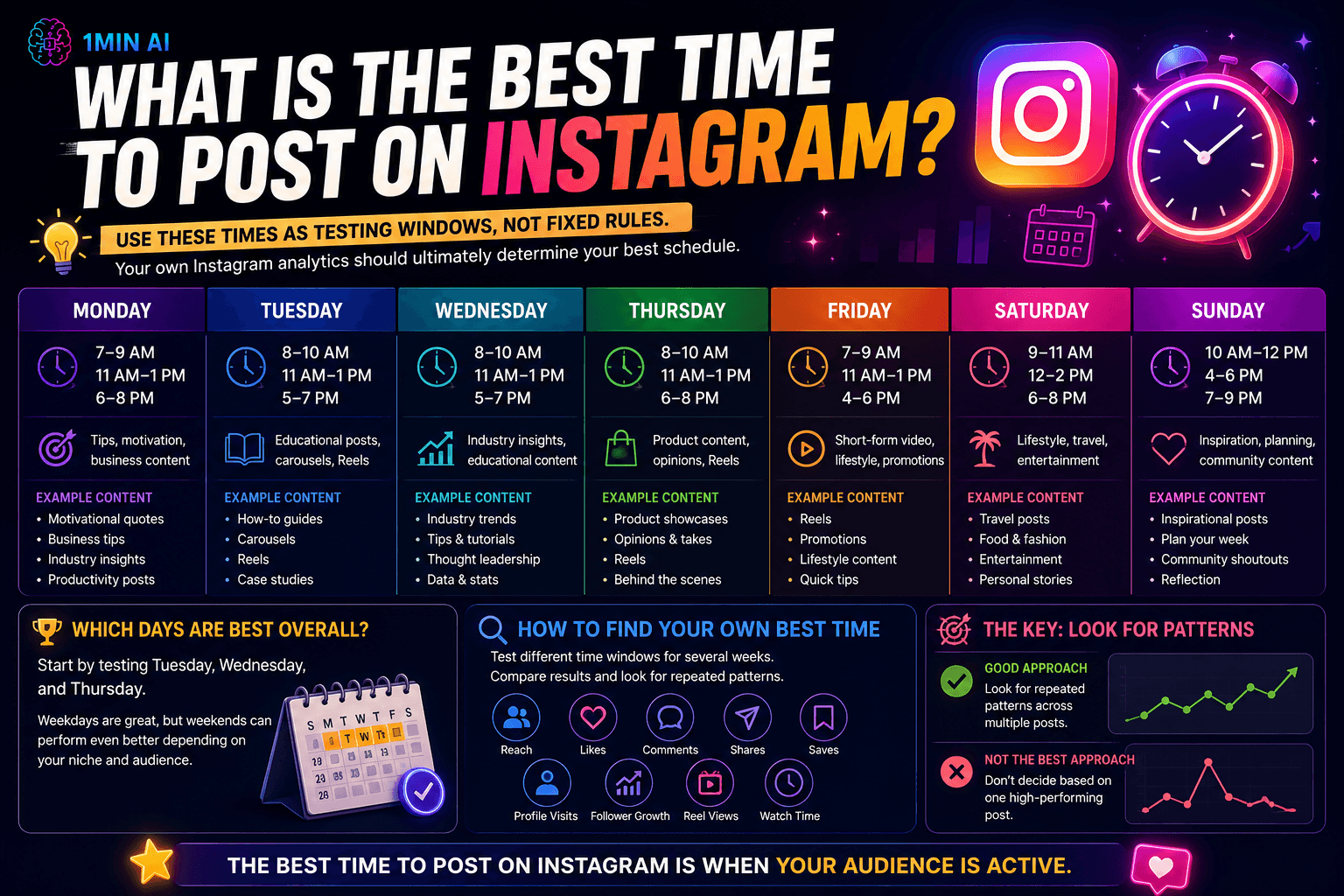
However, these time windows are useful starting points for testing:
| Day | Recommended Starting Times | Good Content to Test |
|---|---|---|
| Monday | 7–9 AM, 11 AM–1 PM, 6–8 PM | Tips, motivation, business content |
| Tuesday | 8–10 AM, 11 AM–1 PM, 5–7 PM | Educational posts, carousels, Reels |
| Wednesday | 8–10 AM, 11 AM–1 PM, 5–7 PM | Industry insights, educational content |
| Thursday | 8–10 AM, 11 AM–1 PM, 6–8 PM | Product content, opinions, Reels |
| Friday | 7–9 AM, 11 AM–1 PM, 4–6 PM | Short-form video, lifestyle, promotions |
| Saturday | 9–11 AM, 12–2 PM, 6–8 PM | Lifestyle, travel, entertainment |
| Sunday | 10 AM–12 PM, 4–6 PM, 7–9 PM | Inspiration, planning, community content |
Use these times as testing windows, not fixed rules. Your own Instagram analytics should ultimately determine your best schedule.
Best Time to Post on Instagram on Monday
Monday audiences are often transitioning back into their weekly routines.
Try:
- 7–9 AM
- 11 AM–1 PM
- 6–8 PM
For business accounts, morning and lunchtime posts can be worth testing. Motivational, educational, and industry-related content may also fit well at the beginning of the week.
Best Time to Post on Instagram on Tuesday
Tuesday can be a strong day for reaching audiences who have settled into their weekly routine.
Try:
- 8–10 AM
- 11 AM–1 PM
- 5–7 PM
This is a good day to test educational carousels, product content, professional insights, and Reels.
Best Time to Post on Instagram on Wednesday
Wednesday gives you another useful opportunity to reach people during the middle of the week.
Try:
- 8–10 AM
- 11 AM–1 PM
- 5–7 PM
If you're targeting professionals, test morning and lunch periods. Consumer-focused accounts can also experiment with evening posts.
Best Time to Post on Instagram on Thursday
Thursday can be useful for content designed to generate engagement before the weekend.
Try:
- 8–10 AM
- 11 AM–1 PM
- 6–8 PM
Consider testing product announcements, educational content, industry opinions, and short-form videos.
Best Time to Post on Instagram on Friday
Audience behavior can change as people approach the weekend.
Try:
- 7–9 AM
- 11 AM–1 PM
- 4–6 PM
For B2B accounts, earlier publishing may be preferable. Lifestyle, entertainment, and consumer brands can experiment with afternoon and evening windows.
Best Time to Post on Instagram on Saturday
Weekend behavior tends to be less predictable because people have different schedules.
Try:
- 9–11 AM
- 12–2 PM
- 6–8 PM
Saturday can be particularly useful for lifestyle, travel, food, fashion, entertainment, and personal content.
Best Time to Post on Instagram on Sunday
Sunday is often a slower day, with users browsing Instagram during relaxed periods.
Try:
- 10 AM–12 PM
- 4–6 PM
- 7–9 PM
Inspirational, educational, lifestyle, and "prepare for the week" content can be worth testing.
Which Days Are Best Overall?
If you don't have enough data to build a personalized schedule yet, start by testing Tuesday, Wednesday, and Thursday.
These days can provide useful opportunities to reach audiences during established weekday routines.
But don't automatically ignore weekends. A travel creator, restaurant, fashion brand, or entertainment account may perform differently from a B2B company.
The best schedule is the one that matches your audience's behavior.
How to Find Your Own Best Time
Once you've tested several time windows, compare your results across multiple posts.
Pay attention to:
- Reach
- Likes
- Comments
- Shares
- Saves
- Profile visits
- Follower growth
- Reel views and watch time
Don't decide that 8 AM is your best time because one post performed well at 8 AM.
Instead, look for repeated patterns.
For example, if five posts published around lunchtime consistently generate stronger engagement than similar posts published in the evening, lunchtime may be a better opportunity for your account.
How 1minAI Helps You Create More Instagram Content at the Right Time
Knowing the best time to post on Instagram is only half the challenge.
You also need enough high-quality content to publish consistently.
For many marketers and creators, content production becomes the real bottleneck. Coming up with ideas, writing captions, designing visuals, creating Reels, and adapting content for different formats can take hours.
This is where AI can help simplify the workflow.
With 1minAI, creators and marketers can bring several parts of the content creation process into one AI workspace.
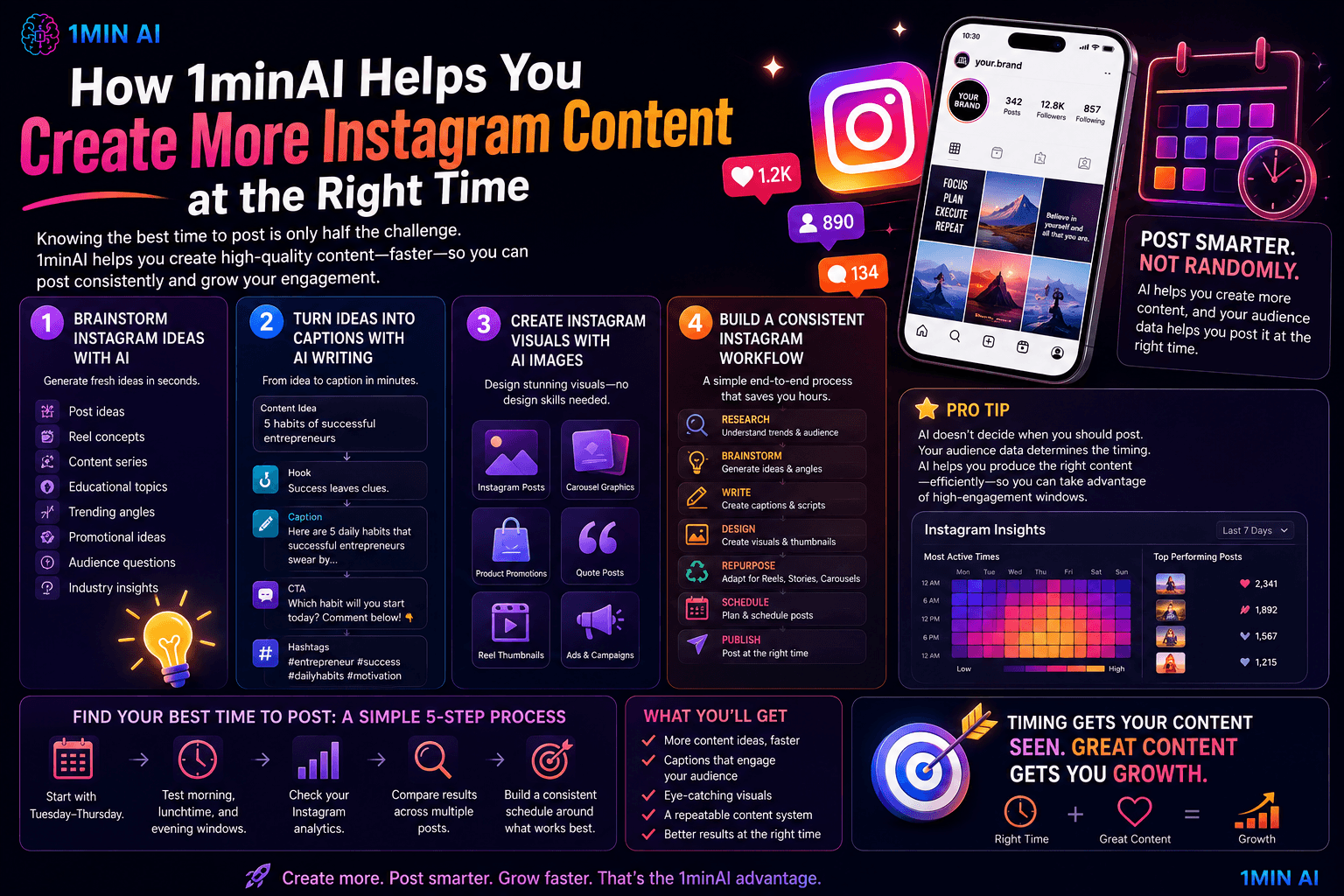
Brainstorm Instagram Ideas With AI
Running out of content ideas can make it difficult to maintain a consistent posting schedule.
Use AI to brainstorm:
- Instagram post ideas
- Reel concepts
- Content series
- Educational topics
- Trending angles
- Promotional ideas
- Audience questions
- Industry insights
Instead of starting from a blank page, you can quickly develop a list of ideas to fill your content calendar.
Turn Ideas Into Captions With AI Writing
Once you have an idea, AI Writing can help turn it into an Instagram caption.
For example:
Content idea → Hook → Caption → CTA → Hashtags
You can also adapt one idea into different versions for different audiences and campaigns.
The goal isn't to publish generic AI-generated content. Use the generated draft as a starting point, then add your own experience, personality, and brand voice.
Create Instagram Visuals With AI Images
Instagram is a visual platform, so strong creative assets are essential.
AI Images can help you create or modify visuals for:
- Instagram posts
- Carousel graphics
- Product promotions
- Quote posts
- Campaign visuals
- Reel thumbnails
- Social media advertisements
This can reduce the time needed to create supporting assets for every post.
Build a More Consistent Instagram Workflow
Your overall process can become:
Research → Brainstorm → Write → Design → Repurpose → Schedule → Publish
The important point is that AI doesn't determine when you should post.
Your audience data determines the timing.
AI simply helps you produce content efficiently enough to take advantage of those high-engagement windows.
Conclusion: Find Your Best Time to Post on Instagram
The best time to post on Instagram isn't one magic hour that works for everyone.
Use general time windows as a starting point, then test different days and times based on your audience's behavior.
A simple approach is:
1. Start with Tuesday–Thursday.
2. Test morning, lunchtime, and evening windows.
3. Check your Instagram analytics.
4. Compare results across multiple posts.
5. Build a consistent schedule around the time windows that perform best.
And remember: timing can improve your chances of reaching an active audience, but great content is still the foundation of Instagram growth.
Once you know when your audience is most active, tools like 1minAI can help you brainstorm, write, design, and repurpose enough content to consistently show up at the right time.
👉 Official Website: https://1min.ai/
👉 Try 1minAI agent now: https://app.1min.ai/ai-agent-demo
Alternatives
Discover the best alternatives to 1minAI and compare features, pricing, and use cases.

1min.AI vs OpenRouter
1min.AI vs. OpenRouter: Compare the ready-to-use AI creation product against the technical API tool. Find out if you need a zero-code creative studio or a coding infrastructure hub.
 Ngoc Hong
1min.AI vs Lovart
Compare 1min.AI vs Lovart across features, pricing, credits, brand tools, and use cases to find the right AI platform for your workflow.
Ngoc Hong
1min. AI vs Dola AI
Looking for a Dola AI alternative? Compare 1min.AI vs Dola AI on video generation, free plans, pricing and privacy to pick the right AI app.
Ngoc HongAI Tools
Discover the best AI tools to boost productivity, creativity, and everyday work.

Create Consistent Cartoon Content in Just a Few Steps
Create engaging cartoon videos for TikTok and Reels with 1min.AI. Research ideas, create characters, and turn images into animated videos in 3 simple steps.
 Lien Anh Vu
One Product, 10 UGC Creatives: How AI Makes Content Testing Easier
Create more authentic UGC with an AI UGC video generator, test more creative angles and scale affiliate content without filming every version.
Lien Anh Vu
Top 4 Affordable AI Tools for Startup Founders
Discover the top 4 affordable AI tools for startup founders to validate ideas, build products, create content, and launch faster without overspending.
 Tram Ta
AI Features
Comprehensive AI features that streamline workflows, improve efficiency, and empower teams to achieve more.
Create Consistent Cartoon Content in Just a Few Steps
Create engaging cartoon videos for TikTok and Reels with 1min.AI. Research ideas, create characters, and turn images into animated videos in 3 simple steps.
Lien Anh VuOne Product, 10 UGC Creatives: How AI Makes Content Testing Easier
Create more authentic UGC with an AI UGC video generator, test more creative angles and scale affiliate content without filming every version.
Lien Anh Vu
1minAI: Free AI Grammar Checker
Check grammar for free with 1minAI’s AI grammar checker. Find grammar, spelling, and writing mistakes, improve clarity, and polish your content in seconds.
Tram TaAI Use Cases
A curated collection of AI use cases for business, productivity, and industry-specific applications.
Create Consistent Cartoon Content in Just a Few Steps
Create engaging cartoon videos for TikTok and Reels with 1min.AI. Research ideas, create characters, and turn images into animated videos in 3 simple steps.
Lien Anh VuOne Product, 10 UGC Creatives: How AI Makes Content Testing Easier
Create more authentic UGC with an AI UGC video generator, test more creative angles and scale affiliate content without filming every version.
Lien Anh VuBest Time to Post on Instagram: A Practical Guide for Better Engagement
Discover the best time to post on Instagram, including the best days and times for different audiences, plus tips to find the ideal posting schedule for your account.
Tram TaAI Tutorials
Learn how to use AI with practical, step-by-step tutorials.

Black Friday AI Tool Deals in 2026
Discover what Black Friday AI tool deals 2026 has to offer. Find out how to secure the 1min.AI lifetime deal via AppSumo, Dealify, Stack Social, and verify on Trustpilot, Slashdot, and Software Advice.
 Hang Nguyen
Create Consistent Cartoon Content in Just a Few Steps
Create engaging cartoon videos for TikTok and Reels with 1min.AI. Research ideas, create characters, and turn images into animated videos in 3 simple steps.
Lien Anh Vu
[Seedance 2.5 New] Better AI Product Videos, Less Rework in 1min.AI
Use Seedance 2.5 image to video on 1min.AI to create more consistent AI product videos, reduce failed generations, save credits, and improve UGC workflows.
Lien Anh VuAI Guides
Learn AI faster with practical guides, real-world examples, and actionable best practices.

Safely Buy AI Tools Online: 2026 Black Friday Guide
Discover how to find and secure the best Black Friday AI deals online. Learn expert strategies to avoid scams, combat subscription fatigue, and verify software.
Hang NguyenCreate Consistent Cartoon Content in Just a Few Steps
Create engaging cartoon videos for TikTok and Reels with 1min.AI. Research ideas, create characters, and turn images into animated videos in 3 simple steps.
Lien Anh Vu[Seedance 2.5 New] Better AI Product Videos, Less Rework in 1min.AI
Use Seedance 2.5 image to video on 1min.AI to create more consistent AI product videos, reduce failed generations, save credits, and improve UGC workflows.
Lien Anh VuAI Solutions
Browse the best AI solutions for automation, coding, research, productivity, customer support, marketing, and business workflows.
Safely Buy AI Tools Online: 2026 Black Friday Guide
Discover how to find and secure the best Black Friday AI deals online. Learn expert strategies to avoid scams, combat subscription fatigue, and verify software.
Hang NguyenCreate Consistent Cartoon Content in Just a Few Steps
Create engaging cartoon videos for TikTok and Reels with 1min.AI. Research ideas, create characters, and turn images into animated videos in 3 simple steps.
Lien Anh VuOne Product, 10 UGC Creatives: How AI Makes Content Testing Easier
Create more authentic UGC with an AI UGC video generator, test more creative angles and scale affiliate content without filming every version.
Lien Anh VuAI Models
Explore the world's leading AI models in one place.
Create Consistent Cartoon Content in Just a Few Steps
Create engaging cartoon videos for TikTok and Reels with 1min.AI. Research ideas, create characters, and turn images into animated videos in 3 simple steps.
Lien Anh VuOne Product, 10 UGC Creatives: How AI Makes Content Testing Easier
Create more authentic UGC with an AI UGC video generator, test more creative angles and scale affiliate content without filming every version.
Lien Anh Vu[Seedance 2.5 New] Better AI Product Videos, Less Rework in 1min.AI
Use Seedance 2.5 image to video on 1min.AI to create more consistent AI product videos, reduce failed generations, save credits, and improve UGC workflows.
Lien Anh VuAI Comparisons
Compare AI tools, models, and platforms to find the best fit for your needs.

Kling AI Vs Veo 3: Which Model Wins?
Kling AI vs Veo 3: compare motion, native audio, pricing & free tiers to see which AI video generator wins for your project - try both on 1min.AI.
 Trang Tran
[Seedance 2.5 New] Better AI Product Videos, Less Rework in 1min.AI
Use Seedance 2.5 image to video on 1min.AI to create more consistent AI product videos, reduce failed generations, save credits, and improve UGC workflows.
Lien Anh Vu
DeepSeek V4 Pro vs Flash Comparison
Compare DeepSeek V4 Pro vs DeepSeek V4 Flash metrics. Optimize your agentic apps and improve AI fact checking on 1min.ai today.
Ngoc HongAI Integrations
Seamlessly integrate AI with the tools you already use to automate work and boost productivity.

POV: You Have 10+ Posts to Make Every Day
Learn how to build an AI content workflow that helps content creators produce 10+ social media posts a day faster with AI brainstorming, image generation, and content creation.
Lien Anh Vu
How to Use an AI Fashion Video Generator for Fashion Week 2026
Turn Fashion Week 2026 ideas into stunning fashion videos with AI. Learn how to brainstorm, create visuals, and transform images into videos with one simple workflow.
Lien Anh Vu
Stop Switching Between AI Apps: How AI Integration Transforms Employer Branding
Discover how AI integration helps HR teams streamline employer branding by combining AI writing, documents, images, video, and multiple AI models into one workspace.
Tram TaAI for Industries
Find the best AI tools and workflows for healthcare, finance, education, legal, manufacturing, retail, real estate, and more

7 Low-Cost AI Business Ideas for Your Startup
Explore 7 low-cost AI business ideas you can start with a small budget, from content and video services to AI consulting, reselling, and automation.
Tram Ta
How to Start a One-Person AI Business: 7 Models You Can Run Solo
Learn how to start a one-person AI business with 7 practical models, from AI consulting and content services to automation and software reselling.
Tram Ta
Free AI Image Generator For Ecommerce
Turn phone photos into studio, white-background, and lifestyle product images. Try the best AI image generator for ecommerce online free with 1min.AI.
Trang TranAI Agents
Discover and run AI agents to automate tasks across your work and daily life.
1minAI: Free AI Grammar Checker
Check grammar for free with 1minAI’s AI grammar checker. Find grammar, spelling, and writing mistakes, improve clarity, and polish your content in seconds.
Tram Ta
AI Agents for Facebook
Use an AI Agent for Facebook to create content, generate images, schedule posts, and publish from your documents and conversations.
Ngoc Hong
AI Agent vs AI Assistant: Which One Actually Saves Designers More Time?
Learn the difference between AI Agent vs AI Assistant and discover which solution helps designers automate repetitive work, reduce revisions, and save more time.
Lien Anh VuAI Workflows
Explore ready-to-use AI workflows for productivity, marketing, sales, support, and more.
Create Consistent Cartoon Content in Just a Few Steps
Create engaging cartoon videos for TikTok and Reels with 1min.AI. Research ideas, create characters, and turn images into animated videos in 3 simple steps.
Lien Anh VuOne Product, 10 UGC Creatives: How AI Makes Content Testing Easier
Create more authentic UGC with an AI UGC video generator, test more creative angles and scale affiliate content without filming every version.
Lien Anh VuPOV: You Have 10+ Posts to Make Every Day
Learn how to build an AI content workflow that helps content creators produce 10+ social media posts a day faster with AI brainstorming, image generation, and content creation.
Lien Anh VuNewsletter
Weekly AI Innovations with 1minAI

🔮 Weekly AI Innovations #140: Deepseek 4.1 Flash & Gemini Upgrades
Explore Deepseek 4.1 Flash and new Gemini models on 1min.ai. Plus, check our update on your Billing - Usage page for better clarity.
Hang Nguyen
🔮 Weekly AI Innovations #136: Grok 4.6 and Smart Data Retention
Discover the latest 1min.ai updates! Upgrade to Grok 4.6 for blazing-fast AI, and check our new Data Retention policies to secure your files today.
Hang Nguyen
🔮 Weekly AI Innovations #139: Dawn of the next-gen AI
Discover the immense power of GPT-6 Astra and Claude Fable 5.1. Unlock next-generation AI models on 1min.ai to solve complex tasks effortlessly.
Hang Nguyen