
Kling AI Vs Veo 3: Which Model Wins?

Trang Tran
October 2, 2026

Kling AI vs Veo 3: compare motion, native audio, pricing & free tiers to see which AI video generator wins for your project - try both on 1min.AI.
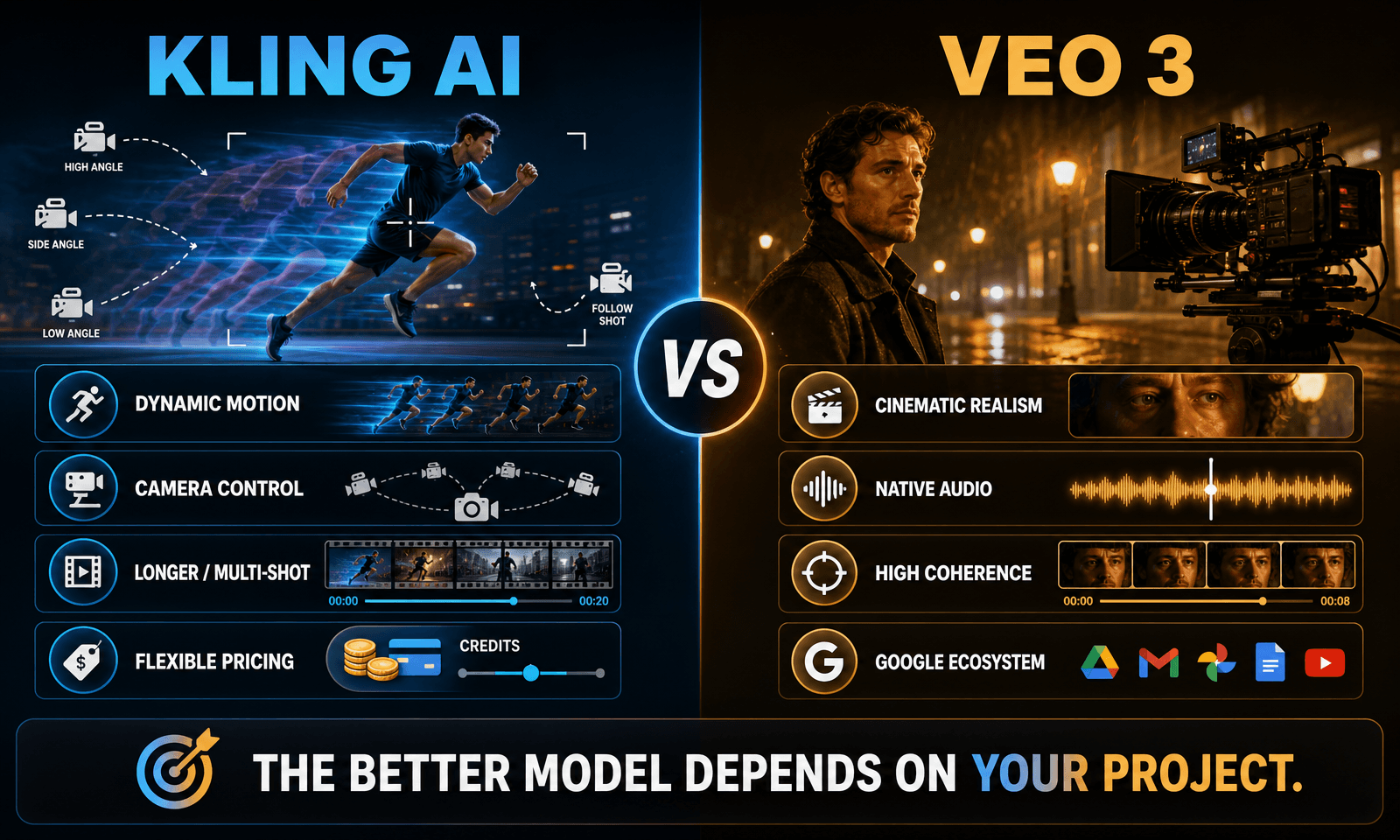
If you only have a minute: Veo 3 is particularly strong in cinematic realism, prompt adherence, and native audio, while Kling AI stands out for dynamic motion, longer generations, multi-shot control, and creative flexibility. The right choice depends on what you need the video to do.
The comparison has also changed significantly as newer versions arrived. Kling 3.0 introduced native audio, multi-shot generation, stronger consistency, and videos up to 15 seconds, while Veo 3.1 expanded its control features with image-to-video, reference images, first-and-last-frame generation, and video extension.
Instead of asking which model is universally better, it is more useful to compare them across the parts of an actual video workflow.
Kling AI vs Veo 3: Quick Comparison
| Feature | Kling AI | Veo 3 |
|---|---|---|
| Visual realism | Strong photorealism and consistency | Excellent cinematic realism |
| Motion | Strong, especially for complex movement | Strong, particularly for natural cinematic motion |
| Native audio | Available in newer Kling models | Native audio is a core Veo capability |
| Maximum generation length | Up to 15 seconds with Kling 3.0 | 4, 6, or 8 seconds depending on configuration |
| Multi-shot | Supported in Kling 3.0 | Uses different control and extension workflows |
| Image-to-video | Yes | Yes |
| Creative control | Strong reference and shot controls | Strong reference and frame controls |
| Best suited for | Action, longer sequences, multi-shot workflows | Cinematic shots, dialogue, realism and audio |
| Pricing model | Credit-based plans | Google ecosystem/API-based access |
The biggest difference: Kling gives creators more room for longer, motion-heavy sequences, while Veo is especially compelling when visual realism, audio, and cinematic presentation are central to the shot.
Video Quality and Realism
Veo 3: Cinematic realism and visual detail
Veo 3 is designed around realistic video generation, with particular strength in lighting, textures, physical interactions, and prompt adherence.
Scenes involving skin, hair, water, fabric, shadows, and natural lighting can benefit from Veo's emphasis on physical realism. Google also reports strong results for Veo 3.1 in text-to-video, image-to-video, prompt alignment, visual quality, and realistic physics.
This makes Veo a strong fit for:
- Cinematic establishing shots
- Product and lifestyle visuals
- Dialogue-driven scenes
- Realistic environments
- Shots where lighting and texture matter
Kling AI: Motion, consistency, and creative control
Kling has traditionally been particularly strong with motion, and Kling 3.0 expands that advantage with stronger element consistency, reference inputs, multi-shot generation, and longer clips.
This becomes useful when the shot involves:
- Fast movement
- Multiple subjects
- Camera choreography
- Longer continuous action
- Multiple shots in one generation
- Character or object consistency
For creators making action-heavy social content, product demonstrations, or sequences that need more narrative movement, Kling's longer generation format can reduce the need to stitch together as many short clips.
Native Audio: Kling AI vs Veo 3
Audio is no longer a simple “Veo has it, Kling does not” comparison.
Veo 3 generates audio natively with the video, including dialogue, ambient sound, and sound effects. Veo 3.1 is explicitly designed as an audio-and-video generation model.
Kling 3.0 also introduced native audio, including multilingual dialogue and support for different accents and dialects.
The practical difference is therefore more about audio workflow and output behavior than simply whether audio exists.
If your project depends heavily on synchronized dialogue, environmental sound, or a finished audio-visual shot, test both models with the exact dialogue and sound requirements you expect to use.
Video Duration and Multi-Shot Generation
This is one of Kling's clearest workflow advantages.
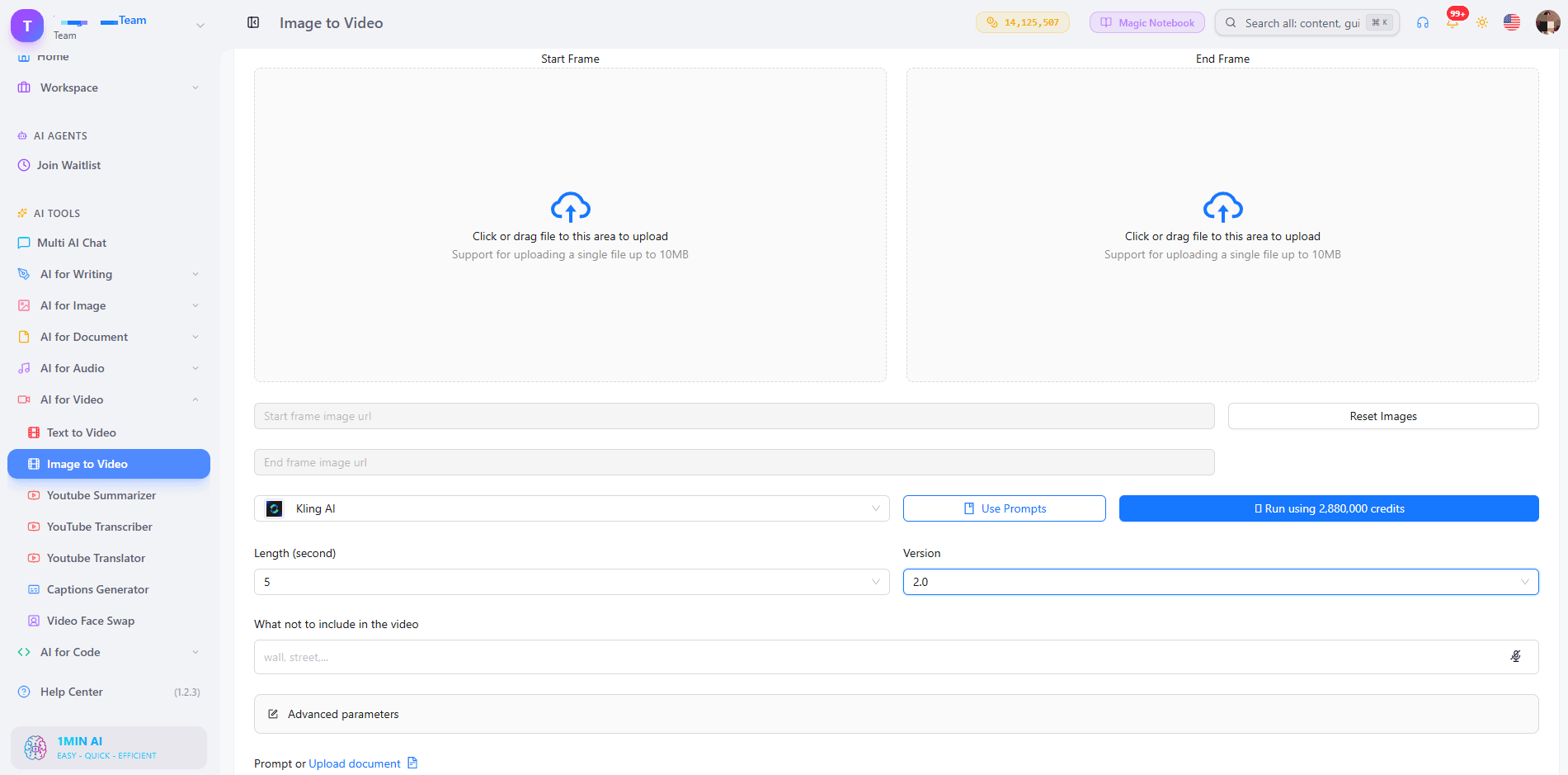
Kling 3.0 supports video generation of up to 15 seconds, with flexible duration and multi-shot storytelling. That gives creators more room to establish a scene, introduce movement, and complete an action in one generation.
Veo 3.1 is built around shorter generations of 4, 6, or 8 seconds, depending on the configuration. However, Veo 3.1 also supports video extension, first-and-last-frame generation, and reference-image workflows.
So the difference is not simply “long video versus short video.”
Kling is useful when you want more narrative content inside a single generation. Veo is useful when you want tightly controlled shots that can be extended or connected through additional generation tools.
Motion and Camera Control
For dynamic scenes, Kling deserves particular attention.
Kling 3.0 supports multi-shot generation and stronger control over characters, objects, and scene consistency. Its longer output also gives complex movements more room to develop.
Veo 3.1 focuses strongly on cinematic realism and prompt adherence. It also supports reference images and first-and-last-frame control, giving creators additional ways to define what the generated shot should look like.
For a simple cinematic shot, either model can work well.
For a complex action sequence, test the same prompt in both models rather than relying only on general model comparisons.
Pricing and Value
Pricing changes frequently, and the actual cost depends on the model, resolution, duration, audio settings, and subscription or API plan.
Kling uses a credit-based system, with different generation costs depending on the selected model and settings. Kling's official credit documentation also notes that features such as native audio, 4K output, duration, and multi-shot generation can affect credit usage.
Veo access varies by product and API configuration, with different models and resolutions carrying different costs.
For that reason, cost per generated video is more useful than comparing subscription prices alone.
If you create many variations every day, calculate the average credits or API cost required to produce one usable clip—not simply the price of the monthly subscription.
Kling AI vs Veo 3 for Different Use Cases
Choose Kling AI when you need:
- Longer generated sequences
- Multi-shot storytelling
- Dynamic movement and camera choreography
- Strong reference and consistency controls
- High-volume experimentation
- Action-heavy or movement-focused content
Choose Veo 3 when you need:
- Cinematic photorealism
- Native synchronized audio
- Dialogue-driven scenes
- Strong prompt adherence
- Realistic lighting and physical interactions
- Tight, polished individual shots
These are not mutually exclusive. A production can use Kling for one scene and Veo for another depending on the requirements of the shot.
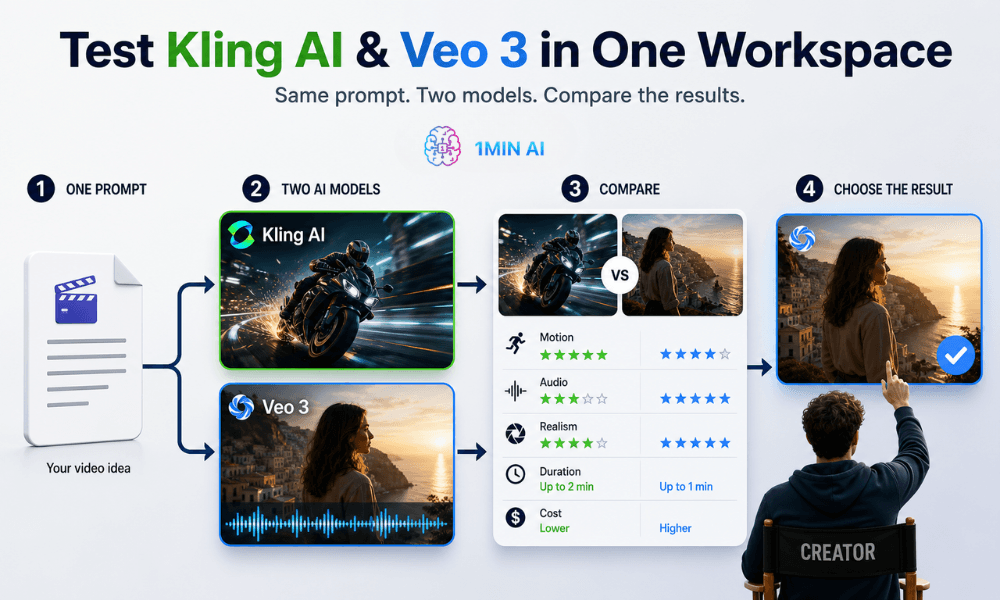
Test Kling AI and Veo 3 With the Same Prompt
Model comparisons are most useful when the variables are controlled.
Try the same:
- Prompt
- Reference image
- Aspect ratio
- Duration
- Visual style
- Camera direction
- Audio requirements
Then compare the actual outputs.
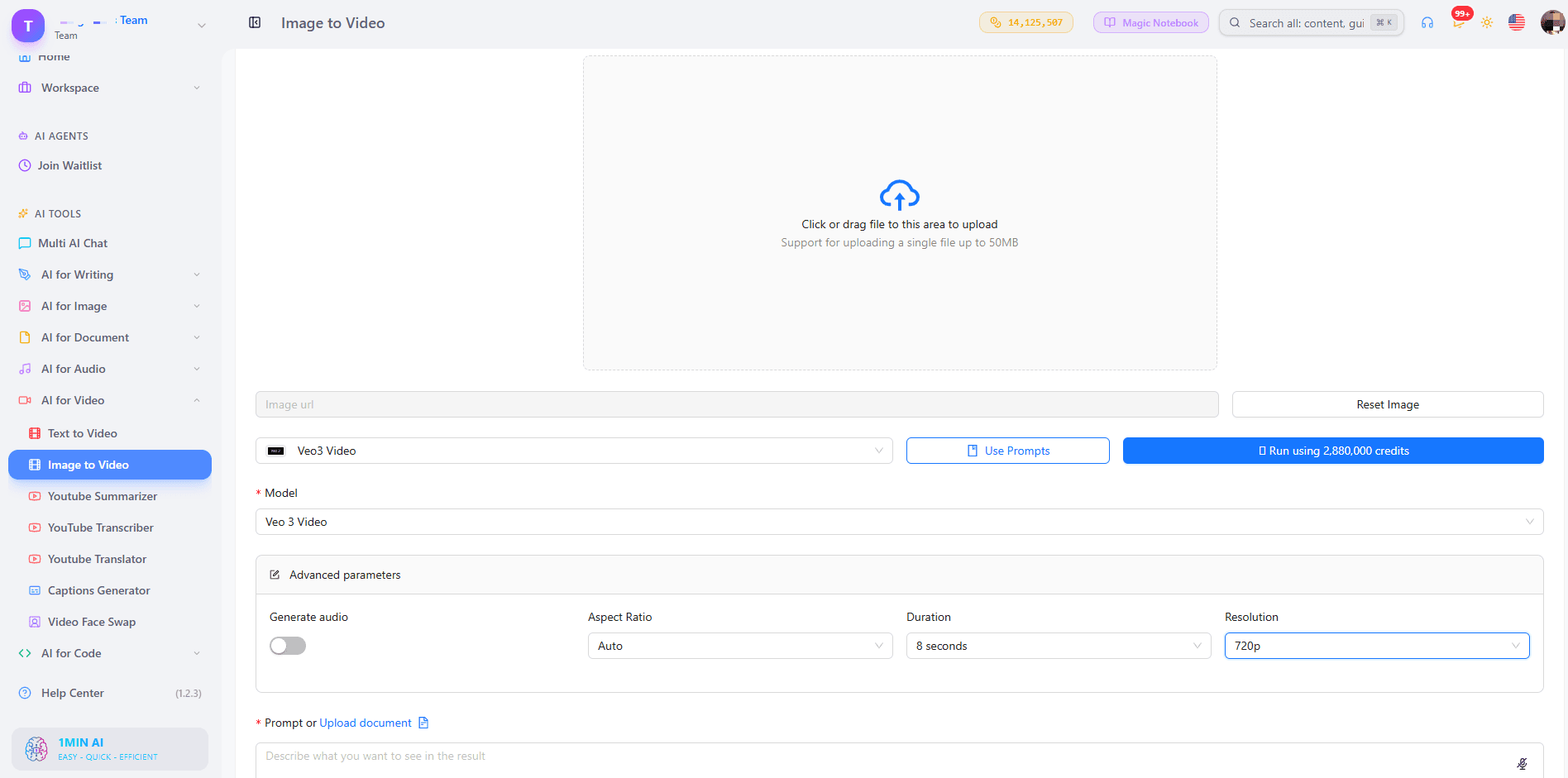
For creators starting from an existing image, an AI image-to-video workflow makes this particularly easy because the same reference frame can be used to evaluate how each model interprets movement, camera direction, and subject consistency.
For text-based experiments, an AI text-to-video workflow lets you run the same prompt through different models and compare the results without rebuilding the workflow from scratch.
Which Is Better: Kling AI or Veo 3?
There is no single winner for every video project.
Kling AI is a strong fit when duration, motion, multi-shot storytelling, and creative control are important.
Veo 3 is a strong fit when cinematic realism, prompt adherence, and native audio are the priority.
The most useful way to choose is to match the model to the shot rather than committing to one model for every project.
If you are unsure, generate the same concept with both. A side-by-side test using your own prompts will usually tell you more than a generic specification table.
Why Use Both Kling AI and Veo 3?
Creators do not necessarily have to choose one model exclusively.
A practical workflow could use Kling for longer action sequences or multi-shot concepts, then use Veo for cinematic shots where realistic lighting, dialogue, or synchronized audio is more important.
Using both also reduces the risk of forcing a model into a task it is not designed to handle particularly well.
1min.AI makes this comparison easier by bringing multiple AI video models into the same creative workflow, allowing creators to test outputs against their own prompts instead of relying only on benchmark claims.
FAQ: Kling AI vs Veo 3
Is Kling AI better than Veo 3?
It depends on the project. Kling is particularly useful for motion-heavy, longer, and multi-shot content, while Veo is particularly strong for cinematic realism, prompt adherence, and native audio.
Which produces more realistic video, Kling AI or Veo 3?
Both can produce highly realistic video. Veo has a strong focus on cinematic realism, lighting, physical behavior, and prompt alignment, while Kling 3.0 has made major improvements in photorealism and consistency.
Does Kling AI have native audio?
Yes. Kling 3.0 introduced native audio generation, including multilingual dialogue capabilities.
Does Veo 3 generate audio?
Yes. Veo 3 and Veo 3.1 generate audio natively with video, including sound effects, ambient sound, and dialogue.
Which generates longer videos?
Kling 3.0 supports generations up to 15 seconds. Veo 3.1 generates 4-, 6-, or 8-second clips depending on the configuration, with video extension available for supported workflows.
Can Kling AI and Veo 3 use images as inputs?
Yes. Both support image-to-video workflows. Veo 3.1 also supports reference-image and first-and-last-frame workflows, while Kling 3.0 supports image references and element consistency controls.
Can I use Kling AI and Veo 3 together?
Yes. Using different models for different shots can be practical when a project requires a combination of motion, realism, audio, duration, and creative control.
Final Takeaway
Kling AI and Veo 3 have moved beyond the simple “which AI video generator is better?” comparison.
Kling AI focuses strongly on motion, longer sequences, multi-shot storytelling, and creative control. Veo 3 focuses strongly on cinematic realism, prompt adherence, and native audio.
The best comparison is therefore not a universal winner. It is the model that produces the most usable result for your specific shot.
When the decision matters, run the same prompt through both models and compare the final footage—not just the specifications.
Alternatives
Discover the best alternatives to 1minAI and compare features, pricing, and use cases.

1min.AI vs OpenRouter
1min.AI vs. OpenRouter: Compare the ready-to-use AI creation product against the technical API tool. Find out if you need a zero-code creative studio or a coding infrastructure hub.
 Ngoc Hong
1min.AI vs Jarvis AI
Compare 1min.AI vs Jarvis AI to discover which AI platform is better for writing, research, automation, and content creation. Find the best AI assistant for your workflow.
Ngoc Hong
1min.AI vs Taskade
Compare 1min.AI vs Taskade for AI content creation, automation, agents, and creative workflows to find the right workspace.
Ngoc HongAI Tools
Discover the best AI tools to boost productivity, creativity, and everyday work.

Create Consistent Cartoon Content in Just a Few Steps
Create engaging cartoon videos for TikTok and Reels with 1min.AI. Research ideas, create characters, and turn images into animated videos in 3 simple steps.
 Lien Anh Vu
One Product, 10 UGC Creatives: How AI Makes Content Testing Easier
Create more authentic UGC with an AI UGC video generator, test more creative angles and scale affiliate content without filming every version.
Lien Anh Vu
Top 4 Affordable AI Tools for Startup Founders
Discover the top 4 affordable AI tools for startup founders to validate ideas, build products, create content, and launch faster without overspending.
 Tram Ta
AI Features
Comprehensive AI features that streamline workflows, improve efficiency, and empower teams to achieve more.
Create Consistent Cartoon Content in Just a Few Steps
Create engaging cartoon videos for TikTok and Reels with 1min.AI. Research ideas, create characters, and turn images into animated videos in 3 simple steps.
Lien Anh VuOne Product, 10 UGC Creatives: How AI Makes Content Testing Easier
Create more authentic UGC with an AI UGC video generator, test more creative angles and scale affiliate content without filming every version.
Lien Anh Vu
1minAI: Free AI Grammar Checker
Check grammar for free with 1minAI’s AI grammar checker. Find grammar, spelling, and writing mistakes, improve clarity, and polish your content in seconds.
Tram TaAI Use Cases
A curated collection of AI use cases for business, productivity, and industry-specific applications.
Create Consistent Cartoon Content in Just a Few Steps
Create engaging cartoon videos for TikTok and Reels with 1min.AI. Research ideas, create characters, and turn images into animated videos in 3 simple steps.
Lien Anh VuOne Product, 10 UGC Creatives: How AI Makes Content Testing Easier
Create more authentic UGC with an AI UGC video generator, test more creative angles and scale affiliate content without filming every version.
Lien Anh Vu
Best Time to Post on Instagram: A Practical Guide for Better Engagement
Discover the best time to post on Instagram, including the best days and times for different audiences, plus tips to find the ideal posting schedule for your account.
Tram TaAI Tutorials
Learn how to use AI with practical, step-by-step tutorials.

Black Friday AI Tool Deals in 2026
Discover what Black Friday AI tool deals 2026 has to offer. Find out how to secure the 1min.AI lifetime deal via AppSumo, Dealify, Stack Social, and verify on Trustpilot, Slashdot, and Software Advice.
 Hang Nguyen
Create Consistent Cartoon Content in Just a Few Steps
Create engaging cartoon videos for TikTok and Reels with 1min.AI. Research ideas, create characters, and turn images into animated videos in 3 simple steps.
Lien Anh Vu
[Seedance 2.5 New] Better AI Product Videos, Less Rework in 1min.AI
Use Seedance 2.5 image to video on 1min.AI to create more consistent AI product videos, reduce failed generations, save credits, and improve UGC workflows.
Lien Anh VuAI Guides
Learn AI faster with practical guides, real-world examples, and actionable best practices.

Safely Buy AI Tools Online: 2026 Black Friday Guide
Discover how to find and secure the best Black Friday AI deals online. Learn expert strategies to avoid scams, combat subscription fatigue, and verify software.
Hang NguyenCreate Consistent Cartoon Content in Just a Few Steps
Create engaging cartoon videos for TikTok and Reels with 1min.AI. Research ideas, create characters, and turn images into animated videos in 3 simple steps.
Lien Anh Vu[Seedance 2.5 New] Better AI Product Videos, Less Rework in 1min.AI
Use Seedance 2.5 image to video on 1min.AI to create more consistent AI product videos, reduce failed generations, save credits, and improve UGC workflows.
Lien Anh VuAI Solutions
Browse the best AI solutions for automation, coding, research, productivity, customer support, marketing, and business workflows.
Safely Buy AI Tools Online: 2026 Black Friday Guide
Discover how to find and secure the best Black Friday AI deals online. Learn expert strategies to avoid scams, combat subscription fatigue, and verify software.
Hang NguyenCreate Consistent Cartoon Content in Just a Few Steps
Create engaging cartoon videos for TikTok and Reels with 1min.AI. Research ideas, create characters, and turn images into animated videos in 3 simple steps.
Lien Anh VuOne Product, 10 UGC Creatives: How AI Makes Content Testing Easier
Create more authentic UGC with an AI UGC video generator, test more creative angles and scale affiliate content without filming every version.
Lien Anh VuAI Models
Explore the world's leading AI models in one place.
Create Consistent Cartoon Content in Just a Few Steps
Create engaging cartoon videos for TikTok and Reels with 1min.AI. Research ideas, create characters, and turn images into animated videos in 3 simple steps.
Lien Anh VuOne Product, 10 UGC Creatives: How AI Makes Content Testing Easier
Create more authentic UGC with an AI UGC video generator, test more creative angles and scale affiliate content without filming every version.
Lien Anh Vu[Seedance 2.5 New] Better AI Product Videos, Less Rework in 1min.AI
Use Seedance 2.5 image to video on 1min.AI to create more consistent AI product videos, reduce failed generations, save credits, and improve UGC workflows.
Lien Anh VuAI Comparisons
Compare AI tools, models, and platforms to find the best fit for your needs.
Kling AI Vs Veo 3: Which Model Wins?
Kling AI vs Veo 3: compare motion, native audio, pricing & free tiers to see which AI video generator wins for your project - try both on 1min.AI.
 Trang Tran
[Seedance 2.5 New] Better AI Product Videos, Less Rework in 1min.AI
Use Seedance 2.5 image to video on 1min.AI to create more consistent AI product videos, reduce failed generations, save credits, and improve UGC workflows.
Lien Anh Vu
DeepSeek V4 Pro vs Flash Comparison
Compare DeepSeek V4 Pro vs DeepSeek V4 Flash metrics. Optimize your agentic apps and improve AI fact checking on 1min.ai today.
Ngoc HongAI Integrations
Seamlessly integrate AI with the tools you already use to automate work and boost productivity.

POV: You Have 10+ Posts to Make Every Day
Learn how to build an AI content workflow that helps content creators produce 10+ social media posts a day faster with AI brainstorming, image generation, and content creation.
Lien Anh Vu
How to Use an AI Fashion Video Generator for Fashion Week 2026
Turn Fashion Week 2026 ideas into stunning fashion videos with AI. Learn how to brainstorm, create visuals, and transform images into videos with one simple workflow.
Lien Anh Vu
Stop Switching Between AI Apps: How AI Integration Transforms Employer Branding
Discover how AI integration helps HR teams streamline employer branding by combining AI writing, documents, images, video, and multiple AI models into one workspace.
Tram TaAI for Industries
Find the best AI tools and workflows for healthcare, finance, education, legal, manufacturing, retail, real estate, and more

Best AI Tool for Content Marketing |1minAI
Looking for the best AI tool for content marketing? See how 1minAI helps marketers research, write, repurpose, create visuals, and scale content from one AI workspace.
Tram Ta
7 Low-Cost AI Business Ideas for Your Startup
Explore 7 low-cost AI business ideas you can start with a small budget, from content and video services to AI consulting, reselling, and automation.
Tram Ta
How to Start a One-Person AI Business: 7 Models You Can Run Solo
Learn how to start a one-person AI business with 7 practical models, from AI consulting and content services to automation and software reselling.
Tram TaAI Agents
Discover and run AI agents to automate tasks across your work and daily life.
1minAI: Free AI Grammar Checker
Check grammar for free with 1minAI’s AI grammar checker. Find grammar, spelling, and writing mistakes, improve clarity, and polish your content in seconds.
Tram Ta
AI Agents for Facebook
Use an AI Agent for Facebook to create content, generate images, schedule posts, and publish from your documents and conversations.
Ngoc Hong
AI Agent vs AI Assistant: Which One Actually Saves Designers More Time?
Learn the difference between AI Agent vs AI Assistant and discover which solution helps designers automate repetitive work, reduce revisions, and save more time.
Lien Anh VuAI Workflows
Explore ready-to-use AI workflows for productivity, marketing, sales, support, and more.
Create Consistent Cartoon Content in Just a Few Steps
Create engaging cartoon videos for TikTok and Reels with 1min.AI. Research ideas, create characters, and turn images into animated videos in 3 simple steps.
Lien Anh VuOne Product, 10 UGC Creatives: How AI Makes Content Testing Easier
Create more authentic UGC with an AI UGC video generator, test more creative angles and scale affiliate content without filming every version.
Lien Anh VuPOV: You Have 10+ Posts to Make Every Day
Learn how to build an AI content workflow that helps content creators produce 10+ social media posts a day faster with AI brainstorming, image generation, and content creation.
Lien Anh VuNewsletter
Weekly AI Innovations with 1minAI

🔮 Weekly AI Innovations #140: Deepseek 4.1 Flash & Gemini Upgrades
Explore Deepseek 4.1 Flash and new Gemini models on 1min.ai. Plus, check our update on your Billing - Usage page for better clarity.
Hang Nguyen
🔮 Weekly AI Innovations #1: Llama, Mistral AI, Cohere Integration, Chat UI, Real-time credit estimation
Enhanced Chat with 3 new AI models, improved UI/UX, real-time credit tracking, and newsletter for AI news.
Hang Nguyen
🔮 Weekly AI Innovations #136: Grok 4.6 and Smart Data Retention
Discover the latest 1min.ai updates! Upgrade to Grok 4.6 for blazing-fast AI, and check our new Data Retention policies to secure your files today.
Hang Nguyen