
1min.AI vs PostEverywhere

Trang Tran
October 30, 2026
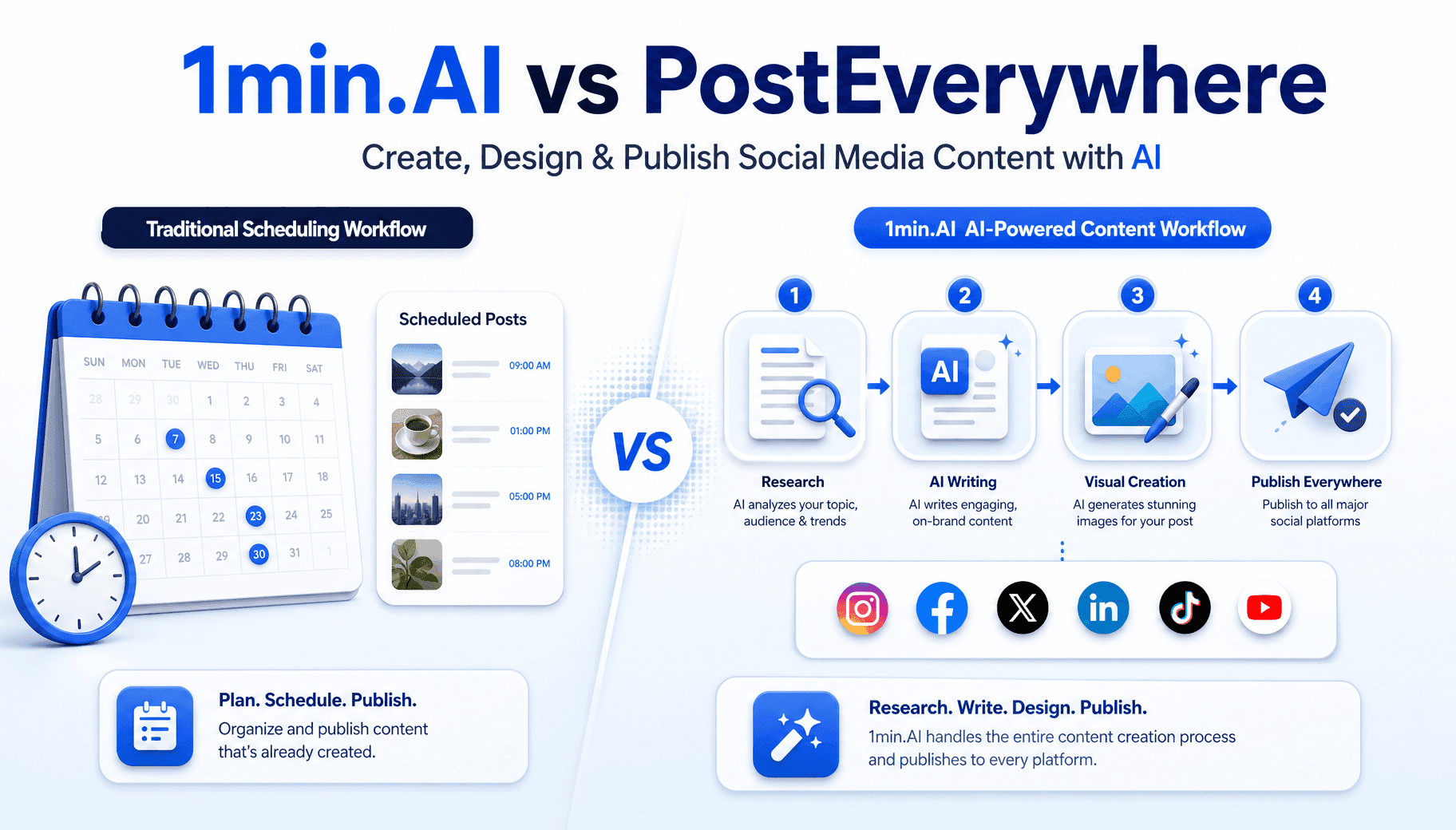
Looking for a PostEverywhere alternative that also writes and designs your posts? See how 1min.AI covers research, copy, images and publishing.
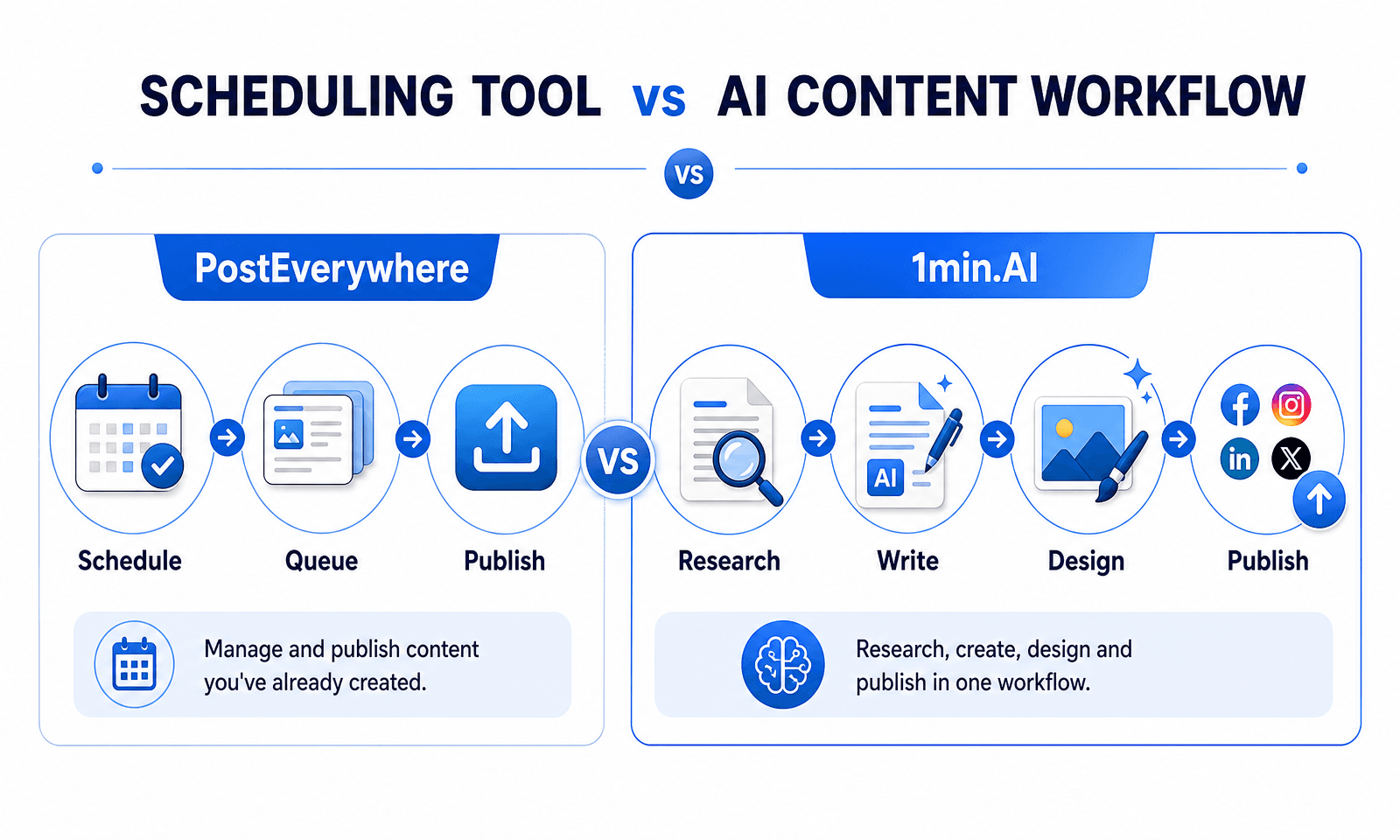
The best PostEverywhere alternative for LinkedIn creators is 1min.AI, because it researches, writes, designs and publishes posts in one workflow instead of only scheduling content you made elsewhere. PostEverywhere is an affordable scheduler with AI drafting. 1min.AI is an AI agent platform, so the content itself gets built for you, and you pay only for the step you change.
Quick answer
- Choose 1min.AI if you want research, copy, visuals and publishing in one flow.
- Choose 1min.AI if a team or agency needs shared credits and unlimited members.
- Choose PostEverywhere only if you already create content elsewhere and just need a low-cost queue.
PostEverywhere vs 1min.AI at a Glance
| PostEverywhere | 1min.AI LinkedIn Agent | |
|---|---|---|
| Main job | Scheduling and publishing with AI drafting | Research, writing, image creation and publishing |
| Research from your sources | Not described on its LinkedIn page | Links, PDFs, reports and brand decks |
| Credit control when editing | Not described on its LinkedIn page | Step Caching and Reuse Previous Result |
| Failure handling | Delivery tab lists failed posts | Non-blocking steps with exact reason and fix button |
| Team size | 1 to 5 members by plan | Unlimited members, credits per member |
| Entry price | $9/mo, 2 accounts, 10 AI credits | Free daily credits, paid plans on pricing page |
How We Compared These Tools
We reviewed PostEverywhere’s public pricing and LinkedIn feature pages, plus ratings on G2 and Capterra. We weighed three things: how much content the tool creates for you, how it handles LinkedIn specifically, and how well it supports teams.
Why People Look for a PostEverywhere Alternative
PostEverywhere is a capable, low-cost scheduler, but four limits send users looking elsewhere.
Small AI Allowances on Entry Plans
The Lite plan ($9 per month) includes 10 AI credits and 2 accounts, and Starter ($19) includes 25 credits. That can run short for anyone drafting daily posts and carousels.
Scheduling First, Content Creation Second
One G2 reviewer said they wanted more help creating content, and a published review notes that complex visuals still need a separate design tool.
LinkedIn Feature Gaps
PostEverywhere does not publish LinkedIn polls or Articles, cannot add @mentions or alt text, and cannot edit a post after LinkedIn accepts it. Post analytics cover Company Pages only, not personal profiles.
A Small Independent Review Base
G2 lists 3 reviews (4.8 average) and Capterra shows none yet. That is normal for a newer product, but it gives you less outside evidence to check.
Why Choose 1min.AI as a PostEverywhere Alternative
The 1min.AI LinkedIn Agent replaces the usual stack of a chatbot, an image generator, a design tool and a scheduler. By 1min.AI’s own estimate, one monthly plan (1,000,000 credits plus 450,000 free daily visit credits) can produce 250+ researched LinkedIn posts and 150+ LinkedIn-sized graphics, and can save 8 to 12 hours a week.
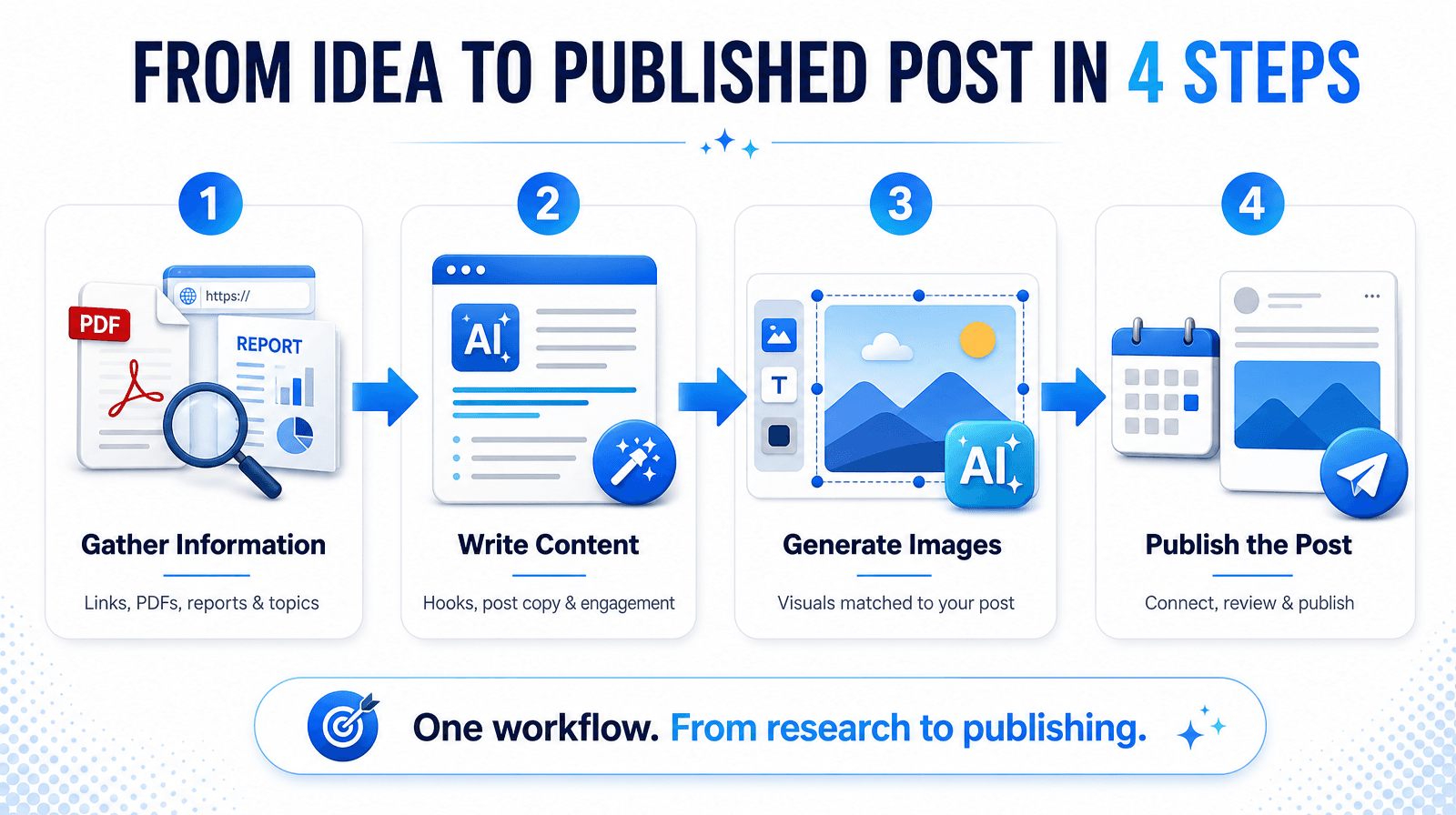
An AI LinkedIn Content Generator in Four Steps
Step 1: Gather Information
Add web links, PDFs, reports or brand decks, or simply a topic. The agent organizes findings into core concepts, data points and references.
Step 2: Write Content
Prompt recipes built for LinkedIn produce two-line hooks, readable spacing and comment-driving endings, and avoid stock AI openers.
Step 3: Generate the Image
Visual prompts come from the post’s core message, so graphics match the copy instead of looking like generic stock photos.
Step 4: Publish the Post
Connect a profile or Company Page through secure OAuth in under 30 seconds, then publish natively with no downloading or copy-pasting.
What a Week Looks Like in Practice
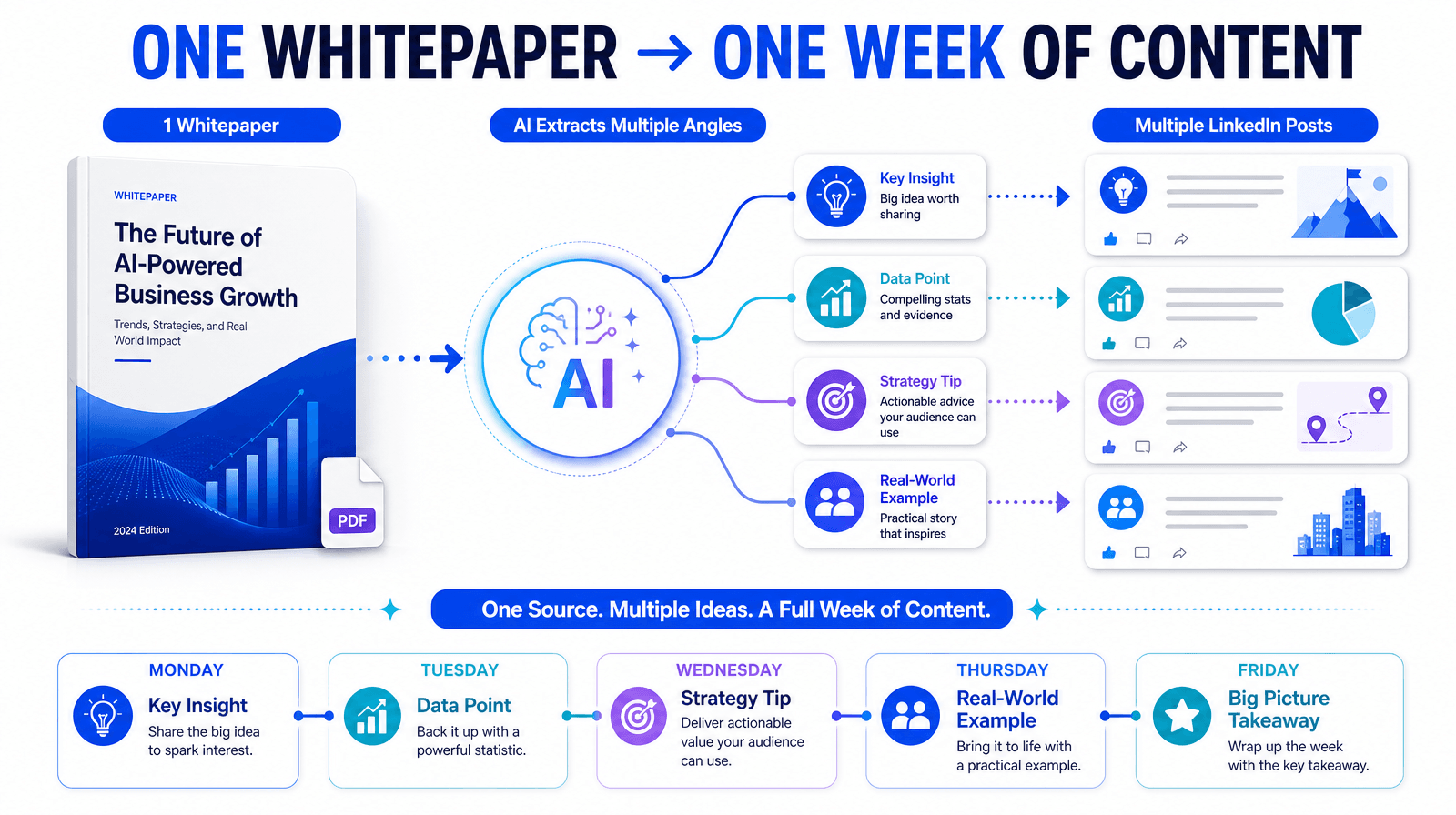
Upload one whitepaper, let the agent extract several angles, then generate a post and a matching graphic for each. Review each draft, then set the whole batch to Recurring. One source becomes a full week of content.
Step Caching Protects Your Credits
1min.AI caches each step’s output. Turn on Reuse Previous Result to lock finished steps, and you pay only for the edit you make. Three run options (Run this step, Run up to this step, Run from this step) let you test before spending more.
LinkedIn Post Scheduler With Clear Failure Messages
Scheduling has three simple choices: No schedule, Run once or Recurring. If a step fails, such as an expired connection, later tasks are not hard-blocked, and the interface shows the exact reason with a fix button like Reconnect Account. An Executed History helps you avoid duplicate topics.
More Than LinkedIn
1min.AI also offers Facebook, Instagram, Threads and X agents, so one workspace can serve several channels. For the wider picture, read this guide to an AI agent for social media management.
Agency and Team Collaboration
Members Management, Sharing and Collaboration, unlimited members, credits per member and priority support let agencies and teams work from one account.
Ratings You Can Verify
1min.AI is rated 4.6/5 on Trustpilot and G2, 4.8/5 on the Chrome Web Store (900+ ratings), 5.0/5 on the Apple App Store and 4.4/5 on Google Play (1,300+ ratings), with 100,000+ users. It holds SourceForge, Slashdot and Top Business Software badges and is listed on Capterra, Software Advice and GetApp. It runs on web, macOS, Windows, iOS, Android and as a Chrome extension.




PostEverywhere vs 1min.AI: Pricing and Credits
- PostEverywhere: $9 to $39 per month, with 2 to 20 accounts, 10 to 500 AI credits and 1 to 5 team members. It has a 7-day trial and no free plan.
- 1min.AI: a monthly credit pool plus up to 450,000 free daily visit credits, and credits per member for teams. See the current 1min.AI plans for exact prices.
Credits are not directly comparable, because what one credit buys differs by tool. Compare by the output you need, such as posts and graphics per month.
Which Tool Fits Your Workflow
- Solo founder or creator who wants posts made for you: 1min.AI, since research, copy, image and publishing run in one flow.
- Agency or team sharing credits and members: 1min.AI, with unlimited members and credits per member.
- Someone who already writes and designs content elsewhere and only needs a cheap queue: PostEverywhere can cover that narrower job.
Moving From PostEverywhere to 1min.AI
- Export or note your scheduled posts and top-performing topics.
- Connect your LinkedIn profile or Company Page to the 1min.AI LinkedIn Agent via OAuth.
- Add a source (link, PDF or topic), run the four steps and set a schedule.
Frequently Asked Questions
What is the best PostEverywhere alternative for LinkedIn?
1min.AI is the best fit if you want research, writing, images and publishing in one workflow, with credits that are protected by Step Caching.
Is PostEverywhere worth it?
Yes, if you mainly need inexpensive scheduling and create content elsewhere. It is a weaker fit if you want the tool to handle research and content production.
Does PostEverywhere support LinkedIn polls?
No. It does not publish LinkedIn polls or Articles, so you post those in LinkedIn directly.
Does 1min.AI support agencies and teams?
Yes. It offers Members Management, Sharing and Collaboration, unlimited members, credits per member and priority support.
Can I try 1min.AI for free?
You can claim 15,000 free credits each day by logging in to the web app, which adds up to 450,000 credits a month.
Does 1min.AI cover Instagram, Facebook, Threads and X?
Yes. 1min.AI has a dedicated agent for each, alongside the LinkedIn Agent.
- #Commercial
Alternatives
Discover the best alternatives to 1minAI and compare features, pricing, and use cases.

1min.AI vs OpenRouter
1min.AI vs. OpenRouter: Compare the ready-to-use AI creation product against the technical API tool. Find out if you need a zero-code creative studio or a coding infrastructure hub.
 Ngoc Hong
1min.AI vs PostEverywhere
Looking for a PostEverywhere alternative that also writes and designs your posts? See how 1min.AI covers research, copy, images and publishing.
 Trang Tran
1min.AI vs Postiv
Compare 1min.AI and Postiv for LinkedIn writing, visuals, planning, pricing, and team workflows. Find the right fit for your creative workload.
Ngoc HongAI Tools
Discover the best AI tools to boost productivity, creativity, and everyday work.

Create Consistent Cartoon Content in Just a Few Steps
Create engaging cartoon videos for TikTok and Reels with 1min.AI. Research ideas, create characters, and turn images into animated videos in 3 simple steps.
 Lien Anh Vu
One Product, 10 UGC Creatives: How AI Makes Content Testing Easier
Create more authentic UGC with an AI UGC video generator, test more creative angles and scale affiliate content without filming every version.
Lien Anh Vu
Top 4 Affordable AI Tools for Startup Founders
Discover the top 4 affordable AI tools for startup founders to validate ideas, build products, create content, and launch faster without overspending.
 Tram Ta
AI Features
Comprehensive AI features that streamline workflows, improve efficiency, and empower teams to achieve more.
Create Consistent Cartoon Content in Just a Few Steps
Create engaging cartoon videos for TikTok and Reels with 1min.AI. Research ideas, create characters, and turn images into animated videos in 3 simple steps.
Lien Anh VuOne Product, 10 UGC Creatives: How AI Makes Content Testing Easier
Create more authentic UGC with an AI UGC video generator, test more creative angles and scale affiliate content without filming every version.
Lien Anh Vu
1minAI: Free AI Grammar Checker
Check grammar for free with 1minAI’s AI grammar checker. Find grammar, spelling, and writing mistakes, improve clarity, and polish your content in seconds.
Tram TaAI Use Cases
A curated collection of AI use cases for business, productivity, and industry-specific applications.
Create Consistent Cartoon Content in Just a Few Steps
Create engaging cartoon videos for TikTok and Reels with 1min.AI. Research ideas, create characters, and turn images into animated videos in 3 simple steps.
Lien Anh VuOne Product, 10 UGC Creatives: How AI Makes Content Testing Easier
Create more authentic UGC with an AI UGC video generator, test more creative angles and scale affiliate content without filming every version.
Lien Anh Vu
Best Time to Post on Instagram: A Practical Guide for Better Engagement
Discover the best time to post on Instagram, including the best days and times for different audiences, plus tips to find the ideal posting schedule for your account.
Tram TaAI Tutorials
Learn how to use AI with practical, step-by-step tutorials.

Black Friday AI Tool Deals in 2026
Discover what Black Friday AI tool deals 2026 has to offer. Find out how to secure the 1min.AI lifetime deal via AppSumo, Dealify, Stack Social, and verify on Trustpilot, Slashdot, and Software Advice.
 Hang Nguyen
Create Consistent Cartoon Content in Just a Few Steps
Create engaging cartoon videos for TikTok and Reels with 1min.AI. Research ideas, create characters, and turn images into animated videos in 3 simple steps.
Lien Anh Vu
[Seedance 2.5 New] Better AI Product Videos, Less Rework in 1min.AI
Use Seedance 2.5 image to video on 1min.AI to create more consistent AI product videos, reduce failed generations, save credits, and improve UGC workflows.
Lien Anh VuAI Guides
Learn AI faster with practical guides, real-world examples, and actionable best practices.

Safely Buy AI Tools Online: 2026 Black Friday Guide
Discover how to find and secure the best Black Friday AI deals online. Learn expert strategies to avoid scams, combat subscription fatigue, and verify software.
Hang NguyenCreate Consistent Cartoon Content in Just a Few Steps
Create engaging cartoon videos for TikTok and Reels with 1min.AI. Research ideas, create characters, and turn images into animated videos in 3 simple steps.
Lien Anh Vu[Seedance 2.5 New] Better AI Product Videos, Less Rework in 1min.AI
Use Seedance 2.5 image to video on 1min.AI to create more consistent AI product videos, reduce failed generations, save credits, and improve UGC workflows.
Lien Anh VuAI Solutions
Browse the best AI solutions for automation, coding, research, productivity, customer support, marketing, and business workflows.
Safely Buy AI Tools Online: 2026 Black Friday Guide
Discover how to find and secure the best Black Friday AI deals online. Learn expert strategies to avoid scams, combat subscription fatigue, and verify software.
Hang NguyenCreate Consistent Cartoon Content in Just a Few Steps
Create engaging cartoon videos for TikTok and Reels with 1min.AI. Research ideas, create characters, and turn images into animated videos in 3 simple steps.
Lien Anh VuOne Product, 10 UGC Creatives: How AI Makes Content Testing Easier
Create more authentic UGC with an AI UGC video generator, test more creative angles and scale affiliate content without filming every version.
Lien Anh VuAI Models
Explore the world's leading AI models in one place.
Create Consistent Cartoon Content in Just a Few Steps
Create engaging cartoon videos for TikTok and Reels with 1min.AI. Research ideas, create characters, and turn images into animated videos in 3 simple steps.
Lien Anh VuOne Product, 10 UGC Creatives: How AI Makes Content Testing Easier
Create more authentic UGC with an AI UGC video generator, test more creative angles and scale affiliate content without filming every version.
Lien Anh Vu[Seedance 2.5 New] Better AI Product Videos, Less Rework in 1min.AI
Use Seedance 2.5 image to video on 1min.AI to create more consistent AI product videos, reduce failed generations, save credits, and improve UGC workflows.
Lien Anh VuAI Comparisons
Compare AI tools, models, and platforms to find the best fit for your needs.

Kling AI Vs Veo 3: Which Model Wins?
Kling AI vs Veo 3: compare motion, native audio, pricing & free tiers to see which AI video generator wins for your project - try both on 1min.AI.
Trang Tran[Seedance 2.5 New] Better AI Product Videos, Less Rework in 1min.AI
Use Seedance 2.5 image to video on 1min.AI to create more consistent AI product videos, reduce failed generations, save credits, and improve UGC workflows.
Lien Anh Vu
DeepSeek V4 Pro vs Flash Comparison
Compare DeepSeek V4 Pro vs DeepSeek V4 Flash metrics. Optimize your agentic apps and improve AI fact checking on 1min.ai today.
Ngoc HongAI Integrations
Seamlessly integrate AI with the tools you already use to automate work and boost productivity.

POV: You Have 10+ Posts to Make Every Day
Learn how to build an AI content workflow that helps content creators produce 10+ social media posts a day faster with AI brainstorming, image generation, and content creation.
Lien Anh Vu
How to Use an AI Fashion Video Generator for Fashion Week 2026
Turn Fashion Week 2026 ideas into stunning fashion videos with AI. Learn how to brainstorm, create visuals, and transform images into videos with one simple workflow.
Lien Anh Vu
Stop Switching Between AI Apps: How AI Integration Transforms Employer Branding
Discover how AI integration helps HR teams streamline employer branding by combining AI writing, documents, images, video, and multiple AI models into one workspace.
Tram TaAI for Industries
Find the best AI tools and workflows for healthcare, finance, education, legal, manufacturing, retail, real estate, and more

Free AI Product Description Generator
Write product descriptions that sell in minutes. Use this free AI product description generator to turn details or a photo into on-brand copy. Try 1min.AI.
Trang Tran
Best Business Productivity Tools for Startups to Maximize Profits | 1minAI
Discover the best business productivity tools for startups to save time, streamline workflows, reduce repetitive tasks, and support profitable growth with AI.
Tram Ta
Best AI Tool for Content Marketing |1minAI
Looking for the best AI tool for content marketing? See how 1minAI helps marketers research, write, repurpose, create visuals, and scale content from one AI workspace.
Tram TaAI Agents
Discover and run AI agents to automate tasks across your work and daily life.
1minAI: Free AI Grammar Checker
Check grammar for free with 1minAI’s AI grammar checker. Find grammar, spelling, and writing mistakes, improve clarity, and polish your content in seconds.
Tram Ta
AI Agents for Facebook
Use an AI Agent for Facebook to create content, generate images, schedule posts, and publish from your documents and conversations.
Ngoc Hong
AI Agent vs AI Assistant: Which One Actually Saves Designers More Time?
Learn the difference between AI Agent vs AI Assistant and discover which solution helps designers automate repetitive work, reduce revisions, and save more time.
Lien Anh VuAI Workflows
Explore ready-to-use AI workflows for productivity, marketing, sales, support, and more.
Create Consistent Cartoon Content in Just a Few Steps
Create engaging cartoon videos for TikTok and Reels with 1min.AI. Research ideas, create characters, and turn images into animated videos in 3 simple steps.
Lien Anh VuOne Product, 10 UGC Creatives: How AI Makes Content Testing Easier
Create more authentic UGC with an AI UGC video generator, test more creative angles and scale affiliate content without filming every version.
Lien Anh VuPOV: You Have 10+ Posts to Make Every Day
Learn how to build an AI content workflow that helps content creators produce 10+ social media posts a day faster with AI brainstorming, image generation, and content creation.
Lien Anh VuNewsletter
Weekly AI Innovations with 1minAI

🔮 Weekly AI Innovations #143: Update GPT-6, GPT-6.1 & Ideogram 4.0
Access GPT-6 Sol, Luna, GPT-6.1 Sol, and Ideogram 4.0 on 1min.ai. Boost typography accuracy to 98.4% and cut reasoning latency by 45% in one platform.
Hang Nguyen
🔮 Weekly AI Innovations #142: Grok 4.7, Opus 5.5 & Sonnet 5.5 on 1min.ai
Access Grok 4.7, Claude Opus 5.5, and Sonnet 5.5 on 1min.ai. Cut subscription costs by up to 70% and process millions tokens in a single unified workspace.
Hang Nguyen
🔮 Weekly AI Innovations #141: Seedance 2.5 & Stable Audio 3: Next-Gen AI
Explore Seedance 2.0, 2.5, and StabilityAI's Stable Audio 3 on 1min.ai. Generate studio-grade audio and synchronized motion with next-gen generative AI.
Hang Nguyen