Make Your Sketch Easier to Approve with 1min.AI
Lien Anh Vu
July 7, 2026
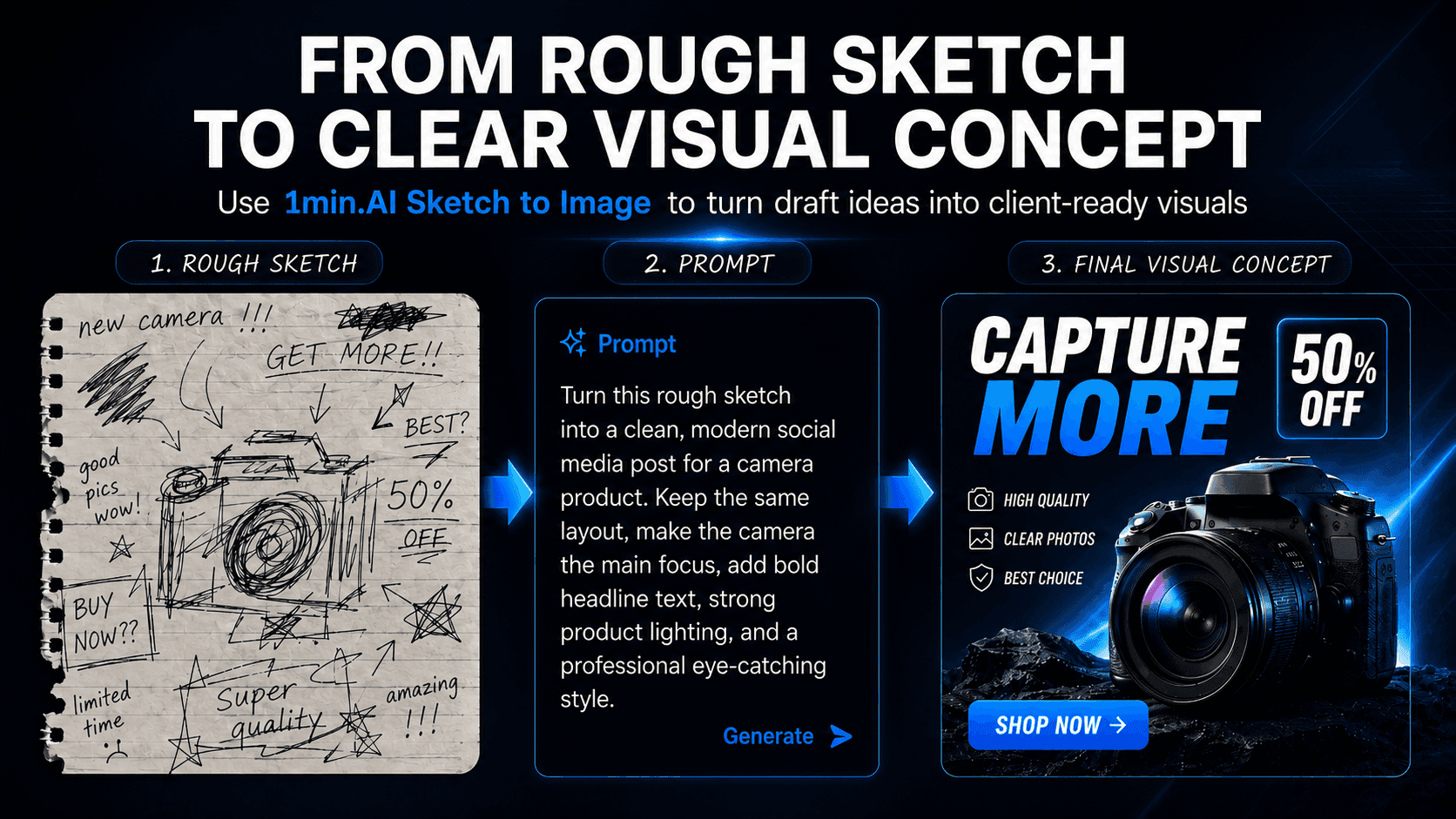
Help clients understand your visual ideas faster. Use 1min.AI Sketch to Image turns rough sketches into clearer concept previews before production starts.
A rough sketch can be enough for a creator to understand the idea, but not always enough for a client to approve it.
Many content creators already have the concept, layout, and direction in mind. The problem is that clients often cannot visualise the final result from a simple draft. This leads to long explanations, unclear feedback, and unnecessary revision rounds.
With 1min.AI Sketch to Image, creators can turn early sketches into clearer visual concepts, making ideas easier to present, discuss, and approve before moving into editing or production.
Why Rough Sketches Often Fail in Client Presentations
The idea is clear in your head, but not in the client’s mind
Creators often use rough sketches to capture layouts, scenes, or campaign ideas quickly. But clients do not always see the same final picture. What feels obvious to the creator may look unfinished, vague, or confusing to someone outside the creative process.
A rough draft does not show the final mood or style
A sketch may show the structure, but it usually does not show the full visual direction. Clients may still wonder the following:
- Will it look premium or playful?
- Will it feel bold or minimal?
- Will the final content be scroll-stopping enough?
- Will this fit the brand?
Without mood, colour, texture, and style, the client is forced to imagine too much.
Unclear visuals slow down approval
When clients cannot visualise the idea, they ask for more explanation, more references, or more options. This creates delays before the project even reaches production. A strong idea can be delayed not because it is weak, but because it is not presented clearly enough.
How 1min.AI Sketch to Image Helps Bridge the Visualization Gap
Turn a rough draft into a clearer concept preview
Instead of sending only a simple sketch, creators can upload the draft into 1min.AI Sketch to Image and generate a more polished visual concept. This gives clients a clearer preview of what the final direction could look like.
Show the visual direction before production begins
The tool helps creators communicate important creative elements earlier, such as the following:
- layout
- composition
- mood
- style
- subject placement
- possible final look
This makes the concept easier to evaluate before time is spent on editing, shooting, or designing the final asset.
Create visual options faster
Creators can use one sketch to explore different directions, such as clean, premium, colourful, bold, or social-first visuals. This is especially useful when clients ask for “another option” or are unsure which direction fits the campaign best.
Simple steps on 1min.AI
Turn a rough sketch into a visual concept in a few quick steps:
**Step 1: Upload your sketch **Drag and drop your rough draft into 1min.AI.
**Step 2: Choose the AI model **Select a model such as Stable Image Core - StabilityAI.
**Step 3: Write your prompt **Describe the style, mood, colours, and final visual direction.
**Step 4: Adjust settings if needed **Use advanced parameters to refine the output.
Step 5: Generate the image Run the tool to create a clearer concept preview.
**Step 6: Share with the client **Use the result for feedback, approval, or next-step production.
Why This Matters for Content Creators and Small Creative Teams
Faster client approval
When clients can see the idea more clearly, they can respond faster. A visual concept reduces the need for long explanations and helps move the conversation from “I don’t understand” to “Let’s adjust this direction.”
Fewer revisions later
A clearer concept at the beginning helps prevent misalignment later. Creators are less likely to spend hours editing or producing content in the wrong direction because the visual direction has already been discussed earlier.
More professional idea presentation
A rough sketch alone can feel too unfinished. But when paired with an AI-generated concept preview, the creator can present the idea with more confidence and structure. This makes the workflow feel more professional, even for solo creators or small teams.
Better idea validation before production
Not every idea that sounds good will work visually. Sketch to Image allows creators to test whether a layout, scene, or campaign visual is strong enough before investing more time and resources into production.
Have a rough idea but your client can’t visualize it yet? Use 1min.AI Sketch to Image to turn your sketch into a clearer concept preview before production starts: https://app.1min.ai/sketch-to-image