
Transcribe Audio To Text Free With AI

Trang Tran
September 12, 2026
Transcribe audio to text free with 1min.AI. Upload your file, pick an AI model, and convert audio to text online in 60+ languages within minutes.
You can transcribe audio to text for free using 1min.AI's Speech to Text tool. Upload your audio file, choose an AI transcription model, select a language, and get a clean, editable transcript in minutes. No manual note taking, no replaying the same clip five times to catch one word.
Whether you are turning an interview into an article, a lecture into study notes, or a sales call into a searchable record, converting audio to text online saves hours of manual work. This guide walks through exactly how to do it with 1min.AI, which AI model to pick for your audio, and why an all in one workspace beats a single purpose converter.
How to Transcribe Audio to Text with 1min.AI
The process takes three steps and works entirely in your browser.
Step 1: Upload Your Audio File
Click or drag your file into the upload area. 1min.AI's audio to text converter accepts MP3, M4A, OGG, WAV, and FLAC files up to 50MB, which covers most interviews, voice memos, podcast episodes, and short lecture recordings without needing to convert the file first.
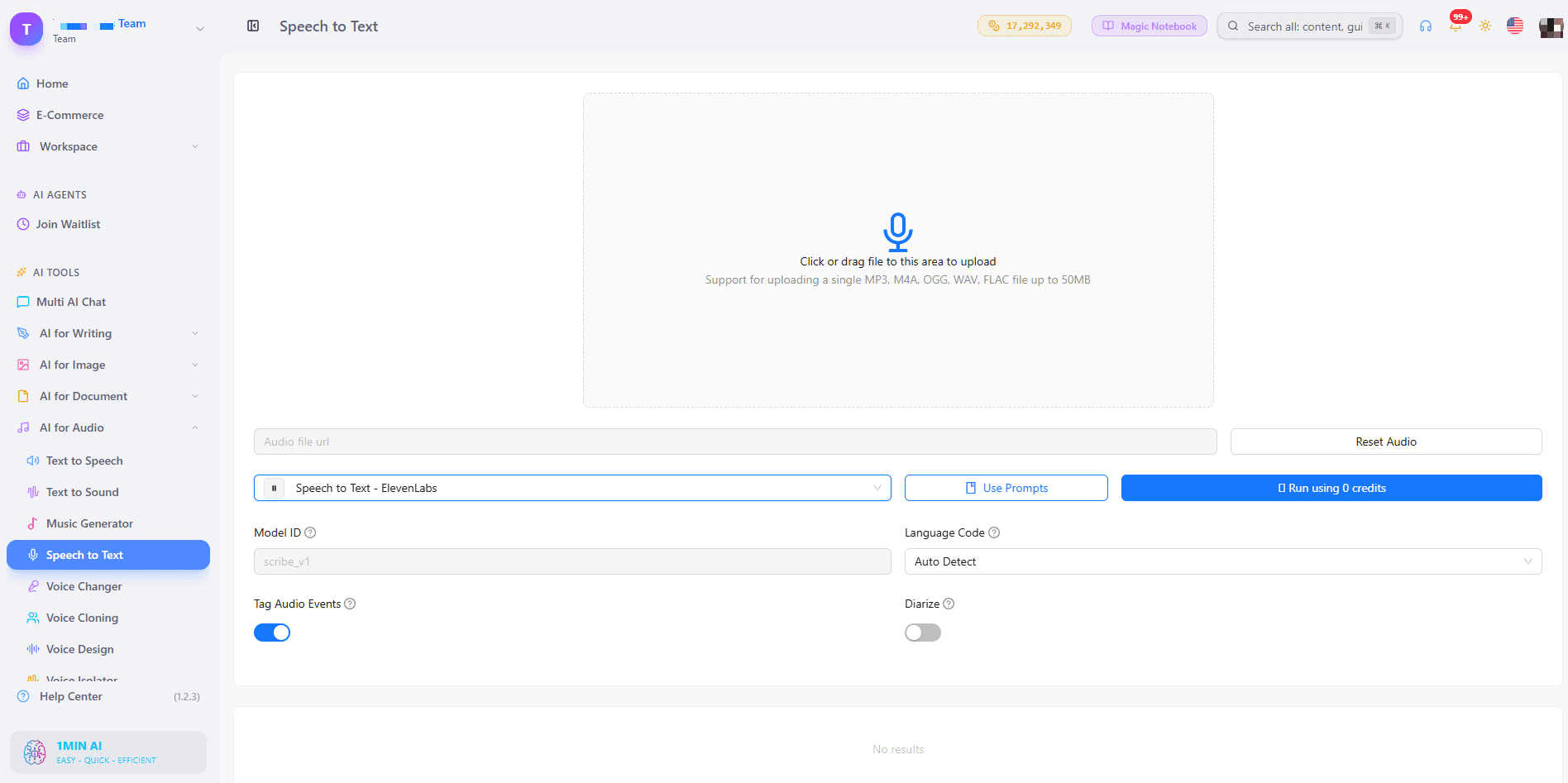
Step 2: Choose an AI Transcription Model
This is where 1min.AI differs from most free converters. Instead of locking you into one engine, you pick from 11 speech to text models across four providers, including Qwen3 ASR Flash, ElevenLabs, Google, and OpenAI. Each model is tuned for a different kind of audio, so the right choice depends on what you are transcribing (more on this below).
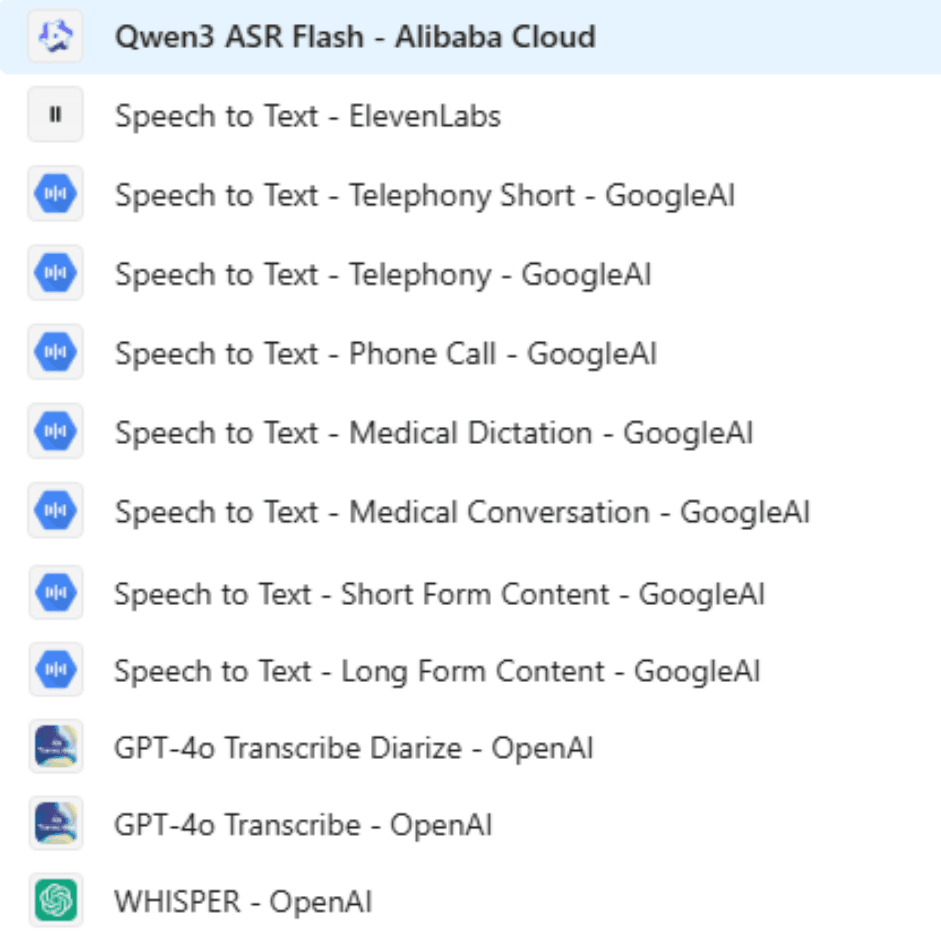
Step 3: Select Your Language and Export the Transcript
Choose from 60 plus languages and locales, including US, UK, Indian, and Australian English, Mandarin and Cantonese Chinese, Spanish, French, Arabic, Hindi, Japanese, Korean, Vietnamese, and dozens more regional variants. Run the transcription, review the text, and copy or export the result.
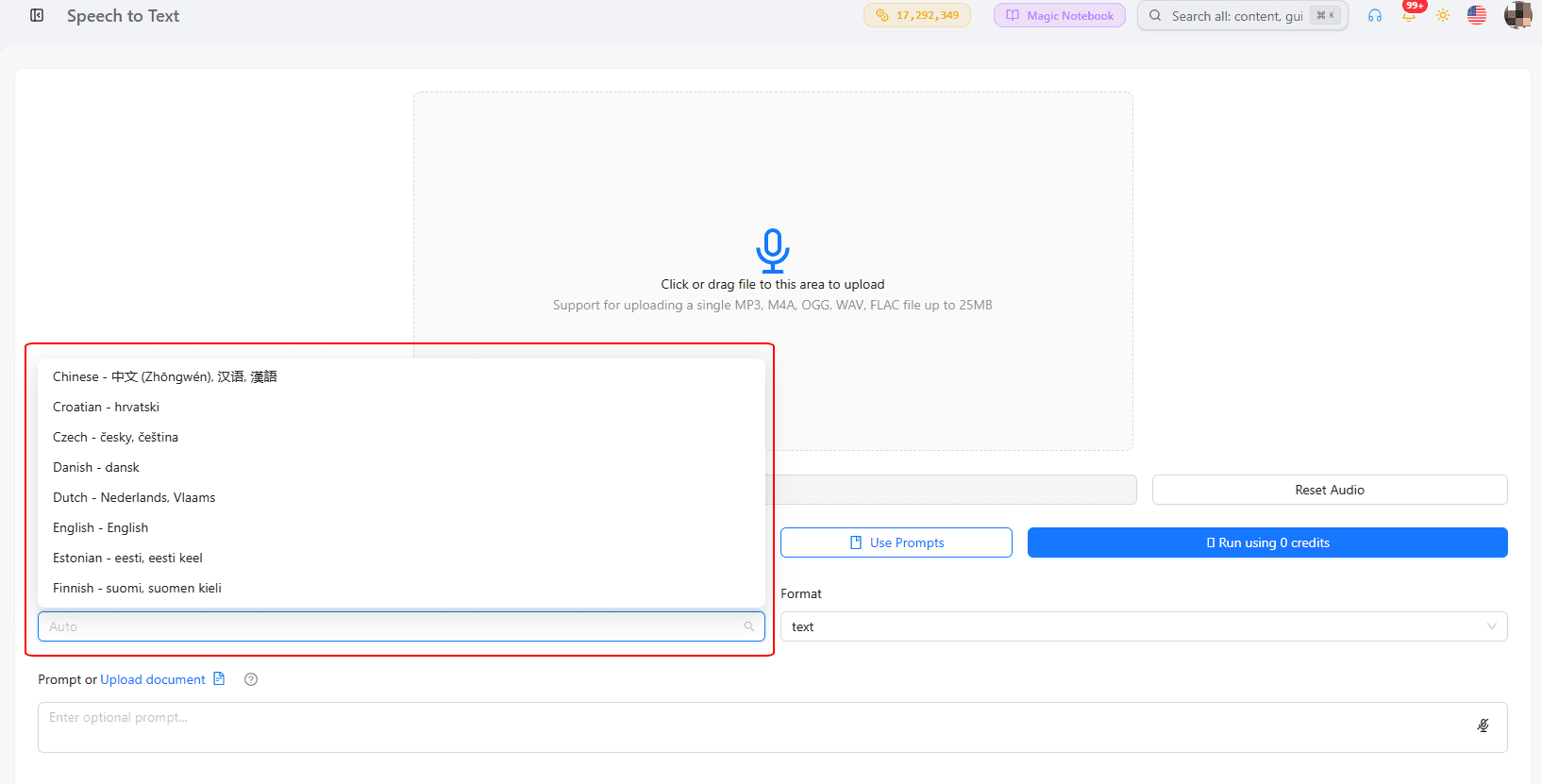
Which AI Model Should You Pick to Convert Audio to Text?
Not every audio file needs the same model. Here is how to match your recording to the right one.
| Your audio | Recommended model |
|---|---|
| General interviews, meetings, voice memos | GPT-4o Transcribe or Whisper (OpenAI) |
| Multiple speakers you need labeled | GPT-4o Transcribe Diarize |
| Doctor visits or clinical notes | Speech to Text - Medical Dictation or Medical Conversation (Google) |
| Call center recordings or phone calls | Speech to Text - Telephony or Phone Call (Google) |
| Podcasts or long recordings | Speech to Text - Long Form Content (Google) or Speech to Text (ElevenLabs) |
| Short clips, quick clips to text | Speech to Text - Short Form Content (Google) or Qwen3 ASR Flash |
Best for Speaker Labeling
If you are transcribing a panel discussion, a podcast with co-hosts, or a group interview, GPT-4o Transcribe Diarize identifies who is speaking so you are not left guessing which line belongs to which person.
Best for Niche or Industry Audio
Google's Medical Dictation, Medical Conversation, and Telephony models exist because healthcare and call center audio behave differently from a casual voice memo. Background noise, medical terminology, and phone line compression all need a model trained for that context, and 1min.AI gives you that choice instead of forcing one general model on every file.
Why Choose 1min.AI to Transcribe Speech to Text
Most free audio to text tools give you one engine and one language list. 1min.AI is built as an AI workspace, so your transcription tool sits next to writing, image, and video AI tools you likely already use for the same project.
| Feature | 1min.AI | Typical single-purpose converters |
|---|---|---|
| AI models available | 11 models from 4 providers | Usually 1 fixed engine |
| Speaker labeling | Yes, via GPT-4o Transcribe Diarize | Varies, often a paid add-on |
| Languages supported | 60+ locales | Often limited or English-first |
| Industry-specific models | Medical, telephony, long form, short form | Rarely offered |
| Works alongside other AI tools | Yes, in the same workspace | No, standalone tool only |
Who Uses Audio to Text Transcription?
Podcasters and Content Creators
Turn a recorded episode into a blog post, show notes, or social captions without retyping a single word. Automatic audio transcription also makes old episodes searchable, so you can pull a quote from an episode months later in seconds.
Students and Researchers
Convert lectures, seminars, or interview recordings into text you can highlight, search, and cite. This is especially useful for qualitative research, where finding one specific quote inside hours of audio by ear is impractical.
Business Teams and Call Centers
Meetings, sales calls, and support calls become searchable records instead of audio files nobody replays. The telephony and phone call models are built specifically for this kind of recording quality.
Frequently Asked Questions
Can ChatGPT Transcribe an Audio File?
ChatGPT can transcribe short audio clips when Whisper is available in the interface, but it is not built as a dedicated transcription workspace with speaker labeling, format export, or industry-specific models. A tool built around Speech to Text, like 1min.AI, is better suited for regular transcription work.
Is Google Transcribe Free?
Google's built in voice typing tool in Google Docs is free but works only through live microphone dictation, not uploaded audio files. To transcribe an existing recording, you need a tool that accepts file uploads, such as 1min.AI's Speech to Text feature.
What Audio Formats Can I Upload?
1min.AI accepts MP3, M4A, OGG, WAV, and FLAC files, up to 50MB per upload.
Does 1min.AI Support Multiple Speakers?
Yes. Selecting GPT-4o Transcribe Diarize labels each speaker in the transcript, so multi-person recordings come back organized instead of as one unbroken block of text.
Alternatives
Discover the best alternatives to 1minAI and compare features, pricing, and use cases.

1min.AI vs OpenRouter
1min.AI vs. OpenRouter: Compare the ready-to-use AI creation product against the technical API tool. Find out if you need a zero-code creative studio or a coding infrastructure hub.
 Ngoc Hong
1min.AI vs Taskade
Compare 1min.AI vs Taskade for AI content creation, automation, agents, and creative workflows to find the right workspace.
Ngoc Hong
1min.AI vs Lovart
Compare 1min.AI vs Lovart across features, pricing, credits, brand tools, and use cases to find the right AI platform for your workflow.
Ngoc HongAI Tools
Discover the best AI tools to boost productivity, creativity, and everyday work.

Top 4 Affordable AI Tools for Startup Founders
Discover the top 4 affordable AI tools for startup founders to validate ideas, build products, create content, and launch faster without overspending.
 Tram Ta
[Seedance 2.5 New] Better AI Product Videos, Less Rework in 1min.AI
Discover how AI image-to-video product consistency helps creators reduce failed generations, save AI credits, and produce more usable commercial and UGC content.
 Lien Anh Vu
Turn “Make It Better” Into Better Content With AI
Use AI to turn vague client feedback into clear revisions, reduce unnecessary edits, and deliver better content faster.
Lien Anh VuAI Features
Comprehensive AI features that streamline workflows, improve efficiency, and empower teams to achieve more.

One Product, 10 UGC Creatives: How AI Makes Content Testing Easier
Create more authentic UGC with an AI UGC video generator, test more creative angles and scale affiliate content without filming every version.
Lien Anh Vu
Create Consistent Cartoon Content in Just a Few Steps
Create cartoon videos for TikTok and Reels in 3 simple steps with 1min.AI, from researching ideas to characters and animated videos.
Lien Anh Vu
1minAI: Free AI Grammar Checker
Check grammar for free with 1minAI’s AI grammar checker. Find grammar, spelling, and writing mistakes, improve clarity, and polish your content in seconds.
Tram TaAI Use Cases
A curated collection of AI use cases for business, productivity, and industry-specific applications.
One Product, 10 UGC Creatives: How AI Makes Content Testing Easier
Create more authentic UGC with an AI UGC video generator, test more creative angles and scale affiliate content without filming every version.
Lien Anh Vu
Best Time to Post on Instagram: A Practical Guide for Better Engagement
Discover the best time to post on Instagram, including the best days and times for different audiences, plus tips to find the ideal posting schedule for your account.
Tram Ta
Build a Portfolio Website Faster with 1min.AI
Learn how freelance creatives can use 1min.AI to plan, write, design, and generate a professional portfolio website faster, even without strong coding skills.
Lien Anh VuAI Tutorials
Learn how to use AI with practical, step-by-step tutorials.

Black Friday AI Tool Deals in 2026
Discover what Black Friday AI tool deals 2026 has to offer. Find out how to secure the 1min.AI lifetime deal via AppSumo, Dealify, Stack Social, and verify on Trustpilot, Slashdot, and Software Advice.
 Hang Nguyen
Create Consistent Cartoon Content in Just a Few Steps
Create cartoon videos for TikTok and Reels in 3 simple steps with 1min.AI, from researching ideas to characters and animated videos.
Lien Anh Vu[Seedance 2.5 New] Better AI Product Videos, Less Rework in 1min.AI
Discover how AI image-to-video product consistency helps creators reduce failed generations, save AI credits, and produce more usable commercial and UGC content.
Lien Anh VuAI Guides
Learn AI faster with practical guides, real-world examples, and actionable best practices.

Safely Buy AI Tools Online: 2026 Black Friday Guide
Discover how to find and secure the best Black Friday AI deals online. Learn expert strategies to avoid scams, combat subscription fatigue, and verify software.
Hang NguyenCreate Consistent Cartoon Content in Just a Few Steps
Create cartoon videos for TikTok and Reels in 3 simple steps with 1min.AI, from researching ideas to characters and animated videos.
Lien Anh Vu[Seedance 2.5 New] Better AI Product Videos, Less Rework in 1min.AI
Discover how AI image-to-video product consistency helps creators reduce failed generations, save AI credits, and produce more usable commercial and UGC content.
Lien Anh VuAI Solutions
Browse the best AI solutions for automation, coding, research, productivity, customer support, marketing, and business workflows.

Free AI Tattoo Generator: Custom Designs
Turn any idea into a custom tattoo design with 1min.AI's free AI tattoo generator. Describe your idea, pick a style, and download in seconds.
 Trang Tran
Safely Buy AI Tools Online: 2026 Black Friday Guide
Discover how to find and secure the best Black Friday AI deals online. Learn expert strategies to avoid scams, combat subscription fatigue, and verify software.
Hang Nguyen[Seedance 2.5 New] Better AI Product Videos, Less Rework in 1min.AI
Discover how AI image-to-video product consistency helps creators reduce failed generations, save AI credits, and produce more usable commercial and UGC content.
Lien Anh VuAI Models
Explore the world's leading AI models in one place.
One Product, 10 UGC Creatives: How AI Makes Content Testing Easier
Create more authentic UGC with an AI UGC video generator, test more creative angles and scale affiliate content without filming every version.
Lien Anh VuCreate Consistent Cartoon Content in Just a Few Steps
Create cartoon videos for TikTok and Reels in 3 simple steps with 1min.AI, from researching ideas to characters and animated videos.
Lien Anh Vu[Seedance 2.5 New] Better AI Product Videos, Less Rework in 1min.AI
Discover how AI image-to-video product consistency helps creators reduce failed generations, save AI credits, and produce more usable commercial and UGC content.
Lien Anh VuAI Comparisons
Compare AI tools, models, and platforms to find the best fit for your needs.

Kling AI Vs Veo 3: Which Model Wins?
Kling AI vs Veo 3: compare motion, native audio, pricing & free tiers to see which AI video generator wins for your project - try both on 1min.AI.
Trang Tran[Seedance 2.5 New] Better AI Product Videos, Less Rework in 1min.AI
Discover how AI image-to-video product consistency helps creators reduce failed generations, save AI credits, and produce more usable commercial and UGC content.
Lien Anh Vu
DeepSeek V4 Pro vs Flash Comparison
Compare DeepSeek V4 Pro vs DeepSeek V4 Flash metrics. Optimize your agentic apps and improve AI fact checking on 1min.ai today.
Ngoc HongAI Integrations
Seamlessly integrate AI with the tools you already use to automate work and boost productivity.

POV: You Have 10+ Posts to Make Every Day
Learn how to build an AI content workflow that helps content creators produce 10+ social media posts a day faster with AI brainstorming, image generation, and content creation.
Lien Anh Vu
How to Use an AI Fashion Video Generator for Fashion Week 2026
Turn Fashion Week 2026 ideas into stunning fashion videos with AI. Learn how to brainstorm, create visuals, and transform images into videos with one simple workflow.
Lien Anh Vu
Stop Switching Between AI Apps: How AI Integration Transforms Employer Branding
Discover how AI integration helps HR teams streamline employer branding by combining AI writing, documents, images, video, and multiple AI models into one workspace.
Tram TaAI for Industries
Find the best AI tools and workflows for healthcare, finance, education, legal, manufacturing, retail, real estate, and more

Free AI Real Estate Video Generator
Turn listing photos into narrated property videos with AI real estate video tools. See how 1min.AI creates walkthroughs, voiceovers & captions in minutes.
Trang Tran
Free AI Virtual Staging: Furnish Any Room
Stage any real estate listing with AI virtual staging: upload a photo, pick a style, and get a photorealistic furnished room in seconds, free to try.
Trang Tran
The Problem With AI Design? It Looks Too AI
AI-generated designs can look polished but still feel artificial. Here are 5 prompt techniques designers can use to create more realistic, intentional visuals.
Lien Anh VuAI Agents
Discover and run AI agents to automate tasks across your work and daily life.
1minAI: Free AI Grammar Checker
Check grammar for free with 1minAI’s AI grammar checker. Find grammar, spelling, and writing mistakes, improve clarity, and polish your content in seconds.
Tram Ta
AI Agents for Facebook
Use an AI Agent for Facebook to create content, generate images, schedule posts, and publish from your documents and conversations.
Ngoc Hong
AI Agent vs AI Assistant: Which One Actually Saves Designers More Time?
Learn the difference between AI Agent vs AI Assistant and discover which solution helps designers automate repetitive work, reduce revisions, and save more time.
Lien Anh VuAI Workflows
Explore ready-to-use AI workflows for productivity, marketing, sales, support, and more.
Create Consistent Cartoon Content in Just a Few Steps
Create cartoon videos for TikTok and Reels in 3 simple steps with 1min.AI, from researching ideas to characters and animated videos.
Lien Anh VuPOV: You Have 10+ Posts to Make Every Day
Learn how to build an AI content workflow that helps content creators produce 10+ social media posts a day faster with AI brainstorming, image generation, and content creation.
Lien Anh VuHow to Use an AI Fashion Video Generator for Fashion Week 2026
Turn Fashion Week 2026 ideas into stunning fashion videos with AI. Learn how to brainstorm, create visuals, and transform images into videos with one simple workflow.
Lien Anh VuNewsletter
Weekly AI Innovations with 1minAI

🔮 Weekly AI Innovations #137: ElevenLabs Music & AI social Profile Control
The newest 1min.ai updates deliver professional music generation and highly requested privacy tools. Dive into a seamless workflow today!
Hang Nguyen
🔮 Weekly AI Innovations #136: Grok 4.6 and Smart Data Retention
Discover the latest 1min.ai updates! Upgrade to Grok 4.6 for blazing-fast AI, and check our new Data Retention policies to secure your files today.
Hang Nguyen
🔮 Weekly AI Innovations #135: Claude Opus 5 and new AI Social Features
Experience the powerful Claude Opus 5 model, and explore new AI Social features like User Pages and Following creators.
Hang Nguyen