
Free AI Tools to Rephrase Text for Students

Tram Ta
October 7, 2026
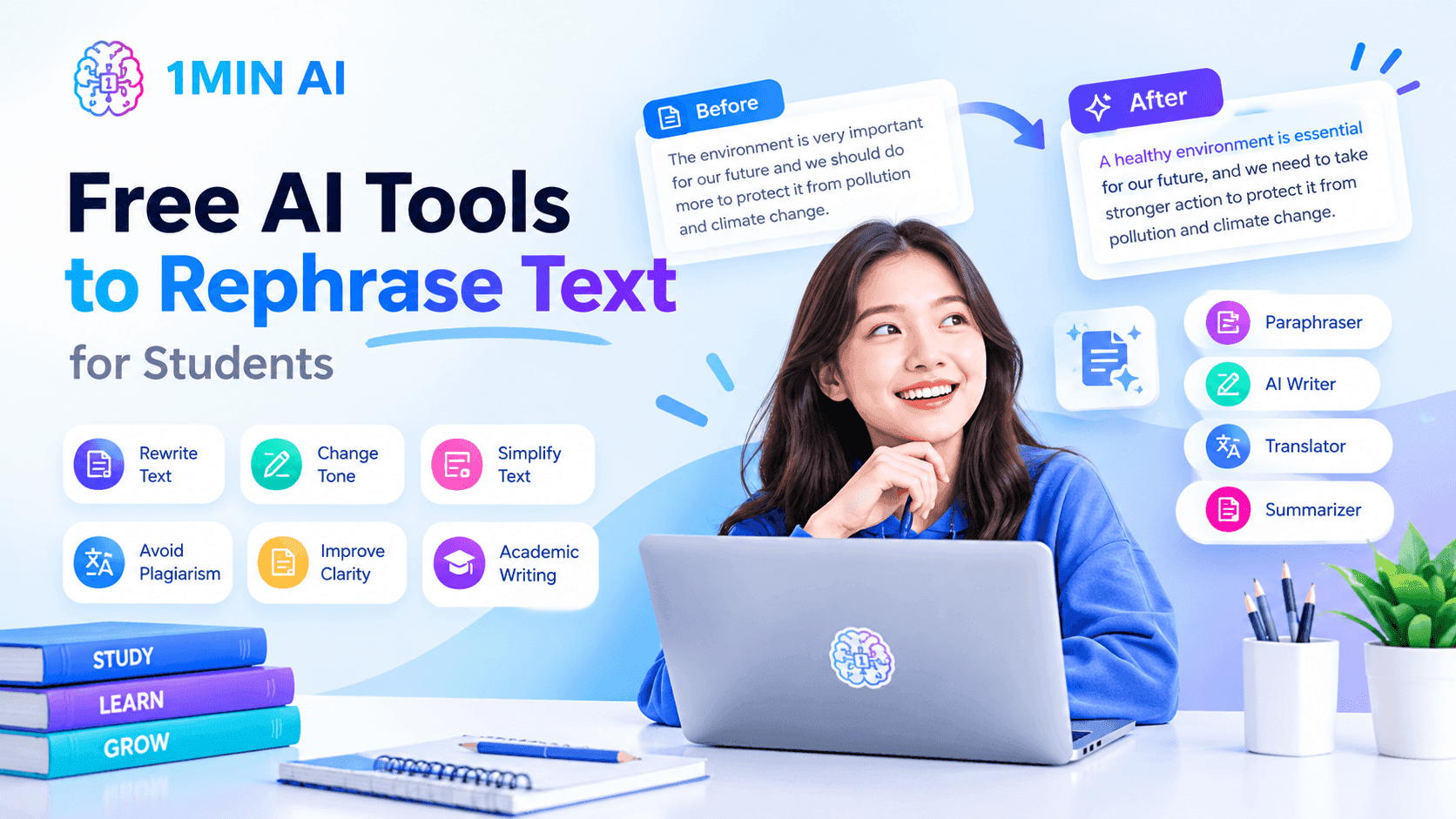
Rephrase text for free with AI tools. Learn how students can improve clarity, simplify sentences, and write better with 1minAI.
Writing clearly is an important skill for students. Whether you're preparing an essay, writing a research paper, summarizing a reading, or completing an assignment, you often need to express complex ideas in your own words.
But finding the right wording isn't always easy. You may understand a concept but struggle to explain it naturally. Sometimes your sentences sound repetitive, your paragraphs are too complicated, or you aren't sure how to rephrase a sentence without changing its original meaning.
That's where free AI tools to rephrase text can help.
AI rephrasing tools can suggest alternative sentence structures, simplify complicated wording, improve readability, and help you explore different ways to express an idea. Used properly, they can support your writing process while helping you develop your own writing skills.
In this guide, we'll explore practical ways students can use AI rephrasing tools, share useful prompts, and show how 1minAI can help you rewrite and improve your writing.
What Does It Mean to Rephrase Text?
To rephrase means to express an idea using different words or sentence structures while preserving its original meaning.
For example:
Original sentence:
Technology has significantly changed the way students access educational resources.
Rephrased sentence:
Students can now access learning materials in different ways because of technological advances.
Both sentences communicate a similar idea, but the wording and structure are different.
Rephrasing is useful when you want to:
- Make complex sentences easier to understand
- Improve clarity and readability
- Avoid repetitive wording
- Adapt language to a specific audience
- Express information in your own writing style
- Make paragraphs more concise
However, rephrasing is not the same as replacing a few words with synonyms. Good rephrasing requires understanding the original idea and expressing it accurately in a new way.
When working with academic sources, remember that rephrasing does not remove the need for citations. You should still acknowledge the original source when using someone else's ideas or research.
Why Do Students Need AI Rephrasing Tools?
Students work with different types of writing, from short homework assignments to lengthy research papers. Each task comes with different writing challenges.
Free AI rephrasing tools can help with several common problems.
1. Improve Sentence Clarity
Academic texts often contain technical terms and long sentences. When you're taking notes or explaining an idea, you may need to simplify the language without losing important information.
For example:
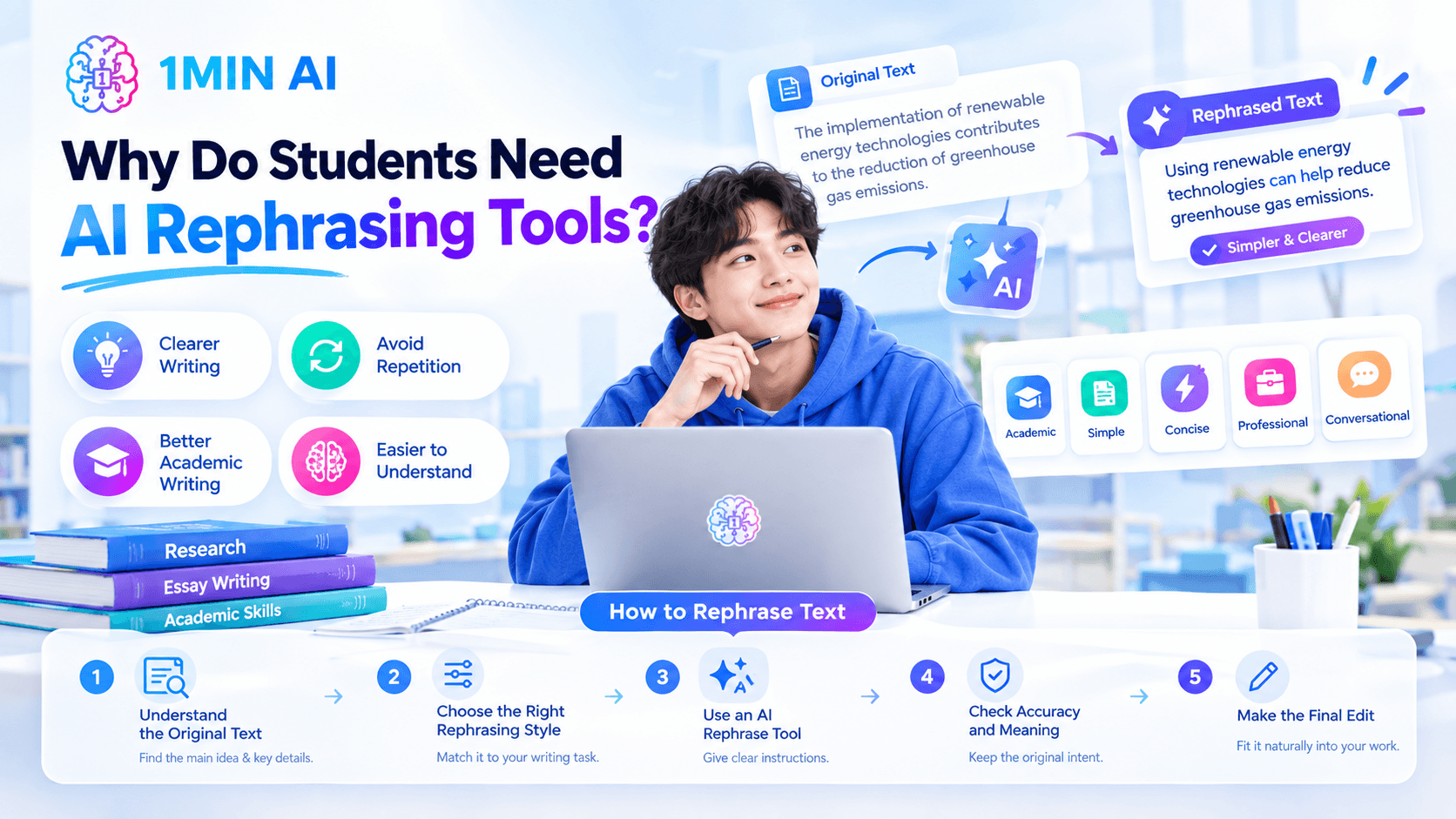
Original: The implementation of renewable energy technologies contributes to the reduction of greenhouse gas emissions.
Simplified: Using renewable energy technologies can help reduce greenhouse gas emissions.
A rephrasing tool can suggest a simpler version that is easier to read.
2. Avoid Repetitive Writing
Using the same words or sentence structures repeatedly can make an essay feel monotonous.
For example, if several paragraphs begin with “This shows that,” you can explore alternative transitions such as:
- This suggests that
- These findings indicate
- The evidence highlights
- This result demonstrates
AI can suggest alternatives, but choose transitions based on the actual relationship between your ideas.
3. Improve Academic Writing
Students sometimes understand a topic but struggle to communicate it in a formal and organized way.
An AI rephrase tool can help turn rough notes into clearer sentences, improve the flow of paragraphs, and suggest more appropriate wording.
You should still review the result to make sure it reflects your own understanding and follows your instructor's requirements.
4. Make Complex Information Easier to Understand
When studying unfamiliar topics, rephrasing can also support learning.
You can ask AI to explain a difficult sentence in simpler language, provide an example, or break a complicated concept into smaller parts.
This is especially useful when reviewing textbooks, lecture notes, or research materials.
How to Rephrase Text With Free AI Tools
A useful rephrasing process involves more than pasting text into a tool and copying the output.
Follow these steps to get better results.
Step 1: Understand the Original Text
Before rephrasing, identify the main idea.
Ask yourself:
- What is the sentence trying to explain?
- Which details are essential?
- Are there technical terms that must remain unchanged?
- Does the sentence express a fact, argument, or interpretation?
Understanding the original content helps prevent accidental changes in meaning.
Step 2: Choose the Right Rephrasing Style
Different writing tasks require different styles.
For example:
- Academic: formal and precise wording for essays and research papers
- Simple: easy-to-understand language for notes and explanations
- Concise: shorter sentences that preserve the essential information
- Professional: polished language for reports and presentations
- Conversational: natural language for informal explanations
Tell the AI what style you need instead of asking it to rewrite text without context.
Step 3: Use an AI Rephrase Tool
Paste your sentence or paragraph into a rephrasing tool and provide clear instructions.
For example: Rephrase this paragraph in clear academic language. Preserve the original meaning, key facts, and technical terms. Avoid unnecessary complexity and do not add new information.
Review the output and compare it with the original.
Step 4: Check Accuracy and Meaning
AI may occasionally remove an important detail, introduce an unsupported claim, or change the relationship between ideas.
Compare the rewritten version with the source and verify that:
- The main idea remains unchanged
- Important details are preserved
- Technical terms are used correctly
- The sentence does not imply something different
- Sources are cited where required
Step 5: Make the Final Edit
The final version should fit naturally into your essay or assignment.
Adjust transitions, sentence length, and vocabulary so the rephrased text connects smoothly with the surrounding paragraphs.
This final review is what turns an AI suggestion into writing that reflects your own understanding.
How 1minAI Helps Students Rephrase and Improve Writing
1minAI brings multiple AI writing tools into one workspace, making it useful for students who need more than basic sentence rewriting.
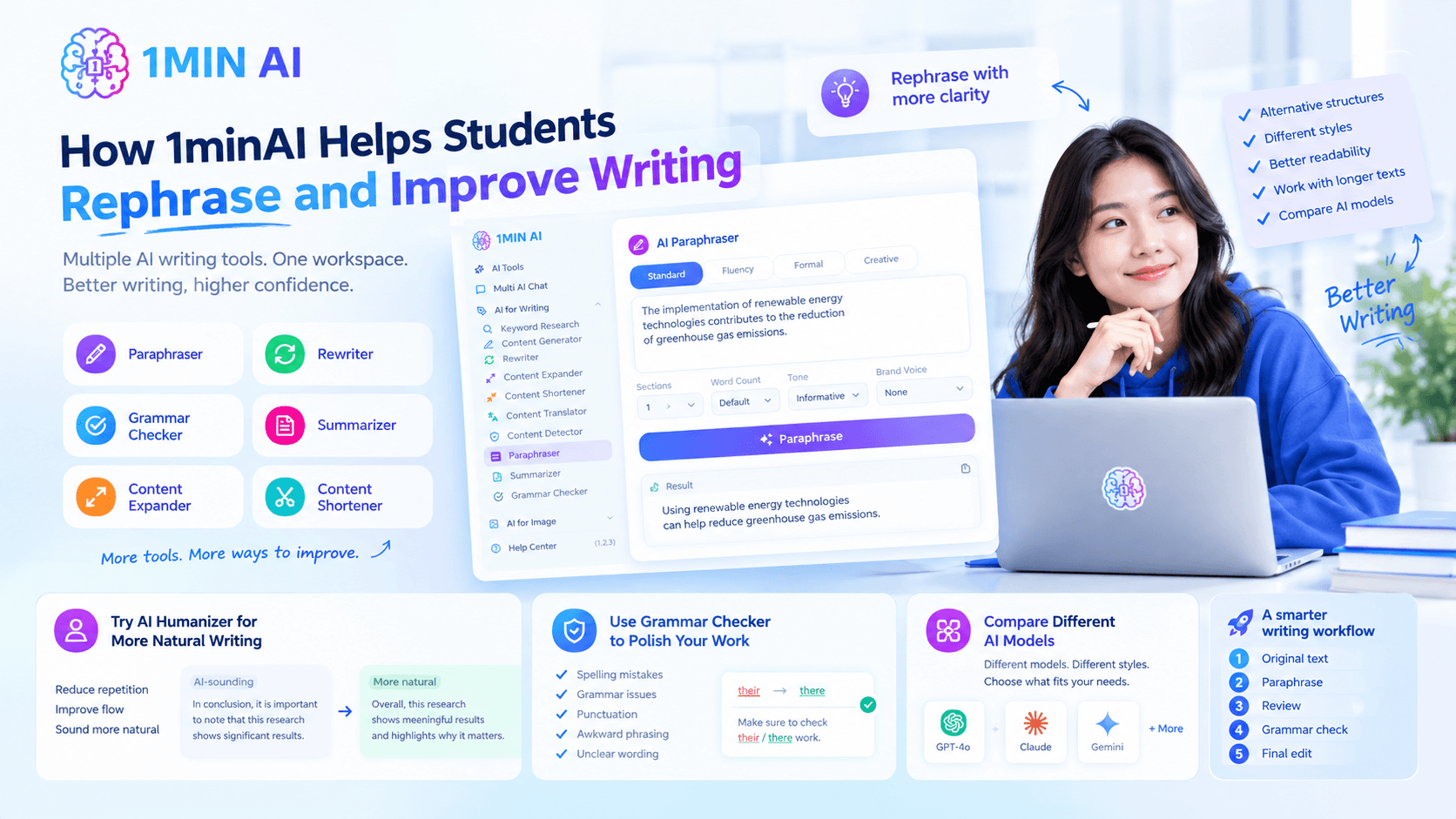
Its writing features include Paraphraser, Rewriter, Grammar Checker, Summarizer, Content Expander, and Content Shortener. These tools can support different stages of the writing process.
Use 1minAI Paraphraser to Rephrase Text
The 1minAI AI Content Paraphraser is designed to rewrite text while preserving its original meaning.
It can help students:
- Explore alternative sentence structures
- Rephrase paragraphs in different styles
- Improve wording and readability
- Work with longer pieces of text
- Compare outputs from different AI models
The Paraphraser interface also includes settings for the number of sections, word count, tone, and Brand Voice. Students can use these controls to guide the output according to their writing needs.
For example, you can select an informative tone and ask the tool to rephrase a paragraph using simpler, more direct language.
The goal is to find wording that communicates your intended meaning clearly, not to change text simply to make it look different.
Use AI Humanizer to Make Writing More Natural
Sometimes a rephrased paragraph is grammatically correct but still sounds stiff or overly formal.
The 1minAI Free AI Humanizer can support another editing step by helping improve the naturalness and flow of AI-assisted text.
You can use it to explore ways to:
- Reduce repetitive expressions
- Improve sentence variety
- Make wording sound more natural
- Adjust the tone to your intended audience
- Remove unnecessary filler
For example, after paraphrasing a paragraph, you might ask for a more conversational version that still preserves the main idea.
Students should use humanization to improve readability and personal expression, not to disguise prohibited AI use or evade academic integrity requirements.
Use Grammar Checker to Polish Your Work
After rephrasing, grammar and punctuation may need another review.
A grammar checker can help identify:
- Spelling mistakes
- Grammar problems
- Awkward sentence construction
- Punctuation issues
- Unclear wording
With 1minAI, you can combine rephrasing and grammar checking in a simple editing workflow:
Original text → Paraphrase → Review → Grammar check → Final edit
This helps you focus on meaning and structure first, then polish the language.
Compare Different AI Models
Different AI models may produce different versions of the same sentence.
One may create a concise rewrite, while another may use a more formal academic style.
1minAI's multi-model approach gives you the option to compare different outputs and choose the one that best fits your assignment.
However, more alternatives do not automatically mean better writing. Always prioritize accuracy, clarity, and your own understanding over the number of versions generated.
Rephrasing vs. Paraphrasing vs. Summarizing
These terms are related, but they serve different purposes.
| Writing task | What it does | Example use |
|---|---|---|
| Rephrasing | Expresses an idea using different wording or structure | Improving an unclear sentence |
| Paraphrasing | Restates source material in your own words while preserving its meaning | Explaining a research finding |
| Summarizing | Condenses the main points into a shorter version | Reviewing a long article |
| Humanizing | Improves the naturalness and style of writing | Editing stiff AI-assisted text |
Understanding these differences helps you select the right tool for your task.
For example, if you need to explain a research finding in your essay, paraphrasing may be appropriate. If you need to capture the main argument of an entire article in a few sentences, summarizing is more suitable.
Regardless of the method, ideas taken from sources still need proper attribution.
Conclusion
Learning how to rephrase effectively can make academic writing clearer, more organized, and easier to understand. Free AI rephrasing tools can help students explore alternative wording, simplify difficult sentences, reduce repetition, and improve the flow of their work.
With 1minAI, students can combine Paraphraser, AI Humanizer, Grammar Checker, and multiple AI models to support different stages of the writing process.
The most effective workflow is simple: understand the original idea, use AI to explore better wording, verify the meaning, and make the final edits yourself.
AI should make it easier to communicate what you understand—not replace the learning and critical thinking behind your writing.
For further information, explore 1minAI AI Content Paraphraser
Discover more AI features: https://1min.ai/features
Try 1minAI agent now: https://app.1min.ai/ai-agent-demo
Alternatives
Discover the best alternatives to 1minAI and compare features, pricing, and use cases.

1min.AI vs OpenRouter
1min.AI vs. OpenRouter: Compare the ready-to-use AI creation product against the technical API tool. Find out if you need a zero-code creative studio or a coding infrastructure hub.
 Ngoc Hong
1min.AI vs Lovart
Compare 1min.AI vs Lovart across features, pricing, credits, brand tools, and use cases to find the right AI platform for your workflow.
Ngoc Hong
1min. AI vs Dola AI
Looking for a Dola AI alternative? Compare 1min.AI vs Dola AI on video generation, free plans, pricing and privacy to pick the right AI app.
Ngoc HongAI Tools
Discover the best AI tools to boost productivity, creativity, and everyday work.

Create Consistent Cartoon Content in Just a Few Steps
Create engaging cartoon videos for TikTok and Reels with 1min.AI. Research ideas, create characters, and turn images into animated videos in 3 simple steps.
 Lien Anh Vu
One Product, 10 UGC Creatives: How AI Makes Content Testing Easier
Create more authentic UGC with an AI UGC video generator, test more creative angles and scale affiliate content without filming every version.
Lien Anh Vu
Top 4 Affordable AI Tools for Startup Founders
Discover the top 4 affordable AI tools for startup founders to validate ideas, build products, create content, and launch faster without overspending.
 Tram Ta
AI Features
Comprehensive AI features that streamline workflows, improve efficiency, and empower teams to achieve more.
Create Consistent Cartoon Content in Just a Few Steps
Create engaging cartoon videos for TikTok and Reels with 1min.AI. Research ideas, create characters, and turn images into animated videos in 3 simple steps.
Lien Anh VuOne Product, 10 UGC Creatives: How AI Makes Content Testing Easier
Create more authentic UGC with an AI UGC video generator, test more creative angles and scale affiliate content without filming every version.
Lien Anh Vu
1minAI: Free AI Grammar Checker
Check grammar for free with 1minAI’s AI grammar checker. Find grammar, spelling, and writing mistakes, improve clarity, and polish your content in seconds.
Tram TaAI Use Cases
A curated collection of AI use cases for business, productivity, and industry-specific applications.
Create Consistent Cartoon Content in Just a Few Steps
Create engaging cartoon videos for TikTok and Reels with 1min.AI. Research ideas, create characters, and turn images into animated videos in 3 simple steps.
Lien Anh VuOne Product, 10 UGC Creatives: How AI Makes Content Testing Easier
Create more authentic UGC with an AI UGC video generator, test more creative angles and scale affiliate content without filming every version.
Lien Anh Vu
Best Time to Post on Instagram: A Practical Guide for Better Engagement
Discover the best time to post on Instagram, including the best days and times for different audiences, plus tips to find the ideal posting schedule for your account.
Tram TaAI Tutorials
Learn how to use AI with practical, step-by-step tutorials.
Create Consistent Cartoon Content in Just a Few Steps
Create engaging cartoon videos for TikTok and Reels with 1min.AI. Research ideas, create characters, and turn images into animated videos in 3 simple steps.
Lien Anh Vu
Black Friday AI Tool Deals in 2026
Discover what Black Friday AI tool deals 2026 has to offer. Find out how to secure the 1min.AI lifetime deal via AppSumo, Dealify, Stack Social, and verify on Trustpilot, Slashdot, and Software Advice.
 Hang Nguyen
[Seedance 2.5 New] Better AI Product Videos, Less Rework in 1min.AI
Use Seedance 2.5 image to video on 1min.AI to create more consistent AI product videos, reduce failed generations, save credits, and improve UGC workflows.
Lien Anh VuAI Guides
Learn AI faster with practical guides, real-world examples, and actionable best practices.
Create Consistent Cartoon Content in Just a Few Steps
Create engaging cartoon videos for TikTok and Reels with 1min.AI. Research ideas, create characters, and turn images into animated videos in 3 simple steps.
Lien Anh Vu
Safely Buy AI Tools Online: 2026 Black Friday Guide
Discover how to find and secure the best Black Friday AI deals online. Learn expert strategies to avoid scams, combat subscription fatigue, and verify software.
Hang Nguyen[Seedance 2.5 New] Better AI Product Videos, Less Rework in 1min.AI
Use Seedance 2.5 image to video on 1min.AI to create more consistent AI product videos, reduce failed generations, save credits, and improve UGC workflows.
Lien Anh VuAI Solutions
Browse the best AI solutions for automation, coding, research, productivity, customer support, marketing, and business workflows.
Create Consistent Cartoon Content in Just a Few Steps
Create engaging cartoon videos for TikTok and Reels with 1min.AI. Research ideas, create characters, and turn images into animated videos in 3 simple steps.
Lien Anh VuOne Product, 10 UGC Creatives: How AI Makes Content Testing Easier
Create more authentic UGC with an AI UGC video generator, test more creative angles and scale affiliate content without filming every version.
Lien Anh Vu
Free AI Tattoo Generator: Custom Designs
Turn any idea into a custom tattoo design with 1min.AI's free AI tattoo generator. Describe your idea, pick a style, and download in seconds.
 Trang Tran
AI Models
Explore the world's leading AI models in one place.
Create Consistent Cartoon Content in Just a Few Steps
Create engaging cartoon videos for TikTok and Reels with 1min.AI. Research ideas, create characters, and turn images into animated videos in 3 simple steps.
Lien Anh VuOne Product, 10 UGC Creatives: How AI Makes Content Testing Easier
Create more authentic UGC with an AI UGC video generator, test more creative angles and scale affiliate content without filming every version.
Lien Anh Vu[Seedance 2.5 New] Better AI Product Videos, Less Rework in 1min.AI
Use Seedance 2.5 image to video on 1min.AI to create more consistent AI product videos, reduce failed generations, save credits, and improve UGC workflows.
Lien Anh VuAI Comparisons
Compare AI tools, models, and platforms to find the best fit for your needs.

Kling AI Vs Veo 3: Which Model Wins?
Kling AI vs Veo 3: compare motion, native audio, pricing & free tiers to see which AI video generator wins for your project - try both on 1min.AI.
Trang Tran[Seedance 2.5 New] Better AI Product Videos, Less Rework in 1min.AI
Use Seedance 2.5 image to video on 1min.AI to create more consistent AI product videos, reduce failed generations, save credits, and improve UGC workflows.
Lien Anh Vu
DeepSeek V4 Pro vs Flash Comparison
Compare DeepSeek V4 Pro vs DeepSeek V4 Flash metrics. Optimize your agentic apps and improve AI fact checking on 1min.ai today.
Ngoc HongAI Integrations
Seamlessly integrate AI with the tools you already use to automate work and boost productivity.

POV: You Have 10+ Posts to Make Every Day
Learn how to build an AI content workflow that helps content creators produce 10+ social media posts a day faster with AI brainstorming, image generation, and content creation.
Lien Anh Vu
How to Use an AI Fashion Video Generator for Fashion Week 2026
Turn Fashion Week 2026 ideas into stunning fashion videos with AI. Learn how to brainstorm, create visuals, and transform images into videos with one simple workflow.
Lien Anh Vu
Stop Switching Between AI Apps: How AI Integration Transforms Employer Branding
Discover how AI integration helps HR teams streamline employer branding by combining AI writing, documents, images, video, and multiple AI models into one workspace.
Tram TaAI for Industries
Find the best AI tools and workflows for healthcare, finance, education, legal, manufacturing, retail, real estate, and more

How to Start a One-Person AI Business: 7 Models You Can Run Solo
Learn how to start a one-person AI business with 7 practical models, from AI consulting and content services to automation and software reselling.
Tram Ta
7 Low-Cost AI Business Ideas for Your Startup
Explore 7 low-cost AI business ideas you can start with a small budget, from content and video services to AI consulting, reselling, and automation.
Tram Ta
Free AI Image Generator For Ecommerce
Turn phone photos into studio, white-background, and lifestyle product images. Try the best AI image generator for ecommerce online free with 1min.AI.
Trang TranAI Agents
Discover and run AI agents to automate tasks across your work and daily life.
1minAI: Free AI Grammar Checker
Check grammar for free with 1minAI’s AI grammar checker. Find grammar, spelling, and writing mistakes, improve clarity, and polish your content in seconds.
Tram Ta
AI Agents for Facebook
Use an AI Agent for Facebook to create content, generate images, schedule posts, and publish from your documents and conversations.
Ngoc Hong
AI Agent vs AI Assistant: Which One Actually Saves Designers More Time?
Learn the difference between AI Agent vs AI Assistant and discover which solution helps designers automate repetitive work, reduce revisions, and save more time.
Lien Anh VuAI Workflows
Explore ready-to-use AI workflows for productivity, marketing, sales, support, and more.
Create Consistent Cartoon Content in Just a Few Steps
Create engaging cartoon videos for TikTok and Reels with 1min.AI. Research ideas, create characters, and turn images into animated videos in 3 simple steps.
Lien Anh VuOne Product, 10 UGC Creatives: How AI Makes Content Testing Easier
Create more authentic UGC with an AI UGC video generator, test more creative angles and scale affiliate content without filming every version.
Lien Anh VuPOV: You Have 10+ Posts to Make Every Day
Learn how to build an AI content workflow that helps content creators produce 10+ social media posts a day faster with AI brainstorming, image generation, and content creation.
Lien Anh VuNewsletter
Weekly AI Innovations with 1minAI

🔮 Weekly AI Innovations #140: Deepseek 4.1 Flash & Gemini Upgrades
Explore Deepseek 4.1 Flash and new Gemini models on 1min.ai. Plus, check our update on your Billing - Usage page for better clarity.
Hang Nguyen
🔮 Weekly AI Innovations #136: Grok 4.6 and Smart Data Retention
Discover the latest 1min.ai updates! Upgrade to Grok 4.6 for blazing-fast AI, and check our new Data Retention policies to secure your files today.
Hang Nguyen
🔮 Weekly AI Innovations #139: Dawn of the next-gen AI
Discover the immense power of GPT-6 Astra and Claude Fable 5.1. Unlock next-generation AI models on 1min.ai to solve complex tasks effortlessly.
Hang Nguyen