
Kimi K3 Free: Chat With Kimi K3 AI Online

Trang Tran
October 6, 2026
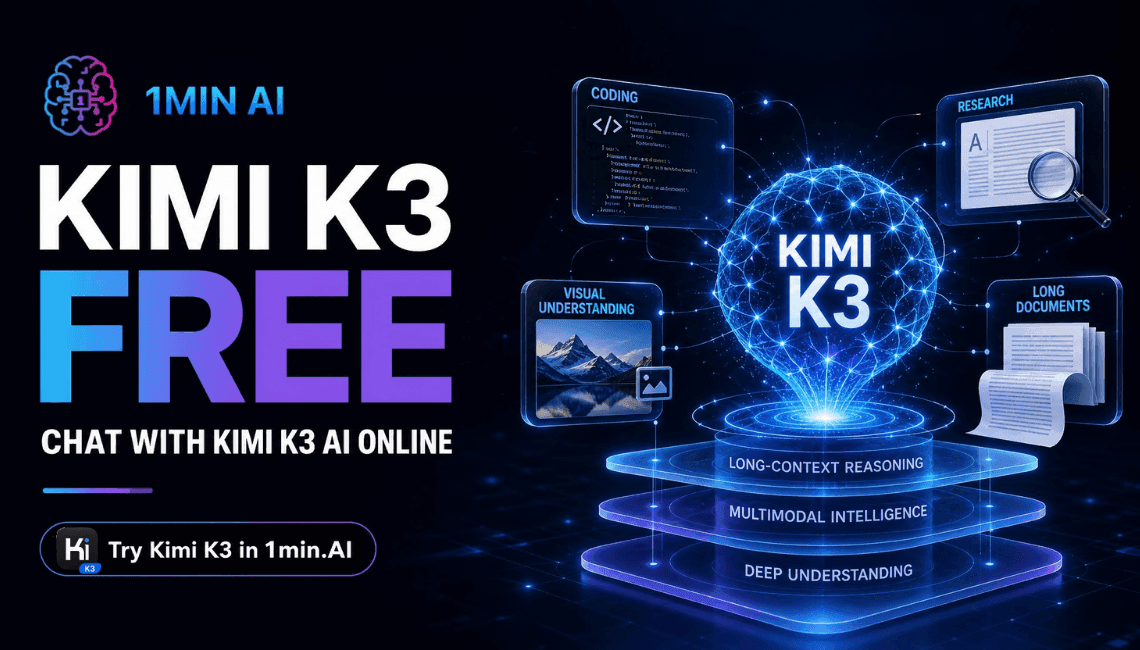
Want Kimi K3 free? Try Kimi K3 AI chat in 1min.AI with no sign-up, plus a quick Kimi K3 API and Kimi K3 plan guide to start building fast.
You can try Kimi K3 free in 1min.AI. Open the chat, pick Kimi K3, and send your first prompt. You do not need to register anything to get started. This guide shows what Kimi K3 AI does well, how to use Kimi K3 chat, what to know before calling the Kimi K3 API, and a simple Kimi K3 plan for your first session.
Kimi K3 at a Glance
| Item | Detail |
|---|---|
| Developer | Moonshot AI |
| Architecture | Mixture-of-Experts, about 2.8T total parameters |
| Context window | 1 million tokens |
| Input | Text and images (native vision) |
| Reasoning | Always on, with low, high and max effort levels |
| Best for | Long coding sessions, agentic work, research, visual tasks |
| Where to try it | 1min.AI Multi AI Chat |
Source: Moonshot AI's official Kimi K3 model documentation.
What Is Kimi K3 AI?
Kimi K3 is Moonshot AI's flagship model and the successor to the Kimi K2 line. Moonshot describes it as an open-weight, natively multimodal agentic model built for long-horizon coding, knowledge work and reasoning.
Key Capabilities of Kimi AI K3
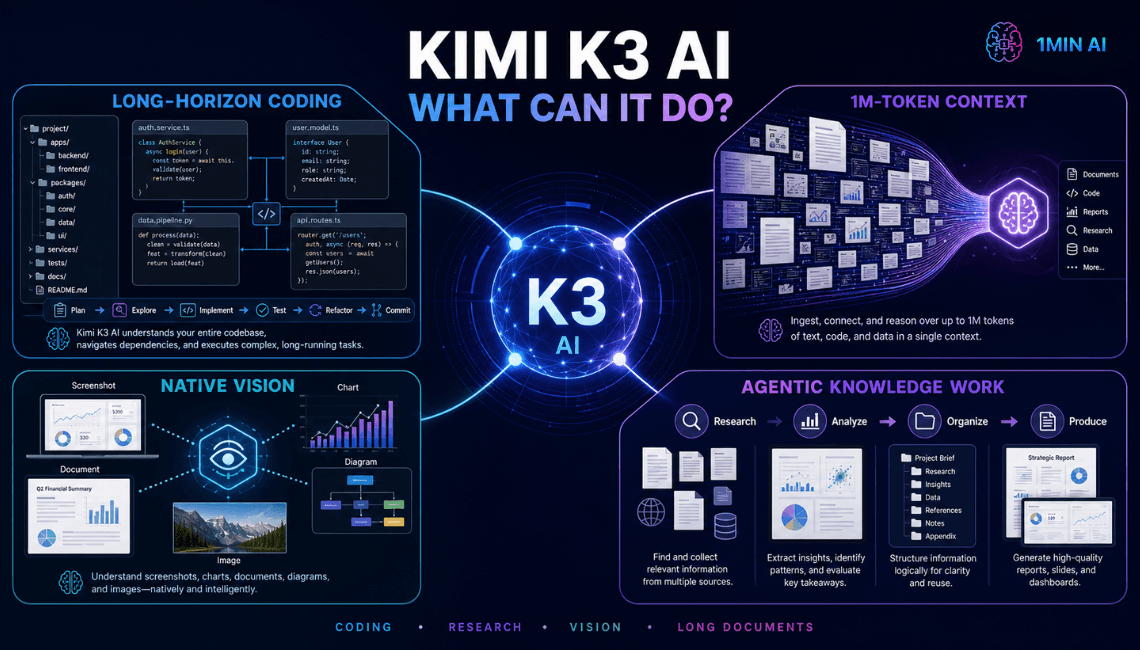
- Long-horizon coding: it can work across large repositories and long engineering sessions with little supervision.
- 1M-token context: you can keep a full codebase, report set or project history in a single conversation.
- Native vision: it reads screenshots, charts, documents and diagrams without a separate add-on.
- Agentic knowledge work: it can carry multi-step tasks such as deep research, dashboards and structured documents through to a finished result.
Who Gets the Most From Kimi K3
- Developers debugging or refactoring large projects
- Marketers and content creators turning research into drafts, slides and reports
- Analysts and students working through long documents and image-heavy material
- Small teams that want one place to test several AI models
Kimi K3 Free: How To Start in 3 Steps
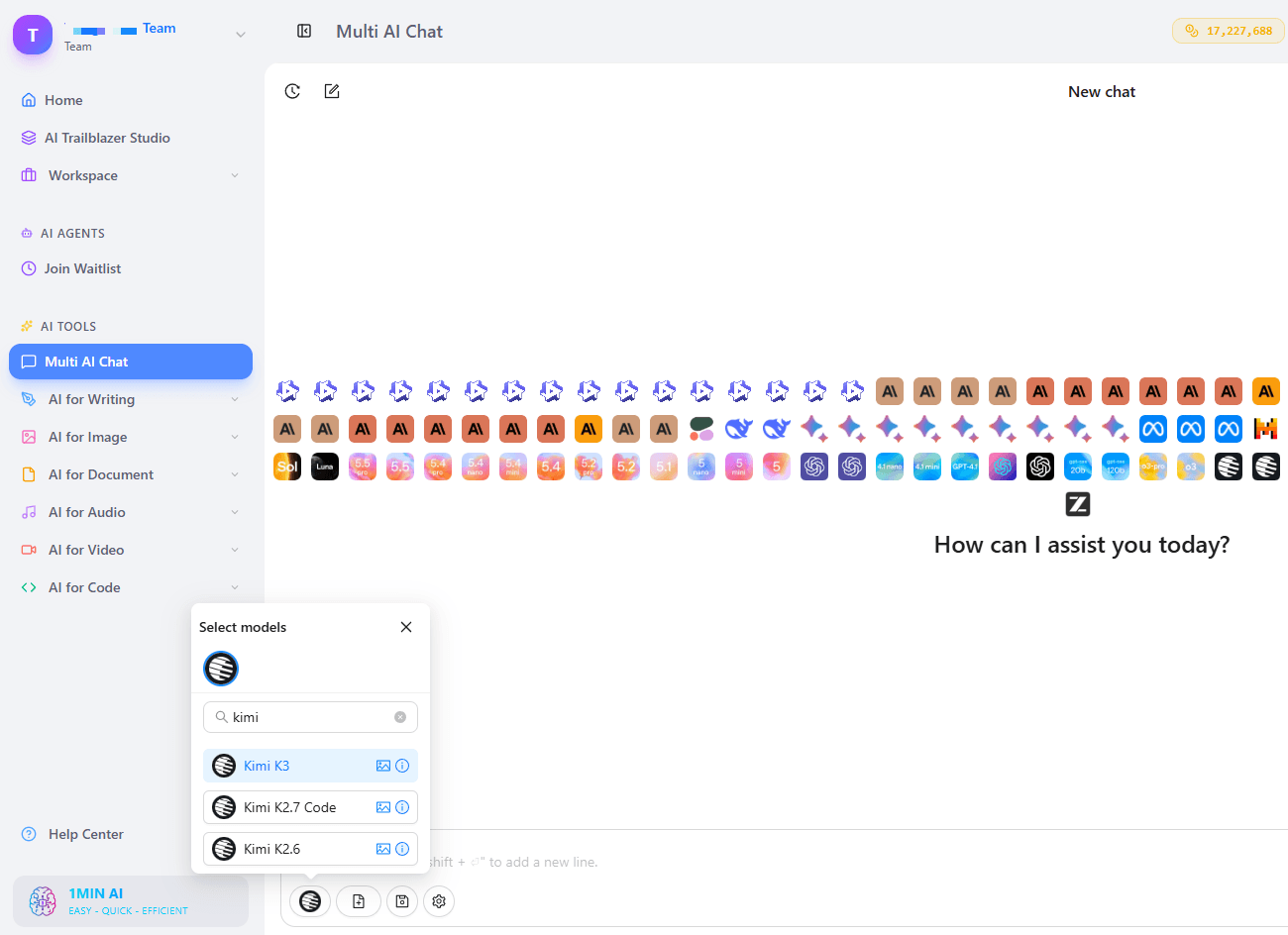
Chat With Kimi K3 in 1min.AI
- Open 1min.AI Chat.
- Select Kimi K3 from the model list.
- Type your prompt, or attach an image, and press Enter.
That is the whole setup. You can start using it right away, with no registration step in between.
No Kimi K3 Login Needed to Begin
Many people search for "Kimi K3 login" because they expect a long setup. In 1min.AI you can skip that and go straight to the chat. The workspace tools AI Studio, Brand Voice List, Prompt List, Tag List and Asset List also work without an account. Shared Zone and History need an account, because they save and share your work across sessions.
Use It in Your Browser, Not Through a Mod APK
Searches such as "Kimi K3 mod APK" and "Kimi K3 desktop app" usually come from people who want quick access. Unofficial APK files can carry malware and fake model access, so avoid them. A browser tab is the safer way to try Kimi K3 AI chat on any device.
Kimi K3 Chat: Prompts Worth Trying First
Kimi K3 is built for big, multi-step tasks, so give it work that shows what it can do.
For Coding
- "Review this project structure and list the three riskiest modules to refactor."
- "Build a single-page browser game with keyboard controls and a score counter."
For Visual Reasoning
- "Here is a screenshot of my landing page. Suggest layout fixes and rewrite the hero section."
- "Extract the key numbers from this chart and explain the trend in plain English."
For Research and Writing
- "Summarize these notes into a one-page brief with five action items."
- "Draft a 10-slide outline from this report for a non-technical audience."
Tip: Be specific. Moonshot notes that Kimi K3 can act proactively when instructions are vague, so a clear goal, format and constraints give you tighter results.
Kimi K3 API: What Developers Should Know
If you plan to build with the model, the Kimi K3 API is available through Moonshot AI's platform under the model ID kimi-k3, with OpenAI-compatible and Anthropic-compatible endpoints.
Test Your Prompts Before You Wire Anything Up
Run your key prompts in 1min.AI chat first. You can check output quality, tone and format in minutes, then move the best prompts into your code. For more developer-friendly options, see our guide to the Kimi K2.5 multimodal agent on 1min.AI, which covers an earlier Kimi model.
Technical Notes From Moonshot AI
- Thinking is always on: Responses include reasoning_content.
- Effort is adjustable: Set reasoning_effort to "low", "high" or "max" (the default is "max").
- Pass history back as-is: In multi-turn chats and tool calls, return the full assistant message, including reasoning_content and tool_calls.
Kimi K3 Plan: A Simple 3-Step Workflow
A plan keeps your first session productive. Try this one:
- Warm up (10 minutes): run one coding prompt, one image prompt and one writing prompt to see the range.
- Go long (20 minutes): paste a large document or codebase section and ask for a structured analysis. This is where the 1M-token context shows its value.
- Save what works: store your best prompts in Prompt List, tag them in Tag List, and keep reference files in Asset List.
Why Use Kimi K3 Inside 1min.AI
Kimi K3 is strong, and the rest of your work needs more than one model and one tool. 1min.AI puts them in one workspace.
- Multi AI Chat: switch between models without restarting your project.
- AI for Writing: Content Generator, Rewriter, Summarizer, Grammar Checker and more.
- AI for Image, Video, Audio and Document: Image Generator, Background Remover, Text to Video, Multi Doc Chat, Presentation Generator, Text to Speech and others, all in the same place.
- Workspace organization: Brand Voice List, Prompt List, Tag List and Asset List keep repeat work consistent. Add an account to unlock Shared Zone for teamwork and History to find past chats.
Trusted by Real Users
1min.AI is recognized on SourceForge and Slashdot as a Top Business Software, holds an Excellent rating on Trustpilot, and is listed on Capterra, Software Advice and GetApp.
Kimi K3 Free: Frequently Asked Questions
Can I use Kimi K3 free?
Yes. You can try Kimi K3 free in 1min.AI Multi AI Chat. Open the chat, choose Kimi K3 and start prompting.
Do I need a Kimi K3 login to start?
No. In 1min.AI you can open the chat and begin without creating an account. An account is only needed for Shared Zone and History.
What is Kimi K3 best for?
Long coding sessions, agentic knowledge work, document and image analysis, and any task that benefits from a 1-million-token context window.
How do I use the Kimi K3 API?
Use the model ID kimi-k3 on Moonshot AI's platform with OpenAI-compatible requests. Test your prompts in chat first, then move them into code.
Is there a Kimi K3 desktop app or APK?
Use a browser. Avoid unofficial mod APK files, which can be unsafe.
What is a good first Kimi K3 plan?
Run one coding, one visual and one writing prompt, then test a long-document task, then save your best prompts.
Ready To Try Kimi K3?
Open the chat, pick Kimi K3 and run your first prompt in under a minute.
Alternatives
Discover the best alternatives to 1minAI and compare features, pricing, and use cases.

1min.AI vs OpenRouter
1min.AI vs. OpenRouter: Compare the ready-to-use AI creation product against the technical API tool. Find out if you need a zero-code creative studio or a coding infrastructure hub.
 Ngoc Hong
1min.AI vs Lovart
Compare 1min.AI vs Lovart across features, pricing, credits, brand tools, and use cases to find the right AI platform for your workflow.
Ngoc Hong
1min. AI vs Dola AI
Looking for a Dola AI alternative? Compare 1min.AI vs Dola AI on video generation, free plans, pricing and privacy to pick the right AI app.
Ngoc HongAI Tools
Discover the best AI tools to boost productivity, creativity, and everyday work.

Create Consistent Cartoon Content in Just a Few Steps
Create engaging cartoon videos for TikTok and Reels with 1min.AI. Research ideas, create characters, and turn images into animated videos in 3 simple steps.
 Lien Anh Vu
One Product, 10 UGC Creatives: How AI Makes Content Testing Easier
Create more authentic UGC with an AI UGC video generator, test more creative angles and scale affiliate content without filming every version.
Lien Anh Vu
Top 4 Affordable AI Tools for Startup Founders
Discover the top 4 affordable AI tools for startup founders to validate ideas, build products, create content, and launch faster without overspending.
 Tram Ta
AI Features
Comprehensive AI features that streamline workflows, improve efficiency, and empower teams to achieve more.
Create Consistent Cartoon Content in Just a Few Steps
Create engaging cartoon videos for TikTok and Reels with 1min.AI. Research ideas, create characters, and turn images into animated videos in 3 simple steps.
Lien Anh VuOne Product, 10 UGC Creatives: How AI Makes Content Testing Easier
Create more authentic UGC with an AI UGC video generator, test more creative angles and scale affiliate content without filming every version.
Lien Anh Vu
1minAI: Free AI Grammar Checker
Check grammar for free with 1minAI’s AI grammar checker. Find grammar, spelling, and writing mistakes, improve clarity, and polish your content in seconds.
Tram TaAI Use Cases
A curated collection of AI use cases for business, productivity, and industry-specific applications.
Create Consistent Cartoon Content in Just a Few Steps
Create engaging cartoon videos for TikTok and Reels with 1min.AI. Research ideas, create characters, and turn images into animated videos in 3 simple steps.
Lien Anh VuOne Product, 10 UGC Creatives: How AI Makes Content Testing Easier
Create more authentic UGC with an AI UGC video generator, test more creative angles and scale affiliate content without filming every version.
Lien Anh Vu
Best Time to Post on Instagram: A Practical Guide for Better Engagement
Discover the best time to post on Instagram, including the best days and times for different audiences, plus tips to find the ideal posting schedule for your account.
Tram TaAI Tutorials
Learn how to use AI with practical, step-by-step tutorials.
Create Consistent Cartoon Content in Just a Few Steps
Create engaging cartoon videos for TikTok and Reels with 1min.AI. Research ideas, create characters, and turn images into animated videos in 3 simple steps.
Lien Anh Vu
Black Friday AI Tool Deals in 2026
Discover what Black Friday AI tool deals 2026 has to offer. Find out how to secure the 1min.AI lifetime deal via AppSumo, Dealify, Stack Social, and verify on Trustpilot, Slashdot, and Software Advice.
 Hang Nguyen
[Seedance 2.5 New] Better AI Product Videos, Less Rework in 1min.AI
Use Seedance 2.5 image to video on 1min.AI to create more consistent AI product videos, reduce failed generations, save credits, and improve UGC workflows.
Lien Anh VuAI Guides
Learn AI faster with practical guides, real-world examples, and actionable best practices.
Create Consistent Cartoon Content in Just a Few Steps
Create engaging cartoon videos for TikTok and Reels with 1min.AI. Research ideas, create characters, and turn images into animated videos in 3 simple steps.
Lien Anh Vu
Safely Buy AI Tools Online: 2026 Black Friday Guide
Discover how to find and secure the best Black Friday AI deals online. Learn expert strategies to avoid scams, combat subscription fatigue, and verify software.
Hang Nguyen[Seedance 2.5 New] Better AI Product Videos, Less Rework in 1min.AI
Use Seedance 2.5 image to video on 1min.AI to create more consistent AI product videos, reduce failed generations, save credits, and improve UGC workflows.
Lien Anh VuAI Solutions
Browse the best AI solutions for automation, coding, research, productivity, customer support, marketing, and business workflows.
Create Consistent Cartoon Content in Just a Few Steps
Create engaging cartoon videos for TikTok and Reels with 1min.AI. Research ideas, create characters, and turn images into animated videos in 3 simple steps.
Lien Anh VuOne Product, 10 UGC Creatives: How AI Makes Content Testing Easier
Create more authentic UGC with an AI UGC video generator, test more creative angles and scale affiliate content without filming every version.
Lien Anh Vu
Free AI Tattoo Generator: Custom Designs
Turn any idea into a custom tattoo design with 1min.AI's free AI tattoo generator. Describe your idea, pick a style, and download in seconds.
 Trang Tran
AI Models
Explore the world's leading AI models in one place.
Create Consistent Cartoon Content in Just a Few Steps
Create engaging cartoon videos for TikTok and Reels with 1min.AI. Research ideas, create characters, and turn images into animated videos in 3 simple steps.
Lien Anh VuOne Product, 10 UGC Creatives: How AI Makes Content Testing Easier
Create more authentic UGC with an AI UGC video generator, test more creative angles and scale affiliate content without filming every version.
Lien Anh Vu[Seedance 2.5 New] Better AI Product Videos, Less Rework in 1min.AI
Use Seedance 2.5 image to video on 1min.AI to create more consistent AI product videos, reduce failed generations, save credits, and improve UGC workflows.
Lien Anh VuAI Comparisons
Compare AI tools, models, and platforms to find the best fit for your needs.

Kling AI Vs Veo 3: Which Model Wins?
Kling AI vs Veo 3: compare motion, native audio, pricing & free tiers to see which AI video generator wins for your project - try both on 1min.AI.
Trang Tran[Seedance 2.5 New] Better AI Product Videos, Less Rework in 1min.AI
Use Seedance 2.5 image to video on 1min.AI to create more consistent AI product videos, reduce failed generations, save credits, and improve UGC workflows.
Lien Anh Vu
DeepSeek V4 Pro vs Flash Comparison
Compare DeepSeek V4 Pro vs DeepSeek V4 Flash metrics. Optimize your agentic apps and improve AI fact checking on 1min.ai today.
Ngoc HongAI Integrations
Seamlessly integrate AI with the tools you already use to automate work and boost productivity.

POV: You Have 10+ Posts to Make Every Day
Learn how to build an AI content workflow that helps content creators produce 10+ social media posts a day faster with AI brainstorming, image generation, and content creation.
Lien Anh Vu
How to Use an AI Fashion Video Generator for Fashion Week 2026
Turn Fashion Week 2026 ideas into stunning fashion videos with AI. Learn how to brainstorm, create visuals, and transform images into videos with one simple workflow.
Lien Anh Vu
Stop Switching Between AI Apps: How AI Integration Transforms Employer Branding
Discover how AI integration helps HR teams streamline employer branding by combining AI writing, documents, images, video, and multiple AI models into one workspace.
Tram TaAI for Industries
Find the best AI tools and workflows for healthcare, finance, education, legal, manufacturing, retail, real estate, and more

How to Start a One-Person AI Business: 7 Models You Can Run Solo
Learn how to start a one-person AI business with 7 practical models, from AI consulting and content services to automation and software reselling.
Tram Ta
7 Low-Cost AI Business Ideas for Your Startup
Explore 7 low-cost AI business ideas you can start with a small budget, from content and video services to AI consulting, reselling, and automation.
Tram Ta
Free AI Image Generator For Ecommerce
Turn phone photos into studio, white-background, and lifestyle product images. Try the best AI image generator for ecommerce online free with 1min.AI.
Trang TranAI Agents
Discover and run AI agents to automate tasks across your work and daily life.
1minAI: Free AI Grammar Checker
Check grammar for free with 1minAI’s AI grammar checker. Find grammar, spelling, and writing mistakes, improve clarity, and polish your content in seconds.
Tram Ta
AI Agents for Facebook
Use an AI Agent for Facebook to create content, generate images, schedule posts, and publish from your documents and conversations.
Ngoc Hong
AI Agent vs AI Assistant: Which One Actually Saves Designers More Time?
Learn the difference between AI Agent vs AI Assistant and discover which solution helps designers automate repetitive work, reduce revisions, and save more time.
Lien Anh VuAI Workflows
Explore ready-to-use AI workflows for productivity, marketing, sales, support, and more.
Create Consistent Cartoon Content in Just a Few Steps
Create engaging cartoon videos for TikTok and Reels with 1min.AI. Research ideas, create characters, and turn images into animated videos in 3 simple steps.
Lien Anh VuOne Product, 10 UGC Creatives: How AI Makes Content Testing Easier
Create more authentic UGC with an AI UGC video generator, test more creative angles and scale affiliate content without filming every version.
Lien Anh VuPOV: You Have 10+ Posts to Make Every Day
Learn how to build an AI content workflow that helps content creators produce 10+ social media posts a day faster with AI brainstorming, image generation, and content creation.
Lien Anh VuNewsletter
Weekly AI Innovations with 1minAI

🔮 Weekly AI Innovations #140: Deepseek 4.1 Flash & Gemini Upgrades
Explore Deepseek 4.1 Flash and new Gemini models on 1min.ai. Plus, check our update on your Billing - Usage page for better clarity.
Hang Nguyen
🔮 Weekly AI Innovations #136: Grok 4.6 and Smart Data Retention
Discover the latest 1min.ai updates! Upgrade to Grok 4.6 for blazing-fast AI, and check our new Data Retention policies to secure your files today.
Hang Nguyen
🔮 Weekly AI Innovations #139: Dawn of the next-gen AI
Discover the immense power of GPT-6 Astra and Claude Fable 5.1. Unlock next-generation AI models on 1min.ai to solve complex tasks effortlessly.
Hang Nguyen