
Best Free AI Humanizer in 2026 | 1minAI

Tram Ta
October 1, 2026
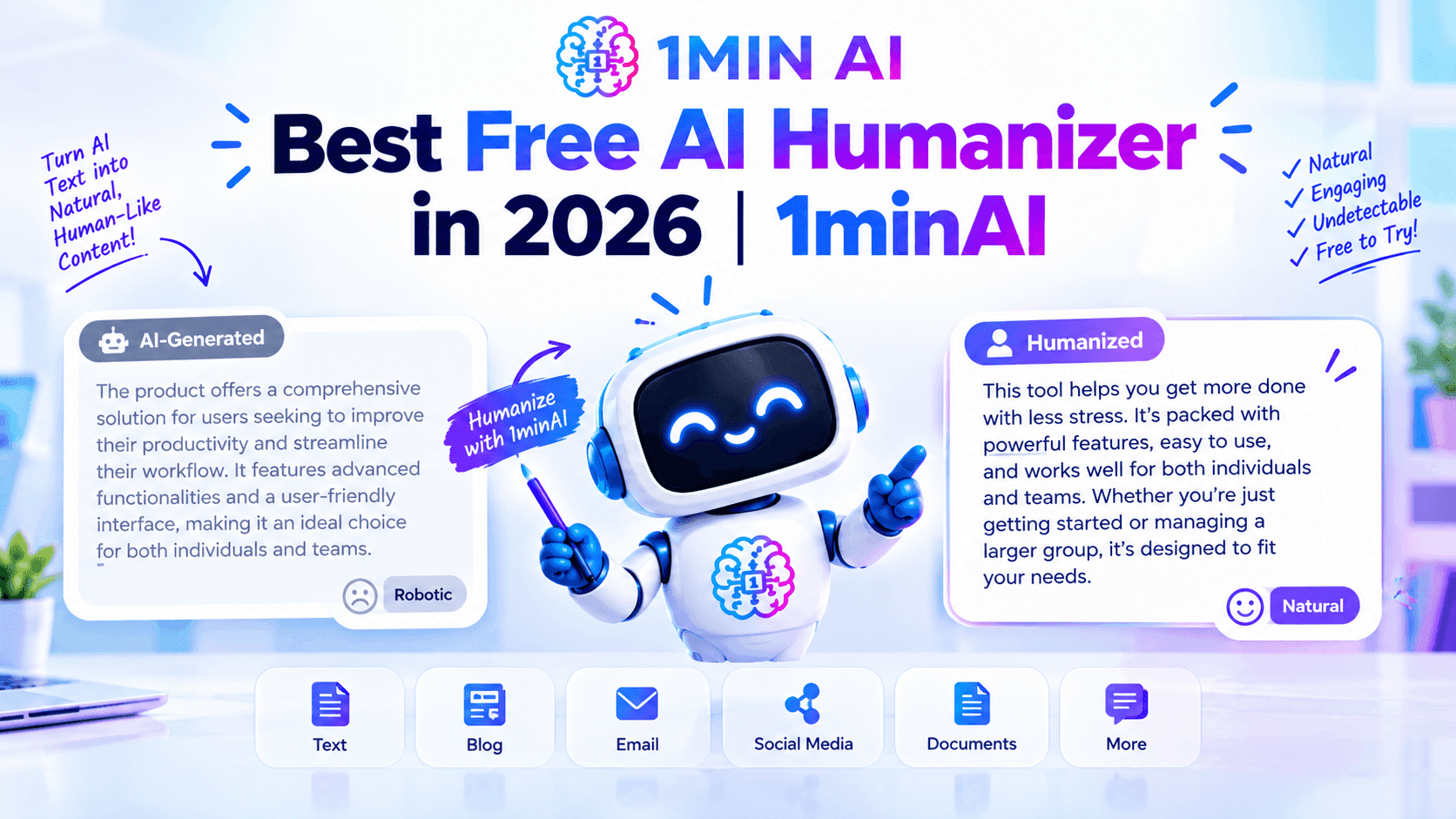
Looking for a free AI humanizer? Learn how to humanize AI text naturally with 1minAI Paraphraser, Rewriter, Brand Voice, and more.
AI writing tools can help you create articles, essays, emails, social posts, reports, and other content much faster. But AI-generated text can sometimes have a recognizable style: repetitive transitions, overly formal wording, predictable sentence structures, or language that doesn't sound like the person who is supposed to be writing it.
That's where an AI humanizer can help.
A good AI humanizer should do more than replace a few words with synonyms. It should help restructure sentences, improve readability, preserve the original meaning, and make the writing feel more natural.
If you're looking for a free AI humanizer, 1minAI provides several tools that can be combined for this workflow, including its AI Paraphraser, Rewriter, Grammar Checker, multiple AI models, and writing controls such as tone and brand voice.
In this guide, we'll explain how to humanize AI text effectively and how to use 1minAI to create a repeatable AI writing workflow.
What Is an AI Humanizer?
An AI humanizer is a tool that rewrites AI-generated or overly robotic text to make it sound more natural and readable.
AI-generated writing can sometimes have patterns such as:
- Repetitive sentence structures
- Overuse of generic transitions
- Excessively formal language
- Vague statements
- Similar sentence lengths
- Unnecessary filler
- A tone that doesn't match the intended audience
Humanizing the content means improving these areas while keeping the original idea intact.
For example, an AI-generated sentence might say: In today's rapidly evolving digital landscape, businesses must leverage innovative solutions to enhance productivity and achieve sustainable growth.
A more natural version could be: Businesses can use AI tools to save time, improve productivity, and support growth.
The second version is shorter and more direct. It doesn't necessarily sound “more human” because of a magic formula. It simply communicates the idea more naturally.
That's an important distinction when using a free AI humanizer: the goal should be better writing, not simply trying to fool an AI detector.
Why Does AI-Generated Text Sometimes Sound Robotic?
AI models are trained to predict and generate language based on patterns in large amounts of text. As a result, generated content can sometimes fall into familiar writing patterns.
For example, AI may:
- Repeat the same transition words
- Use unnecessarily complicated vocabulary
- Start several paragraphs in a similar way
- Over-explain simple concepts
- Add generic introductions
- Use phrases that don't match the writer's normal style
This doesn't mean every AI-generated paragraph sounds robotic.
The quality depends on the model, prompt, context, editing, and the type of content being created.
A strong workflow therefore doesn't simply generate text and then run it through a “humanizer.” It combines generation, rewriting, personalization, and human editing.
How to Humanize AI Text With 1minAI
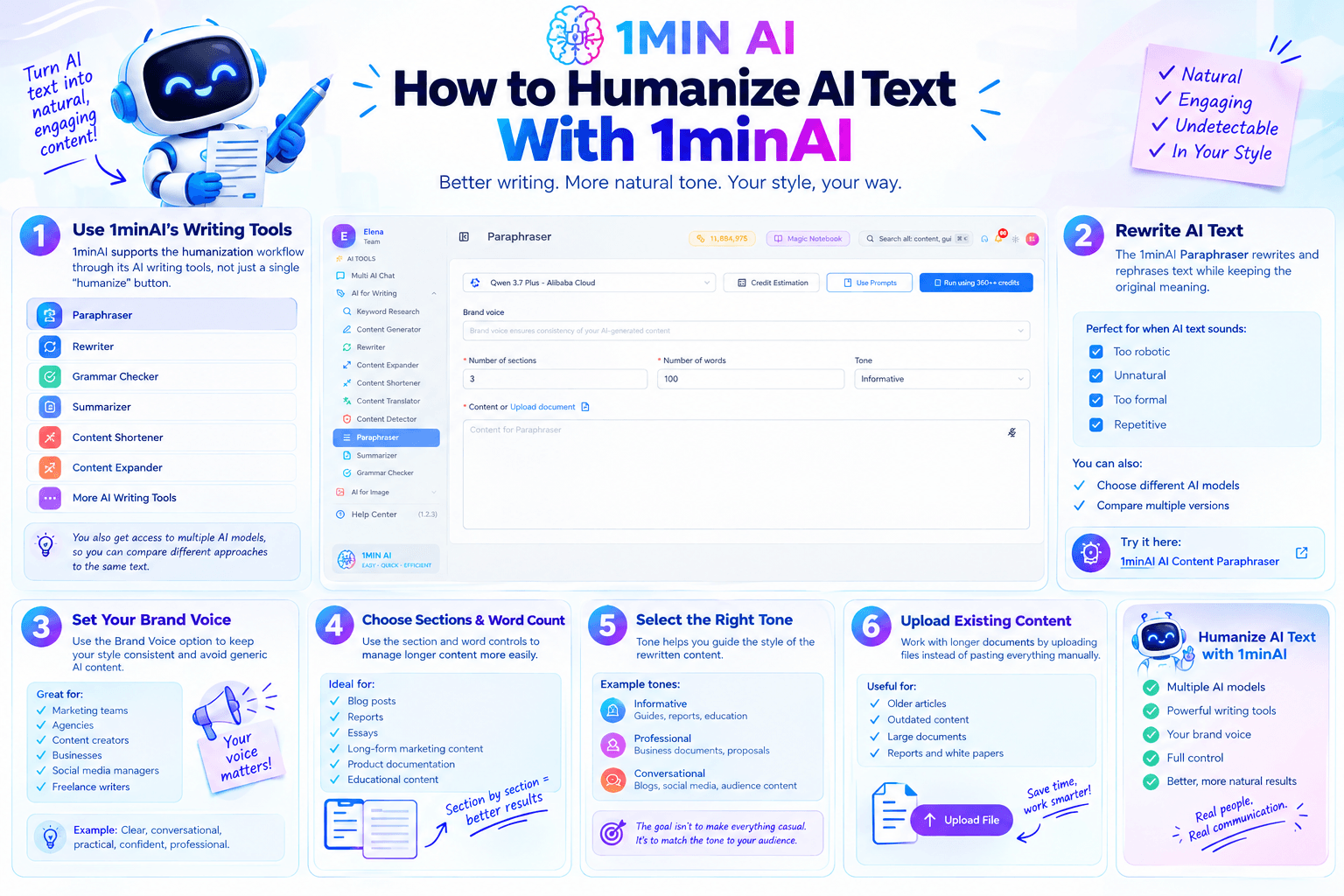
1minAI can support the humanization workflow through its AI writing tools rather than relying on a single “humanize” button.
Its writing toolkit includes Paraphraser, Rewriter, Grammar Checker, Summarizer, Content Shortener, Content Expander, and other AI writing features.
The platform also provides access to multiple AI models, allowing you to compare different approaches to the same piece of text.
Use 1minAI Paraphraser to Rewrite AI Text
The 1minAI Paraphraser is designed to rewrite and rephrase text while preserving its original meaning.
This makes it useful when an AI-generated paragraph is technically correct but doesn't sound natural enough.
For example, paste your text and ask for a version that is:
- More conversational
- More concise
- Easier to understand
- Less repetitive
- Better suited to your audience
You can also choose different AI models to compare how they rewrite the same content.
For a dedicated workflow, try the 1minAI AI Content Paraphraser.
Use Brand Voice to Keep Your Style Consistent
One problem with repeatedly using AI rewriting tools is that your content can start to sound generic.
1minAI's writing interface includes a Brand Voice option, which can help maintain consistency in AI-generated content.
This can be particularly useful for:
- Marketing teams
- Agencies
- Content creators
- Businesses
- Social media managers
- Freelance writers
Instead of simply asking AI to “make this human,” define how you want your content to sound.
For example: Clear, conversational, practical, confident, and professional. Avoid excessive buzzwords and overly formal language.
The more clearly you define your preferred style, the easier it is to evaluate whether a rewritten version actually fits your voice.
Choose the Number of Words and Sections
The 1minAI Paraphraser interface also gives you controls for the number of sections and words, which can help when you're working with longer content.
Instead of treating a long article as one huge block of text, you can organize the rewriting process into manageable sections.
This can be useful when humanizing:
- Blog posts
- Reports
- Essays
- Long-form marketing content
- Product documentation
- Educational content
Working section by section also makes it easier to review the rewritten output and make manual changes.
Select the Right Tone
Tone matters when humanizing AI content.
A business report may require a professional tone, while a social media post may need something more conversational.
1minAI's writing interface includes tone controls, allowing you to guide the style of the generated output.
For example, you could use:
Informative:
For guides, reports, and educational content.
Professional:
For business documents, proposals, and workplace communication.
Conversational:
For blogs, social media, and audience-focused content.
The goal is not to make every piece of content casual. The goal is to make the language appropriate for the person reading it.
Upload Existing Content
If you're working with a longer document, the 1minAI Paraphraser interface supports uploading a document instead of requiring you to paste everything manually.
This can make the workflow more convenient when working with existing content that needs substantial rewriting.
For example, you could start with an older article, identify the sections that feel outdated or overly generic, and rewrite those sections while preserving the original ideas.
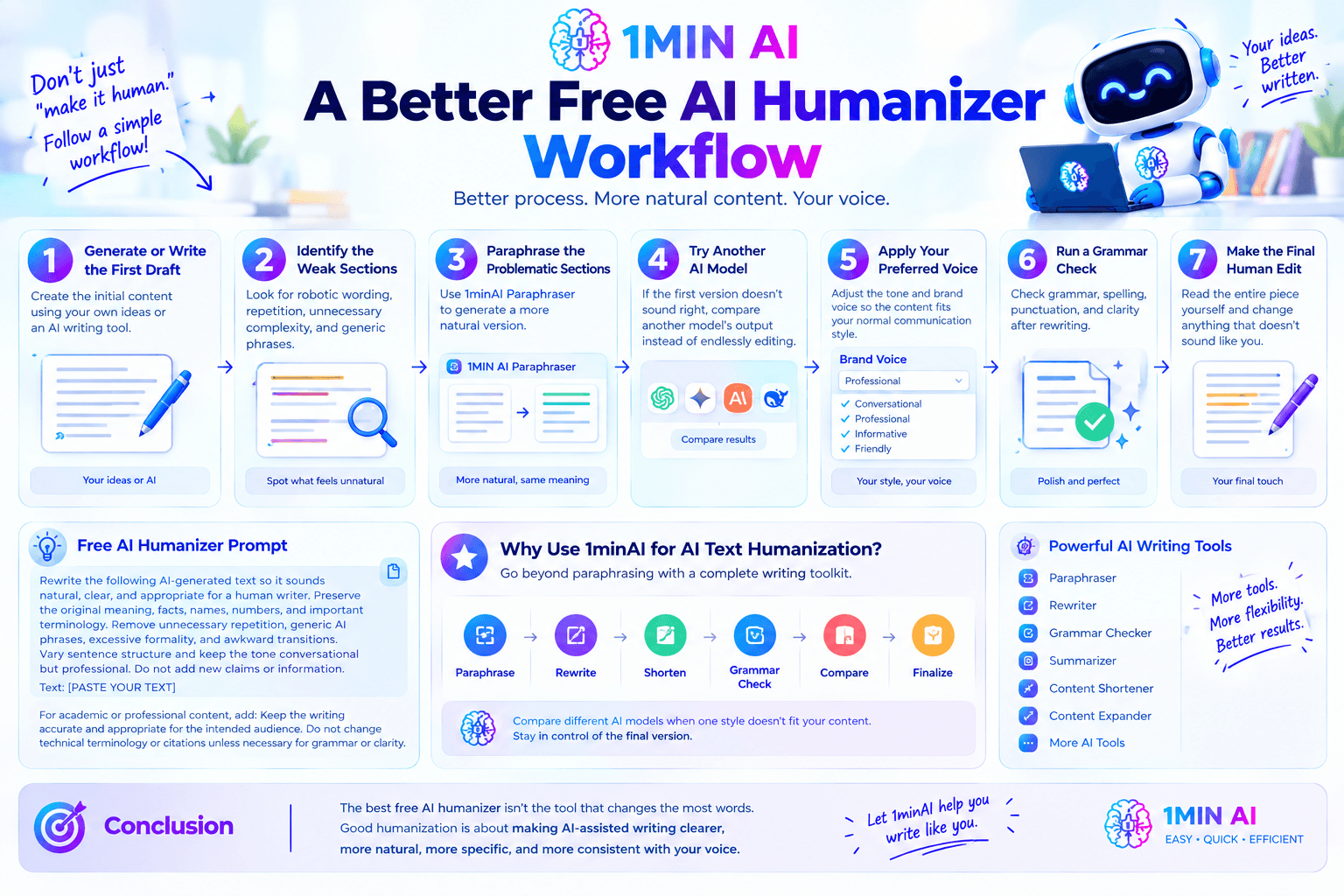
A Better Free AI Humanizer Workflow
Instead of using an AI humanizer as a one-click solution, build a repeatable process.
Step 1: Generate or Write the First Draft
Create the initial content using your own ideas or an AI writing tool.
Step 2: Identify the Weak Sections
Look for robotic wording, repetition, unnecessary complexity, and generic phrases.
Step 3: Paraphrase the Problematic Sections
Use 1minAI Paraphraser to generate a more natural version.
Step 4: Try Another AI Model
If the first version doesn't sound right, compare another model's output rather than endlessly editing the same response.
Step 5: Apply Your Preferred Voice
Adjust the tone and brand voice so the content fits your normal communication style.
Step 6: Run a Grammar Check
After rewriting, check grammar, spelling, punctuation, and clarity.
Step 7: Make the Final Human Edit
Read the entire piece yourself and change anything that doesn't sound like you.
This workflow is more reliable than simply asking an AI tool to “make this 100% human.”
Free AI Humanizer Prompt You Can Use
You can use this prompt with 1minAI or another AI writing model:
Rewrite the following AI-generated text so it sounds natural, clear, and appropriate for a human writer. Preserve the original meaning, facts, names, numbers, and important terminology. Remove unnecessary repetition, generic AI phrases, excessive formality, and awkward transitions. Vary sentence structure and keep the tone conversational but professional. Do not add new claims or information. Text: [PASTE YOUR TEXT]
For academic or professional content, add: Keep the writing accurate and appropriate for the intended audience. Do not change technical terminology or citations unless necessary for grammar or clarity.
Why Use 1minAI for AI Text Humanization?
1minAI is useful when humanizing AI text because the workflow doesn't have to stop at paraphrasing.
You can move from:
Paraphrase → Rewrite → Shorten → Grammar Check → Compare → Finalize
You can also compare different AI models when one rewriting style doesn't fit your content.
That makes the process more flexible than simply copying text into a standalone humanizer and accepting the first output.
The important part is that you remain in control of the final version.
Conclusion
The best free AI humanizer isn't necessarily the tool that changes the most words.
Good humanization is about making AI-assisted writing clearer, more natural, more specific, and more consistent with the writer's intended voice.
With 1minAI, you can build this process around its Paraphraser, Rewriter, tone controls, Brand Voice, multiple AI models, and Grammar Checker.
Start with an accurate draft, identify the sections that feel unnatural, rewrite them, compare alternatives, and then make the final edits yourself.
That workflow helps you use AI to improve your writing without losing the human judgment behind it.
For further information, explore 1minAI AI Content Paraphraser
Discover more AI features: https://1min.ai/features
Try 1minAI agent now: https://app.1min.ai/ai-agent-demo
Alternatives
Discover the best alternatives to 1minAI and compare features, pricing, and use cases.

1min.AI vs OpenRouter
1min.AI vs. OpenRouter: Compare the ready-to-use AI creation product against the technical API tool. Find out if you need a zero-code creative studio or a coding infrastructure hub.
 Ngoc Hong
1min.AI vs Lovart
Compare 1min.AI vs Lovart across features, pricing, credits, brand tools, and use cases to find the right AI platform for your workflow.
Ngoc Hong
1min. AI vs Dola AI
Looking for a Dola AI alternative? Compare 1min.AI vs Dola AI on video generation, free plans, pricing and privacy to pick the right AI app.
Ngoc HongAI Tools
Discover the best AI tools to boost productivity, creativity, and everyday work.

Create Consistent Cartoon Content in Just a Few Steps
Create engaging cartoon videos for TikTok and Reels with 1min.AI. Research ideas, create characters, and turn images into animated videos in 3 simple steps.
 Lien Anh Vu
One Product, 10 UGC Creatives: How AI Makes Content Testing Easier
Create more authentic UGC with an AI UGC video generator, test more creative angles and scale affiliate content without filming every version.
Lien Anh Vu
Top 4 Affordable AI Tools for Startup Founders
Discover the top 4 affordable AI tools for startup founders to validate ideas, build products, create content, and launch faster without overspending.
 Tram Ta
AI Features
Comprehensive AI features that streamline workflows, improve efficiency, and empower teams to achieve more.
Create Consistent Cartoon Content in Just a Few Steps
Create engaging cartoon videos for TikTok and Reels with 1min.AI. Research ideas, create characters, and turn images into animated videos in 3 simple steps.
Lien Anh VuOne Product, 10 UGC Creatives: How AI Makes Content Testing Easier
Create more authentic UGC with an AI UGC video generator, test more creative angles and scale affiliate content without filming every version.
Lien Anh Vu
1minAI: Free AI Grammar Checker
Check grammar for free with 1minAI’s AI grammar checker. Find grammar, spelling, and writing mistakes, improve clarity, and polish your content in seconds.
Tram TaAI Use Cases
A curated collection of AI use cases for business, productivity, and industry-specific applications.
Create Consistent Cartoon Content in Just a Few Steps
Create engaging cartoon videos for TikTok and Reels with 1min.AI. Research ideas, create characters, and turn images into animated videos in 3 simple steps.
Lien Anh VuOne Product, 10 UGC Creatives: How AI Makes Content Testing Easier
Create more authentic UGC with an AI UGC video generator, test more creative angles and scale affiliate content without filming every version.
Lien Anh Vu
Best Time to Post on Instagram: A Practical Guide for Better Engagement
Discover the best time to post on Instagram, including the best days and times for different audiences, plus tips to find the ideal posting schedule for your account.
Tram TaAI Tutorials
Learn how to use AI with practical, step-by-step tutorials.
Create Consistent Cartoon Content in Just a Few Steps
Create engaging cartoon videos for TikTok and Reels with 1min.AI. Research ideas, create characters, and turn images into animated videos in 3 simple steps.
Lien Anh Vu
Black Friday AI Tool Deals in 2026
Discover what Black Friday AI tool deals 2026 has to offer. Find out how to secure the 1min.AI lifetime deal via AppSumo, Dealify, Stack Social, and verify on Trustpilot, Slashdot, and Software Advice.
 Hang Nguyen
[Seedance 2.5 New] Better AI Product Videos, Less Rework in 1min.AI
Use Seedance 2.5 image to video on 1min.AI to create more consistent AI product videos, reduce failed generations, save credits, and improve UGC workflows.
Lien Anh VuAI Guides
Learn AI faster with practical guides, real-world examples, and actionable best practices.
Create Consistent Cartoon Content in Just a Few Steps
Create engaging cartoon videos for TikTok and Reels with 1min.AI. Research ideas, create characters, and turn images into animated videos in 3 simple steps.
Lien Anh Vu
Safely Buy AI Tools Online: 2026 Black Friday Guide
Discover how to find and secure the best Black Friday AI deals online. Learn expert strategies to avoid scams, combat subscription fatigue, and verify software.
Hang Nguyen[Seedance 2.5 New] Better AI Product Videos, Less Rework in 1min.AI
Use Seedance 2.5 image to video on 1min.AI to create more consistent AI product videos, reduce failed generations, save credits, and improve UGC workflows.
Lien Anh VuAI Solutions
Browse the best AI solutions for automation, coding, research, productivity, customer support, marketing, and business workflows.
Create Consistent Cartoon Content in Just a Few Steps
Create engaging cartoon videos for TikTok and Reels with 1min.AI. Research ideas, create characters, and turn images into animated videos in 3 simple steps.
Lien Anh VuOne Product, 10 UGC Creatives: How AI Makes Content Testing Easier
Create more authentic UGC with an AI UGC video generator, test more creative angles and scale affiliate content without filming every version.
Lien Anh Vu
Free AI Tattoo Generator: Custom Designs
Turn any idea into a custom tattoo design with 1min.AI's free AI tattoo generator. Describe your idea, pick a style, and download in seconds.
 Trang Tran
AI Models
Explore the world's leading AI models in one place.
Create Consistent Cartoon Content in Just a Few Steps
Create engaging cartoon videos for TikTok and Reels with 1min.AI. Research ideas, create characters, and turn images into animated videos in 3 simple steps.
Lien Anh VuOne Product, 10 UGC Creatives: How AI Makes Content Testing Easier
Create more authentic UGC with an AI UGC video generator, test more creative angles and scale affiliate content without filming every version.
Lien Anh Vu[Seedance 2.5 New] Better AI Product Videos, Less Rework in 1min.AI
Use Seedance 2.5 image to video on 1min.AI to create more consistent AI product videos, reduce failed generations, save credits, and improve UGC workflows.
Lien Anh VuAI Comparisons
Compare AI tools, models, and platforms to find the best fit for your needs.

Kling AI Vs Veo 3: Which Model Wins?
Kling AI vs Veo 3: compare motion, native audio, pricing & free tiers to see which AI video generator wins for your project - try both on 1min.AI.
Trang Tran[Seedance 2.5 New] Better AI Product Videos, Less Rework in 1min.AI
Use Seedance 2.5 image to video on 1min.AI to create more consistent AI product videos, reduce failed generations, save credits, and improve UGC workflows.
Lien Anh Vu
DeepSeek V4 Pro vs Flash Comparison
Compare DeepSeek V4 Pro vs DeepSeek V4 Flash metrics. Optimize your agentic apps and improve AI fact checking on 1min.ai today.
Ngoc HongAI Integrations
Seamlessly integrate AI with the tools you already use to automate work and boost productivity.

POV: You Have 10+ Posts to Make Every Day
Learn how to build an AI content workflow that helps content creators produce 10+ social media posts a day faster with AI brainstorming, image generation, and content creation.
Lien Anh Vu
How to Use an AI Fashion Video Generator for Fashion Week 2026
Turn Fashion Week 2026 ideas into stunning fashion videos with AI. Learn how to brainstorm, create visuals, and transform images into videos with one simple workflow.
Lien Anh Vu
Stop Switching Between AI Apps: How AI Integration Transforms Employer Branding
Discover how AI integration helps HR teams streamline employer branding by combining AI writing, documents, images, video, and multiple AI models into one workspace.
Tram TaAI for Industries
Find the best AI tools and workflows for healthcare, finance, education, legal, manufacturing, retail, real estate, and more

Free AI Image Generator For Ecommerce
Turn phone photos into studio, white-background, and lifestyle product images. Try the best AI image generator for ecommerce online free with 1min.AI.
Trang Tran
Free Property Management Email Templates
Free property management email templates for tenants and owners: rent reminders, renewals, maintenance updates. Copy, customize, and send in minutes.
Trang Tran
Free AI Virtual Staging: Furnish Any Room
Stage any real estate listing with AI virtual staging: upload a photo, pick a style, and get a photorealistic furnished room in seconds, free to try.
Trang TranAI Agents
Discover and run AI agents to automate tasks across your work and daily life.
1minAI: Free AI Grammar Checker
Check grammar for free with 1minAI’s AI grammar checker. Find grammar, spelling, and writing mistakes, improve clarity, and polish your content in seconds.
Tram Ta
AI Agents for Facebook
Use an AI Agent for Facebook to create content, generate images, schedule posts, and publish from your documents and conversations.
Ngoc Hong
AI Agent vs AI Assistant: Which One Actually Saves Designers More Time?
Learn the difference between AI Agent vs AI Assistant and discover which solution helps designers automate repetitive work, reduce revisions, and save more time.
Lien Anh VuAI Workflows
Explore ready-to-use AI workflows for productivity, marketing, sales, support, and more.
Create Consistent Cartoon Content in Just a Few Steps
Create engaging cartoon videos for TikTok and Reels with 1min.AI. Research ideas, create characters, and turn images into animated videos in 3 simple steps.
Lien Anh VuOne Product, 10 UGC Creatives: How AI Makes Content Testing Easier
Create more authentic UGC with an AI UGC video generator, test more creative angles and scale affiliate content without filming every version.
Lien Anh VuPOV: You Have 10+ Posts to Make Every Day
Learn how to build an AI content workflow that helps content creators produce 10+ social media posts a day faster with AI brainstorming, image generation, and content creation.
Lien Anh VuNewsletter
Weekly AI Innovations with 1minAI

🔮 Weekly AI Innovations #139: Dawn of the next-gen AI
Discover the immense power of GPT-6 Astra and Claude Fable 5.1. Unlock next-generation AI models on 1min.ai to solve complex tasks effortlessly.
Hang Nguyen
🔮 Weekly AI Innovations #138: Claude Sonnet 5, Fable 5 & Wan 2.7
Explode your creative potential with massive 1min.ai updates! Access Claude Sonnet 5, Fable 5, and Alibaba Wan 2.7 for unmatched multi-modal generation today.
Hang Nguyen
🔮 Weekly AI Innovations #137: ElevenLabs Music & AI social Profile Control
The newest 1min.ai updates deliver professional music generation and highly requested privacy tools. Dive into a seamless workflow today!
Hang Nguyen