
Free AI Image Generator For Ecommerce

Trang Tran
September 30, 2026

Turn phone photos into studio, white-background, and lifestyle product images. Try the best AI image generator for ecommerce online free with 1min.AI.
An AI image generator for ecommerce turns a basic product photo into a studio shot, a clean white-background catalog image, or a lifestyle scene in minutes. You do not need a photographer, a studio, or a reshoot. The best tool for your store depends on what you sell and which image you need most. This guide shows which type of tool fits each need, what to check before you choose, and how to build a full listing image set from one photo with 1min.AI.
How Can AI Be Used in Ecommerce Product Photography?
Weak listing photos cost you sales, and every new SKU, season, or ad campaign adds another photography bill. AI image generation solves both problems by separating the product from the scene around it. You photograph the item once, then change the background, lighting, format, and setting as many times as you need.
The most common uses are:
- Background replacement: swap a phone snapshot for a pure white marketplace background or a lifestyle setting.
- Lifestyle and ad scenes: place the product in a kitchen, studio, or outdoor scene without a location shoot.
- Visual variations: test different styles and seasonal themes without reshooting.
- Brand consistency: keep lighting, shadows, and color treatment aligned across the whole catalog.
- Channel formats: produce square, vertical, and wide versions for each sales channel.
AI does not build an entire ecommerce store for you. It creates the visual assets that fill the store, which is often the slowest and most expensive part of a launch.
| Traditional photoshoot | AI image generation | |
|---|---|---|
| Turnaround | Days to weeks | Minutes |
| Cost per new scene | New session each time | Prompt and regenerate |
| Seasonal updates | Reshoot needed | Change the background |
| Best for | Hero shots, tactile detail | Backgrounds, variations, volume |
Which AI Is Best for Ecommerce? Match the Tool to the Image
No single tool wins every category, so choose by the image you need most.
| Your need | What to look for | 1min.AI tools |
|---|---|---|
| Marketplace-ready white background | Clean cutouts and pure white backgrounds | Background Remover, Background Replacer |
| Lifestyle and ad scenes | Text-to-scene control with accurate product placement | Image Generator, Search and Replace |
| Multiple versions of one image | Fast variations for testing | Image Variator, Image to Prompt |
| Sharp zoom views and channel formats | Upscaling and canvas extension | Image Upscaler, Image Extender |
| Cleanup and retouching | Object and text removal, selective edits | Object Remover, Text Remover, Image Mask Editor |
| Short product videos | Image animation from a finished visual | Image to Video |
Many ecommerce AI tools cover only one or two of these jobs, so sellers end up paying for several subscriptions. 1min.AI keeps generation, editing, resizing, upscaling, and video in one workspace, with multiple image models under one account. If your catalog needs one narrow function at very large scale, such as bulk processing through a dedicated API, a specialist tool may fit that single job better.
What to Check Before You Choose
- Product accuracy: logos, labels, and shapes must stay unchanged.
- Background control: you need both pure white and contextual scenes.
- Output sharpness: images must hold up in zoom views.
- Format flexibility: every channel has different aspect ratios.
- Commercial use terms: confirm the rights that come with your plan.
- Cost per usable image: count the images you keep, not the images you generate.
How to Create Ecommerce Product Images With 1min.AI
This workflow starts with one product photo and ends with a complete listing set. Every step uses a tool inside the same 1min.AI workspace.
Create a Clean White-Background Product Image
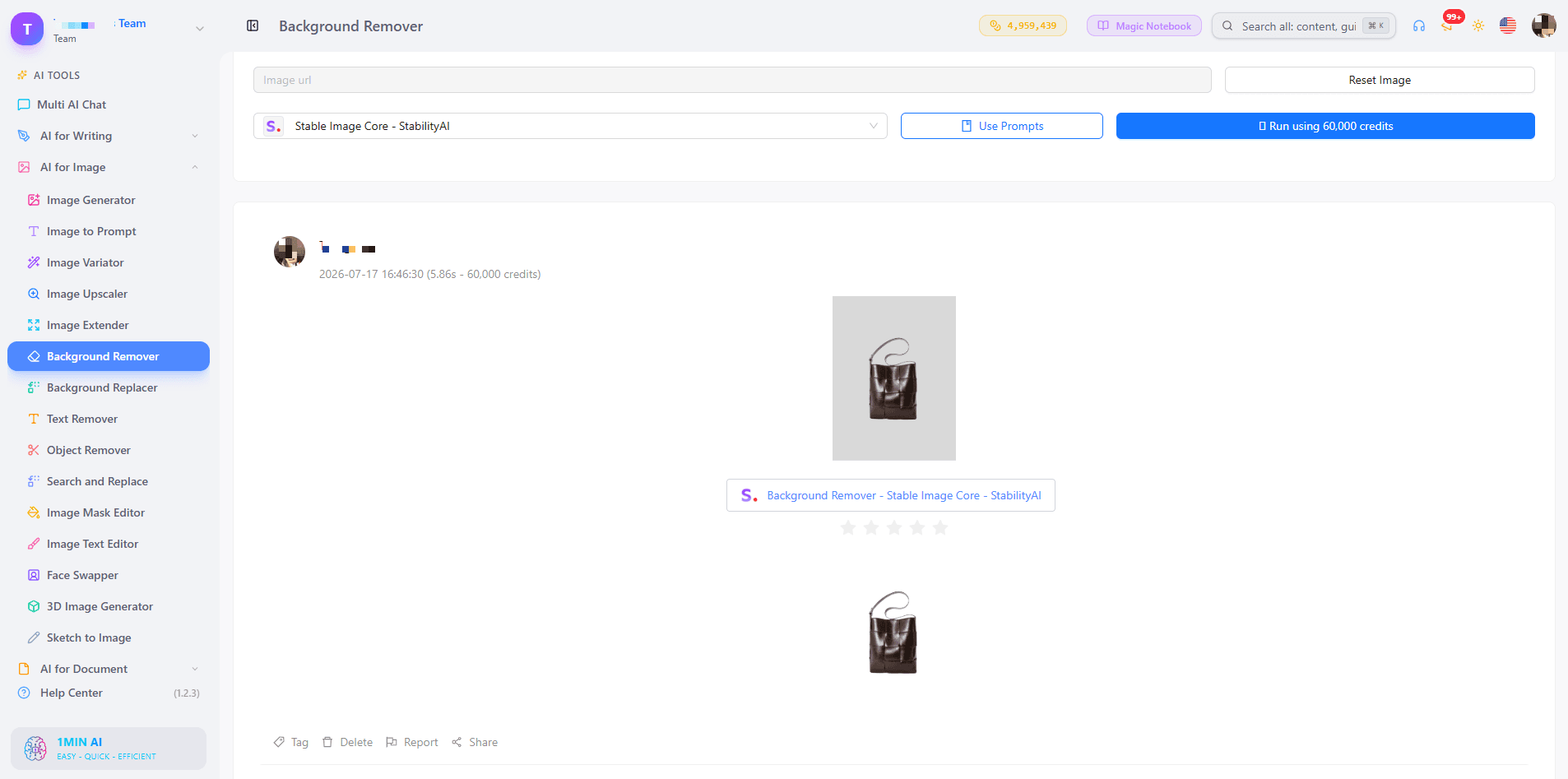
Upload your photo and use Background Remover to isolate the product. Then use Background Replacer to place it on a pure white background. Many marketplaces require a plain white background for the main image, so check each channel's image rules before you publish.
Build Lifestyle Scenes Without a Photoshoot
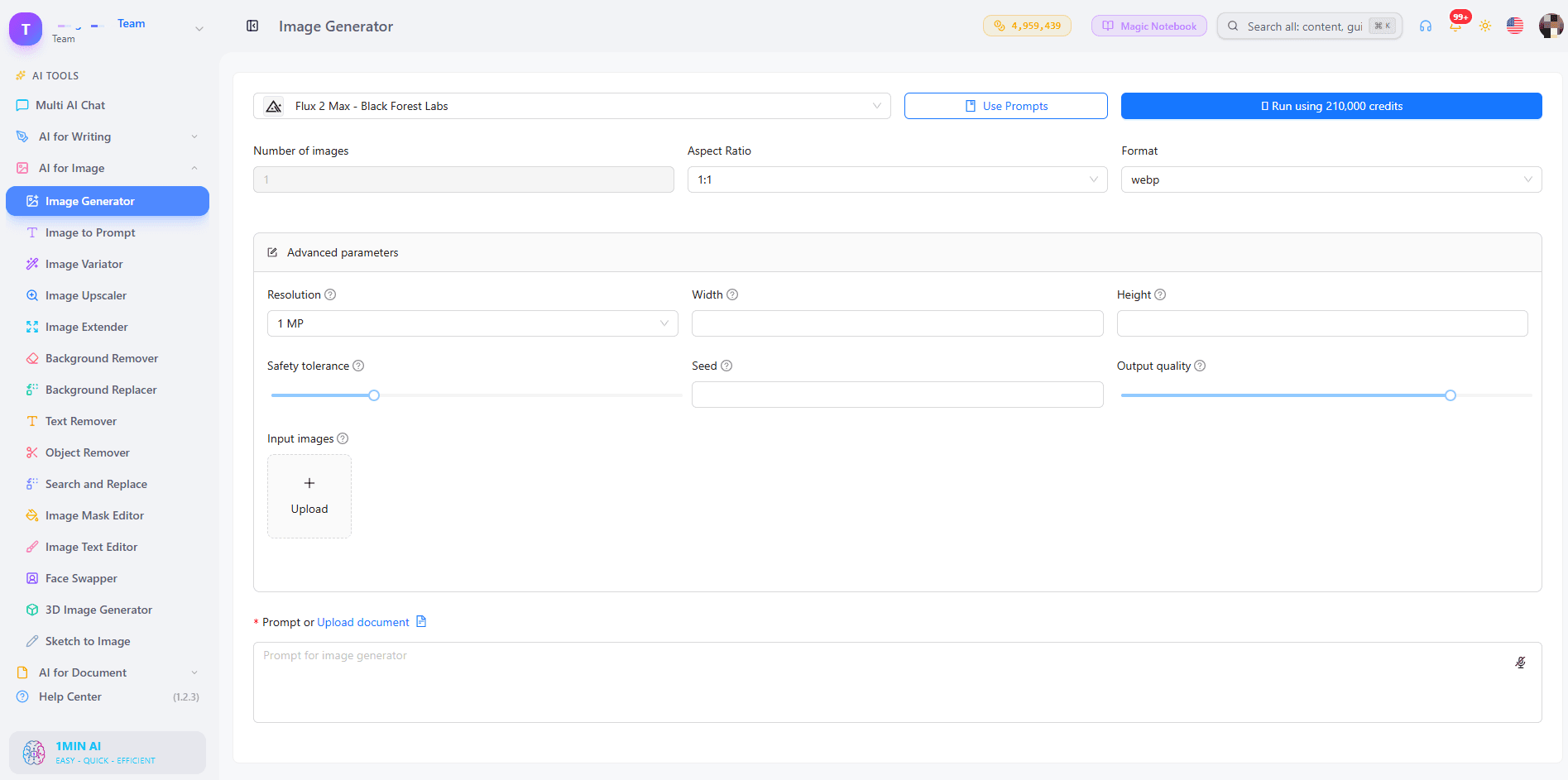
Use Background Replacer with a text prompt that describes the scene. For example: "matte ceramic mug on a wooden kitchen counter, soft morning light." A few tools extend this step:
- Image to Prompt: upload an image whose style you like and get a prompt that recreates the look.
- Search and Replace: change one element in a scene, such as a prop or a color, without redoing the image.
- Image Variator: generate alternative versions so you can test which one performs best.
A Prompt Formula That Keeps Products Accurate
Write prompts in this order: product, surface, setting, lighting, camera angle. Describe the product literally first, then add scene details. This keeps the model focused on your item instead of inventing new features. Always compare the result with the physical product before you publish.
Fix Flaws and Adapt Every Sales Channel
Small defects cost trust. Object Remover clears dust, stray reflections, or clutter. Text Remover removes unwanted watermarks or overlays. Image Mask Editor lets you edit only the area you select.
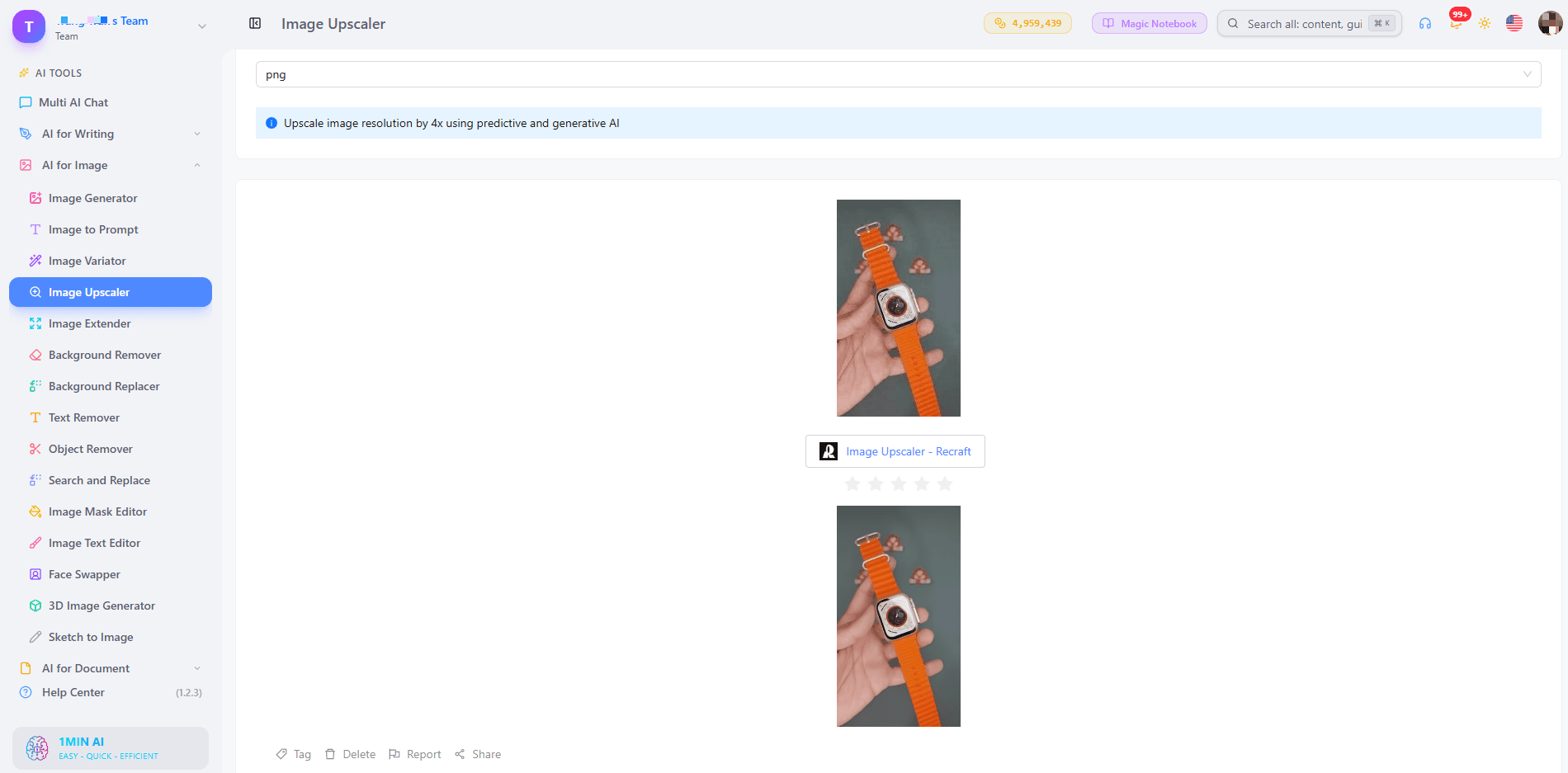
Next, prepare formats. Image Extender expands the canvas to fit square grids, vertical feeds, and story formats. Image Upscaler sharpens the file so shoppers can zoom into fabric, texture, and packaging. For any final touch-up, an AI image editor in the same workspace saves you a trip to separate software.
Turn Product Images Into Short Videos
Image to Video animates a finished product image into a short clip for social ads and listing videos. You reuse the same visual instead of briefing a new shoot.
Can I Use AI-Generated Images for My Business?
Yes, AI-generated images are widely used for product listings, ads, and catalogs. Verify three things before you publish:
- Commercial rights: read the terms for your plan.
- Marketplace policy: each channel sets its own rules for main images.
- Accuracy: the image must not show features, colors, or sizes the product does not have.
A hybrid method is the safest. Photograph the real product once, use AI for backgrounds, scenes, and variations, and check every output against the physical item before it goes live. Hero shots, fit-sensitive apparel, and texture-heavy products still benefit from real photography.
Try an AI Image Generator for Ecommerce Online Free
You can test quality before you commit. Start with a free 1min.AI account and pick one best-selling product. Run it through the steps above, then compare the result with your current listing photo. If the new image looks cleaner and more professional, roll the same workflow out to the rest of your catalog. Track click-through rate and conversion on the updated listings to measure the effect.
1min.AI is rated Excellent on Trustpilot and is recognized on SourceForge, Slashdot (Top Business Software), Capterra, Software Advice, and GetApp.
Alternatives
Discover the best alternatives to 1minAI and compare features, pricing, and use cases.

1min.AI vs OpenRouter
1min.AI vs. OpenRouter: Compare the ready-to-use AI creation product against the technical API tool. Find out if you need a zero-code creative studio or a coding infrastructure hub.
 Ngoc Hong
1minAI vs Hix AI
Compare 5 HIX AI alternatives for AI chat, research, writing, images, video, pricing, and flexible AI workflows.
Ngoc Hong
1min.AI vs Easy Peasy AI
Looking for an Easy Peasy AI alternative? Compare Easy Peasy AI and 1min.AI for content workflows, AI models, and professional teams.
Ngoc HongAI Tools
Discover the best AI tools to boost productivity, creativity, and everyday work.

Create Consistent Cartoon Content in Just a Few Steps
Create engaging cartoon videos for TikTok and Reels with 1min.AI. Research ideas, create characters, and turn images into animated videos in 3 simple steps.
 Lien Anh Vu
One Product, 10 UGC Creatives: How AI Makes Content Testing Easier
Create more authentic UGC with an AI UGC video generator, test more creative angles and scale affiliate content without filming every version.
Lien Anh Vu
Top 4 Affordable AI Tools for Startup Founders
Discover the top 4 affordable AI tools for startup founders to validate ideas, build products, create content, and launch faster without overspending.
 Tram Ta
AI Features
Comprehensive AI features that streamline workflows, improve efficiency, and empower teams to achieve more.
Create Consistent Cartoon Content in Just a Few Steps
Create engaging cartoon videos for TikTok and Reels with 1min.AI. Research ideas, create characters, and turn images into animated videos in 3 simple steps.
Lien Anh VuOne Product, 10 UGC Creatives: How AI Makes Content Testing Easier
Create more authentic UGC with an AI UGC video generator, test more creative angles and scale affiliate content without filming every version.
Lien Anh Vu
1minAI: Free AI Grammar Checker
Check grammar for free with 1minAI’s AI grammar checker. Find grammar, spelling, and writing mistakes, improve clarity, and polish your content in seconds.
Tram TaAI Use Cases
A curated collection of AI use cases for business, productivity, and industry-specific applications.
Create Consistent Cartoon Content in Just a Few Steps
Create engaging cartoon videos for TikTok and Reels with 1min.AI. Research ideas, create characters, and turn images into animated videos in 3 simple steps.
Lien Anh VuOne Product, 10 UGC Creatives: How AI Makes Content Testing Easier
Create more authentic UGC with an AI UGC video generator, test more creative angles and scale affiliate content without filming every version.
Lien Anh Vu
Best Time to Post on Instagram: A Practical Guide for Better Engagement
Discover the best time to post on Instagram, including the best days and times for different audiences, plus tips to find the ideal posting schedule for your account.
Tram TaAI Tutorials
Learn how to use AI with practical, step-by-step tutorials.
Create Consistent Cartoon Content in Just a Few Steps
Create engaging cartoon videos for TikTok and Reels with 1min.AI. Research ideas, create characters, and turn images into animated videos in 3 simple steps.
Lien Anh Vu
Black Friday AI Tool Deals in 2026
Discover what Black Friday AI tool deals 2026 has to offer. Find out how to secure the 1min.AI lifetime deal via AppSumo, Dealify, Stack Social, and verify on Trustpilot, Slashdot, and Software Advice.
 Hang Nguyen
[Seedance 2.5 New] Better AI Product Videos, Less Rework in 1min.AI
Use Seedance 2.5 image to video on 1min.AI to create more consistent AI product videos, reduce failed generations, save credits, and improve UGC workflows.
Lien Anh VuAI Guides
Learn AI faster with practical guides, real-world examples, and actionable best practices.
Create Consistent Cartoon Content in Just a Few Steps
Create engaging cartoon videos for TikTok and Reels with 1min.AI. Research ideas, create characters, and turn images into animated videos in 3 simple steps.
Lien Anh Vu
Safely Buy AI Tools Online: 2026 Black Friday Guide
Discover how to find and secure the best Black Friday AI deals online. Learn expert strategies to avoid scams, combat subscription fatigue, and verify software.
Hang Nguyen[Seedance 2.5 New] Better AI Product Videos, Less Rework in 1min.AI
Use Seedance 2.5 image to video on 1min.AI to create more consistent AI product videos, reduce failed generations, save credits, and improve UGC workflows.
Lien Anh VuAI Solutions
Browse the best AI solutions for automation, coding, research, productivity, customer support, marketing, and business workflows.
Create Consistent Cartoon Content in Just a Few Steps
Create engaging cartoon videos for TikTok and Reels with 1min.AI. Research ideas, create characters, and turn images into animated videos in 3 simple steps.
Lien Anh VuOne Product, 10 UGC Creatives: How AI Makes Content Testing Easier
Create more authentic UGC with an AI UGC video generator, test more creative angles and scale affiliate content without filming every version.
Lien Anh Vu
Free AI Tattoo Generator: Custom Designs
Turn any idea into a custom tattoo design with 1min.AI's free AI tattoo generator. Describe your idea, pick a style, and download in seconds.
 Trang Tran
AI Models
Explore the world's leading AI models in one place.
Create Consistent Cartoon Content in Just a Few Steps
Create engaging cartoon videos for TikTok and Reels with 1min.AI. Research ideas, create characters, and turn images into animated videos in 3 simple steps.
Lien Anh VuOne Product, 10 UGC Creatives: How AI Makes Content Testing Easier
Create more authentic UGC with an AI UGC video generator, test more creative angles and scale affiliate content without filming every version.
Lien Anh Vu[Seedance 2.5 New] Better AI Product Videos, Less Rework in 1min.AI
Use Seedance 2.5 image to video on 1min.AI to create more consistent AI product videos, reduce failed generations, save credits, and improve UGC workflows.
Lien Anh VuAI Comparisons
Compare AI tools, models, and platforms to find the best fit for your needs.

Kling AI Vs Veo 3: Which Model Wins?
Kling AI vs Veo 3: compare motion, native audio, pricing & free tiers to see which AI video generator wins for your project - try both on 1min.AI.
Trang Tran[Seedance 2.5 New] Better AI Product Videos, Less Rework in 1min.AI
Use Seedance 2.5 image to video on 1min.AI to create more consistent AI product videos, reduce failed generations, save credits, and improve UGC workflows.
Lien Anh Vu
DeepSeek V4 Pro vs Flash Comparison
Compare DeepSeek V4 Pro vs DeepSeek V4 Flash metrics. Optimize your agentic apps and improve AI fact checking on 1min.ai today.
Ngoc HongAI Integrations
Seamlessly integrate AI with the tools you already use to automate work and boost productivity.

POV: You Have 10+ Posts to Make Every Day
Learn how to build an AI content workflow that helps content creators produce 10+ social media posts a day faster with AI brainstorming, image generation, and content creation.
Lien Anh Vu
How to Use an AI Fashion Video Generator for Fashion Week 2026
Turn Fashion Week 2026 ideas into stunning fashion videos with AI. Learn how to brainstorm, create visuals, and transform images into videos with one simple workflow.
Lien Anh Vu
Stop Switching Between AI Apps: How AI Integration Transforms Employer Branding
Discover how AI integration helps HR teams streamline employer branding by combining AI writing, documents, images, video, and multiple AI models into one workspace.
Tram TaAI for Industries
Find the best AI tools and workflows for healthcare, finance, education, legal, manufacturing, retail, real estate, and more
Free AI Image Generator For Ecommerce
Turn phone photos into studio, white-background, and lifestyle product images. Try the best AI image generator for ecommerce online free with 1min.AI.
Trang Tran
Free Property Management Email Templates
Free property management email templates for tenants and owners: rent reminders, renewals, maintenance updates. Copy, customize, and send in minutes.
Trang Tran
Free AI Virtual Staging: Furnish Any Room
Stage any real estate listing with AI virtual staging: upload a photo, pick a style, and get a photorealistic furnished room in seconds, free to try.
Trang TranAI Agents
Discover and run AI agents to automate tasks across your work and daily life.
1minAI: Free AI Grammar Checker
Check grammar for free with 1minAI’s AI grammar checker. Find grammar, spelling, and writing mistakes, improve clarity, and polish your content in seconds.
Tram Ta
AI Agents for Facebook
Use an AI Agent for Facebook to create content, generate images, schedule posts, and publish from your documents and conversations.
Ngoc Hong
AI Agent vs AI Assistant: Which One Actually Saves Designers More Time?
Learn the difference between AI Agent vs AI Assistant and discover which solution helps designers automate repetitive work, reduce revisions, and save more time.
Lien Anh VuAI Workflows
Explore ready-to-use AI workflows for productivity, marketing, sales, support, and more.
Create Consistent Cartoon Content in Just a Few Steps
Create engaging cartoon videos for TikTok and Reels with 1min.AI. Research ideas, create characters, and turn images into animated videos in 3 simple steps.
Lien Anh VuOne Product, 10 UGC Creatives: How AI Makes Content Testing Easier
Create more authentic UGC with an AI UGC video generator, test more creative angles and scale affiliate content without filming every version.
Lien Anh VuPOV: You Have 10+ Posts to Make Every Day
Learn how to build an AI content workflow that helps content creators produce 10+ social media posts a day faster with AI brainstorming, image generation, and content creation.
Lien Anh VuNewsletter
Weekly AI Innovations with 1minAI

🔮 Weekly AI Innovations #139: Dawn of the next-gen AI
Discover the immense power of GPT-6 Astra and Claude Fable 5.1. Unlock next-generation AI models on 1min.ai to solve complex tasks effortlessly.
Hang Nguyen
🔮 Weekly AI Innovations #138: Claude Sonnet 5, Fable 5 & Wan 2.7
Explode your creative potential with massive 1min.ai updates! Access Claude Sonnet 5, Fable 5, and Alibaba Wan 2.7 for unmatched multi-modal generation today.
Hang Nguyen
🔮 Weekly AI Innovations #137: ElevenLabs Music & AI social Profile Control
The newest 1min.ai updates deliver professional music generation and highly requested privacy tools. Dive into a seamless workflow today!
Hang Nguyen