
Hotel Lobby AI Video Trend and Best Prompts

Tram Ta
October 7, 2026
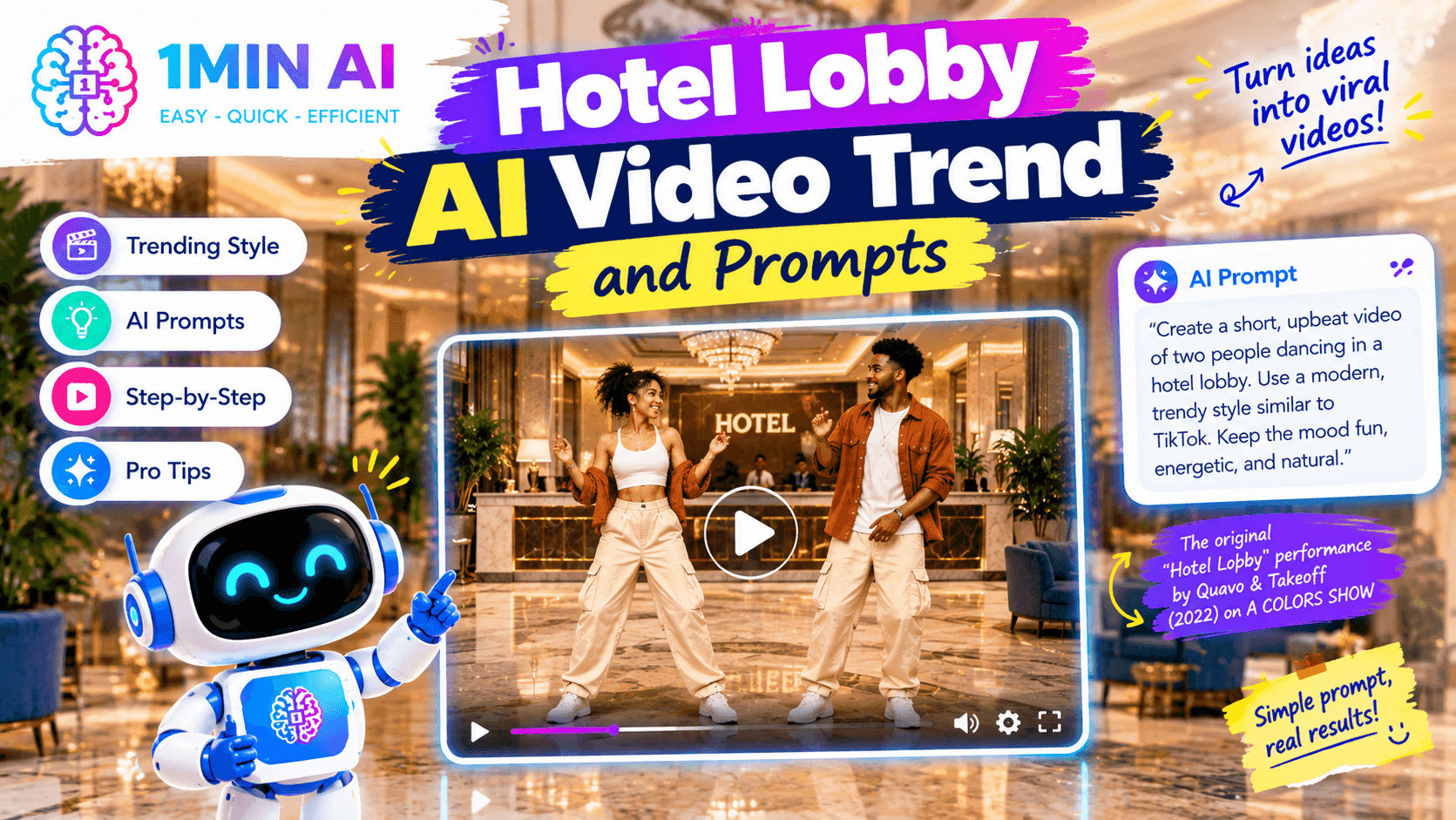
Hotel Lobby AI is trending in 2026. Learn what the viral video trend is, how it works, and try copy-ready AI prompts to create your own video.
Hotel Lobby AI is one of the viral AI video trends of 2026, featuring two people performing in an orange studio with a hanging microphone. Learn what the trend is, how to create it, and get ready-to-use Hotel Lobby AI prompts
What Is the Hotel Lobby AI Trend?
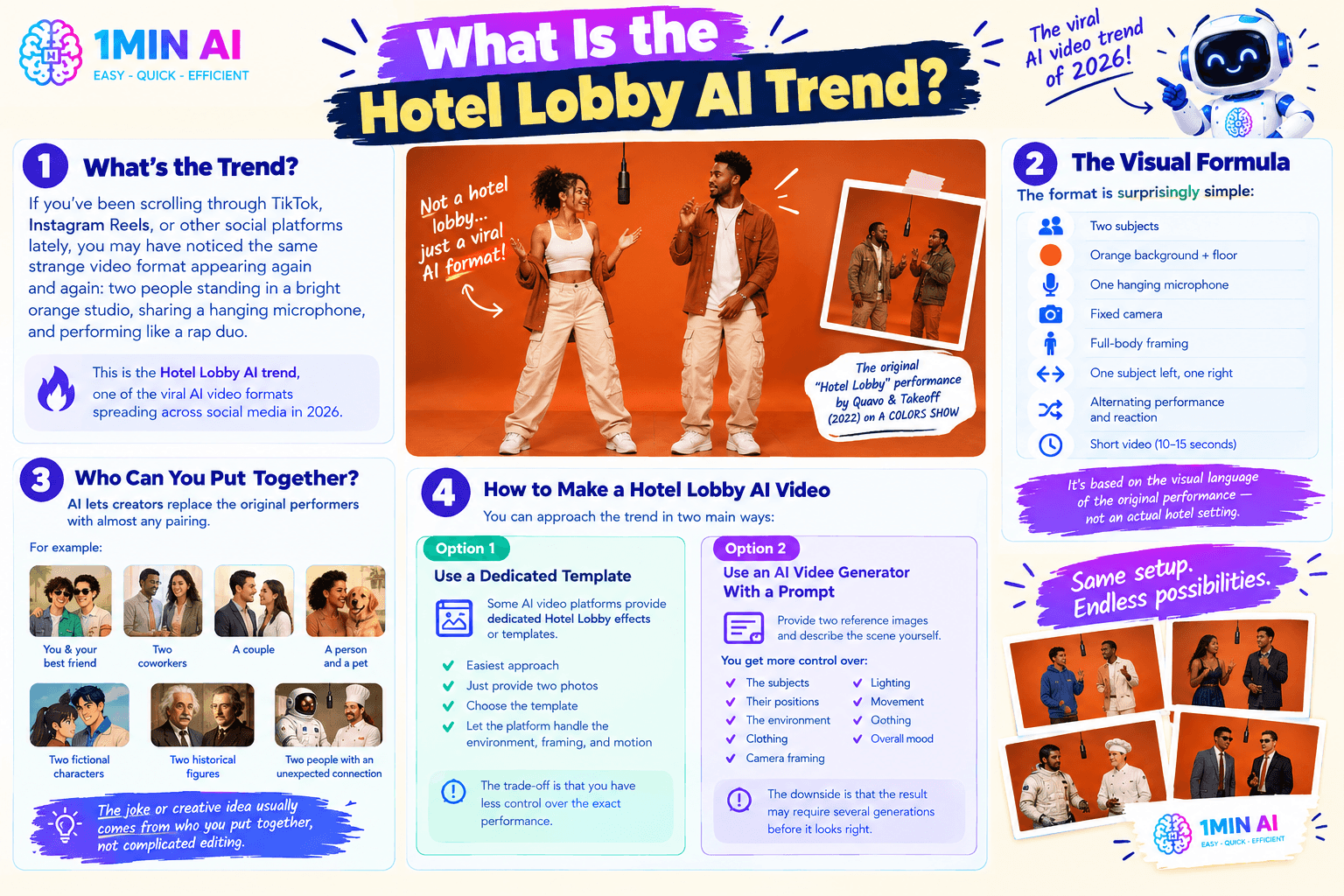
If you've been scrolling through TikTok, Instagram Reels, or other social platforms lately, you may have noticed the same strange video format appearing again and again: two people standing in a bright orange studio, sharing a hanging microphone, and performing like a rap duo.
This is the Hotel Lobby AI trend, one of the viral AI video formats spreading across social media in 2026. Despite the name, the video isn't actually set in a hotel lobby. The trend comes from Quavo and Takeoff's 2022 performance of “Hotel Lobby” as Unc & Phew on A COLORS SHOW. The original performance used a minimalist orange set and a suspended microphone, and AI creators have turned that recognizable setup into a reusable video format.
The visual formula is surprisingly simple:
- Two subjects
- A seamless orange background and floor
- One hanging microphone
- A fixed camera
- Full-body framing
- One subject on the left and one on the right
- Alternating performance and reaction
- A short video, typically around 10–15 seconds
The format is based on the visual language of the original “Hotel Lobby” performance rather than an actual hotel setting.
AI makes the trend interesting because creators can replace the original performers with almost any pairing.
For example, the two subjects could be:
- You and your best friend
- Two coworkers
- A couple
- A person and a pet
- Two fictional characters
- Two historical figures
- Two people with an unexpected connection
The joke or creative idea usually comes from who you put together, rather than complicated editing.
How to Make a Hotel Lobby AI Video
You can approach the trend in two main ways.
Option 1: Use a Dedicated Template
Some AI video platforms provide dedicated Hotel Lobby effects or templates.
This is the easiest approach if your goal is simply to participate in the trend.
Typically, you provide two photos, choose the template, and let the platform handle the environment, framing, and motion.
The trade-off is that you have less control over the exact performance.
Option 2: Use an AI Video Generator With a Prompt
A more flexible approach is to provide two reference images and describe the scene yourself.
This gives you more control over:
- The subjects
- Their positions
- The environment
- Clothing
- Camera framing
- Gestures
- Lighting
- Movement
- Overall mood
The downside is that the result may require several generations before the faces, hands, positioning, and movement look right.
The Hugging Face guide similarly distinguishes between one-click templates and prompt-driven image-to-video tools: templates are faster, while prompts give you more control.
Hotel Lobby AI Prompt: Basic Version
Here is a copy-ready prompt you can adapt for an AI video generator that supports reference images:
Create a short photorealistic music-performance video featuring the two people from the reference images. Place reference image 1 on the LEFT and reference image 2 on the RIGHT. Keep both identities consistent throughout the entire video.
Place them in a minimalist seamless burnt-orange studio with an orange floor and background. A single vintage-style microphone hangs from the ceiling between them.
Use a fixed front-facing camera and a full-body wide shot. Both people remain visible throughout the video. One performer confidently performs toward the microphone while the other reacts naturally, then they alternate. Use subtle rhythmic movements, natural hand gestures, realistic facial expressions, and believable body motion.
Preserve each person's facial features, hairstyle, skin tone, body proportions, and clothing. Keep the two identities separate and never swap or blend their faces.
Cinematic studio lighting, realistic skin texture, natural motion, high realism, no text, no logos, no extra people.
The important instructions here are not just the orange background. The prompt explicitly controls identity, left/right position, camera, microphone, movement, and the number of people.
Hotel Lobby AI Prompt for Friends
Want to make a version with your friend?
Try:
Create a playful photorealistic short video of two friends performing together in a minimalist orange studio. Person 1 stays on the LEFT and person 2 stays on the RIGHT throughout the entire clip. A single microphone hangs between them.
Use a static full-body camera. Person 1 performs confidently toward the microphone while person 2 reacts with playful gestures. After a few seconds, they switch roles. Keep their faces, hairstyles, clothing, and identities consistent.
Warm cinematic lighting, realistic movement, subtle body gestures, natural facial expressions, seamless orange floor and background, clean studio environment, no additional people, no text, no logos.
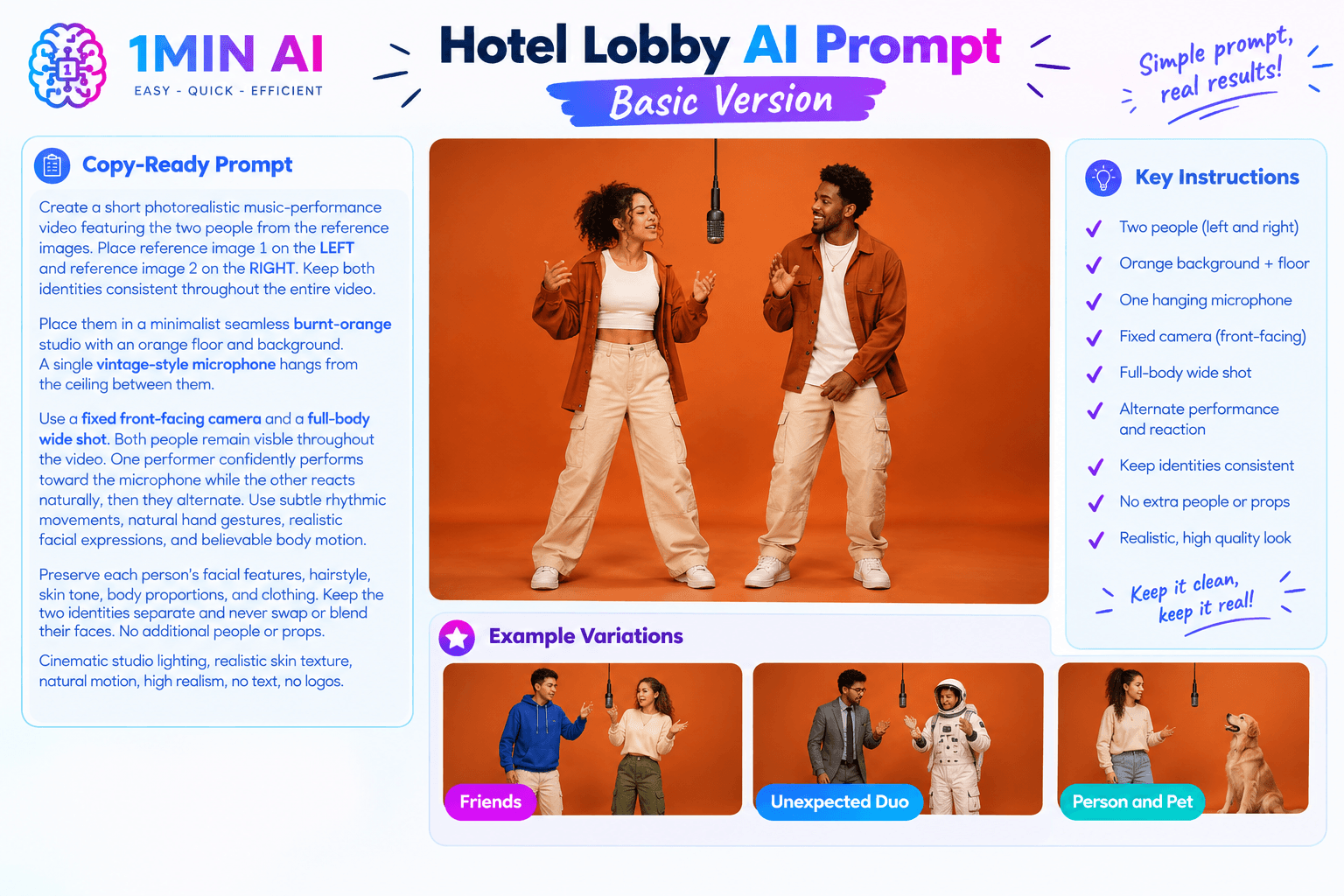
Hotel Lobby AI Prompt for an Unexpected Duo
The pairing is where you can get creative.
For example, imagine putting a serious-looking professional next to a completely unexpected character.
Create a humorous photorealistic music-performance video featuring the two reference subjects as an unexpected rap duo. Reference image 1 remains on the LEFT and reference image 2 remains on the RIGHT.
Place both subjects in a minimalist saturated orange studio with one hanging microphone centered between them. Use a locked-off full-body camera.
The person on the LEFT performs confidently with subtle rhythmic gestures while the person on the RIGHT reacts with an exaggeratedly serious expression. They alternate naturally during the performance.
Preserve both identities accurately. Do not merge, swap, duplicate, or distort their faces. No additional characters or props. Realistic lighting and natural movement.
The more specific the contrast between your two subjects, the more interesting the final concept can become.
Hotel Lobby AI Prompt for a Person and Pet
You don't have to use two people.
The format can also work as a playful person-and-pet concept.
Create a short photorealistic music-performance video featuring the person from reference image 1 and the pet from reference image 2.
Keep the person on the LEFT and the pet on the RIGHT. Place both in a minimalist orange studio with a single hanging microphone centered between them.
Use a static full-body camera. The person performs toward the microphone while the pet reacts naturally with subtle head and body movements. Keep the pet's appearance, markings, fur pattern, and proportions consistent throughout the video.
Realistic studio lighting, natural movement, humorous but believable performance, seamless orange background, no extra animals, no additional people, no text or logos.
How to Get Better Hotel Lobby AI Results
Your first generation may not be perfect.
That's normal with AI video.
Instead of rewriting the entire prompt every time, change one variable at a time.
If the faces are changing
Add stronger identity instructions: Keep each person's facial identity locked throughout every frame. Never swap, blend, average, or alter the two faces.
If the subjects switch sides
Specify: Reference image 1 remains on the LEFT and reference image 2 remains on the RIGHT for the entire video.
If the camera moves too much
Add:Locked-off camera, fixed viewpoint, no zoom, no pan, no tilt, no camera movement.
If there are too many people
Add: Exactly two subjects only. No additional people, reflections, duplicates, or background characters.
If the video looks too static
Add controlled movement: Subtle rhythmic body movement, natural hand gestures, realistic facial expressions, slight head movement, alternating performance and reaction.
The goal is controlled motion rather than asking for “lots of movement,” which can increase the chance of distorted hands, faces, or bodies.
Create a Hotel Lobby AI Video With 1minAI
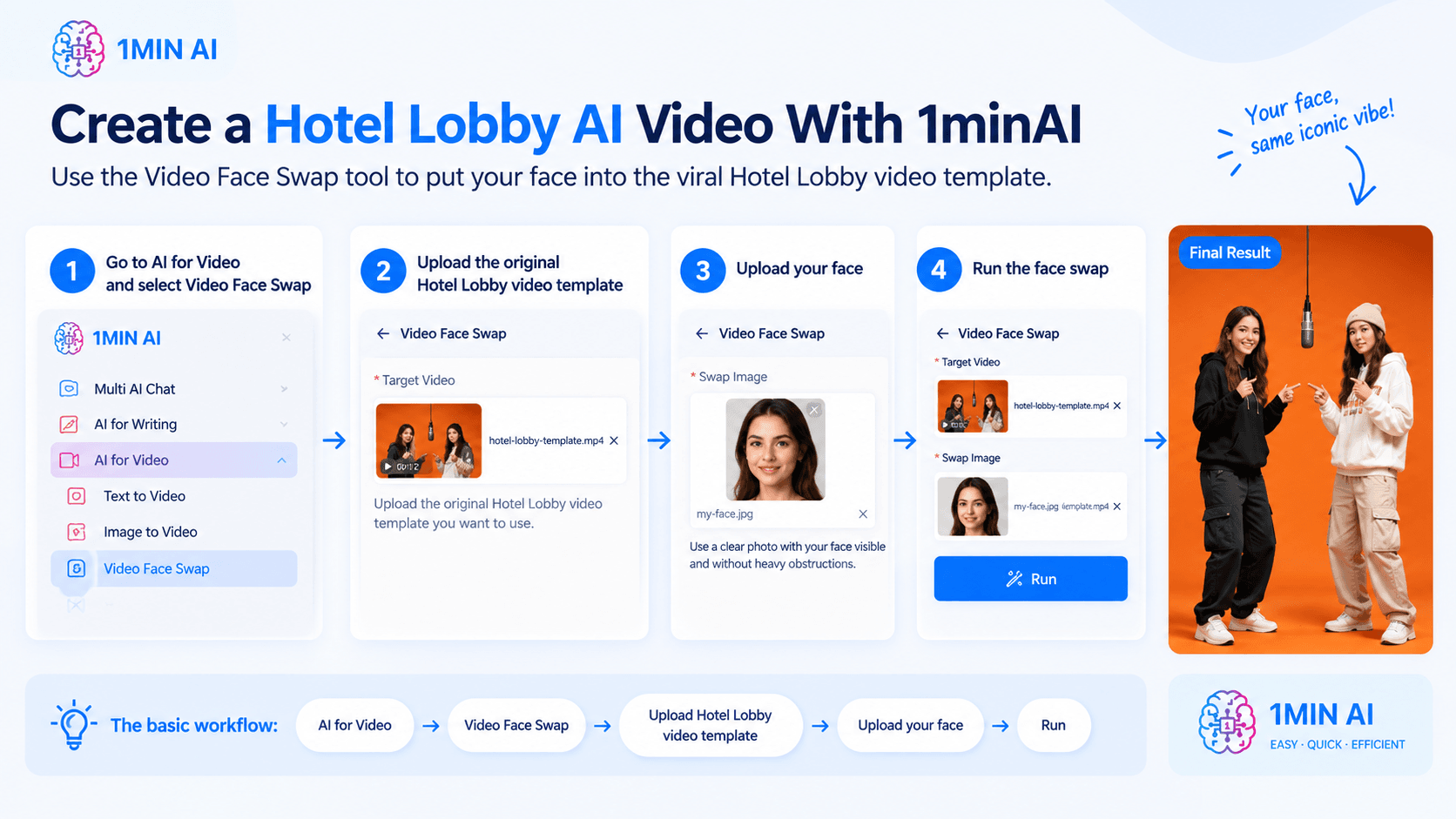
You can create a Hotel Lobby AI video in 1minAI by using the Video Face Swap tool. Instead of generating the entire scene from a prompt, start with the original Hotel Lobby video template, then replace the performer’s face with your own.
Step 1: Open AI for Video → Video Face Swap
In 1minAI, go to AI for Video and select Video Face Swap.
Step 2: Upload the original Hotel Lobby video template
Under Target Video, upload the original Hotel Lobby video template you want to use.
This video provides the scene, movement, camera angle, and performance. You are only changing the face.
Step 3: Upload your face
Under Swap Image, upload a clear photo of the face you want to use.
For better results, choose a well-lit image with your face clearly visible and without heavy obstructions.
Step 4: Run the face swap
Once the Target Video and Swap Image are uploaded, review the assets and run the tool.
1minAI processes the video and applies your face to the target footage. For videos with multiple people, you can also use Face Swap Pairs to control which video face is replaced. 1minAI
The basic workflow is:
AI for Video → Video Face Swap → Upload Hotel Lobby video template → Upload your face → Run
This approach is especially useful for the Hotel Lobby trend because you can keep the recognizable orange studio, hanging microphone, and performance from the original template while personalizing the face. 1minAI also provides other AI video tools, including Image to Video, Text to Video, and Captions Generator, so you can continue editing or repurposing the result in the same workspace.
Conclusion
Start with two clear reference photos, define who stays on the left and right, describe the orange studio and hanging microphone, keep the camera fixed, and use controlled movement.
Then generate a few variations and choose the cleanest result.
With 1minAI's AI Image to Video and Text to Video capabilities, you can also use the trend as a starting point for experimenting with other AI video concepts for TikTok, Reels, Shorts, and social content.
For further information, explore 1minAI AI Image to Video
Discover more AI features: https://1min.ai/features
Try 1minAI agent now: https://app.1min.ai/ai-agent-demo
Alternatives
Discover the best alternatives to 1minAI and compare features, pricing, and use cases.

1min.AI vs OpenRouter
1min.AI vs. OpenRouter: Compare the ready-to-use AI creation product against the technical API tool. Find out if you need a zero-code creative studio or a coding infrastructure hub.
 Ngoc Hong
1min.AI vs Lovart
Compare 1min.AI vs Lovart across features, pricing, credits, brand tools, and use cases to find the right AI platform for your workflow.
Ngoc Hong
1min. AI vs Dola AI
Looking for a Dola AI alternative? Compare 1min.AI vs Dola AI on video generation, free plans, pricing and privacy to pick the right AI app.
Ngoc HongAI Tools
Discover the best AI tools to boost productivity, creativity, and everyday work.

Create Consistent Cartoon Content in Just a Few Steps
Create engaging cartoon videos for TikTok and Reels with 1min.AI. Research ideas, create characters, and turn images into animated videos in 3 simple steps.
 Lien Anh Vu
One Product, 10 UGC Creatives: How AI Makes Content Testing Easier
Create more authentic UGC with an AI UGC video generator, test more creative angles and scale affiliate content without filming every version.
Lien Anh Vu
Top 4 Affordable AI Tools for Startup Founders
Discover the top 4 affordable AI tools for startup founders to validate ideas, build products, create content, and launch faster without overspending.
 Tram Ta
AI Features
Comprehensive AI features that streamline workflows, improve efficiency, and empower teams to achieve more.
Create Consistent Cartoon Content in Just a Few Steps
Create engaging cartoon videos for TikTok and Reels with 1min.AI. Research ideas, create characters, and turn images into animated videos in 3 simple steps.
Lien Anh VuOne Product, 10 UGC Creatives: How AI Makes Content Testing Easier
Create more authentic UGC with an AI UGC video generator, test more creative angles and scale affiliate content without filming every version.
Lien Anh Vu
1minAI: Free AI Grammar Checker
Check grammar for free with 1minAI’s AI grammar checker. Find grammar, spelling, and writing mistakes, improve clarity, and polish your content in seconds.
Tram TaAI Use Cases
A curated collection of AI use cases for business, productivity, and industry-specific applications.
Create Consistent Cartoon Content in Just a Few Steps
Create engaging cartoon videos for TikTok and Reels with 1min.AI. Research ideas, create characters, and turn images into animated videos in 3 simple steps.
Lien Anh VuOne Product, 10 UGC Creatives: How AI Makes Content Testing Easier
Create more authentic UGC with an AI UGC video generator, test more creative angles and scale affiliate content without filming every version.
Lien Anh Vu
Best Time to Post on Instagram: A Practical Guide for Better Engagement
Discover the best time to post on Instagram, including the best days and times for different audiences, plus tips to find the ideal posting schedule for your account.
Tram TaAI Tutorials
Learn how to use AI with practical, step-by-step tutorials.
Create Consistent Cartoon Content in Just a Few Steps
Create engaging cartoon videos for TikTok and Reels with 1min.AI. Research ideas, create characters, and turn images into animated videos in 3 simple steps.
Lien Anh Vu
Black Friday AI Tool Deals in 2026
Discover what Black Friday AI tool deals 2026 has to offer. Find out how to secure the 1min.AI lifetime deal via AppSumo, Dealify, Stack Social, and verify on Trustpilot, Slashdot, and Software Advice.
 Hang Nguyen
[Seedance 2.5 New] Better AI Product Videos, Less Rework in 1min.AI
Use Seedance 2.5 image to video on 1min.AI to create more consistent AI product videos, reduce failed generations, save credits, and improve UGC workflows.
Lien Anh VuAI Guides
Learn AI faster with practical guides, real-world examples, and actionable best practices.
Create Consistent Cartoon Content in Just a Few Steps
Create engaging cartoon videos for TikTok and Reels with 1min.AI. Research ideas, create characters, and turn images into animated videos in 3 simple steps.
Lien Anh Vu
Safely Buy AI Tools Online: 2026 Black Friday Guide
Discover how to find and secure the best Black Friday AI deals online. Learn expert strategies to avoid scams, combat subscription fatigue, and verify software.
Hang Nguyen[Seedance 2.5 New] Better AI Product Videos, Less Rework in 1min.AI
Use Seedance 2.5 image to video on 1min.AI to create more consistent AI product videos, reduce failed generations, save credits, and improve UGC workflows.
Lien Anh VuAI Solutions
Browse the best AI solutions for automation, coding, research, productivity, customer support, marketing, and business workflows.
Create Consistent Cartoon Content in Just a Few Steps
Create engaging cartoon videos for TikTok and Reels with 1min.AI. Research ideas, create characters, and turn images into animated videos in 3 simple steps.
Lien Anh VuOne Product, 10 UGC Creatives: How AI Makes Content Testing Easier
Create more authentic UGC with an AI UGC video generator, test more creative angles and scale affiliate content without filming every version.
Lien Anh Vu
Free AI Tattoo Generator: Custom Designs
Turn any idea into a custom tattoo design with 1min.AI's free AI tattoo generator. Describe your idea, pick a style, and download in seconds.
 Trang Tran
AI Models
Explore the world's leading AI models in one place.
Create Consistent Cartoon Content in Just a Few Steps
Create engaging cartoon videos for TikTok and Reels with 1min.AI. Research ideas, create characters, and turn images into animated videos in 3 simple steps.
Lien Anh VuOne Product, 10 UGC Creatives: How AI Makes Content Testing Easier
Create more authentic UGC with an AI UGC video generator, test more creative angles and scale affiliate content without filming every version.
Lien Anh Vu[Seedance 2.5 New] Better AI Product Videos, Less Rework in 1min.AI
Use Seedance 2.5 image to video on 1min.AI to create more consistent AI product videos, reduce failed generations, save credits, and improve UGC workflows.
Lien Anh VuAI Comparisons
Compare AI tools, models, and platforms to find the best fit for your needs.

Kling AI Vs Veo 3: Which Model Wins?
Kling AI vs Veo 3: compare motion, native audio, pricing & free tiers to see which AI video generator wins for your project - try both on 1min.AI.
Trang Tran[Seedance 2.5 New] Better AI Product Videos, Less Rework in 1min.AI
Use Seedance 2.5 image to video on 1min.AI to create more consistent AI product videos, reduce failed generations, save credits, and improve UGC workflows.
Lien Anh Vu
DeepSeek V4 Pro vs Flash Comparison
Compare DeepSeek V4 Pro vs DeepSeek V4 Flash metrics. Optimize your agentic apps and improve AI fact checking on 1min.ai today.
Ngoc HongAI Integrations
Seamlessly integrate AI with the tools you already use to automate work and boost productivity.

POV: You Have 10+ Posts to Make Every Day
Learn how to build an AI content workflow that helps content creators produce 10+ social media posts a day faster with AI brainstorming, image generation, and content creation.
Lien Anh Vu
How to Use an AI Fashion Video Generator for Fashion Week 2026
Turn Fashion Week 2026 ideas into stunning fashion videos with AI. Learn how to brainstorm, create visuals, and transform images into videos with one simple workflow.
Lien Anh Vu
Stop Switching Between AI Apps: How AI Integration Transforms Employer Branding
Discover how AI integration helps HR teams streamline employer branding by combining AI writing, documents, images, video, and multiple AI models into one workspace.
Tram TaAI for Industries
Find the best AI tools and workflows for healthcare, finance, education, legal, manufacturing, retail, real estate, and more

How to Start a One-Person AI Business: 7 Models You Can Run Solo
Learn how to start a one-person AI business with 7 practical models, from AI consulting and content services to automation and software reselling.
Tram Ta
7 Low-Cost AI Business Ideas for Your Startup
Explore 7 low-cost AI business ideas you can start with a small budget, from content and video services to AI consulting, reselling, and automation.
Tram Ta
Free AI Image Generator For Ecommerce
Turn phone photos into studio, white-background, and lifestyle product images. Try the best AI image generator for ecommerce online free with 1min.AI.
Trang TranAI Agents
Discover and run AI agents to automate tasks across your work and daily life.
1minAI: Free AI Grammar Checker
Check grammar for free with 1minAI’s AI grammar checker. Find grammar, spelling, and writing mistakes, improve clarity, and polish your content in seconds.
Tram Ta
AI Agents for Facebook
Use an AI Agent for Facebook to create content, generate images, schedule posts, and publish from your documents and conversations.
Ngoc Hong
AI Agent vs AI Assistant: Which One Actually Saves Designers More Time?
Learn the difference between AI Agent vs AI Assistant and discover which solution helps designers automate repetitive work, reduce revisions, and save more time.
Lien Anh VuAI Workflows
Explore ready-to-use AI workflows for productivity, marketing, sales, support, and more.
Create Consistent Cartoon Content in Just a Few Steps
Create engaging cartoon videos for TikTok and Reels with 1min.AI. Research ideas, create characters, and turn images into animated videos in 3 simple steps.
Lien Anh VuOne Product, 10 UGC Creatives: How AI Makes Content Testing Easier
Create more authentic UGC with an AI UGC video generator, test more creative angles and scale affiliate content without filming every version.
Lien Anh VuPOV: You Have 10+ Posts to Make Every Day
Learn how to build an AI content workflow that helps content creators produce 10+ social media posts a day faster with AI brainstorming, image generation, and content creation.
Lien Anh VuNewsletter
Weekly AI Innovations with 1minAI

🔮 Weekly AI Innovations #140: Deepseek 4.1 Flash & Gemini Upgrades
Explore Deepseek 4.1 Flash and new Gemini models on 1min.ai. Plus, check our update on your Billing - Usage page for better clarity.
Hang Nguyen
🔮 Weekly AI Innovations #136: Grok 4.6 and Smart Data Retention
Discover the latest 1min.ai updates! Upgrade to Grok 4.6 for blazing-fast AI, and check our new Data Retention policies to secure your files today.
Hang Nguyen
🔮 Weekly AI Innovations #139: Dawn of the next-gen AI
Discover the immense power of GPT-6 Astra and Claude Fable 5.1. Unlock next-generation AI models on 1min.ai to solve complex tasks effortlessly.
Hang Nguyen