
Free AI Music Generator

Ngoc Hong
October 7, 2026

Try a free AI music generator with daily credits. Test Suno, Lyria 3 Pro and ElevenLabs Music V1 with your own lyrics for YouTube videos. Start free
Free AI Music Generator Tips
A free AI music generator turns a short text prompt or your own lyrics into a finished track, without a studio or upfront payment. In 1min.AI, you can claim free credits every day and compare music models such as Suno, Lyria 3 Pro, and ElevenLabs Music V1 in one workspace. This guide shows how to start, write better prompts, and choose a model for YouTube videos. You need a free account, and credits are limited, so we explain the limits clearly.
| Question | Short answer |
|---|---|
| What do I need? | A free 1min.AI account |
| How do I get credits? | Visit the web app daily to unlock 15,000 free credits (a new day starts at 12 AM PST) |
| What can I enter? | A text prompt, plus your own lyrics |
| What is the catch? | Credits are limited, and credit use can vary by model |
Why Most Free AI Music Generators Fall Short
Free AI music generators look simple, but small limits often block real projects. Many creators discover these limits only after spending an hour on a single track. Knowing the common problems helps you judge any tool before you invest time or money. Here are the three issues that appear most often when people search for an ai music generator free of charge.
- Tight daily limits. Free tiers often cap how many songs you can make, so testing different styles becomes expensive quickly.
- Unclear usage rights. Some free tiers limit tracks to personal use, which is a problem for monetized channels.
- One model only. A single free AI music generator may handle one genre well and struggle with another, and you cannot compare without a second subscription.
How to Create Music With a Free AI Music Generator
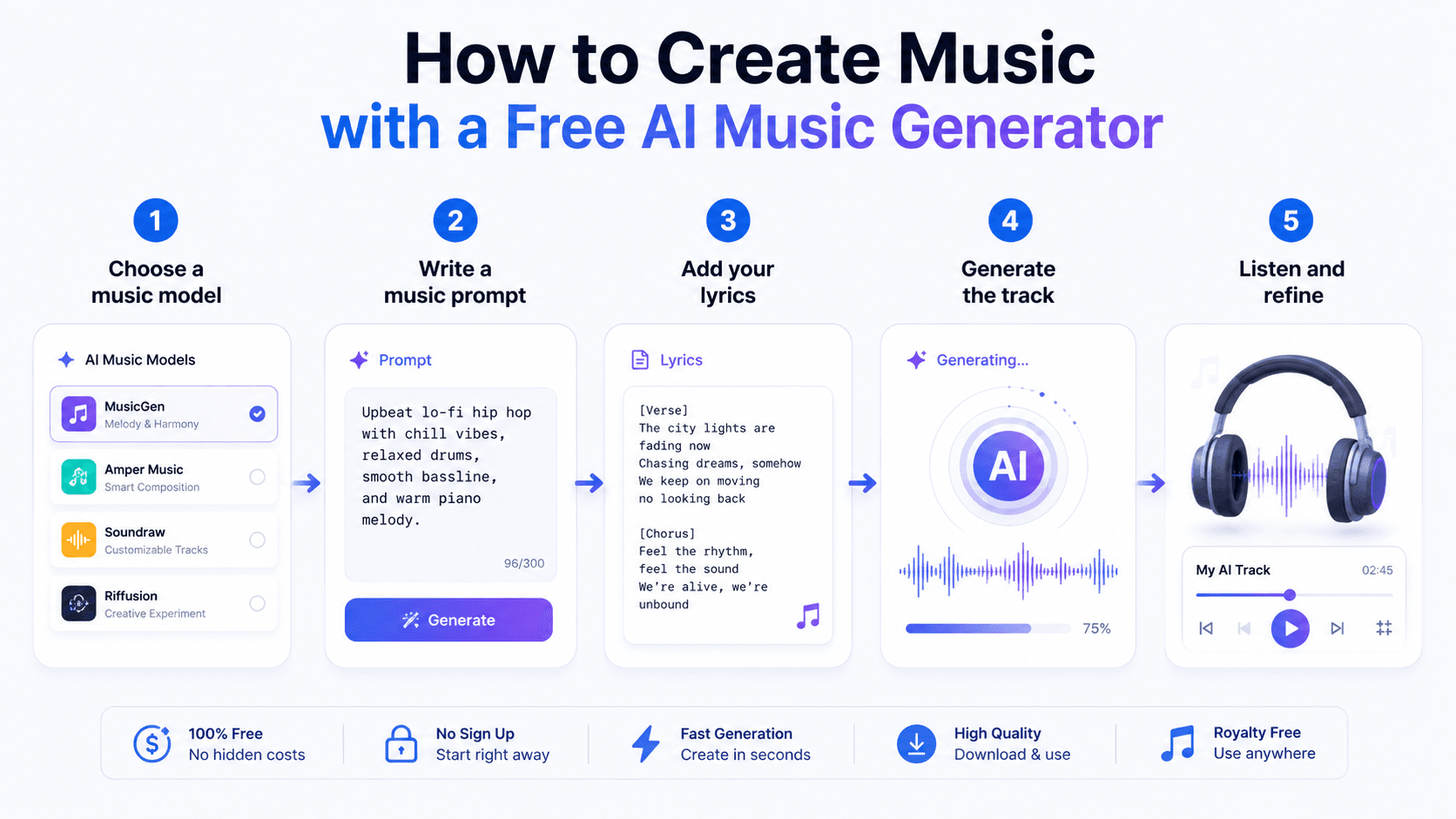
Creating a track takes about five minutes once you know the workflow. The steps below work for any text to music AI tool, and they match how music generation works in 1min.AI. Follow them in order, and test your first prompt on a short, simple idea before spending credits on a longer song.
- Create a free account and claim your daily credits on the free credits page.
- Open the music generator and choose a model from the list.
- Write a prompt that names the genre, mood, tempo, and instruments.
- Paste your lyrics if you have them.
- Generate, listen, and refine the prompt until the track fits. Keep the version you like.
A Prompt Formula That Works Across Models
A clear prompt matters more than the model you pick, so start there. Use one repeatable formula to compare results fairly across tools. Describe the style first, then the mood, then the tempo, and finally the use case. Short, specific prompts tend to work better than long, vague ones, and the examples below show how to apply the formula.
| Use case | Example prompt |
|---|---|
| YouTube intro | Upbeat electronic intro, 120 BPM, bright synths, energetic mood |
| Podcast background | Calm lo-fi beat, soft piano, relaxed mood, loopable |
Free AI Music for YouTube: Check Rights First
Free AI music for YouTube is only useful if you are allowed to publish it. Rights can differ by model and provider, so never assume every track is cleared for monetized videos. Before you upload, read the terms of 1min.AI and the model provider. Keep a record of the prompt and date for each track, and contact support if a rule is unclear.
Why Use 1min.AI as Your Free AI Music Generator
1min.AI puts several music models in one workspace, so you can test before you choose. Instead of opening separate Suno, Google, or ElevenLabs accounts just to compare them, you work from one account and one credit balance. This single-workspace approach is the core idea behind 1min.AI's multi-model design, and it makes any free AI music generator trial more useful.
Three Music Models to Start With
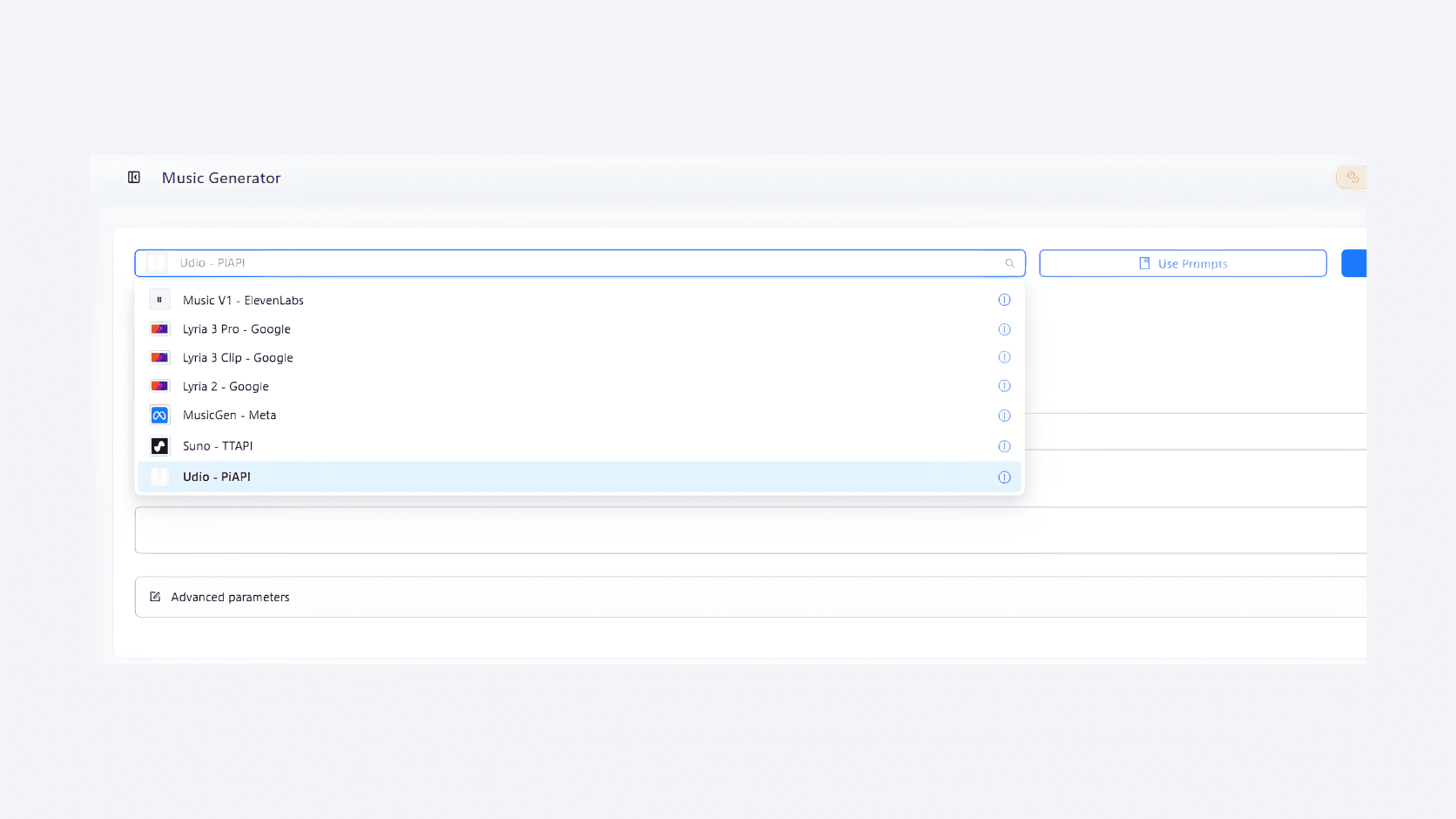
The model list has more options, including MusicGen and Udio, but three are enough to compare different engines on the same idea. Suno is reached through the API provider TTAPI, so results may differ from the original app. Read more about Lyria 3 music generation and the latest Suno model updates before you choose.
| Model | Provider |
|---|---|
| Suno | TTAPI (API provider) |
| Lyria 3 Pro | |
| Music V1 | ElevenLabs |
Test Three Prompts Before You Spend Credits
A small test plan saves credits and shows which model fits your needs. Run the same prompt in all three models, note the credits each one uses, and keep the best result. Use the credit calculator to estimate costs first, then repeat the test whenever a new model appears, because quality changes between versions.
| Test | Prompt idea | Listen for |
|---|---|---|
| Instrumental loop | Calm lo-fi beat, soft piano | Clean loop, steady mood |
| Vocal song | Your own two-verse lyrics, pop style | Clear words, lyric accuracy |
| Short jingle | Upbeat brand jingle, bright synths | Strong hook, quick start |
Three Music Models: Which One Should You Choose?
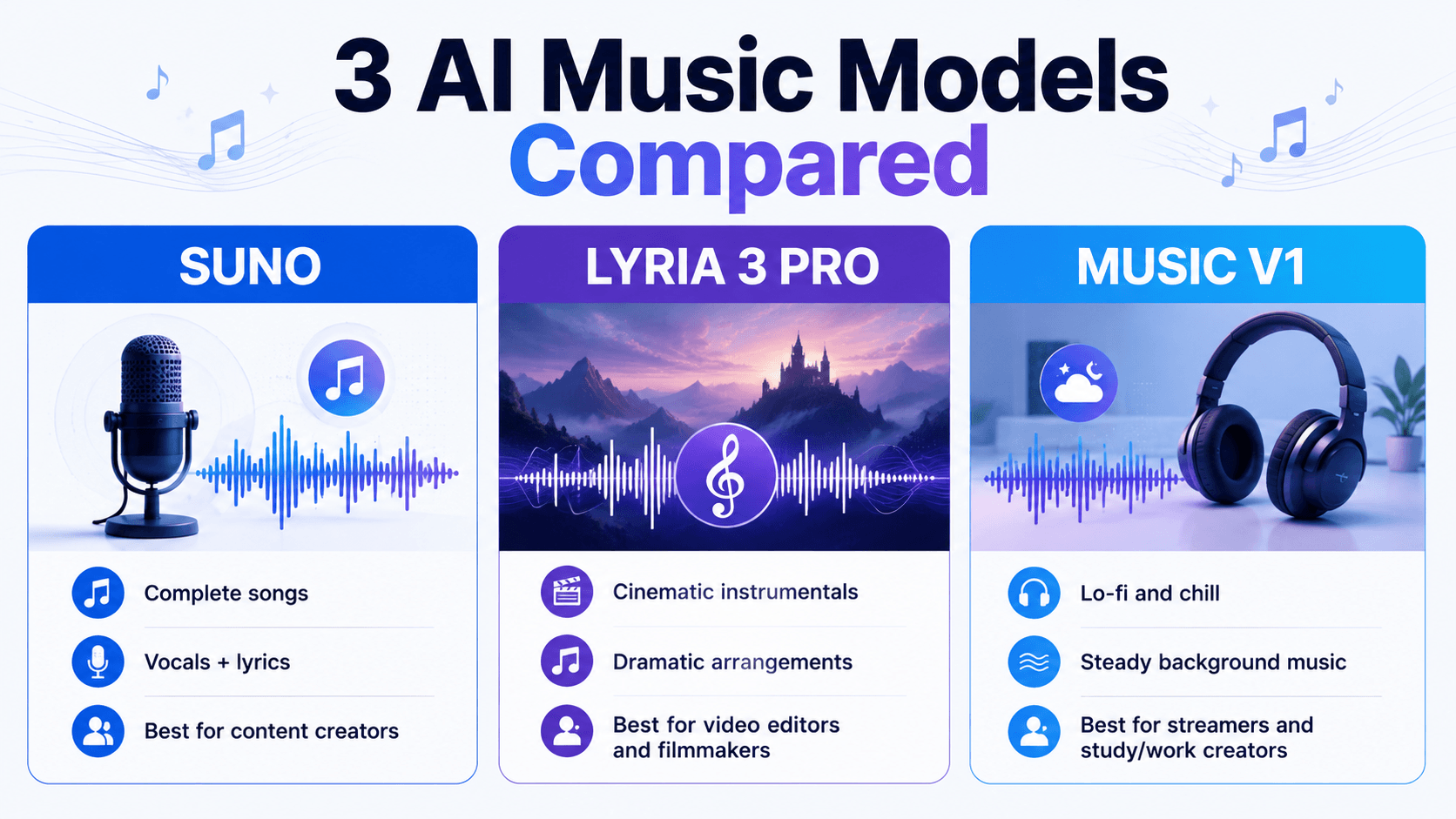
The three models are designed for different music-generation needs. Suno is the strongest choice for complete songs with vocals, Lyria 3 Pro works well for cinematic instrumental backgrounds, while Music V1 is better suited to calm, continuous background music. Choosing the right model depends on whether your project needs lyrics, cinematic depth, or a non-distracting atmosphere.
| Model | Best for | Key strength | Recommended users |
|---|---|---|---|
| Suno | Complete songs with vocals | Full song structure, clear vocals, smooth beats | Content Creators, TikTokers, Marketers |
| Lyria 3 Pro | Cinematic background music | Instrumental arrangements, depth, dramatic build-up | Video Editors, Filmmakers, Game Developers |
| Music V1 | Lo-fi and chill background music | Steady, clean, relaxing loops | Streamers, Study/Work creators, cafés |
Suno: Best for complete songs with vocals
Suno focuses on creating complete songs with recognizable structures such as verses and choruses. Its clear vocals and well-integrated beats make it a strong option when the lyrics need to communicate a message directly.
Best for: Content Creators, TikTokers, and Marketers creating original songs for travel vlogs, product reviews, promotional videos, or advertising jingles.
Lyria 3 Pro: Best for cinematic instrumentals
Lyria 3 Pro is better suited to instrumental music that builds from a softer opening toward a more powerful climax. Its emphasis on instrumental arrangement can create a sense of space, scale, and drama.
Best for: Video Editors, Filmmakers, and Game Developers who need epic background music for trailers, short films, action scenes, or exploration sequences.
Music V1: Best for lo-fi and chill background music
Music V1 focuses on steady rhythms and clean, gentle instrumental sounds. Its relaxed loops can provide a consistent atmosphere without competing heavily with the main content.
Best for: Streamers who need continuous background music, Study/Work With Me YouTube channels, or businesses looking for background playlists for cafés and other spaces.
Quick takeaway
If you need a complete song with lyrics and vocals, start with Suno. If your project needs cinematic instrumental music with a strong build-up, try Lyria 3 Pro. For relaxed, unobtrusive background music, Music V1 is the better starting point.
Suno → Vocals & complete songs Lyria 3 Pro → Cinematic & instrumental Music V1 → Lo-fi, chill & background
Ways to Earn More Free Credits
Daily credits are the easiest way to start, but they are not the only option. Offers can change over time, so always check the free credits page for the current list before you plan a larger project, and remember that each new day starts at 12 AM PST.
- Daily visit: 15,000 free credits every day you visit the web app.
- AI Social: extra credits through community rewards and streaks.
- Referrals: credits when friends join and try a feature.
Start Your Free AI Music Generator Trial Today
The best way to judge a free AI music generator is to run your own prompt through it. Claim your daily credits, test all three models, and keep the track that fits your project. Explore more AI tutorials, compare pricing, or pair your music with AI video generation. Questions about credits or models? Contact us.
Alternatives
Discover the best alternatives to 1minAI and compare features, pricing, and use cases.

1min.AI vs OpenRouter
1min.AI vs. OpenRouter: Compare the ready-to-use AI creation product against the technical API tool. Find out if you need a zero-code creative studio or a coding infrastructure hub.
 Ngoc Hong
1min.AI vs Lovart
Compare 1min.AI vs Lovart across features, pricing, credits, brand tools, and use cases to find the right AI platform for your workflow.
Ngoc Hong
1min. AI vs Dola AI
Looking for a Dola AI alternative? Compare 1min.AI vs Dola AI on video generation, free plans, pricing and privacy to pick the right AI app.
Ngoc HongAI Tools
Discover the best AI tools to boost productivity, creativity, and everyday work.

Create Consistent Cartoon Content in Just a Few Steps
Create engaging cartoon videos for TikTok and Reels with 1min.AI. Research ideas, create characters, and turn images into animated videos in 3 simple steps.
 Lien Anh Vu
One Product, 10 UGC Creatives: How AI Makes Content Testing Easier
Create more authentic UGC with an AI UGC video generator, test more creative angles and scale affiliate content without filming every version.
Lien Anh Vu
Top 4 Affordable AI Tools for Startup Founders
Discover the top 4 affordable AI tools for startup founders to validate ideas, build products, create content, and launch faster without overspending.
 Tram Ta
AI Features
Comprehensive AI features that streamline workflows, improve efficiency, and empower teams to achieve more.
Create Consistent Cartoon Content in Just a Few Steps
Create engaging cartoon videos for TikTok and Reels with 1min.AI. Research ideas, create characters, and turn images into animated videos in 3 simple steps.
Lien Anh VuOne Product, 10 UGC Creatives: How AI Makes Content Testing Easier
Create more authentic UGC with an AI UGC video generator, test more creative angles and scale affiliate content without filming every version.
Lien Anh Vu
1minAI: Free AI Grammar Checker
Check grammar for free with 1minAI’s AI grammar checker. Find grammar, spelling, and writing mistakes, improve clarity, and polish your content in seconds.
Tram TaAI Use Cases
A curated collection of AI use cases for business, productivity, and industry-specific applications.
Create Consistent Cartoon Content in Just a Few Steps
Create engaging cartoon videos for TikTok and Reels with 1min.AI. Research ideas, create characters, and turn images into animated videos in 3 simple steps.
Lien Anh VuOne Product, 10 UGC Creatives: How AI Makes Content Testing Easier
Create more authentic UGC with an AI UGC video generator, test more creative angles and scale affiliate content without filming every version.
Lien Anh Vu
Best Time to Post on Instagram: A Practical Guide for Better Engagement
Discover the best time to post on Instagram, including the best days and times for different audiences, plus tips to find the ideal posting schedule for your account.
Tram TaAI Tutorials
Learn how to use AI with practical, step-by-step tutorials.
Create Consistent Cartoon Content in Just a Few Steps
Create engaging cartoon videos for TikTok and Reels with 1min.AI. Research ideas, create characters, and turn images into animated videos in 3 simple steps.
Lien Anh Vu
Black Friday AI Tool Deals in 2026
Discover what Black Friday AI tool deals 2026 has to offer. Find out how to secure the 1min.AI lifetime deal via AppSumo, Dealify, Stack Social, and verify on Trustpilot, Slashdot, and Software Advice.
 Hang Nguyen
[Seedance 2.5 New] Better AI Product Videos, Less Rework in 1min.AI
Use Seedance 2.5 image to video on 1min.AI to create more consistent AI product videos, reduce failed generations, save credits, and improve UGC workflows.
Lien Anh VuAI Guides
Learn AI faster with practical guides, real-world examples, and actionable best practices.
Create Consistent Cartoon Content in Just a Few Steps
Create engaging cartoon videos for TikTok and Reels with 1min.AI. Research ideas, create characters, and turn images into animated videos in 3 simple steps.
Lien Anh Vu
Safely Buy AI Tools Online: 2026 Black Friday Guide
Discover how to find and secure the best Black Friday AI deals online. Learn expert strategies to avoid scams, combat subscription fatigue, and verify software.
Hang Nguyen[Seedance 2.5 New] Better AI Product Videos, Less Rework in 1min.AI
Use Seedance 2.5 image to video on 1min.AI to create more consistent AI product videos, reduce failed generations, save credits, and improve UGC workflows.
Lien Anh VuAI Solutions
Browse the best AI solutions for automation, coding, research, productivity, customer support, marketing, and business workflows.
Create Consistent Cartoon Content in Just a Few Steps
Create engaging cartoon videos for TikTok and Reels with 1min.AI. Research ideas, create characters, and turn images into animated videos in 3 simple steps.
Lien Anh VuOne Product, 10 UGC Creatives: How AI Makes Content Testing Easier
Create more authentic UGC with an AI UGC video generator, test more creative angles and scale affiliate content without filming every version.
Lien Anh Vu
Free AI Tattoo Generator: Custom Designs
Turn any idea into a custom tattoo design with 1min.AI's free AI tattoo generator. Describe your idea, pick a style, and download in seconds.
 Trang Tran
AI Models
Explore the world's leading AI models in one place.
Create Consistent Cartoon Content in Just a Few Steps
Create engaging cartoon videos for TikTok and Reels with 1min.AI. Research ideas, create characters, and turn images into animated videos in 3 simple steps.
Lien Anh VuOne Product, 10 UGC Creatives: How AI Makes Content Testing Easier
Create more authentic UGC with an AI UGC video generator, test more creative angles and scale affiliate content without filming every version.
Lien Anh Vu[Seedance 2.5 New] Better AI Product Videos, Less Rework in 1min.AI
Use Seedance 2.5 image to video on 1min.AI to create more consistent AI product videos, reduce failed generations, save credits, and improve UGC workflows.
Lien Anh VuAI Comparisons
Compare AI tools, models, and platforms to find the best fit for your needs.

Kling AI Vs Veo 3: Which Model Wins?
Kling AI vs Veo 3: compare motion, native audio, pricing & free tiers to see which AI video generator wins for your project - try both on 1min.AI.
Trang Tran[Seedance 2.5 New] Better AI Product Videos, Less Rework in 1min.AI
Use Seedance 2.5 image to video on 1min.AI to create more consistent AI product videos, reduce failed generations, save credits, and improve UGC workflows.
Lien Anh Vu
DeepSeek V4 Pro vs Flash Comparison
Compare DeepSeek V4 Pro vs DeepSeek V4 Flash metrics. Optimize your agentic apps and improve AI fact checking on 1min.ai today.
Ngoc HongAI Integrations
Seamlessly integrate AI with the tools you already use to automate work and boost productivity.

POV: You Have 10+ Posts to Make Every Day
Learn how to build an AI content workflow that helps content creators produce 10+ social media posts a day faster with AI brainstorming, image generation, and content creation.
Lien Anh Vu
How to Use an AI Fashion Video Generator for Fashion Week 2026
Turn Fashion Week 2026 ideas into stunning fashion videos with AI. Learn how to brainstorm, create visuals, and transform images into videos with one simple workflow.
Lien Anh Vu
Stop Switching Between AI Apps: How AI Integration Transforms Employer Branding
Discover how AI integration helps HR teams streamline employer branding by combining AI writing, documents, images, video, and multiple AI models into one workspace.
Tram TaAI for Industries
Find the best AI tools and workflows for healthcare, finance, education, legal, manufacturing, retail, real estate, and more

How to Start a One-Person AI Business: 7 Models You Can Run Solo
Learn how to start a one-person AI business with 7 practical models, from AI consulting and content services to automation and software reselling.
Tram Ta
7 Low-Cost AI Business Ideas for Your Startup
Explore 7 low-cost AI business ideas you can start with a small budget, from content and video services to AI consulting, reselling, and automation.
Tram Ta
Free AI Image Generator For Ecommerce
Turn phone photos into studio, white-background, and lifestyle product images. Try the best AI image generator for ecommerce online free with 1min.AI.
Trang TranAI Agents
Discover and run AI agents to automate tasks across your work and daily life.
1minAI: Free AI Grammar Checker
Check grammar for free with 1minAI’s AI grammar checker. Find grammar, spelling, and writing mistakes, improve clarity, and polish your content in seconds.
Tram Ta
AI Agents for Facebook
Use an AI Agent for Facebook to create content, generate images, schedule posts, and publish from your documents and conversations.
Ngoc Hong
AI Agent vs AI Assistant: Which One Actually Saves Designers More Time?
Learn the difference between AI Agent vs AI Assistant and discover which solution helps designers automate repetitive work, reduce revisions, and save more time.
Lien Anh VuAI Workflows
Explore ready-to-use AI workflows for productivity, marketing, sales, support, and more.
Create Consistent Cartoon Content in Just a Few Steps
Create engaging cartoon videos for TikTok and Reels with 1min.AI. Research ideas, create characters, and turn images into animated videos in 3 simple steps.
Lien Anh VuOne Product, 10 UGC Creatives: How AI Makes Content Testing Easier
Create more authentic UGC with an AI UGC video generator, test more creative angles and scale affiliate content without filming every version.
Lien Anh VuPOV: You Have 10+ Posts to Make Every Day
Learn how to build an AI content workflow that helps content creators produce 10+ social media posts a day faster with AI brainstorming, image generation, and content creation.
Lien Anh VuNewsletter
Weekly AI Innovations with 1minAI

🔮 Weekly AI Innovations #140: Deepseek 4.1 Flash & Gemini Upgrades
Explore Deepseek 4.1 Flash and new Gemini models on 1min.ai. Plus, check our update on your Billing - Usage page for better clarity.
Hang Nguyen
🔮 Weekly AI Innovations #136: Grok 4.6 and Smart Data Retention
Discover the latest 1min.ai updates! Upgrade to Grok 4.6 for blazing-fast AI, and check our new Data Retention policies to secure your files today.
Hang Nguyen
🔮 Weekly AI Innovations #139: Dawn of the next-gen AI
Discover the immense power of GPT-6 Astra and Claude Fable 5.1. Unlock next-generation AI models on 1min.ai to solve complex tasks effortlessly.
Hang Nguyen