
1min. AI vs Dola AI

Ngoc Hong
October 1, 2026

Looking for a Dola AI alternative? Compare 1min.AI vs Dola AI on video generation, free plans, pricing and privacy to pick the right AI app.
Dola AI Alternative: 1min.AI vs Dola AI
Looking for a Dola AI alternative that can handle more than everyday AI assistance? Dola is positioned as an all-in-one AI assistant, while 1min.AI takes a broader multi-model workspace approach. The difference becomes more noticeable when your workflow involves research, writing, images, videos, documents, and content repurposing.
If you are comparing the two, the key question is not simply which tool has more AI features. It is how each platform fits into the way you actually work.
What Is Dola AI?
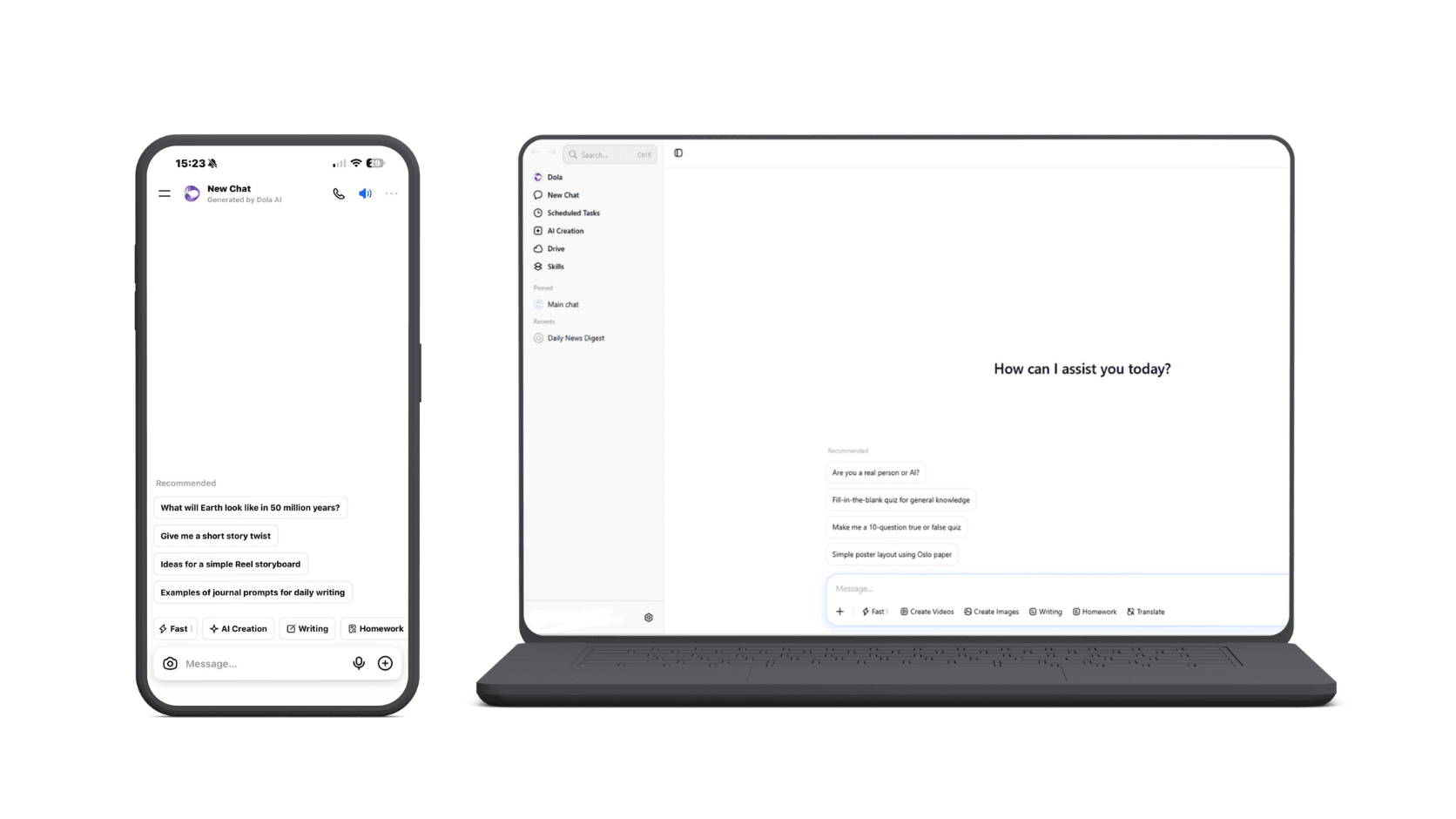
Dola is an all-in-one AI assistant designed to help users write, think, create, search, and manage everyday tasks from one app. It combines conversational AI with tools for work, study, creativity, and daily productivity.
Users can chat with Dola to brainstorm ideas, draft and polish content, summarize information, solve problems, research topics, generate visuals, and work with files or webpages. Dola also supports voice input, making it possible to interact with the assistant without typing every request.
The platform is designed around a simple assistant experience: tell Dola what you need, and let the AI help with the task. This makes it suitable for users who want one general-purpose AI assistant for everyday work, learning, and creative tasks.
Key capabilities of Dola AI
| Capability | What it helps with |
|---|---|
| AI Chat | Ask questions, brainstorm ideas, solve problems, and get everyday assistance |
| Writing | Draft and improve emails, reports, resumes, social posts, and other content |
| Research & Search | Search the web, summarize information, and explore topics |
| File & Webpage Analysis | Summarize and work with information from files and webpages |
| AI Image Generation | Turn ideas or photos into AI-generated visuals and different creative styles |
| Image Editing | Restyle or modify images through natural-language instructions |
| Voice Input | Interact with Dola using voice instead of typing |
| Everyday Productivity | Help with planning, recipes, language learning, meeting summaries, and other routine tasks |
Dola's current positioning therefore goes beyond a traditional chatbot. It combines AI assistance, content creation, search, and everyday productivity in a single application.
What Is 1min.AI?
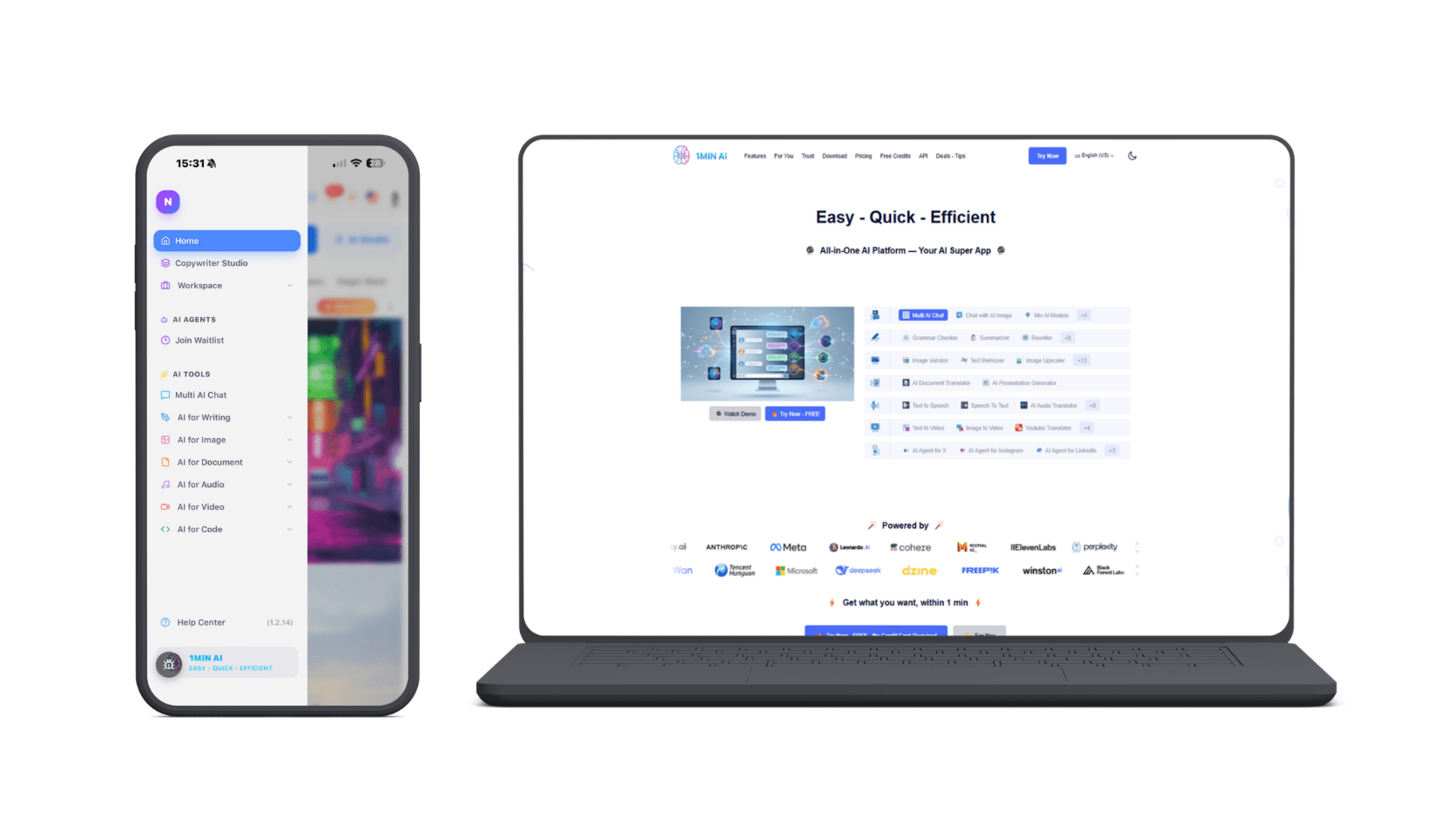
1min.AI is an all-in-one AI workspace that brings multiple AI models and AI-powered tools into one platform. Instead of relying on separate AI services for different tasks, users can access a wide range of models and capabilities from a single workspace.
The platform gives users access to 100+ AI models, including leading models from providers such as GPT, Claude, Gemini, DeepSeek, Grok, and Perplexity. Users can switch between models or compare multiple responses depending on the task.
Beyond AI chat, 1min.AI covers a broader production workflow. Its current feature set includes AI writing, keyword research, document tools, image generation and editing, audio tools, video generation, and AI Agents.
This makes 1min.AI less focused on being a single general-purpose assistant and more focused on giving users one workspace for different AI models, tools, and stages of a workflow.
Key capabilities of 1min.AI
| Capability | What it helps with |
|---|---|
| 100+ AI Models | Access and switch between multiple leading AI models in one workspace |
| Multi AI Chat | Compare responses from different models for research, writing, brainstorming, and other tasks |
| AI Writing | Generate, rewrite, expand, shorten, paraphrase, summarize, and improve content |
| SEO Tools | Research keywords and support SEO-focused content workflows |
| AI Documents | Chat with documents, translate files, and generate presentations |
| AI Image | Generate, edit, vary, upscale, and transform images |
| AI Audio | Convert text to speech, transcribe audio, translate, and generate audio |
| AI Video | Create videos from text or images and work with video-related tools |
| AI Agents | Automate tasks across platforms such as X, Instagram, LinkedIn, Facebook, and Threads |
| AI Workspace | Keep different AI capabilities within one connected environment |
The core idea behind 1min.AI is model choice and workflow consolidation: users can select different AI models for different tasks while continuing to work across writing, research, documents, images, audio, video, and automation in the same platform.
Dola AI vs 1min.AI: What Is the Difference?
The biggest difference is the way the two platforms approach AI workflows. Dola centers on an AI assistant experience, while 1min.AI is designed as a broader workspace combining multiple AI models and different content-production capabilities.
1min.AI currently brings together AI chat, writing, image, document, audio, video, and AI Agent capabilities. Its feature library also includes tools such as keyword research, rewriting, summarization, image-to-video, text-to-video, and document translation.
| Capability | Dola | 1min.AI |
|---|---|---|
| AI assistant/chat | Yes | Yes |
| Multiple AI models | Third-party services may be included | Core platform approach |
| AI writing | Yes | Yes |
| Document workflows | Available within the broader assistant experience | Dedicated AI Document tools |
| Image generation | Available in Dola's ecosystem | Dedicated AI Image tools |
| Video creation | Depends on the specific Dola-branded service | Dedicated AI Video tools |
| Keyword research | Not the core positioning | Yes |
| AI Agents | Not the core positioning | Yes |
| Content workflow | Assistant-led | Multi-model workspace |
| Model comparison | Not the primary workflow | Yes |
The practical distinction is simple: Dola is useful when you want an AI assistant; 1min.AI is designed for users who want an AI workspace.
1min.AI's Multi AI Chat allows users to test the same prompt across multiple AI models and compare their responses without repeatedly switching platforms. The platform currently highlights models including GPT-5, Gemini, Claude, DeepSeek, Grok, and others.
That makes the comparison especially relevant for content creators, marketers, researchers, and teams that regularly move between different AI tasks.
AI Video Generation Test: 1min.AI vs Dola AI
To compare the video-generation capabilities of 1min.AI and Dola AI, we used the same prompt and evaluated both outputs against the same criteria. The test focused on prompt adherence, character consistency, motion quality, camera movement, hand generation, lighting, and overall visual style.
The test prompt
Create a 5-second nostalgic home-video style shot of a young Japanese woman in a Japanese classroom, recording herself with a small handheld camcorder.
She looks into the camera, smiles naturally, briefly laughs, then moves slightly closer to the lens and makes a small spontaneous hand gesture. Her movement should feel casual and unscripted, like a candid moment captured by a friend rather than a staged performance.
The classroom has wooden desks, large windows, soft afternoon light, and gently moving curtains. A few students are visible in the background with natural depth of field.
Camera: handheld camcorder perspective, subtle natural camera shake, slightly imperfect framing, gentle camera movement, intimate close-up.
Visual style: nostalgic Japanese coming-of-age film, inspired by late-1990s to early-2000s home-video footage. Warm, slightly faded colors, soft highlights, moderate contrast, subtle film grain, mild analog texture, and natural skin tones. Keep the image realistic rather than heavily stylized.
Mood: youthful, warm, casual, nostalgic, and spontaneous.
Technical requirements: 5 seconds, 16:9, realistic human movement, consistent facial features, natural facial expressions, anatomically correct hands, stable background details, no text, no flickering, no major visual distortions, and no unnatural object changes.
Motion sequence:
- Look into the camera and smile.
- Briefly laugh.
- Move slightly closer to the lens.
- Make one small, natural hand gesture before the clip ends.
We used the same prompt to generate the videos in both tools.
1min.AI result
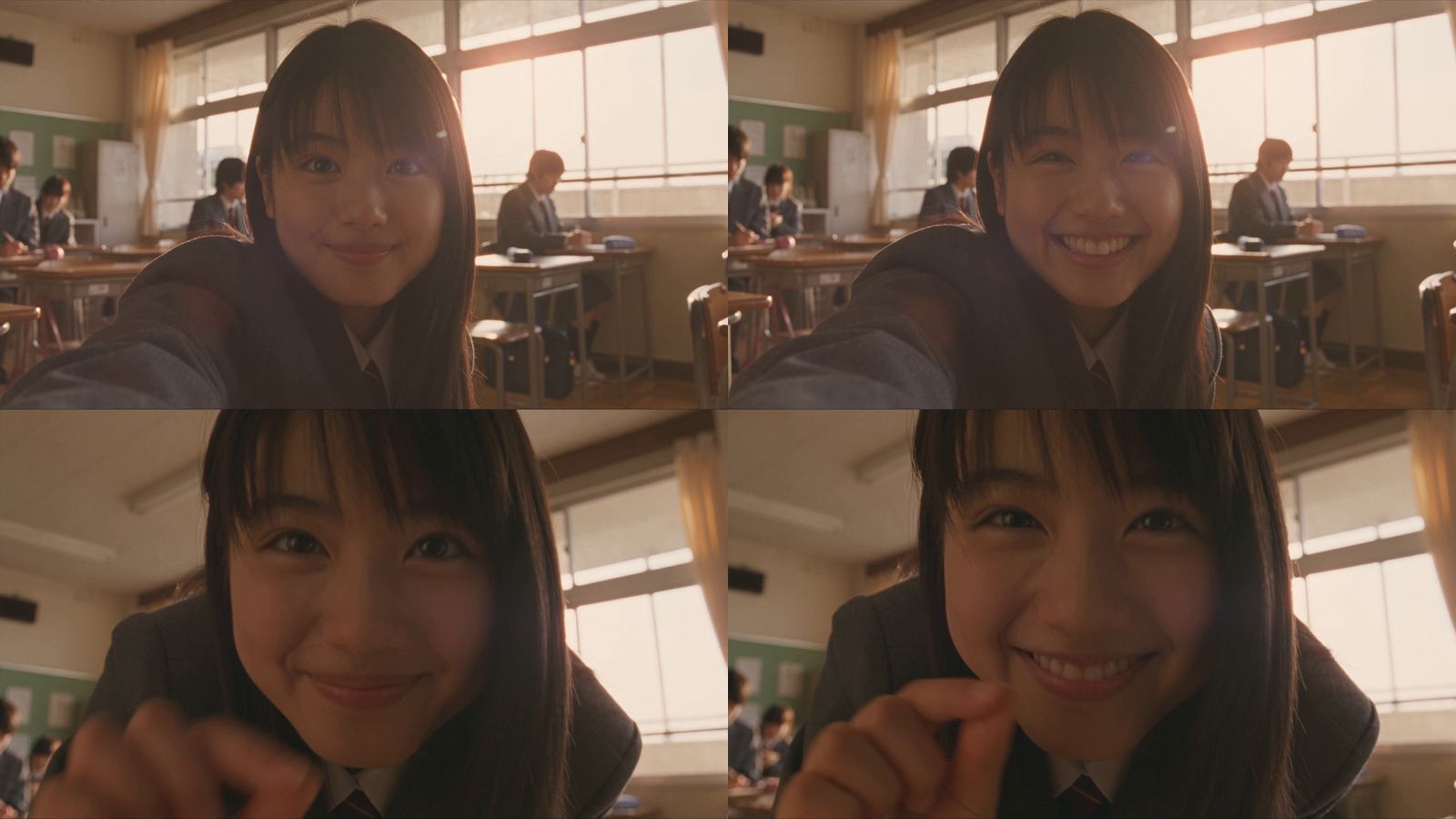
The 1min.AI output, generated with Seedance 2.5, followed most of the requested visual and motion details.
The character appears in a Japanese classroom with wooden desks and other students in the background. The main action sequence is also recognizable: she smiles at the camera, moves closer to the lens, and makes a small hand gesture near the end of the clip.
The facial expression remains relatively natural throughout the movement. Her facial features stay consistent as she approaches the camera, with no major morphing or noticeable distortion.
The video also captures the requested nostalgic Japanese home-video aesthetic. Warm, slightly faded colors, soft afternoon lighting, subtle highlights, and analog-style texture contribute to the late-1990s/early-2000s feeling described in the prompt.
The handheld camera movement is another strong point. The subtle shake and imperfect framing create a more convincing camcorder-like perspective rather than looking like a static digital camera with an artificial shake effect.
The hand gesture is also relatively well preserved. The fingers remain recognizable and the movement feels connected to the character's action rather than appearing as an isolated animation.
Overall, the output showed strong adherence to the combination of character action, camera direction, visual style, and atmosphere specified in the prompt.
Dola AI result
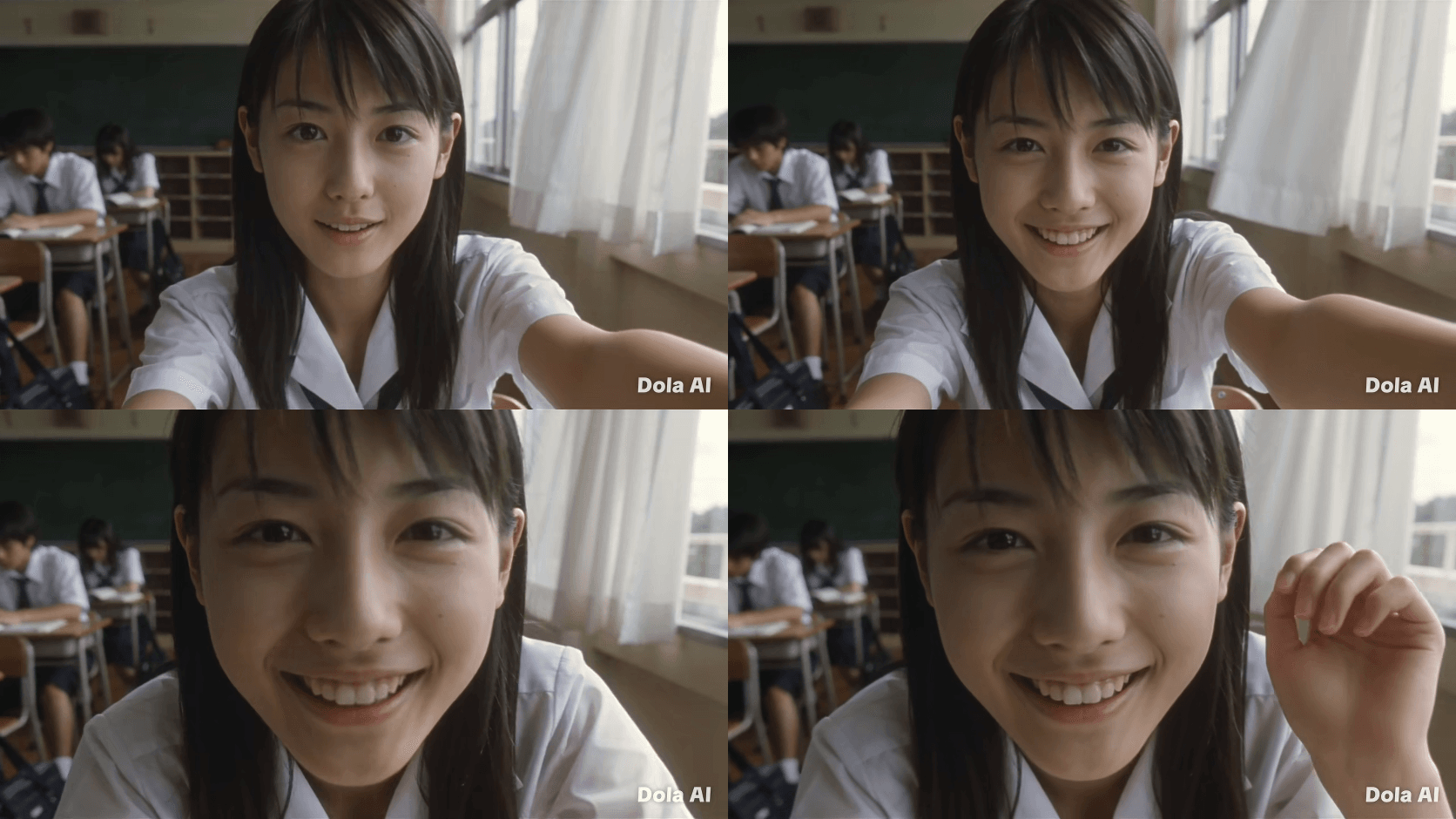
Dola AI also reproduced the basic scenario successfully. The output contains a young woman in a Japanese classroom, with students and classroom elements visible in the background.
The main character smiles and moves toward the camera, so the core action is present. However, some of the more specific creative instructions were less apparent in the final result.
The most noticeable difference is the visual treatment. Instead of the warm, faded late-1990s/early-2000s aesthetic requested in the prompt, the footage appears brighter and cooler. The lighting is more neutral and flatter, with less of the soft afternoon atmosphere and analog film texture described in the instructions.
The facial expression is also less natural in some moments. The smile and mouth movement appear somewhat stiff, creating a more noticeable artificial look.
The handheld camera effect is present, but the movement feels more mechanical and less organically connected to the character's movement.
The hand gesture near the end is another weaker area. The hand is visible, but the finger positioning appears more rigid and the gesture is less clearly defined than requested.
Side-by-side comparison
| Test factor | 1min.AI — Seedance 2.5 | Dola AI |
|---|---|---|
| Prompt adherence | Strong adherence to the main scene, action sequence, camera direction, and visual style | Captures the main scene and action, but misses some specific stylistic details |
| Facial expressions | Relatively natural smile and eye contact; facial features remain consistent | Smile and mouth movement appear somewhat stiff |
| Character consistency | Facial structure remains stable when moving closer to camera | Character remains recognizable, but expression quality is less consistent |
| Motion | Smooth transition between smiling, approaching the camera, and hand gesture | Basic movement is present but feels less natural |
| Hand generation | Hand and fingers remain relatively natural during the gesture | Hand appears more rigid and less clearly articulated |
| Camera movement | Subtle, natural handheld movement | Handheld effect is present but feels more mechanical |
| Lighting | Warm afternoon light with softer highlights | Brighter and cooler lighting with less depth |
| Color & texture | More closely matches the requested faded, nostalgic analog look | More modern digital appearance with weaker analog texture |
| Background | Classroom remains relatively stable during subject movement | Classroom setting is recognizable but visually less atmospheric |
| Overall style | Stronger match to the requested nostalgic home-video aesthetic | Basic aesthetic is present, but several style details are less pronounced |
What the test shows
This test demonstrates that AI video quality is not only about whether a model can generate the requested subject and environment. Detailed prompt adherence also matters, particularly when a prompt specifies a sequence of actions, camera behavior, lighting, color treatment, and visual texture.
In this particular test, 1min.AI's Seedance 2.5 output followed more of these specific instructions, especially in facial consistency, handheld camera movement, hand generation, lighting, and the nostalgic visual style.
Dola AI successfully reproduced the core concept, but showed more noticeable differences from the prompt in color grading, facial expression, hand movement, and camera behavior.
For creators comparing AI video tools, this provides a useful way to evaluate outputs beyond promotional examples: use the same prompt, identify specific visual requirements, and compare how consistently each tool translates those requirements into the final video.
Why Consider 1min.AI as a Dola AI Alternative?
The main reason to consider 1min.AI is its broader workflow rather than a single feature.
1min.AI combines multiple AI models and capabilities in one platform. Its current feature set covers AI chat, writing, images, documents, audio, video, and AI Agents.
Research and writing
Content production usually starts before the first image or video is generated.
1min.AI's Multi AI Chat lets you compare responses from different AI models within the same workspace. This can help when brainstorming topics, exploring different approaches, or testing how different models handle the same prompt.
Its writing tools also include keyword research, content generation, rewriting, summarization, paraphrasing, grammar checking, and other writing workflows.
For SEO-focused content teams, this creates a workflow that goes beyond simply asking an AI chatbot to write an article.
Images and visual content
Visual production is another area where workflows can become fragmented.
1min.AI includes image-generation and image-editing capabilities such as image variation, image upscaling, image-to-prompt, text removal, and other visual tools.
This can be useful when the same campaign requires both written and visual assets.
Instead of creating the copy in one tool and moving to a separate application for every visual task, you can continue working inside the same AI ecosystem.
Video creation
1min.AI also includes dedicated text-to-video and image-to-video capabilities.
This is particularly useful for workflows that begin with a static concept.
For example:
Article idea → Social post → Product image → Image-to-video → Caption
The goal is not to make every asset with one model. Different models can be used for different jobs.
That multi-model approach is central to 1min.AI's workflow. The platform is designed to let users choose among multiple AI models and capabilities instead of relying on one model for every task.
Social content and AI Agents
For teams producing content repeatedly, the workflow does not end when an asset is generated.
1min.AI also offers AI Agent capabilities for social platforms, alongside its broader AI workflow tools.
This makes the platform relevant to workflows that involve recurring content creation rather than one-off AI experiments.
The difference can be summarized as:
Dola: Ask an AI assistant to help with a task.
1min.AI: Combine models and AI capabilities to build a repeatable workflow around that task.
Which Tool Fits Your Workflow?
There is no single AI workflow that works for everyone. The more useful question is what you need the platform to do.
| If you need... | Consider the workflow |
|---|---|
| An everyday AI assistant | Dola's assistant experience |
| Quick conversational help | Dola |
| Multi-model AI comparison | 1min.AI |
| SEO and keyword workflows | 1min.AI |
| Writing and rewriting tools | Both, with different workflows |
| Image generation and editing | Compare the specific features you need |
| AI video generation | Verify which Dola service you mean, then compare |
| Multiple content formats | 1min.AI |
| AI Agents and repeatable workflows | 1min.AI |
Dola can make sense when your primary need is an AI assistant for everyday tasks.
A Dola AI alternative becomes more relevant when your workflow extends into multiple content formats, AI models, research, SEO, images, video, and repeatable production processes.
For those workflows, 1min.AI provides a broader environment where different AI capabilities can be connected within one workspace.
FAQ
What is Dola AI?
Dola is an AI assistant provided by SPRING (SG) PTE. LTD. It is designed to help users with everyday AI-assisted tasks through its service and applications.
Is Dola AI free?
Some Dola services offer free access or free credits, but the exact limits depend on which Dola product you are using. The independent Dola AI video generator, for example, advertises free daily credits.
Is Dola AI a video generator?
This depends on which Dola product you mean. There is a separate service called Dola AI Video Generator that provides text-to-video and image-to-video generation. It should not automatically be treated as the same product as the official Dola AI assistant.
Is Dola AI safe to use?
Dola's terms provide information about how user input and output are handled and advise users not to submit sensitive personal or confidential information. Dola also states that AI output can be inaccurate and should be reviewed before use.
What is a good Dola AI alternative?
The right alternative depends on your workflow. If you need multi-model AI, writing, research, image generation, video creation, documents, and AI Agents in one workspace, 1min.AI is designed around that broader use case.
Conclusion
A Dola AI alternative is worth considering when an AI assistant is no longer enough for the way you work.
Dola focuses on an assistant-led experience, while 1min.AI brings multiple AI models and content-production capabilities into one workspace. That difference matters when your workflow moves from a simple prompt to research, writing, visuals, video, and repeatable content production.
If you want to explore a multi-model AI workspace, try 1min.AI and see how it fits into your workflow.
Alternatives
Discover the best alternatives to 1minAI and compare features, pricing, and use cases.

1min.AI vs OpenRouter
1min.AI vs. OpenRouter: Compare the ready-to-use AI creation product against the technical API tool. Find out if you need a zero-code creative studio or a coding infrastructure hub.
 Ngoc Hong
1min.AI vs Lovart
Compare 1min.AI vs Lovart across features, pricing, credits, brand tools, and use cases to find the right AI platform for your workflow.
Ngoc Hong1min. AI vs Dola AI
Looking for a Dola AI alternative? Compare 1min.AI vs Dola AI on video generation, free plans, pricing and privacy to pick the right AI app.
Ngoc HongAI Tools
Discover the best AI tools to boost productivity, creativity, and everyday work.

Create Consistent Cartoon Content in Just a Few Steps
Create engaging cartoon videos for TikTok and Reels with 1min.AI. Research ideas, create characters, and turn images into animated videos in 3 simple steps.
 Lien Anh Vu
One Product, 10 UGC Creatives: How AI Makes Content Testing Easier
Create more authentic UGC with an AI UGC video generator, test more creative angles and scale affiliate content without filming every version.
Lien Anh Vu
Top 4 Affordable AI Tools for Startup Founders
Discover the top 4 affordable AI tools for startup founders to validate ideas, build products, create content, and launch faster without overspending.
 Tram Ta
AI Features
Comprehensive AI features that streamline workflows, improve efficiency, and empower teams to achieve more.
Create Consistent Cartoon Content in Just a Few Steps
Create engaging cartoon videos for TikTok and Reels with 1min.AI. Research ideas, create characters, and turn images into animated videos in 3 simple steps.
Lien Anh VuOne Product, 10 UGC Creatives: How AI Makes Content Testing Easier
Create more authentic UGC with an AI UGC video generator, test more creative angles and scale affiliate content without filming every version.
Lien Anh Vu
1minAI: Free AI Grammar Checker
Check grammar for free with 1minAI’s AI grammar checker. Find grammar, spelling, and writing mistakes, improve clarity, and polish your content in seconds.
Tram TaAI Use Cases
A curated collection of AI use cases for business, productivity, and industry-specific applications.
Create Consistent Cartoon Content in Just a Few Steps
Create engaging cartoon videos for TikTok and Reels with 1min.AI. Research ideas, create characters, and turn images into animated videos in 3 simple steps.
Lien Anh VuOne Product, 10 UGC Creatives: How AI Makes Content Testing Easier
Create more authentic UGC with an AI UGC video generator, test more creative angles and scale affiliate content without filming every version.
Lien Anh Vu
Best Time to Post on Instagram: A Practical Guide for Better Engagement
Discover the best time to post on Instagram, including the best days and times for different audiences, plus tips to find the ideal posting schedule for your account.
Tram TaAI Tutorials
Learn how to use AI with practical, step-by-step tutorials.
Create Consistent Cartoon Content in Just a Few Steps
Create engaging cartoon videos for TikTok and Reels with 1min.AI. Research ideas, create characters, and turn images into animated videos in 3 simple steps.
Lien Anh Vu
Black Friday AI Tool Deals in 2026
Discover what Black Friday AI tool deals 2026 has to offer. Find out how to secure the 1min.AI lifetime deal via AppSumo, Dealify, Stack Social, and verify on Trustpilot, Slashdot, and Software Advice.
 Hang Nguyen
[Seedance 2.5 New] Better AI Product Videos, Less Rework in 1min.AI
Use Seedance 2.5 image to video on 1min.AI to create more consistent AI product videos, reduce failed generations, save credits, and improve UGC workflows.
Lien Anh VuAI Guides
Learn AI faster with practical guides, real-world examples, and actionable best practices.
Create Consistent Cartoon Content in Just a Few Steps
Create engaging cartoon videos for TikTok and Reels with 1min.AI. Research ideas, create characters, and turn images into animated videos in 3 simple steps.
Lien Anh Vu
Safely Buy AI Tools Online: 2026 Black Friday Guide
Discover how to find and secure the best Black Friday AI deals online. Learn expert strategies to avoid scams, combat subscription fatigue, and verify software.
Hang Nguyen[Seedance 2.5 New] Better AI Product Videos, Less Rework in 1min.AI
Use Seedance 2.5 image to video on 1min.AI to create more consistent AI product videos, reduce failed generations, save credits, and improve UGC workflows.
Lien Anh VuAI Solutions
Browse the best AI solutions for automation, coding, research, productivity, customer support, marketing, and business workflows.
Create Consistent Cartoon Content in Just a Few Steps
Create engaging cartoon videos for TikTok and Reels with 1min.AI. Research ideas, create characters, and turn images into animated videos in 3 simple steps.
Lien Anh VuOne Product, 10 UGC Creatives: How AI Makes Content Testing Easier
Create more authentic UGC with an AI UGC video generator, test more creative angles and scale affiliate content without filming every version.
Lien Anh Vu
Free AI Tattoo Generator: Custom Designs
Turn any idea into a custom tattoo design with 1min.AI's free AI tattoo generator. Describe your idea, pick a style, and download in seconds.
 Trang Tran
AI Models
Explore the world's leading AI models in one place.
Create Consistent Cartoon Content in Just a Few Steps
Create engaging cartoon videos for TikTok and Reels with 1min.AI. Research ideas, create characters, and turn images into animated videos in 3 simple steps.
Lien Anh VuOne Product, 10 UGC Creatives: How AI Makes Content Testing Easier
Create more authentic UGC with an AI UGC video generator, test more creative angles and scale affiliate content without filming every version.
Lien Anh Vu[Seedance 2.5 New] Better AI Product Videos, Less Rework in 1min.AI
Use Seedance 2.5 image to video on 1min.AI to create more consistent AI product videos, reduce failed generations, save credits, and improve UGC workflows.
Lien Anh VuAI Comparisons
Compare AI tools, models, and platforms to find the best fit for your needs.

Kling AI Vs Veo 3: Which Model Wins?
Kling AI vs Veo 3: compare motion, native audio, pricing & free tiers to see which AI video generator wins for your project - try both on 1min.AI.
Trang Tran[Seedance 2.5 New] Better AI Product Videos, Less Rework in 1min.AI
Use Seedance 2.5 image to video on 1min.AI to create more consistent AI product videos, reduce failed generations, save credits, and improve UGC workflows.
Lien Anh Vu
DeepSeek V4 Pro vs Flash Comparison
Compare DeepSeek V4 Pro vs DeepSeek V4 Flash metrics. Optimize your agentic apps and improve AI fact checking on 1min.ai today.
Ngoc HongAI Integrations
Seamlessly integrate AI with the tools you already use to automate work and boost productivity.

POV: You Have 10+ Posts to Make Every Day
Learn how to build an AI content workflow that helps content creators produce 10+ social media posts a day faster with AI brainstorming, image generation, and content creation.
Lien Anh Vu
How to Use an AI Fashion Video Generator for Fashion Week 2026
Turn Fashion Week 2026 ideas into stunning fashion videos with AI. Learn how to brainstorm, create visuals, and transform images into videos with one simple workflow.
Lien Anh Vu
Stop Switching Between AI Apps: How AI Integration Transforms Employer Branding
Discover how AI integration helps HR teams streamline employer branding by combining AI writing, documents, images, video, and multiple AI models into one workspace.
Tram TaAI for Industries
Find the best AI tools and workflows for healthcare, finance, education, legal, manufacturing, retail, real estate, and more

Free AI Image Generator For Ecommerce
Turn phone photos into studio, white-background, and lifestyle product images. Try the best AI image generator for ecommerce online free with 1min.AI.
Trang Tran
Free Property Management Email Templates
Free property management email templates for tenants and owners: rent reminders, renewals, maintenance updates. Copy, customize, and send in minutes.
Trang Tran
Free AI Virtual Staging: Furnish Any Room
Stage any real estate listing with AI virtual staging: upload a photo, pick a style, and get a photorealistic furnished room in seconds, free to try.
Trang TranAI Agents
Discover and run AI agents to automate tasks across your work and daily life.
1minAI: Free AI Grammar Checker
Check grammar for free with 1minAI’s AI grammar checker. Find grammar, spelling, and writing mistakes, improve clarity, and polish your content in seconds.
Tram Ta
AI Agents for Facebook
Use an AI Agent for Facebook to create content, generate images, schedule posts, and publish from your documents and conversations.
Ngoc Hong
AI Agent vs AI Assistant: Which One Actually Saves Designers More Time?
Learn the difference between AI Agent vs AI Assistant and discover which solution helps designers automate repetitive work, reduce revisions, and save more time.
Lien Anh VuAI Workflows
Explore ready-to-use AI workflows for productivity, marketing, sales, support, and more.
Create Consistent Cartoon Content in Just a Few Steps
Create engaging cartoon videos for TikTok and Reels with 1min.AI. Research ideas, create characters, and turn images into animated videos in 3 simple steps.
Lien Anh VuOne Product, 10 UGC Creatives: How AI Makes Content Testing Easier
Create more authentic UGC with an AI UGC video generator, test more creative angles and scale affiliate content without filming every version.
Lien Anh VuPOV: You Have 10+ Posts to Make Every Day
Learn how to build an AI content workflow that helps content creators produce 10+ social media posts a day faster with AI brainstorming, image generation, and content creation.
Lien Anh VuNewsletter
Weekly AI Innovations with 1minAI

🔮 Weekly AI Innovations #139: Dawn of the next-gen AI
Discover the immense power of GPT-6 Astra and Claude Fable 5.1. Unlock next-generation AI models on 1min.ai to solve complex tasks effortlessly.
Hang Nguyen
🔮 Weekly AI Innovations #138: Claude Sonnet 5, Fable 5 & Wan 2.7
Explode your creative potential with massive 1min.ai updates! Access Claude Sonnet 5, Fable 5, and Alibaba Wan 2.7 for unmatched multi-modal generation today.
Hang Nguyen
🔮 Weekly AI Innovations #137: ElevenLabs Music & AI social Profile Control
The newest 1min.ai updates deliver professional music generation and highly requested privacy tools. Dive into a seamless workflow today!
Hang Nguyen