
1min.AI vs ContentIn

Trang Tran
October 29, 2026
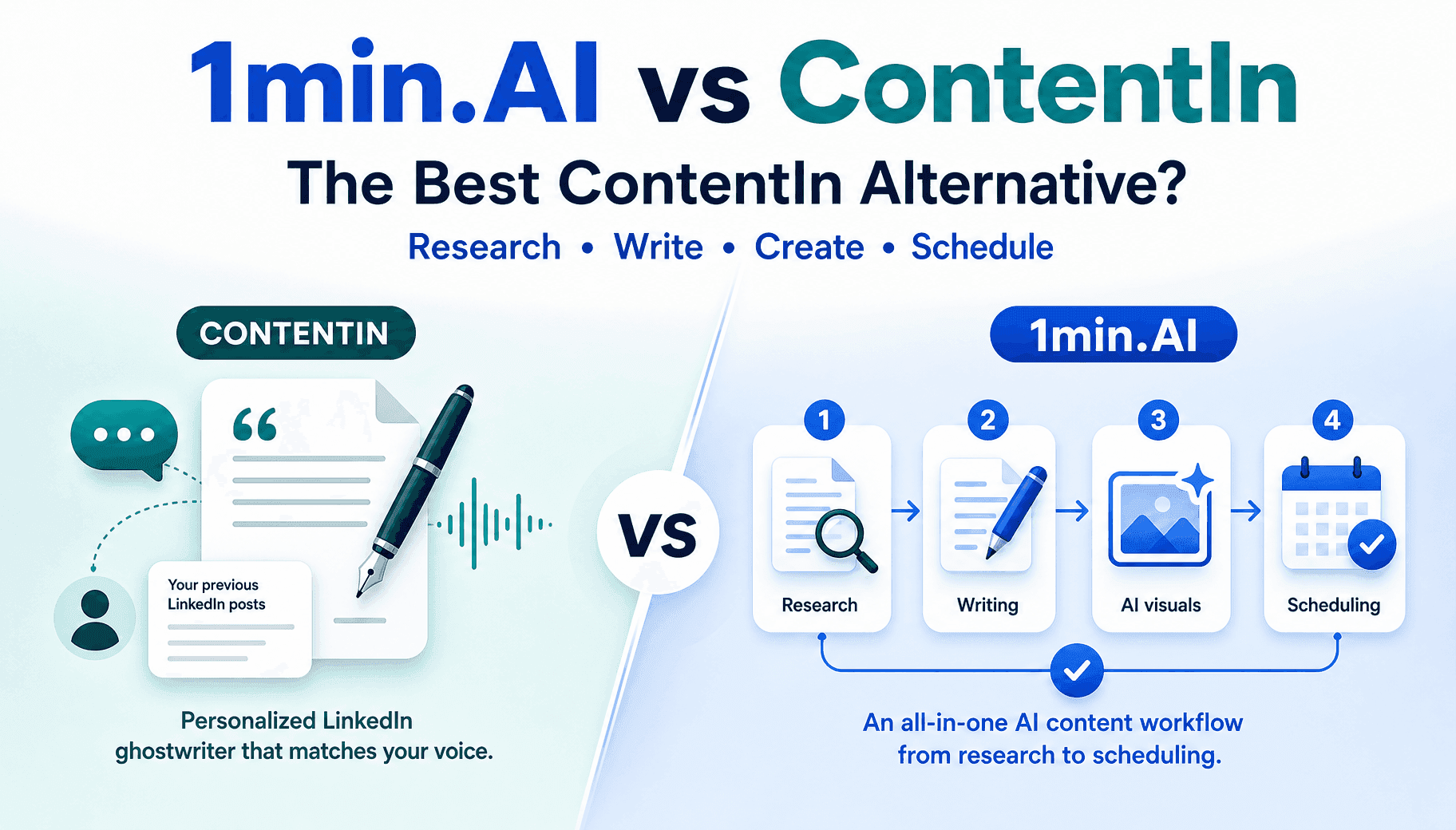
Need a ContentIn alternative? Compare 1min.AI vs ContentIn on price, AI models, images and scheduling to post on LinkedIn without juggling tools.
1min.AI is a strong ContentIn alternative for professionals who want research, LinkedIn copywriting, AI images and scheduling in one workspace. ContentIn is the better pick if you want a ghostwriter trained on your own past posts. ContentIn costs $31 to $59 per month billed annually with no free plan, while the 1min.AI LinkedIn Agent runs on a flexible credit pool.
Best ContentIn Alternative at a Glance
| ContentIn | 1min.AI | |
|---|---|---|
| Best for | Founders and coaches who want a voice-matched ghostwriter | Marketers, founders and teams who want research, copy, visuals and publishing in one flow |
| Entry price | $39/mo, or $31/mo billed annually | Credit-based plans, plus free daily credits |
| Free option | No free plan, 7-day trial with card | 15,000 free credits for each daily login |
| Writing approach | Voice model trained on your past posts | Researched posts built on LinkedIn-specific copy recipes |
| Research | Post ideas from any URL | Links, PDFs and brand decks turned into verifiable insights |
| Images | AI images, carousels, quote cards | Graphics generated from the message of each post |
| Publishing | Official LinkedIn API, weekly planning | OAuth connection, run once or recurring schedules |
| Platforms | Web | Web, macOS, Windows, iOS, Android, Chrome extension |
What Is ContentIn?
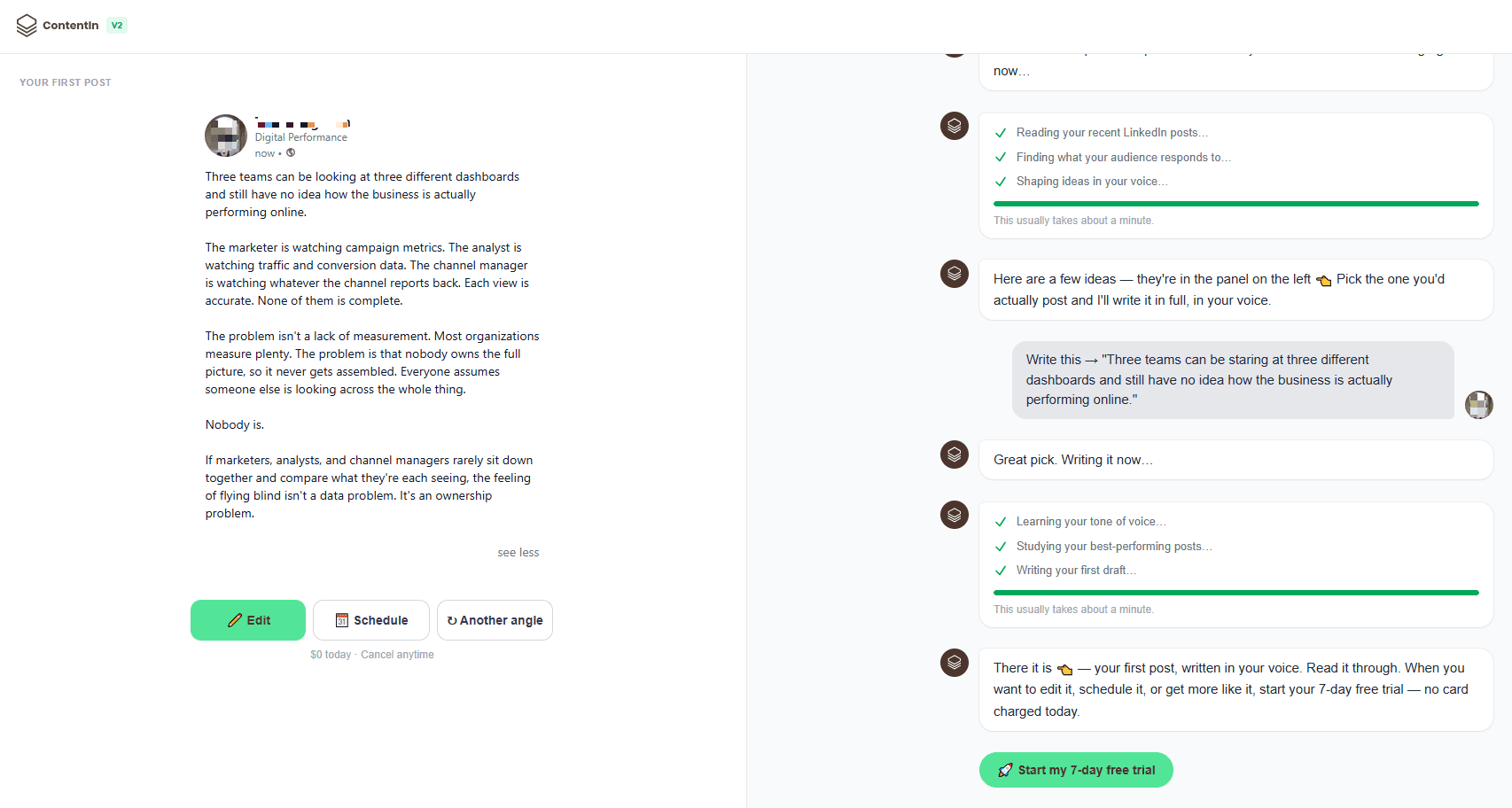
ContentIn is an AI ghostwriter built only for LinkedIn. It reads your profile and past posts, runs a 10-minute interview to build a knowledge base, then drafts a week of posts that you edit and schedule through LinkedIn’s official API. It is popular with founders, coaches and consultants. Capterra lists 82 verified user reviews for it, and G2 shows a 4.5 average from 5 reviews.
ContentIn Pricing: Growth vs Pro
- Growth: $39 per month, or $31 per month billed annually. One personal profile, 2 planned posts a week and unlimited drafts.
- Pro: $59 per month, or $48 per month billed annually. 3 planned posts a week, company pages, leads analytics and a Telegram bot.
- Agency: custom pricing for multiple profiles and team seats.
- Trial: no free plan, and the 7-day trial requires a card.
ContentIn Pros and Cons
- Pro: a voice model trained on your own post history.
- Pro: official API publishing, so no password sharing.
- Pro: guided onboarding and a weekly planning routine.
- Con: it works only on LinkedIn.
- Con: Growth has monthly caps on images, carousels and ideas.
- Con: reviewers say drafts can need manual refinement to avoid sounding formulaic.
- Con: analytics can feel basic next to dedicated social tools.
Why Professionals Look for a ContentIn Alternative
Most switchers raise the same three issues:
- A narrow scope: A single-platform tool means a separate stack for research, design and any other channel.
- Subscription cost without a free tier: You pay before you know whether the voice-matching fits.
- Editing time: If every draft still needs a rewrite, the time savings shrink.
How 1min.AI Works as a ContentIn Alternative
The 1min.AI LinkedIn Agent replaces the usual ChatGPT, image generator, design tool and scheduler stack with one pipeline. It runs on models from OpenAI, Anthropic and Google, plus leading image models. 1min.AI is trusted by 100,000+ users and rated 4.6/5 on Trustpilot and G2. It has also earned SourceForge and Slashdot Top Business Software badges.
The 4-Step LinkedIn Content Workflow
Step 1: Gather Information With Deep Research
Add web links, PDFs, reports or brand decks, or just type a topic. The agent sorts findings into core concepts, data points and credible references. One whitepaper can yield several angles, enough for a full week of posts.
Step 2: Write LinkedIn Posts With B2B Copy Recipes
The agent uses prompt recipes built for LinkedIn’s feed. You get a two-line hook, readable spacing, an actionable framework and an open-ended comment prompt, without generic openers.
Step 3: Generate Contextual AI Images
Visual prompts come from the post itself, so you avoid disconnected stock photos. Text on banners stays readable.
Step 4: Publish or Schedule Directly
Connect a personal profile or company page through secure OAuth, which takes under 30 seconds. Then choose no schedule (save drafts), run once at a chosen time, or recurring (daily or weekly).
Step Caching: Pay Only for the Edit You Make
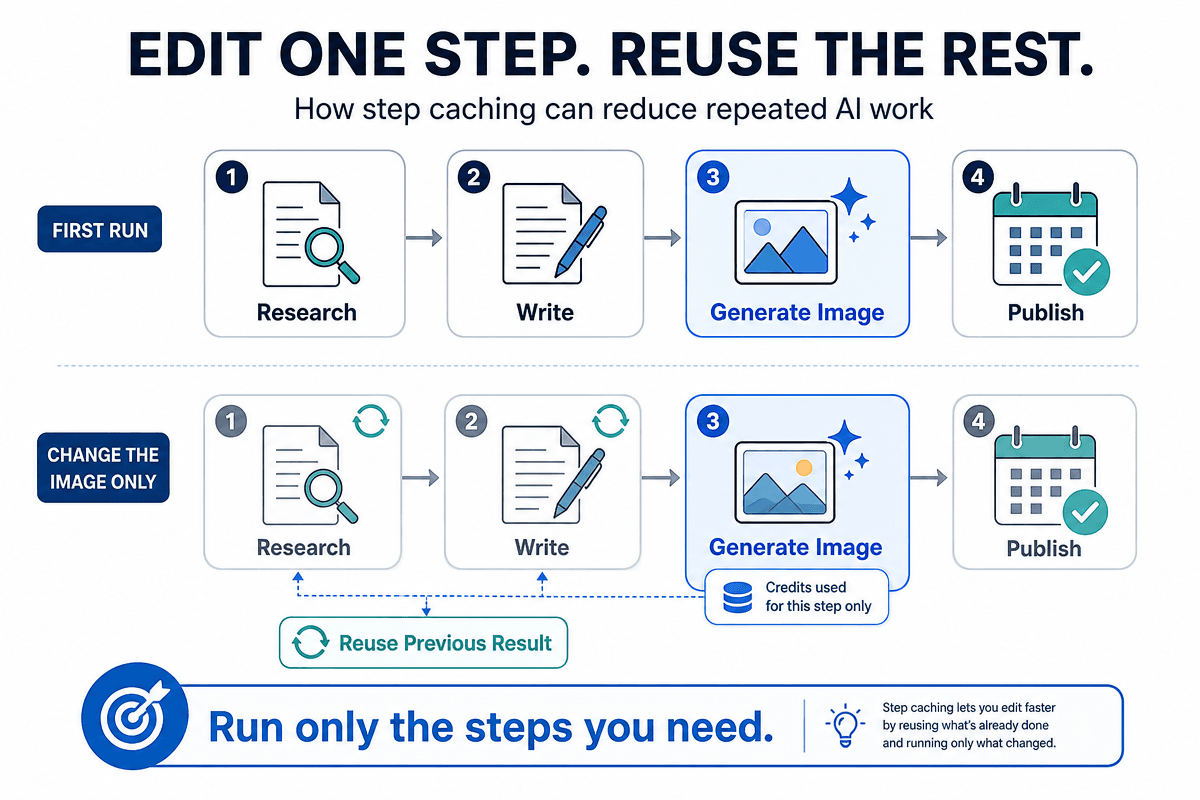
In many multi-step tools, changing one image reruns research and writing too. 1min.AI caches each step. Turn on Reuse Previous Result, and a new graphic or a refined paragraph costs credits only for that edit. You can also run a single step, run up to a step, or resume from a midpoint. Status labels such as Need action and Waiting show where your review is needed.
One Workspace for Social Media Management
Executed History records every published and scheduled post, which helps you avoid duplicate topics across accounts. If you plan to automate more than LinkedIn, read how an AI agent for social media management fits into the same workflow.
1min.AI vs ContentIn Pricing
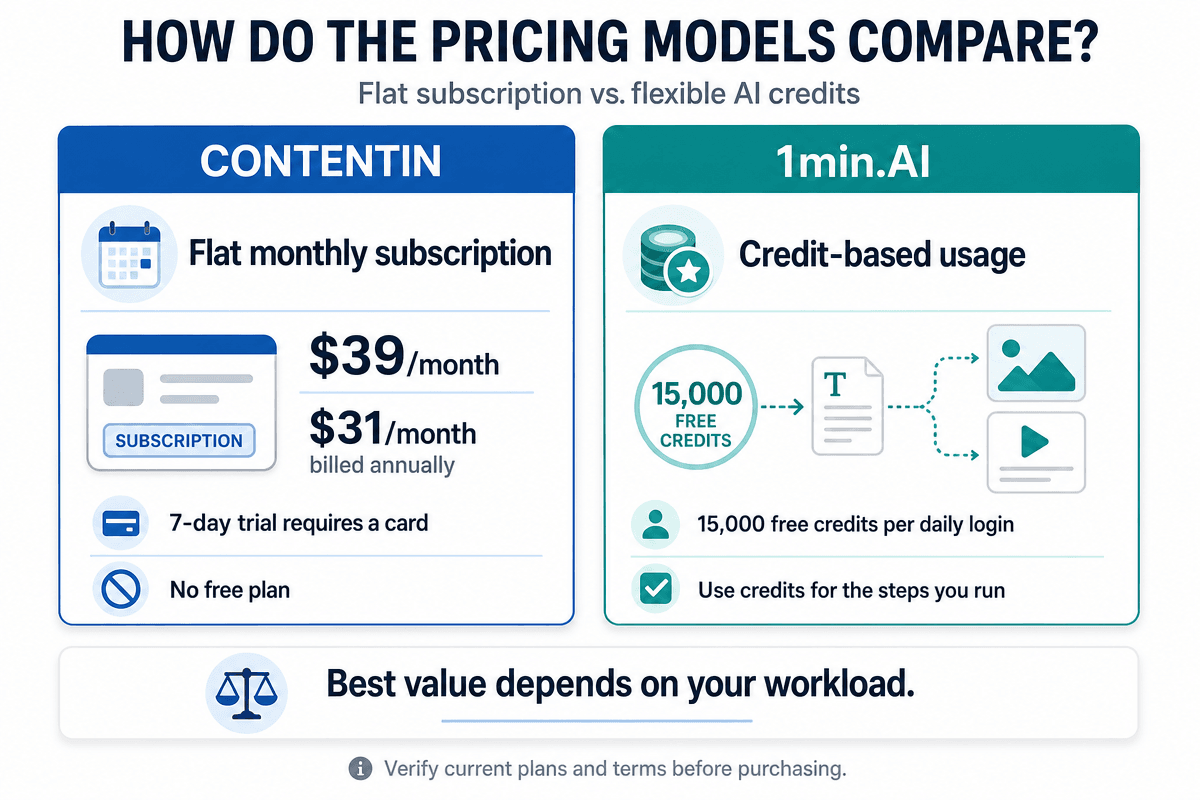
ContentIn charges a flat fee per tier. 1min.AI works differently: you spend credits, and you only pay for the work you run.
- Included volume: one monthly plan includes 1,000,000 credits, which 1min.AI estimates at 250+ researched posts and 150+ LinkedIn-sized graphics.
- Free credits: 15,000 credits for each daily login, up to 450,000 a month, plus referral and review bonuses.
- Stack savings: 1min.AI estimates that separate ChatGPT, image, design and scheduler subscriptions cost $80 to $150 per month.
- Plan details: see the current 1min.AI credit plans before you decide.
Which is cheaper? It depends on your volume. At 2 to 3 posts a week, ContentIn’s flat price is predictable. If you also create images, repurpose research or use several AI models, one credit pool can cost less than separate subscriptions.
Which Tool Should You Choose?
Choose ContentIn If
- Your top priority is a voice model trained on your own post history.
- You only publish on LinkedIn and want a guided weekly ritual.
- You prefer flat monthly pricing.
Choose 1min.AI If
- You want research, copywriting, visuals and publishing in one pipeline.
- You want free credits to test before you commit.
- You work across devices, including mobile apps and a Chrome extension.
- You want to cut wasted spend through step caching.
Frequently Asked Questions
What is the best ContentIn alternative?
It depends on your goal. 1min.AI suits users who want research, writing, images and publishing in one workspace. Other LinkedIn-only tools suit users who only want a post writer.
Does ContentIn have a free plan?
No. ContentIn offers a 7-day free trial that requires a card. A free post generator on its site lets you preview a draft first.
Is 1min.AI cheaper than ContentIn?
It can be, depending on use. ContentIn starts at $31 per month on annual billing. 1min.AI uses credits and adds free daily credits, so light users can start without paying upfront.
Does 1min.AI publish directly to LinkedIn?
Yes. It connects to a personal profile or company page through secure OAuth, so you publish without downloading files or copying text.
Can 1min.AI write in my voice?
ContentIn’s headline feature is a voice model trained on your post history. The 1min.AI LinkedIn Agent relies instead on grounded research and LinkedIn-specific copy recipes. Edit drafts to add your own stories and details.
Ready to Switch From ContentIn?
Turn one source document into a week of LinkedIn posts, images and scheduled publishing.
- #Transaction
Alternatives
Discover the best alternatives to 1minAI and compare features, pricing, and use cases.

1min.AI vs OpenRouter
1min.AI vs. OpenRouter: Compare the ready-to-use AI creation product against the technical API tool. Find out if you need a zero-code creative studio or a coding infrastructure hub.
 Ngoc Hong
1min.AI vs ContentIn
Need a ContentIn alternative? Compare 1min.AI vs ContentIn on price, AI models, images and scheduling to post on LinkedIn without juggling tools.
 Trang Tran
1min.AI vs MagicPost
Best MagicPost alternative? Compare 1min.AI vs MagicPost on pricing, features and LinkedIn safety, with free credits and Reddit-style questions answered.
Trang TranAI Tools
Discover the best AI tools to boost productivity, creativity, and everyday work.

Create Consistent Cartoon Content in Just a Few Steps
Create engaging cartoon videos for TikTok and Reels with 1min.AI. Research ideas, create characters, and turn images into animated videos in 3 simple steps.
 Lien Anh Vu
One Product, 10 UGC Creatives: How AI Makes Content Testing Easier
Create more authentic UGC with an AI UGC video generator, test more creative angles and scale affiliate content without filming every version.
Lien Anh Vu
Top 4 Affordable AI Tools for Startup Founders
Discover the top 4 affordable AI tools for startup founders to validate ideas, build products, create content, and launch faster without overspending.
 Tram Ta
AI Features
Comprehensive AI features that streamline workflows, improve efficiency, and empower teams to achieve more.
Create Consistent Cartoon Content in Just a Few Steps
Create engaging cartoon videos for TikTok and Reels with 1min.AI. Research ideas, create characters, and turn images into animated videos in 3 simple steps.
Lien Anh VuOne Product, 10 UGC Creatives: How AI Makes Content Testing Easier
Create more authentic UGC with an AI UGC video generator, test more creative angles and scale affiliate content without filming every version.
Lien Anh Vu
1minAI: Free AI Grammar Checker
Check grammar for free with 1minAI’s AI grammar checker. Find grammar, spelling, and writing mistakes, improve clarity, and polish your content in seconds.
Tram TaAI Use Cases
A curated collection of AI use cases for business, productivity, and industry-specific applications.
Create Consistent Cartoon Content in Just a Few Steps
Create engaging cartoon videos for TikTok and Reels with 1min.AI. Research ideas, create characters, and turn images into animated videos in 3 simple steps.
Lien Anh VuOne Product, 10 UGC Creatives: How AI Makes Content Testing Easier
Create more authentic UGC with an AI UGC video generator, test more creative angles and scale affiliate content without filming every version.
Lien Anh Vu
Best Time to Post on Instagram: A Practical Guide for Better Engagement
Discover the best time to post on Instagram, including the best days and times for different audiences, plus tips to find the ideal posting schedule for your account.
Tram TaAI Tutorials
Learn how to use AI with practical, step-by-step tutorials.

Black Friday AI Tool Deals in 2026
Discover what Black Friday AI tool deals 2026 has to offer. Find out how to secure the 1min.AI lifetime deal via AppSumo, Dealify, Stack Social, and verify on Trustpilot, Slashdot, and Software Advice.
 Hang Nguyen
Create Consistent Cartoon Content in Just a Few Steps
Create engaging cartoon videos for TikTok and Reels with 1min.AI. Research ideas, create characters, and turn images into animated videos in 3 simple steps.
Lien Anh Vu
[Seedance 2.5 New] Better AI Product Videos, Less Rework in 1min.AI
Use Seedance 2.5 image to video on 1min.AI to create more consistent AI product videos, reduce failed generations, save credits, and improve UGC workflows.
Lien Anh VuAI Guides
Learn AI faster with practical guides, real-world examples, and actionable best practices.

Safely Buy AI Tools Online: 2026 Black Friday Guide
Discover how to find and secure the best Black Friday AI deals online. Learn expert strategies to avoid scams, combat subscription fatigue, and verify software.
Hang NguyenCreate Consistent Cartoon Content in Just a Few Steps
Create engaging cartoon videos for TikTok and Reels with 1min.AI. Research ideas, create characters, and turn images into animated videos in 3 simple steps.
Lien Anh Vu[Seedance 2.5 New] Better AI Product Videos, Less Rework in 1min.AI
Use Seedance 2.5 image to video on 1min.AI to create more consistent AI product videos, reduce failed generations, save credits, and improve UGC workflows.
Lien Anh VuAI Solutions
Browse the best AI solutions for automation, coding, research, productivity, customer support, marketing, and business workflows.
Safely Buy AI Tools Online: 2026 Black Friday Guide
Discover how to find and secure the best Black Friday AI deals online. Learn expert strategies to avoid scams, combat subscription fatigue, and verify software.
Hang NguyenCreate Consistent Cartoon Content in Just a Few Steps
Create engaging cartoon videos for TikTok and Reels with 1min.AI. Research ideas, create characters, and turn images into animated videos in 3 simple steps.
Lien Anh VuOne Product, 10 UGC Creatives: How AI Makes Content Testing Easier
Create more authentic UGC with an AI UGC video generator, test more creative angles and scale affiliate content without filming every version.
Lien Anh VuAI Models
Explore the world's leading AI models in one place.
Create Consistent Cartoon Content in Just a Few Steps
Create engaging cartoon videos for TikTok and Reels with 1min.AI. Research ideas, create characters, and turn images into animated videos in 3 simple steps.
Lien Anh VuOne Product, 10 UGC Creatives: How AI Makes Content Testing Easier
Create more authentic UGC with an AI UGC video generator, test more creative angles and scale affiliate content without filming every version.
Lien Anh Vu[Seedance 2.5 New] Better AI Product Videos, Less Rework in 1min.AI
Use Seedance 2.5 image to video on 1min.AI to create more consistent AI product videos, reduce failed generations, save credits, and improve UGC workflows.
Lien Anh VuAI Comparisons
Compare AI tools, models, and platforms to find the best fit for your needs.

Kling AI Vs Veo 3: Which Model Wins?
Kling AI vs Veo 3: compare motion, native audio, pricing & free tiers to see which AI video generator wins for your project - try both on 1min.AI.
Trang Tran[Seedance 2.5 New] Better AI Product Videos, Less Rework in 1min.AI
Use Seedance 2.5 image to video on 1min.AI to create more consistent AI product videos, reduce failed generations, save credits, and improve UGC workflows.
Lien Anh Vu
DeepSeek V4 Pro vs Flash Comparison
Compare DeepSeek V4 Pro vs DeepSeek V4 Flash metrics. Optimize your agentic apps and improve AI fact checking on 1min.ai today.
Ngoc HongAI Integrations
Seamlessly integrate AI with the tools you already use to automate work and boost productivity.

POV: You Have 10+ Posts to Make Every Day
Learn how to build an AI content workflow that helps content creators produce 10+ social media posts a day faster with AI brainstorming, image generation, and content creation.
Lien Anh Vu
How to Use an AI Fashion Video Generator for Fashion Week 2026
Turn Fashion Week 2026 ideas into stunning fashion videos with AI. Learn how to brainstorm, create visuals, and transform images into videos with one simple workflow.
Lien Anh Vu
Stop Switching Between AI Apps: How AI Integration Transforms Employer Branding
Discover how AI integration helps HR teams streamline employer branding by combining AI writing, documents, images, video, and multiple AI models into one workspace.
Tram TaAI for Industries
Find the best AI tools and workflows for healthcare, finance, education, legal, manufacturing, retail, real estate, and more

Free AI Product Description Generator
Write product descriptions that sell in minutes. Use this free AI product description generator to turn details or a photo into on-brand copy. Try 1min.AI.
Trang Tran
Best Business Productivity Tools for Startups to Maximize Profits | 1minAI
Discover the best business productivity tools for startups to save time, streamline workflows, reduce repetitive tasks, and support profitable growth with AI.
Tram Ta
Best AI Tool for Content Marketing |1minAI
Looking for the best AI tool for content marketing? See how 1minAI helps marketers research, write, repurpose, create visuals, and scale content from one AI workspace.
Tram TaAI Agents
Discover and run AI agents to automate tasks across your work and daily life.
1minAI: Free AI Grammar Checker
Check grammar for free with 1minAI’s AI grammar checker. Find grammar, spelling, and writing mistakes, improve clarity, and polish your content in seconds.
Tram Ta
AI Agents for Facebook
Use an AI Agent for Facebook to create content, generate images, schedule posts, and publish from your documents and conversations.
Ngoc Hong
AI Agent vs AI Assistant: Which One Actually Saves Designers More Time?
Learn the difference between AI Agent vs AI Assistant and discover which solution helps designers automate repetitive work, reduce revisions, and save more time.
Lien Anh VuAI Workflows
Explore ready-to-use AI workflows for productivity, marketing, sales, support, and more.
Create Consistent Cartoon Content in Just a Few Steps
Create engaging cartoon videos for TikTok and Reels with 1min.AI. Research ideas, create characters, and turn images into animated videos in 3 simple steps.
Lien Anh VuOne Product, 10 UGC Creatives: How AI Makes Content Testing Easier
Create more authentic UGC with an AI UGC video generator, test more creative angles and scale affiliate content without filming every version.
Lien Anh VuPOV: You Have 10+ Posts to Make Every Day
Learn how to build an AI content workflow that helps content creators produce 10+ social media posts a day faster with AI brainstorming, image generation, and content creation.
Lien Anh VuNewsletter
Weekly AI Innovations with 1minAI

🔮 Weekly AI Innovations #143: Update Update GPT-6, GPT-6.1 & Ideogram 4.0 & Ideogram 4.0
Access GPT-6 Sol, Luna, GPT-6.1 Sol, and Ideogram 4.0 on 1min.ai. Boost typography accuracy to 98.4% and cut reasoning latency by 45% in one platform.
Hang Nguyen
🔮 Weekly AI Innovations #142: Grok 4.7, Opus 5.5 & Sonnet 5.5 on 1min.ai
Access Grok 4.7, Claude Opus 5.5, and Sonnet 5.5 on 1min.ai. Cut subscription costs by up to 70% and process millions tokens in a single unified workspace.
Hang Nguyen
🔮 Weekly AI Innovations #141: Seedance 2.5 & Stable Audio 3: Next-Gen AI
Explore Seedance 2.0, 2.5, and StabilityAI's Stable Audio 3 on 1min.ai. Generate studio-grade audio and synchronized motion with next-gen generative AI.
Hang Nguyen