
Free AI Ad Generator for Marketers

Ngoc Hong
October 26, 2026
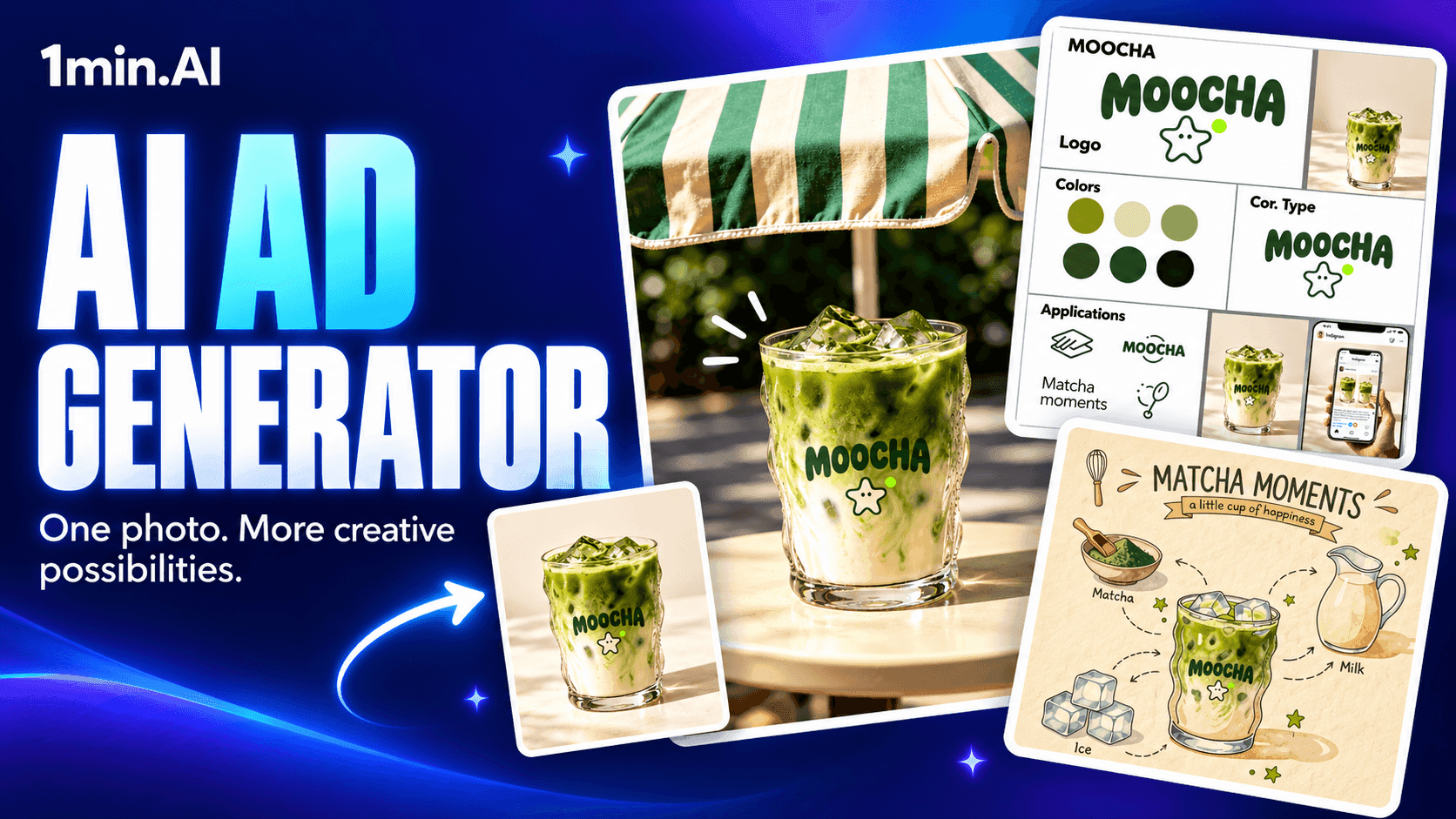
Create ad copy, image concepts, and video drafts with 1min.AI. Start with available free credits and turn your campaign brief into creative ideas.
Free AI ad generator for marketers
Turn a product photo and campaign brief into fresh advertising ideas with 1min.AI. Develop ad copy, create image variations, and explore video drafts through the relevant AI tools.
Start with the free credits available in your account. Credit requirements vary by feature, model, and generation settings, so check the displayed cost before generating.
Turn one product brief into multiple ad creatives
Creating a campaign involves finding a message, developing visuals, and preparing variations for review. An AI ad generator can help marketers explore these options before committing to a final direction.
Explore more creative directions
Use the same product brief to develop different campaign angles. For a matcha brand, you might explore an afternoon desk break, a weekend café moment, or a bold product announcement.
Each angle gives your team a different relationship between the audience, message, and visual.
Keep your product identity consistent
Provide a product reference and brand instructions when the selected tool supports them. Specify which details must stay consistent, including packaging, logo, colors, and product shape.
Review each result carefully. Reference images guide generation, but logos and fine details may still need correction during editing.
Prepare variations for testing
Create alternative backgrounds, hooks, and visual treatments around an approved concept. Change one major element at a time when you want to compare creative directions.
AI-generated variations provide testing material. Campaign data determines which version performs best.
Create advertising content for different campaign needs
Start with the output your campaign requires, then choose the relevant chat, image, or video tool in 1min.AI.
| Campaign need | What to create |
|---|---|
| Product launch | Campaign angles, introductory copy, and hero images |
| Social advertising | Product visuals, lifestyle scenes, and short video drafts |
| Ingredient storytelling | Illustrated product breakdowns with approved ingredient labels |
| Creative testing | Variations of backgrounds, compositions, headlines, and hooks |
The examples below use MOOCHA, a fictional matcha brand with a wavy glass, a green wordmark, and a star mascot. Replace these details with your own product references and approved information.
How to create image and video ads with 1min.AI
Begin with a clear brief: your audience, product facts, campaign objective, channel, and desired style. Develop your message in AI chat, then continue in the appropriate creation tool.
For example, ask AI to suggest three advertising angles for a matcha latte aimed at office workers. Choose one direction before generating visuals, and avoid adding unsupported health or productivity claims.
1. Create a product image ad
Upload your product photo to an image tool that supports reference images. Use a focused prompt to develop one advertising composition at a time.
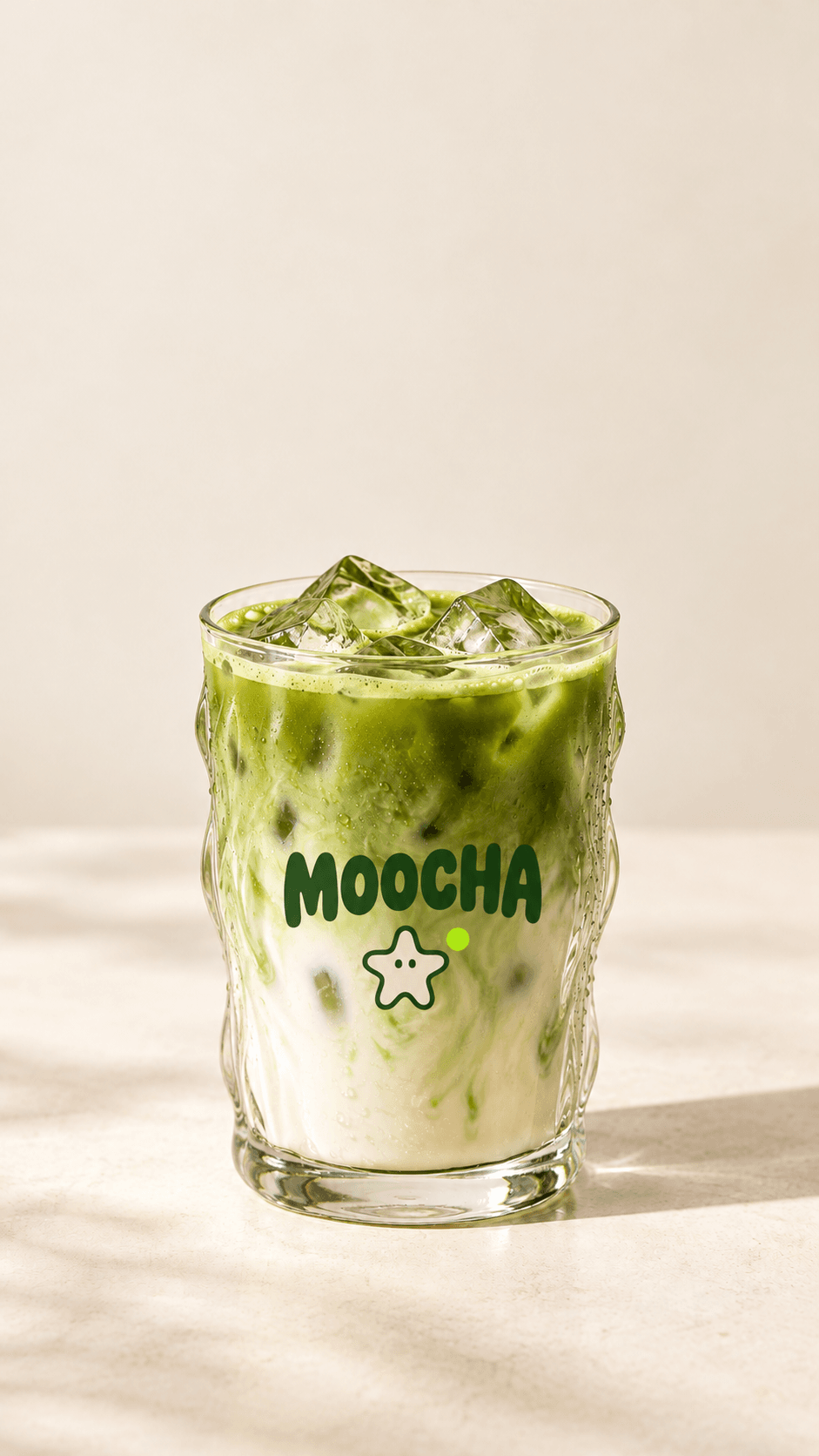
Example prompt: Product hero image
Create a premium advertising image for the fictional matcha brand MOOCHA using the uploaded product photo as the exact visual reference.
Preserve the wavy glass, MOOCHA wordmark, star mascot, ice cubes, and green-and-cream drink.
Place one glass on a cream circular podium against a rich matcha-green background. Use soft directional lighting, realistic condensation, and a subtle contact shadow. Add one small lime-green star graphic behind the product.
Create a 4:5 portrait composition with the entire glass visible and clean space above for a headline.
Keep the existing branding readable. Do not add headlines, prices, offers, extra products, or health claims.
2. Explore a different campaign setting
Use the same reference image to create a lifestyle variation. Keep the product identity consistent while changing its surroundings.
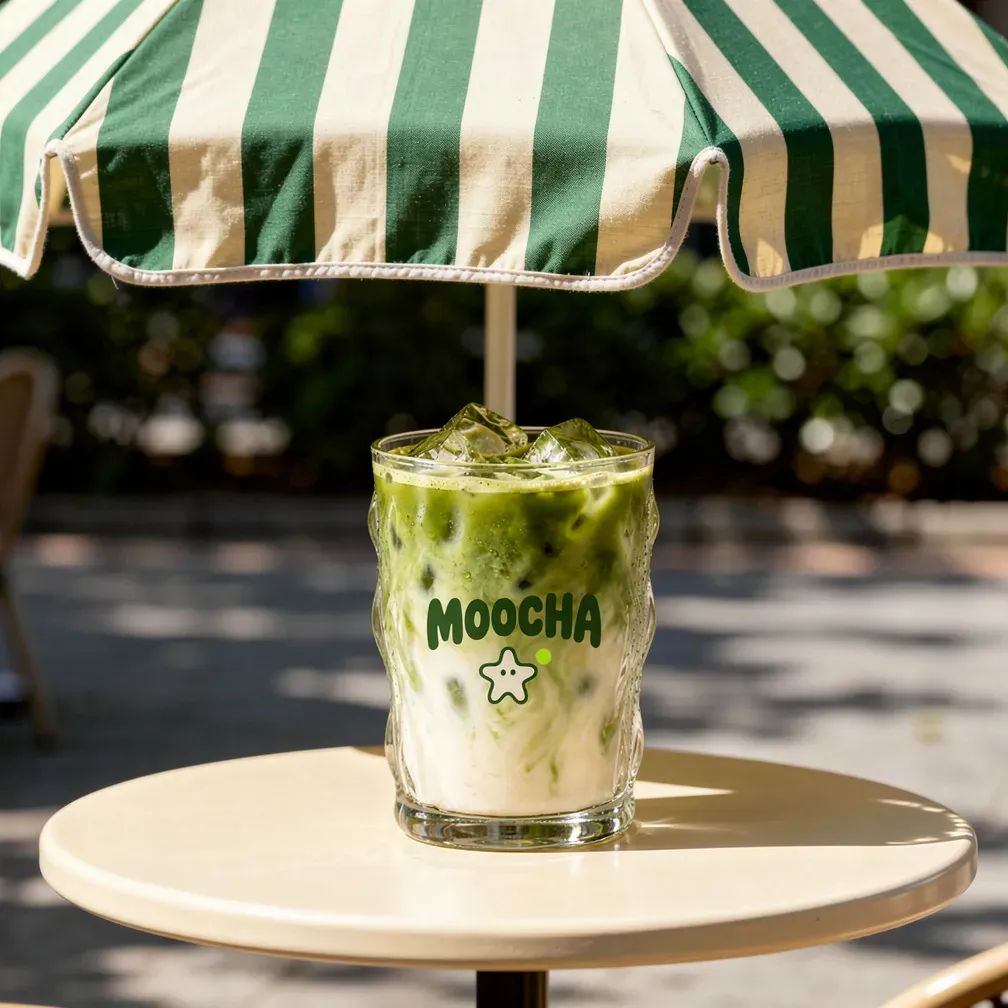
Example prompt: Afternoon matcha break
Create a photorealistic lifestyle advertisement featuring the MOOCHA matcha glass from the uploaded reference.
Place it on a bright cream office desk beside a notebook and a softly blurred laptop. Warm afternoon sunlight creates gentle shadows. Use subtle green accents and a relaxed, contemporary atmosphere.
Preserve the original glass shape, logo, mascot, and drink appearance. Keep the glass sharp and the supporting objects secondary.
Use a 4:5 portrait layout with empty space at the upper left for advertising copy. No people, hands, additional drinks, or generated text.
3. Create a handwritten ingredient visual
An illustrated variation can introduce a different visual style while retaining recognizable product details. Use confirmed ingredients when adapting this example for a real campaign.
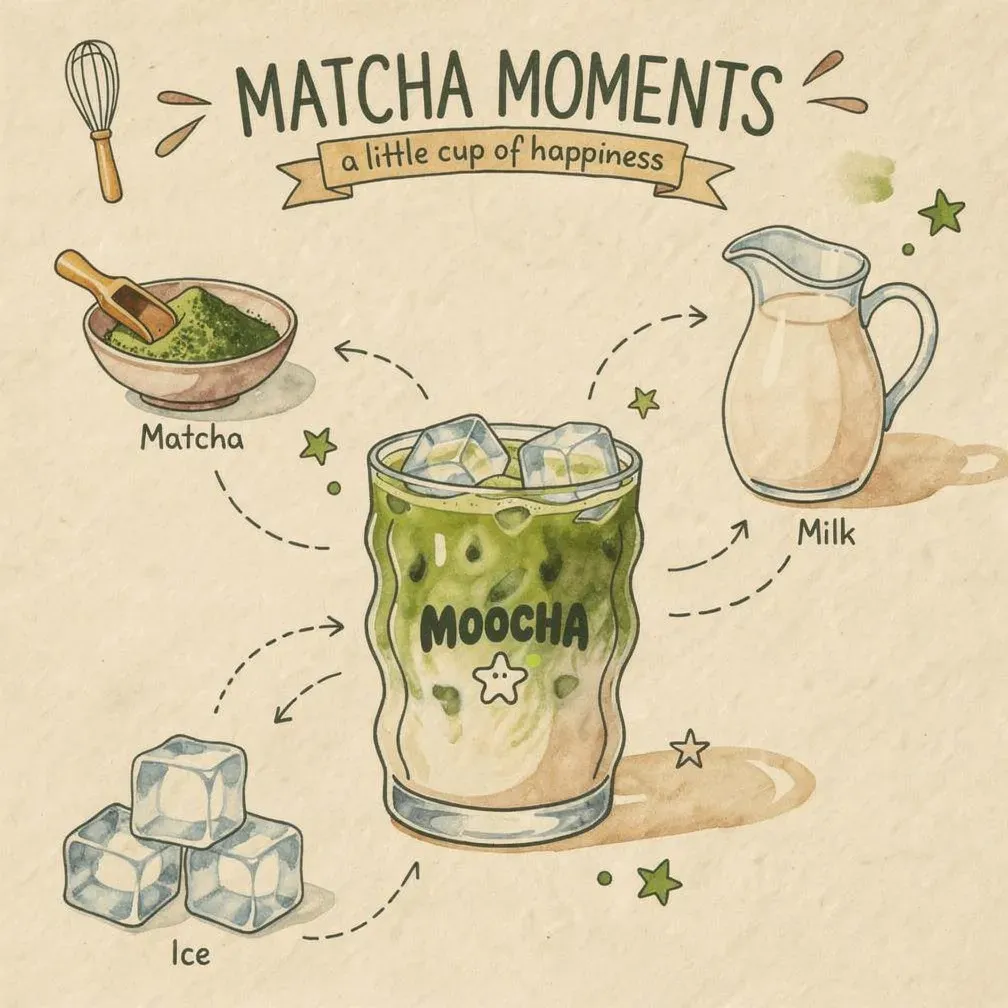
Example prompt: Matcha ingredient notebook
Transform the uploaded MOOCHA product photo into an illustrated ingredient journal page.
Place a large watercolor illustration of the reference glass in the center of a 4:5 ivory paper composition. Preserve the MOOCHA wordmark, star mascot, and distinctive glass silhouette.
Arrange three small ingredient illustrations around it: matcha powder, a milk pitcher, and ice cubes. Add clearly legible handwritten labels: “Matcha”, “Milk”, and “Ice”.
Draw curved dashed arrows pointing outward from the corresponding drink layers toward each ingredient illustration. Keep arrows clear of the logo.
Use forest-green ink, soft watercolor washes, colored-pencil textures, and a few tiny star doodles. No quantities, extra ingredients, or additional claims.
Chèn phần này trước prompt tạo ảnh quảng cáo để nối workflow: ảnh sản phẩm → brand guideline → ảnh và video ads.
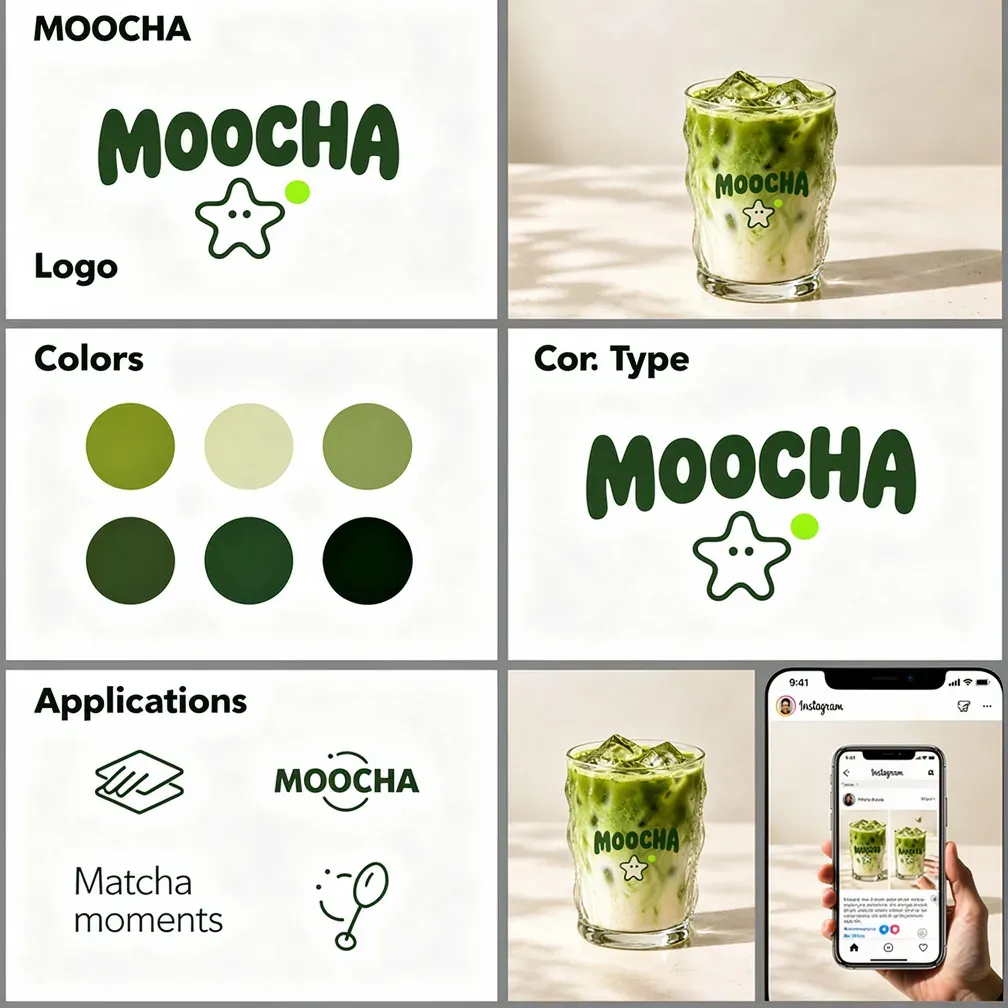
4. Create a visual brand guideline from your product photo
Start by exploring a consistent visual direction for your campaign. Upload your MOOCHA product photo, then use this prompt to create a brand guideline concept board. Use the selected board as an additional reference for later image and video prompts where supported.
Example prompt:
Create a visual brand guideline concept board for the fictional matcha brand MOOCHA, using the uploaded product photo as the main reference.
Preserve the existing identity Keep the MOOCHA wordmark, star mascot, distinctive wavy glass, and green-and-cream drink consistent with the reference. Develop the visual system around these existing elements.
Brand personality Playful, fresh, bold, and welcoming. Combine rounded typography, organic shapes, and clean editorial layouts inspired by everyday café moments.
5. Turn your product image into a video ad
For a more expressive creative direction, combine product footage with animated graphic elements. Select a model that supports your intended reference image, duration, and aspect ratio.
Example prompt: Matcha doodles come alive
Create a 10-second vertical 9:16 advertisement using the uploaded MOOCHA glass as the exact product reference.
Preserve the glass shape, logo, mascot, ice, and drink appearance throughout.
0–3 seconds: Begin with the glass on a cream background. A hand-drawn green line traces its silhouette, then springs outward into playful stars and curved doodles.
3–7 seconds: A green brushstroke sweeps behind the stationary glass, transforming the background into a bold matcha-green studio set. Cream ribbons and lime star graphics move behind the product without covering its branding.
7–10 seconds: The graphics settle into a balanced composition. Finish with a steady hero shot and empty space above for a headline.
Combine photorealistic beverage photography with tactile 2D animation. No people, hands, product morphing, generated captions, or health claims. If audio is supported, add a playful beat and subtle scribble and whoosh sounds.
Add final text during editing for precise spelling and placement. For example: “A little matcha magic.” followed by “Meet MOOCHA.”
Review all assets for product accuracy, readable branding, permissions, and placement requirements before publishing through your usual advertising platform.
Frequently asked questions
These answers cover the main considerations before starting your first AI advertising draft.
Is 1min.AI free to try?
Start with the free credits available in your account. Usage depends on the selected feature, model, and settings. Check the credit requirement before generating each output.
Can I create both image and video ads?
Use the relevant image and video tools to develop creative drafts. Reference-image support, output formats, duration, and audio options depend on the selected feature and model.
Can AI guarantee better advertising results?
No. Creative quality is one part of campaign performance. Your offer, audience, targeting, landing page, and campaign setup also affect results.
- #Free AI Ad Generator for Marketers
Alternatives
Discover the best alternatives to 1minAI and compare features, pricing, and use cases.

1min.AI vs OpenRouter
1min.AI vs. OpenRouter: Compare the ready-to-use AI creation product against the technical API tool. Find out if you need a zero-code creative studio or a coding infrastructure hub.
 Ngoc Hong
1min.AI vs Lovart
Looking for a Lovart alternative? Compare creative workflows, pricing considerations, and practical prompts to see whether 1min.AI fits your team.
Ngoc Hong
1min.AI vs Jarvis AI
Compare 1min.AI vs Jarvis AI to discover which AI platform is better for writing, research, automation, and content creation. Find the best AI assistant for your workflow.
Ngoc HongAI Tools
Discover the best AI tools to boost productivity, creativity, and everyday work.

Create Consistent Cartoon Content in Just a Few Steps
Create engaging cartoon videos for TikTok and Reels with 1min.AI. Research ideas, create characters, and turn images into animated videos in 3 simple steps.
 Lien Anh Vu
One Product, 10 UGC Creatives: How AI Makes Content Testing Easier
Create more authentic UGC with an AI UGC video generator, test more creative angles and scale affiliate content without filming every version.
Lien Anh Vu
Top 4 Affordable AI Tools for Startup Founders
Discover the top 4 affordable AI tools for startup founders to validate ideas, build products, create content, and launch faster without overspending.
 Tram Ta
AI Features
Comprehensive AI features that streamline workflows, improve efficiency, and empower teams to achieve more.
Create Consistent Cartoon Content in Just a Few Steps
Create engaging cartoon videos for TikTok and Reels with 1min.AI. Research ideas, create characters, and turn images into animated videos in 3 simple steps.
Lien Anh VuOne Product, 10 UGC Creatives: How AI Makes Content Testing Easier
Create more authentic UGC with an AI UGC video generator, test more creative angles and scale affiliate content without filming every version.
Lien Anh Vu
1minAI: Free AI Grammar Checker
Check grammar for free with 1minAI’s AI grammar checker. Find grammar, spelling, and writing mistakes, improve clarity, and polish your content in seconds.
Tram TaAI Use Cases
A curated collection of AI use cases for business, productivity, and industry-specific applications.
Create Consistent Cartoon Content in Just a Few Steps
Create engaging cartoon videos for TikTok and Reels with 1min.AI. Research ideas, create characters, and turn images into animated videos in 3 simple steps.
Lien Anh VuOne Product, 10 UGC Creatives: How AI Makes Content Testing Easier
Create more authentic UGC with an AI UGC video generator, test more creative angles and scale affiliate content without filming every version.
Lien Anh Vu
Best Time to Post on Instagram: A Practical Guide for Better Engagement
Discover the best time to post on Instagram, including the best days and times for different audiences, plus tips to find the ideal posting schedule for your account.
Tram TaAI Tutorials
Learn how to use AI with practical, step-by-step tutorials.

Black Friday AI Tool Deals in 2026
Discover what Black Friday AI tool deals 2026 has to offer. Find out how to secure the 1min.AI lifetime deal via AppSumo, Dealify, Stack Social, and verify on Trustpilot, Slashdot, and Software Advice.
 Hang Nguyen
Create Consistent Cartoon Content in Just a Few Steps
Create engaging cartoon videos for TikTok and Reels with 1min.AI. Research ideas, create characters, and turn images into animated videos in 3 simple steps.
Lien Anh Vu
[Seedance 2.5 New] Better AI Product Videos, Less Rework in 1min.AI
Use Seedance 2.5 image to video on 1min.AI to create more consistent AI product videos, reduce failed generations, save credits, and improve UGC workflows.
Lien Anh VuAI Guides
Learn AI faster with practical guides, real-world examples, and actionable best practices.

Safely Buy AI Tools Online: 2026 Black Friday Guide
Discover how to find and secure the best Black Friday AI deals online. Learn expert strategies to avoid scams, combat subscription fatigue, and verify software.
Hang NguyenCreate Consistent Cartoon Content in Just a Few Steps
Create engaging cartoon videos for TikTok and Reels with 1min.AI. Research ideas, create characters, and turn images into animated videos in 3 simple steps.
Lien Anh Vu[Seedance 2.5 New] Better AI Product Videos, Less Rework in 1min.AI
Use Seedance 2.5 image to video on 1min.AI to create more consistent AI product videos, reduce failed generations, save credits, and improve UGC workflows.
Lien Anh VuAI Solutions
Browse the best AI solutions for automation, coding, research, productivity, customer support, marketing, and business workflows.
Safely Buy AI Tools Online: 2026 Black Friday Guide
Discover how to find and secure the best Black Friday AI deals online. Learn expert strategies to avoid scams, combat subscription fatigue, and verify software.
Hang NguyenCreate Consistent Cartoon Content in Just a Few Steps
Create engaging cartoon videos for TikTok and Reels with 1min.AI. Research ideas, create characters, and turn images into animated videos in 3 simple steps.
Lien Anh VuOne Product, 10 UGC Creatives: How AI Makes Content Testing Easier
Create more authentic UGC with an AI UGC video generator, test more creative angles and scale affiliate content without filming every version.
Lien Anh VuAI Models
Explore the world's leading AI models in one place.
Create Consistent Cartoon Content in Just a Few Steps
Create engaging cartoon videos for TikTok and Reels with 1min.AI. Research ideas, create characters, and turn images into animated videos in 3 simple steps.
Lien Anh VuOne Product, 10 UGC Creatives: How AI Makes Content Testing Easier
Create more authentic UGC with an AI UGC video generator, test more creative angles and scale affiliate content without filming every version.
Lien Anh Vu[Seedance 2.5 New] Better AI Product Videos, Less Rework in 1min.AI
Use Seedance 2.5 image to video on 1min.AI to create more consistent AI product videos, reduce failed generations, save credits, and improve UGC workflows.
Lien Anh VuAI Comparisons
Compare AI tools, models, and platforms to find the best fit for your needs.

Kling AI Vs Veo 3: Which Model Wins?
Kling AI vs Veo 3: compare motion, native audio, pricing & free tiers to see which AI video generator wins for your project - try both on 1min.AI.
 Trang Tran
[Seedance 2.5 New] Better AI Product Videos, Less Rework in 1min.AI
Use Seedance 2.5 image to video on 1min.AI to create more consistent AI product videos, reduce failed generations, save credits, and improve UGC workflows.
Lien Anh Vu
DeepSeek V4 Pro vs Flash Comparison
Compare DeepSeek V4 Pro vs DeepSeek V4 Flash metrics. Optimize your agentic apps and improve AI fact checking on 1min.ai today.
Ngoc HongAI Integrations
Seamlessly integrate AI with the tools you already use to automate work and boost productivity.

POV: You Have 10+ Posts to Make Every Day
Learn how to build an AI content workflow that helps content creators produce 10+ social media posts a day faster with AI brainstorming, image generation, and content creation.
Lien Anh Vu
How to Use an AI Fashion Video Generator for Fashion Week 2026
Turn Fashion Week 2026 ideas into stunning fashion videos with AI. Learn how to brainstorm, create visuals, and transform images into videos with one simple workflow.
Lien Anh Vu
Stop Switching Between AI Apps: How AI Integration Transforms Employer Branding
Discover how AI integration helps HR teams streamline employer branding by combining AI writing, documents, images, video, and multiple AI models into one workspace.
Tram TaAI for Industries
Find the best AI tools and workflows for healthcare, finance, education, legal, manufacturing, retail, real estate, and more

Free AI Product Description Generator
Write product descriptions that sell in minutes. Use this free AI product description generator to turn details or a photo into on-brand copy. Try 1min.AI.
Trang Tran
Best Business Productivity Tools for Startups to Maximize Profits | 1minAI
Discover the best business productivity tools for startups to save time, streamline workflows, reduce repetitive tasks, and support profitable growth with AI.
Tram Ta
Best AI Tool for Content Marketing |1minAI
Looking for the best AI tool for content marketing? See how 1minAI helps marketers research, write, repurpose, create visuals, and scale content from one AI workspace.
Tram TaAI Agents
Discover and run AI agents to automate tasks across your work and daily life.
1minAI: Free AI Grammar Checker
Check grammar for free with 1minAI’s AI grammar checker. Find grammar, spelling, and writing mistakes, improve clarity, and polish your content in seconds.
Tram Ta
AI Agents for Facebook
Use an AI Agent for Facebook to create content, generate images, schedule posts, and publish from your documents and conversations.
Ngoc Hong
AI Agent vs AI Assistant: Which One Actually Saves Designers More Time?
Learn the difference between AI Agent vs AI Assistant and discover which solution helps designers automate repetitive work, reduce revisions, and save more time.
Lien Anh VuAI Workflows
Explore ready-to-use AI workflows for productivity, marketing, sales, support, and more.
Create Consistent Cartoon Content in Just a Few Steps
Create engaging cartoon videos for TikTok and Reels with 1min.AI. Research ideas, create characters, and turn images into animated videos in 3 simple steps.
Lien Anh VuOne Product, 10 UGC Creatives: How AI Makes Content Testing Easier
Create more authentic UGC with an AI UGC video generator, test more creative angles and scale affiliate content without filming every version.
Lien Anh VuPOV: You Have 10+ Posts to Make Every Day
Learn how to build an AI content workflow that helps content creators produce 10+ social media posts a day faster with AI brainstorming, image generation, and content creation.
Lien Anh VuNewsletter
Weekly AI Innovations with 1minAI

🔮 Weekly AI Innovations #142: Grok 4.7, Opus 5.5 & Sonnet 5.5 on 1min.ai
Access Grok 4.7, Claude Opus 5.5, and Sonnet 5.5 on 1min.ai. Cut subscription costs by up to 70% and process millions tokens in a single unified workspace.
Hang Nguyen
🔮 Weekly AI Innovations #141: Seedance 2.5 & Stable Audio 3: Next-Gen AI
Explore Seedance 2.0, 2.5, and StabilityAI's Stable Audio 3 on 1min.ai. Generate studio-grade audio and synchronized motion with next-gen generative AI.
Hang Nguyen
🔮 Weekly AI Innovations #140: Deepseek 4.1 Flash & Gemini Upgrades
Explore Deepseek 4.1 Flash and new Gemini models on 1min.ai. Plus, check our update on your Billing - Usage page for better clarity.
Hang Nguyen