
Gemini 4 Pro: How to Try Free on 1minAI

Tram Ta
October 29, 2026
Searching for Gemini 4 Pro? Learn about Google's Gemini 4 Argon, its key capabilities, practical prompts, and how to check AI model access on 1minAI.
Looking for Gemini 4 Pro and wondering how to try it? Google's latest Gemini 4 generation includes Gemini 4 Argon, a frontier AI model designed for complex reasoning, coding, scientific work, and multi-step tasks. It supports a large context window and can handle text, images, audio, and video inputs.
If you want to explore Google's AI models without building a complicated workflow, 1minAI can help you compare available AI assistants, test prompts, and organize AI-powered tasks in one workspace. In this guide, you'll learn what Gemini 4 offers, how to check whether it is available on 1minAI, and how to get useful results from AI chat.
A quick naming note: Google's official model documentation identifies the current Gemini 4 model as Gemini 4 Argon. “Gemini 4 Pro” is a commonly searched phrase, but it is not the official model name listed in Google's current model catalog. Availability through 1minAI depends on its current model selection and your account's access.
What Is Gemini 4 Pro?
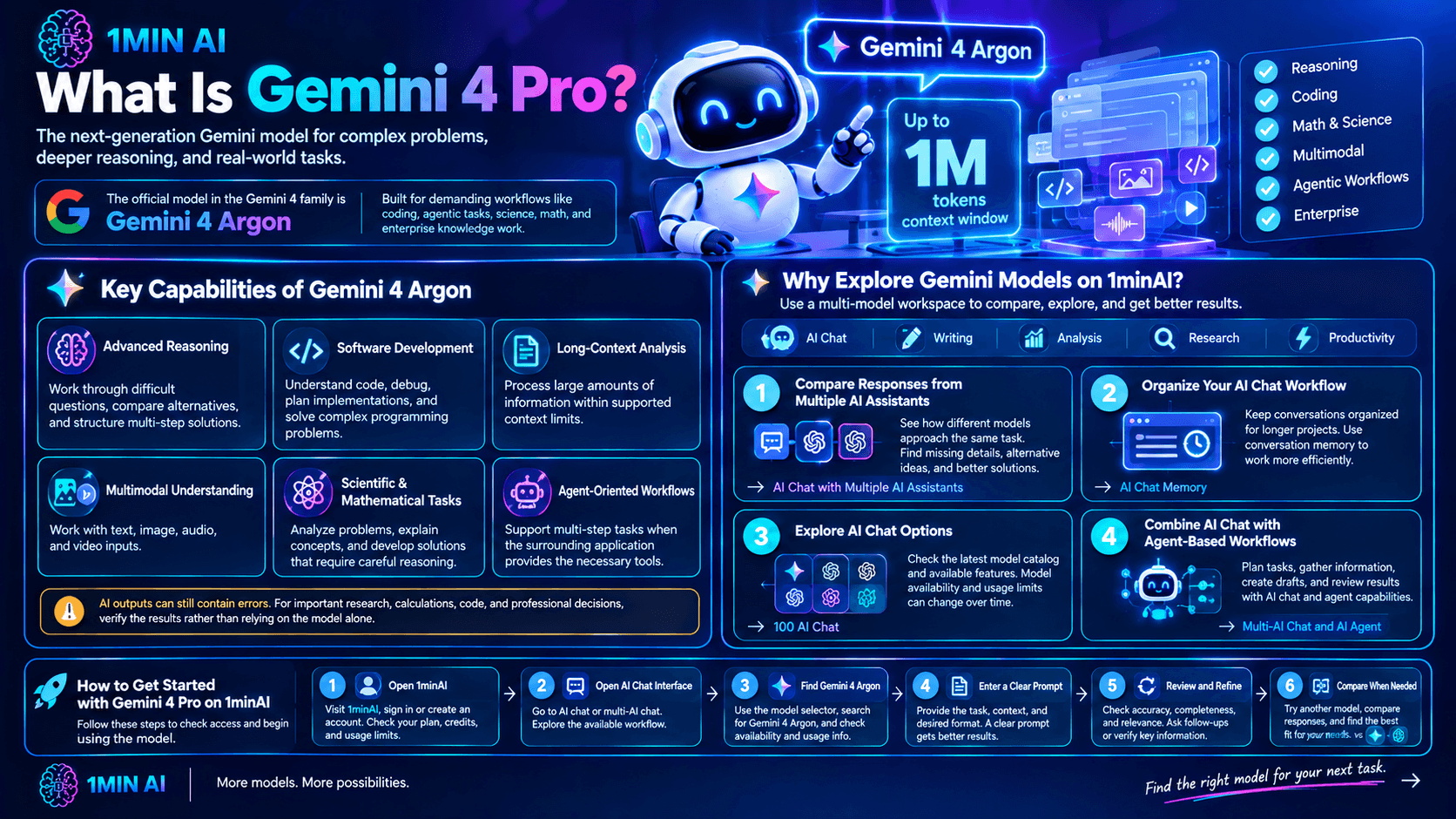
People searching for Gemini 4 Pro are generally looking for Google's next-generation, high-capability Gemini model. The official model currently listed in the Gemini 4 family is Gemini 4 Argon, which Google positions for demanding workflows that require deeper reasoning and sustained problem-solving.
According to Google's model documentation, Gemini 4 Argon is designed for complex coding, agentic workflows, mathematics, science, and enterprise knowledge work. It also supports a unified context window of up to approximately one million tokens, allowing it to process substantial amounts of information in supported configurations.
These capabilities make it worth exploring for users who need more than a quick answer to a simple question.
Key Capabilities of Gemini 4 Argon
Here are the main capabilities to know about:
- Advanced reasoning: Work through difficult questions, compare alternatives, and structure multi-step solutions.
- Software development: Assist with understanding code, debugging, planning implementations, and working through complex programming problems.
- Long-context analysis: Process large amounts of supplied information within supported context limits.
- Multimodal understanding: Work with supported text, image, audio, and video inputs.
- Scientific and mathematical tasks: Help analyze problems, explain concepts, and develop solutions that require careful reasoning.
- Agent-oriented workflows: Support tasks that involve planning and multiple stages of work when the surrounding application provides the necessary tools.
AI outputs can still contain errors. For important research, calculations, code, and professional decisions, verify the results rather than relying on the model alone.
Why Explore Gemini Models on 1minAI?
Using AI through a multi-model workspace can make it easier to experiment with different assistants and compare their responses.
1minAI provides AI chat and other AI-powered tools that can support research, writing, analysis, and productivity workflows. Rather than treating every task as a separate project, you can use a structured workflow to generate ideas, review results, and improve your final output.
1. Compare Responses from Multiple AI Assistants
Different models may approach the same task differently. One might provide a concise answer, while another offers a more detailed explanation or a different way to solve the problem.
With 1minAI AI Chat with Multiple AI Assistants, you can explore multi-model workflows and compare available assistants.
For example, you could ask one model to create a project outline and another to review the outline for missing steps. If Gemini 4 Argon is available in your model selector, you can include it in your comparison.
2. Organize Your AI Chat Workflow
Longer projects often involve repeated questions, revisions, and follow-up instructions. Keeping conversations organized can help you work more efficiently.
Explore 1minAI AI Chat Memory to learn about its conversation-memory capabilities and how they may support your workflow. Check the current feature behavior and settings before relying on persistent context for a project.
3. Explore AI Chat Options
The 1minAI 100 AI Chat page is another place to explore the platform's AI chat offering and available model options.
Model catalogs and usage allowances can change over time. Always check the current interface to confirm which models are available to your account.
4. Combine AI Chat with Agent-Based Workflows
Some projects require more than a single answer. You may need to plan a task, collect information, generate an initial result, and review the output.
The 1minAI Multi-AI Chat and AI Agent page introduces workflows that combine AI chat with agent capabilities. Explore the available options to see which tools fit your requirements.
How to Try Gemini 4 on 1minAI
Want to see whether you can access Gemini 4 Argon through 1minAI? Follow these steps.
Step 1: Open 1minAI
Visit 1minAI and sign in or create an account if needed.
Review the current plan details and available usage credits. Access to individual models may depend on the platform's current offering and your account.
Step 2: Open AI Chat
Navigate to the AI chat or multi-AI chat interface.
You can start with 1minAI AI Chat with Multiple AI Assistants to explore the available workflow.
Step 3: Check the Model Selector
Open the model list and look for Gemini 4 Argon.
If it appears, select it and review any displayed usage requirements or limits. If it does not appear, it may not currently be available through that interface or for your account.
Don't assume that searching for “Gemini 4 Pro” will return a model under that exact name. Check for the official name, Gemini 4 Argon.
Step 4: Start with a Specific Prompt
Choose a task that matches the model's capabilities. For example, ask it to analyze a report, explain a difficult concept, or review a coding approach.
Prompt example:
"Analyze the following project proposal. Identify its main objective, assumptions, potential risks, missing information, and recommended next steps. Organize your response into clear sections and distinguish facts from assumptions."
A well-defined task makes it easier to assess the quality of the response.
Step 5: Review and Refine the Result
Read the answer carefully and identify anything that needs clarification. Ask follow-up questions when you need additional detail, alternative solutions, or a different output format.
For technical tasks, test generated code and validate important claims against reliable sources.
Step 6: Compare Available Models
If you are unsure whether Gemini is the best option for a task, compare it with other models available on 1minAI.
You might ask two models to solve the same problem, then evaluate the results for accuracy, clarity, completeness, and usefulness. Model agreement can be helpful, but it does not guarantee correctness.
Important: This process explains how to check model access. It does not guarantee that Gemini 4 Argon is currently included in 1minAI or available for free.
5 Practical Ways to Use Gemini 4 Argon
If the model is available to you, try these prompts to explore its reasoning and analysis capabilities.
1. Analyze a Long Document
Large reports can be difficult to review when you need to identify key findings quickly. A capable model can help summarize supplied documents and organize their most important points.
Prompt:
"Analyze the following report. Provide an executive summary, five key findings, important figures, potential risks, and recommended next steps. Reference the relevant sections of the supplied text and identify any conclusions that the report does not fully support."
This is useful for business reports, research papers, project documentation, and planning materials. Verify important figures and conclusions against the original document.
2. Solve a Complex Problem Step by Step
For a problem with multiple constraints, ask the model to explain its approach and check whether the proposed solution meets your requirements.
Prompt:
"Help me solve the following problem: [describe the problem]. List the relevant constraints, compare possible approaches, explain the trade-offs, and recommend a solution. State any assumptions and identify information that would change your recommendation."
This can help structure difficult questions, but you should independently verify mathematical results and other high-impact conclusions.
3. Review and Debug Code
Gemini 4 Argon is designed to support demanding software-development tasks. You can use a coding prompt to ask for an explanation, diagnosis, and proposed correction.
Prompt:
"Review the following code. Explain its intended behavior, identify likely bugs and edge cases, and suggest the smallest reliable correction. Provide a test case for each important issue and explain how I can verify the fix."
Run the tests before adopting the changes. For production systems, review security, performance, and compatibility as well.
4. Compare Business Strategies
AI can help organize options when you are deciding between different business approaches.
Prompt:
"Compare these three strategies for [business objective]: [Strategy A], [Strategy B], and [Strategy C]. Evaluate each based on cost, potential benefits, risks, implementation difficulty, and time to results. Use a comparison table and explain which assumptions need to be validated before making a decision."
Use the result as a planning aid, then validate the assumptions using current market data and real business constraints.
5. Analyze Images and Other Supported Media
Gemini 4 Argon supports multimodal inputs in supported environments. Depending on the interface, this can help you analyze an image, interpret a chart, or understand supplied audio or video content.
Prompt example for a chart:
"Analyze the attached chart. Explain what it measures, identify the main trends, compare the most important values, and note any limitations or conclusions that cannot be supported by the chart alone."
Check whether the platform you are using supports the specific file type and input method. If the model cannot access the media directly, provide a description or extract of the relevant information instead.
Gemini 4 Pro vs. Other Gemini Models
The phrase “Gemini 4 Pro” may be used in searches to describe a high-end Gemini model, but Google's official Gemini 4 model listed in current documentation is Gemini 4 Argon.
The wider Gemini lineup includes models designed for different priorities, such as deep reasoning, speed, and efficiency.
| Model | General focus | When to consider it |
|---|---|---|
| Gemini 4 Argon | Advanced reasoning and complex, multi-step tasks | Challenging analysis, coding, science, and knowledge work |
| Gemini 3.1 Pro | Advanced general-purpose reasoning and problem-solving | Tasks that need a capable Pro-tier model |
| Gemini 3.8 Flash | Fast responses and efficient workflows | Everyday tasks where speed matters |
This is a general guide rather than a universal ranking. The best model depends on your prompt, available features, response quality, and usage limits. Confirm the current model list and capabilities in Google's documentation and the platform you use.
Frequently Asked Questions
Is Gemini 4 Pro an official Google model?
Google's official model documentation currently lists Gemini 4 Argon as the Gemini 4 model. “Gemini 4 Pro” is not the official model name in the current catalog. If you are looking for Google's latest high-capability Gemini model, check for Gemini 4 Argon.
Can I use Gemini 4 Argon for free on 1minAI?
Availability depends on 1minAI's current model offering, your account, and any usage limits. Open the model selector and check the plan or credit information. Do not assume the model is free unless the platform explicitly confirms it for your account.
What is Gemini 4 Argon best at?
Google positions Gemini 4 Argon for complex reasoning, coding, scientific and mathematical work, multimodal understanding, and agent-oriented tasks. Results depend on the task, the supplied information, and the environment in which you use the model.
Does Gemini 4 Argon support images and videos?
Google's model card lists text, image, audio, and video among its supported input types. However, support can depend on the interface or integration you use. Check the input options available on your chosen platform.
Can I compare Gemini with other AI models on 1minAI?
You can explore the available multi-model workflow through 1minAI AI Chat with Multiple AI Assistants. Which specific models you can compare depends on the current model selector and your account's access.
Conclusion
If you're searching for Gemini 4 Pro, the key thing to know is that Google's official Gemini 4 model is called Gemini 4 Argon. It is designed for complex reasoning, software development, scientific work, and other tasks that benefit from sustained analysis.
1minAI can help you explore AI chat workflows, compare available assistants, and organize multi-step tasks. To get started, open the platform, check the current model selector, and try a focused prompt that matches your needs.
Explore these 1minAI resources to continue:
For more AI capabilities, visit 1minAI Features and try the 1minAI Agent demo.
- #Commerce
Alternatives
Discover the best alternatives to 1minAI and compare features, pricing, and use cases.

1min.AI vs OpenRouter
1min.AI vs. OpenRouter: Compare the ready-to-use AI creation product against the technical API tool. Find out if you need a zero-code creative studio or a coding infrastructure hub.
 Ngoc Hong
1min.AI vs Lovart
Looking for a Lovart alternative? Compare creative workflows, pricing considerations, and practical prompts to see whether 1min.AI fits your team.
Ngoc Hong
1min.AI vs Jarvis AI
Compare 1min.AI vs Jarvis AI to discover which AI platform is better for writing, research, automation, and content creation. Find the best AI assistant for your workflow.
Ngoc HongAI Tools
Discover the best AI tools to boost productivity, creativity, and everyday work.

Create Consistent Cartoon Content in Just a Few Steps
Create engaging cartoon videos for TikTok and Reels with 1min.AI. Research ideas, create characters, and turn images into animated videos in 3 simple steps.
 Lien Anh Vu
One Product, 10 UGC Creatives: How AI Makes Content Testing Easier
Create more authentic UGC with an AI UGC video generator, test more creative angles and scale affiliate content without filming every version.
Lien Anh Vu
Top 4 Affordable AI Tools for Startup Founders
Discover the top 4 affordable AI tools for startup founders to validate ideas, build products, create content, and launch faster without overspending.
 Tram Ta
AI Features
Comprehensive AI features that streamline workflows, improve efficiency, and empower teams to achieve more.
Create Consistent Cartoon Content in Just a Few Steps
Create engaging cartoon videos for TikTok and Reels with 1min.AI. Research ideas, create characters, and turn images into animated videos in 3 simple steps.
Lien Anh VuOne Product, 10 UGC Creatives: How AI Makes Content Testing Easier
Create more authentic UGC with an AI UGC video generator, test more creative angles and scale affiliate content without filming every version.
Lien Anh Vu
1minAI: Free AI Grammar Checker
Check grammar for free with 1minAI’s AI grammar checker. Find grammar, spelling, and writing mistakes, improve clarity, and polish your content in seconds.
Tram TaAI Use Cases
A curated collection of AI use cases for business, productivity, and industry-specific applications.
Create Consistent Cartoon Content in Just a Few Steps
Create engaging cartoon videos for TikTok and Reels with 1min.AI. Research ideas, create characters, and turn images into animated videos in 3 simple steps.
Lien Anh VuOne Product, 10 UGC Creatives: How AI Makes Content Testing Easier
Create more authentic UGC with an AI UGC video generator, test more creative angles and scale affiliate content without filming every version.
Lien Anh Vu
Best Time to Post on Instagram: A Practical Guide for Better Engagement
Discover the best time to post on Instagram, including the best days and times for different audiences, plus tips to find the ideal posting schedule for your account.
Tram TaAI Tutorials
Learn how to use AI with practical, step-by-step tutorials.

Black Friday AI Tool Deals in 2026
Discover what Black Friday AI tool deals 2026 has to offer. Find out how to secure the 1min.AI lifetime deal via AppSumo, Dealify, Stack Social, and verify on Trustpilot, Slashdot, and Software Advice.
 Hang Nguyen
Create Consistent Cartoon Content in Just a Few Steps
Create engaging cartoon videos for TikTok and Reels with 1min.AI. Research ideas, create characters, and turn images into animated videos in 3 simple steps.
Lien Anh Vu
[Seedance 2.5 New] Better AI Product Videos, Less Rework in 1min.AI
Use Seedance 2.5 image to video on 1min.AI to create more consistent AI product videos, reduce failed generations, save credits, and improve UGC workflows.
Lien Anh VuAI Guides
Learn AI faster with practical guides, real-world examples, and actionable best practices.

Safely Buy AI Tools Online: 2026 Black Friday Guide
Discover how to find and secure the best Black Friday AI deals online. Learn expert strategies to avoid scams, combat subscription fatigue, and verify software.
Hang NguyenCreate Consistent Cartoon Content in Just a Few Steps
Create engaging cartoon videos for TikTok and Reels with 1min.AI. Research ideas, create characters, and turn images into animated videos in 3 simple steps.
Lien Anh Vu[Seedance 2.5 New] Better AI Product Videos, Less Rework in 1min.AI
Use Seedance 2.5 image to video on 1min.AI to create more consistent AI product videos, reduce failed generations, save credits, and improve UGC workflows.
Lien Anh VuAI Solutions
Browse the best AI solutions for automation, coding, research, productivity, customer support, marketing, and business workflows.
Safely Buy AI Tools Online: 2026 Black Friday Guide
Discover how to find and secure the best Black Friday AI deals online. Learn expert strategies to avoid scams, combat subscription fatigue, and verify software.
Hang NguyenCreate Consistent Cartoon Content in Just a Few Steps
Create engaging cartoon videos for TikTok and Reels with 1min.AI. Research ideas, create characters, and turn images into animated videos in 3 simple steps.
Lien Anh VuOne Product, 10 UGC Creatives: How AI Makes Content Testing Easier
Create more authentic UGC with an AI UGC video generator, test more creative angles and scale affiliate content without filming every version.
Lien Anh VuAI Models
Explore the world's leading AI models in one place.
Create Consistent Cartoon Content in Just a Few Steps
Create engaging cartoon videos for TikTok and Reels with 1min.AI. Research ideas, create characters, and turn images into animated videos in 3 simple steps.
Lien Anh VuOne Product, 10 UGC Creatives: How AI Makes Content Testing Easier
Create more authentic UGC with an AI UGC video generator, test more creative angles and scale affiliate content without filming every version.
Lien Anh Vu[Seedance 2.5 New] Better AI Product Videos, Less Rework in 1min.AI
Use Seedance 2.5 image to video on 1min.AI to create more consistent AI product videos, reduce failed generations, save credits, and improve UGC workflows.
Lien Anh VuAI Comparisons
Compare AI tools, models, and platforms to find the best fit for your needs.

Kling AI Vs Veo 3: Which Model Wins?
Kling AI vs Veo 3: compare motion, native audio, pricing & free tiers to see which AI video generator wins for your project - try both on 1min.AI.
 Trang Tran
[Seedance 2.5 New] Better AI Product Videos, Less Rework in 1min.AI
Use Seedance 2.5 image to video on 1min.AI to create more consistent AI product videos, reduce failed generations, save credits, and improve UGC workflows.
Lien Anh Vu
DeepSeek V4 Pro vs Flash Comparison
Compare DeepSeek V4 Pro vs DeepSeek V4 Flash metrics. Optimize your agentic apps and improve AI fact checking on 1min.ai today.
Ngoc HongAI Integrations
Seamlessly integrate AI with the tools you already use to automate work and boost productivity.

POV: You Have 10+ Posts to Make Every Day
Learn how to build an AI content workflow that helps content creators produce 10+ social media posts a day faster with AI brainstorming, image generation, and content creation.
Lien Anh Vu
How to Use an AI Fashion Video Generator for Fashion Week 2026
Turn Fashion Week 2026 ideas into stunning fashion videos with AI. Learn how to brainstorm, create visuals, and transform images into videos with one simple workflow.
Lien Anh Vu
Stop Switching Between AI Apps: How AI Integration Transforms Employer Branding
Discover how AI integration helps HR teams streamline employer branding by combining AI writing, documents, images, video, and multiple AI models into one workspace.
Tram TaAI for Industries
Find the best AI tools and workflows for healthcare, finance, education, legal, manufacturing, retail, real estate, and more

Free AI Product Description Generator
Write product descriptions that sell in minutes. Use this free AI product description generator to turn details or a photo into on-brand copy. Try 1min.AI.
Trang Tran
Best Business Productivity Tools for Startups to Maximize Profits | 1minAI
Discover the best business productivity tools for startups to save time, streamline workflows, reduce repetitive tasks, and support profitable growth with AI.
Tram Ta
Best AI Tool for Content Marketing |1minAI
Looking for the best AI tool for content marketing? See how 1minAI helps marketers research, write, repurpose, create visuals, and scale content from one AI workspace.
Tram TaAI Agents
Discover and run AI agents to automate tasks across your work and daily life.
1minAI: Free AI Grammar Checker
Check grammar for free with 1minAI’s AI grammar checker. Find grammar, spelling, and writing mistakes, improve clarity, and polish your content in seconds.
Tram Ta
AI Agents for Facebook
Use an AI Agent for Facebook to create content, generate images, schedule posts, and publish from your documents and conversations.
Ngoc Hong
AI Agent vs AI Assistant: Which One Actually Saves Designers More Time?
Learn the difference between AI Agent vs AI Assistant and discover which solution helps designers automate repetitive work, reduce revisions, and save more time.
Lien Anh VuAI Workflows
Explore ready-to-use AI workflows for productivity, marketing, sales, support, and more.
Create Consistent Cartoon Content in Just a Few Steps
Create engaging cartoon videos for TikTok and Reels with 1min.AI. Research ideas, create characters, and turn images into animated videos in 3 simple steps.
Lien Anh VuOne Product, 10 UGC Creatives: How AI Makes Content Testing Easier
Create more authentic UGC with an AI UGC video generator, test more creative angles and scale affiliate content without filming every version.
Lien Anh VuPOV: You Have 10+ Posts to Make Every Day
Learn how to build an AI content workflow that helps content creators produce 10+ social media posts a day faster with AI brainstorming, image generation, and content creation.
Lien Anh VuNewsletter
Weekly AI Innovations with 1minAI

🔮 Weekly AI Innovations #143: Update Update GPT-6, GPT-6.1 & Ideogram 4.0 & Ideogram 4.0
Access GPT-6 Sol, Luna, GPT-6.1 Sol, and Ideogram 4.0 on 1min.ai. Boost typography accuracy to 98.4% and cut reasoning latency by 45% in one platform.
Hang Nguyen
🔮 Weekly AI Innovations #142: Grok 4.7, Opus 5.5 & Sonnet 5.5 on 1min.ai
Access Grok 4.7, Claude Opus 5.5, and Sonnet 5.5 on 1min.ai. Cut subscription costs by up to 70% and process millions tokens in a single unified workspace.
Hang Nguyen
🔮 Weekly AI Innovations #141: Seedance 2.5 & Stable Audio 3: Next-Gen AI
Explore Seedance 2.0, 2.5, and StabilityAI's Stable Audio 3 on 1min.ai. Generate studio-grade audio and synchronized motion with next-gen generative AI.
Hang Nguyen