
Is 1minAI Secure? A Guide to Data Security and Privacy

Tram Ta
October 27, 2026
Explore 1minAI data security and privacy practices, including encryption, data retention, AI training policies, and SOC 2 Type II status.
AI tools can help you write content, analyze documents, generate visuals, and streamline business workflows. But before uploading a client brief, internal report, or business document, it is important to understand how your information is handled.
Data security and privacy are essential considerations when choosing an AI platform. You need to know how information is protected, whether customer data is used to train AI models, how long information is retained, and which third-party services may process it.
So, is 1minAI secure enough for your workflow?
The answer depends on the information you plan to use and your organization's requirements. 1minAI publishes security and compliance information through its Trust Center, giving users a starting point for evaluating its practices.
This guide explains the main data security and privacy considerations, what to review before using 1minAI for work, and how to reduce unnecessary data exposure when working with AI.
Why Data Security and Privacy Matter When Using AI
AI platforms may process more than the prompts you type. Depending on the task, you might upload documents, images, customer research, campaign plans, or internal business information.
Each workflow raises different questions:
- Who can access the information you submit?
- How is data protected while it is transferred and stored?
- Is customer content used to train AI models?
- How long are prompts, files, and outputs retained?
- Which third-party providers may process your information?
- What happens when you delete content or close an account?
These questions matter whether you are an individual creator, freelancer, marketing agency, or business team.
For example, using AI to brainstorm ideas for a public social media campaign is different from uploading a confidential client strategy. The second scenario requires closer attention to data handling, contractual obligations, and access restrictions.
A responsible evaluation considers both the platform's documented controls and the sensitivity of the information involved.
How Does 1minAI Approach Data Security and Privacy?
1minAI brings multiple AI capabilities together in one workspace, including AI chat, writing, image generation, video, audio, document tools, and AI Agents. Because these features can support different workflows, users should review the applicable security and privacy information before submitting sensitive material.
1minAI's published security information describes measures across several areas.
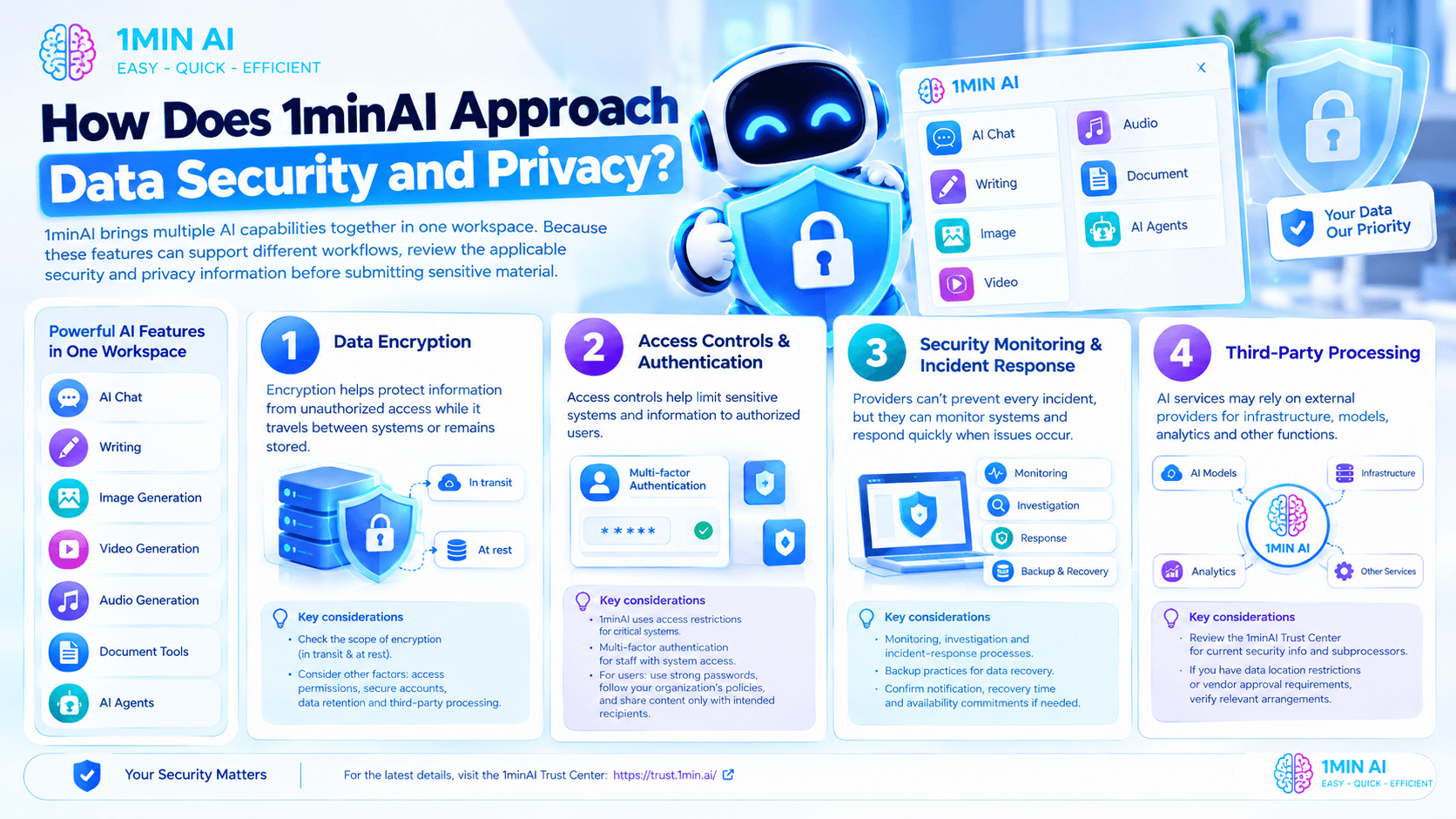
1. Data Encryption
Encryption helps protect information from unauthorized access while it travels between systems or remains stored.
1minAI's security information describes encryption for data in transit and at rest. When reviewing these protections, check the documented scope and whether the relevant systems and data types are covered.
Encryption is an important part of data security, but it is not the only consideration. Access permissions, secure account practices, data retention, and third-party processing also affect how information is protected.
2. Access Controls and Authentication
Access controls help limit sensitive systems and information to authorized users.
1minAI's published security materials describe restrictions around access to critical systems and multi-factor authentication for staff with access to those systems.
For users, account security and responsible sharing remain important. Use strong, unique passwords, follow your organization's authentication policies, and make sure shared content is accessible only to the intended recipients.
3. Security Monitoring and Incident Response
No online service can promise that security incidents will never occur. A useful assessment also considers how a provider monitors systems and responds to problems.
1minAI's published information describes security monitoring, incident investigation procedures, and a documented incident-response process. It also outlines backup practices intended to support data recovery.
If your organization has specific requirements for incident notifications, recovery times, or service availability, confirm the applicable commitments with 1minAI before adopting it for sensitive workflows.
4. Third-Party Processing
AI services may rely on external providers for infrastructure, AI models, analytics, and other operational functions.
Understanding these relationships is part of data security and privacy because information may be processed by more than one service to complete a task.
Review the 1minAI Trust Center for its current security documentation and subprocessor information. If your organization restricts data locations or requires approval of specific vendors, verify that the relevant arrangements meet those requirements.
Does 1minAI Use Customer Data to Train AI Models?
One of the most common privacy questions about AI tools is whether information submitted by users is used to train AI models.
Data storage and model training are different activities. A service may store information to provide features such as conversation history without using that information to train AI models.
1minAI states that customer data is not used to train AI models. If you plan to use the platform for confidential work, review the current privacy documentation to understand the scope of that statement and how it applies to the features you intend to use.
You should also distinguish model training from other aspects of data handling. A statement about training does not, by itself, explain how long information is retained, how deletion works, or which third-party providers may process it.
Before submitting sensitive information, check these questions:
| Privacy consideration | What to review |
|---|---|
| AI model training | Whether prompts, files, or outputs are used to train or improve models |
| Data retention | How long different types of information are stored |
| Data deletion | What happens when you delete content or close an account |
| Third-party processing | Which providers may process information |
| Access permissions | Who can access your content and under what circumstances |
| Legal and contractual requirements | Whether your intended use complies with applicable policies and agreements |
For additional details, consult the 1minAI Trust Center and the applicable privacy documentation.
What Does SOC 2 Type II Mean for 1minAI's Security?
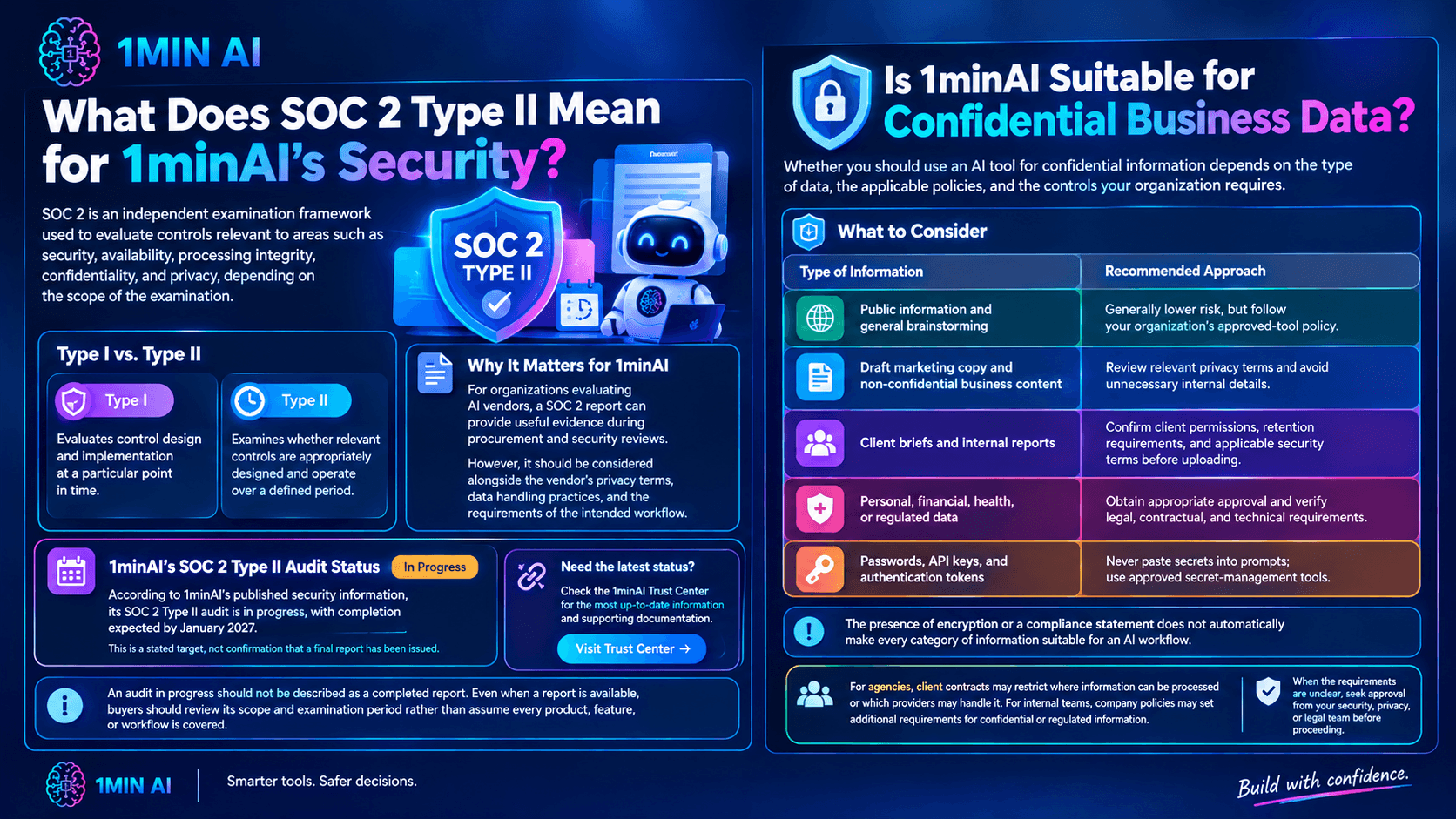
SOC 2 is an independent examination framework used to evaluate controls relevant to areas such as security, availability, processing integrity, confidentiality, and privacy, depending on the scope of the examination.
SOC 2 Type II examines whether relevant controls are appropriately designed and operate over a defined period. It differs from Type I, which evaluates control design and implementation at a particular point in time.
For organizations evaluating AI vendors, a SOC 2 report can provide useful evidence during procurement and security reviews. However, it should be considered alongside the vendor's privacy terms, data handling practices, and the requirements of the intended workflow.
According to 1minAI's published security information, its SOC 2 Type II audit is in progress, with completion expected by January 2027. This is a stated target, not confirmation that a final report has been issued.
If your organization requires a completed SOC 2 Type II report, check the 1minAI Trust Center for the latest status and supporting documentation.
An audit in progress should not be described as a completed report. Likewise, even when a report is available, buyers should review its scope and examination period rather than assume every product, feature, or workflow is covered.
Is 1minAI Suitable for Confidential Business Data?
Whether you should use an AI tool for confidential information depends on the type of data, the applicable policies, and the controls your organization requires.
Consider the following examples:
| Type of information | Recommended approach |
|---|---|
| Public information and general brainstorming | Generally lower risk, but follow your organization's approved-tool policy. |
| Draft marketing copy and non-confidential business content | Review relevant privacy terms and avoid unnecessary internal details. |
| Client briefs and internal reports | Confirm client permissions, retention requirements, and applicable security terms before uploading. |
| Personal, financial, health, or regulated data | Obtain appropriate approval and verify legal, contractual, and technical requirements. |
| Passwords, API keys, and authentication tokens | Never paste secrets into prompts; use approved secret-management tools. |
The presence of encryption or a compliance statement does not automatically make every category of information suitable for an AI workflow.
For agencies, this is especially important because client contracts may restrict where information can be processed or which providers may handle it. For internal teams, company policies may set additional requirements for confidential or regulated information.
When the requirements are unclear, seek approval from your security, privacy, or legal team before proceeding.
6 Ways to Improve Data Security and Privacy When Using AI
The platform you choose is only one part of the security picture. Your own workflow can also reduce unnecessary exposure.
1. Share Only the Information Needed
Before uploading a file, ask whether the AI task requires the entire document.
If you only need a summary of one section, provide that section instead of the full report. A marketing team may be able to generate campaign ideas from an approved product brief without including customer records or internal financial data.
2. Remove Unnecessary Personal Information
Where appropriate, replace names, email addresses, account numbers, and other identifiers with neutral placeholders.
Remember that removing a name alone does not always anonymize a document. Other details, such as a person's job title, location, or unique circumstances, may still identify them.
3. Review Privacy and Retention Policies
Before introducing a new type of information into your workflow, check how the service handles retention, deletion, model training, and third-party processing.
If your organization has a data-retention policy, confirm that your intended use is compatible with it.
4. Protect Accounts and Shared Content
Follow your organization's account-security requirements and share generated documents only with the intended people.
Before sending AI-generated content externally, check that it does not expose confidential information, personal details, or internal notes.
5. Review AI Outputs Before Sharing
AI-generated content may reproduce sensitive information included in the original prompt or uploaded material.
Review outputs before publishing them, sending them to clients, or transferring them into another system. Pay particular attention to personal information, confidential business details, and unsupported claims.
6. Establish an Approved AI Workflow
For teams, document which AI tools are approved, what information employees can submit, who reviews outputs, and when additional security approval is required.
Clear guidelines help employees make consistent decisions and reduce the risk of sensitive information being shared unintentionally.
Frequently Asked Questions
Is 1minAI secure?
1minAI publishes information about security measures that include encryption, access restrictions, monitoring, backups, and incident response. Whether the platform is suitable for a particular workflow depends on the information involved and your organization's requirements.
What does data security and privacy mean when using AI?
Data security focuses on protecting information from unauthorized access, loss, or misuse. Data privacy concerns how information is collected, processed, stored, shared, and deleted. Both matter when prompts, documents, or other information are submitted to an AI service.
Does 1minAI use my data to train AI models?
1minAI states that customer data is not used to train AI models. Review the current privacy documentation for the scope of that statement and any details relevant to your intended use.
Does 1minAI have SOC 2 Type II?
According to its published security information, 1minAI's SOC 2 Type II audit is in progress, with completion expected by January 2027. Check the Trust Center for updates rather than treating the target date as a completed audit.
Can I upload confidential client documents to 1minAI?
First confirm that the applicable privacy terms, data-handling practices, third-party arrangements, and client or organizational policies permit it. For sensitive information, obtain the required approval and minimize the data you share.
Where can I find 1minAI's data security and privacy information?
Visit the 1minAI Trust Center for published security and compliance information. You can also review the applicable privacy documentation and contact 1minAI if your organization needs additional clarification.
Conclusion
Data security and privacy should be part of every AI tool evaluation, particularly when a workflow involves client documents, internal reports, or personal information.
1minAI publishes security information covering areas such as encryption, access controls, monitoring, backups, and incident response. It also states that customer data is not used to train AI models, while its SOC 2 Type II audit remains in progress according to its published information.
Before using the platform for sensitive work, review the Trust Center, understand the relevant data-handling practices, and confirm that they match your organization's requirements.
A thoughtful vendor review, combined with responsible data practices, helps you make better-informed decisions about using AI at work.
For further information, explore the 1minAI Trust Center.
Discover more AI features: https://1min.ai/features
Try 1minAI agent now: https://app.1min.ai/ai-agent-demo
- #Information
- #Commerce
Alternatives
Discover the best alternatives to 1minAI and compare features, pricing, and use cases.

1min.AI vs OpenRouter
1min.AI vs. OpenRouter: Compare the ready-to-use AI creation product against the technical API tool. Find out if you need a zero-code creative studio or a coding infrastructure hub.
 Ngoc Hong
1min.AI vs Lovart
Looking for a Lovart alternative? Compare creative workflows, pricing considerations, and practical prompts to see whether 1min.AI fits your team.
Ngoc Hong
1min.AI vs Jarvis AI
Compare 1min.AI vs Jarvis AI to discover which AI platform is better for writing, research, automation, and content creation. Find the best AI assistant for your workflow.
Ngoc HongAI Tools
Discover the best AI tools to boost productivity, creativity, and everyday work.

Create Consistent Cartoon Content in Just a Few Steps
Create engaging cartoon videos for TikTok and Reels with 1min.AI. Research ideas, create characters, and turn images into animated videos in 3 simple steps.
 Lien Anh Vu
One Product, 10 UGC Creatives: How AI Makes Content Testing Easier
Create more authentic UGC with an AI UGC video generator, test more creative angles and scale affiliate content without filming every version.
Lien Anh Vu
Top 4 Affordable AI Tools for Startup Founders
Discover the top 4 affordable AI tools for startup founders to validate ideas, build products, create content, and launch faster without overspending.
 Tram Ta
AI Features
Comprehensive AI features that streamline workflows, improve efficiency, and empower teams to achieve more.
Create Consistent Cartoon Content in Just a Few Steps
Create engaging cartoon videos for TikTok and Reels with 1min.AI. Research ideas, create characters, and turn images into animated videos in 3 simple steps.
Lien Anh VuOne Product, 10 UGC Creatives: How AI Makes Content Testing Easier
Create more authentic UGC with an AI UGC video generator, test more creative angles and scale affiliate content without filming every version.
Lien Anh Vu
1minAI: Free AI Grammar Checker
Check grammar for free with 1minAI’s AI grammar checker. Find grammar, spelling, and writing mistakes, improve clarity, and polish your content in seconds.
Tram TaAI Use Cases
A curated collection of AI use cases for business, productivity, and industry-specific applications.
Create Consistent Cartoon Content in Just a Few Steps
Create engaging cartoon videos for TikTok and Reels with 1min.AI. Research ideas, create characters, and turn images into animated videos in 3 simple steps.
Lien Anh VuOne Product, 10 UGC Creatives: How AI Makes Content Testing Easier
Create more authentic UGC with an AI UGC video generator, test more creative angles and scale affiliate content without filming every version.
Lien Anh Vu
Best Time to Post on Instagram: A Practical Guide for Better Engagement
Discover the best time to post on Instagram, including the best days and times for different audiences, plus tips to find the ideal posting schedule for your account.
Tram TaAI Tutorials
Learn how to use AI with practical, step-by-step tutorials.

Black Friday AI Tool Deals in 2026
Discover what Black Friday AI tool deals 2026 has to offer. Find out how to secure the 1min.AI lifetime deal via AppSumo, Dealify, Stack Social, and verify on Trustpilot, Slashdot, and Software Advice.
 Hang Nguyen
Create Consistent Cartoon Content in Just a Few Steps
Create engaging cartoon videos for TikTok and Reels with 1min.AI. Research ideas, create characters, and turn images into animated videos in 3 simple steps.
Lien Anh Vu
[Seedance 2.5 New] Better AI Product Videos, Less Rework in 1min.AI
Use Seedance 2.5 image to video on 1min.AI to create more consistent AI product videos, reduce failed generations, save credits, and improve UGC workflows.
Lien Anh VuAI Guides
Learn AI faster with practical guides, real-world examples, and actionable best practices.

Safely Buy AI Tools Online: 2026 Black Friday Guide
Discover how to find and secure the best Black Friday AI deals online. Learn expert strategies to avoid scams, combat subscription fatigue, and verify software.
Hang NguyenCreate Consistent Cartoon Content in Just a Few Steps
Create engaging cartoon videos for TikTok and Reels with 1min.AI. Research ideas, create characters, and turn images into animated videos in 3 simple steps.
Lien Anh Vu[Seedance 2.5 New] Better AI Product Videos, Less Rework in 1min.AI
Use Seedance 2.5 image to video on 1min.AI to create more consistent AI product videos, reduce failed generations, save credits, and improve UGC workflows.
Lien Anh VuAI Solutions
Browse the best AI solutions for automation, coding, research, productivity, customer support, marketing, and business workflows.
Safely Buy AI Tools Online: 2026 Black Friday Guide
Discover how to find and secure the best Black Friday AI deals online. Learn expert strategies to avoid scams, combat subscription fatigue, and verify software.
Hang NguyenCreate Consistent Cartoon Content in Just a Few Steps
Create engaging cartoon videos for TikTok and Reels with 1min.AI. Research ideas, create characters, and turn images into animated videos in 3 simple steps.
Lien Anh VuOne Product, 10 UGC Creatives: How AI Makes Content Testing Easier
Create more authentic UGC with an AI UGC video generator, test more creative angles and scale affiliate content without filming every version.
Lien Anh VuAI Models
Explore the world's leading AI models in one place.
Create Consistent Cartoon Content in Just a Few Steps
Create engaging cartoon videos for TikTok and Reels with 1min.AI. Research ideas, create characters, and turn images into animated videos in 3 simple steps.
Lien Anh VuOne Product, 10 UGC Creatives: How AI Makes Content Testing Easier
Create more authentic UGC with an AI UGC video generator, test more creative angles and scale affiliate content without filming every version.
Lien Anh Vu[Seedance 2.5 New] Better AI Product Videos, Less Rework in 1min.AI
Use Seedance 2.5 image to video on 1min.AI to create more consistent AI product videos, reduce failed generations, save credits, and improve UGC workflows.
Lien Anh VuAI Comparisons
Compare AI tools, models, and platforms to find the best fit for your needs.

Kling AI Vs Veo 3: Which Model Wins?
Kling AI vs Veo 3: compare motion, native audio, pricing & free tiers to see which AI video generator wins for your project - try both on 1min.AI.
 Trang Tran
[Seedance 2.5 New] Better AI Product Videos, Less Rework in 1min.AI
Use Seedance 2.5 image to video on 1min.AI to create more consistent AI product videos, reduce failed generations, save credits, and improve UGC workflows.
Lien Anh Vu
DeepSeek V4 Pro vs Flash Comparison
Compare DeepSeek V4 Pro vs DeepSeek V4 Flash metrics. Optimize your agentic apps and improve AI fact checking on 1min.ai today.
Ngoc HongAI Integrations
Seamlessly integrate AI with the tools you already use to automate work and boost productivity.

POV: You Have 10+ Posts to Make Every Day
Learn how to build an AI content workflow that helps content creators produce 10+ social media posts a day faster with AI brainstorming, image generation, and content creation.
Lien Anh Vu
How to Use an AI Fashion Video Generator for Fashion Week 2026
Turn Fashion Week 2026 ideas into stunning fashion videos with AI. Learn how to brainstorm, create visuals, and transform images into videos with one simple workflow.
Lien Anh Vu
Stop Switching Between AI Apps: How AI Integration Transforms Employer Branding
Discover how AI integration helps HR teams streamline employer branding by combining AI writing, documents, images, video, and multiple AI models into one workspace.
Tram TaAI for Industries
Find the best AI tools and workflows for healthcare, finance, education, legal, manufacturing, retail, real estate, and more

Free AI Product Description Generator
Write product descriptions that sell in minutes. Use this free AI product description generator to turn details or a photo into on-brand copy. Try 1min.AI.
Trang Tran
Best Business Productivity Tools for Startups to Maximize Profits | 1minAI
Discover the best business productivity tools for startups to save time, streamline workflows, reduce repetitive tasks, and support profitable growth with AI.
Tram Ta
Best AI Tool for Content Marketing |1minAI
Looking for the best AI tool for content marketing? See how 1minAI helps marketers research, write, repurpose, create visuals, and scale content from one AI workspace.
Tram TaAI Agents
Discover and run AI agents to automate tasks across your work and daily life.
1minAI: Free AI Grammar Checker
Check grammar for free with 1minAI’s AI grammar checker. Find grammar, spelling, and writing mistakes, improve clarity, and polish your content in seconds.
Tram Ta
AI Agents for Facebook
Use an AI Agent for Facebook to create content, generate images, schedule posts, and publish from your documents and conversations.
Ngoc Hong
AI Agent vs AI Assistant: Which One Actually Saves Designers More Time?
Learn the difference between AI Agent vs AI Assistant and discover which solution helps designers automate repetitive work, reduce revisions, and save more time.
Lien Anh VuAI Workflows
Explore ready-to-use AI workflows for productivity, marketing, sales, support, and more.
Create Consistent Cartoon Content in Just a Few Steps
Create engaging cartoon videos for TikTok and Reels with 1min.AI. Research ideas, create characters, and turn images into animated videos in 3 simple steps.
Lien Anh VuOne Product, 10 UGC Creatives: How AI Makes Content Testing Easier
Create more authentic UGC with an AI UGC video generator, test more creative angles and scale affiliate content without filming every version.
Lien Anh VuPOV: You Have 10+ Posts to Make Every Day
Learn how to build an AI content workflow that helps content creators produce 10+ social media posts a day faster with AI brainstorming, image generation, and content creation.
Lien Anh VuNewsletter
Weekly AI Innovations with 1minAI
🔮 Weekly AI Innovations #143: Update Update GPT-6, GPT-6.1 & Ideogram 4.0 & Ideogram 4.0
Access GPT-6 Sol, Luna, GPT-6.1 Sol, and Ideogram 4.0 on 1min.ai. Boost typography accuracy to 98.4% and cut reasoning latency by 45% in one platform.
Hang Nguyen
🔮 Weekly AI Innovations #142: Grok 4.7, Opus 5.5 & Sonnet 5.5 on 1min.ai
Access Grok 4.7, Claude Opus 5.5, and Sonnet 5.5 on 1min.ai. Cut subscription costs by up to 70% and process millions tokens in a single unified workspace.
Hang Nguyen
🔮 Weekly AI Innovations #141: Seedance 2.5 & Stable Audio 3: Next-Gen AI
Explore Seedance 2.0, 2.5, and StabilityAI's Stable Audio 3 on 1min.ai. Generate studio-grade audio and synchronized motion with next-gen generative AI.
Hang Nguyen