
Leonardo AI Image Generator Free: Models on 1min.AI

Ngoc Hong
October 28, 2026
Try Leonardo AI image generation with free credits on 1min.AI. Compare models, explore use cases, and understand Leonardo.Ai’s free plan limits.
Leonardo AI Image Generator Free: Models on 1min.AI
Looking for a Leonardo AI image generator free option? You can use Leonardo.Ai’s free plan or try Leonardo models through 1min.AI’s free credit program. Leonardo.Ai provides 150 daily tokens, while 1min.AI uses its own credit system. This guide explains the difference, shows you how to start, and helps you choose a model for your image.
Is the Leonardo AI image generator free to use?
Yes. The Leonardo AI free plan includes 150 tokens per day, resetting every 24 hours. Unused tokens expire rather than carrying over. The number of images you can generate depends on the model, image dimensions, and settings, so 150 tokens does not represent a fixed image allowance.
| Item | Leonardo.Ai free plan |
|---|---|
| Token allowance | 150 tokens daily |
| Rollover | Unused daily tokens do not carry over |
| Image privacy | Free-plan creations are public |
| Commercial use | Permitted under Leonardo.Ai’s terms |
| Private generation | Available on paid plans |
Leonardo.Ai allows commercial use of free-plan images, but its pricing page states that free users receive a non-exclusive, royalty-free commercial license while Leonardo.Ai owns rights to those images. Public creations may also be accessible to others through the service. Review the current terms before using outputs for client or commercial projects.
Use Leonardo models on 1min.AI
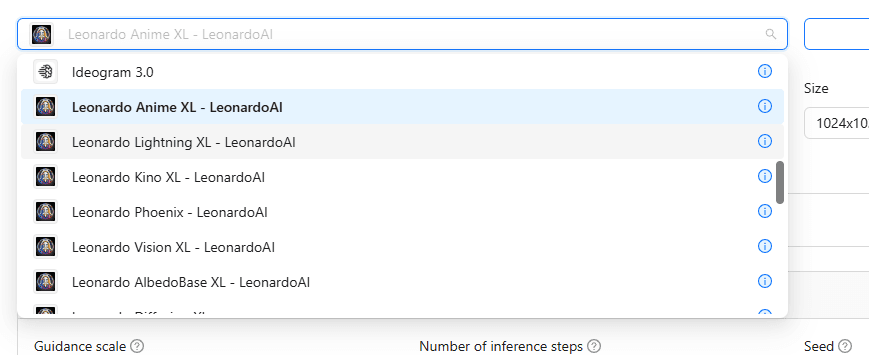
The 1min.AI Image Generator brings Leonardo models into a workspace that also includes AI chat, writing, and document tools. You can try models such as Phoenix, Anime XL, Lightning XL, Kino XL, Vision XL, AlbedoBase XL, and Diffusion XL.
Access through 1min.AI is separate from the Leonardo.Ai app. You use your 1min.AI account and credits; Leonardo.Ai’s daily token allowance does not transfer to this workspace.
How to generate an image in three steps
Start with one clear image idea, then follow these steps:
- Sign in to 1min.AI and open AI for Image → Image Generator.
- Select a Leonardo model and enter your prompt.
- Choose the available image settings, review the credit cost, and click Run.
For your first test, choose one subject and a simple setting. This makes it easier to identify what needs improvement.
Which Leonardo model should you use?
Choose your starting model around the image you need. Phoenix emphasizes detailed instruction following, Anime XL targets anime imagery, Lightning XL focuses on faster generation, and Kino XL supports cinematic visuals. The table below provides practical starting points for testing rather than a universal ranking.
| Your purpose | Model to try first | Prompt tips |
|---|---|---|
| Product concepts and precise arrangements | Leonardo Phoenix | Specify object counts, colors, placement, and background. |
| Anime avatars and illustrated characters | Leonardo Anime XL | Describe appearance, outfit, expression, pose, and shading style. |
| Cinematic campaign images and storyboard frames | Leonardo Kino XL | Define shot size, camera angle, mood, and lighting. |
| Photography-style portraits and lifestyle scenes | Leonardo Vision XL | Test descriptions of natural texture, daylight, and depth of field. |
| Exploring initial concepts | Leonardo Lightning XL | Keep the subject clear and test variations before refining details. |
| Fantasy illustrations and CG-style concepts | Leonardo AlbedoBase XL | Experiment with materials, textures, and an explicit illustration style. |
| Exploring multiple styles | Leonardo Diffusion XL | Test one visual treatment at a time: photographic, painterly, or illustrative. |
These models can handle overlapping tasks. Use the table to select a first candidate, then compare the actual output against your brief.
Same prompt, different models: our test results
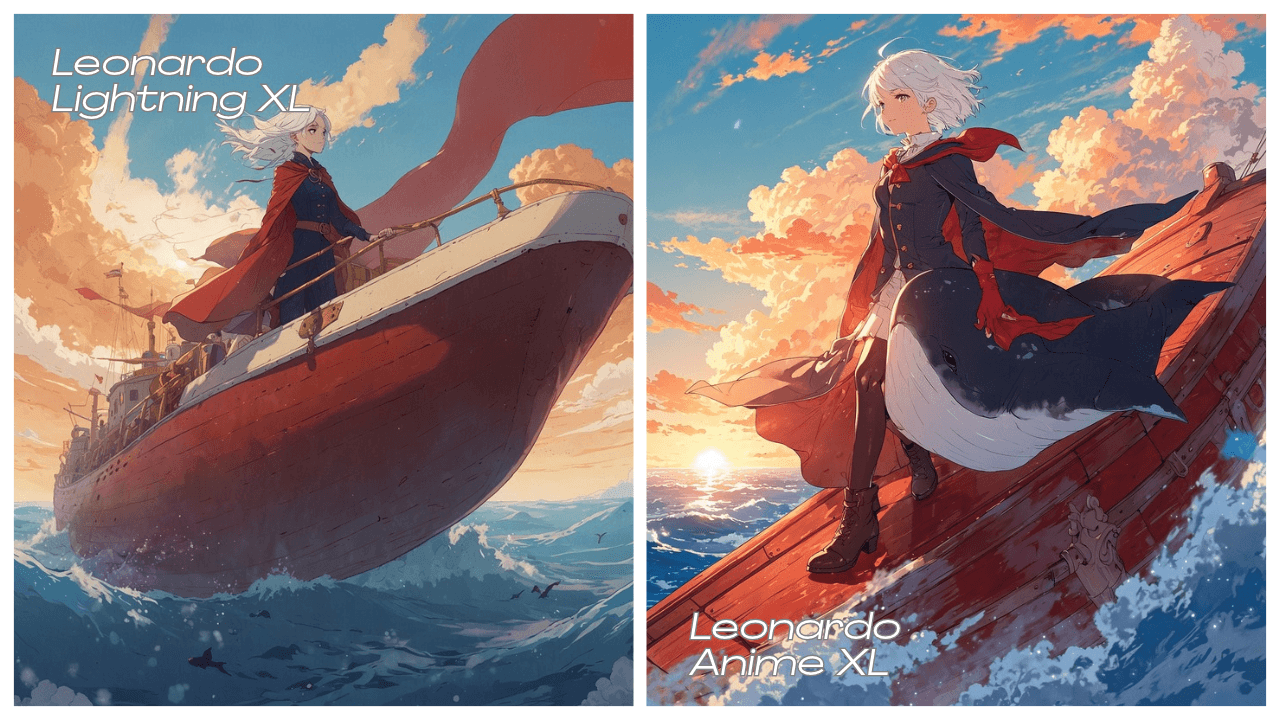
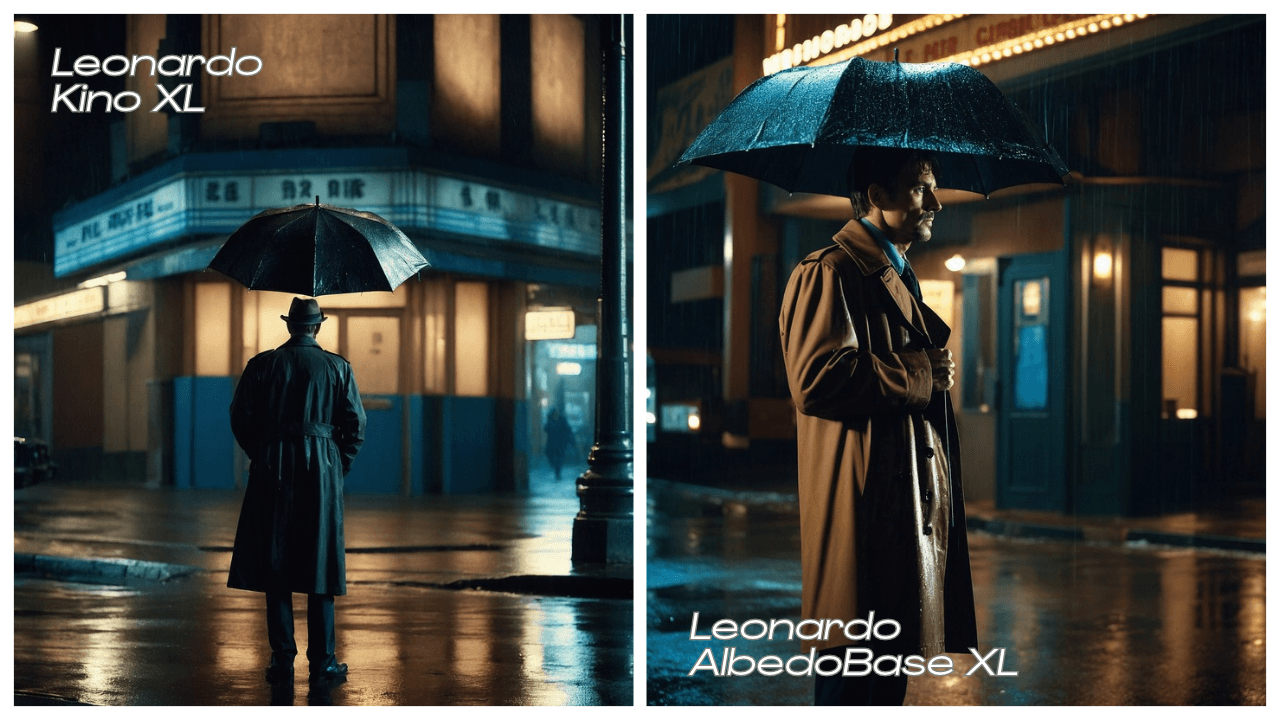
We tested two prompts across four Leonardo models. The outputs show differences in framing, visual style, and how closely each model followed the requested details.
Anime scene: Lightning XL vs Anime XL
Lightning XL emphasizes the ship and its surroundings, creating a wider, softer illustration. Anime XL brings the character closer, with more defined costume details and stronger sunset colors. However, Lightning XL omits the prominent sky whale, while Anime XL includes an opaque whale overlapping the character rather than a translucent creature swimming beside the ship. Neither clearly delivers the floating islands or airborne setting.
Detective scene: Kino XL vs AlbedoBase XL
Kino XL creates a wider establishing shot, emphasizing the theater, silhouette, and wet pavement. AlbedoBase XL frames the detective more closely, making his face, coat texture, and warm–cool lighting easier to assess. Both capture the rainy cinematic mood, but both show an open umbrella despite the prompt requesting a closed one.
What this means for model selection
For these samples, Anime XL provides stronger character emphasis, Lightning XL prioritizes the ship and environment, Kino XL establishes atmosphere, and AlbedoBase XL reveals more character detail. Visual appeal and prompt accuracy should be evaluated separately: an attractive image can still miss important instructions. These individual results suggest starting points, rather than proving one model is consistently better.
Leonardo.Ai free plan vs Leonardo models on 1min.AI
Both options offer a way to experiment, but their accounts, allowances, and tools differ. Choose based on where you want to work.
| Leonardo.Ai free plan | Leonardo models on 1min.AI | |
|---|---|---|
| Free access | 150 daily tokens | 1min.AI free credit program |
| Account | Leonardo.Ai account | 1min.AI account |
| Model selection | Models offered within Leonardo.Ai | Available Leonardo models alongside other providers |
| Workflow | Leonardo.Ai’s creative tools | Image tools alongside chat, writing, and document tools |
More Image Tools in the Same Workspace
After you generate an image, you can keep working in the same account. The AI for Image menu also includes:
- Image to Prompt
- Image Variator
- Image Upscaler
- Image Extender
- Background Remover and Background Replacer
- Text Remover and** **Object Remover
Frequently asked questions
Is the Leonardo AI free plan unlimited?
No. Free users receive 150 daily tokens. Generation costs vary, and unused daily tokens do not accumulate. Leonardo.Ai Help Center
Which model should I start with?
Try Phoenix for detailed instructions, Anime XL for anime, or Kino XL for cinematic scenes. Compare two models when your brief could suit several styles.
Can I use free images commercially?
Leonardo.Ai permits commercial use under its terms, with conditions concerning ownership and public visibility. For images generated through 1min.AI, review the applicable 1min.AI terms. Leonardo.Ai
Do I need a Leonardo.Ai account for 1min.AI?
No separate Leonardo.Ai account is needed to use the Leonardo models available within 1min.AI.
Start creating with Leonardo models
Choose one real task—a product concept, anime avatar, or campaign visual—and test it on a suitable model. Refine the prompt, compare results, and keep the image that meets your brief. Try the Image Generator on 1min.AI with the available free credit program.
- #Transactional
Alternatives
Discover the best alternatives to 1minAI and compare features, pricing, and use cases.

1min.AI vs OpenRouter
1min.AI vs. OpenRouter: Compare the ready-to-use AI creation product against the technical API tool. Find out if you need a zero-code creative studio or a coding infrastructure hub.
 Ngoc Hong
1min.AI vs Lovart
Looking for a Lovart alternative? Compare creative workflows, pricing considerations, and practical prompts to see whether 1min.AI fits your team.
Ngoc Hong
1min.AI vs Jarvis AI
Compare 1min.AI vs Jarvis AI to discover which AI platform is better for writing, research, automation, and content creation. Find the best AI assistant for your workflow.
Ngoc HongAI Tools
Discover the best AI tools to boost productivity, creativity, and everyday work.

Create Consistent Cartoon Content in Just a Few Steps
Create engaging cartoon videos for TikTok and Reels with 1min.AI. Research ideas, create characters, and turn images into animated videos in 3 simple steps.
 Lien Anh Vu
One Product, 10 UGC Creatives: How AI Makes Content Testing Easier
Create more authentic UGC with an AI UGC video generator, test more creative angles and scale affiliate content without filming every version.
Lien Anh Vu
Top 4 Affordable AI Tools for Startup Founders
Discover the top 4 affordable AI tools for startup founders to validate ideas, build products, create content, and launch faster without overspending.
 Tram Ta
AI Features
Comprehensive AI features that streamline workflows, improve efficiency, and empower teams to achieve more.
Create Consistent Cartoon Content in Just a Few Steps
Create engaging cartoon videos for TikTok and Reels with 1min.AI. Research ideas, create characters, and turn images into animated videos in 3 simple steps.
Lien Anh VuOne Product, 10 UGC Creatives: How AI Makes Content Testing Easier
Create more authentic UGC with an AI UGC video generator, test more creative angles and scale affiliate content without filming every version.
Lien Anh Vu
1minAI: Free AI Grammar Checker
Check grammar for free with 1minAI’s AI grammar checker. Find grammar, spelling, and writing mistakes, improve clarity, and polish your content in seconds.
Tram TaAI Use Cases
A curated collection of AI use cases for business, productivity, and industry-specific applications.
Create Consistent Cartoon Content in Just a Few Steps
Create engaging cartoon videos for TikTok and Reels with 1min.AI. Research ideas, create characters, and turn images into animated videos in 3 simple steps.
Lien Anh VuOne Product, 10 UGC Creatives: How AI Makes Content Testing Easier
Create more authentic UGC with an AI UGC video generator, test more creative angles and scale affiliate content without filming every version.
Lien Anh Vu
Best Time to Post on Instagram: A Practical Guide for Better Engagement
Discover the best time to post on Instagram, including the best days and times for different audiences, plus tips to find the ideal posting schedule for your account.
Tram TaAI Tutorials
Learn how to use AI with practical, step-by-step tutorials.

Black Friday AI Tool Deals in 2026
Discover what Black Friday AI tool deals 2026 has to offer. Find out how to secure the 1min.AI lifetime deal via AppSumo, Dealify, Stack Social, and verify on Trustpilot, Slashdot, and Software Advice.
 Hang Nguyen
Create Consistent Cartoon Content in Just a Few Steps
Create engaging cartoon videos for TikTok and Reels with 1min.AI. Research ideas, create characters, and turn images into animated videos in 3 simple steps.
Lien Anh Vu
[Seedance 2.5 New] Better AI Product Videos, Less Rework in 1min.AI
Use Seedance 2.5 image to video on 1min.AI to create more consistent AI product videos, reduce failed generations, save credits, and improve UGC workflows.
Lien Anh VuAI Guides
Learn AI faster with practical guides, real-world examples, and actionable best practices.

Safely Buy AI Tools Online: 2026 Black Friday Guide
Discover how to find and secure the best Black Friday AI deals online. Learn expert strategies to avoid scams, combat subscription fatigue, and verify software.
Hang NguyenCreate Consistent Cartoon Content in Just a Few Steps
Create engaging cartoon videos for TikTok and Reels with 1min.AI. Research ideas, create characters, and turn images into animated videos in 3 simple steps.
Lien Anh Vu[Seedance 2.5 New] Better AI Product Videos, Less Rework in 1min.AI
Use Seedance 2.5 image to video on 1min.AI to create more consistent AI product videos, reduce failed generations, save credits, and improve UGC workflows.
Lien Anh VuAI Solutions
Browse the best AI solutions for automation, coding, research, productivity, customer support, marketing, and business workflows.
Safely Buy AI Tools Online: 2026 Black Friday Guide
Discover how to find and secure the best Black Friday AI deals online. Learn expert strategies to avoid scams, combat subscription fatigue, and verify software.
Hang NguyenCreate Consistent Cartoon Content in Just a Few Steps
Create engaging cartoon videos for TikTok and Reels with 1min.AI. Research ideas, create characters, and turn images into animated videos in 3 simple steps.
Lien Anh VuOne Product, 10 UGC Creatives: How AI Makes Content Testing Easier
Create more authentic UGC with an AI UGC video generator, test more creative angles and scale affiliate content without filming every version.
Lien Anh VuAI Models
Explore the world's leading AI models in one place.
Create Consistent Cartoon Content in Just a Few Steps
Create engaging cartoon videos for TikTok and Reels with 1min.AI. Research ideas, create characters, and turn images into animated videos in 3 simple steps.
Lien Anh VuOne Product, 10 UGC Creatives: How AI Makes Content Testing Easier
Create more authentic UGC with an AI UGC video generator, test more creative angles and scale affiliate content without filming every version.
Lien Anh Vu[Seedance 2.5 New] Better AI Product Videos, Less Rework in 1min.AI
Use Seedance 2.5 image to video on 1min.AI to create more consistent AI product videos, reduce failed generations, save credits, and improve UGC workflows.
Lien Anh VuAI Comparisons
Compare AI tools, models, and platforms to find the best fit for your needs.

Kling AI Vs Veo 3: Which Model Wins?
Kling AI vs Veo 3: compare motion, native audio, pricing & free tiers to see which AI video generator wins for your project - try both on 1min.AI.
 Trang Tran
[Seedance 2.5 New] Better AI Product Videos, Less Rework in 1min.AI
Use Seedance 2.5 image to video on 1min.AI to create more consistent AI product videos, reduce failed generations, save credits, and improve UGC workflows.
Lien Anh Vu
DeepSeek V4 Pro vs Flash Comparison
Compare DeepSeek V4 Pro vs DeepSeek V4 Flash metrics. Optimize your agentic apps and improve AI fact checking on 1min.ai today.
Ngoc HongAI Integrations
Seamlessly integrate AI with the tools you already use to automate work and boost productivity.

POV: You Have 10+ Posts to Make Every Day
Learn how to build an AI content workflow that helps content creators produce 10+ social media posts a day faster with AI brainstorming, image generation, and content creation.
Lien Anh Vu
How to Use an AI Fashion Video Generator for Fashion Week 2026
Turn Fashion Week 2026 ideas into stunning fashion videos with AI. Learn how to brainstorm, create visuals, and transform images into videos with one simple workflow.
Lien Anh Vu
Stop Switching Between AI Apps: How AI Integration Transforms Employer Branding
Discover how AI integration helps HR teams streamline employer branding by combining AI writing, documents, images, video, and multiple AI models into one workspace.
Tram TaAI for Industries
Find the best AI tools and workflows for healthcare, finance, education, legal, manufacturing, retail, real estate, and more

Free AI Product Description Generator
Write product descriptions that sell in minutes. Use this free AI product description generator to turn details or a photo into on-brand copy. Try 1min.AI.
Trang Tran
Best Business Productivity Tools for Startups to Maximize Profits | 1minAI
Discover the best business productivity tools for startups to save time, streamline workflows, reduce repetitive tasks, and support profitable growth with AI.
Tram Ta
Best AI Tool for Content Marketing |1minAI
Looking for the best AI tool for content marketing? See how 1minAI helps marketers research, write, repurpose, create visuals, and scale content from one AI workspace.
Tram TaAI Agents
Discover and run AI agents to automate tasks across your work and daily life.
1minAI: Free AI Grammar Checker
Check grammar for free with 1minAI’s AI grammar checker. Find grammar, spelling, and writing mistakes, improve clarity, and polish your content in seconds.
Tram Ta
AI Agents for Facebook
Use an AI Agent for Facebook to create content, generate images, schedule posts, and publish from your documents and conversations.
Ngoc Hong
AI Agent vs AI Assistant: Which One Actually Saves Designers More Time?
Learn the difference between AI Agent vs AI Assistant and discover which solution helps designers automate repetitive work, reduce revisions, and save more time.
Lien Anh VuAI Workflows
Explore ready-to-use AI workflows for productivity, marketing, sales, support, and more.
Create Consistent Cartoon Content in Just a Few Steps
Create engaging cartoon videos for TikTok and Reels with 1min.AI. Research ideas, create characters, and turn images into animated videos in 3 simple steps.
Lien Anh VuOne Product, 10 UGC Creatives: How AI Makes Content Testing Easier
Create more authentic UGC with an AI UGC video generator, test more creative angles and scale affiliate content without filming every version.
Lien Anh VuPOV: You Have 10+ Posts to Make Every Day
Learn how to build an AI content workflow that helps content creators produce 10+ social media posts a day faster with AI brainstorming, image generation, and content creation.
Lien Anh VuNewsletter
Weekly AI Innovations with 1minAI

🔮 Weekly AI Innovations #143: Update Update GPT-6, GPT-6.1 & Ideogram 4.0 & Ideogram 4.0
Access GPT-6 Sol, Luna, GPT-6.1 Sol, and Ideogram 4.0 on 1min.ai. Boost typography accuracy to 98.4% and cut reasoning latency by 45% in one platform.
Hang Nguyen
🔮 Weekly AI Innovations #142: Grok 4.7, Opus 5.5 & Sonnet 5.5 on 1min.ai
Access Grok 4.7, Claude Opus 5.5, and Sonnet 5.5 on 1min.ai. Cut subscription costs by up to 70% and process millions tokens in a single unified workspace.
Hang Nguyen
🔮 Weekly AI Innovations #141: Seedance 2.5 & Stable Audio 3: Next-Gen AI
Explore Seedance 2.0, 2.5, and StabilityAI's Stable Audio 3 on 1min.ai. Generate studio-grade audio and synchronized motion with next-gen generative AI.
Hang Nguyen