
Claude Duet Waitlist: How to Join and AI Agent Alternatives to Try

Tram Ta
October 27, 2026
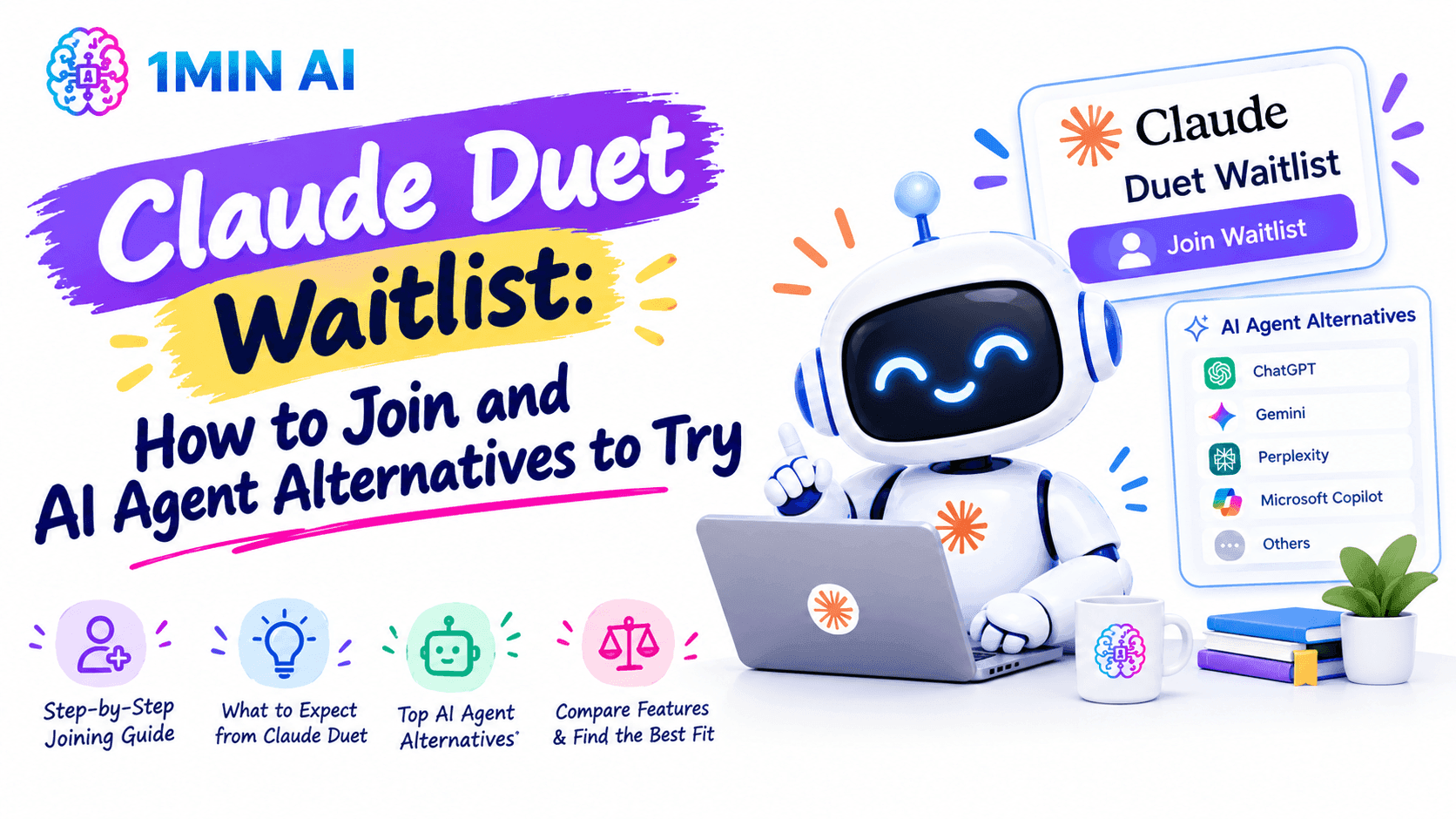
Learn how to join the Claude Duet waitlist, check eligibility, explore its AI agent features, and discover AI tools to try on 1minAI while you wait.
Looking for a way to get access to Claude Duet? Anthropic's new AI agent is designed to do more than answer questions. It can work across connected apps, handle delegated tasks in the background, and notify you when something needs your attention.
However, Claude Duet is currently available through a limited research preview, so joining the waitlist does not guarantee immediate access. The good news is that you can explore other AI chat and agent tools while waiting.
This guide explains what Claude Duet does, how to join the waitlist, who is eligible, and how to explore AI workflows with 1minAI in the meantime.
What Is Claude Duet?
Claude Duet is a proactive AI agent developed by Anthropic. Announced on October 21, 2026, it is designed to help professionals and small business owners manage work across connected applications.
Unlike a conventional AI chatbot, which generally waits for you to start a conversation, Claude Duet can proactively surface important tasks, prepare work, and continue working in its cloud-based environment when you step away.
Its main capabilities include:
- Morning briefings: Review connected email and calendar information to identify tasks that need attention.
- Background work: Continue working on delegated tasks without requiring your computer or phone to remain active.
- Connected applications: Work with supported apps and services through available connectors and plugins.
- Document and project creation: Help prepare reports, presentations, spreadsheets, dashboards, and other deliverables.
- Approval-based actions: Ask for your approval before taking consequential actions, such as sending certain messages or making payments.
Claude Duet is powered by Claude Opus 5.5 and uses your existing Claude account, including supported memory, skills, and connected applications.
The key difference is its proactive approach: instead of only helping when you ask a question, it is designed to identify work that needs your attention and help move it forward.
Who Can Join the Claude Duet Waitlist?
As of October 27, 2026, Claude Duet is in research preview and access is limited.
According to the official Claude Duet page, you currently need to meet these requirements:
- Have an eligible Claude Pro or Max subscription.
- Have a Claude account in the United States.
- Receive an invitation through the waitlist process.
Claude Duet is not currently available to Team or Enterprise subscribers through this research preview.
Anthropic is inviting users in waves, which means you may not receive access immediately after signing up. Availability, supported features, and eligibility can change as the preview develops.
If you're outside the United States, you may not be eligible for the current preview. You can still explore other AI tools while monitoring the official page for future availability updates.
How to Join the Claude Duet Waitlist
If you meet the current eligibility requirements, follow these steps to request access.
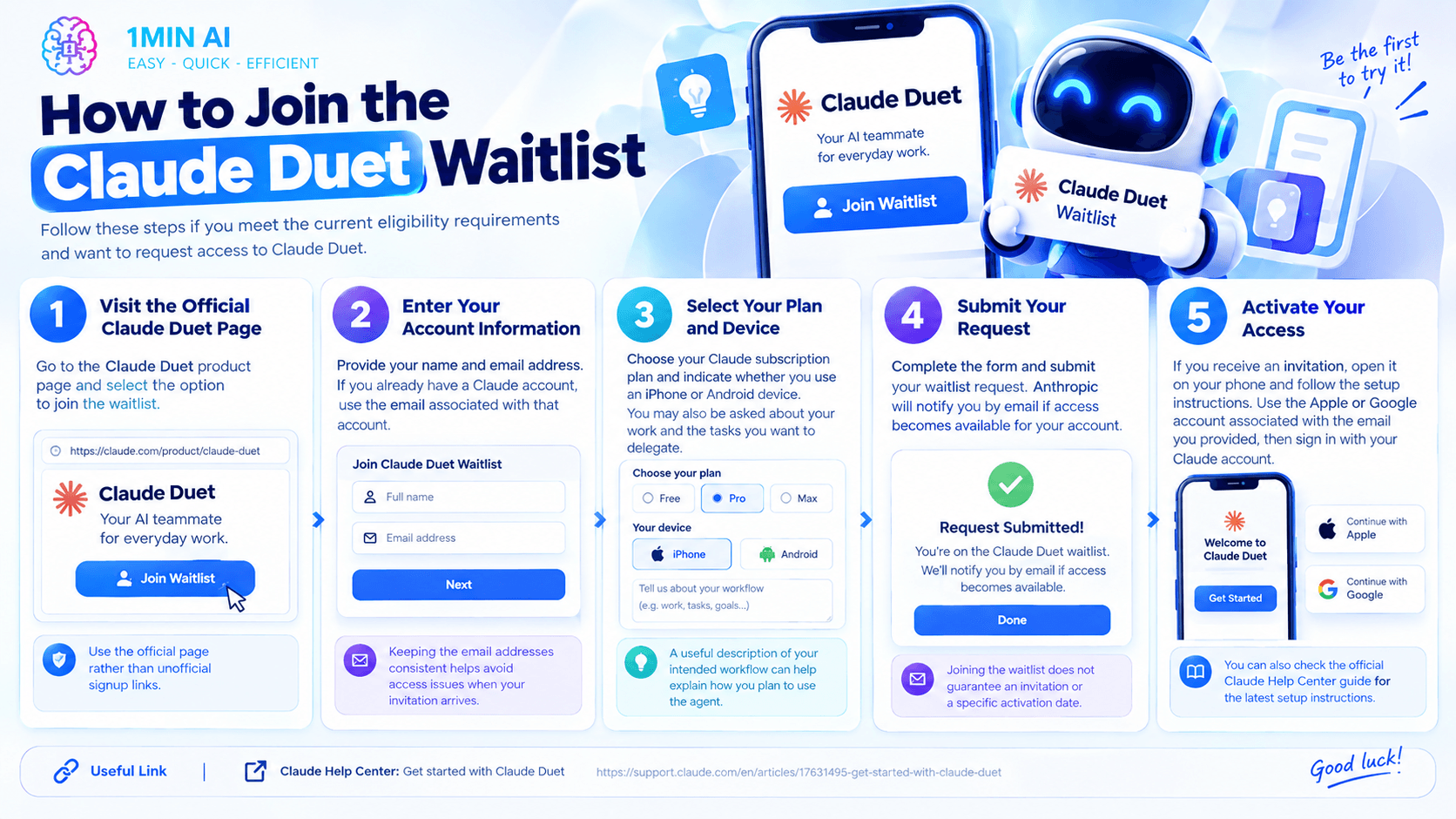
Step 1: Visit the Official Claude Duet Page
Open the Claude Duet product page and select the option to join the waitlist.
Use the official page rather than relying on unofficial signup links.
Step 2: Enter Your Account Information
Provide your name and email address. If you already have a Claude account, use the email associated with that account.
Keeping the email addresses consistent helps avoid access issues when your invitation arrives.
Step 3: Select Your Plan and Device
Choose your Claude subscription plan and indicate whether you use an iPhone or Android device. The signup process may also ask about your work and which tasks you would like to delegate.
Providing a useful description of your intended workflow can help explain how you plan to use the agent.
Step 4: Submit Your Request
Complete the form and submit your waitlist request. Anthropic will notify you by email if access becomes available for your account.
Joining the waitlist does not guarantee an invitation or a specific activation date.
Step 5: Activate Your Access
If you receive an invitation, open it on your phone and follow the setup instructions. Use the Apple or Google account associated with the email address you provided, then sign in with your Claude account.
You can also check the official Claude Help Center guide for the latest setup instructions.
What Can You Do While Waiting for Claude Duet?
You don't have to pause your AI workflow while waiting for an invitation. You can explore other tools for specific tasks, from generating content and comparing AI responses to investigating agent-based automation.
One option is 1minAI AI Agents, where you can explore agent-based tools for different workflows.
Although these tools are not exact replacements for Claude Duet's proactive, connected-app experience, they can help you begin using AI more effectively today.
1. Explore AI Agents for Different Tasks
AI agents can help organize multi-step work, depending on their available capabilities and integrations.
For example, you might use an agent-based workflow to support content planning, research, or routine business tasks. Start by identifying one repetitive process, then check whether a suitable agent supports the steps you need.
Explore the 1minAI AI Agents collection to discover available options.
2. Compare AI Responses in One Workspace
Sometimes you don't need an always-on agent. You simply need a reliable way to work through a difficult question or generate better ideas.
With 1minAI Multi AI Chat and AI Agent, you can explore multi-model chat and agent capabilities in one workspace.
For example, you could ask one available model to draft a project plan, then use another to critique the assumptions and identify missing steps. Comparing responses can help you spot gaps before making a decision.
The models and capabilities available to you depend on the current platform offering and your account access.
3. Automate Parts of Your Social Media Workflow
For founders and marketers, social media is a practical place to begin experimenting with AI-assisted workflows.
The 1minAI AI Agent for Social Media Management is a relevant resource to explore if you want help with social media tasks.
Depending on the available features, an AI-assisted workflow can help you plan topics, prepare post drafts, and organize content for review. Check the current page for supported platforms, integrations, and publishing options.
This is useful if your immediate goal is to reduce repetitive marketing work rather than automate every part of your business.
4. Try Claude Chat for Writing and Analysis
If you specifically want to work with Claude, you can explore the Claude chat options available through 1minAI.
- Claude 3.5 Sonnet on 1minAI: Explore a Claude chat option for writing, brainstorming, and analyzing information, subject to current availability.
- Claude 5 Fable on 1minAI: Visit this dedicated model page to check the available chat experience and usage conditions.
These are model-specific chat options, not the same as Claude Duet's background agent. A regular chat interface can help you complete individual tasks, but it does not automatically provide Duet's proactive briefings or connected-app workflow.
Claude Duet vs. Other AI Agent Workflows
Before deciding whether to wait for Claude Duet, consider the type of work you want AI to handle.
| Your goal | What to explore |
|---|---|
| Receive proactive updates from connected work apps | Claude Duet, when eligible and invited |
| Delegate work that continues in the background | Claude Duet's supported agent tasks |
| Compare answers from different AI models | 1minAI Multi AI Chat |
| Explore AI agents for different workflows | 1minAI AI Agents |
| Prepare social media content | 1minAI Social Media Management Agent |
| Work with Claude through a chat interface | The available Claude model pages on 1minAI |
These options serve different needs. If you want an assistant that monitors connected apps and proactively reports what needs attention, Claude Duet is specifically designed around that experience. If you want to start experimenting with AI content, chat, or agent workflows now, other tools may be useful without waiting for an invitation.
Is Claude Duet Worth Waiting For?
Claude Duet may be particularly useful if your work involves managing many messages, appointments, follow-ups, and business tasks across connected applications.
Its proactive approach could reduce the need to repeatedly check different tools. However, the product is still in research preview, and Anthropic acknowledges that it can sometimes misjudge urgency or misunderstand a conversation.
There are also practical considerations:
- Access is currently restricted to eligible users in the United States.
- Invitations are distributed gradually.
- Background tasks use the same usage limits as other Claude features on your plan.
- Important actions still require your review and approval.
For these reasons, joining the waitlist makes sense if Duet's specific features match your needs. But you can start improving individual workflows with other AI tools while waiting.
Conclusion
The Claude Duet waitlist is the starting point for users interested in Anthropic's proactive AI agent. Its ability to work across connected apps, continue tasks in the background, and surface important updates makes it different from a standard chatbot.
To request access, visit the official Claude Duet page, check your eligibility, and submit the waitlist form. Remember that access is currently limited to eligible US Pro and Max subscribers and that invitations are not immediate.
In the meantime, explore 1minAI AI Agents, try multi-model chat, or experiment with AI-assisted social media workflows. You can start making parts of your work easier today without waiting for one specific agent to become available.
For further information, explore 1minAI Multi AI Chat and AI Agent
Discover more AI features: https://1min.ai/features
Try 1minAI agent now: https://app.1min.ai/ai-agent-demo
- #Commerce
- #Information
Alternatives
Discover the best alternatives to 1minAI and compare features, pricing, and use cases.

1min.AI vs OpenRouter
1min.AI vs. OpenRouter: Compare the ready-to-use AI creation product against the technical API tool. Find out if you need a zero-code creative studio or a coding infrastructure hub.
 Ngoc Hong
1min.AI vs Lovart
Looking for a Lovart alternative? Compare creative workflows, pricing considerations, and practical prompts to see whether 1min.AI fits your team.
Ngoc Hong
1min.AI vs Jarvis AI
Compare 1min.AI vs Jarvis AI to discover which AI platform is better for writing, research, automation, and content creation. Find the best AI assistant for your workflow.
Ngoc HongAI Tools
Discover the best AI tools to boost productivity, creativity, and everyday work.

Create Consistent Cartoon Content in Just a Few Steps
Create engaging cartoon videos for TikTok and Reels with 1min.AI. Research ideas, create characters, and turn images into animated videos in 3 simple steps.
 Lien Anh Vu
One Product, 10 UGC Creatives: How AI Makes Content Testing Easier
Create more authentic UGC with an AI UGC video generator, test more creative angles and scale affiliate content without filming every version.
Lien Anh Vu
Top 4 Affordable AI Tools for Startup Founders
Discover the top 4 affordable AI tools for startup founders to validate ideas, build products, create content, and launch faster without overspending.
 Tram Ta
AI Features
Comprehensive AI features that streamline workflows, improve efficiency, and empower teams to achieve more.
Create Consistent Cartoon Content in Just a Few Steps
Create engaging cartoon videos for TikTok and Reels with 1min.AI. Research ideas, create characters, and turn images into animated videos in 3 simple steps.
Lien Anh VuOne Product, 10 UGC Creatives: How AI Makes Content Testing Easier
Create more authentic UGC with an AI UGC video generator, test more creative angles and scale affiliate content without filming every version.
Lien Anh Vu
1minAI: Free AI Grammar Checker
Check grammar for free with 1minAI’s AI grammar checker. Find grammar, spelling, and writing mistakes, improve clarity, and polish your content in seconds.
Tram TaAI Use Cases
A curated collection of AI use cases for business, productivity, and industry-specific applications.
Create Consistent Cartoon Content in Just a Few Steps
Create engaging cartoon videos for TikTok and Reels with 1min.AI. Research ideas, create characters, and turn images into animated videos in 3 simple steps.
Lien Anh VuOne Product, 10 UGC Creatives: How AI Makes Content Testing Easier
Create more authentic UGC with an AI UGC video generator, test more creative angles and scale affiliate content without filming every version.
Lien Anh Vu
Best Time to Post on Instagram: A Practical Guide for Better Engagement
Discover the best time to post on Instagram, including the best days and times for different audiences, plus tips to find the ideal posting schedule for your account.
Tram TaAI Tutorials
Learn how to use AI with practical, step-by-step tutorials.

Black Friday AI Tool Deals in 2026
Discover what Black Friday AI tool deals 2026 has to offer. Find out how to secure the 1min.AI lifetime deal via AppSumo, Dealify, Stack Social, and verify on Trustpilot, Slashdot, and Software Advice.
 Hang Nguyen
Create Consistent Cartoon Content in Just a Few Steps
Create engaging cartoon videos for TikTok and Reels with 1min.AI. Research ideas, create characters, and turn images into animated videos in 3 simple steps.
Lien Anh Vu
[Seedance 2.5 New] Better AI Product Videos, Less Rework in 1min.AI
Use Seedance 2.5 image to video on 1min.AI to create more consistent AI product videos, reduce failed generations, save credits, and improve UGC workflows.
Lien Anh VuAI Guides
Learn AI faster with practical guides, real-world examples, and actionable best practices.

Safely Buy AI Tools Online: 2026 Black Friday Guide
Discover how to find and secure the best Black Friday AI deals online. Learn expert strategies to avoid scams, combat subscription fatigue, and verify software.
Hang NguyenCreate Consistent Cartoon Content in Just a Few Steps
Create engaging cartoon videos for TikTok and Reels with 1min.AI. Research ideas, create characters, and turn images into animated videos in 3 simple steps.
Lien Anh Vu[Seedance 2.5 New] Better AI Product Videos, Less Rework in 1min.AI
Use Seedance 2.5 image to video on 1min.AI to create more consistent AI product videos, reduce failed generations, save credits, and improve UGC workflows.
Lien Anh VuAI Solutions
Browse the best AI solutions for automation, coding, research, productivity, customer support, marketing, and business workflows.
Safely Buy AI Tools Online: 2026 Black Friday Guide
Discover how to find and secure the best Black Friday AI deals online. Learn expert strategies to avoid scams, combat subscription fatigue, and verify software.
Hang NguyenCreate Consistent Cartoon Content in Just a Few Steps
Create engaging cartoon videos for TikTok and Reels with 1min.AI. Research ideas, create characters, and turn images into animated videos in 3 simple steps.
Lien Anh VuOne Product, 10 UGC Creatives: How AI Makes Content Testing Easier
Create more authentic UGC with an AI UGC video generator, test more creative angles and scale affiliate content without filming every version.
Lien Anh VuAI Models
Explore the world's leading AI models in one place.
Create Consistent Cartoon Content in Just a Few Steps
Create engaging cartoon videos for TikTok and Reels with 1min.AI. Research ideas, create characters, and turn images into animated videos in 3 simple steps.
Lien Anh VuOne Product, 10 UGC Creatives: How AI Makes Content Testing Easier
Create more authentic UGC with an AI UGC video generator, test more creative angles and scale affiliate content without filming every version.
Lien Anh Vu[Seedance 2.5 New] Better AI Product Videos, Less Rework in 1min.AI
Use Seedance 2.5 image to video on 1min.AI to create more consistent AI product videos, reduce failed generations, save credits, and improve UGC workflows.
Lien Anh VuAI Comparisons
Compare AI tools, models, and platforms to find the best fit for your needs.

Kling AI Vs Veo 3: Which Model Wins?
Kling AI vs Veo 3: compare motion, native audio, pricing & free tiers to see which AI video generator wins for your project - try both on 1min.AI.
 Trang Tran
[Seedance 2.5 New] Better AI Product Videos, Less Rework in 1min.AI
Use Seedance 2.5 image to video on 1min.AI to create more consistent AI product videos, reduce failed generations, save credits, and improve UGC workflows.
Lien Anh Vu
DeepSeek V4 Pro vs Flash Comparison
Compare DeepSeek V4 Pro vs DeepSeek V4 Flash metrics. Optimize your agentic apps and improve AI fact checking on 1min.ai today.
Ngoc HongAI Integrations
Seamlessly integrate AI with the tools you already use to automate work and boost productivity.

POV: You Have 10+ Posts to Make Every Day
Learn how to build an AI content workflow that helps content creators produce 10+ social media posts a day faster with AI brainstorming, image generation, and content creation.
Lien Anh Vu
How to Use an AI Fashion Video Generator for Fashion Week 2026
Turn Fashion Week 2026 ideas into stunning fashion videos with AI. Learn how to brainstorm, create visuals, and transform images into videos with one simple workflow.
Lien Anh Vu
Stop Switching Between AI Apps: How AI Integration Transforms Employer Branding
Discover how AI integration helps HR teams streamline employer branding by combining AI writing, documents, images, video, and multiple AI models into one workspace.
Tram TaAI for Industries
Find the best AI tools and workflows for healthcare, finance, education, legal, manufacturing, retail, real estate, and more

Free AI Product Description Generator
Write product descriptions that sell in minutes. Use this free AI product description generator to turn details or a photo into on-brand copy. Try 1min.AI.
Trang Tran
Best Business Productivity Tools for Startups to Maximize Profits | 1minAI
Discover the best business productivity tools for startups to save time, streamline workflows, reduce repetitive tasks, and support profitable growth with AI.
Tram Ta
Best AI Tool for Content Marketing |1minAI
Looking for the best AI tool for content marketing? See how 1minAI helps marketers research, write, repurpose, create visuals, and scale content from one AI workspace.
Tram TaAI Agents
Discover and run AI agents to automate tasks across your work and daily life.
1minAI: Free AI Grammar Checker
Check grammar for free with 1minAI’s AI grammar checker. Find grammar, spelling, and writing mistakes, improve clarity, and polish your content in seconds.
Tram Ta
AI Agents for Facebook
Use an AI Agent for Facebook to create content, generate images, schedule posts, and publish from your documents and conversations.
Ngoc Hong
AI Agent vs AI Assistant: Which One Actually Saves Designers More Time?
Learn the difference between AI Agent vs AI Assistant and discover which solution helps designers automate repetitive work, reduce revisions, and save more time.
Lien Anh VuAI Workflows
Explore ready-to-use AI workflows for productivity, marketing, sales, support, and more.
Create Consistent Cartoon Content in Just a Few Steps
Create engaging cartoon videos for TikTok and Reels with 1min.AI. Research ideas, create characters, and turn images into animated videos in 3 simple steps.
Lien Anh VuOne Product, 10 UGC Creatives: How AI Makes Content Testing Easier
Create more authentic UGC with an AI UGC video generator, test more creative angles and scale affiliate content without filming every version.
Lien Anh VuPOV: You Have 10+ Posts to Make Every Day
Learn how to build an AI content workflow that helps content creators produce 10+ social media posts a day faster with AI brainstorming, image generation, and content creation.
Lien Anh VuNewsletter
Weekly AI Innovations with 1minAI

🔮 Weekly AI Innovations #143: Update Update GPT-6, GPT-6.1 & Ideogram 4.0 & Ideogram 4.0
Access GPT-6 Sol, Luna, GPT-6.1 Sol, and Ideogram 4.0 on 1min.ai. Boost typography accuracy to 98.4% and cut reasoning latency by 45% in one platform.
Hang Nguyen
🔮 Weekly AI Innovations #142: Grok 4.7, Opus 5.5 & Sonnet 5.5 on 1min.ai
Access Grok 4.7, Claude Opus 5.5, and Sonnet 5.5 on 1min.ai. Cut subscription costs by up to 70% and process millions tokens in a single unified workspace.
Hang Nguyen
🔮 Weekly AI Innovations #141: Seedance 2.5 & Stable Audio 3: Next-Gen AI
Explore Seedance 2.0, 2.5, and StabilityAI's Stable Audio 3 on 1min.ai. Generate studio-grade audio and synchronized motion with next-gen generative AI.
Hang Nguyen