
Halloween Marketing Campaigns You Can Create With AI

Lien Anh Vu
October 16, 2026
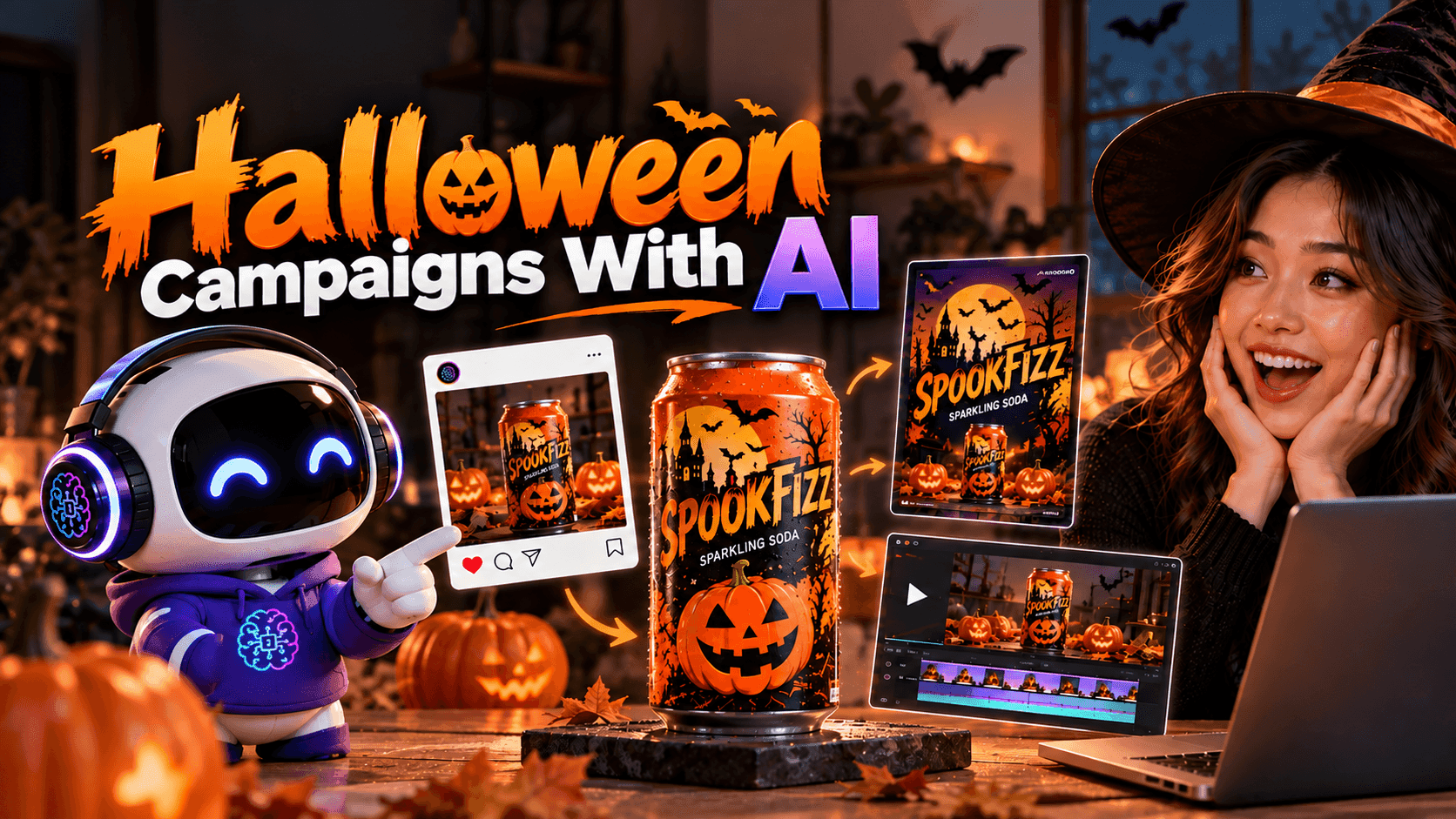
Create Halloween marketing campaigns with AI using practical prompts for product photos, seasonal packaging, posters, social media ads and videos.
Halloween is the perfect opportunity to give everyday products a fresh, eye-catching look. From spooky packaging to cinematic product videos, a creative seasonal campaign can make your brand stand out.
But creating matching product photos, posters, packaging designs, and social media videos can take a lot of time.
What if you could create an entire Halloween marketing campaign using AI?
With 1min.AI, you can use Claude Opus 5.5 to plan your campaign and write creative prompts, GPT Image 2 to generate campaign visuals, and Kling AI or Seedance to turn those images into videos.
In this guide, we'll use SPOOKFIZZ, a fictional sparkling soda brand, to show you how to build a Halloween campaign step by step.
How to Create a Halloween Marketing Campaign With AI
You don't need advanced design skills to get started. The key is using the right AI model for each task while keeping your product's identity consistent.
Here's the workflow we'll follow:
| AI Model | What You'll Create |
|---|---|
| Claude Opus 5.5 | Campaign ideas, creative concepts, image prompts, and video scripts |
| GPT Image 2 | Halloween product photos, packaging mockups, posters, and campaign visuals |
| Kling AI or Seedance | Cinematic Halloween product videos |
Step 1. Plan Your Campaign With Claude Opus 5.5
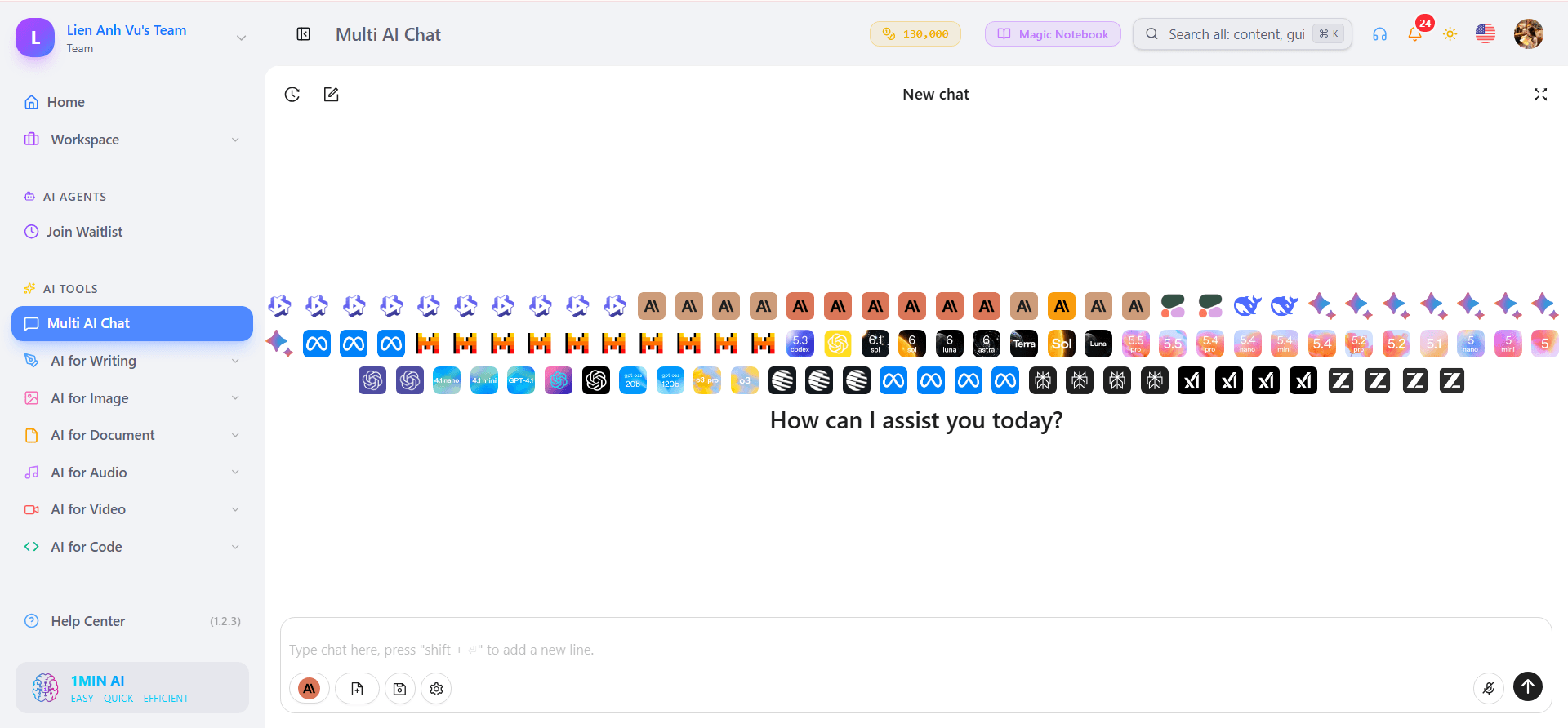
Start by opening Multi AI Chat on 1min.AI and selecting Claude Opus 5.5, if available in your workspace.
Upload a reference image of your product and describe the kind of Halloween campaign you want to create.
For SPOOKFIZZ, we'll use a silver-and-orange soda can and transform its presentation into a playful Halloween campaign featuring pumpkins, deep purple lighting, and spooky decorations.
Copy-Ready Prompt: Halloween Campaign Planning
Act as a creative director for an e-commerce brand.

I want to create a Halloween marketing campaign
for the product in the uploaded image.

Product: SPOOKFIZZ sparkling soda
Target audience: Young adults
Campaign style: Playful, spooky, cinematic
Main colors: Orange, black, and purple
Campaign message: Spooky Good Taste

Please create:
1. One creative campaign concept
2. Three Halloween product photography ideas
3. One limited-edition packaging concept
4. One promotional poster idea
5. One short video advertising concept

For each visual, write a detailed image
generation prompt suitable for GPT Image 2.

Also provide a short video script and
an image-to-video prompt suitable for
Kling AI or Seedance.

Keep the product shape, logo, and brand
identity consistent across all assets.
Claude will help organize your ideas into a creative direction and prepare prompts for the next stages.
Review the suggestions and choose one concept before generating images. Using a single approved creative direction makes the final campaign feel more consistent.
Step 2. Generate Halloween Campaign Images With GPT Image 2.5
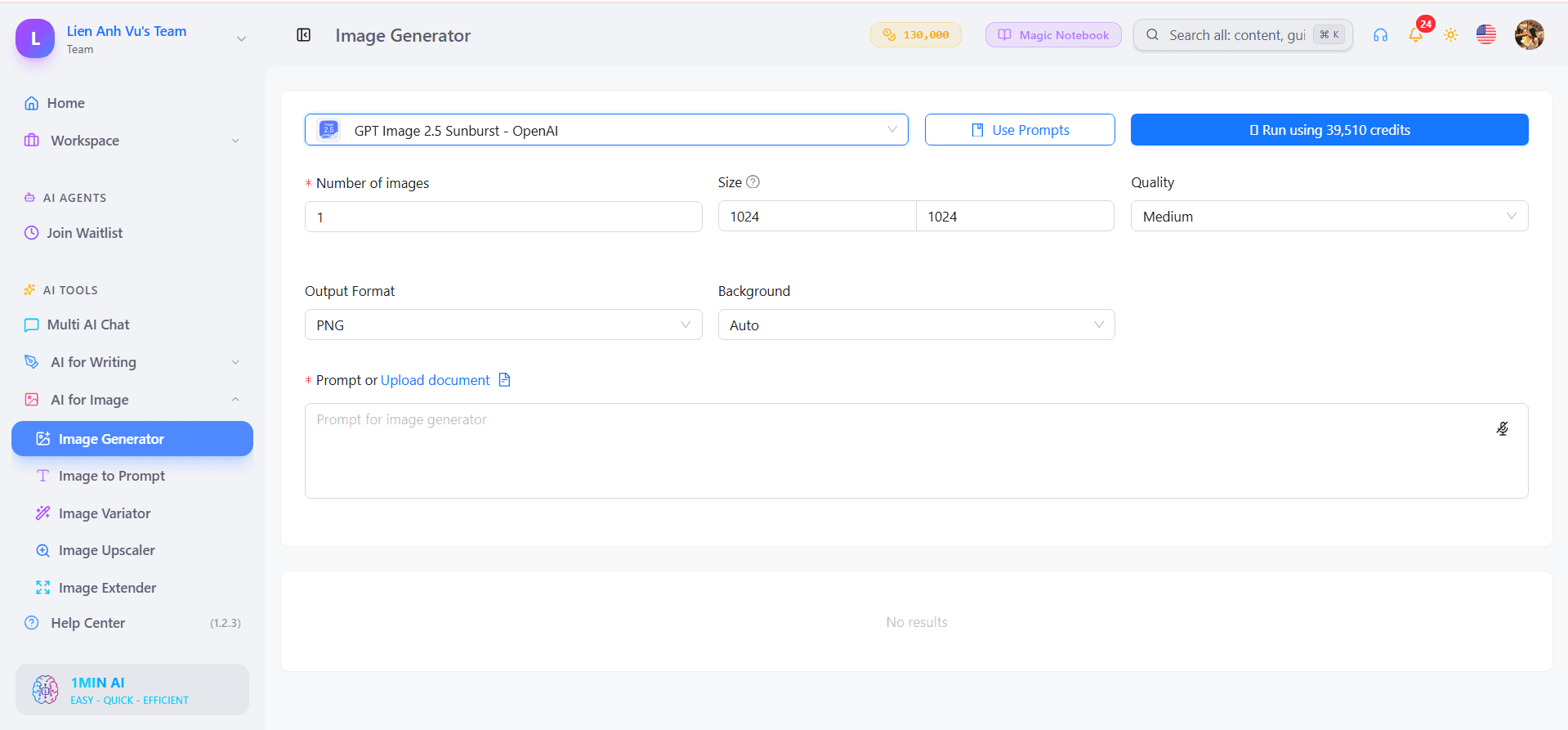
Once Claude has prepared your image prompts, open AI for Image on 1min.AI and select GPT Image 2.5.
Upload the original product image as a reference, then use the prompts from Claude to create your campaign visuals.
For example, you can generate these three types of images.
Halloween Product Photography
Transform an ordinary product shot into a cinematic Halloween advertisement.
Create an ultra-photorealistic Halloween
advertisement using the uploaded soda can.

Place the original product on a dark stone
pedestal surrounded by carved pumpkins.

Add realistic condensation, subtle purple
mist, warm orange rim lighting, and
soft cinematic shadows.

Preserve the original can shape, logo,
label, colors, and proportions.

Premium commercial photography,
realistic materials, sharp product details,
dramatic lighting, 16:9 composition.

No distorted packaging or extra text.
This visual can be used for website banners, product promotions, and seasonal social media content.
Halloween Packaging Design
Next, create a limited-edition packaging concept that matches the campaign.
Create a premium Halloween limited-edition
packaging concept for the uploaded
SPOOKFIZZ soda product.

Keep the original product shape and
recognizable brand identity.

Use matte black, pumpkin orange, and
deep purple with playful Halloween details.

Include subtle bats, pumpkins, and
spooky decorative patterns.

Show the soda can alongside a matching
multipack carton.

Professional packaging mockup,
realistic materials and studio lighting.

Avoid distorted logos and random text.
Halloween Promotional Poster
Finally, turn the approved product visual into a social media advertisement.
Create a cinematic Halloween promotional
poster using the approved SPOOKFIZZ
product image.

Place the soda can as the main subject.

Use glowing pumpkins, purple atmospheric
mist, dark backgrounds, and warm
orange lighting.

Maintain consistent packaging,
brand colors, and product proportions.

Create a premium advertising composition
with clear visual hierarchy.

Leave clean space for adding a headline
during editing.

No extra text, distorted logos,
or unrelated objects.
By reusing the same product reference and creative direction, your images will look like parts of one campaign rather than unrelated designs.
Check the generated packaging and logos before using the assets commercially.
Step 3. Turn Your Images Into Videos With Kling AI or Seedance
Now it's time to bring your Halloween campaign to life.
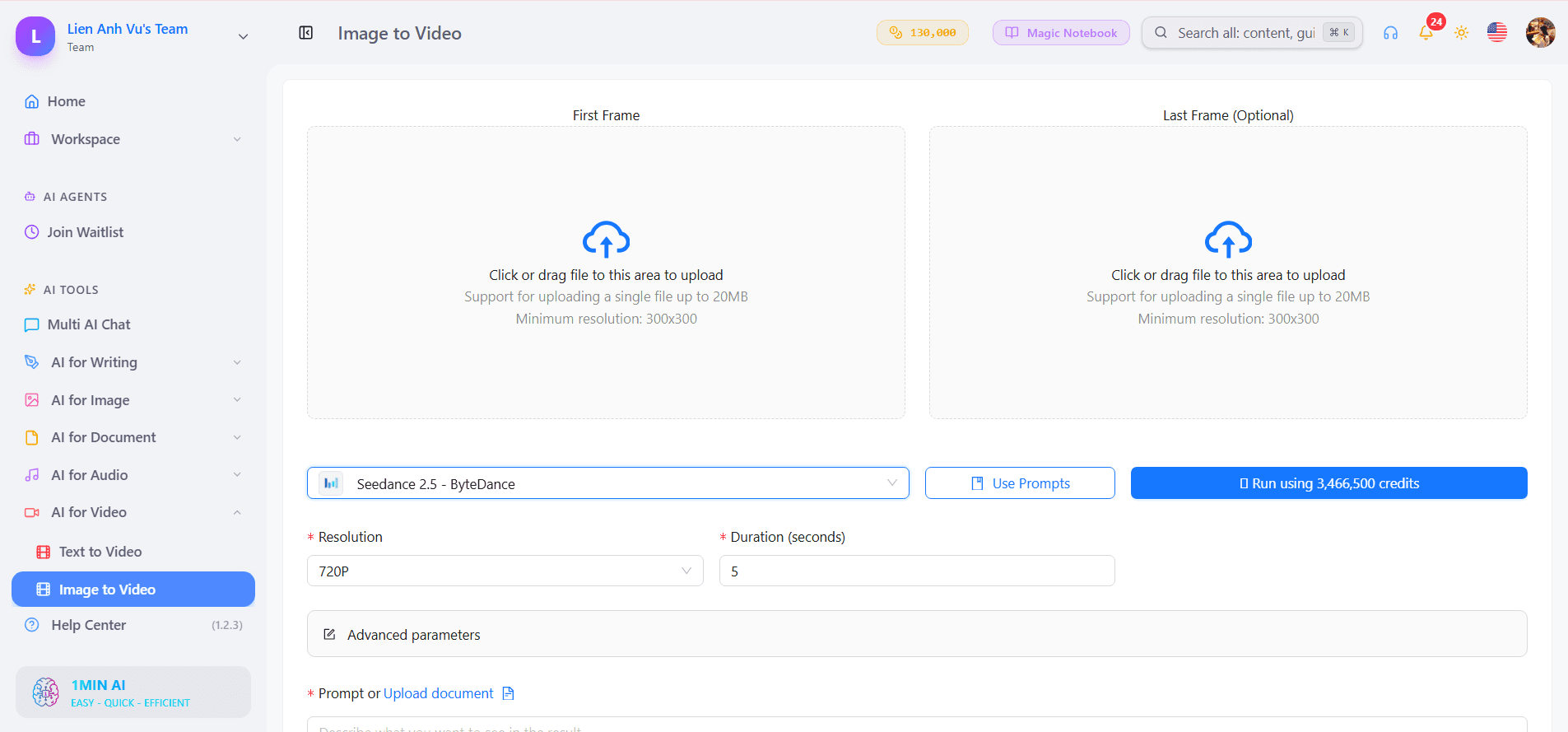
Open AI for Video on 1min.AI and choose Kling AI or Seedance, depending on the models available.
Upload your approved Halloween product image and use an image-to-video prompt created with Claude Opus 5.5.
Copy-Ready Prompt: Halloween Product Video
Create a 10-second ultra-photorealistic
Halloween product commercial in 16:9.

Use the uploaded SPOOKFIZZ product image
as the exact visual reference.

0–3 seconds:
Begin with a cinematic close-up of the
soda can surrounded by subtle purple mist.

3–6 seconds:
Camera quickly moves around the product,
revealing glowing pumpkins, orange rim
lighting, and realistic condensation.

6–8 seconds:
Use a smooth dynamic camera transition
to reveal the full Halloween campaign set.

8–10 seconds:
Finish with a premium product hero shot.

Keep the product logo, label, shape,
and colors unchanged throughout.

Fast-paced cinematic editing,
smooth camera movement,
realistic lighting, and premium
commercial advertising quality.

No subtitles, distorted packaging,
random text, or additional logos.
For longer videos, divide your concept into shorter scenes and use the previous scene's final frame as a reference for the next clip.
Kling AI or Seedance can help add camera movement, atmospheric effects, and transitions to your generated product images.
If your advertisement needs a voiceover, create it separately and add it during editing. This also makes it easier to synchronize narration with the visuals.
How to Keep Your Halloween Campaign Consistent
The biggest challenge when combining different AI models is maintaining the same product appearance throughout the campaign.
Your product should remain recognizable even when its environment, packaging concept, or presentation changes.
| Keep Consistent | Change for Halloween |
|---|---|
| Brand logo | Background |
| Product shape | Lighting |
| Product proportions | Halloween decorations |
| Recognizable brand colors | Atmospheric effects |
| Product identity | Camera angles and composition |
Use the original product image as a reference whenever possible. For packaging concepts, keep the approved design consistent across subsequent generations.
Also review all generated content before publishing. AI-generated logos, labels, and typography may contain errors, so important brand elements may need to be replaced with original assets during editing.
Create Your Halloween Campaign With 1min.AI
A complete Halloween campaign doesn't have to start with expensive photoshoots or complicated production tools.
With a clear creative direction, you can use Claude Opus 5.5 to develop your campaign strategy and prompts, GPT Image 2 to create product visuals, and Kling AI or Seedance to transform those images into engaging videos.
From seasonal product photography to limited-edition packaging and cinematic advertisements, this workflow helps you explore creative ideas while maintaining a consistent brand identity.
Start with one product, develop your Halloween concept, and bring the entire campaign together using AI tools in one workspace.
🚀 Start Creating Your Halloween Marketing Campaign With 1min.AI
- #Informational
Alternatives
Discover the best alternatives to 1minAI and compare features, pricing, and use cases.

1min.AI vs OpenRouter
1min.AI vs. OpenRouter: Compare the ready-to-use AI creation product against the technical API tool. Find out if you need a zero-code creative studio or a coding infrastructure hub.
 Ngoc Hong
1min.AI vs Jarvis AI
Compare 1min.AI vs Jarvis AI to discover which AI platform is better for writing, research, automation, and content creation. Find the best AI assistant for your workflow.
Ngoc Hong
1min.AI vs Taskade
Compare 1min.AI vs Taskade for AI content creation, automation, agents, and creative workflows to find the right workspace.
Ngoc HongAI Tools
Discover the best AI tools to boost productivity, creativity, and everyday work.

Create Consistent Cartoon Content in Just a Few Steps
Create engaging cartoon videos for TikTok and Reels with 1min.AI. Research ideas, create characters, and turn images into animated videos in 3 simple steps.
 Lien Anh Vu
One Product, 10 UGC Creatives: How AI Makes Content Testing Easier
Create more authentic UGC with an AI UGC video generator, test more creative angles and scale affiliate content without filming every version.
Lien Anh Vu
Top 4 Affordable AI Tools for Startup Founders
Discover the top 4 affordable AI tools for startup founders to validate ideas, build products, create content, and launch faster without overspending.
 Tram Ta
AI Features
Comprehensive AI features that streamline workflows, improve efficiency, and empower teams to achieve more.
Create Consistent Cartoon Content in Just a Few Steps
Create engaging cartoon videos for TikTok and Reels with 1min.AI. Research ideas, create characters, and turn images into animated videos in 3 simple steps.
Lien Anh VuOne Product, 10 UGC Creatives: How AI Makes Content Testing Easier
Create more authentic UGC with an AI UGC video generator, test more creative angles and scale affiliate content without filming every version.
Lien Anh Vu
1minAI: Free AI Grammar Checker
Check grammar for free with 1minAI’s AI grammar checker. Find grammar, spelling, and writing mistakes, improve clarity, and polish your content in seconds.
Tram TaAI Use Cases
A curated collection of AI use cases for business, productivity, and industry-specific applications.
Create Consistent Cartoon Content in Just a Few Steps
Create engaging cartoon videos for TikTok and Reels with 1min.AI. Research ideas, create characters, and turn images into animated videos in 3 simple steps.
Lien Anh VuOne Product, 10 UGC Creatives: How AI Makes Content Testing Easier
Create more authentic UGC with an AI UGC video generator, test more creative angles and scale affiliate content without filming every version.
Lien Anh Vu
Best Time to Post on Instagram: A Practical Guide for Better Engagement
Discover the best time to post on Instagram, including the best days and times for different audiences, plus tips to find the ideal posting schedule for your account.
Tram TaAI Tutorials
Learn how to use AI with practical, step-by-step tutorials.

Black Friday AI Tool Deals in 2026
Discover what Black Friday AI tool deals 2026 has to offer. Find out how to secure the 1min.AI lifetime deal via AppSumo, Dealify, Stack Social, and verify on Trustpilot, Slashdot, and Software Advice.
 Hang Nguyen
Create Consistent Cartoon Content in Just a Few Steps
Create engaging cartoon videos for TikTok and Reels with 1min.AI. Research ideas, create characters, and turn images into animated videos in 3 simple steps.
Lien Anh Vu
[Seedance 2.5 New] Better AI Product Videos, Less Rework in 1min.AI
Use Seedance 2.5 image to video on 1min.AI to create more consistent AI product videos, reduce failed generations, save credits, and improve UGC workflows.
Lien Anh VuAI Guides
Learn AI faster with practical guides, real-world examples, and actionable best practices.

Safely Buy AI Tools Online: 2026 Black Friday Guide
Discover how to find and secure the best Black Friday AI deals online. Learn expert strategies to avoid scams, combat subscription fatigue, and verify software.
Hang NguyenCreate Consistent Cartoon Content in Just a Few Steps
Create engaging cartoon videos for TikTok and Reels with 1min.AI. Research ideas, create characters, and turn images into animated videos in 3 simple steps.
Lien Anh Vu[Seedance 2.5 New] Better AI Product Videos, Less Rework in 1min.AI
Use Seedance 2.5 image to video on 1min.AI to create more consistent AI product videos, reduce failed generations, save credits, and improve UGC workflows.
Lien Anh VuAI Solutions
Browse the best AI solutions for automation, coding, research, productivity, customer support, marketing, and business workflows.
Safely Buy AI Tools Online: 2026 Black Friday Guide
Discover how to find and secure the best Black Friday AI deals online. Learn expert strategies to avoid scams, combat subscription fatigue, and verify software.
Hang NguyenCreate Consistent Cartoon Content in Just a Few Steps
Create engaging cartoon videos for TikTok and Reels with 1min.AI. Research ideas, create characters, and turn images into animated videos in 3 simple steps.
Lien Anh VuOne Product, 10 UGC Creatives: How AI Makes Content Testing Easier
Create more authentic UGC with an AI UGC video generator, test more creative angles and scale affiliate content without filming every version.
Lien Anh VuAI Models
Explore the world's leading AI models in one place.
Create Consistent Cartoon Content in Just a Few Steps
Create engaging cartoon videos for TikTok and Reels with 1min.AI. Research ideas, create characters, and turn images into animated videos in 3 simple steps.
Lien Anh VuOne Product, 10 UGC Creatives: How AI Makes Content Testing Easier
Create more authentic UGC with an AI UGC video generator, test more creative angles and scale affiliate content without filming every version.
Lien Anh Vu[Seedance 2.5 New] Better AI Product Videos, Less Rework in 1min.AI
Use Seedance 2.5 image to video on 1min.AI to create more consistent AI product videos, reduce failed generations, save credits, and improve UGC workflows.
Lien Anh VuAI Comparisons
Compare AI tools, models, and platforms to find the best fit for your needs.

Kling AI Vs Veo 3: Which Model Wins?
Kling AI vs Veo 3: compare motion, native audio, pricing & free tiers to see which AI video generator wins for your project - try both on 1min.AI.
 Trang Tran
[Seedance 2.5 New] Better AI Product Videos, Less Rework in 1min.AI
Use Seedance 2.5 image to video on 1min.AI to create more consistent AI product videos, reduce failed generations, save credits, and improve UGC workflows.
Lien Anh Vu
DeepSeek V4 Pro vs Flash Comparison
Compare DeepSeek V4 Pro vs DeepSeek V4 Flash metrics. Optimize your agentic apps and improve AI fact checking on 1min.ai today.
Ngoc HongAI Integrations
Seamlessly integrate AI with the tools you already use to automate work and boost productivity.

POV: You Have 10+ Posts to Make Every Day
Learn how to build an AI content workflow that helps content creators produce 10+ social media posts a day faster with AI brainstorming, image generation, and content creation.
Lien Anh Vu
How to Use an AI Fashion Video Generator for Fashion Week 2026
Turn Fashion Week 2026 ideas into stunning fashion videos with AI. Learn how to brainstorm, create visuals, and transform images into videos with one simple workflow.
Lien Anh Vu
Stop Switching Between AI Apps: How AI Integration Transforms Employer Branding
Discover how AI integration helps HR teams streamline employer branding by combining AI writing, documents, images, video, and multiple AI models into one workspace.
Tram TaAI for Industries
Find the best AI tools and workflows for healthcare, finance, education, legal, manufacturing, retail, real estate, and more

Free AI Product Description Generator
Write product descriptions that sell in minutes. Use this free AI product description generator to turn details or a photo into on-brand copy. Try 1min.AI.
Trang Tran
Best Business Productivity Tools for Startups to Maximize Profits | 1minAI
Discover the best business productivity tools for startups to save time, streamline workflows, reduce repetitive tasks, and support profitable growth with AI.
Tram Ta
Best AI Tool for Content Marketing |1minAI
Looking for the best AI tool for content marketing? See how 1minAI helps marketers research, write, repurpose, create visuals, and scale content from one AI workspace.
Tram TaAI Agents
Discover and run AI agents to automate tasks across your work and daily life.
1minAI: Free AI Grammar Checker
Check grammar for free with 1minAI’s AI grammar checker. Find grammar, spelling, and writing mistakes, improve clarity, and polish your content in seconds.
Tram Ta
AI Agents for Facebook
Use an AI Agent for Facebook to create content, generate images, schedule posts, and publish from your documents and conversations.
Ngoc Hong
AI Agent vs AI Assistant: Which One Actually Saves Designers More Time?
Learn the difference between AI Agent vs AI Assistant and discover which solution helps designers automate repetitive work, reduce revisions, and save more time.
Lien Anh VuAI Workflows
Explore ready-to-use AI workflows for productivity, marketing, sales, support, and more.
Create Consistent Cartoon Content in Just a Few Steps
Create engaging cartoon videos for TikTok and Reels with 1min.AI. Research ideas, create characters, and turn images into animated videos in 3 simple steps.
Lien Anh VuOne Product, 10 UGC Creatives: How AI Makes Content Testing Easier
Create more authentic UGC with an AI UGC video generator, test more creative angles and scale affiliate content without filming every version.
Lien Anh VuPOV: You Have 10+ Posts to Make Every Day
Learn how to build an AI content workflow that helps content creators produce 10+ social media posts a day faster with AI brainstorming, image generation, and content creation.
Lien Anh VuNewsletter
Weekly AI Innovations with 1minAI

🔮 Weekly AI Innovations #141: Seedance 2.5 & Stable Audio 3: Next-Gen AI
Explore Seedance 2.0, 2.5, and StabilityAI's Stable Audio 3 on 1min.ai. Generate studio-grade audio and synchronized motion with next-gen generative AI.
Hang Nguyen
🔮 Weekly AI Innovations #140: Deepseek 4.1 Flash & Gemini Upgrades
Explore Deepseek 4.1 Flash and new Gemini models on 1min.ai. Plus, check our update on your Billing - Usage page for better clarity.
Hang Nguyen
🔮 Weekly AI Innovations #139: Dawn of the next-gen AI
Discover the immense power of GPT-6 Astra and Claude Fable 5.1. Unlock next-generation AI models on 1min.ai to solve complex tasks effortlessly.
Hang Nguyen