
Free Project Management Tools for Startup Businesses

Tram Ta
October 16, 2026
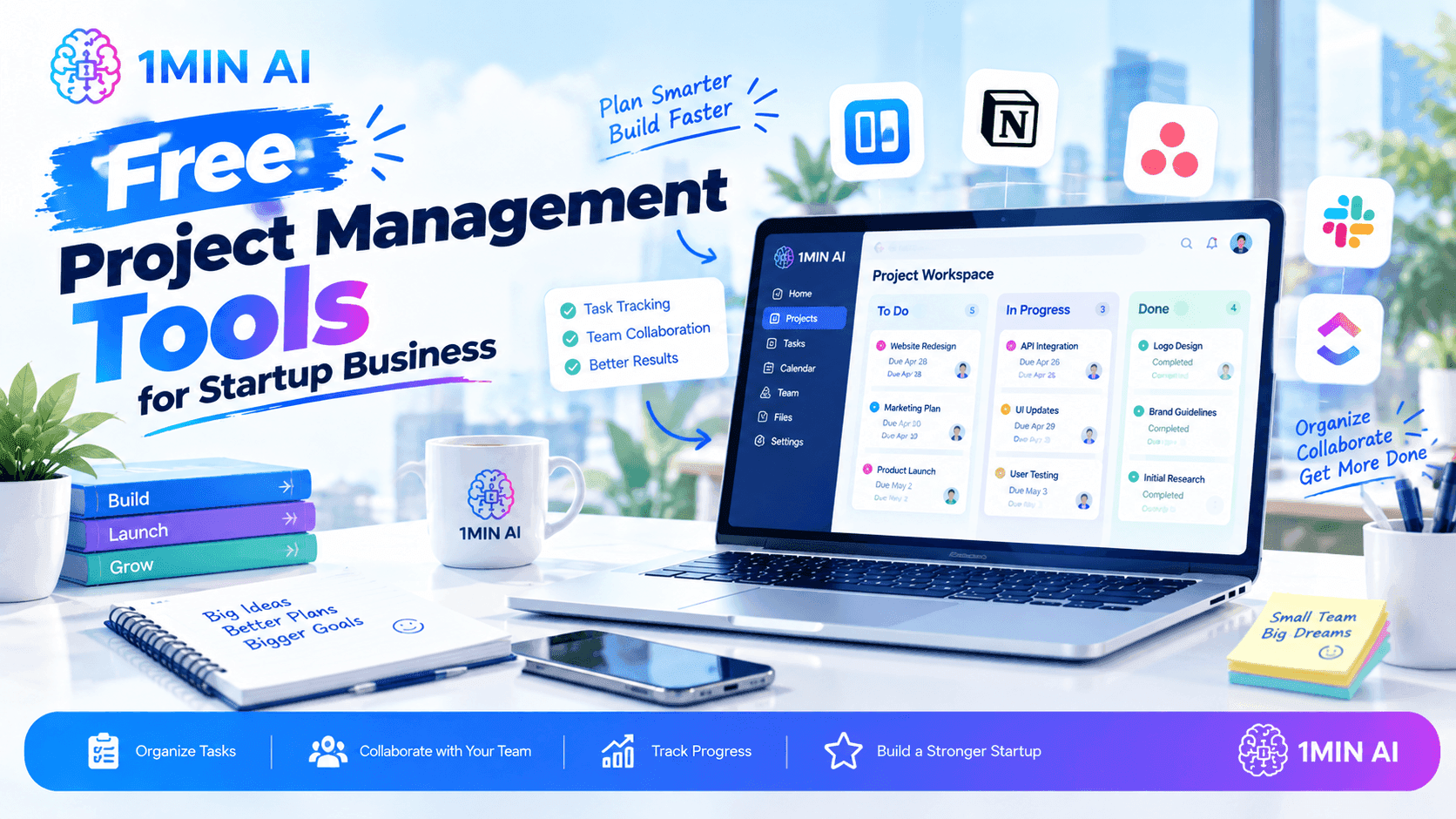
Discover free project management tools for startup businesses, learn how to organize tasks and teams, and use AI to streamline everyday workflows.
Starting a business means managing multiple priorities with limited time, people, and budget. The right project management tools help startups organize tasks, assign responsibilities, track deadlines, and keep everyone aligned without adding unnecessary costs. This guide explores popular free options, what to look for before choosing one, and how AI tools like 1minAI can support your team's daily workflows.
What Are Project Management Tools?
Project management tools are software applications that help individuals and teams plan, organize, execute, and monitor projects. They bring tasks, deadlines, responsibilities, files, and progress updates into a shared workspace so everyone understands what needs to happen next.
For startups, project management software can help coordinate product launches, marketing campaigns, customer onboarding, website development, and daily operations.
Depending on the platform, common features include:
- Task management: Break large projects into smaller, actionable tasks.
- Task assignments: Clarify who owns each task and who is responsible for delivery.
- Deadline tracking: Set due dates and monitor upcoming milestones.
- Project views: Organize work using lists, Kanban boards, calendars, or timelines.
- Team collaboration: Share updates, comments, documents, and feedback.
- Workflow automation: Reduce repetitive administrative work through automated rules or integrations.
- Progress reporting: Review completed tasks, identify delays, and understand project status.
Not every free project management tool includes all these features. Some limit team members, projects, storage, integrations, or automation, so startups should compare actual plan restrictions before committing.
Why Do Startups Need Free Project Management Tools?
Early-stage businesses often operate with small teams where each person handles several responsibilities. Without a shared system, tasks can become scattered across emails, chat messages, spreadsheets, and personal to-do lists.
Free project management software provides a structured starting point without requiring another immediate subscription.
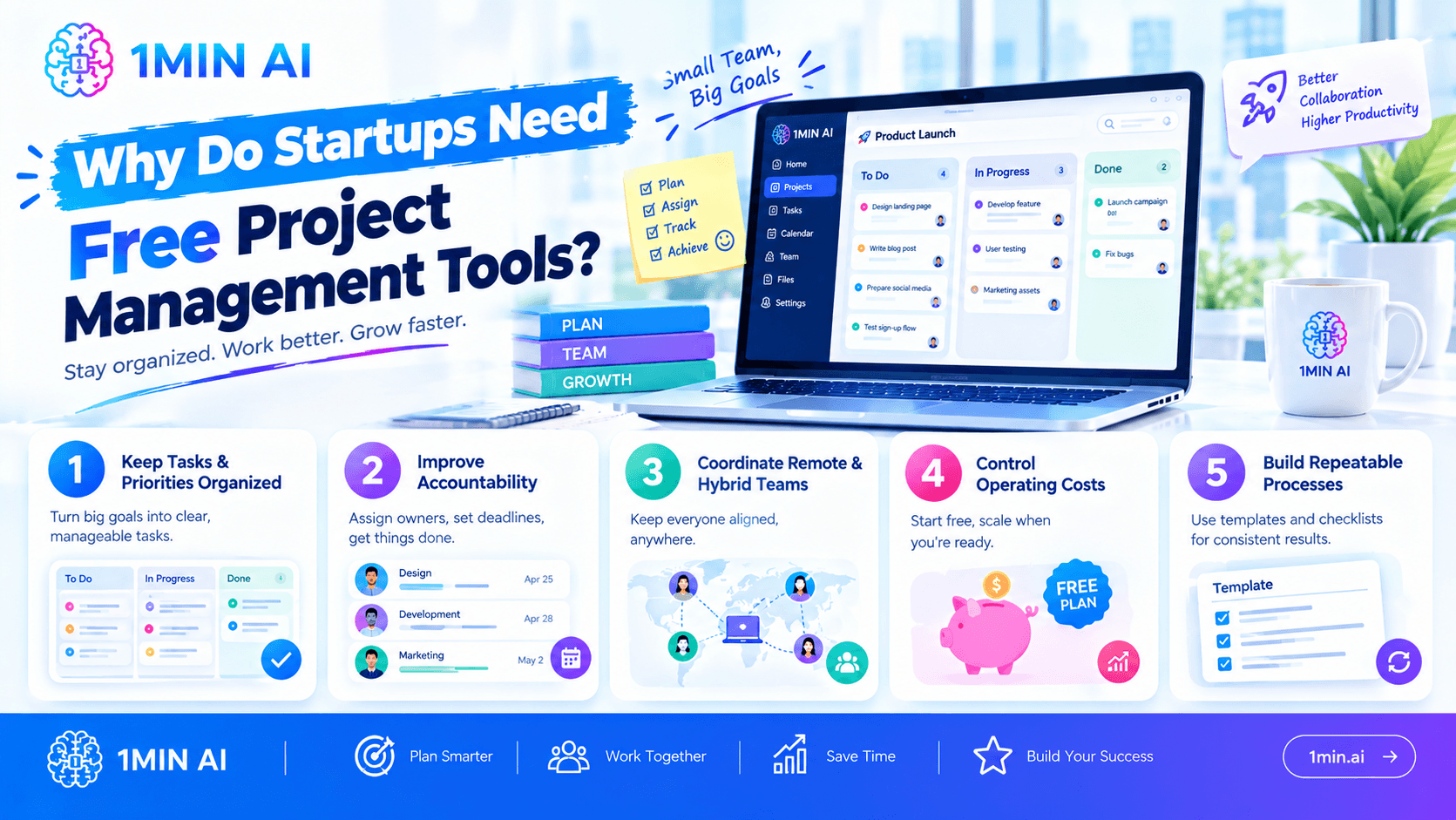
1. Keep Tasks and Priorities Organized
A startup may be preparing a product launch while managing customer feedback, creating marketing content, and improving its website.
A project management board helps the team separate these activities into manageable tasks, set priorities, and identify what needs attention first.
2. Improve Accountability
When every task has an owner, a deadline, and a clear definition of completion, team members can understand their responsibilities more easily.
This reduces the need for constant status-checking and makes it easier for founders to see where support is needed.
3. Coordinate Remote and Hybrid Teams
Shared project workspaces help remote team members access updates without relying on long message threads. Everyone can check the latest task status, review deadlines, and see outstanding work.
4. Control Operating Costs
Free plans can help startups validate their workflows before investing in paid software. A basic board or task list may be sufficient for a small team with straightforward projects.
However, review limits on users, storage, integrations, and automation. A free plan is useful only if it supports the work your team actually needs to complete.
5. Build Repeatable Processes
Startups frequently repeat tasks such as publishing blog posts, onboarding customers, launching campaigns, or releasing product updates.
Templates and reusable checklists can help turn these activities into consistent processes rather than rebuilding the plan every time.
Best Free Project Management Tools for Startups
There is no single best platform for every startup. The right choice depends on your team size, project complexity, preferred workflow, and required integrations.
The following options are worth evaluating. They are established project management or work-management platforms, not products owned by 1minAI. Check their official pricing pages for current free-plan limits.
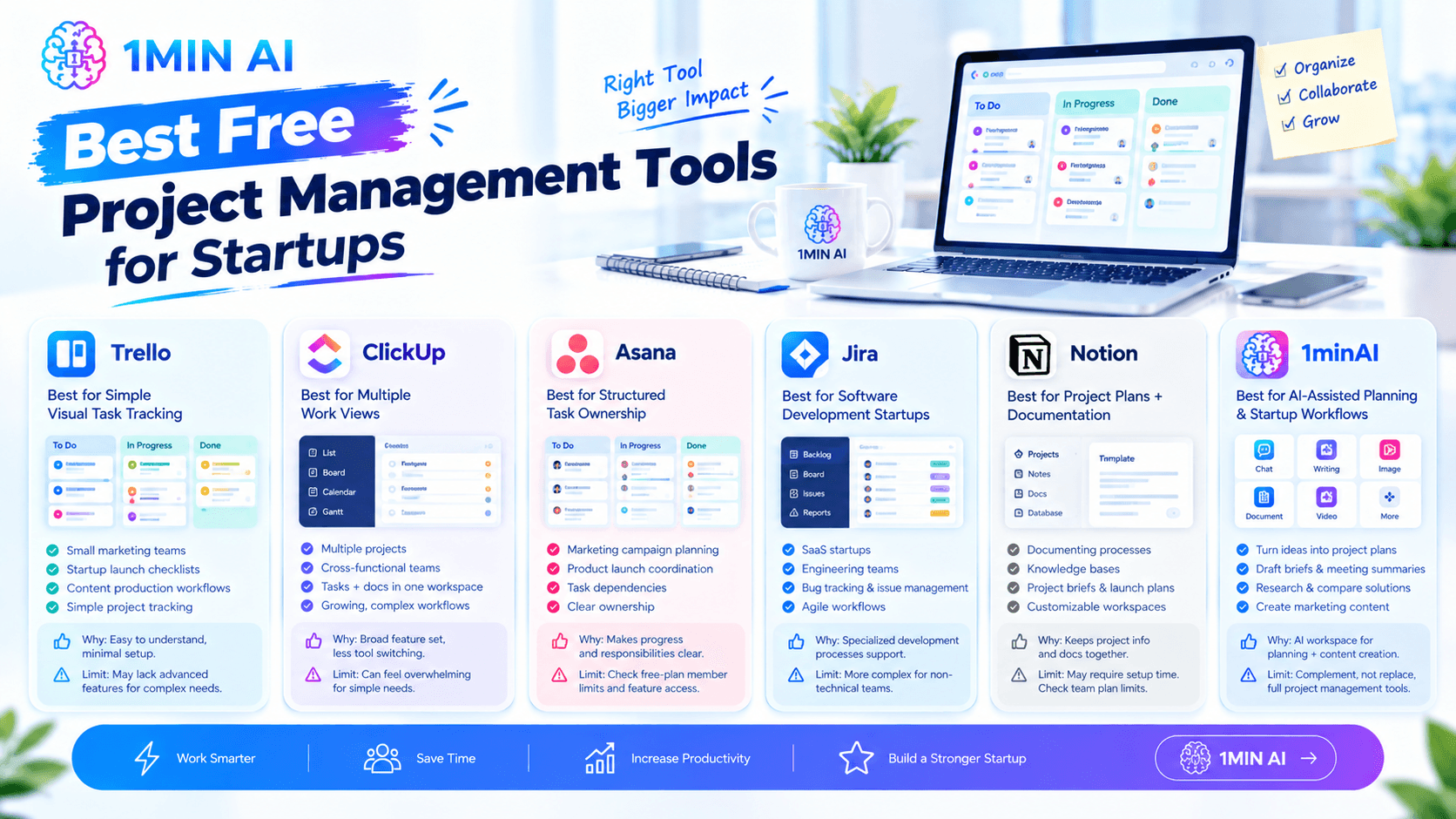
1. Trello — Best for Simple Visual Task Tracking
Trello organizes projects using boards, lists, and cards. It is a practical starting point for founders who want to see work move through stages such as “To Do,” “In Progress,” and “Done.”
Useful for:
- Small marketing teams
- Startup launch checklists
- Content production workflows
- Simple project tracking
Why consider it: The visual board format is easy to understand and requires little setup.
Potential limitation: Teams that need complex dependencies, advanced reporting, or extensive resource planning may eventually need additional capabilities.
2. ClickUp — Best for Teams Wanting Multiple Work Views
ClickUp combines task management with other work-management features. Depending on the plan, teams can use different views and organize projects around their own processes.
Useful for:
- Startups managing multiple projects
- Cross-functional teams
- Teams that want tasks and documentation in one workspace
- Businesses expecting their workflows to become more complex
Why consider it: Its broad feature set may reduce the need to maintain several separate work-management tools.
Potential limitation: The number of features and configuration choices can feel overwhelming to teams that only need a simple task board.
3. Asana — Best for Structured Task Ownership
Asana helps teams organize projects, assign tasks, set deadlines, and track work across different initiatives.
Useful for:
- Marketing campaign planning
- Product launch coordination
- Teams with clear task dependencies
- Founders who want to see task ownership at a glance
Why consider it: Its structured approach can make responsibilities and project progress easier to follow.
Potential limitation: Check the current free-plan member limit and whether the views or reporting features you need require a paid plan.
4. Jira — Best for Software Development Startups
Jira is designed for issue tracking and software development workflows. It can help technical teams organize backlogs, track bugs, and coordinate development work.
Useful for:
- SaaS startups
- Software engineering teams
- Bug tracking and issue management
- Agile development workflows
Why consider it: It supports more specialized development processes than a basic to-do list.
Potential limitation: A nontechnical team that mainly manages content, sales, or general operations may find it more complex than necessary.
5. Notion — Best for Combining Project Plans and Documentation
Notion combines documents, databases, notes, and task organization in a flexible workspace. Startups can use it to maintain project plans alongside meeting notes, operating procedures, and internal knowledge.
Useful for:
- Small teams documenting processes
- Startup knowledge bases
- Project briefs and launch plans
- Teams that prefer customizable workspaces
Why consider it: Keeping project information and supporting documentation together can reduce context switching.
Potential limitation: Flexible databases and custom layouts may require time to design and maintain. Confirm the current plan limits for team collaboration.
6. 1minAI — Best for AI-Assisted Project Planning and Startup Workflows
1minAI is an all-in-one AI workspace that helps startup teams with the work surrounding project management, including brainstorming, research, writing, document analysis, and content creation.
While it is not a traditional task-tracking platform like Trello or Asana, 1minAI can complement your project management software by helping you prepare project plans, organize ideas, draft briefs, and create project deliverables more efficiently.
Useful for:
- Turning startup ideas into actionable project plans
- Drafting project briefs, meeting summaries, and progress updates
- Researching business ideas and comparing potential solutions
- Creating marketing content and launch materials
- Exploring different AI-generated approaches through multiple AI assistants
Why consider it: With AI Chat With Multiple AI Assistants, startup founders can brainstorm, draft, and refine project-related work in one AI workspace. The AI Agent for Social Media Management can also support relevant marketing workflows.
Potential limitation: 1minAI should complement—not replace—a dedicated project management platform when your team needs features such as task assignments, deadlines, dependencies, and project progress tracking. Check the current free plan and feature availability before choosing it for your workflow.
Best approach: Use a dedicated project management tool to track tasks and deadlines, and use 1minAI to help plan the work and produce the materials needed to complete it.
Quick Comparison
| Tool | Best for | Main strength |
|---|---|---|
| Trello | Simple startup workflows | Visual boards |
| ClickUp | Multiple project types | Broad work-management features |
| Asana | Coordinating team responsibilities | Structured task tracking |
| Jira | Software development | Issue and backlog management |
| Notion | Documentation and project planning | Flexible workspace |
Treat this as a starting shortlist rather than a definitive ranking. Free-plan features change, and the most suitable option is the one your team can use consistently.
How to Choose the Right Project Management Tool for Your Startup
Before signing up, define what your team needs to manage. Choosing software based on feature count alone can lead to unnecessary complexity.
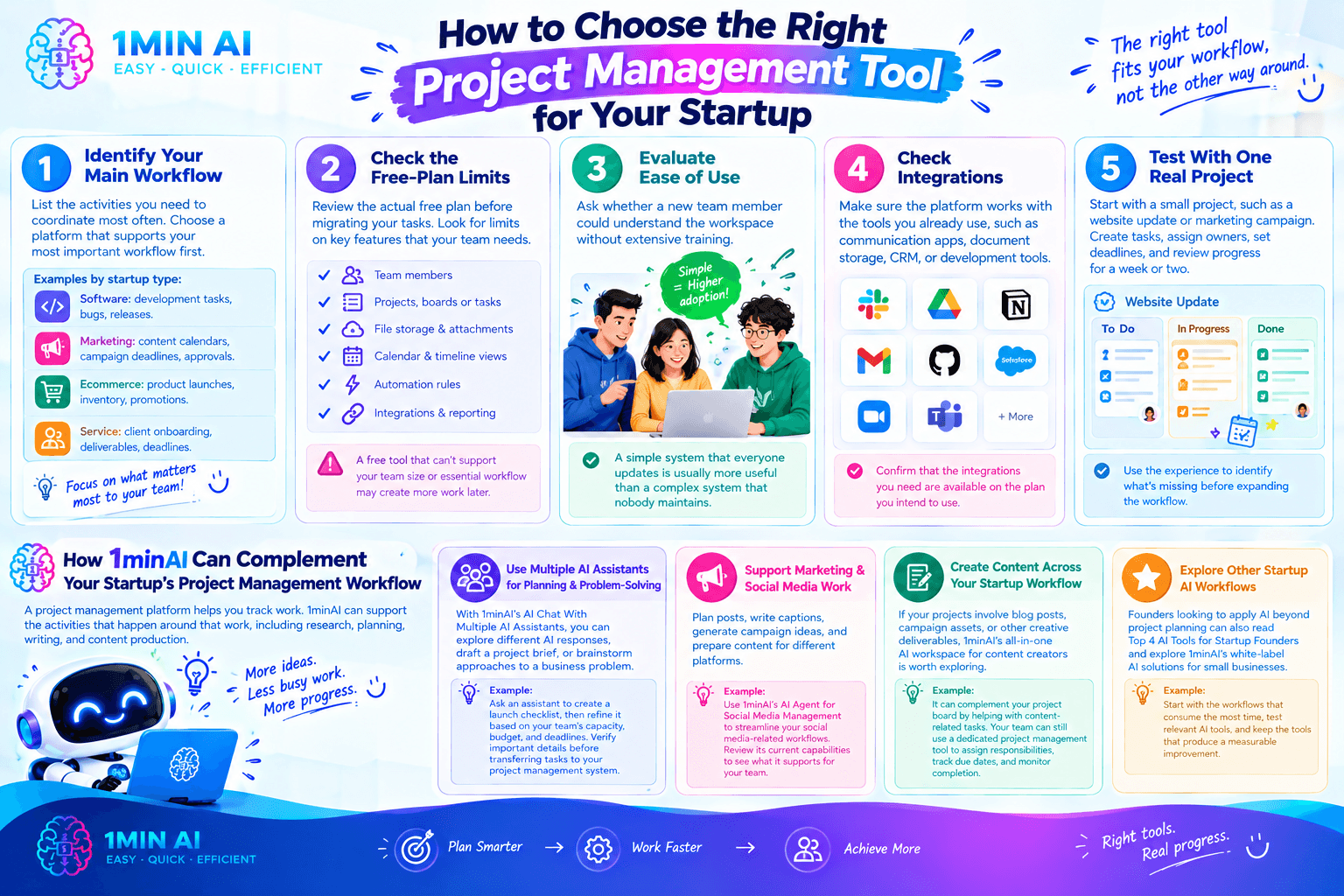
Step 1: Identify Your Main Workflow
List the activities you need to coordinate most often. For example:
- A software startup may prioritize development tasks, bugs, and releases.
- A marketing startup may need content calendars, campaign deadlines, and approval stages.
- An ecommerce business may coordinate product launches, inventory tasks, and promotional campaigns.
- A service business may need client onboarding, deliverables, and project deadlines.
Choose a platform that supports your most important workflow first.
Step 2: Check the Free-Plan Limits
Review the actual free plan before migrating your tasks. Look for limits on:
- Number of team members
- Projects, boards, or tasks
- File storage and attachments
- Calendar and timeline views
- Automation rules
- Integrations and reporting
A free tool that cannot support your team size or essential workflow may create more work later.
Step 3: Evaluate Ease of Use
Ask whether a new team member could understand the workspace without extensive training.
A simple system that everyone updates is usually more useful than a complex system that nobody maintains.
Step 4: Check Integrations
Your project management platform may need to work alongside communication apps, document storage, customer relationship management software, or development tools.
Confirm that the integrations you need are available on the plan you intend to use.
Step 5: Test With One Real Project
Rather than moving every business process at once, choose a small project such as a website update or marketing campaign.
Create tasks, assign owners, set deadlines, and review progress for a week or two. Use the experience to identify what is missing before expanding the workflow.
How 1minAI Can Complement Your Startup's Project Management Workflow
A project management platform helps you track work. 1minAI can support the activities that happen around that work, including research, planning, writing, and content production.
Rather than presenting 1minAI as a replacement for dedicated project management software, consider it an AI workspace that can help your team prepare deliverables and reduce repetitive knowledge work.
Use Multiple AI Assistants for Planning and Problem-Solving
With 1minAI's AI Chat With Multiple AI Assistants, you can explore different AI responses to a planning question, draft a project brief, or brainstorm approaches to a business problem.
For example, ask an assistant to create a launch checklist, then refine the result based on your team's capacity, budget, and deadlines. Verify important details before transferring the final tasks into your project management system.
Support Marketing and Social Media Work
Startups managing their own marketing may need to plan posts, write captions, generate campaign ideas, and prepare content for different platforms.
The 1minAI AI Agent for Social Media Management is a relevant option to explore for social media-related workflows. Review its current capabilities to determine which tasks it supports for your team.
Create Content Across Your Startup Workflow
If your projects involve blog posts, campaign assets, or other creative deliverables, 1minAI's all-in-one AI workspace for content creators is worth exploring.
It can complement your project board by helping with content-related tasks. Your team can still use a dedicated project management tool to assign responsibilities, track due dates, and monitor completion.
Explore Other Startup AI Workflows
Founders looking to apply AI beyond project planning can also read Top 4 AI Tools for Startup Founders and explore 1minAI's white-label AI solutions for small businesses.
The right setup depends on your business model. Start with the workflows that consume the most time, test relevant AI tools, and keep the tools that produce a measurable improvement.
Common Project Management Mistakes Startups Should Avoid
Even a well-chosen platform cannot fix unclear processes on its own. Avoid these common mistakes when introducing project management software.
- Using too many tools: Scattering tasks across multiple boards and apps makes it difficult to identify the latest source of truth.
- Creating unnecessary complexity: Start with a simple structure and add fields, automations, or reports only when they solve a real problem.
- Leaving tasks without owners: Each important task should have a clear owner, even when several people contribute.
- Setting vague deadlines: Define realistic due dates and clarify dependencies rather than labeling every task as urgent.
- Ignoring free-plan limits: Check user caps, integrations, storage, and automation restrictions before building your workflow around a tool.
- Expecting AI to manage everything automatically: AI-generated plans need human review, and project tracking still requires accurate task updates.
- Failing to review progress: Use a brief weekly review to identify blockers, revise priorities, and close completed work.
Conclusion
The best project management tools for a startup are not necessarily the ones with the most features. They are the ones that help your team clarify priorities, assign ownership, meet deadlines, and maintain a reliable view of ongoing work without creating unnecessary overhead.
Start by testing a free option such as Trello, ClickUp, Asana, Jira, or Notion against one real project. Once your tracking process is working, consider complementary AI tools to support planning, research, communication, and content creation.
For startups looking to combine structured project tracking with AI-assisted work, 1minAI can complement a dedicated project management platform by helping with the tasks and deliverables that keep projects moving.
For further information, explore Top 4 AI Tools for Startup Founders
Discover more AI features: https://1min.ai/features
Try 1minAI agent now: https://app.1min.ai/ai-agent-demo
- #Commerce
Alternatives
Discover the best alternatives to 1minAI and compare features, pricing, and use cases.

1min.AI vs OpenRouter
1min.AI vs. OpenRouter: Compare the ready-to-use AI creation product against the technical API tool. Find out if you need a zero-code creative studio or a coding infrastructure hub.
 Ngoc Hong
1min.AI vs Jarvis AI
Compare 1min.AI vs Jarvis AI to discover which AI platform is better for writing, research, automation, and content creation. Find the best AI assistant for your workflow.
Ngoc Hong
1min.AI vs Taskade
Compare 1min.AI vs Taskade for AI content creation, automation, agents, and creative workflows to find the right workspace.
Ngoc HongAI Tools
Discover the best AI tools to boost productivity, creativity, and everyday work.

Create Consistent Cartoon Content in Just a Few Steps
Create engaging cartoon videos for TikTok and Reels with 1min.AI. Research ideas, create characters, and turn images into animated videos in 3 simple steps.
 Lien Anh Vu
One Product, 10 UGC Creatives: How AI Makes Content Testing Easier
Create more authentic UGC with an AI UGC video generator, test more creative angles and scale affiliate content without filming every version.
Lien Anh Vu
Top 4 Affordable AI Tools for Startup Founders
Discover the top 4 affordable AI tools for startup founders to validate ideas, build products, create content, and launch faster without overspending.
 Tram Ta
AI Features
Comprehensive AI features that streamline workflows, improve efficiency, and empower teams to achieve more.
Create Consistent Cartoon Content in Just a Few Steps
Create engaging cartoon videos for TikTok and Reels with 1min.AI. Research ideas, create characters, and turn images into animated videos in 3 simple steps.
Lien Anh VuOne Product, 10 UGC Creatives: How AI Makes Content Testing Easier
Create more authentic UGC with an AI UGC video generator, test more creative angles and scale affiliate content without filming every version.
Lien Anh Vu
1minAI: Free AI Grammar Checker
Check grammar for free with 1minAI’s AI grammar checker. Find grammar, spelling, and writing mistakes, improve clarity, and polish your content in seconds.
Tram TaAI Use Cases
A curated collection of AI use cases for business, productivity, and industry-specific applications.
Create Consistent Cartoon Content in Just a Few Steps
Create engaging cartoon videos for TikTok and Reels with 1min.AI. Research ideas, create characters, and turn images into animated videos in 3 simple steps.
Lien Anh VuOne Product, 10 UGC Creatives: How AI Makes Content Testing Easier
Create more authentic UGC with an AI UGC video generator, test more creative angles and scale affiliate content without filming every version.
Lien Anh Vu
Best Time to Post on Instagram: A Practical Guide for Better Engagement
Discover the best time to post on Instagram, including the best days and times for different audiences, plus tips to find the ideal posting schedule for your account.
Tram TaAI Tutorials
Learn how to use AI with practical, step-by-step tutorials.

Black Friday AI Tool Deals in 2026
Discover what Black Friday AI tool deals 2026 has to offer. Find out how to secure the 1min.AI lifetime deal via AppSumo, Dealify, Stack Social, and verify on Trustpilot, Slashdot, and Software Advice.
 Hang Nguyen
Create Consistent Cartoon Content in Just a Few Steps
Create engaging cartoon videos for TikTok and Reels with 1min.AI. Research ideas, create characters, and turn images into animated videos in 3 simple steps.
Lien Anh Vu
[Seedance 2.5 New] Better AI Product Videos, Less Rework in 1min.AI
Use Seedance 2.5 image to video on 1min.AI to create more consistent AI product videos, reduce failed generations, save credits, and improve UGC workflows.
Lien Anh VuAI Guides
Learn AI faster with practical guides, real-world examples, and actionable best practices.

Safely Buy AI Tools Online: 2026 Black Friday Guide
Discover how to find and secure the best Black Friday AI deals online. Learn expert strategies to avoid scams, combat subscription fatigue, and verify software.
Hang NguyenCreate Consistent Cartoon Content in Just a Few Steps
Create engaging cartoon videos for TikTok and Reels with 1min.AI. Research ideas, create characters, and turn images into animated videos in 3 simple steps.
Lien Anh Vu[Seedance 2.5 New] Better AI Product Videos, Less Rework in 1min.AI
Use Seedance 2.5 image to video on 1min.AI to create more consistent AI product videos, reduce failed generations, save credits, and improve UGC workflows.
Lien Anh VuAI Solutions
Browse the best AI solutions for automation, coding, research, productivity, customer support, marketing, and business workflows.
Safely Buy AI Tools Online: 2026 Black Friday Guide
Discover how to find and secure the best Black Friday AI deals online. Learn expert strategies to avoid scams, combat subscription fatigue, and verify software.
Hang NguyenCreate Consistent Cartoon Content in Just a Few Steps
Create engaging cartoon videos for TikTok and Reels with 1min.AI. Research ideas, create characters, and turn images into animated videos in 3 simple steps.
Lien Anh VuOne Product, 10 UGC Creatives: How AI Makes Content Testing Easier
Create more authentic UGC with an AI UGC video generator, test more creative angles and scale affiliate content without filming every version.
Lien Anh VuAI Models
Explore the world's leading AI models in one place.
Create Consistent Cartoon Content in Just a Few Steps
Create engaging cartoon videos for TikTok and Reels with 1min.AI. Research ideas, create characters, and turn images into animated videos in 3 simple steps.
Lien Anh VuOne Product, 10 UGC Creatives: How AI Makes Content Testing Easier
Create more authentic UGC with an AI UGC video generator, test more creative angles and scale affiliate content without filming every version.
Lien Anh Vu[Seedance 2.5 New] Better AI Product Videos, Less Rework in 1min.AI
Use Seedance 2.5 image to video on 1min.AI to create more consistent AI product videos, reduce failed generations, save credits, and improve UGC workflows.
Lien Anh VuAI Comparisons
Compare AI tools, models, and platforms to find the best fit for your needs.

Kling AI Vs Veo 3: Which Model Wins?
Kling AI vs Veo 3: compare motion, native audio, pricing & free tiers to see which AI video generator wins for your project - try both on 1min.AI.
 Trang Tran
[Seedance 2.5 New] Better AI Product Videos, Less Rework in 1min.AI
Use Seedance 2.5 image to video on 1min.AI to create more consistent AI product videos, reduce failed generations, save credits, and improve UGC workflows.
Lien Anh Vu
DeepSeek V4 Pro vs Flash Comparison
Compare DeepSeek V4 Pro vs DeepSeek V4 Flash metrics. Optimize your agentic apps and improve AI fact checking on 1min.ai today.
Ngoc HongAI Integrations
Seamlessly integrate AI with the tools you already use to automate work and boost productivity.

POV: You Have 10+ Posts to Make Every Day
Learn how to build an AI content workflow that helps content creators produce 10+ social media posts a day faster with AI brainstorming, image generation, and content creation.
Lien Anh Vu
How to Use an AI Fashion Video Generator for Fashion Week 2026
Turn Fashion Week 2026 ideas into stunning fashion videos with AI. Learn how to brainstorm, create visuals, and transform images into videos with one simple workflow.
Lien Anh Vu
Stop Switching Between AI Apps: How AI Integration Transforms Employer Branding
Discover how AI integration helps HR teams streamline employer branding by combining AI writing, documents, images, video, and multiple AI models into one workspace.
Tram TaAI for Industries
Find the best AI tools and workflows for healthcare, finance, education, legal, manufacturing, retail, real estate, and more

Free AI Product Description Generator
Write product descriptions that sell in minutes. Use this free AI product description generator to turn details or a photo into on-brand copy. Try 1min.AI.
Trang Tran
Best Business Productivity Tools for Startups to Maximize Profits | 1minAI
Discover the best business productivity tools for startups to save time, streamline workflows, reduce repetitive tasks, and support profitable growth with AI.
Tram Ta
Best AI Tool for Content Marketing |1minAI
Looking for the best AI tool for content marketing? See how 1minAI helps marketers research, write, repurpose, create visuals, and scale content from one AI workspace.
Tram TaAI Agents
Discover and run AI agents to automate tasks across your work and daily life.
1minAI: Free AI Grammar Checker
Check grammar for free with 1minAI’s AI grammar checker. Find grammar, spelling, and writing mistakes, improve clarity, and polish your content in seconds.
Tram Ta
AI Agents for Facebook
Use an AI Agent for Facebook to create content, generate images, schedule posts, and publish from your documents and conversations.
Ngoc Hong
AI Agent vs AI Assistant: Which One Actually Saves Designers More Time?
Learn the difference between AI Agent vs AI Assistant and discover which solution helps designers automate repetitive work, reduce revisions, and save more time.
Lien Anh VuAI Workflows
Explore ready-to-use AI workflows for productivity, marketing, sales, support, and more.
Create Consistent Cartoon Content in Just a Few Steps
Create engaging cartoon videos for TikTok and Reels with 1min.AI. Research ideas, create characters, and turn images into animated videos in 3 simple steps.
Lien Anh VuOne Product, 10 UGC Creatives: How AI Makes Content Testing Easier
Create more authentic UGC with an AI UGC video generator, test more creative angles and scale affiliate content without filming every version.
Lien Anh VuPOV: You Have 10+ Posts to Make Every Day
Learn how to build an AI content workflow that helps content creators produce 10+ social media posts a day faster with AI brainstorming, image generation, and content creation.
Lien Anh VuNewsletter
Weekly AI Innovations with 1minAI

🔮 Weekly AI Innovations #141: Seedance 2.5 & Stable Audio 3: Next-Gen AI
Explore Seedance 2.0, 2.5, and StabilityAI's Stable Audio 3 on 1min.ai. Generate studio-grade audio and synchronized motion with next-gen generative AI.
Hang Nguyen
🔮 Weekly AI Innovations #140: Deepseek 4.1 Flash & Gemini Upgrades
Explore Deepseek 4.1 Flash and new Gemini models on 1min.ai. Plus, check our update on your Billing - Usage page for better clarity.
Hang Nguyen
🔮 Weekly AI Innovations #139: Dawn of the next-gen AI
Discover the immense power of GPT-6 Astra and Claude Fable 5.1. Unlock next-generation AI models on 1min.ai to solve complex tasks effortlessly.
Hang Nguyen