
5 Halloween AI Costume Prompts for 2026

Lien Anh Vu
October 8, 2026

Discover 5 Halloween costume ideas for 2026 inspired by popular movies and characters, with realistic AI prompts you can recreate using Flux 2 Max or Face Swap on 1min.AI.
Finding the right Halloween costume can be harder than actually wearing one. There are endless Halloween characters, movie-inspired outfits, makeup ideas, and cosplay references online, but not every look photographs equally well.
For Halloween 2026, movie and pop-culture-inspired costumes are an especially useful place to start. Instead of choosing the most complicated character possible, focus on costumes people can recognize quickly and that still look believable when photographed. The five Halloween costume ideas below range from sci-fi and superheroes to fantasy and mythology. Each one also includes an AI prompt designed around realistic skin, believable costume materials, natural lighting, and real-world photography instead of the overly polished look many AI Halloween images produce.
1. The Mandalorian and Grogu Halloween Costume
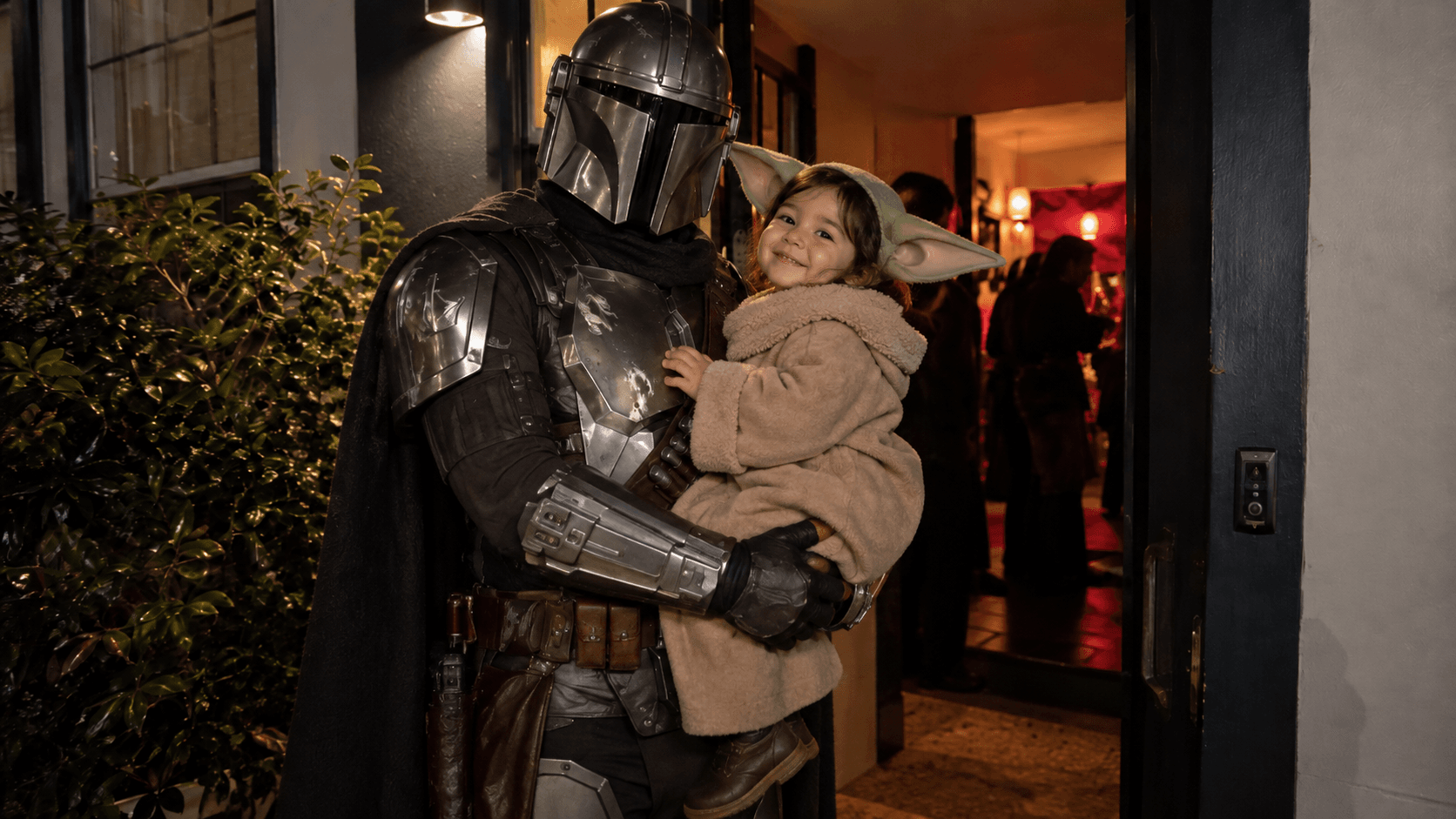
For anyone looking for a duo or family Halloween costume, The Mandalorian and Grogu is one of the most recognizable combinations to try in 2026. The film opened theatrically on May 22, 2026, making the pair particularly timely for this year's Halloween content.
The visual contrast also works extremely well in photos. Mandalorian-inspired armor creates a strong metallic silhouette, while Grogu adds a softer and more playful element. You do not need a complicated galaxy background to make the costume work. A home entrance, hallway, Halloween party, or city street at night can actually make the final photo feel more authentic.
AI Prompt
Create a photorealistic Halloween duo cosplay photo inspired by The Mandalorian and Grogu. Preserve the real facial identity, facial structure, hairstyle, body proportions, and natural appearance of the people in the reference photo. One person wears a premium Mandalorian-inspired Halloween costume with weathered metallic armor, dark fabric layers, leather utility details, gloves, boots, and a long dark cape. The second person wears a cute Grogu-inspired costume with a soft oversized beige robe, green ears, and believable handcrafted costume details. Photograph them standing naturally together outside a Halloween party or inside a modern apartment hallway at night. Real costume materials, natural body posture, believable indoor or street lighting, realistic shadows, slight smartphone camera grain, imperfect everyday composition. No artificial galaxy background, no floating objects, no excessive glow, no plastic CGI textures.
Best for: family Halloween costumes, couples, siblings, duo photos, and short-form social content.
2. Clowncore Inspired Halloween Costume
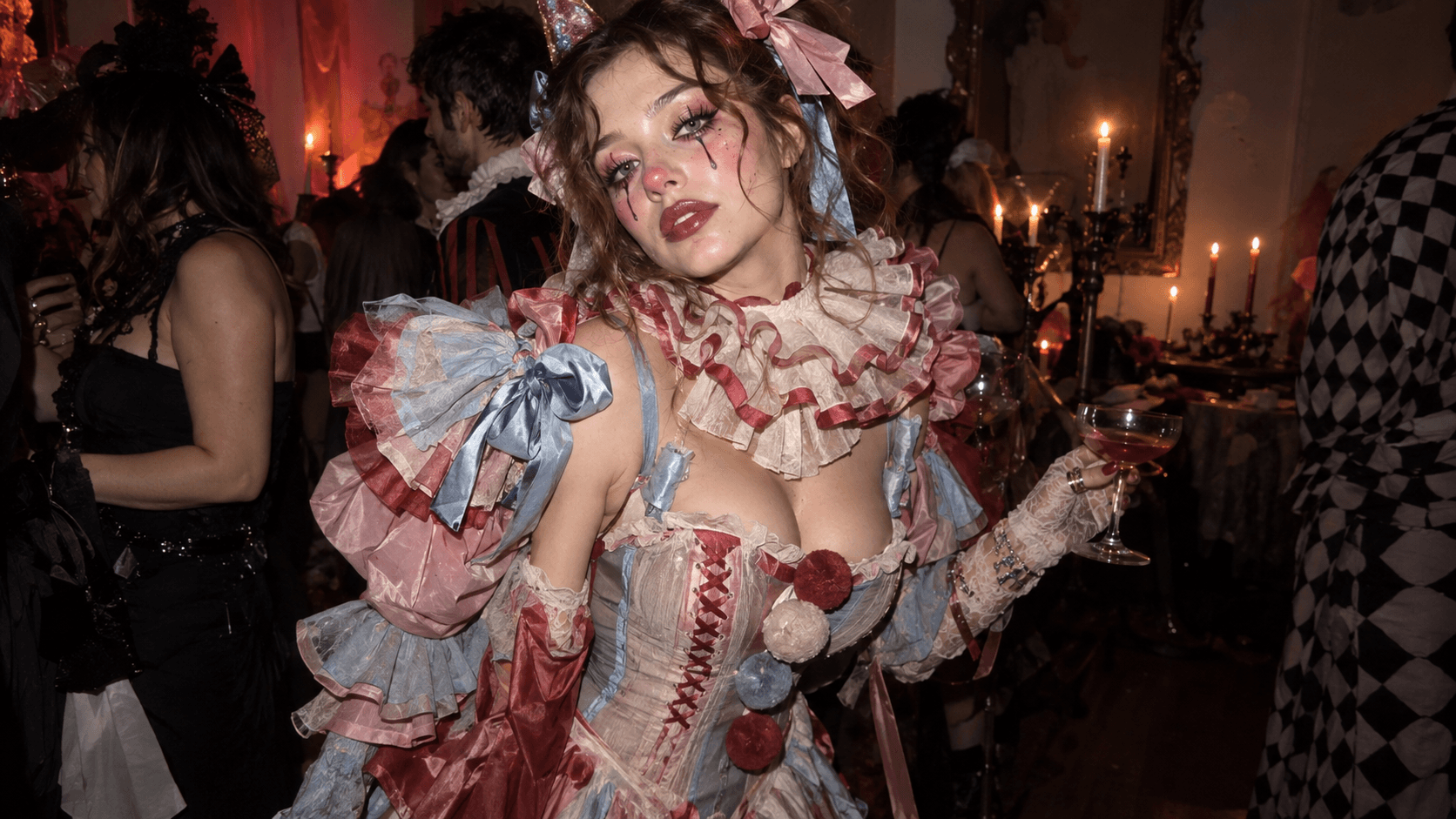
For a bold and playful Halloween costume idea, a Clowncore-inspired look combines vintage circus fashion with dramatic makeup and a slightly creepy aesthetic. Think colorful ruffled collars, oversized bows, puff sleeves, playful accessories, and expressive clown makeup. Keep the styling fashionable and wearable, like a real Halloween party outfit rather than a theatrical costume.
AI Prompt
Create an ultra-photorealistic Halloween party portrait of a stylish adult woman in a trendy clowncore costume. She wears a pastel pink, dusty blue, and faded red vintage circus-inspired dress with a fitted corset bodice, oversized ruffled collar, puff sleeves, ribbon bows, and pom-pom details. Her makeup is fashionable clown-inspired with a rosy nose, soft pink eyeshadow, glossy lips, delicate painted teardrops, and flushed cheeks. Her hair is loosely curled and slightly messy with oversized bows. She holds a cocktail glass and poses naturally at a real indoor Halloween party with candlelight, blurred costumed guests, and a dark moody atmosphere. Use authentic smartphone flash photography, natural skin texture, visible pores, realistic hands, real fabric folds, subtle grain, and believable shadows. Trendy, playful, eerie, and stylish. No CGI, no plastic skin, no cartoon look, no fake background.
Best for: Halloween makeup ideas, especially with graphic eyeliner, colorful teardrops, painted blush, and vintage circus-inspired details.
3. Edward Scissorhands Inspired Halloween Costume
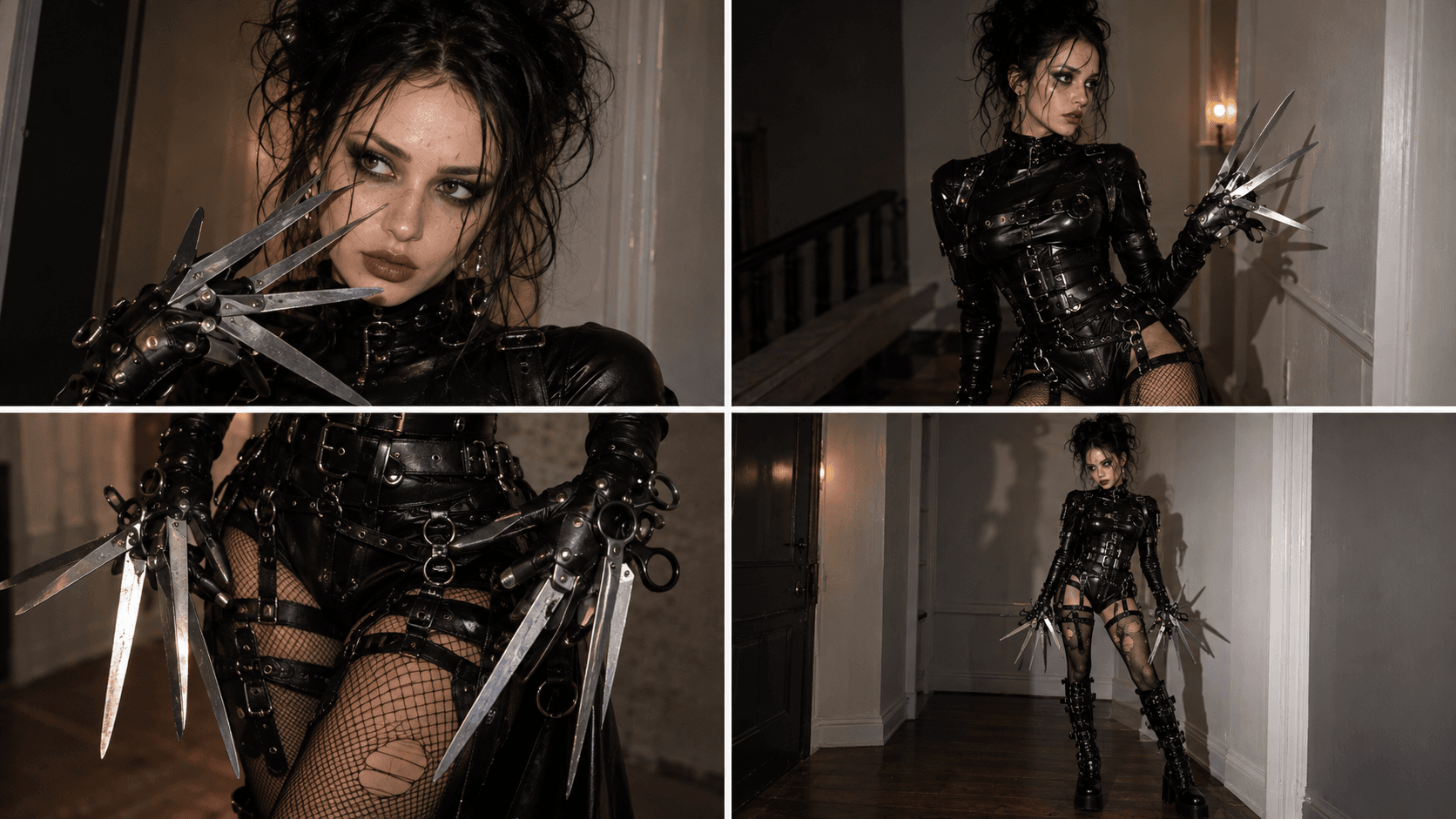
For a bold, gothic, and effortlessly cool Halloween costume idea, an Edward Scissorhands-inspired look combines dark fashion, dramatic makeup, and edgy handcrafted details. Think fitted black leather outfits, layered belts, metal buckles, messy teased hair, and iconic scissor-inspired gloves.
The key is to reinterpret the classic character through a modern, feminine gothic fashion aesthetic. Keep the costume wearable and realistic while making the overall look mysterious, striking, and slightly unsettling.
AI Prompt
Create an ultra-photorealistic Halloween fashion portrait of a stylish adult woman inspired by Edward Scissorhands. Preserve natural facial features, realistic skin texture, and body proportions. She wears a fitted black gothic leather outfit with layered straps, metallic buckles, structured corset details, and tall leather boots. Add handcrafted scissor-inspired gloves with lightweight, blunt metallic-looking blades, dramatic teased black hair, pale gothic makeup, smoky eyes, and muted dark lips. Pose confidently in a real industrial hallway or moody indoor Halloween setting. Authentic smartphone flash photography, natural skin pores, realistic leather textures, subtle imperfections, soft shadows, and slightly desaturated colors. Dark, edgy, mysterious, feminine, and high-fashion. No CGI, plastic skin, unrealistic weapons, exaggerated fantasy effects, or artificial backgrounds.
Best for: This Edward Scissorhands-inspired look is especially suitable for gothic Halloween makeup, DIY costume ideas, dramatic hairstyles, and edgy Halloween fashion photography. The combination of pale makeup, textured black leather, and sculptural scissor gloves creates a recognizable, fashion-forward Halloween look.
4. Mystic Siren Halloween Costume
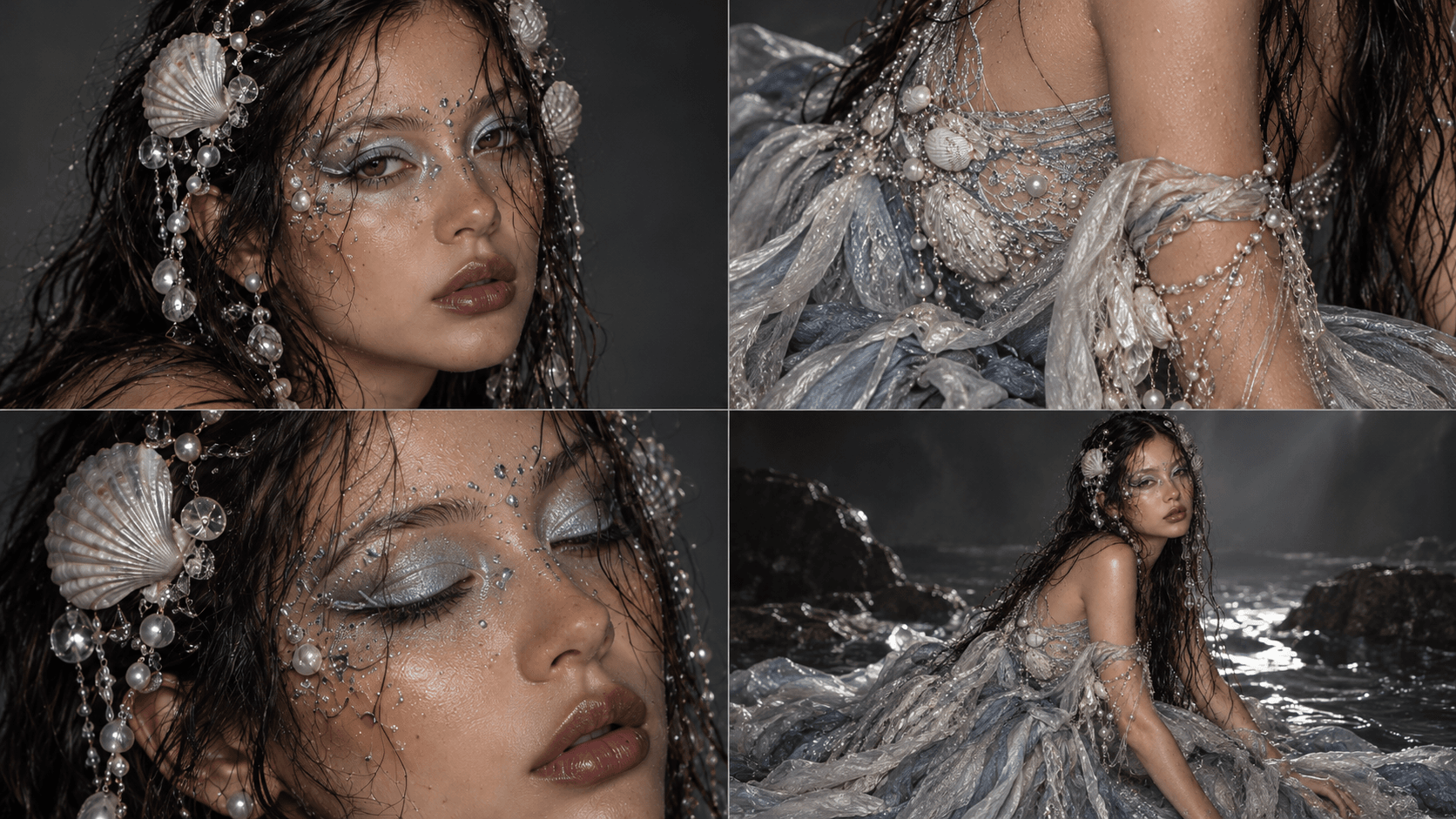
A Mystic Siren Halloween costume is a striking choice for Halloween 2026 if you want something ethereal, mysterious, and highly photogenic. Instead of a typical mermaid look, this concept leans into a darker ocean-inspired aesthetic with wet-look hair, pearlescent makeup, shells, crystals, pearls, and flowing fabrics that feel elegant rather than costume-like.
To keep the result realistic, avoid cartoon fins, neon underwater effects, or overly glossy CGI skin. Think translucent fabrics, silver and pearl tones, iridescent details, shell jewelry, slightly wet hair, luminous makeup, and subtle mystical sea-inspired accessories. The overall image should feel like a real Halloween editorial with a supernatural edge.
AI Prompt
Create a photorealistic Halloween portrait of a woman dressed as a mystical siren. Preserve her real facial identity, facial structure, hairstyle, body proportions, and natural skin texture. Style her with long slightly wet dark hair, delicate shell and pearl hair accessories, crystal strands, translucent beads, and subtle ocean-inspired jewelry. Dress her in an elegant flowing costume made from layered sheer fabric in pearl white, silver, smoky gray, and muted blue tones, with realistic folds and handcrafted details. Add ethereal siren makeup with softly shimmering skin, pearlescent eyelids, silver highlights, subtle rhinestones around the eyes, and glossy neutral lips while keeping natural pores and realistic makeup texture. Photograph her near dark coastal rocks, a misty shoreline, or a softly lit water-inspired studio setting at dusk. Include subtle mystical sea-animal elements such as a pale wolf-like guardian, translucent fish silhouettes, delicate shells, or softly visible marine forms in the background without overpowering the subject. Use natural low light, soft camera flash, realistic reflections, slightly imperfect wet hair, subtle film grain, and believable shadows. The final image should feel mysterious, elegant, haunting, and editorial rather than like CGI fantasy art. No cartoon mermaid tail, no neon glow, no plastic skin, no oversized fantasy creatures, no unrealistic anatomy, no excessive visual effects.
The strongest version of this look feels like a real person transformed into an eerie sea siren for Halloween, not a digital mermaid character.
Best for: dark fantasy Halloween portraits, siren makeup, mystical fashion shoots, ocean-inspired cosplay, and dramatic social content.
5. Dark Enchantress Halloween Costume
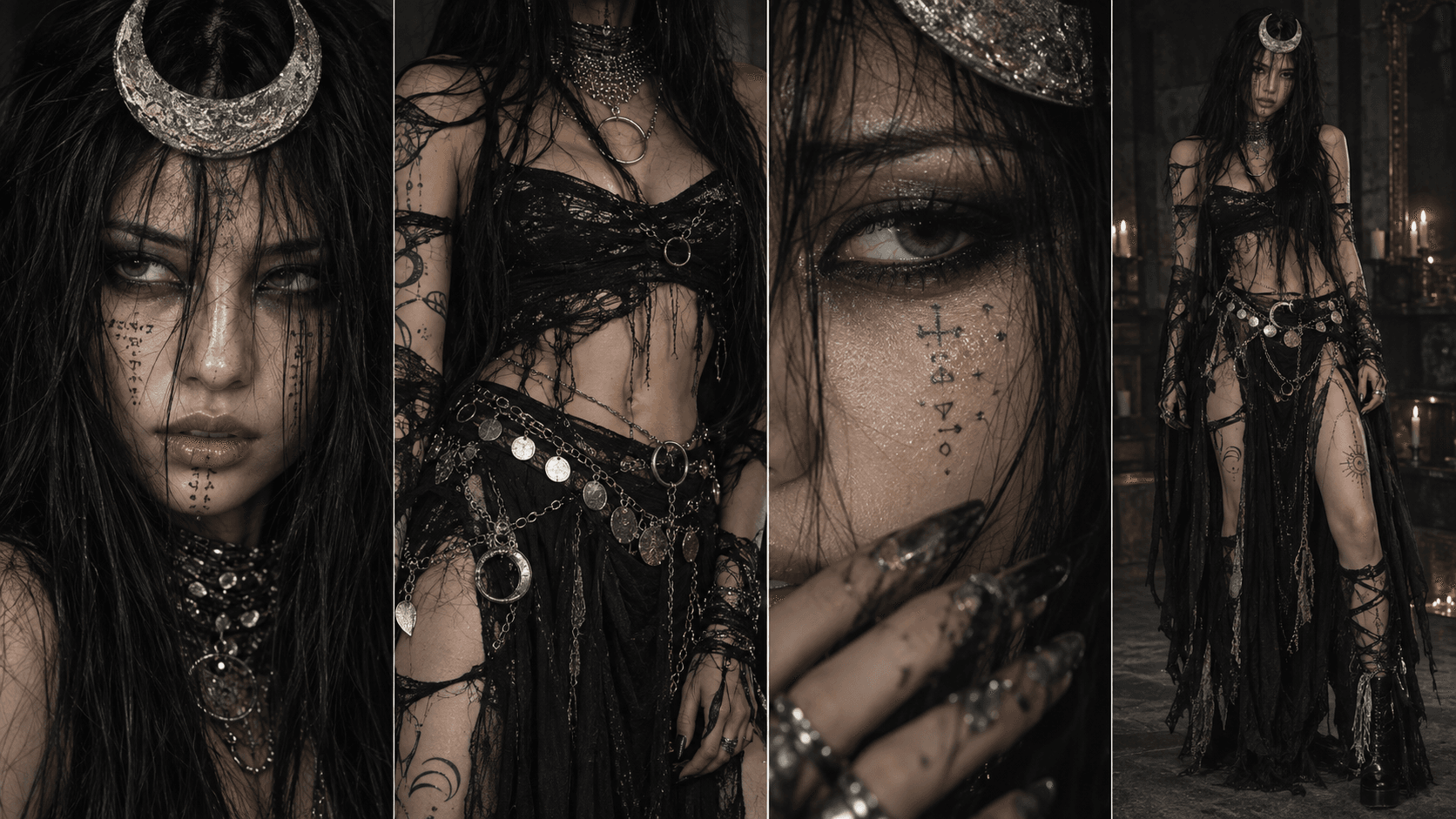
A Dark Enchantress Halloween costume is perfect for Halloween 2026 if you want something darker, more mysterious, and visually dramatic than a classic witch. The look combines occult-inspired styling, crescent moon accessories, layered black fabrics, metallic jewelry, smoky makeup, and long textured hair for a strong mystical aesthetic without referencing a specific movie or character.
To keep the image realistic, avoid oversized magical effects or glowing fantasy skin. Instead, focus on handcrafted jewelry, sheer black fabrics, silver details, distressed textures, subtle body markings, and moody low-light photography. The final result should feel like someone genuinely dressed for an underground Halloween party or dark editorial photoshoot.
AI Prompt
Create a photorealistic Halloween portrait of a woman dressed as a dark enchantress. Preserve her real facial identity, facial structure, hairstyle, body proportions, and natural skin texture. Style her with very long dark slightly messy hair, a sculptural crescent moon headpiece, layered silver chains, antique metallic jewelry, arm cuffs, rings, and subtle mystical symbols painted naturally across the face, neck, and arms. Dress her in a sophisticated black Halloween costume made from sheer fabric, distressed lace, soft velvet, and layered dark textiles with a fitted silhouette and handmade details. Add dramatic but realistic makeup with smoky charcoal eyes, softly smudged black liner, muted lips, subtle silver highlights, and natural skin texture still visible underneath. Photograph her inside a dim vintage room, candlelit hallway, dark apartment, or nighttime urban setting using low ambient light and soft direct camera flash. Real fabric texture, imperfect hair strands, natural hands, realistic makeup, subtle grain, believable shadows, slightly raw editorial photography. The overall mood should feel mysterious, occult-inspired, elegant, eerie, and fashion-forward. No glowing eyes, no supernatural energy effects, no CGI skin, no floating objects, no unrealistic anatomy, no excessive fantasy background.
This look works best when it feels raw, dark, and slightly imperfect, rather than polished like a fantasy character render.
Best for: dark Halloween portraits, enchantress makeup, gothic fashion, mystical cosplay, moon-inspired costumes, and moody social content.
How to Make Halloween AI Photos Look Real
Using words such as “8K,” “cinematic,” “high resolution,” or “dramatic lighting” does not automatically make an AI image realistic. In many cases, stacking too many of these phrases actually encourages the model to create something overly polished or artificial.
A better prompt describes details a real camera would capture: natural skin texture, visible pores, realistic hands, imperfect hair, physical fabric folds, believable body proportions, actual light sources, ordinary background objects, subtle grain, and realistic shadows.
A useful realism instruction you can reuse is:
Natural skin texture, visible pores, realistic hands, correct anatomy, believable fabric folds, physically accurate shadows, subtle camera grain, slightly imperfect real-world composition, no plastic skin, no excessive glow, no CGI appearance.
The rule is simple: Real person first → Costume second → AI effects last. If realistic faces are still difficult to achieve, read our guide on how to fix plastic skin and unnatural AI faces for more practical ways to make AI portraits look natural.
Two Ways to Try These Halloween Costume Ideas on 1min.AI
You do not need to buy every costume just to see whether a look works for you. With 1min.AI, you can visualize the costume with your own face in two different ways.
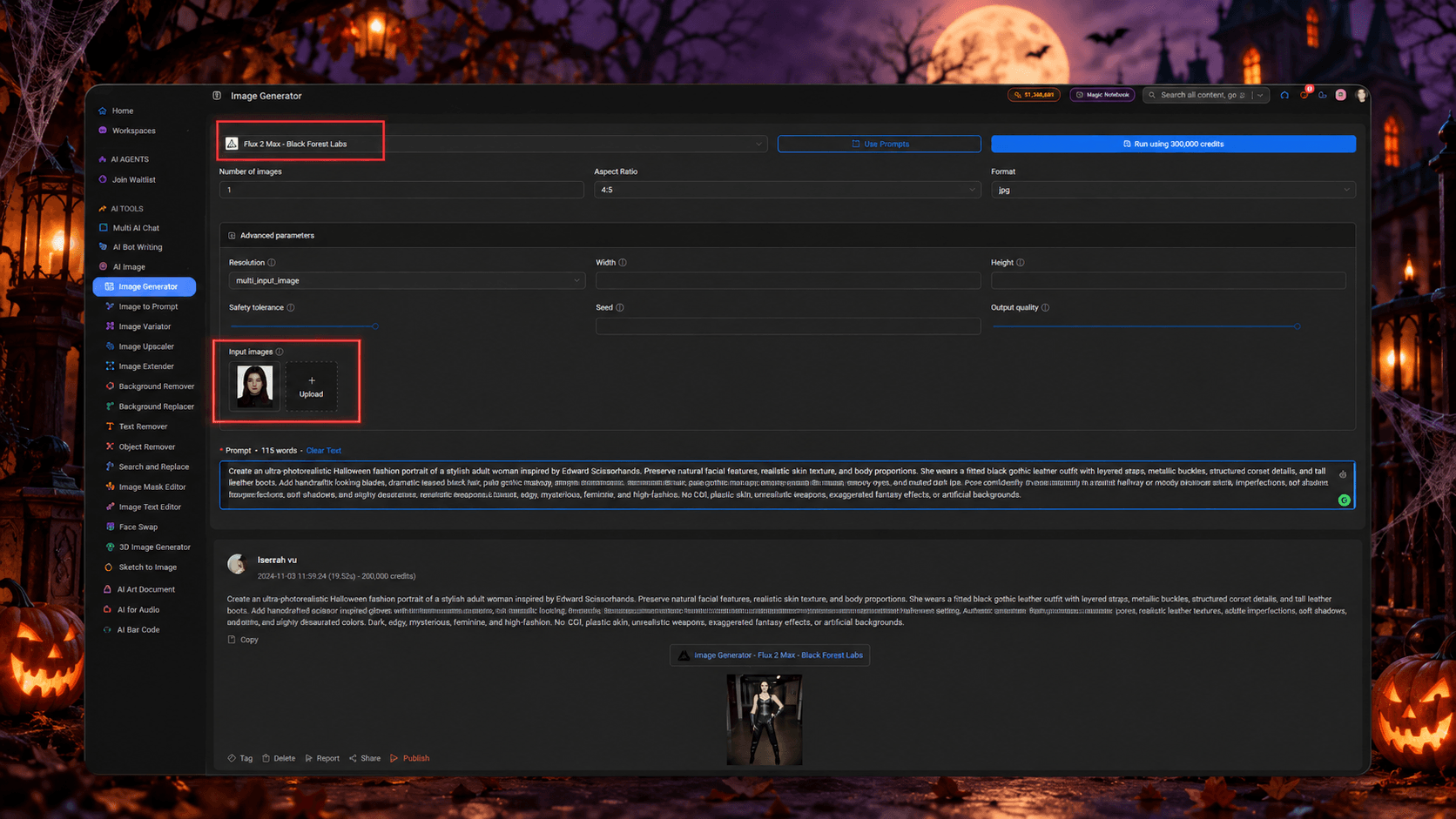
Option 1 Create a New Halloween Photo With Flux 2 Max
Go to 1min.AI → AI for Image → Image Generator and select Flux 2 Max by Black Forest Labs. Upload a clear photo of yourself, then paste one of the Halloween costume prompts above. Your reference image helps establish who should appear in the image, while the prompt controls the costume, setting, pose, lighting, and photography style.
For better results, use a photo where your face is clearly visible from the front or a slight three-quarter angle. After generating the image, review more than just the overall composition. Check whether the face still resembles you, whether the hands look natural, whether the clothing has believable texture, and whether the environment feels physically real.
The workflow is simple: Upload your photo → Select Flux 2 Max → Paste the prompt → Generate → Review → Refine.
Use this method when you want control over the entire Halloween image. You can keep the same costume idea while changing the location, camera angle, pose, lighting, or styling until the result matches what you imagined.
Option 2 Put Your Face Into an Existing Halloween Look
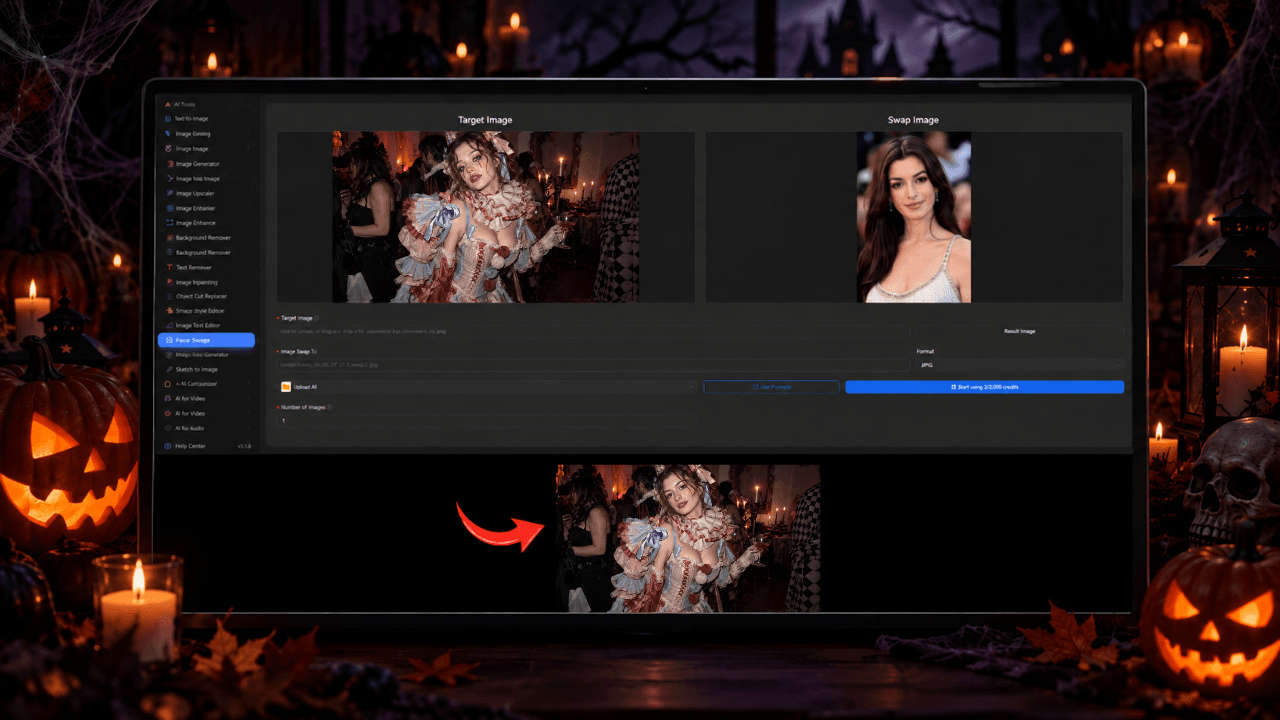
If you already like one of the costume images shown in this article, you do not have to generate everything again from scratch. Open Face Swapper on 1min.AI and use the Halloween costume image you like as the target. Then upload a clear photo of your own face.
The target image already gives you the costume, body pose, composition, lighting, and background, while Face Swap allows you to personalize the person in that image.
The workflow becomes: Choose a Halloween image → Upload the target image → Upload your face → Face Swap → Review the result.
The difference is straightforward: Want to design the entire Halloween photo yourself? Use Flux 2 Max. Already found the perfect costume image? Use Face Swap.
Frequently Asked Questions
What Are Popular Halloween Costume Ideas for 2026?
Movie-inspired characters, recognizable fantasy worlds, superhero groups, mythology-inspired costumes, and duo concepts are strong directions for Halloween 2026. The best option depends on whether you are planning a solo, couple, family, or group costume.
Can AI Help Me Choose a Halloween Costume?
Yes. AI image generators can help you visualize different Halloween costume ideas on yourself before deciding which look you want to buy, recreate, or wear in real life.
Can I Create a Halloween Costume Photo With My Own Face?
Yes. On 1min.AI, you can upload a reference photo and use Flux 2 Max to create an entirely new Halloween costume image. You can also use Face Swap when you already have a costume image you like and simply want to place your own face into the look.
How Do I Make an AI Halloween Photo Look Less Fake?
Prioritize natural skin texture, realistic costume materials, correct anatomy, believable lighting, subtle camera grain, and real-world environments. Avoid unnecessary glowing effects, exaggerated fantasy elements, and overly smooth skin.
Should I Use Flux 2 Max or Face Swap?
Use Flux 2 Max when you want to create and customize the entire Halloween costume scene from a prompt. Use Face Swap when you already like an existing costume image and mainly want to personalize the face.
Which Halloween Costume Works Best for Groups?
A small Avengers-inspired team works especially well because every person can have a recognizable character while the overall image remains visually connected. Keeping the group to around three or four people can also help produce cleaner AI-generated faces and costume details.
🚀 Explore your Halloween costume for 2026 with Flux 2 Max or Face Swapper on 1min.AI before bringing the look to life.
Alternatives
Discover the best alternatives to 1minAI and compare features, pricing, and use cases.

1min.AI vs OpenRouter
1min.AI vs. OpenRouter: Compare the ready-to-use AI creation product against the technical API tool. Find out if you need a zero-code creative studio or a coding infrastructure hub.
 Ngoc Hong
1min.AI vs Lovart
Compare 1min.AI vs Lovart across features, pricing, credits, brand tools, and use cases to find the right AI platform for your workflow.
Ngoc Hong
1min. AI vs Dola AI
Looking for a Dola AI alternative? Compare 1min.AI vs Dola AI on video generation, free plans, pricing and privacy to pick the right AI app.
Ngoc HongAI Tools
Discover the best AI tools to boost productivity, creativity, and everyday work.

Create Consistent Cartoon Content in Just a Few Steps
Create engaging cartoon videos for TikTok and Reels with 1min.AI. Research ideas, create characters, and turn images into animated videos in 3 simple steps.
 Lien Anh Vu
One Product, 10 UGC Creatives: How AI Makes Content Testing Easier
Create more authentic UGC with an AI UGC video generator, test more creative angles and scale affiliate content without filming every version.
Lien Anh Vu
Top 4 Affordable AI Tools for Startup Founders
Discover the top 4 affordable AI tools for startup founders to validate ideas, build products, create content, and launch faster without overspending.
 Tram Ta
AI Features
Comprehensive AI features that streamline workflows, improve efficiency, and empower teams to achieve more.
Create Consistent Cartoon Content in Just a Few Steps
Create engaging cartoon videos for TikTok and Reels with 1min.AI. Research ideas, create characters, and turn images into animated videos in 3 simple steps.
Lien Anh VuOne Product, 10 UGC Creatives: How AI Makes Content Testing Easier
Create more authentic UGC with an AI UGC video generator, test more creative angles and scale affiliate content without filming every version.
Lien Anh Vu
1minAI: Free AI Grammar Checker
Check grammar for free with 1minAI’s AI grammar checker. Find grammar, spelling, and writing mistakes, improve clarity, and polish your content in seconds.
Tram TaAI Use Cases
A curated collection of AI use cases for business, productivity, and industry-specific applications.
Create Consistent Cartoon Content in Just a Few Steps
Create engaging cartoon videos for TikTok and Reels with 1min.AI. Research ideas, create characters, and turn images into animated videos in 3 simple steps.
Lien Anh VuOne Product, 10 UGC Creatives: How AI Makes Content Testing Easier
Create more authentic UGC with an AI UGC video generator, test more creative angles and scale affiliate content without filming every version.
Lien Anh Vu
Best Time to Post on Instagram: A Practical Guide for Better Engagement
Discover the best time to post on Instagram, including the best days and times for different audiences, plus tips to find the ideal posting schedule for your account.
Tram TaAI Tutorials
Learn how to use AI with practical, step-by-step tutorials.

Black Friday AI Tool Deals in 2026
Discover what Black Friday AI tool deals 2026 has to offer. Find out how to secure the 1min.AI lifetime deal via AppSumo, Dealify, Stack Social, and verify on Trustpilot, Slashdot, and Software Advice.
 Hang Nguyen
Create Consistent Cartoon Content in Just a Few Steps
Create engaging cartoon videos for TikTok and Reels with 1min.AI. Research ideas, create characters, and turn images into animated videos in 3 simple steps.
Lien Anh Vu
[Seedance 2.5 New] Better AI Product Videos, Less Rework in 1min.AI
Use Seedance 2.5 image to video on 1min.AI to create more consistent AI product videos, reduce failed generations, save credits, and improve UGC workflows.
Lien Anh VuAI Guides
Learn AI faster with practical guides, real-world examples, and actionable best practices.

Safely Buy AI Tools Online: 2026 Black Friday Guide
Discover how to find and secure the best Black Friday AI deals online. Learn expert strategies to avoid scams, combat subscription fatigue, and verify software.
Hang NguyenCreate Consistent Cartoon Content in Just a Few Steps
Create engaging cartoon videos for TikTok and Reels with 1min.AI. Research ideas, create characters, and turn images into animated videos in 3 simple steps.
Lien Anh Vu[Seedance 2.5 New] Better AI Product Videos, Less Rework in 1min.AI
Use Seedance 2.5 image to video on 1min.AI to create more consistent AI product videos, reduce failed generations, save credits, and improve UGC workflows.
Lien Anh VuAI Solutions
Browse the best AI solutions for automation, coding, research, productivity, customer support, marketing, and business workflows.
Safely Buy AI Tools Online: 2026 Black Friday Guide
Discover how to find and secure the best Black Friday AI deals online. Learn expert strategies to avoid scams, combat subscription fatigue, and verify software.
Hang NguyenCreate Consistent Cartoon Content in Just a Few Steps
Create engaging cartoon videos for TikTok and Reels with 1min.AI. Research ideas, create characters, and turn images into animated videos in 3 simple steps.
Lien Anh VuOne Product, 10 UGC Creatives: How AI Makes Content Testing Easier
Create more authentic UGC with an AI UGC video generator, test more creative angles and scale affiliate content without filming every version.
Lien Anh VuAI Models
Explore the world's leading AI models in one place.
Create Consistent Cartoon Content in Just a Few Steps
Create engaging cartoon videos for TikTok and Reels with 1min.AI. Research ideas, create characters, and turn images into animated videos in 3 simple steps.
Lien Anh VuOne Product, 10 UGC Creatives: How AI Makes Content Testing Easier
Create more authentic UGC with an AI UGC video generator, test more creative angles and scale affiliate content without filming every version.
Lien Anh Vu[Seedance 2.5 New] Better AI Product Videos, Less Rework in 1min.AI
Use Seedance 2.5 image to video on 1min.AI to create more consistent AI product videos, reduce failed generations, save credits, and improve UGC workflows.
Lien Anh VuAI Comparisons
Compare AI tools, models, and platforms to find the best fit for your needs.

Kling AI Vs Veo 3: Which Model Wins?
Kling AI vs Veo 3: compare motion, native audio, pricing & free tiers to see which AI video generator wins for your project - try both on 1min.AI.
 Trang Tran
[Seedance 2.5 New] Better AI Product Videos, Less Rework in 1min.AI
Use Seedance 2.5 image to video on 1min.AI to create more consistent AI product videos, reduce failed generations, save credits, and improve UGC workflows.
Lien Anh Vu
DeepSeek V4 Pro vs Flash Comparison
Compare DeepSeek V4 Pro vs DeepSeek V4 Flash metrics. Optimize your agentic apps and improve AI fact checking on 1min.ai today.
Ngoc HongAI Integrations
Seamlessly integrate AI with the tools you already use to automate work and boost productivity.

POV: You Have 10+ Posts to Make Every Day
Learn how to build an AI content workflow that helps content creators produce 10+ social media posts a day faster with AI brainstorming, image generation, and content creation.
Lien Anh Vu
How to Use an AI Fashion Video Generator for Fashion Week 2026
Turn Fashion Week 2026 ideas into stunning fashion videos with AI. Learn how to brainstorm, create visuals, and transform images into videos with one simple workflow.
Lien Anh Vu
Stop Switching Between AI Apps: How AI Integration Transforms Employer Branding
Discover how AI integration helps HR teams streamline employer branding by combining AI writing, documents, images, video, and multiple AI models into one workspace.
Tram TaAI for Industries
Find the best AI tools and workflows for healthcare, finance, education, legal, manufacturing, retail, real estate, and more

How to Start a One-Person AI Business: 7 Models You Can Run Solo
Learn how to start a one-person AI business with 7 practical models, from AI consulting and content services to automation and software reselling.
Tram Ta
7 Low-Cost AI Business Ideas for Your Startup
Explore 7 low-cost AI business ideas you can start with a small budget, from content and video services to AI consulting, reselling, and automation.
Tram Ta
Free AI Image Generator For Ecommerce
Turn phone photos into studio, white-background, and lifestyle product images. Try the best AI image generator for ecommerce online free with 1min.AI.
Trang TranAI Agents
Discover and run AI agents to automate tasks across your work and daily life.
1minAI: Free AI Grammar Checker
Check grammar for free with 1minAI’s AI grammar checker. Find grammar, spelling, and writing mistakes, improve clarity, and polish your content in seconds.
Tram Ta
AI Agents for Facebook
Use an AI Agent for Facebook to create content, generate images, schedule posts, and publish from your documents and conversations.
Ngoc Hong
AI Agent vs AI Assistant: Which One Actually Saves Designers More Time?
Learn the difference between AI Agent vs AI Assistant and discover which solution helps designers automate repetitive work, reduce revisions, and save more time.
Lien Anh VuAI Workflows
Explore ready-to-use AI workflows for productivity, marketing, sales, support, and more.
Create Consistent Cartoon Content in Just a Few Steps
Create engaging cartoon videos for TikTok and Reels with 1min.AI. Research ideas, create characters, and turn images into animated videos in 3 simple steps.
Lien Anh VuOne Product, 10 UGC Creatives: How AI Makes Content Testing Easier
Create more authentic UGC with an AI UGC video generator, test more creative angles and scale affiliate content without filming every version.
Lien Anh VuPOV: You Have 10+ Posts to Make Every Day
Learn how to build an AI content workflow that helps content creators produce 10+ social media posts a day faster with AI brainstorming, image generation, and content creation.
Lien Anh VuNewsletter
Weekly AI Innovations with 1minAI

🔮 Weekly AI Innovations #140: Deepseek 4.1 Flash & Gemini Upgrades
Explore Deepseek 4.1 Flash and new Gemini models on 1min.ai. Plus, check our update on your Billing - Usage page for better clarity.
Hang Nguyen
🔮 Weekly AI Innovations #136: Grok 4.6 and Smart Data Retention
Discover the latest 1min.ai updates! Upgrade to Grok 4.6 for blazing-fast AI, and check our new Data Retention policies to secure your files today.
Hang Nguyen
🔮 Weekly AI Innovations #139: Dawn of the next-gen AI
Discover the immense power of GPT-6 Astra and Claude Fable 5.1. Unlock next-generation AI models on 1min.ai to solve complex tasks effortlessly.
Hang Nguyen