
UGC Video Multiple Angles With Seedance 2.5 and Kling AI Omni

Lien Anh Vu
September 21, 2026
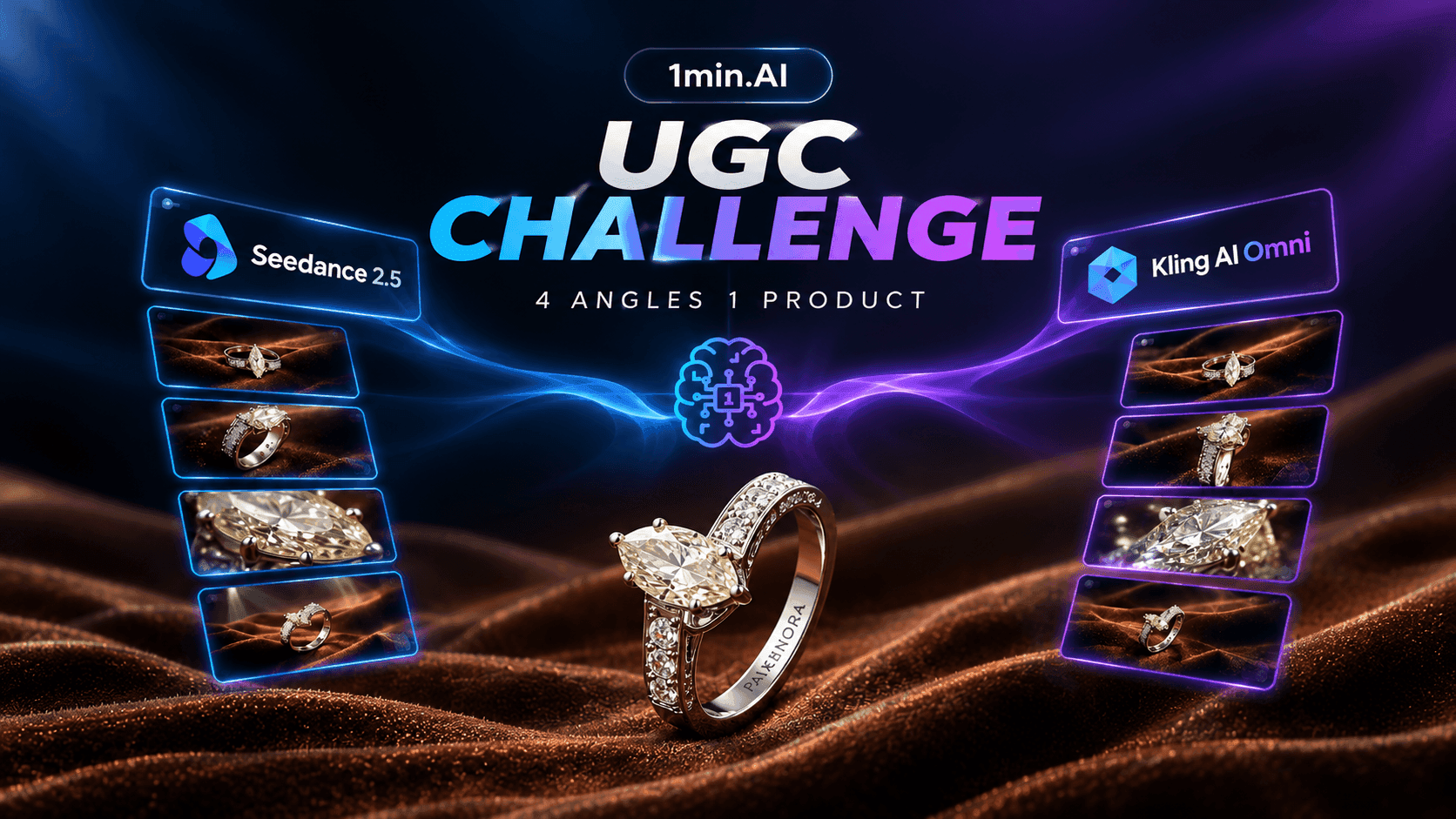
Create professional UGC product videos from one reference with Seedance 2.5 and Kling AI Omni using four creative camera angles in 1min.AI.
Creating four different product videos usually means four different filming setups, which can quickly become expensive and exhausting for Affiliate and UGC creators who need fresh content for TikTok, Instagram Reels and YouTube Shorts. The UGC Multiple Angles Challenge takes a different approach by using one product reference with Seedance 2.5 and Kling AI Omni to create four distinct perspectives, giving creators a faster way to explore professional visual concepts while maintaining product consistency.
Why Seedance 2.5 and Kling AI Omni for This Challenge
Seedance 2.5 and Kling AI Omni are interesting models for this challenge because both support reference driven video creation while offering different approaches to camera movement, visual direction and shot control.
One Product Four Angles Two AI Models
The challenge starts with one product reference and creates four perspectives: Hero angle, Side detail, Macro close up and Creative cinematic angle. Using the same product with both models creates a more consistent comparison while showing how each model handles different visual directions.
Different Approaches to Camera Angles and Motion
The goal is not simply to make the product move. Each angle should have a specific purpose, whether it is establishing the product, revealing details or creating a stronger visual hook. Camera movement, framing, focus and lighting can then be adjusted to create meaningful differences between the shots.
First Frame and Last Frame Control
First frame and last frame control become useful when a video needs a specific opening or ending composition. Instead of allowing the model to determine the entire visual progression, creators can establish clearer visual starting and ending points, which can also make multiple clips easier to connect.
What We Are Testing
The challenge focuses on product consistency, camera control, creative flexibility and visual continuity. The purpose is not to declare one model universally better, but to see how Seedance 2.5 and Kling AI Omni approach the same product video challenge.
The Benefits of Using Advanced AI Models for UGC
Create More Product Content From One Reference
One product image can become multiple creative directions instead of remaining a single static asset. By combining different camera perspectives with first frame and last frame control, creators can produce several clips around the same product while maintaining a connected visual direction.
Produce More Creative Angles Without Reshooting
A traditional product shoot may require a new camera position, lighting setup and composition for every angle. AI video allows creators to explore these perspectives digitally, making it easier to test different visual concepts without repeatedly rebuilding the physical setup.
Keep Product Visuals More Consistent
Product focused UGC needs visual consistency because viewers should recognize the same product throughout the video. The reference should therefore establish the product clearly, while the prompt controls the camera, movement and environment without unnecessarily changing the product itself.
Test More Hooks and Visual Concepts Faster
Multiple angles create more opportunities to develop professional concepts quickly. Instead of spending hours producing one idea before knowing whether it works, creators can explore several visual directions, compare them and select the strongest concept for the final UGC content.
Create UGC Content With Fewer Production Resources
Solo creators and small teams often manage concept development, filming and editing themselves. AI video can reduce some of the repeated production work, allowing creators to spend more time on storytelling, hooks and content strategy.
How to Create Professional UGC Videos in 1min.AI
The workflow can be organized into Reference → Multi AI Chat → Prompt → Video Generation → Review, allowing creators to move from product analysis to final video without constantly rebuilding the creative process.
Step 1 Choose Text to Video or Image to Video
Choose Text to Video when you want the model to build the scene primarily from your written direction. Choose Image to Video when the product reference needs to remain the visual foundation. If you need stronger control over the first frame or last frame, choose a workflow that supports image based frame references.
Kling AI Omni also provides more granular shot control, allowing creators to work with individual shot prompts alongside the overall video direction.
Step 2 Upload Your Product Reference
Upload a clear product reference and identify the details that must remain unchanged, including the shape, proportions, material, color, packaging, logo and important product details. The reference establishes what the product is, while the video prompt determines how the camera presents it.
Step 3 Generate the Visual With Your Chosen AI Model
Choose Seedance 2.5 or Kling AI Omni, then define the angle you want to create. A simple structure is Hero product shot → Side detail shot → Macro close up → Creative cinematic shot. Keep the product consistent while changing the camera language.
Step 4 Enter the Video Prompt
The prompt should describe the shot rather than simply repeating the product description. Define the camera position, camera movement, framing, lighting, focus, subject movement, first frame, last frame and continuity requirements.
For example:
Use the uploaded product image as the exact product reference. Keep the product shape, proportions, material, color and branding unchanged. Begin with a close three quarter view and slowly push the camera toward the product while maintaining natural depth of field. Use soft premium studio lighting with realistic reflections. Keep the product stable throughout the shot and finish with a clean hero composition.
The reference tells the AI what the product is, while the prompt tells the AI how the product should be filmed.
Step 5 Review the Generated Video
Before using the result, check the product shape, proportions, logo, material, color, camera movement, first frame, last frame, unwanted objects and visual artifacts. A successful generation should not only look cinematic but should also remain faithful to the original product.
Step 6 Repeat the Challenge With Four Angles
Repeat the workflow for all four perspectives, then compare the results from Seedance 2.5 and Kling AI Omni. Select the clips with the strongest combination of product consistency, camera movement, visual quality and usefulness for UGC.
Turn Four Angles Into One UGC Video
Once the four clips are ready, arrange them according to their role in the content. Start with the strongest visual hook, move into a detail or macro shot, introduce the creative cinematic perspective and finish with a clear hero product shot.
This turns four separate generations into one structured UGC video while giving creators multiple visual variations that can be tested across TikTok, Instagram Reels and YouTube Shorts.
Frequently Asked Questions
Can I create multiple UGC angles from one product image?
Yes. A single product reference can be used as the foundation for multiple camera perspectives, allowing creators to develop several UGC clips without creating a completely new product asset for every angle.
What are the four angles in the Multiple Angles Challenge?
The challenge uses four core perspectives: Hero product shot, Side detail shot, Macro close up and Creative cinematic shot, with each angle serving a different visual purpose.
Should I use Text to Video or Image to Video?
Use Text to Video when you want the model to construct the scene primarily from your prompt. Use Image to Video when maintaining the product reference is a higher priority, particularly when product consistency is important.
How can I keep the product consistent across multiple angles?
Use a clear product reference and explicitly describe the elements that must remain unchanged, including shape, proportions, material, color, packaging and branding. Always review each generated clip before using it.
Can Seedance 2.5 and Kling AI Omni create professional UGC videos?
Both models can be used to explore professional product video concepts, but the final quality depends on the reference image, prompt, camera direction and generation settings. Reviewing and selecting the strongest outputs remains an important part of the workflow.
🚀 Create your own UGC Multiple Angles Challenge with Seedance 2.5 and Kling AI Omni in 1min.AI.
Alternatives
Discover the best alternatives to 1minAI and compare features, pricing, and use cases.

1min.AI vs OpenRouter
1min.AI vs. OpenRouter: Compare the ready-to-use AI creation product against the technical API tool. Find out if you need a zero-code creative studio or a coding infrastructure hub.
 Ngoc Hong
1min.AI vs Easy Peasy AI
Looking for an Easy Peasy AI alternative? Compare Easy Peasy AI and 1min.AI for content workflows, AI models, and professional teams.
Ngoc Hong
1min.AI vs Taskade
Compare 1min.AI vs Taskade for AI content creation, automation, agents, and creative workflows to find the right workspace.
Ngoc HongAI Tools
Discover the best AI tools to boost productivity, creativity, and everyday work.

Top 4 Affordable AI Tools for Startup Founders
Discover the top 4 affordable AI tools for startup founders to validate ideas, build products, create content, and launch faster without overspending.
 Tram Ta
[Seedance 2.5 New] Better AI Product Videos, Less Rework in 1min.AI
Discover how AI image-to-video product consistency helps creators reduce failed generations, save AI credits, and produce more usable commercial and UGC content.
 Lien Anh Vu
Turn “Make It Better” Into Better Content With AI
Use AI to turn vague client feedback into clear revisions, reduce unnecessary edits, and deliver better content faster.
Lien Anh VuAI Features
Comprehensive AI features that streamline workflows, improve efficiency, and empower teams to achieve more.

One Product, 10 UGC Creatives: How AI Makes Content Testing Easier
Create more authentic UGC with an AI UGC video generator, test more creative angles and scale affiliate content without filming every version.
Lien Anh Vu
Create Consistent Cartoon Content in Just a Few Steps
Create cartoon videos for TikTok and Reels in 3 simple steps with 1min.AI, from researching ideas to characters and animated videos.
Lien Anh Vu
1minAI: Free AI Grammar Checker
Check grammar for free with 1minAI’s AI grammar checker. Find grammar, spelling, and writing mistakes, improve clarity, and polish your content in seconds.
Tram TaAI Use Cases
A curated collection of AI use cases for business, productivity, and industry-specific applications.
One Product, 10 UGC Creatives: How AI Makes Content Testing Easier
Create more authentic UGC with an AI UGC video generator, test more creative angles and scale affiliate content without filming every version.
Lien Anh Vu
Best Time to Post on Instagram: A Practical Guide for Better Engagement
Discover the best time to post on Instagram, including the best days and times for different audiences, plus tips to find the ideal posting schedule for your account.
Tram Ta
Build a Portfolio Website Faster with 1min.AI
Learn how freelance creatives can use 1min.AI to plan, write, design, and generate a professional portfolio website faster, even without strong coding skills.
Lien Anh VuAI Tutorials
Learn how to use AI with practical, step-by-step tutorials.

Black Friday AI Tool Deals in 2026
Discover what Black Friday AI tool deals 2026 has to offer. Find out how to secure the 1min.AI lifetime deal via AppSumo, Dealify, Stack Social, and verify on Trustpilot, Slashdot, and Software Advice.
 Hang Nguyen
Create Consistent Cartoon Content in Just a Few Steps
Create cartoon videos for TikTok and Reels in 3 simple steps with 1min.AI, from researching ideas to characters and animated videos.
Lien Anh Vu[Seedance 2.5 New] Better AI Product Videos, Less Rework in 1min.AI
Discover how AI image-to-video product consistency helps creators reduce failed generations, save AI credits, and produce more usable commercial and UGC content.
Lien Anh VuAI Guides
Learn AI faster with practical guides, real-world examples, and actionable best practices.

Safely Buy AI Tools Online: 2026 Black Friday Guide
Discover how to find and secure the best Black Friday AI deals online. Learn expert strategies to avoid scams, combat subscription fatigue, and verify software.
Hang NguyenCreate Consistent Cartoon Content in Just a Few Steps
Create cartoon videos for TikTok and Reels in 3 simple steps with 1min.AI, from researching ideas to characters and animated videos.
Lien Anh Vu[Seedance 2.5 New] Better AI Product Videos, Less Rework in 1min.AI
Discover how AI image-to-video product consistency helps creators reduce failed generations, save AI credits, and produce more usable commercial and UGC content.
Lien Anh VuAI Solutions
Browse the best AI solutions for automation, coding, research, productivity, customer support, marketing, and business workflows.

Free AI Tattoo Generator: Custom Designs
Turn any idea into a custom tattoo design with 1min.AI's free AI tattoo generator. Describe your idea, pick a style, and download in seconds.
 Trang Tran
Safely Buy AI Tools Online: 2026 Black Friday Guide
Discover how to find and secure the best Black Friday AI deals online. Learn expert strategies to avoid scams, combat subscription fatigue, and verify software.
Hang Nguyen[Seedance 2.5 New] Better AI Product Videos, Less Rework in 1min.AI
Discover how AI image-to-video product consistency helps creators reduce failed generations, save AI credits, and produce more usable commercial and UGC content.
Lien Anh VuAI Models
Explore the world's leading AI models in one place.
One Product, 10 UGC Creatives: How AI Makes Content Testing Easier
Create more authentic UGC with an AI UGC video generator, test more creative angles and scale affiliate content without filming every version.
Lien Anh VuCreate Consistent Cartoon Content in Just a Few Steps
Create cartoon videos for TikTok and Reels in 3 simple steps with 1min.AI, from researching ideas to characters and animated videos.
Lien Anh Vu[Seedance 2.5 New] Better AI Product Videos, Less Rework in 1min.AI
Discover how AI image-to-video product consistency helps creators reduce failed generations, save AI credits, and produce more usable commercial and UGC content.
Lien Anh VuAI Comparisons
Compare AI tools, models, and platforms to find the best fit for your needs.

Kling AI Vs Veo 3: Which Model Wins?
Kling AI vs Veo 3: compare motion, native audio, pricing & free tiers to see which AI video generator wins for your project - try both on 1min.AI.
Trang Tran[Seedance 2.5 New] Better AI Product Videos, Less Rework in 1min.AI
Discover how AI image-to-video product consistency helps creators reduce failed generations, save AI credits, and produce more usable commercial and UGC content.
Lien Anh Vu
DeepSeek V4 Pro vs Flash Comparison
Compare DeepSeek V4 Pro vs DeepSeek V4 Flash metrics. Optimize your agentic apps and improve AI fact checking on 1min.ai today.
Ngoc HongAI Integrations
Seamlessly integrate AI with the tools you already use to automate work and boost productivity.

POV: You Have 10+ Posts to Make Every Day
Learn how to build an AI content workflow that helps content creators produce 10+ social media posts a day faster with AI brainstorming, image generation, and content creation.
Lien Anh Vu
How to Use an AI Fashion Video Generator for Fashion Week 2026
Turn Fashion Week 2026 ideas into stunning fashion videos with AI. Learn how to brainstorm, create visuals, and transform images into videos with one simple workflow.
Lien Anh Vu
Stop Switching Between AI Apps: How AI Integration Transforms Employer Branding
Discover how AI integration helps HR teams streamline employer branding by combining AI writing, documents, images, video, and multiple AI models into one workspace.
Tram TaAI for Industries
Find the best AI tools and workflows for healthcare, finance, education, legal, manufacturing, retail, real estate, and more

Free AI Real Estate Video Generator
Turn listing photos into narrated property videos with AI real estate video tools. See how 1min.AI creates walkthroughs, voiceovers & captions in minutes.
Trang Tran
Free AI Virtual Staging: Furnish Any Room
Stage any real estate listing with AI virtual staging: upload a photo, pick a style, and get a photorealistic furnished room in seconds, free to try.
Trang Tran
The Problem With AI Design? It Looks Too AI
AI-generated designs can look polished but still feel artificial. Here are 5 prompt techniques designers can use to create more realistic, intentional visuals.
Lien Anh VuAI Agents
Discover and run AI agents to automate tasks across your work and daily life.
1minAI: Free AI Grammar Checker
Check grammar for free with 1minAI’s AI grammar checker. Find grammar, spelling, and writing mistakes, improve clarity, and polish your content in seconds.
Tram Ta
AI Agents for Facebook
Use an AI Agent for Facebook to create content, generate images, schedule posts, and publish from your documents and conversations.
Ngoc Hong
AI Agent vs AI Assistant: Which One Actually Saves Designers More Time?
Learn the difference between AI Agent vs AI Assistant and discover which solution helps designers automate repetitive work, reduce revisions, and save more time.
Lien Anh VuAI Workflows
Explore ready-to-use AI workflows for productivity, marketing, sales, support, and more.
Create Consistent Cartoon Content in Just a Few Steps
Create cartoon videos for TikTok and Reels in 3 simple steps with 1min.AI, from researching ideas to characters and animated videos.
Lien Anh VuPOV: You Have 10+ Posts to Make Every Day
Learn how to build an AI content workflow that helps content creators produce 10+ social media posts a day faster with AI brainstorming, image generation, and content creation.
Lien Anh VuHow to Use an AI Fashion Video Generator for Fashion Week 2026
Turn Fashion Week 2026 ideas into stunning fashion videos with AI. Learn how to brainstorm, create visuals, and transform images into videos with one simple workflow.
Lien Anh VuNewsletter
Weekly AI Innovations with 1minAI

🔮 Weekly AI Innovations #138: Claude Sonnet 5, Fable 5 & Wan 2.7
Explode your creative potential with massive 1min.ai updates! Access Claude Sonnet 5, Fable 5, and Alibaba Wan 2.7 for unmatched multi-modal generation today.
Hang Nguyen
🔮 Weekly AI Innovations #137: ElevenLabs Music & AI social Profile Control
The newest 1min.ai updates deliver professional music generation and highly requested privacy tools. Dive into a seamless workflow today!
Hang Nguyen
🔮 Weekly AI Innovations #136: Grok 4.6 and Smart Data Retention
Discover the latest 1min.ai updates! Upgrade to Grok 4.6 for blazing-fast AI, and check our new Data Retention policies to secure your files today.
Hang Nguyen