
How to Fix Plastic Skin and Unnatural AI Faces

Lien Anh Vu
October 7, 2026
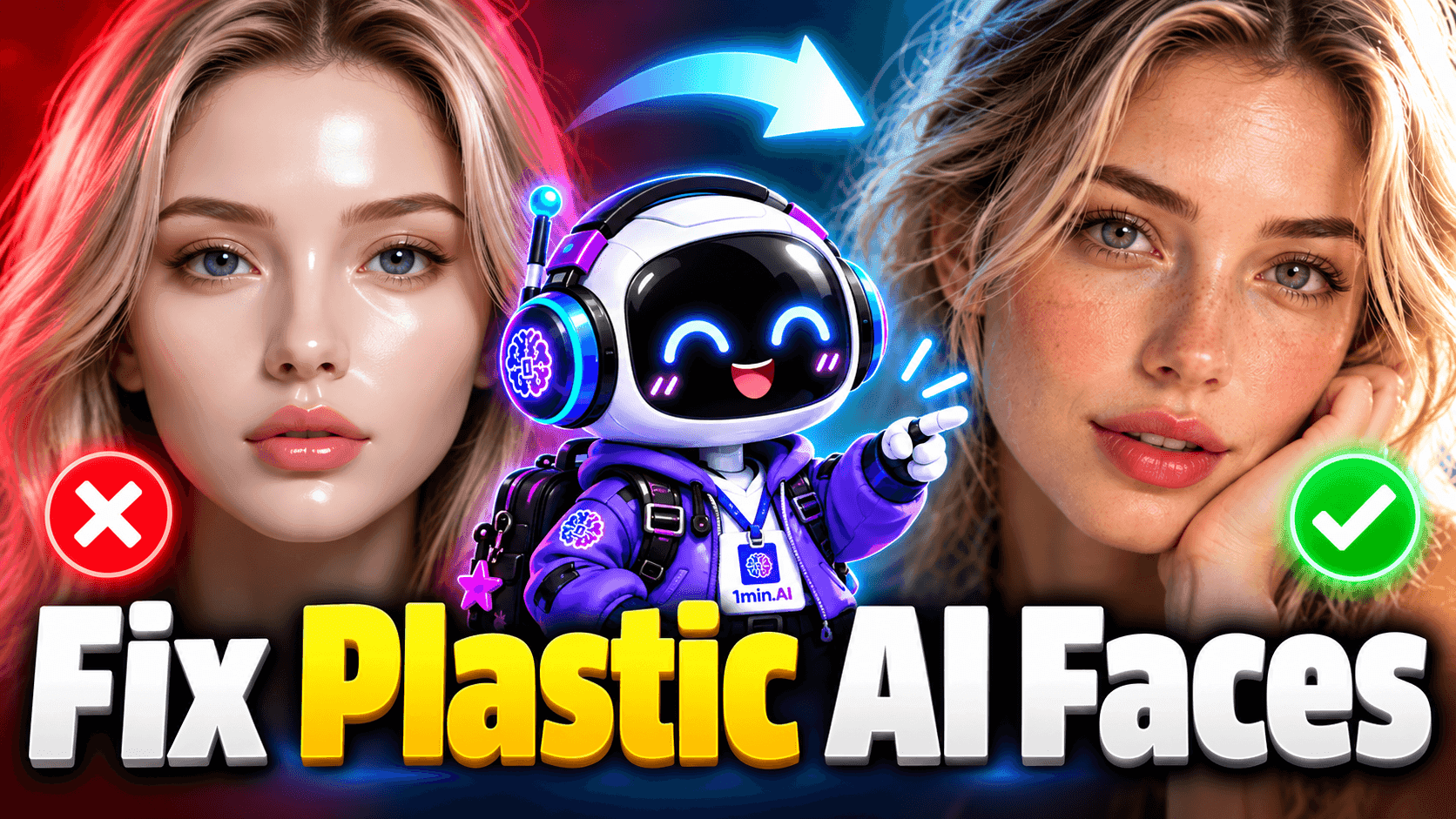
Learn how to fix plastic skin and unnatural AI faces with better prompts for realistic skin texture, natural eyes, facial details, lighting, depth, and negative prompts.
AI image generators can now create highly convincing human portraits, but many results still have the same problem: the face looks technically impressive but somehow artificial. The skin may be too smooth, the eyes may feel lifeless, the facial features can look overly perfect, and the lighting may not interact naturally with the face. This is why simply adding words like “photorealistic,” “8K,” “HDR,” or “ultra realistic” does not automatically make an AI-generated face look real. Realistic AI portraits depend more on believable skin texture, natural imperfections, consistent lighting, correct depth, and visual details that work together.
Why Do AI Faces Look Plastic?
One of the most common causes of unnatural AI faces is overly smooth skin. AI models often generate an idealized version of a face with even skin tone, perfect symmetry, polished highlights, and almost no visible texture. The result can resemble a beauty filter, a wax figure, or a 3D render rather than an unedited photograph. A prompt such as “beautiful woman, flawless skin, perfect face, ultra realistic, 8K” may actually make the problem worse because phrases like “flawless skin” and “perfect face” encourage the model to remove the small irregularities that make human skin believable.
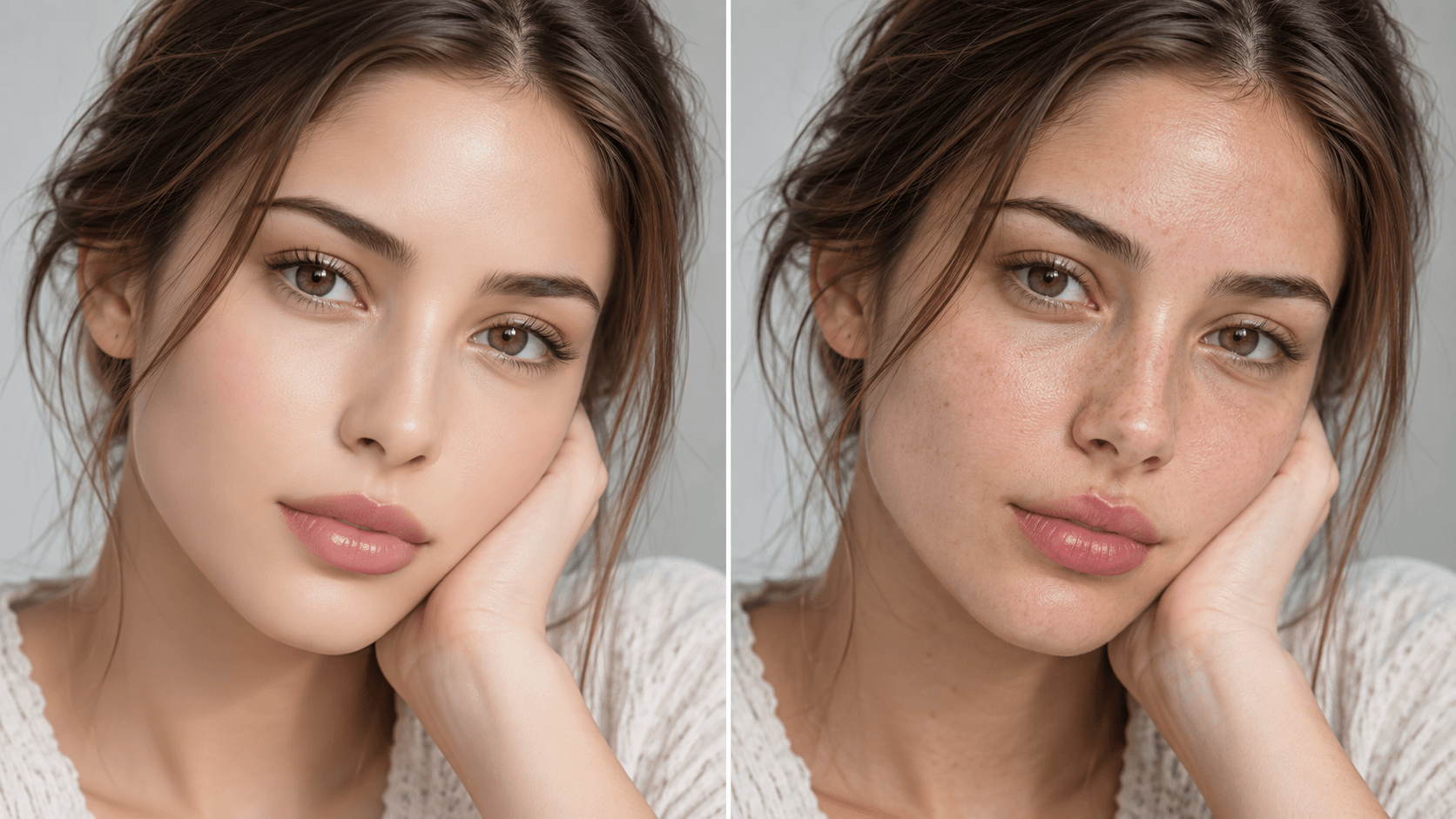
A better prompt should describe the physical characteristics of real skin. Instead of asking for perfection, use details such as authentic skin texture, visible pores, subtle freckles, slight skin tone variation, natural under-eye texture, fine facial hair, realistic skin highlights, and an unretouched appearance. You do not need to include every possible imperfection. Three to five carefully selected details are usually more useful than a long list that causes the model to exaggerate acne, wrinkles, or pigmentation.
For example, instead of writing:
Young woman with perfect skin, beautiful face, ultra realistic, 8K.
Try:
Close-up portrait of a young woman with authentic skin texture, visible pores, subtle freckles, slight natural skin tone variation, soft daylight, and an unretouched photographic appearance.
The second prompt works better because it explains what realistic skin should actually look like.
Add Realistic Skin Texture Without Making the Face Look Rough
The goal is not to make the subject look less attractive. The goal is to avoid skin that appears digitally painted or excessively airbrushed. Real skin contains small variations in color, texture, reflectivity, and fine detail. Different areas of the face also react differently to light. The nose and forehead may have stronger highlights, while the cheeks and under-eye area can have softer texture and subtle shadows.
Useful phrases for an AI skin texture prompt include “visible natural pores,” “subtle skin tone variation,” “fine facial hair,” “soft expression lines,” “natural under-eye texture,” “realistic skin highlights,” and “unretouched skin.” These cues tell the image model to create physical texture instead of simply increasing sharpness.
Avoid combining too many aggressive realism terms such as “extreme pores,” “hyper-detailed wrinkles,” “highly textured skin,” and “every imperfection visible.” That can produce an equally unrealistic result in the opposite direction. Realism is usually created through moderation.
Make AI Eyes Look More Natural
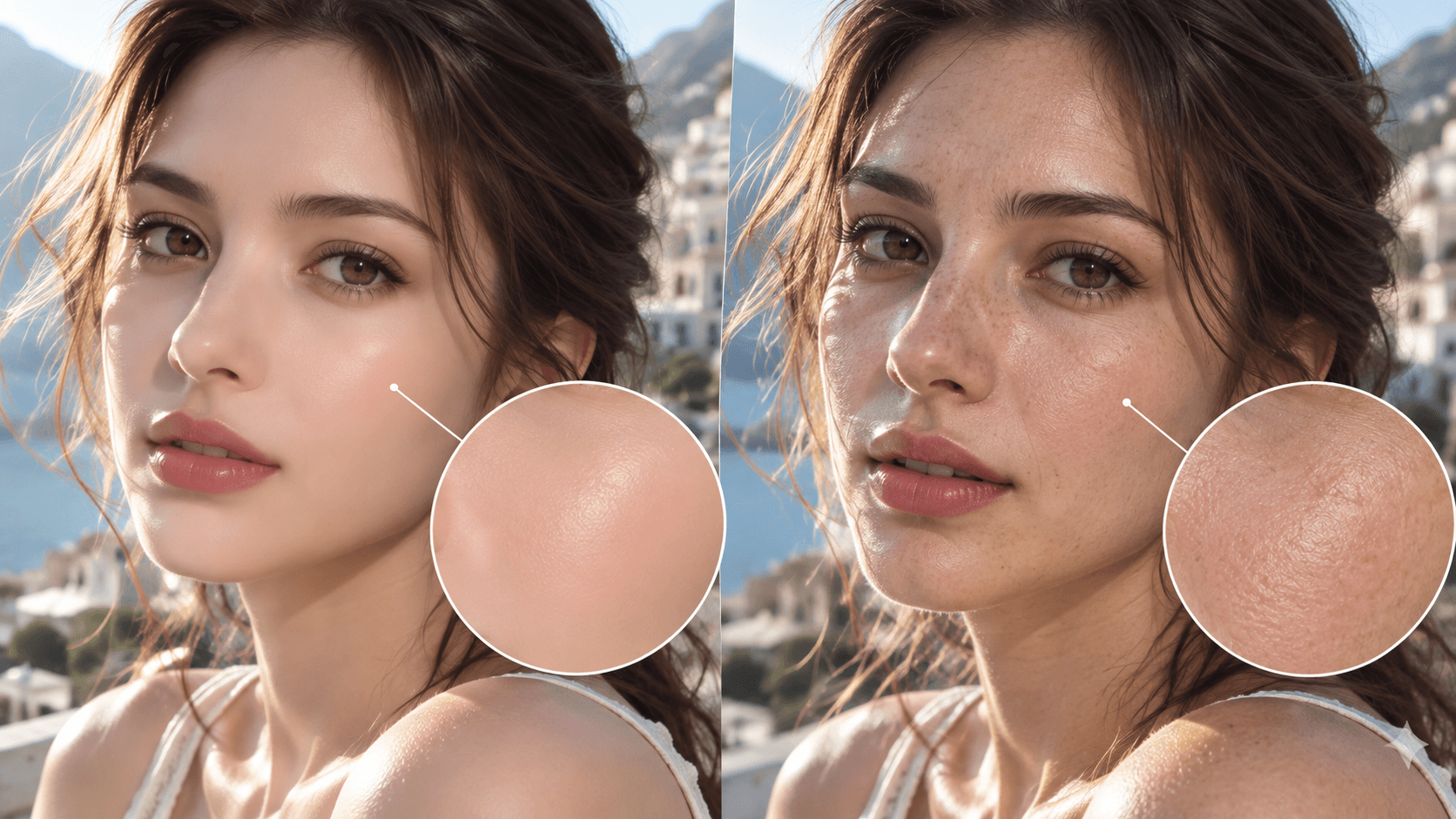
Eyes are another common reason an otherwise realistic AI face feels unnatural. Generated eyes can appear too glossy, too symmetrical, overly bright, or disconnected from the lighting in the scene. The iris may be highly detailed, but the reflections can still look artificial.
Instead of relying on “beautiful detailed eyes,” use more specific instructions such as realistic iris texture, subtle corneal reflections, natural catchlights, realistic moisture, consistent gaze direction, and eye reflections matching the main light source. Consistency is important because realistic eyes should respond to the same lighting environment as the rest of the face.
If soft daylight is coming from camera-left, the eye reflections and facial highlights should support that direction. A portrait becomes less convincing when the skin suggests one light source while the eyes suggest another.
Avoid Perfect Facial Symmetry
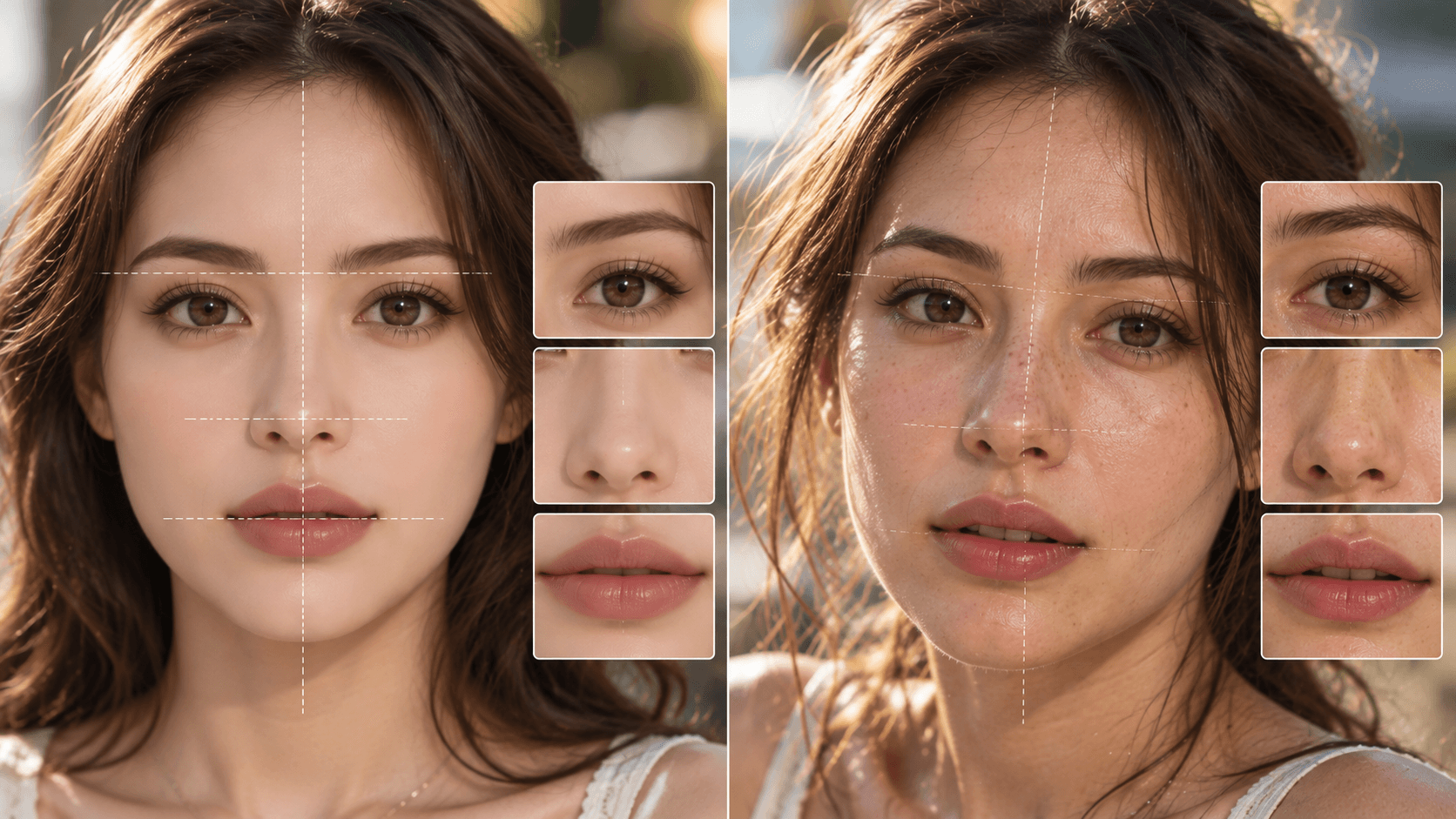
Human faces are naturally asymmetrical. One eyebrow may be slightly higher, one side of the smile may move more strongly, or the eyes may differ subtly in shape. AI-generated portraits often remove these small differences and create faces that are too balanced.
To make AI faces look realistic, you can add phrases such as subtle natural facial asymmetry, naturally imperfect facial features, relaxed expression, or organic facial proportions. The word “subtle” matters. Asking for a strongly asymmetrical face can cause visible distortion instead of natural variation.
The objective is not to create obvious imperfections. It is to prevent the face from looking mathematically perfect.
Make Hair Look Less Artificial
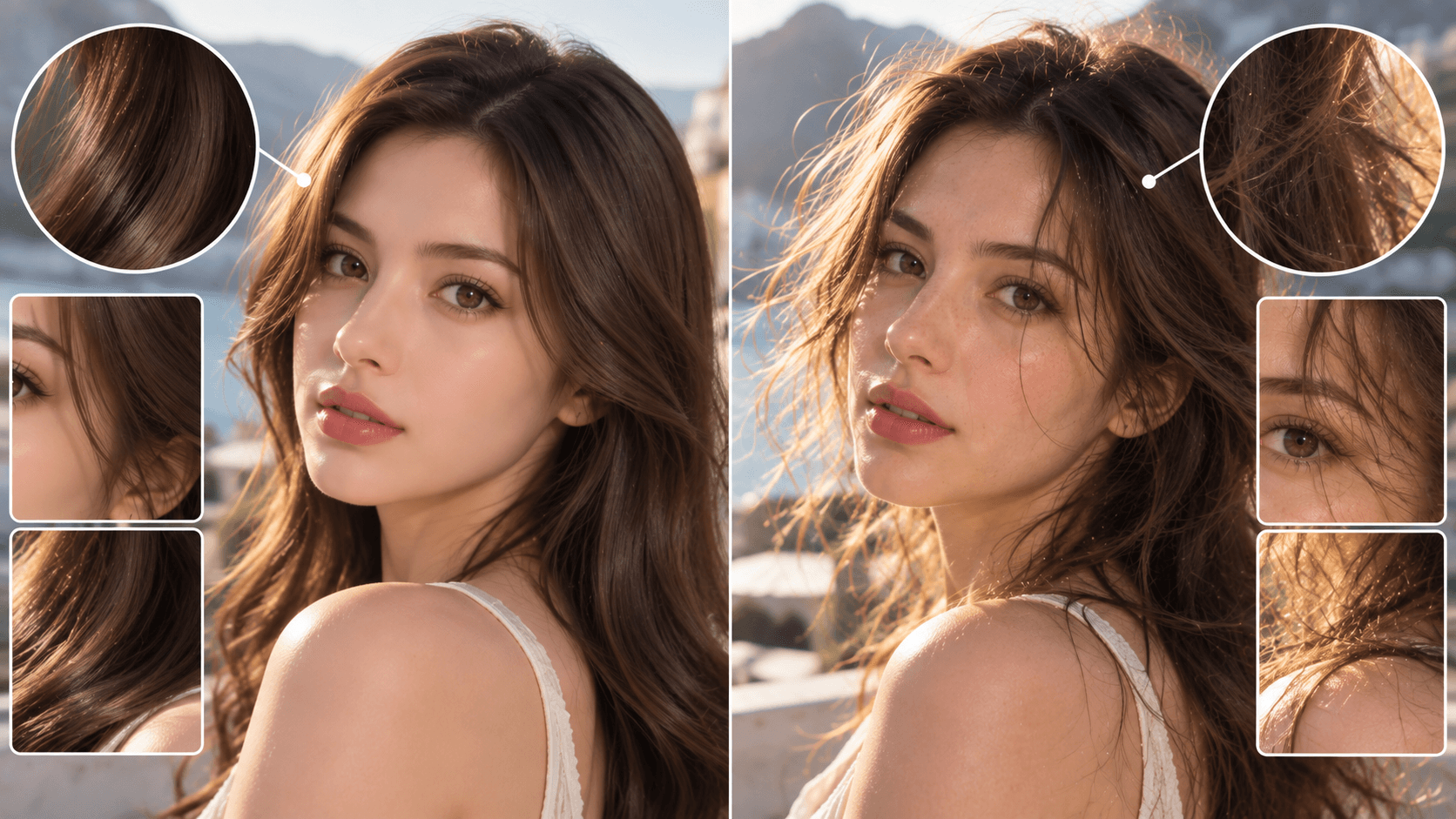
Hair can also make an AI portrait feel synthetic. Many models generate hair as smooth blocks or overly organized strands, especially in beauty and fashion images. Real hair usually contains uneven strands, soft flyaways, slight variation in texture, and small areas that react differently to light.
Instead of using “perfect long hair,” try “natural hair texture with individual strands and a few subtle flyaway hairs.” For casual UGC or lifestyle portraits, this can make the image feel significantly more believable because perfectly styled hair often conflicts with an otherwise spontaneous scene.
Use Specific Lighting Instead of Generic Cinematic Lighting
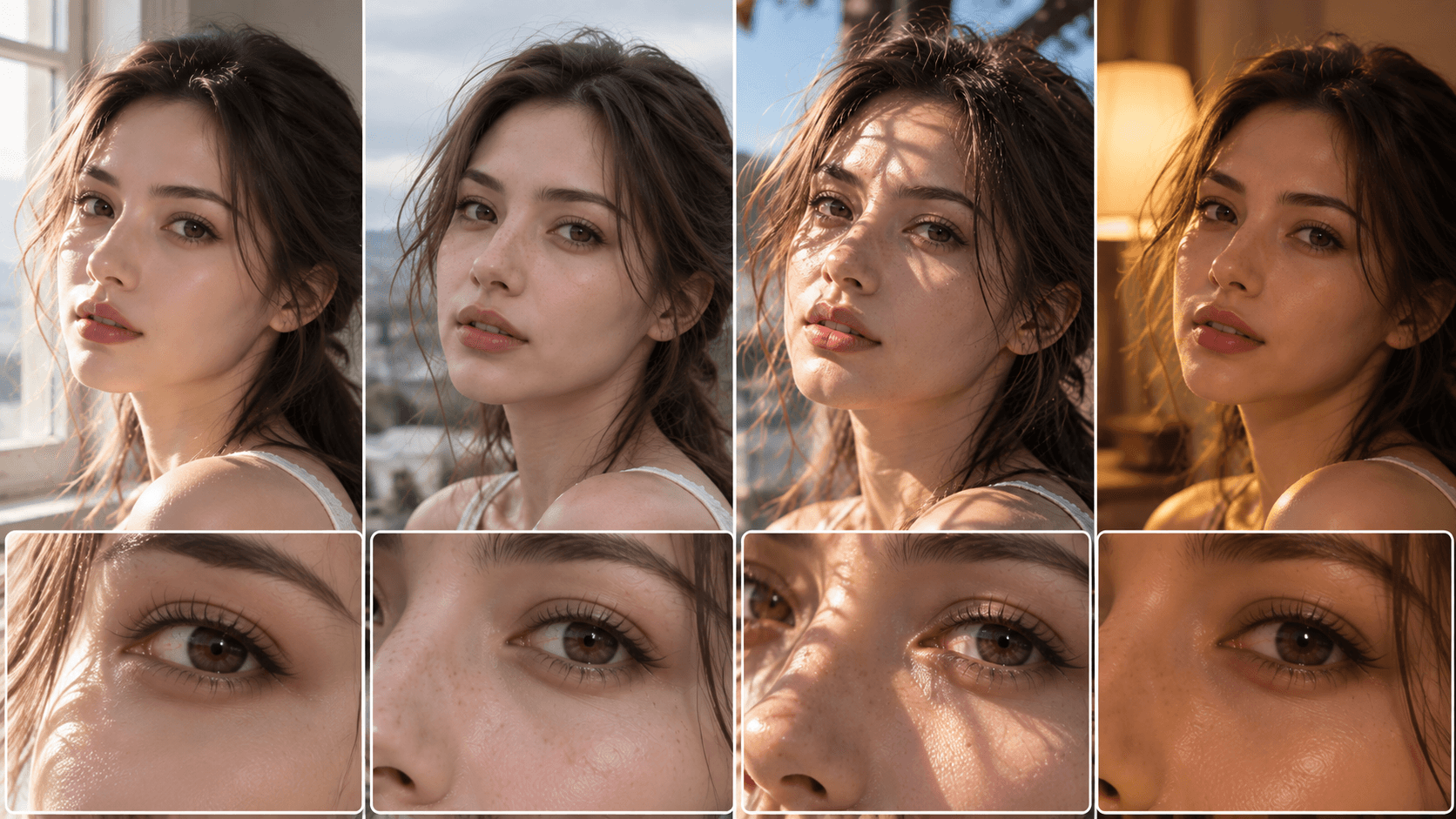
Lighting is one of the strongest factors affecting facial realism. A vague instruction like “cinematic lighting” can produce attractive images, but it gives the model little information about how light should physically interact with the face.
A stronger prompt might say:
Soft daylight coming from a large window on camera-left, creating gentle highlights on the left side of the face and subtle shadows on the opposite cheek.
This creates a clear spatial relationship. The model now knows where the light originates, which side of the face should be brighter, and where shadows should appear.
For outdoor portraits, use instructions such as “soft overcast daylight with natural facial shadows.” For UGC content, try “natural window light with realistic smartphone exposure.” For studio photography, you can describe a specific light position such as “large diffused softbox slightly above and to the left of the subject.”
Specific light direction often contributes more to realistic AI portraits than repeatedly adding “8K,” “HDR,” or “masterpiece.”
Fix Flat AI Faces With Better Depth
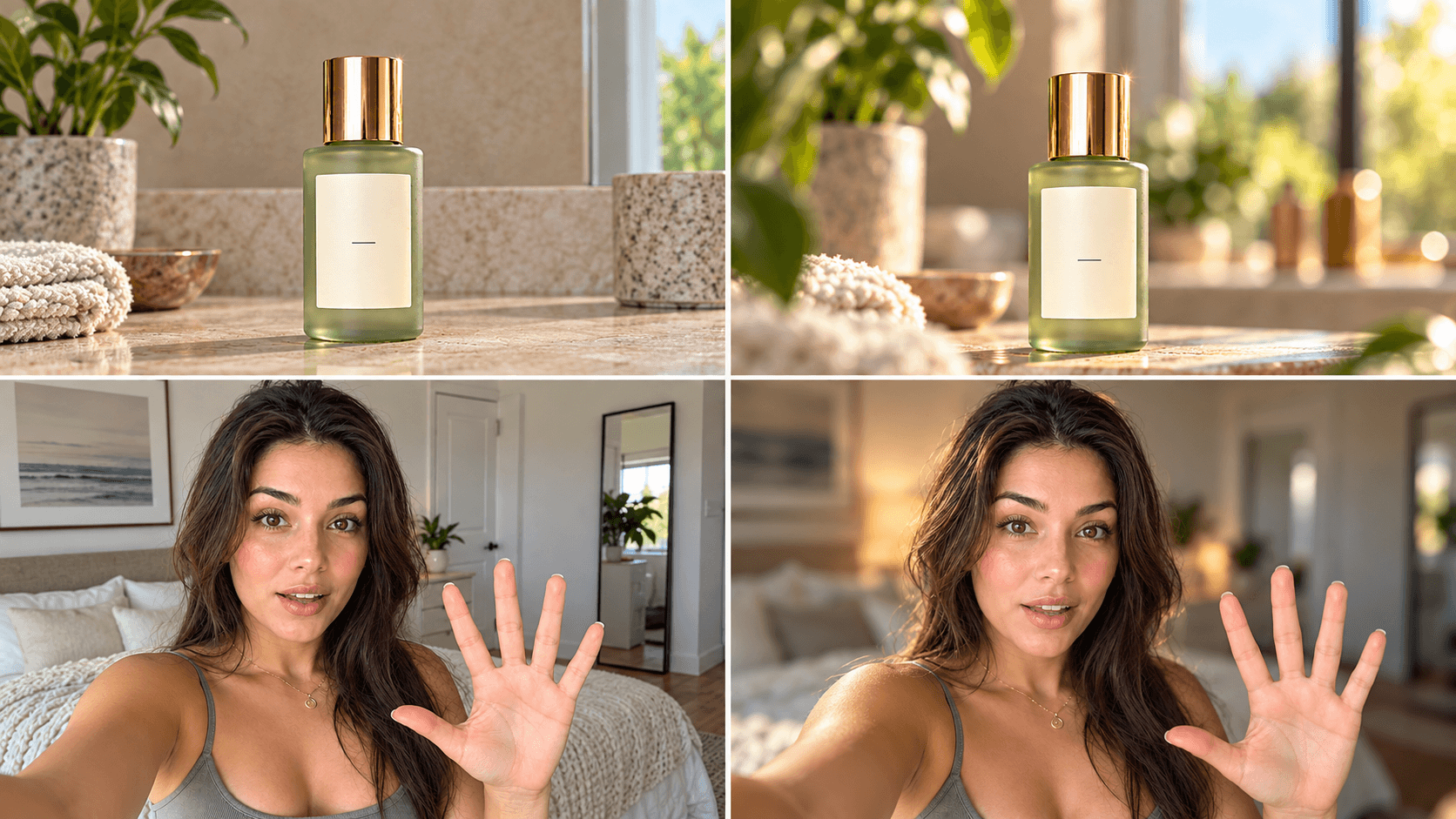
Some AI portraits do not look obviously incorrect but still feel flat. The face, hair, clothes, and background appear to exist on the same visual plane, which makes the image resemble digital artwork rather than photography.
To improve depth, describe the relationship between the subject and the environment. Useful phrases include subject in sharp focus, softly blurred background, natural depth of field, realistic foreground-background separation, and eye-level perspective.
For example:
Subject in sharp focus with natural facial detail, background several meters behind the subject and softly blurred, realistic shallow depth of field.
Camera cues can also help, but they should match the type of image. An 85mm portrait look may suit a professional headshot or beauty photo, while a 35mm or smartphone-style perspective may feel more believable for street photography, lifestyle content, or UGC.
Stop Relying on 8K HDR and Masterpiece
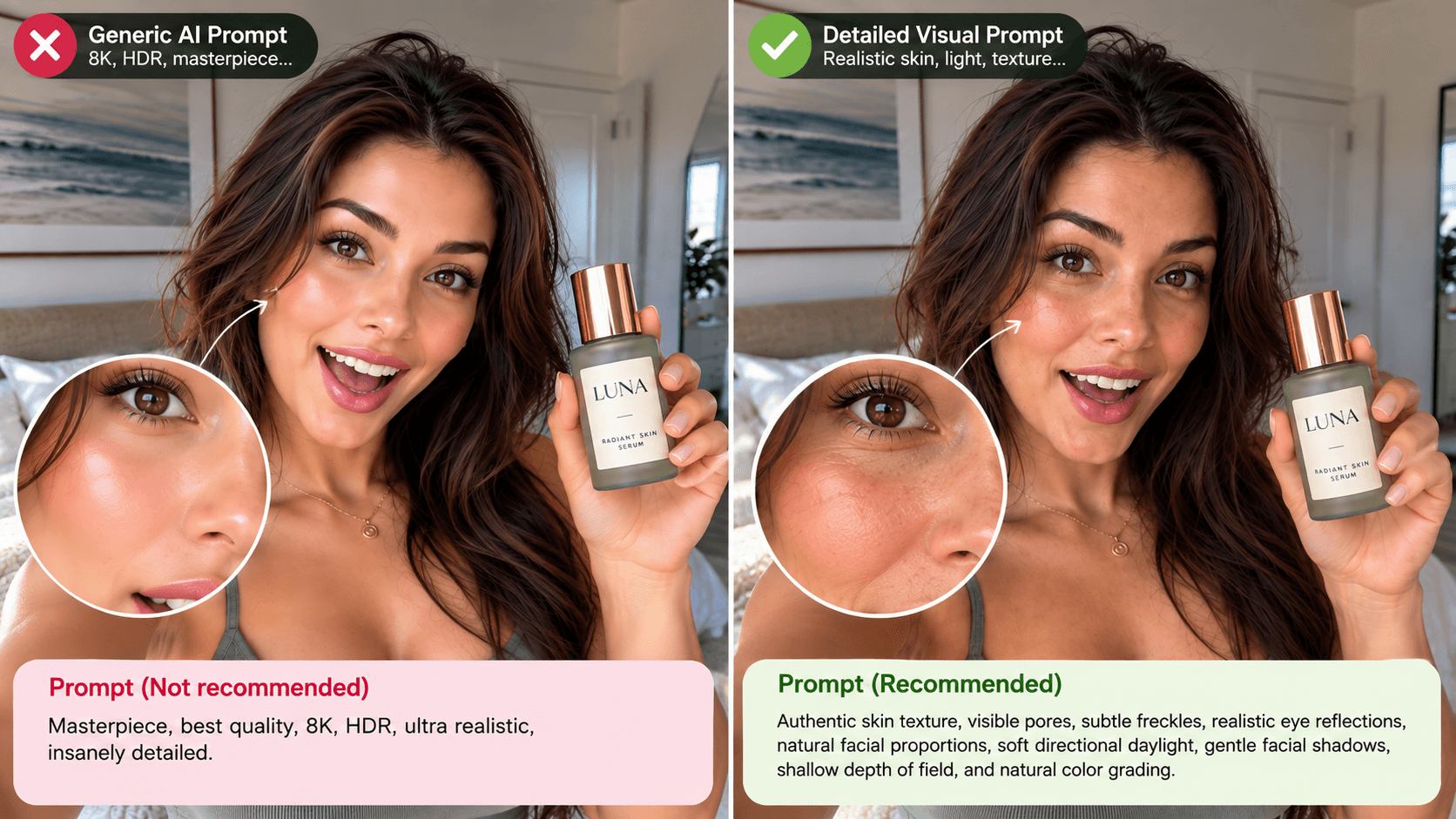
Terms such as “8K,” “HDR,” “masterpiece,” “best quality,” “ultra detailed,” and “hyper realistic” are common in AI prompts. They are not automatically harmful, but they should not replace actual visual instructions.
Consider this prompt:
Masterpiece, best quality, 8K, HDR, ultra realistic, insanely detailed.
It says very little about the person's skin, eyes, lighting, proportions, camera perspective, or environment.
Compare it with:
Authentic skin texture, visible pores, subtle freckles, realistic eye reflections, natural facial proportions, soft directional daylight, gentle facial shadows, shallow depth of field, and natural color grading.
The second prompt gives the model information about texture, structure, light, perspective, and photography. These details are much more closely connected to realism.
Use Negative Prompts to Reduce Plastic Skin
Negative prompts can help reduce common artifacts, especially when the model supports a separate negative prompt field. However, long lists of dozens of unwanted features can make generation harder to control.
For realistic faces, a concise negative prompt is usually enough:
no beauty filter, no plastic skin, no waxy skin, no excessive skin smoothing, no exaggerated facial features, no CGI appearance
You can reinforce this with positive instructions in the main prompt. For example, combine “visible pores and natural skin texture” with “no plastic skin and no excessive smoothing.” This tells the model both what you want and what you want to avoid.
A Simple Formula for Realistic AI Face Prompts
A reliable structure is:
Subject + Environment + Skin Details + Facial Details + Lighting + Camera + Depth + Constraints
For example:
A close-up portrait of a young woman outdoors, authentic skin texture with visible pores, subtle freckles and slight natural skin tone variation, realistic iris texture and natural eye reflections, individual hair strands with a few subtle flyaway hairs, soft daylight coming from camera-left, gentle realistic facial shadows, natural photography, shallow depth of field, softly blurred background, unretouched appearance, no beauty filter, no plastic skin, no CGI look.
This prompt does not depend on repeating “photorealistic.” Instead, each phrase controls a specific part of the image.
Realistic AI Face Prompt for UGC Content
UGC images should not look like polished studio photography. Slight imperfections in framing, exposure, expression, and styling can make the result feel more authentic.
A realistic young female creator filming a casual smartphone selfie in a modern bedroom, authentic skin texture with visible pores and slight natural skin variation, realistic eyes with subtle reflections, a few loose hair strands, relaxed natural expression, soft daylight coming from a nearby window, slightly imperfect smartphone framing, realistic exposure, natural background depth, no beauty filter, no plastic skin, no overly polished studio appearance.
The phrase “slightly imperfect smartphone framing” is useful because perfect composition can actually make UGC images feel less believable.
Realistic AI Beauty Portrait Prompt
Beauty photography can still look polished without removing all human texture.
Close-up beauty portrait of a young woman, healthy natural skin with visible pores, subtle skin texture and slight tonal variation, realistic lips with fine texture, detailed eyes with natural catchlights, individual eyebrow hairs, soft diffused studio lighting, gentle facial shadows, sharp focus on the eyes, shallow depth of field, premium editorial photography, no excessive skin smoothing, no waxy appearance, no beauty filter.
The important balance is to keep the image refined while preserving believable skin and facial detail.
Why Some AI Faces Still Feel Unnatural
An AI face can contain realistic skin, realistic eyes, and high detail but still feel strange. This often happens when different parts of the image have inconsistent levels of realism.
The skin may look photographic while the hair looks like CGI. The eyes may have unrealistic reflections. The person may be lit from one direction while the background suggests another light source. The face may look natural while the clothing or environment appears excessively rendered.
This is closely related to the uncanny valley effect, where something appears almost human but contains enough unusual details to create discomfort.
The important lesson is that more realism is not always the solution. Consistent realism is. Skin, eyes, hair, shadows, camera perspective, background, and lighting should all feel as if they were captured in the same photograph.
Test the Same Prompt Across Different AI Models
Even a carefully written realistic AI face prompt can produce very different results depending on the model. One model may handle skin texture well but generate overly polished hair. Another may create natural eyes but softer facial detail. Some models are stronger at editorial photography, while others may perform better with casual UGC or smartphone-style images.
A useful workflow is to keep your core prompt consistent and compare the output across different image models. Then change one variable at a time. For example, keep the subject, environment, and lighting identical while adjusting only the skin texture description. This makes it easier to understand which instructions are actually improving the image.
With 1min.AI, users can work with multiple AI models from one platform and compare how different models interpret the same realistic face prompt. This is especially useful when testing skin texture, eyes, facial proportions, lighting, and photography styles without rebuilding the entire workflow for each tool.
Final Thoughts
Fixing AI plastic skin and unnatural faces is not about making prompts longer. It is about making them more precise. Instead of relying on generic quality words, describe the visual characteristics that exist in real photographs: natural pores, subtle skin variation, realistic eye reflections, individual hair strands, directional lighting, facial shadows, believable depth, and small imperfections.
The strongest AI portraits are often not the most perfect ones. They are the images where every detail feels visually consistent and appropriate for the scene.
The goal is not to add more detail to an AI face. It is to add the right texture, imperfections, lighting, depth, and visual consistency.
🚀 Try realistic AI face prompts across multiple AI models on 1min.AI and compare which one gives you the most natural result.
Alternatives
Discover the best alternatives to 1minAI and compare features, pricing, and use cases.

1min.AI vs OpenRouter
1min.AI vs. OpenRouter: Compare the ready-to-use AI creation product against the technical API tool. Find out if you need a zero-code creative studio or a coding infrastructure hub.
 Ngoc Hong
1min.AI vs Lovart
Compare 1min.AI vs Lovart across features, pricing, credits, brand tools, and use cases to find the right AI platform for your workflow.
Ngoc Hong
1min. AI vs Dola AI
Looking for a Dola AI alternative? Compare 1min.AI vs Dola AI on video generation, free plans, pricing and privacy to pick the right AI app.
Ngoc HongAI Tools
Discover the best AI tools to boost productivity, creativity, and everyday work.

Create Consistent Cartoon Content in Just a Few Steps
Create engaging cartoon videos for TikTok and Reels with 1min.AI. Research ideas, create characters, and turn images into animated videos in 3 simple steps.
 Lien Anh Vu
One Product, 10 UGC Creatives: How AI Makes Content Testing Easier
Create more authentic UGC with an AI UGC video generator, test more creative angles and scale affiliate content without filming every version.
Lien Anh Vu
Top 4 Affordable AI Tools for Startup Founders
Discover the top 4 affordable AI tools for startup founders to validate ideas, build products, create content, and launch faster without overspending.
 Tram Ta
AI Features
Comprehensive AI features that streamline workflows, improve efficiency, and empower teams to achieve more.
Create Consistent Cartoon Content in Just a Few Steps
Create engaging cartoon videos for TikTok and Reels with 1min.AI. Research ideas, create characters, and turn images into animated videos in 3 simple steps.
Lien Anh VuOne Product, 10 UGC Creatives: How AI Makes Content Testing Easier
Create more authentic UGC with an AI UGC video generator, test more creative angles and scale affiliate content without filming every version.
Lien Anh Vu
1minAI: Free AI Grammar Checker
Check grammar for free with 1minAI’s AI grammar checker. Find grammar, spelling, and writing mistakes, improve clarity, and polish your content in seconds.
Tram TaAI Use Cases
A curated collection of AI use cases for business, productivity, and industry-specific applications.
Create Consistent Cartoon Content in Just a Few Steps
Create engaging cartoon videos for TikTok and Reels with 1min.AI. Research ideas, create characters, and turn images into animated videos in 3 simple steps.
Lien Anh VuOne Product, 10 UGC Creatives: How AI Makes Content Testing Easier
Create more authentic UGC with an AI UGC video generator, test more creative angles and scale affiliate content without filming every version.
Lien Anh Vu
Best Time to Post on Instagram: A Practical Guide for Better Engagement
Discover the best time to post on Instagram, including the best days and times for different audiences, plus tips to find the ideal posting schedule for your account.
Tram TaAI Tutorials
Learn how to use AI with practical, step-by-step tutorials.

Black Friday AI Tool Deals in 2026
Discover what Black Friday AI tool deals 2026 has to offer. Find out how to secure the 1min.AI lifetime deal via AppSumo, Dealify, Stack Social, and verify on Trustpilot, Slashdot, and Software Advice.
 Hang Nguyen
Create Consistent Cartoon Content in Just a Few Steps
Create engaging cartoon videos for TikTok and Reels with 1min.AI. Research ideas, create characters, and turn images into animated videos in 3 simple steps.
Lien Anh Vu
[Seedance 2.5 New] Better AI Product Videos, Less Rework in 1min.AI
Use Seedance 2.5 image to video on 1min.AI to create more consistent AI product videos, reduce failed generations, save credits, and improve UGC workflows.
Lien Anh VuAI Guides
Learn AI faster with practical guides, real-world examples, and actionable best practices.

Safely Buy AI Tools Online: 2026 Black Friday Guide
Discover how to find and secure the best Black Friday AI deals online. Learn expert strategies to avoid scams, combat subscription fatigue, and verify software.
Hang NguyenCreate Consistent Cartoon Content in Just a Few Steps
Create engaging cartoon videos for TikTok and Reels with 1min.AI. Research ideas, create characters, and turn images into animated videos in 3 simple steps.
Lien Anh Vu[Seedance 2.5 New] Better AI Product Videos, Less Rework in 1min.AI
Use Seedance 2.5 image to video on 1min.AI to create more consistent AI product videos, reduce failed generations, save credits, and improve UGC workflows.
Lien Anh VuAI Solutions
Browse the best AI solutions for automation, coding, research, productivity, customer support, marketing, and business workflows.
Safely Buy AI Tools Online: 2026 Black Friday Guide
Discover how to find and secure the best Black Friday AI deals online. Learn expert strategies to avoid scams, combat subscription fatigue, and verify software.
Hang NguyenCreate Consistent Cartoon Content in Just a Few Steps
Create engaging cartoon videos for TikTok and Reels with 1min.AI. Research ideas, create characters, and turn images into animated videos in 3 simple steps.
Lien Anh VuOne Product, 10 UGC Creatives: How AI Makes Content Testing Easier
Create more authentic UGC with an AI UGC video generator, test more creative angles and scale affiliate content without filming every version.
Lien Anh VuAI Models
Explore the world's leading AI models in one place.
Create Consistent Cartoon Content in Just a Few Steps
Create engaging cartoon videos for TikTok and Reels with 1min.AI. Research ideas, create characters, and turn images into animated videos in 3 simple steps.
Lien Anh VuOne Product, 10 UGC Creatives: How AI Makes Content Testing Easier
Create more authentic UGC with an AI UGC video generator, test more creative angles and scale affiliate content without filming every version.
Lien Anh Vu[Seedance 2.5 New] Better AI Product Videos, Less Rework in 1min.AI
Use Seedance 2.5 image to video on 1min.AI to create more consistent AI product videos, reduce failed generations, save credits, and improve UGC workflows.
Lien Anh VuAI Comparisons
Compare AI tools, models, and platforms to find the best fit for your needs.

Kling AI Vs Veo 3: Which Model Wins?
Kling AI vs Veo 3: compare motion, native audio, pricing & free tiers to see which AI video generator wins for your project - try both on 1min.AI.
 Trang Tran
[Seedance 2.5 New] Better AI Product Videos, Less Rework in 1min.AI
Use Seedance 2.5 image to video on 1min.AI to create more consistent AI product videos, reduce failed generations, save credits, and improve UGC workflows.
Lien Anh Vu
DeepSeek V4 Pro vs Flash Comparison
Compare DeepSeek V4 Pro vs DeepSeek V4 Flash metrics. Optimize your agentic apps and improve AI fact checking on 1min.ai today.
Ngoc HongAI Integrations
Seamlessly integrate AI with the tools you already use to automate work and boost productivity.

POV: You Have 10+ Posts to Make Every Day
Learn how to build an AI content workflow that helps content creators produce 10+ social media posts a day faster with AI brainstorming, image generation, and content creation.
Lien Anh Vu
How to Use an AI Fashion Video Generator for Fashion Week 2026
Turn Fashion Week 2026 ideas into stunning fashion videos with AI. Learn how to brainstorm, create visuals, and transform images into videos with one simple workflow.
Lien Anh Vu
Stop Switching Between AI Apps: How AI Integration Transforms Employer Branding
Discover how AI integration helps HR teams streamline employer branding by combining AI writing, documents, images, video, and multiple AI models into one workspace.
Tram TaAI for Industries
Find the best AI tools and workflows for healthcare, finance, education, legal, manufacturing, retail, real estate, and more

How to Start a One-Person AI Business: 7 Models You Can Run Solo
Learn how to start a one-person AI business with 7 practical models, from AI consulting and content services to automation and software reselling.
Tram Ta
7 Low-Cost AI Business Ideas for Your Startup
Explore 7 low-cost AI business ideas you can start with a small budget, from content and video services to AI consulting, reselling, and automation.
Tram Ta
Free AI Image Generator For Ecommerce
Turn phone photos into studio, white-background, and lifestyle product images. Try the best AI image generator for ecommerce online free with 1min.AI.
Trang TranAI Agents
Discover and run AI agents to automate tasks across your work and daily life.
1minAI: Free AI Grammar Checker
Check grammar for free with 1minAI’s AI grammar checker. Find grammar, spelling, and writing mistakes, improve clarity, and polish your content in seconds.
Tram Ta
AI Agents for Facebook
Use an AI Agent for Facebook to create content, generate images, schedule posts, and publish from your documents and conversations.
Ngoc Hong
AI Agent vs AI Assistant: Which One Actually Saves Designers More Time?
Learn the difference between AI Agent vs AI Assistant and discover which solution helps designers automate repetitive work, reduce revisions, and save more time.
Lien Anh VuAI Workflows
Explore ready-to-use AI workflows for productivity, marketing, sales, support, and more.
Create Consistent Cartoon Content in Just a Few Steps
Create engaging cartoon videos for TikTok and Reels with 1min.AI. Research ideas, create characters, and turn images into animated videos in 3 simple steps.
Lien Anh VuOne Product, 10 UGC Creatives: How AI Makes Content Testing Easier
Create more authentic UGC with an AI UGC video generator, test more creative angles and scale affiliate content without filming every version.
Lien Anh VuPOV: You Have 10+ Posts to Make Every Day
Learn how to build an AI content workflow that helps content creators produce 10+ social media posts a day faster with AI brainstorming, image generation, and content creation.
Lien Anh VuNewsletter
Weekly AI Innovations with 1minAI

🔮 Weekly AI Innovations #140: Deepseek 4.1 Flash & Gemini Upgrades
Explore Deepseek 4.1 Flash and new Gemini models on 1min.ai. Plus, check our update on your Billing - Usage page for better clarity.
Hang Nguyen
🔮 Weekly AI Innovations #136: Grok 4.6 and Smart Data Retention
Discover the latest 1min.ai updates! Upgrade to Grok 4.6 for blazing-fast AI, and check our new Data Retention policies to secure your files today.
Hang Nguyen
🔮 Weekly AI Innovations #139: Dawn of the next-gen AI
Discover the immense power of GPT-6 Astra and Claude Fable 5.1. Unlock next-generation AI models on 1min.ai to solve complex tasks effortlessly.
Hang Nguyen