
Free AI Website Builder: Step-by-Step Guide for Beginners

Tram Ta
October 28, 2026
Learn how to build a website with AI for free. Follow this beginner-friendly guide to plan your site, generate content, create code, and launch confidently.
Building a website used to require coding skills, design experience, and hours of work. Today, AI tools can help beginners plan website pages, write content, create visual assets, and even generate code without starting from scratch.
Whether you want to create a personal portfolio, a small business website, or a landing page for your next idea, an AI-powered workflow can make the process easier. With 1minAI, you can use multiple AI assistants to brainstorm your website structure, prepare content, and explore development solutions in one place.
In this guide, you'll learn how to use AI to plan and build your first website step by step, discover practical prompts, and understand what to check before publishing.
What Is an AI Website Builder?
An AI website builder is a tool that uses artificial intelligence to help create websites. Depending on the platform, it may generate page layouts, write website copy, suggest designs, produce code, or provide an editor for making changes.
Instead of manually designing every page, you can describe your goals in plain language and use AI to create a starting point.
For example, you might prompt an AI tool:
"Create a modern website for a freelance graphic designer. Include a homepage, portfolio, services, about section, and contact form. Use a clean layout, neutral colors, and clear calls to action."
An AI website builder or coding assistant can use these instructions to help produce a website draft. You can then refine the result to match your brand and requirements.
What Can AI Help You Build?
AI-assisted website creation can support several common projects:
- Personal portfolios: Showcase your skills, projects, and experience.
- Small business websites: Explain your services, introduce your team, and help customers contact you.
- Landing pages: Present an offer, promote a product, or collect leads.
- Blogs: Plan article categories, write drafts, and organize content.
- Online stores: Plan product pages, write descriptions, and explore ecommerce implementation.
- Web applications: Generate and review code for interactive features, depending on the tools you use.
Not every AI tool performs all these tasks. Some platforms generate and host complete websites, while others help with planning, content, design assets, or code that you must assemble and publish separately.
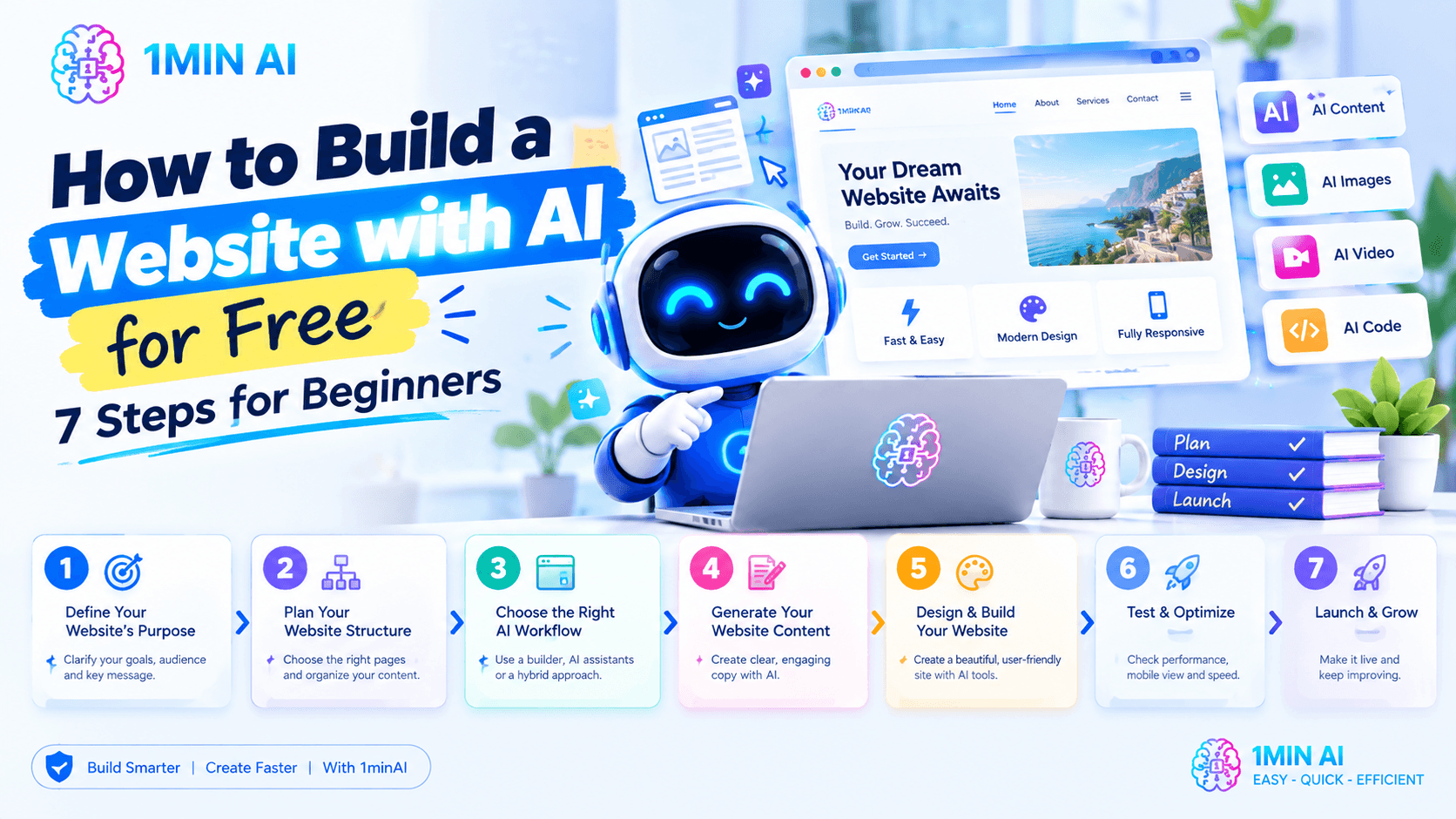
How to Build a Website with AI for Free: 7 Steps
You don't need to complete every task manually. The key is to break website creation into manageable steps and use AI where it offers the most value.
Step 1: Define Your Website's Purpose
Before choosing a website builder, decide what you want your website to achieve.
A personal portfolio needs a different structure from a restaurant website or an online store. A clear goal helps AI generate more relevant ideas and reduces unnecessary revisions.
Start by answering three questions:
- Who is your target audience?
- What information or services do visitors need?
- What action should visitors take?
For example, a freelance designer may want visitors to explore past projects and request a quote. A local bakery may want to display its menu, location, opening hours, and ordering information.
You can use 1minAI's multi-AI chat tools to explore different website concepts and compare suggestions from multiple AI assistants.
Prompt example:
"Act as a website strategist. I'm creating a website for [business or project]. My target audience is [audience], and my main goal is [goal]. Suggest the best website structure, essential pages, key information for each page, and primary call to action. Keep the recommendations suitable for a beginner with a limited budget."
Review the suggestions and choose the structure that best matches your actual needs.
Step 2: Plan Your Website Structure
Once you know your goal, decide which pages your website needs.
A simple business website might include:
| Page | Purpose |
|---|---|
| Home | Introduce your business and main offer |
| About | Explain your background, mission, or team |
| Services | Describe what you offer |
| Portfolio or Testimonials | Demonstrate experience and build trust |
| Contact | Help visitors reach you |
You may not need every page. A simple landing page can be enough for a single offer, while a larger business may need service-specific pages and a blog.
Ask AI to organize the content before you begin designing. This helps you identify missing information and establish a logical navigation structure.
Prompt example:
"Create a sitemap for a [type of website]. Include the essential pages, the purpose of each page, recommended sections, and the main call to action. Prioritize a simple user experience and mobile-friendly navigation. Explain the structure in a table."
With 1minAI, you can compare different approaches by asking multiple assistants to evaluate the sitemap. One response may prioritize conversions, while another may suggest a clearer information architecture.
Step 3: Choose the Right AI Website-Building Workflow
Not all AI tools build websites in the same way. Before you start, decide which approach fits your technical skills and budget.
Option A: Use a dedicated AI website builder
A dedicated builder may generate page layouts, content, and design elements, then let you edit the website visually. Depending on the service and plan, it may also include hosting, a domain connection, and publishing features.
This is generally the simplest option for beginners who want a live website without managing code.
Option B: Use AI assistants to create website code
AI chat and coding tools can help you generate HTML, CSS, JavaScript, or code for a supported framework. You then need an appropriate development environment, hosting, and any required integrations.
This route provides more flexibility but usually requires additional setup and testing.
Option C: Combine AI tools with a traditional website platform
You can use AI to plan pages, write copy, prepare images, and develop snippets of code, then bring those materials into a website platform or content management system.
This approach is useful when you want more control over the final website without doing every task from scratch.
How 1minAI Fits into the Process
1minAI is an all-in-one AI workspace with features such as multi-AI chat, writing tools, image tools, and AI agents. It can help you work through website planning and content creation, compare ideas, and explore coding solutions.
Explore these resources:
- AI Chat with Multiple AI Assistants — brainstorm, review, and compare website ideas with multiple AI assistants.
- Multi-AI Chat and AI Agent — explore AI-assisted workflows for planning and completing tasks.
- 1minAI AI Agents — discover agents designed to assist with different tasks.
- AI Agent for Software Development — explore AI assistance for software development and coding tasks.
Important: These resources support different parts of the website creation process; they should not be mistaken for confirmation that 1minAI itself hosts, publishes, or provides a complete visual website builder.
Step 4: Generate Your Website Content with AI
Website content explains who you are, what you offer, and why visitors should trust you. Clear content is just as important as an attractive design.
Start with your homepage. It should quickly communicate:
- What your business or project does
- Who it serves
- The main benefit visitors can expect
- What visitors should do next
Then create drafts for your other pages. AI can help write headlines, service descriptions, calls to action, FAQs, and introductory paragraphs.
Prompt example:
"Write homepage copy for a [business type] serving [target audience]. Include a clear headline, a short value proposition, three key benefits, an introduction to the services, a trust-building section, and a contact call to action. Use a friendly, professional tone and avoid exaggerated claims."
Use the initial draft as a starting point rather than publishing it immediately. Check all facts, replace generic claims with real business details, and make sure the content reflects your brand's voice.
1minAI's AI writing features can also help you revise sentences, improve grammar, summarize information, and create alternative versions of your copy.
Step 5: Create a Consistent Website Design
You don't need to be a professional designer to develop a clear visual direction. AI can suggest color palettes, font combinations, image concepts, and page layouts.
Begin with a simple style guide:
- Colors: Choose a primary color, a supporting color, and neutral backgrounds.
- Typography: Use readable fonts and a consistent hierarchy for headings and body text.
- Images: Select relevant, high-quality visuals that support your message.
- Layout: Keep navigation, spacing, buttons, and page sections consistent.
- Branding: Use your logo and visual identity consistently across the site.
Prompt example:
"Suggest a visual style for a website for [business type]. Recommend a color palette, heading and body font styles, image direction, button design, and page layout. The design should feel [desired style] and remain easy to use on mobile devices."
You can use AI image tools to explore visual concepts or prepare original assets. However, check image quality, licensing, brand consistency, and accessibility before using the assets on a live website.
If you're using a dedicated website builder, apply the design through its editor. If you're generating code, use the design recommendations as specifications for the implementation.
Step 6: Generate, Review, and Improve the Website
Now bring your plan, content, and visual direction together.
If you use a dedicated AI website builder, enter your website brief and review the generated pages. If you use AI coding tools, ask them to generate the code for your chosen stack and follow the appropriate setup instructions.
Don't assume the first version is ready to publish. Review it section by section.
Check these essential elements:
- Navigation works and visitors can find important information.
- Headlines and calls to action are clear.
- Images load correctly and fit their sections.
- Forms and buttons behave as intended.
- The layout works on desktop, tablet, and mobile.
- Text is readable and has sufficient contrast.
- Links lead to the correct pages.
- Content contains no invented claims, placeholder text, or broken references.
For code-based projects, ask an AI coding assistant to review the implementation for common errors, accessibility issues, and responsive-design problems. Test the changes yourself before accepting them.
Prompt example:
"Review this website content and implementation plan as a quality-assurance specialist. Identify confusing navigation, missing information, inconsistent design, accessibility concerns, mobile usability issues, and potential functional problems. Prioritize the five most important improvements and explain how to test each one."
1minAI's multi-AI workflow can help you compare review suggestions. For more technical tasks, explore the AI Agent for Software Development.
Step 7: Optimize for SEO and Prepare to Publish
A website is more useful when people can discover it and visitors can navigate it easily. Before launch, review the basic SEO and publishing requirements.
On-page SEO checklist
- Choose a primary keyword for each important page.
- Write a descriptive page title and meta description.
- Use one clear H1 heading and logical H2 and H3 subheadings.
- Include relevant keywords naturally.
- Add descriptive alt text to meaningful images.
- Use concise, readable URLs.
- Link related pages together where useful.
- Make sure the website works well on mobile.
- Check loading performance and remove unnecessary elements.
AI can help you brainstorm keywords, draft metadata, and improve headings. However, you should validate keyword relevance and ensure every page serves a real search intent rather than simply repeating keywords.
Publishing checklist
Before going live, confirm that you have:
- Chosen a suitable domain name.
- Selected a hosting or publishing solution.
- Connected the domain if needed.
- Tested all forms and important links.
- Reviewed privacy notices and cookie requirements where applicable.
- Checked mobile layouts and basic accessibility.
- Removed placeholder content and verified factual claims.
- Confirmed ownership and permissions for images, fonts, and other assets.
A dedicated website builder may include hosting and publishing in its plan. If you create the website with AI-generated code, you'll need to arrange deployment and hosting separately.
Best AI Prompts for Building a Website
The quality of your results depends heavily on the instructions you provide. Instead of asking AI to "make a website," explain the purpose, audience, structure, and desired result.
Here are four prompts you can adapt.
1. Website Planning Prompt
"Act as a website strategist. Help me plan a website for [business or project]. My target audience is [audience], and the main objective is [objective]. Recommend a sitemap, essential page sections, user journey, and calls to action. Keep the plan practical for a beginner."
2. Homepage Content Prompt
"Write homepage content for [business name], which provides [products or services] to [target audience]. Include a compelling headline, concise introduction, key benefits, service overview, trust-building content, FAQs, and a clear call to action. Use a [tone] tone and do not invent facts about the business."
3. Website Design Prompt
“Create a website design brief for a [business type] website. Recommend a visual style, color palette, typography, layout, navigation, and mobile-responsive behavior. Explain how each design choice supports usability and the website's main goal.”
4. Website Code Prompt
"Act as a web developer. Help me create a simple, responsive website for [project]. Use [HTML/CSS/JavaScript or chosen framework]. Include [required pages and features]. Explain the file structure, provide the code in manageable sections, and identify how to run and test it locally. Do not claim that features work unless the implementation supports them."
You can use 1minAI's multi-AI chat to compare the resulting plans and suggestions. For a coding project, ask an additional assistant to review the output for potential issues before you deploy it.
Common Mistakes to Avoid When Using an AI Website Builder
AI can speed up website creation, but it doesn't remove the need for judgment and testing.
1. Giving vague prompts
A request such as "make a professional website" leaves too many decisions open. Include your business type, target audience, desired pages, brand style, and main goal.
2. Publishing content without checking it
AI-generated copy may be repetitive, inaccurate, or too generic. Verify facts, revise the wording, and add real information about your business.
3. Ignoring mobile usability
A design that looks good on a desktop may be difficult to use on a phone. Test navigation, text sizes, buttons, images, and forms on different screen sizes.
4. Treating AI-generated code as production-ready
Generated code may contain bugs, insecure patterns, missing dependencies, or incomplete functionality. Review and test it, and seek qualified help for sensitive features such as payments, authentication, or customer data processing.
5. Assuming every tool is free
Some platforms offer free tiers, trials, or limited AI credits, while custom domains, hosting, advanced features, and higher usage limits may require payment. Check the current pricing and usage terms before committing.
6. Forgetting SEO and accessibility
A visually attractive website may still be difficult to discover or use. Review page titles, headings, alt text, contrast, keyboard navigation, and the clarity of your content.
Frequently Asked Questions
Can I build a website with AI for free?
Yes, you can often start building a website with free AI tools or free plans. However, free access may have usage limits, and publishing with a custom domain or accessing advanced features may cost extra. Check the specific platform's current terms before starting.
Do I need coding skills to use an AI website builder?
Not necessarily. Dedicated visual AI website builders can generate editable sites without requiring you to write code. If you use AI to generate code directly, you may still need to understand how to run, debug, host, and maintain the project.
Can I use 1minAI as a website builder?
1minAI provides AI tools that can help with website planning, content generation, design ideas, and software-development tasks. It is not verified here as a dedicated platform for visually building, hosting, and publishing a complete website. You can combine 1minAI with a separate website builder or development environment to complete the process.
Can AI build an ecommerce website?
AI can help plan product pages, write product descriptions, generate visual concepts, and assist with code. A functioning online store also needs secure payments, inventory management, order processing, customer support, and appropriate privacy protections. Choose a platform that supports these requirements and test the complete purchasing process before launch.
How long does it take to build a website with AI?
A simple website may take a few hours to prepare, while a larger site can take days or longer. The timeline depends on the number of pages, the quality of your content, the features you need, and how much testing and customization are required.
Conclusion
An AI website builder can make website creation more approachable by helping you plan pages, draft content, develop design ideas, and reduce repetitive work. The best results come from starting with a clear goal, writing specific prompts, and carefully reviewing every part of the website before publishing.
You can use 1minAI to brainstorm with multiple AI assistants, create and refine website copy, explore visual concepts, and get help with software-development tasks. Pair these capabilities with a dedicated website builder or development platform when you need to create, host, and publish the finished site.
Ready to start planning your website? Explore 1minAI's AI chat with multiple assistants, discover AI agents, and see how AI can support your workflow from the first idea to a more polished website.
For further exploration, visit 1minAI Features and try the 1minAI Agent demo.
- #Commerce
- #Information
Alternatives
Discover the best alternatives to 1minAI and compare features, pricing, and use cases.

1min.AI vs OpenRouter
1min.AI vs. OpenRouter: Compare the ready-to-use AI creation product against the technical API tool. Find out if you need a zero-code creative studio or a coding infrastructure hub.
 Ngoc Hong
1min.AI vs Lovart
Looking for a Lovart alternative? Compare creative workflows, pricing considerations, and practical prompts to see whether 1min.AI fits your team.
Ngoc Hong
1min.AI vs Jarvis AI
Compare 1min.AI vs Jarvis AI to discover which AI platform is better for writing, research, automation, and content creation. Find the best AI assistant for your workflow.
Ngoc HongAI Tools
Discover the best AI tools to boost productivity, creativity, and everyday work.

Create Consistent Cartoon Content in Just a Few Steps
Create engaging cartoon videos for TikTok and Reels with 1min.AI. Research ideas, create characters, and turn images into animated videos in 3 simple steps.
 Lien Anh Vu
One Product, 10 UGC Creatives: How AI Makes Content Testing Easier
Create more authentic UGC with an AI UGC video generator, test more creative angles and scale affiliate content without filming every version.
Lien Anh Vu
Top 4 Affordable AI Tools for Startup Founders
Discover the top 4 affordable AI tools for startup founders to validate ideas, build products, create content, and launch faster without overspending.
 Tram Ta
AI Features
Comprehensive AI features that streamline workflows, improve efficiency, and empower teams to achieve more.
Create Consistent Cartoon Content in Just a Few Steps
Create engaging cartoon videos for TikTok and Reels with 1min.AI. Research ideas, create characters, and turn images into animated videos in 3 simple steps.
Lien Anh VuOne Product, 10 UGC Creatives: How AI Makes Content Testing Easier
Create more authentic UGC with an AI UGC video generator, test more creative angles and scale affiliate content without filming every version.
Lien Anh Vu
1minAI: Free AI Grammar Checker
Check grammar for free with 1minAI’s AI grammar checker. Find grammar, spelling, and writing mistakes, improve clarity, and polish your content in seconds.
Tram TaAI Use Cases
A curated collection of AI use cases for business, productivity, and industry-specific applications.
Create Consistent Cartoon Content in Just a Few Steps
Create engaging cartoon videos for TikTok and Reels with 1min.AI. Research ideas, create characters, and turn images into animated videos in 3 simple steps.
Lien Anh VuOne Product, 10 UGC Creatives: How AI Makes Content Testing Easier
Create more authentic UGC with an AI UGC video generator, test more creative angles and scale affiliate content without filming every version.
Lien Anh Vu
Best Time to Post on Instagram: A Practical Guide for Better Engagement
Discover the best time to post on Instagram, including the best days and times for different audiences, plus tips to find the ideal posting schedule for your account.
Tram TaAI Tutorials
Learn how to use AI with practical, step-by-step tutorials.

Black Friday AI Tool Deals in 2026
Discover what Black Friday AI tool deals 2026 has to offer. Find out how to secure the 1min.AI lifetime deal via AppSumo, Dealify, Stack Social, and verify on Trustpilot, Slashdot, and Software Advice.
 Hang Nguyen
Create Consistent Cartoon Content in Just a Few Steps
Create engaging cartoon videos for TikTok and Reels with 1min.AI. Research ideas, create characters, and turn images into animated videos in 3 simple steps.
Lien Anh Vu
[Seedance 2.5 New] Better AI Product Videos, Less Rework in 1min.AI
Use Seedance 2.5 image to video on 1min.AI to create more consistent AI product videos, reduce failed generations, save credits, and improve UGC workflows.
Lien Anh VuAI Guides
Learn AI faster with practical guides, real-world examples, and actionable best practices.

Safely Buy AI Tools Online: 2026 Black Friday Guide
Discover how to find and secure the best Black Friday AI deals online. Learn expert strategies to avoid scams, combat subscription fatigue, and verify software.
Hang NguyenCreate Consistent Cartoon Content in Just a Few Steps
Create engaging cartoon videos for TikTok and Reels with 1min.AI. Research ideas, create characters, and turn images into animated videos in 3 simple steps.
Lien Anh Vu[Seedance 2.5 New] Better AI Product Videos, Less Rework in 1min.AI
Use Seedance 2.5 image to video on 1min.AI to create more consistent AI product videos, reduce failed generations, save credits, and improve UGC workflows.
Lien Anh VuAI Solutions
Browse the best AI solutions for automation, coding, research, productivity, customer support, marketing, and business workflows.
Safely Buy AI Tools Online: 2026 Black Friday Guide
Discover how to find and secure the best Black Friday AI deals online. Learn expert strategies to avoid scams, combat subscription fatigue, and verify software.
Hang NguyenCreate Consistent Cartoon Content in Just a Few Steps
Create engaging cartoon videos for TikTok and Reels with 1min.AI. Research ideas, create characters, and turn images into animated videos in 3 simple steps.
Lien Anh VuOne Product, 10 UGC Creatives: How AI Makes Content Testing Easier
Create more authentic UGC with an AI UGC video generator, test more creative angles and scale affiliate content without filming every version.
Lien Anh VuAI Models
Explore the world's leading AI models in one place.
Create Consistent Cartoon Content in Just a Few Steps
Create engaging cartoon videos for TikTok and Reels with 1min.AI. Research ideas, create characters, and turn images into animated videos in 3 simple steps.
Lien Anh VuOne Product, 10 UGC Creatives: How AI Makes Content Testing Easier
Create more authentic UGC with an AI UGC video generator, test more creative angles and scale affiliate content without filming every version.
Lien Anh Vu[Seedance 2.5 New] Better AI Product Videos, Less Rework in 1min.AI
Use Seedance 2.5 image to video on 1min.AI to create more consistent AI product videos, reduce failed generations, save credits, and improve UGC workflows.
Lien Anh VuAI Comparisons
Compare AI tools, models, and platforms to find the best fit for your needs.

Kling AI Vs Veo 3: Which Model Wins?
Kling AI vs Veo 3: compare motion, native audio, pricing & free tiers to see which AI video generator wins for your project - try both on 1min.AI.
 Trang Tran
[Seedance 2.5 New] Better AI Product Videos, Less Rework in 1min.AI
Use Seedance 2.5 image to video on 1min.AI to create more consistent AI product videos, reduce failed generations, save credits, and improve UGC workflows.
Lien Anh Vu
DeepSeek V4 Pro vs Flash Comparison
Compare DeepSeek V4 Pro vs DeepSeek V4 Flash metrics. Optimize your agentic apps and improve AI fact checking on 1min.ai today.
Ngoc HongAI Integrations
Seamlessly integrate AI with the tools you already use to automate work and boost productivity.

POV: You Have 10+ Posts to Make Every Day
Learn how to build an AI content workflow that helps content creators produce 10+ social media posts a day faster with AI brainstorming, image generation, and content creation.
Lien Anh Vu
How to Use an AI Fashion Video Generator for Fashion Week 2026
Turn Fashion Week 2026 ideas into stunning fashion videos with AI. Learn how to brainstorm, create visuals, and transform images into videos with one simple workflow.
Lien Anh Vu
Stop Switching Between AI Apps: How AI Integration Transforms Employer Branding
Discover how AI integration helps HR teams streamline employer branding by combining AI writing, documents, images, video, and multiple AI models into one workspace.
Tram TaAI for Industries
Find the best AI tools and workflows for healthcare, finance, education, legal, manufacturing, retail, real estate, and more

Free AI Product Description Generator
Write product descriptions that sell in minutes. Use this free AI product description generator to turn details or a photo into on-brand copy. Try 1min.AI.
Trang Tran
Best Business Productivity Tools for Startups to Maximize Profits | 1minAI
Discover the best business productivity tools for startups to save time, streamline workflows, reduce repetitive tasks, and support profitable growth with AI.
Tram Ta
Best AI Tool for Content Marketing |1minAI
Looking for the best AI tool for content marketing? See how 1minAI helps marketers research, write, repurpose, create visuals, and scale content from one AI workspace.
Tram TaAI Agents
Discover and run AI agents to automate tasks across your work and daily life.
1minAI: Free AI Grammar Checker
Check grammar for free with 1minAI’s AI grammar checker. Find grammar, spelling, and writing mistakes, improve clarity, and polish your content in seconds.
Tram Ta
AI Agents for Facebook
Use an AI Agent for Facebook to create content, generate images, schedule posts, and publish from your documents and conversations.
Ngoc Hong
AI Agent vs AI Assistant: Which One Actually Saves Designers More Time?
Learn the difference between AI Agent vs AI Assistant and discover which solution helps designers automate repetitive work, reduce revisions, and save more time.
Lien Anh VuAI Workflows
Explore ready-to-use AI workflows for productivity, marketing, sales, support, and more.
Create Consistent Cartoon Content in Just a Few Steps
Create engaging cartoon videos for TikTok and Reels with 1min.AI. Research ideas, create characters, and turn images into animated videos in 3 simple steps.
Lien Anh VuOne Product, 10 UGC Creatives: How AI Makes Content Testing Easier
Create more authentic UGC with an AI UGC video generator, test more creative angles and scale affiliate content without filming every version.
Lien Anh VuPOV: You Have 10+ Posts to Make Every Day
Learn how to build an AI content workflow that helps content creators produce 10+ social media posts a day faster with AI brainstorming, image generation, and content creation.
Lien Anh VuNewsletter
Weekly AI Innovations with 1minAI

🔮 Weekly AI Innovations #143: Update Update GPT-6, GPT-6.1 & Ideogram 4.0 & Ideogram 4.0
Access GPT-6 Sol, Luna, GPT-6.1 Sol, and Ideogram 4.0 on 1min.ai. Boost typography accuracy to 98.4% and cut reasoning latency by 45% in one platform.
Hang Nguyen
🔮 Weekly AI Innovations #142: Grok 4.7, Opus 5.5 & Sonnet 5.5 on 1min.ai
Access Grok 4.7, Claude Opus 5.5, and Sonnet 5.5 on 1min.ai. Cut subscription costs by up to 70% and process millions tokens in a single unified workspace.
Hang Nguyen
🔮 Weekly AI Innovations #141: Seedance 2.5 & Stable Audio 3: Next-Gen AI
Explore Seedance 2.0, 2.5, and StabilityAI's Stable Audio 3 on 1min.ai. Generate studio-grade audio and synchronized motion with next-gen generative AI.
Hang Nguyen