
ChatGPT Trending Photo Prompts to Copy and Paste

Trang Tran
November 21, 2026
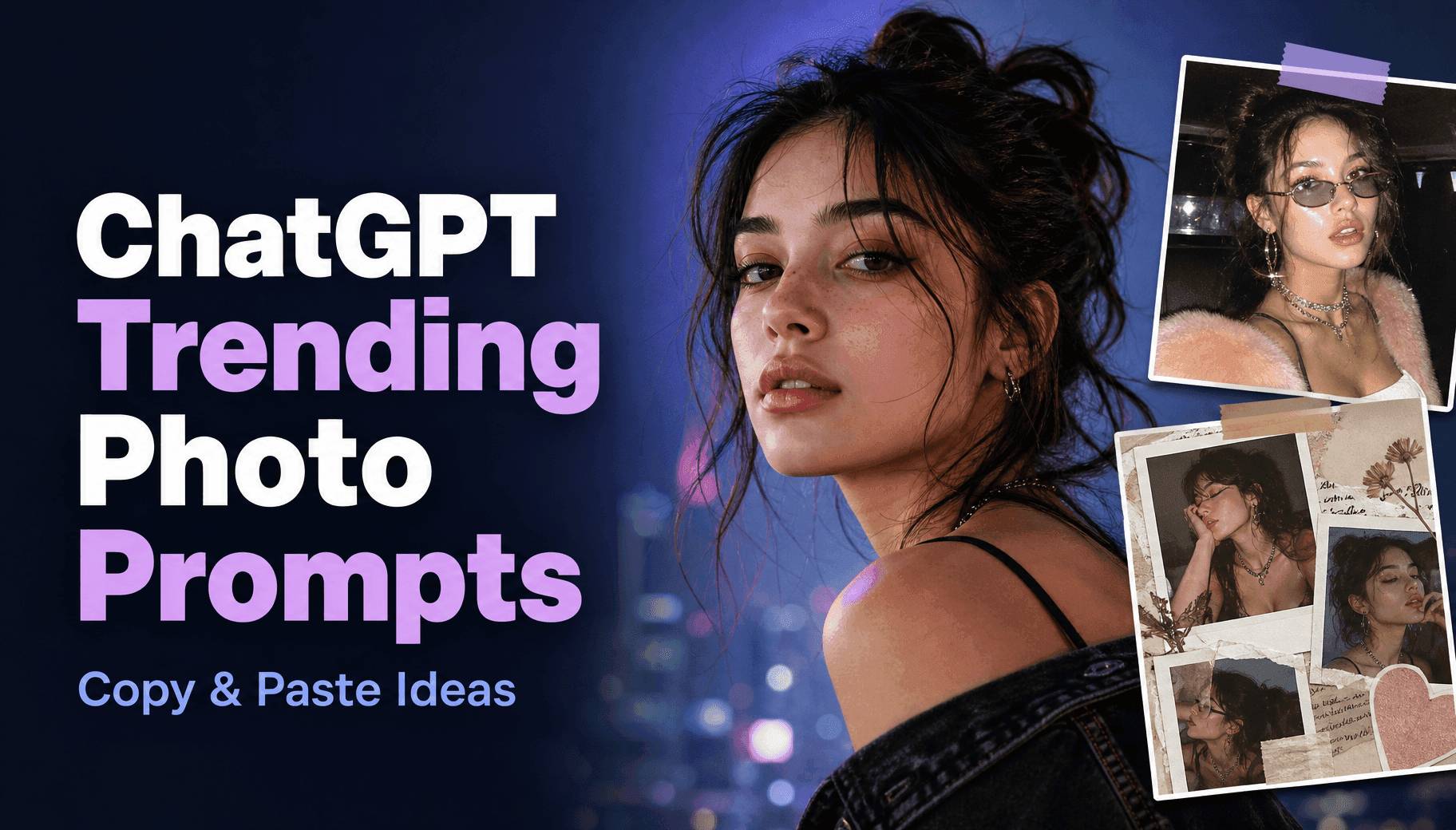
Explore chatgpt trending photo prompt ideas you can copy and paste. Create viral AI portraits, collages, and aesthetic photos with ease.
Want to turn an ordinary selfie into a photo that looks like it belongs on Instagram or Pinterest? The right ChatGPT trending photo prompt can transform your pictures into aesthetic collages, cinematic portraits, Y2K flash photos, vintage Polaroids, and creative 3D figures.
The secret is not simply adding trendy style keywords. A strong prompt tells the AI what to change, what to preserve, and how the final image should look. This helps you create more personalized results without losing the details that make your photo recognizable.
Below are copy-and-paste ChatGPT photo editing prompts, practical customization tips, and a simple way to create your own trending AI photos with 1min.AI.
Best ChatGPT Trending Photo Prompts to Copy and Paste
These viral ChatGPT image prompts cover popular styles for selfies, portraits, couples, and creative social media content. Upload a clear reference photo, copy your preferred prompt, and customize the details inside brackets.
1. AI Scrapbook and Collage Photo Prompts
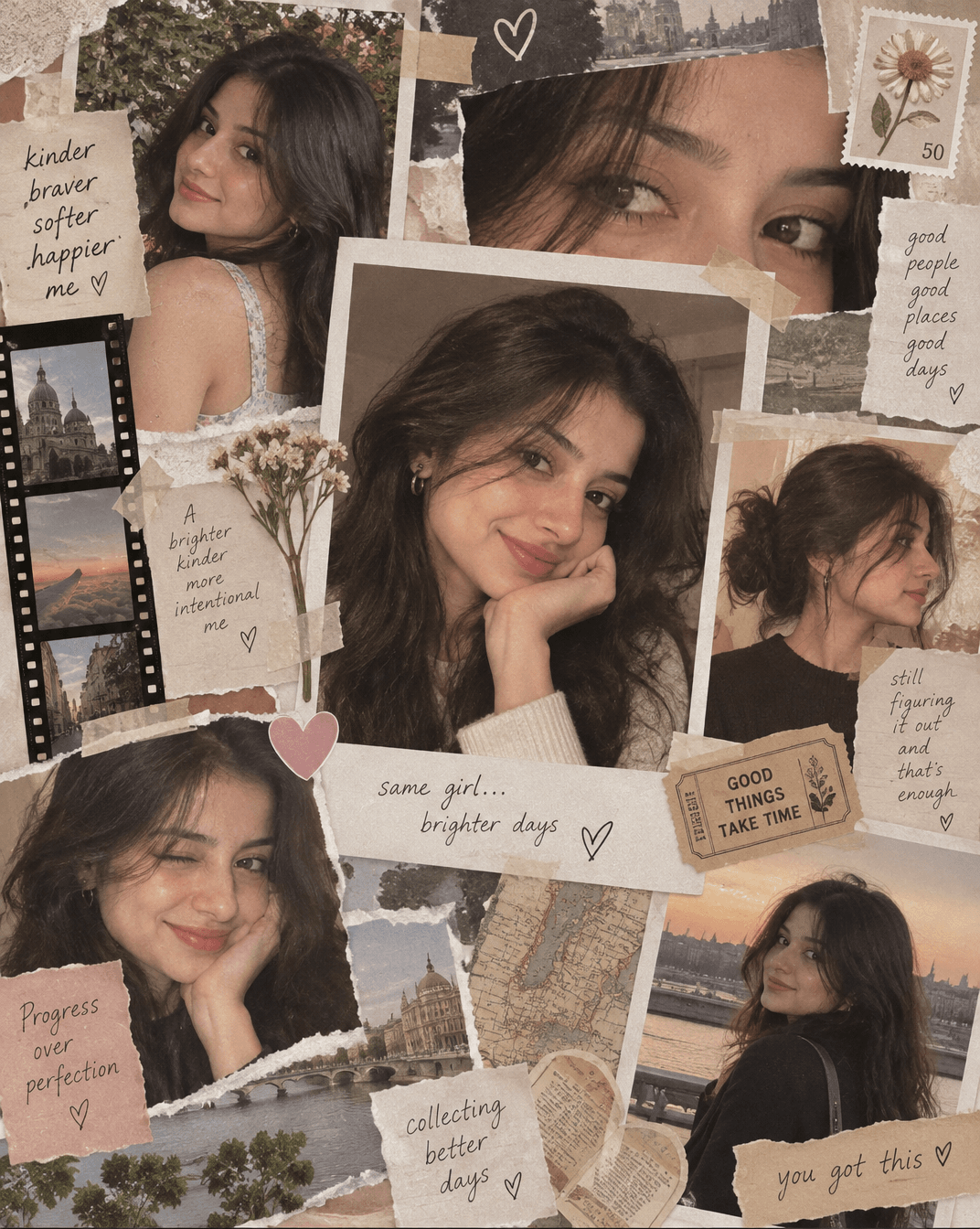
Scrapbook Collage Portrait
Create a vertical 4:5 scrapbook-style collage using the person in the uploaded photo. Arrange multiple overlapping printed photographs, close-up facial crops, side profiles, torn paper edges, masking tape, handwritten decorative notes, and vintage stickers. Use warm editorial lighting, subtle film grain, soft shadows, and a cohesive pastel color palette. Keep the person's facial identity, hairstyle, and skin tone recognizable. Make the composition feel like a personalized Instagram moodboard.
Why try it: This style turns a simple portrait into a layered visual story, making it ideal for Instagram posts, profile updates, and personal moodboards.
2. Y2K Flash and Photo Booth Prompts
Y2K Digital Camera Portrait
Transform the uploaded selfie into an early-2000s Y2K flash photograph. Preserve the person's facial features, natural expression, and skin tone. Add direct compact-camera flash, glossy highlights, a slightly grainy digital camera texture, metallic accessories, and a stylish denim outfit. Use a nighttime city or retro indoor background with imperfect candid framing. Keep the result realistic, nostalgic, and suitable for a 4:5 Instagram post.
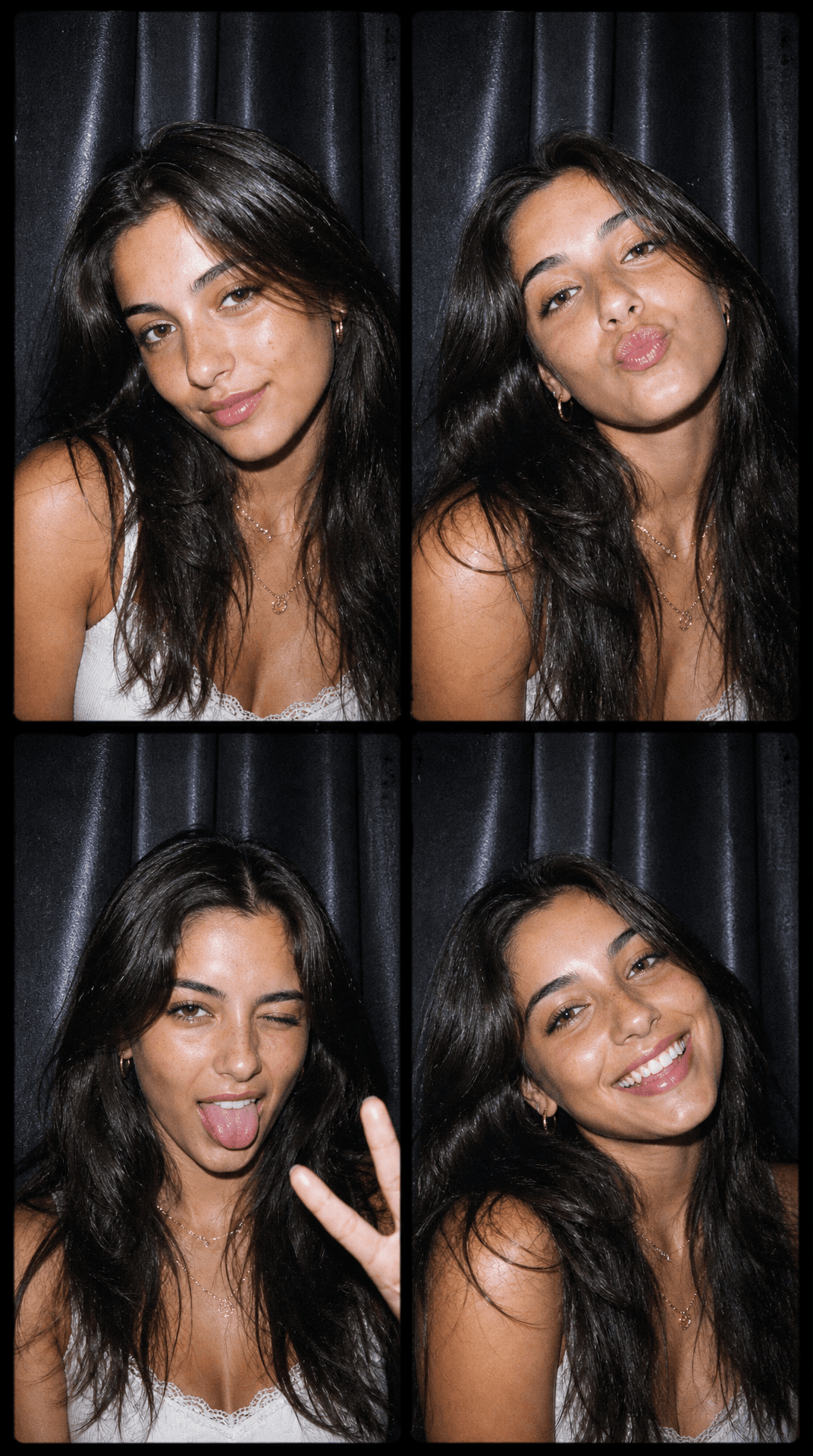
Y2K Photo Booth Strip
Turn the uploaded portrait into a four-frame Y2K photo booth contact sheet. Keep the same person's identity consistent across all four frames. Show different natural expressions and playful poses against a dark curtain background. Add direct camera flash, early-2000s digital grain, subtle glossy highlights, and clean black frame dividers. Use a vertical 9:16 composition without readable text or logos.
Why try it: Flash photography and photo booth aesthetics create playful, nostalgic images that work particularly well for social media photo dumps.
3. Cinematic and Lofi Dusk Portrait Prompts
Lofi Dusk City Portrait
Transform the uploaded photo into a cinematic lofi dusk portrait. Preserve the person's face, hairstyle, and natural expression. Place them on a city street during blue hour, with glowing storefronts, soft neon reflections, warm streetlights, dreamy background blur, and gentle film grain. Add realistic skin texture and subtle shadows. Use a calm, nostalgic atmosphere with balanced cinematic color grading. Output in a vertical 4:5 ratio.
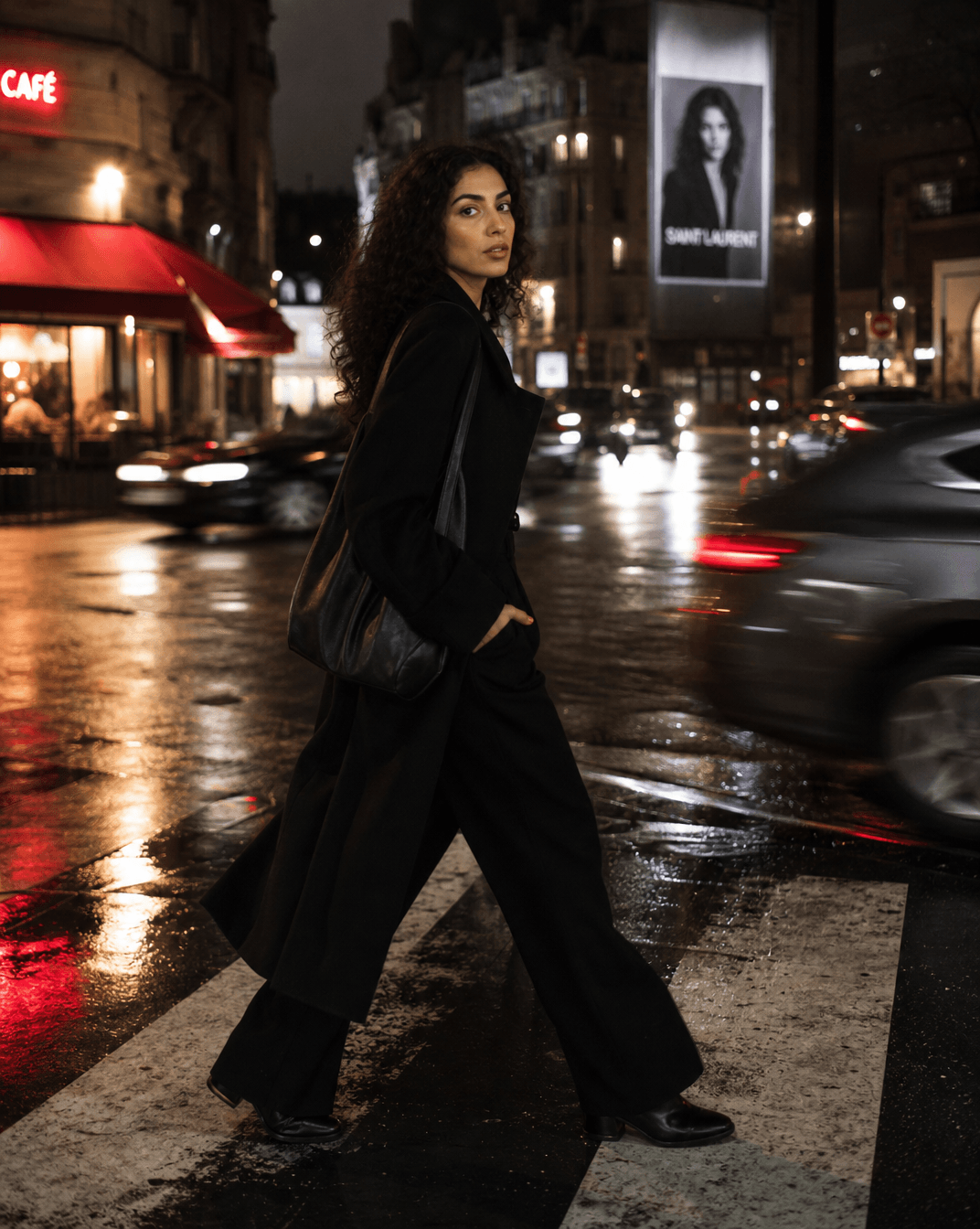
Cinematic Street Photography
Create an editorial-style street photograph using the uploaded portrait. Keep the subject's identity and body proportions unchanged. Place them crossing a rainy city street at night, wearing a modern black outfit. Include wet pavement reflections, passing traffic motion blur, glowing storefronts, dramatic side lighting, and shallow depth of field. Maintain realistic facial details and natural skin texture. Use a cinematic 4:5 vertical composition.
Why try it: These prompts give ordinary portraits a more polished editorial appearance, suitable for profile pictures, creator branding, and lifestyle content.
4. AI Couple and Polaroid Photo Prompts
Vintage Couple Polaroid
Create a nostalgic instant-film photograph using the uploaded couple photo. Preserve both people's facial identities, expressions, and natural proportions. Show them standing close together in a relaxed, affectionate pose near a sunset beach. Add a classic white Polaroid-style border, warm analog colors, subtle light leaks, soft film grain, and gentle golden-hour lighting. Keep the atmosphere intimate and natural. Use a 4:5 vertical composition.
Retro Couple Photo
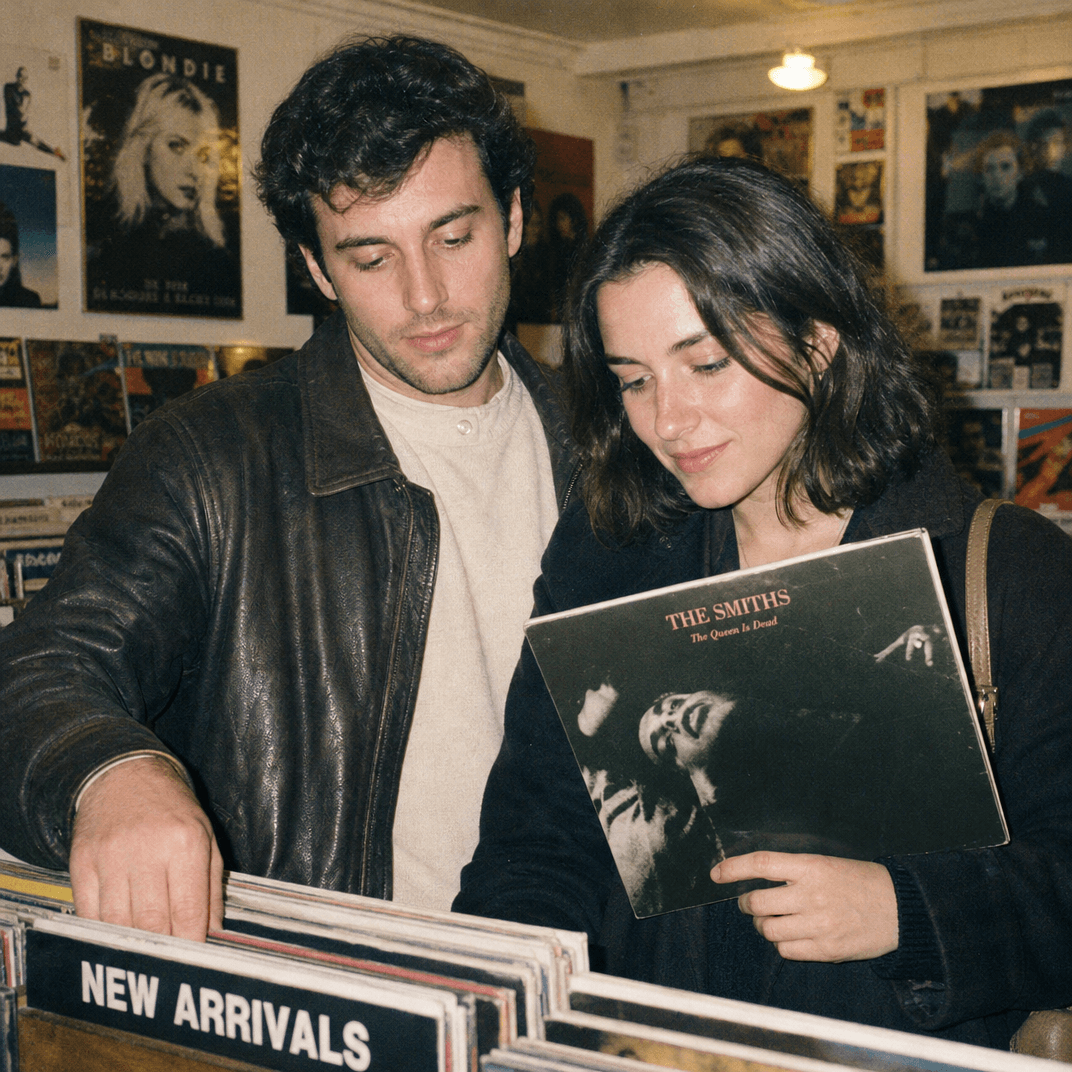
Transform the uploaded couple portrait into a retro 1990s film photograph. Keep both faces recognizable and unchanged. Place the couple in a vintage record store, browsing vinyl records together. Add direct compact-camera flash, warm indoor lighting, muted colors, realistic clothing textures, and subtle analog grain. Use candid body language rather than exaggerated poses. Create a square 1:1 composition.
Why try it: Couple photo prompts are useful for personalized gifts, anniversary posts, romantic photo collections, and social media memories.
5. AI Caricature and 3D Action Figure Prompts
Personalized AI Caricature
Create a playful 3D caricature of the person in the uploaded photo. Keep their facial identity recognizable while slightly exaggerating their head proportions and expressions. Incorporate visual elements representing their profession, hobbies, and personality: [ADD YOUR JOB OR HOBBIES]. Use expressive details, polished 3D materials, soft studio lighting, and a colorful background. Make the result friendly, humorous, and suitable for a social media profile image.
Collectible Action Figure
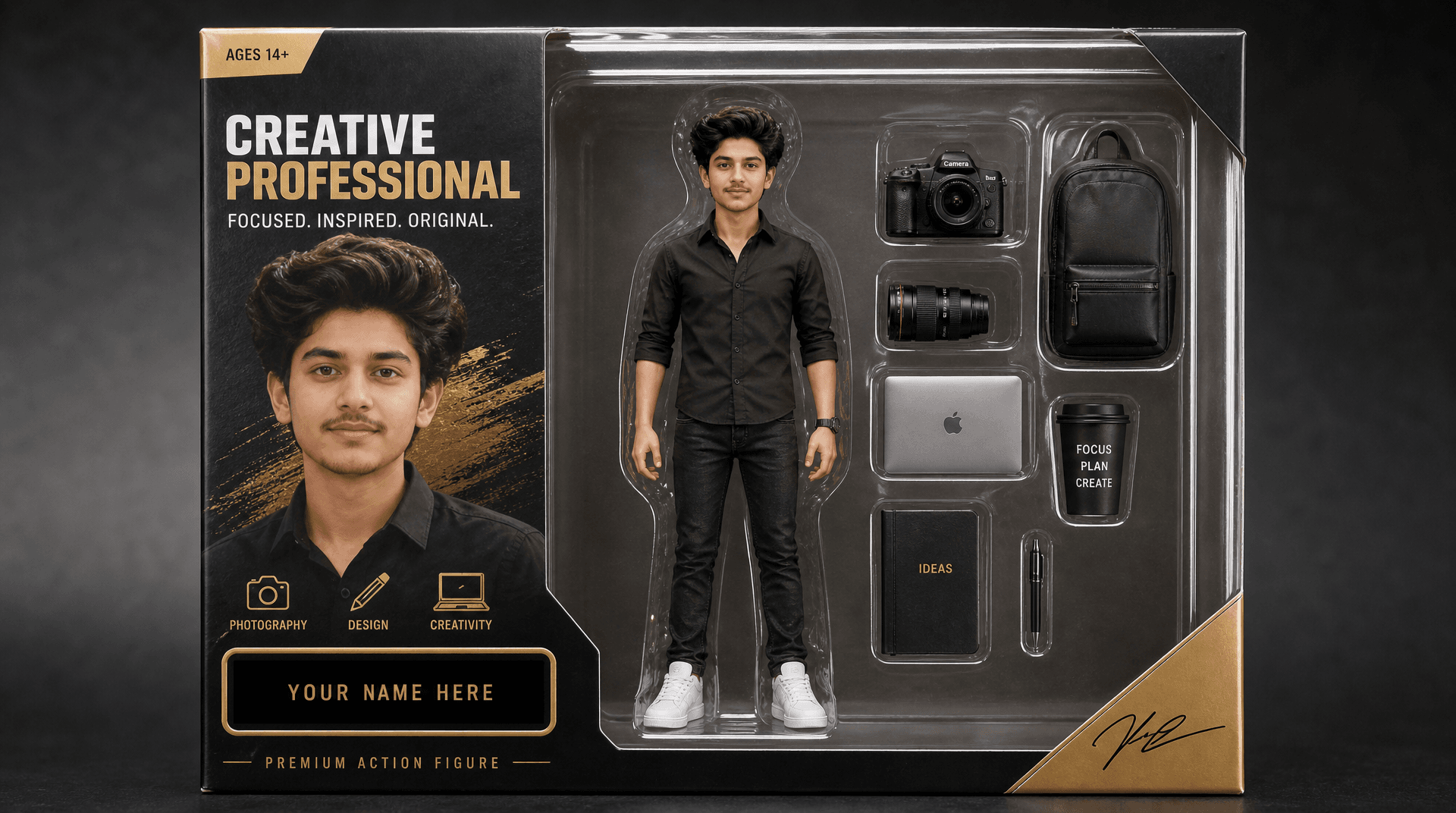
Turn the person in the uploaded photo into a premium collectible action figure inside realistic retail packaging. Preserve their recognizable facial features and hairstyle. Show a full-body stylized figure with accessories related to their job or hobbies, a transparent blister pack, a modern toy-box layout, and professional studio product lighting. Add realistic plastic reflections and detailed miniature accessories. Leave space for a personalized name label.
Why try it: These styles are especially useful for personalized avatars, creator branding, and creative gift concepts.
6. Vintage and Childhood Photo Prompts
1980s Vintage Portrait
Transform the uploaded portrait into an authentic 1980s studio photograph. Preserve the person's facial identity and natural expression. Add soft studio flash, a retro gradient backdrop, vintage clothing, subtle film grain, slightly faded colors, and classic analog photography characteristics. Keep the composition natural and avoid modern objects or digital effects. Use a vertical 4:5 portrait.
Childhood Memory Recreation
Create a nostalgic childhood-inspired portrait based on the uploaded adult photo. Preserve the person's recognizable facial features while portraying them in a gentle, storybook-inspired childhood memory scene. Use warm afternoon sunlight, soft pastel colors, playful environmental details, and subtle film texture. Make the image feel like a treasured family photograph rather than an exaggerated cartoon. Use a vertical 4:5 composition.
For a more personalized result, replace the setting, clothing, color palette, and mood with details from a specific memory.
What Makes a Good ChatGPT Trending Photo Prompt?
A popular ChatGPT photo prompt generator can help turn an idea into an instruction, but understanding prompt structure gives you more control over the final result.
The most useful approach is to organize your instructions into three parts: Change, Preserve, and Constraints.
Change, Preserve, and Constraints
| Prompt element | What to describe | Example |
|---|---|---|
| Change | What the AI should create or modify | Replace the background with a vintage café |
| Preserve | Details that should remain consistent | Keep the face, hairstyle, and skin tone |
| Constraints | Unwanted changes to avoid | No extra people, text, or distorted hands |
For example:
Change: Transform the uploaded selfie into a cinematic nighttime portrait with neon city lights.
Preserve: Keep the person's facial features, hairstyle, expression, and natural skin tone recognizable.
Constraints: Do not add extra people, change body proportions, or introduce logos and watermarks.
This structure is useful for ChatGPT photo editing prompts because it separates creative instructions from identity-preservation requirements.
Lighting, Background, and Aspect Ratio
Small descriptive details can make a significant difference in the final image.
| Element | Useful prompt details |
|---|---|
| Lighting | Golden hour, soft window light, direct flash, cinematic side lighting |
| Texture | Natural skin texture, analog grain, realistic fabric details |
| Background | Rainy city, vintage studio, beach, minimalist interior |
| Mood | Nostalgic, dreamy, playful, editorial, romantic |
| Aspect ratio | 1:1 for avatars, 4:5 for Instagram posts, 9:16 for Stories and Reels |
Avoid combining too many unrelated styles in one prompt. A focused visual direction makes it easier to achieve a consistent result.
How to Create Trending AI Photos with 1min.AI
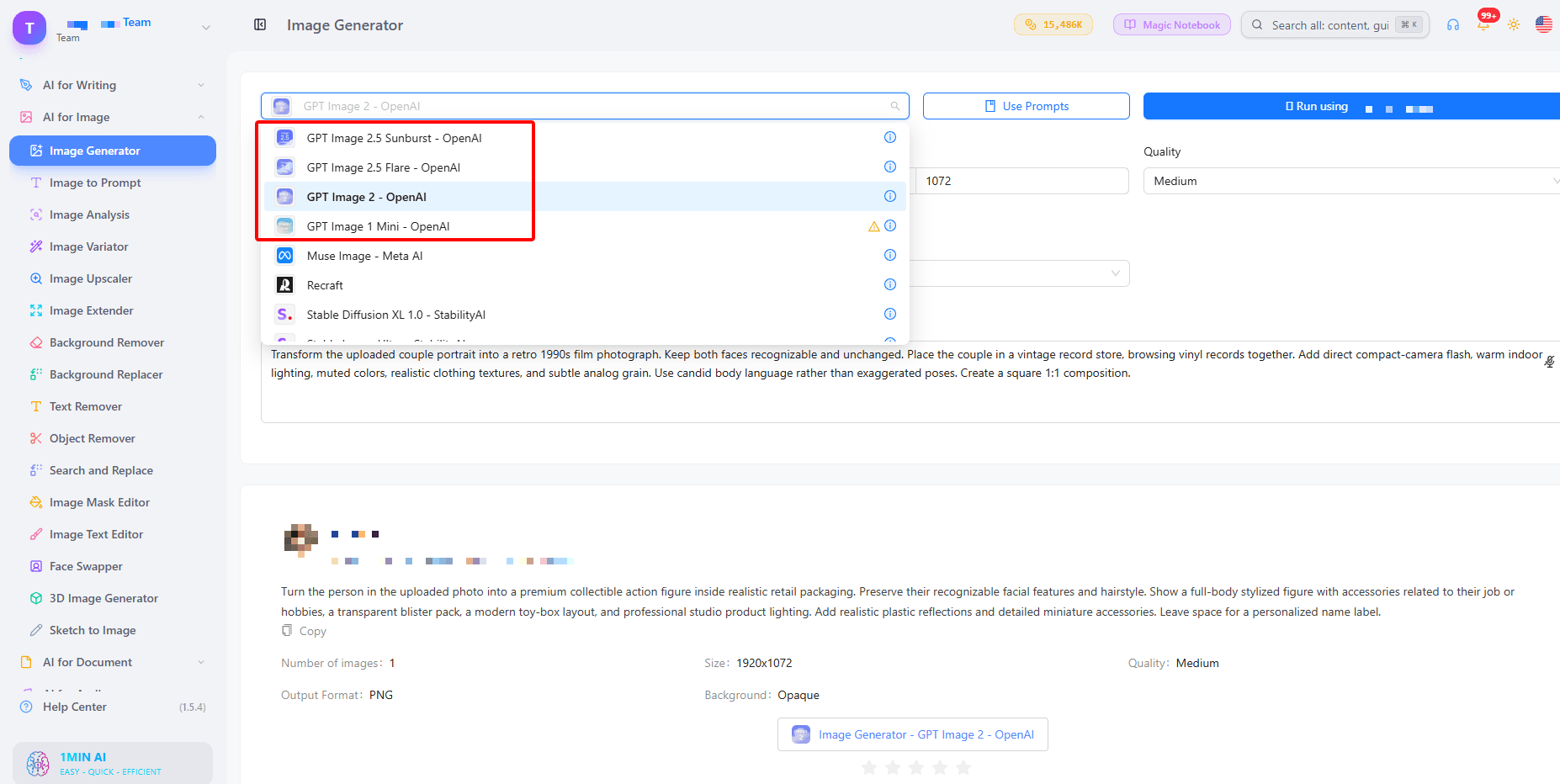
Once you have chosen a style, you can use 1min.AI Image Generator to turn your creative instructions into AI-generated images.
Step 1: Open 1min.AI Image Generator
Visit https://app.1min.ai/image-generator to access the image creation workspace. You can start exploring the available image generation options without a complicated setup.
Step 2: Describe Your Desired Photo
Choose a style from the prompts above or write your own instructions. Include the subject, visual style, lighting, background, and aspect ratio.
If you want to create a variation based on an existing image, explore the available image input options and choose a workflow that supports your reference image.
Step 3: Generate and Refine Your Image
Generate your image and review the result. If something does not match your vision, refine the prompt with more specific instructions.
For example, if the lighting looks too artificial, add:
"Use natural skin texture, soft realistic shadows, and balanced photographic lighting."
If you want to explore different visual directions, try the AI image editing tools to discover additional ways to customize your creative results.
Step 4: Enhance and Share
Once you are happy with the result, use Image Upscaler when you need higher-resolution output. You can also explore other creative features in 1min.AI to develop your image into a larger visual project.
You can start creating with 1min.AI for free, with no watermark on generated images. Open the generator and explore what you can create.
How to Get Better Results from AI Photo Prompts
Even a detailed prompt may need a few adjustments. Use these practical tips to improve consistency and visual quality.
- Start with a clear reference: Use a well-lit photo with a visible face and minimal obstruction.
- Describe identity preservation explicitly: Mention facial features, hairstyle, skin tone, and expression.
- Change one element at a time: If the background is incorrect, refine the background instruction instead of rewriting the entire prompt.
- Be specific about visual style: Describe lighting, camera perspective, colors, and texture instead of relying on vague words such as beautiful or professional.
- Specify the output format: Include the intended aspect ratio and use case, such as an Instagram post or profile picture.
- Review the final image: Check facial details, hands, accessories, background elements, and unwanted text before sharing.
For more inspiration, explore the 1980s AI photo prompt or experiment with the 3D image generator for more creative visual concepts.
Frequently Asked Questions
What are some trending image prompts for ChatGPT?
Popular options include scrapbook collages, Y2K flash portraits, cinematic street photography, lofi dusk images, vintage Polaroids, AI caricatures, action figures, and personalized 3D portraits. These prompts describe the desired style, lighting, background, and details to preserve.
What is the ChatGPT picture trend prompt?
A ChatGPT picture trend prompt is a ready-to-use instruction that helps transform an uploaded photo into a popular visual style. It typically specifies the subject, artistic direction, lighting, background, and identity-preservation requirements.
What are the best prompts for ChatGPT pictures?
The best prompts are specific and structured. Describe exactly what should change, what should remain recognizable, and what the AI should avoid. Scrapbook, Y2K, cinematic, Polaroid, and caricature prompts are useful starting points for experimenting with different looks.
How to create trending images in ChatGPT?
Upload a clear reference photo, paste a detailed image editing prompt, and describe your preferred style. Include instructions to preserve recognizable facial features, then review and refine the generated image until it matches your expectations.
Can I use ChatGPT photo prompts with other AI image generators?
Yes. Most text-based photo prompts can be adapted for different AI image generators. You may need to adjust instructions depending on the available image input, reference-photo support, model capabilities, and aspect ratio settings.
How can I keep my face recognizable in AI-generated photos?
Include an explicit preservation instruction such as: "Keep the person's facial identity, facial structure, hairstyle, and natural skin tone consistent with the uploaded reference photo." Use a clear reference image and review the result because identity preservation cannot be guaranteed perfectly.
Can I create AI photos without a watermark?
You can explore image creation with 1min.AI and generate images without a watermark. Visit the 1min.AI Image Generator to try different creative styles.
Ready to turn your favorite photo idea into something creative? Choose a prompt, customize the details, and start creating with 1min.AI.
- #Commerce
Alternatives
Discover the best alternatives to 1minAI and compare features, pricing, and use cases.

1min.AI vs OpenRouter
1min.AI vs. OpenRouter: Compare the ready-to-use AI creation product against the technical API tool. Find out if you need a zero-code creative studio or a coding infrastructure hub.
 Ngoc Hong

1min.AI vs. Metricool: Which Platform Does More for Your Marketing Workflow?
Compare 1min.AI vs. Metricool across content creation, visual production, scheduling, analytics, MCP, and pricing to find the right platform for your marketing workflow.

1min.AI vs. Hootsuite: Which Social Media Tool Fits Your Workflow?
Compare 1min.AI vs. Hootsuite to explore their AI content creation, social media publishing, analytics, pricing, and collaboration features. Find the right tool for your workflow.
AI Tools
Discover the best AI tools to boost productivity, creativity, and everyday work.

Top 4 Affordable AI Tools for Startup Founders
Discover the top 4 affordable AI tools for startup founders to validate ideas, build products, create content, and launch faster without overspending.
 Tram Ta

Turn “Make It Better” Into Better Content With AI
Use AI to turn vague client feedback into clear revisions, reduce unnecessary edits, and deliver better content faster.
 Lien Anh Vu

Free AI X Comment
Create funny, witty, or insightful comments for Twitter with our AI-powered Twitter Comment Generator. Boost your engagement and stand out in the crowd!
 Trang Tran
AI Features
Comprehensive AI features that streamline workflows, improve efficiency, and empower teams to achieve more.

1minAI: Free AI Grammar Checker
Check grammar for free with 1minAI’s AI grammar checker. Find grammar, spelling, and writing mistakes, improve clarity, and polish your content in seconds.
Tram Ta
Build a Portfolio Website Faster with 1min.AI
Learn how freelance creatives can use 1min.AI to plan, write, design, and generate a professional portfolio website faster, even without strong coding skills.
Lien Anh VuFree AI X Comment
Create funny, witty, or insightful comments for Twitter with our AI-powered Twitter Comment Generator. Boost your engagement and stand out in the crowd!
Trang TranAI Use Cases
A curated collection of AI use cases for business, productivity, and industry-specific applications.

Best Time to Post on Instagram: A Practical Guide for Better Engagement
Discover the best time to post on Instagram, including the best days and times for different audiences, plus tips to find the ideal posting schedule for your account.
Tram TaTurn “Make It Better” Into Better Content With AI
Use AI to turn vague client feedback into clear revisions, reduce unnecessary edits, and deliver better content faster.
Lien Anh VuBuild a Portfolio Website Faster with 1min.AI
Learn how freelance creatives can use 1min.AI to plan, write, design, and generate a professional portfolio website faster, even without strong coding skills.
Lien Anh VuAI Tutorials
Learn how to use AI with practical, step-by-step tutorials.

Black Friday AI Tool Deals in 2026
Discover what Black Friday AI tool deals 2026 has to offer. Find out how to secure the 1min.AI lifetime deal via AppSumo, Dealify, Stack Social, and verify on Trustpilot, Slashdot, and Software Advice.
 Hang Nguyen
Turn “Make It Better” Into Better Content With AI
Use AI to turn vague client feedback into clear revisions, reduce unnecessary edits, and deliver better content faster.
Lien Anh Vu
Viral Reels in Minutes: How to Use 1minAI’s Text-to-Speech for Satirical Voiceovers
Learn how satirical page admins use 1minAI’s Text-to-Speech feature to generate instant news anchor and dramatic voiceovers for TikToks, Shorts, and Instagram Reels.
AI Guides
Learn AI faster with practical guides, real-world examples, and actionable best practices.

Safely Buy AI Tools Online: 2026 Black Friday Guide
Discover how to find and secure the best Black Friday AI deals online. Learn expert strategies to avoid scams, combat subscription fatigue, and verify software.
Hang Nguyen
How to start an AI business without building from scratch
Learn how to start an AI business, validate your idea, and launch faster without building costly AI infrastructure from scratch.
Ngoc Hong
How to Use an AI Fashion Video Generator for Fashion Week 2026
Turn Fashion Week 2026 ideas into stunning fashion videos with AI. Learn how to brainstorm, create visuals, and transform images into videos with one simple workflow.
Lien Anh VuAI Solutions
Browse the best AI solutions for automation, coding, research, productivity, customer support, marketing, and business workflows.
Safely Buy AI Tools Online: 2026 Black Friday Guide
Discover how to find and secure the best Black Friday AI deals online. Learn expert strategies to avoid scams, combat subscription fatigue, and verify software.
Hang Nguyen
Free AI Tattoo Generator: Custom Designs
Turn any idea into a custom tattoo design with 1min.AI's free AI tattoo generator. Describe your idea, pick a style, and download in seconds.
Trang TranTurn “Make It Better” Into Better Content With AI
Use AI to turn vague client feedback into clear revisions, reduce unnecessary edits, and deliver better content faster.
Lien Anh VuAI Models
Explore the world's leading AI models in one place.

Free AI Chat With Claude Fable 5.2 On 1min.AI
Free AI chat with Claude Fable 5.2 on 1min.AI. Compare Fable 5.2 vs Opus 5.5, see Fable 5.2 benchmarks, and start chatting in minutes.
Trang Tran
GPT-6.2 Sol: Specs, Pricing & Free Access
Explore GPT-6.2 Sol specs, pricing, and how it compares with GPT-6.1 Sol and Claude Opus 5.5, then try it free in 1min.AI Multi AI Chat.
Trang Tran
GPT 6.2 Astra: Pricing, Benchmarks & Free Access
GPT 6.2 Astra release date, pricing, Reddit feedback and Opus 5.5 comparison. See what it does best and chat with it on 1min.AI for free.
Trang TranAI Comparisons
Compare AI tools, models, and platforms to find the best fit for your needs.

Gemini 4 Neon vs Hydrogen: Specs, Price & Picks
Gemini 4 Neon vs Hydrogen, Carbon and Argon: compare price, benchmarks and use cases to pick the right model, then test them side by side on 1min.AI.
Trang Tran
Kling AI Vs Veo 3: Which Model Wins?
Kling AI vs Veo 3: compare motion, native audio, pricing & free tiers to see which AI video generator wins for your project - try both on 1min.AI.
Trang Tran
DeepSeek V4 Pro vs Flash Comparison
Compare DeepSeek V4 Pro vs DeepSeek V4 Flash metrics. Optimize your agentic apps and improve AI fact checking on 1min.ai today.
Ngoc HongAI Integrations
Seamlessly integrate AI with the tools you already use to automate work and boost productivity.

POV: You Have 10+ Posts to Make Every Day
Learn how to build an AI content workflow that helps content creators produce 10+ social media posts a day faster with AI brainstorming, image generation, and content creation.
Lien Anh Vu
Stop Switching Between AI Apps: How AI Integration Transforms Employer Branding
Discover how AI integration helps HR teams streamline employer branding by combining AI writing, documents, images, video, and multiple AI models into one workspace.
Tram Ta
AI API Aggregator Explained For Developers
An AI API aggregator gives developers one unified API to call multiple AI models, cutting integration time and vendor lock in.
Trang TranAI for Industries
Find the best AI tools and workflows for healthcare, finance, education, legal, manufacturing, retail, real estate, and more
Try Image To Video AI With Prompt Online Free
Try image to video AI with prompt online free, no login and no watermark. Upload a photo, type the motion you want, and get a short video in minutes.
Trang Tran
No Photoshoot? Create AI Fashion Videos With Seedance 2.5
No photoshoot needed! Create stunning AI fashion videos with Seedance 2.5 on 1min.AI using outfit references, cinematic prompts, and surreal scenes.
Lien Anh Vu
Voice Cloning AI Free: How to Clone Any Voice Online in Minutes
Try voice cloning AI free with 1min.AI. Upload a 5-second clip, pick an ElevenLabs model, choose from 32 languages, and turn text to speech in your own voice.
Trang TranAI Agents
Discover and run AI agents to automate tasks across your work and daily life.
1minAI: Free AI Grammar Checker
Check grammar for free with 1minAI’s AI grammar checker. Find grammar, spelling, and writing mistakes, improve clarity, and polish your content in seconds.
Tram Ta
AI Agents for Facebook
Use an AI Agent for Facebook to create content, generate images, schedule posts, and publish from your documents and conversations.
Ngoc Hong
AI Agent vs AI Assistant: Which One Actually Saves Designers More Time?
Learn the difference between AI Agent vs AI Assistant and discover which solution helps designers automate repetitive work, reduce revisions, and save more time.
Lien Anh VuAI Workflows
Explore ready-to-use AI workflows for productivity, marketing, sales, support, and more.
POV: You Have 10+ Posts to Make Every Day
Learn how to build an AI content workflow that helps content creators produce 10+ social media posts a day faster with AI brainstorming, image generation, and content creation.
Lien Anh VuHow to Use an AI Fashion Video Generator for Fashion Week 2026
Turn Fashion Week 2026 ideas into stunning fashion videos with AI. Learn how to brainstorm, create visuals, and transform images into videos with one simple workflow.
Lien Anh Vu
One Product, 10 UGC Creatives: How AI Makes Content Testing Easier
Create more authentic UGC with an AI UGC video generator, test more creative angles and scale affiliate content without filming every version.
Lien Anh VuNewsletter
Weekly AI Innovations with 1minAI

🔮 Weekly AI Innovations #146: Mistral 3.5, Qwen Image & Cohere A+ are ready on 1min.ai
Deploy Mistral Large 3, Qwen Image 3.0, and Cohere Command A+ on 1min.ai. Boost RAG accuracy and cut visual generation latency in one unified AI workspace.
Hang Nguyen
🔮 Weekly AI Innovations #145: X Content Agent & GPT 6.1 Terra on 1min.ai
Scale viral reach with the X Content Agent on 1min.ai. Discover an end-to-end 4-stage pipeline with zero token burn, plus the launch of GPT 6.1 Terra.
Hang Nguyen
🔮 Weekly AI Innovations #144: LinkedIn Content Agent: Complete B2B Publishing Pipeline
Scale B2B influence with the LinkedIn Content Agent on 1min.ai. Discover an end-to-end 4-stage pipeline with zero redundant token burn and 1-click publishing.
Hang Nguyen