
Best Time to Post on LinkedIn and Tools to Automate Your Workflow

Tram Ta
November 19, 2026
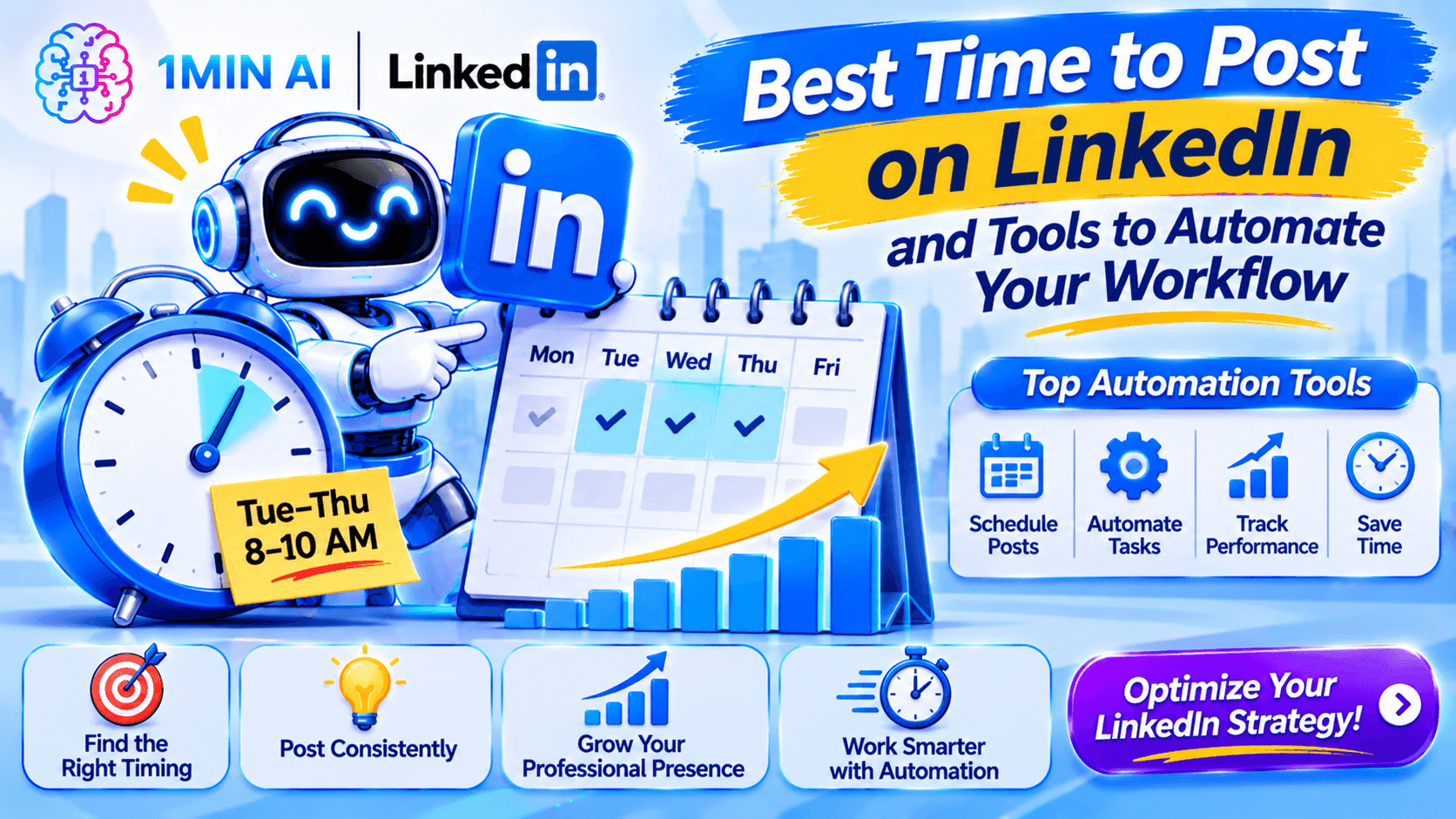
Find the best time to post on LinkedIn in 2026 and explore AI tools to automate content creation, scheduling, and your LinkedIn workflow.
Posting at the right time can give your content a better opportunity to reach people when they are active on LinkedIn. But finding that time is only half the challenge. You also need a consistent process for researching topics, writing posts, preparing visuals, and scheduling content.
So, what is the best time to post on LinkedIn in 2026? Which days and hours should you test? And what tools can help automate your LinkedIn workflow?
This guide covers recent posting-time research, practical scheduling strategies, and AI-powered tools that can help you publish consistently without spending your entire day managing content.
What Is the Best Time to Post on LinkedIn in 2026?
The best time to post on LinkedIn depends on your audience, industry, location, and content type.
However, recent studies provide useful starting points.
Two major 2026 studies offer slightly different recommendations:
- Buffer analyzed more than 4.8 million LinkedIn posts and found that late afternoon and evening performed particularly well.
- Sprout Social analyzed nearly 2 billion engagements across 307,000 social profiles and found strong LinkedIn engagement during weekday working hours, especially Tuesday through Thursday.
These findings suggest that there is no single posting time that works for every LinkedIn account.
Recommended Starting Times to Test
If you need a simple schedule before you have enough account-specific data, try this:
| Day | Suggested test window | Priority |
|---|---|---|
| Monday | 1 PM–2 PM or 5 PM | Moderate |
| Tuesday | 11 AM–5 PM | High |
| Wednesday | 11 AM–4 PM or 3 PM–5 PM | Very high |
| Thursday | 1 PM–5 PM | High |
| Friday | 3 PM–5 PM | High |
| Saturday | Test only if your audience is active | Lower |
| Sunday | Test only if your audience is active | Lower |
These are practical test windows based on the two studies, not a universal ranking for every day.
For a simple starting schedule, prioritize Tuesday through Thursday. Add a late-afternoon Wednesday or Friday slot to see whether your audience responds more strongly later in the day.
Best Time to Post on LinkedIn by Day
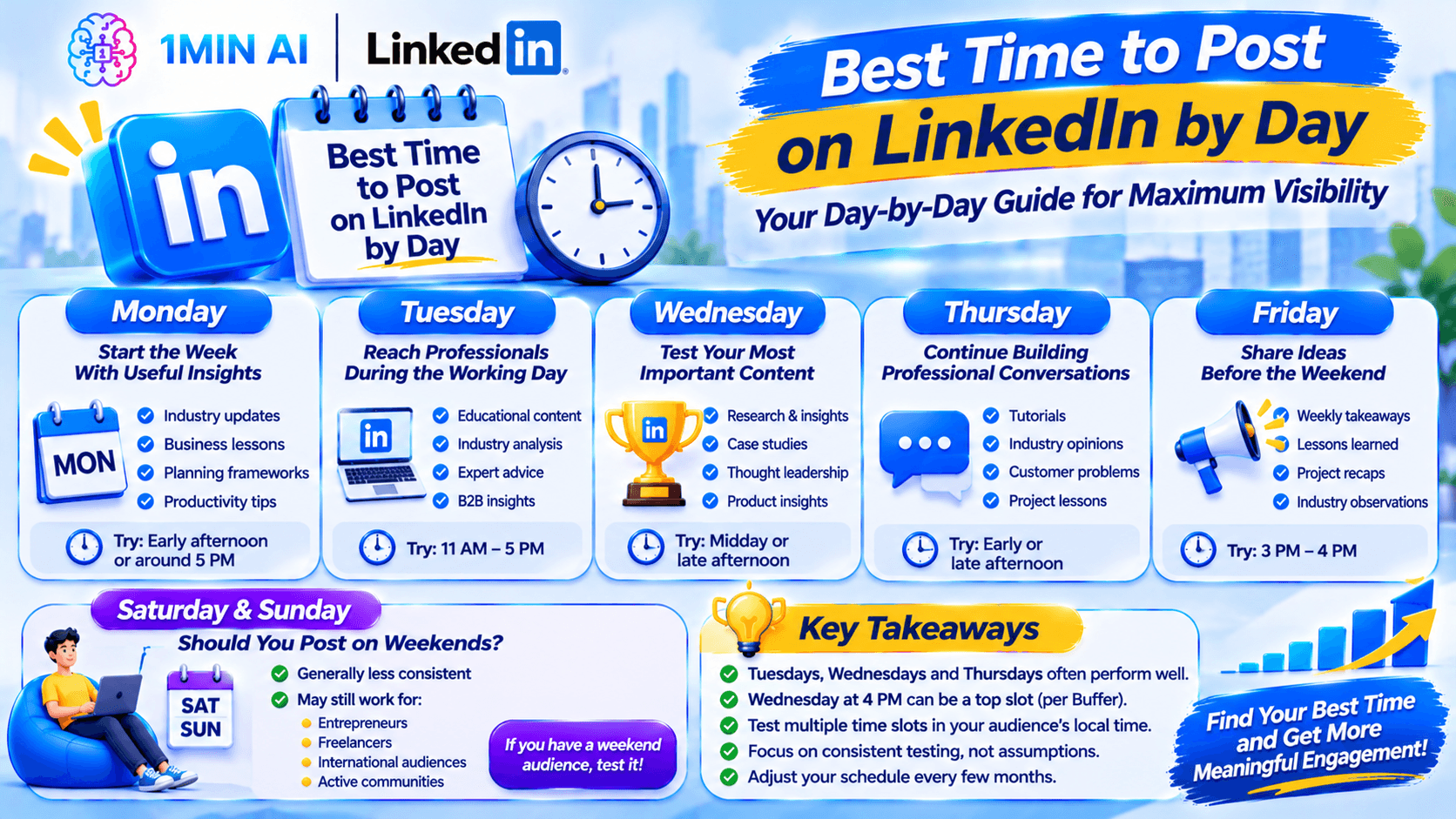
Let's look at each day in more detail.
Monday: Start the Week With Useful Insights
Monday can be useful for sharing content that helps professionals plan their week.
Consider posting:
- Weekly industry updates.
- Business lessons and reflections.
- Planning frameworks.
- Practical tips for improving productivity.
A useful starting test is early afternoon or around 5 PM.
Avoid publishing your most important announcement automatically on Monday just because it is the first working day. Compare its performance with your midweek posts first.
Tuesday: Reach Professionals During the Working Day
Tuesday is one of Sprout Social's strongest days for LinkedIn engagement.
It can be a good day for:
- Educational content.
- Industry analysis.
- Professional advice.
- B2B marketing insights.
- Product-related problem-solving posts.
Try a few slots between 11 AM and 5 PM in your audience's local time.
Wednesday: Test Your Most Important Content
Wednesday is the strongest day in Buffer's 2026 analysis, with 4 PM emerging as its top individual time slot.
It is worth reserving Wednesday for content that deserves extra attention.
For example:
- Original research.
- Case studies.
- Thought leadership.
- Product insights.
- Detailed educational posts.
Test a midday slot against late afternoon rather than assuming 4 PM will work for every audience.
Thursday: Continue Building Professional Conversations
Thursday also performs consistently well in Sprout Social's research.
It is a useful day for:
- Sharing practical tutorials.
- Publishing industry opinions.
- Discussing customer problems.
- Starting professional conversations.
- Sharing lessons from recent projects.
Try early afternoon or late afternoon and compare the results.
Friday: Share Ideas Before the Weekend
Buffer found Friday at 3 PM and 4 PM among its strongest individual time slots.
Friday can work well for:
- Weekly takeaways.
- Lessons learned.
- Project recaps.
- Short industry observations.
- Professional reflections.
However, Friday performance can vary significantly depending on the industry and audience.
Saturday and Sunday: Should You Post on Weekends?
Weekends generally perform less consistently than weekdays in the studies discussed above.
That does not mean weekend posting is always ineffective.
For example, weekend content may still be relevant if your audience includes:
- Entrepreneurs who work outside standard office hours.
- Freelancers and independent creators.
- International professionals across different time zones.
- Communities that actively discuss topics outside the working week.
If you have a weekend audience, test it. Otherwise, prioritize weekdays when building your initial schedule.
Why Does Posting Time Matter on LinkedIn?
LinkedIn is a professional network, so people's activity often reflects their work routines, professional interests, and available time.
Someone working in B2B sales may check LinkedIn between meetings. A founder may browse industry updates after finishing work. A recruiter may use the platform at different times throughout the day.
Posting when your intended audience is active gives your content a better opportunity to be discovered and interacted with.
However, timing is only one part of content performance.
Other factors include:
- Audience relevance: Is the topic useful to the people you want to reach?
- Content quality: Does the post provide a meaningful insight or solution?
- Opening hook: Does the first part encourage people to keep reading?
- Format: Is the message easier to understand as text, an image, a document, or a video?
- Conversation: Does the content encourage genuine discussion?
- Consistency: Do you publish regularly enough to understand what works?
A perfectly timed post with little value may still perform poorly. A useful post can also attract attention outside its original publishing window.
Think of timing as an opportunity multiplier, not a replacement for good content.
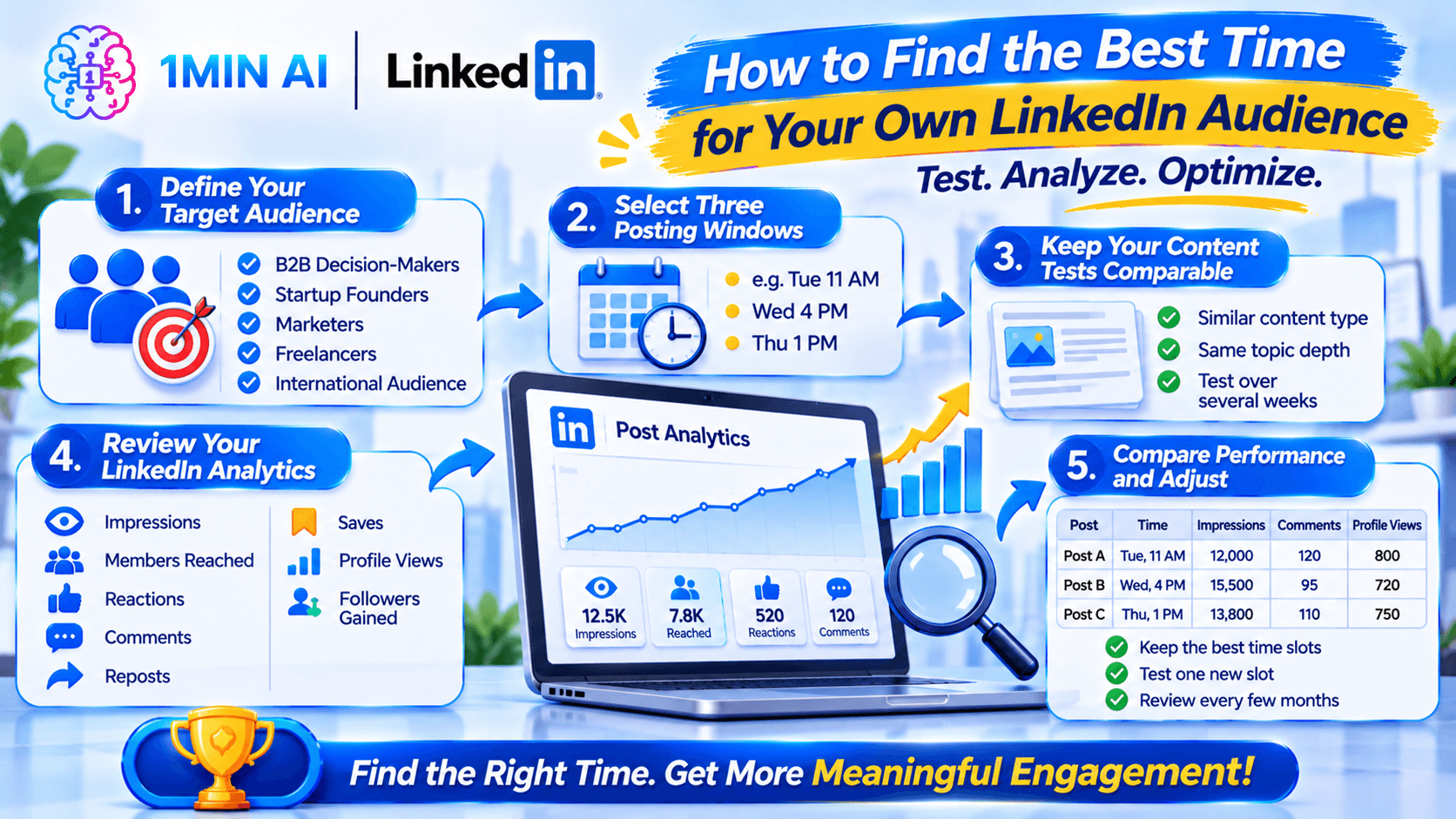
How to Find the Best Time for Your Own LinkedIn Audience
Industry-wide research is useful, but your own LinkedIn analytics should guide your long-term schedule.
A marketing agency, software startup, university, and freelance designer may have very different audiences.
Here is a simple way to identify your strongest posting windows.
Step 1: Define Your Target Audience
Before testing different times, identify who you want to reach.
For example:
| Audience | Potential activity patterns to test |
|---|---|
| B2B decision-makers | Weekday working hours |
| Startup founders | Early workday, lunch, or late afternoon |
| Marketing professionals | Midday and afternoon |
| Freelancers | Working hours and selected evenings |
| International audiences | Separate slots for major audience regions |
These are hypotheses, not guaranteed activity patterns. Use your actual audience data to validate them.
Step 2: Select Three Posting Windows
Start with three different time windows.
For example:
- Tuesday at 11 AM.
- Wednesday at 4 PM.
- Thursday at 1 PM.
Use your audience's local time zone.
Step 3: Keep Your Content Tests Comparable
If you publish a major product announcement at 4 PM and a short personal update at 11 AM, you cannot confidently attribute the difference in performance to posting time.
Try to compare similar content types.
For example, test three educational posts with similar depth and audience relevance across your selected time windows.
You can also repeat the test over several weeks to reduce the influence of unusual topics or one-off events.
Step 4: Review Your LinkedIn Analytics
After publishing, review the available post analytics.
Pay attention to:
- Impressions.
- Members reached.
- Reactions.
- Comments.
- Reposts.
- Saves.
- Profile views.
- Followers gained.
Don't focus only on total impressions.
A post with fewer impressions but more relevant comments or profile visits may be more valuable to your business.
Step 5: Compare Performance and Adjust
Create a simple tracking table:
| Post | Publishing time | Impressions | Comments | Reposts | Profile views |
|---|---|---|---|---|---|
| Post A | Tuesday, 11 AM | Record result | Record result | Record result | Record result |
| Post B | Wednesday, 4 PM | Record result | Record result | Record result | Record result |
| Post C | Thursday, 1 PM | Record result | Record result | Record result | Record result |
Repeat the test with several comparable posts.
Keep the time slots that consistently attract the right audience, then experiment with one new slot.
Review your schedule every few months because audience behavior and professional routines can change.
How to Schedule LinkedIn Posts Automatically
Once you have a posting schedule, you don't need to be online every time a post should go live.
Scheduling tools allow you to prepare content in advance and publish it at a selected time.
There are two main approaches.
1. Use LinkedIn's Native Scheduling Feature
LinkedIn provides a built-in scheduling option for eligible personal profile and Page posts.
For LinkedIn Pages, administrators can schedule posts up to three months in advance.
A typical Page scheduling workflow looks like this:
- Open your LinkedIn Page admin view.
- Navigate to Page posts.
- Select Start a post.
- Prepare your content.
- Select the clock or scheduling icon.
- Choose your publication date and time.
- Review the post and click Schedule.
LinkedIn uses the time zone associated with your location settings when scheduling Page posts.
Some formats and post types are not eligible for scheduling, so check the available options before planning a campaign.
When should you use native scheduling?
It is a good choice if you already have finished content and only need to publish it later.
However, native scheduling does not automatically solve the work involved in researching topics, writing posts, and preparing visuals.
2. Use an AI-Powered LinkedIn Workflow
If you spend more time creating posts than scheduling them, an AI-assisted workflow may be more useful.
Instead of treating research, writing, image creation, and publishing as separate tasks, you can connect them into one repeatable process.
This is where tools such as 1minAI's LinkedIn Content Agent can help.
Best Tools to Automate Your LinkedIn Workflow
There are several types of tools for LinkedIn automation. Some focus on scheduling, while others help create content or organize broader social media workflows.
Here are three categories worth considering.
1. 1minAI LinkedIn Content Agent: From Research to Publishing
The 1minAI LinkedIn Content Agent connects several content tasks in one workflow.
Instead of starting with an empty post composer, you can provide business information or a topic and use the Agent to help prepare the content.
Its workflow includes:
- Gather Information: Start with a topic or saved business Asset.
- Write Content: Generate a LinkedIn post using the configured writing settings.
- Design Image: Create a supporting visual for the post.
- Post to Social: Connect the publishing stage to your LinkedIn account.
- Schedule Workflow: Configure manual, one-time, or recurring workflow runs.
For example, imagine you run a B2B SaaS company.
You could prepare a saved Asset containing your product information, target audience, and approved messaging. Then configure the Agent to generate LinkedIn content based on that information.
The workflow can help turn existing business knowledge into a repeatable content process.
Why this is useful:
You don't have to treat every LinkedIn post as a completely new project. You can reuse relevant business context, generate content, prepare visuals, and organize recurring production.
Explore the AI Agent for Social Media Management to learn more.
2. Buffer: Manage and Schedule Social Media Content
Buffer is a social media management platform that helps users organize and schedule posts across supported channels.
Its useful capabilities include:
- Content calendar.
- Post scheduling.
- AI-assisted writing.
- Multi-channel publishing.
- Performance insights.
Buffer is particularly useful when your main challenge is managing a regular publishing calendar.
However, if you need a workflow that connects business information, content generation, and image creation, you may want to compare it with an AI-first solution.
Read more about 1minAI as a Buffer alternative for LinkedIn content creation.
3. Postbeam: LinkedIn Content and B2B Social Selling
Postbeam focuses on LinkedIn content and B2B social selling.
Its positioning includes features such as:
- LinkedIn content planning.
- Brand voice support.
- Lead-focused workflows.
- Warm lead detection.
- Sales-oriented content operations.
This makes it a different type of solution from a general AI content production workspace.
If your primary goal is to connect content creation with sales pipeline intelligence, compare its capabilities with your existing sales process.
If you mainly want to automate research, writing, image creation, and publishing preparation, explore 1minAI as a Postbeam alternative.
Tool Comparison: Which LinkedIn Workflow Should You Choose?
| Tool | Main focus | Useful for |
|---|---|---|
| 1minAI LinkedIn Content Agent | AI-assisted content production and publishing | Research, writing, image creation, recurring workflow |
| Buffer | Social media management and scheduling | Content calendar, publishing, channel management |
| Postbeam | LinkedIn content and B2B social selling | Lead-focused workflows and LinkedIn operations |
These tools serve different needs, so the best choice depends on which part of your workflow consumes the most time.
If you already have content ready, a scheduler may be enough.
If you repeatedly struggle to turn business knowledge into useful posts, an AI content workflow may offer more value.
How to Automate Your LinkedIn Workflow With 1minAI
Let's look at how you can use 1minAI to organize a more consistent LinkedIn content process.
Step 1: Prepare Your Business Information
Start by preparing the information you want the Agent to use.
A useful business Asset can include:
- Company overview.
- Product or service descriptions.
- Target audience.
- Customer problems.
- Approved brand messaging.
- Relevant examples and case studies.
- Claims or details that should not be changed.
For example, a marketing agency could prepare an Asset describing its services, ideal clients, and most common customer challenges.
This gives the content workflow a more relevant starting point than a generic prompt.
Step 2: Open the LinkedIn Content Agent
Visit the 1minAI workspace and open the Social Agents experience.
Select the LinkedIn Content Agent and configure the available workflow stages.
You can choose the information source and settings for the type of content you want to produce.
Step 3: Configure the Writing Stage
Move to the Write Content stage.
Choose the available model and writing settings, then provide instructions about your audience, topic, and preferred tone.
For example, use this prompt:
"Create a LinkedIn post for startup founders about the importance of publishing consistently.
Start with a strong but realistic hook. Explain three practical ways to build a sustainable posting routine. Include one specific example and finish with a question that encourages founders to share their experiences.
Use a professional, conversational tone. Avoid generic motivational language, unsupported statistics, and exaggerated claims."
Review the generated content before moving to the next stage.
Step 4: Generate a Supporting Image
Move to the Design Image stage.
You can use the available image options to create a visual that supports your post.
For example, a post about LinkedIn scheduling could use a simple calendar illustration showing a weekly publishing routine.
Keep the visual relevant to the message. A clear diagram or useful infographic is often more effective than a decorative image that adds no information.
Step 5: Configure the Publishing Stage
Move to Post to Social and select your connected LinkedIn account under the available platform settings.
Review the content and publishing configuration.
Depending on the workflow settings, you can run the Agent manually, schedule a one-time run, or configure recurring runs.
Step 6: Set Your Posting Schedule
Open the workflow scheduling settings and select the frequency and time that match your content strategy.
For example, you might start with a recurring schedule that supports two or three posts each week.
If your audience responds well to Tuesday through Thursday publishing, configure your workflow around those days and review the results over time.
Important: A recurring Agent workflow automates the configured content process. It does not mean every future generated post will automatically be perfect. Keep your business Assets updated, review content quality, and monitor your publishing results.
A Practical Weekly LinkedIn Automation Schedule
You don't need to publish several times every day to maintain a consistent presence.
Here is an example schedule combining the 2026 timing research with a manageable content workflow.
| Day | Suggested time | Content type | Workflow |
|---|---|---|---|
| Monday | 1 PM | Weekly insight or industry update | Prepare and review |
| Tuesday | 11 AM | Educational post | Generate and schedule |
| Wednesday | 4 PM | Thought leadership or case study | Generate and schedule |
| Thursday | 1 PM | Practical tutorial | Generate and schedule |
| Friday | 3 PM | Weekly takeaway or reflection | Prepare and review |
This is an example, not a requirement to publish five times a week.
If you are a solo founder or small marketing team, start with Tuesday and Thursday. Add Wednesday or Friday once you can maintain the quality and frequency.
The goal is to create a system that saves time without making your LinkedIn feed feel repetitive.
Conclusion: Find Your Best Posting Time and Automate the Repetitive Work
The best time to post on LinkedIn is not a fixed hour that works for every creator or business.
Recent 2026 research suggests that Tuesday through Thursday are strong days to test, while Buffer's data highlights Wednesday at 4 PM and late-afternoon weekday publishing.
Use these findings as a starting point, compare your own analytics, and build a schedule around the people you want to reach.
But remember that consistency requires more than choosing a time.
You need a repeatable process for researching topics, writing posts, creating visuals, reviewing content, and scheduling publication.
With 1minAI's LinkedIn Content Agent, you can connect these steps into one AI-assisted workflow and spend less time handling repetitive content tasks.
Explore the AI Agent for Social Media Management, compare 1minAI with Buffer and Postbeam, and build a LinkedIn publishing routine that works for your team.
For more AI capabilities, visit 1minAI Features and try the 1minAI Agent.
- #Information
- #Commerce
Alternatives
Discover the best alternatives to 1minAI and compare features, pricing, and use cases.

1min.AI vs OpenRouter
1min.AI vs. OpenRouter: Compare the ready-to-use AI creation product against the technical API tool. Find out if you need a zero-code creative studio or a coding infrastructure hub.
 Ngoc Hong

1min.AI vs. Metricool: Which Platform Does More for Your Marketing Workflow?
Compare 1min.AI vs. Metricool across content creation, visual production, scheduling, analytics, MCP, and pricing to find the right platform for your marketing workflow.

1min.AI vs. Hootsuite: Which Social Media Tool Fits Your Workflow?
Compare 1min.AI vs. Hootsuite to explore their AI content creation, social media publishing, analytics, pricing, and collaboration features. Find the right tool for your workflow.
AI Tools
Discover the best AI tools to boost productivity, creativity, and everyday work.

Create Consistent Cartoon Content in Just a Few Steps
Create engaging cartoon videos for TikTok and Reels with 1min.AI. Research ideas, create characters, and turn images into animated videos in 3 simple steps.
 Lien Anh Vu

One Product, 10 UGC Creatives: How AI Makes Content Testing Easier
Create more authentic UGC with an AI UGC video generator, test more creative angles and scale affiliate content without filming every version.
Lien Anh Vu
Top 4 Affordable AI Tools for Startup Founders
Discover the top 4 affordable AI tools for startup founders to validate ideas, build products, create content, and launch faster without overspending.
 Tram Ta
AI Features
Comprehensive AI features that streamline workflows, improve efficiency, and empower teams to achieve more.
Create Consistent Cartoon Content in Just a Few Steps
Create engaging cartoon videos for TikTok and Reels with 1min.AI. Research ideas, create characters, and turn images into animated videos in 3 simple steps.
Lien Anh VuOne Product, 10 UGC Creatives: How AI Makes Content Testing Easier
Create more authentic UGC with an AI UGC video generator, test more creative angles and scale affiliate content without filming every version.
Lien Anh Vu
1minAI: Free AI Grammar Checker
Check grammar for free with 1minAI’s AI grammar checker. Find grammar, spelling, and writing mistakes, improve clarity, and polish your content in seconds.
Tram TaAI Use Cases
A curated collection of AI use cases for business, productivity, and industry-specific applications.
Create Consistent Cartoon Content in Just a Few Steps
Create engaging cartoon videos for TikTok and Reels with 1min.AI. Research ideas, create characters, and turn images into animated videos in 3 simple steps.
Lien Anh VuOne Product, 10 UGC Creatives: How AI Makes Content Testing Easier
Create more authentic UGC with an AI UGC video generator, test more creative angles and scale affiliate content without filming every version.
Lien Anh Vu
Best Time to Post on Instagram: A Practical Guide for Better Engagement
Discover the best time to post on Instagram, including the best days and times for different audiences, plus tips to find the ideal posting schedule for your account.
Tram TaAI Tutorials
Learn how to use AI with practical, step-by-step tutorials.

Black Friday AI Tool Deals in 2026
Discover what Black Friday AI tool deals 2026 has to offer. Find out how to secure the 1min.AI lifetime deal via AppSumo, Dealify, Stack Social, and verify on Trustpilot, Slashdot, and Software Advice.
 Hang Nguyen
Create Consistent Cartoon Content in Just a Few Steps
Create engaging cartoon videos for TikTok and Reels with 1min.AI. Research ideas, create characters, and turn images into animated videos in 3 simple steps.
Lien Anh Vu
[Seedance 2.5 New] Better AI Product Videos, Less Rework in 1min.AI
Use Seedance 2.5 image to video on 1min.AI to create more consistent AI product videos, reduce failed generations, save credits, and improve UGC workflows.
Lien Anh VuAI Guides
Learn AI faster with practical guides, real-world examples, and actionable best practices.

Safely Buy AI Tools Online: 2026 Black Friday Guide
Discover how to find and secure the best Black Friday AI deals online. Learn expert strategies to avoid scams, combat subscription fatigue, and verify software.
Hang NguyenCreate Consistent Cartoon Content in Just a Few Steps
Create engaging cartoon videos for TikTok and Reels with 1min.AI. Research ideas, create characters, and turn images into animated videos in 3 simple steps.
Lien Anh Vu[Seedance 2.5 New] Better AI Product Videos, Less Rework in 1min.AI
Use Seedance 2.5 image to video on 1min.AI to create more consistent AI product videos, reduce failed generations, save credits, and improve UGC workflows.
Lien Anh VuAI Solutions
Browse the best AI solutions for automation, coding, research, productivity, customer support, marketing, and business workflows.
Safely Buy AI Tools Online: 2026 Black Friday Guide
Discover how to find and secure the best Black Friday AI deals online. Learn expert strategies to avoid scams, combat subscription fatigue, and verify software.
Hang NguyenCreate Consistent Cartoon Content in Just a Few Steps
Create engaging cartoon videos for TikTok and Reels with 1min.AI. Research ideas, create characters, and turn images into animated videos in 3 simple steps.
Lien Anh VuOne Product, 10 UGC Creatives: How AI Makes Content Testing Easier
Create more authentic UGC with an AI UGC video generator, test more creative angles and scale affiliate content without filming every version.
Lien Anh VuAI Models
Explore the world's leading AI models in one place.
Create Consistent Cartoon Content in Just a Few Steps
Create engaging cartoon videos for TikTok and Reels with 1min.AI. Research ideas, create characters, and turn images into animated videos in 3 simple steps.
Lien Anh VuOne Product, 10 UGC Creatives: How AI Makes Content Testing Easier
Create more authentic UGC with an AI UGC video generator, test more creative angles and scale affiliate content without filming every version.
Lien Anh Vu[Seedance 2.5 New] Better AI Product Videos, Less Rework in 1min.AI
Use Seedance 2.5 image to video on 1min.AI to create more consistent AI product videos, reduce failed generations, save credits, and improve UGC workflows.
Lien Anh VuAI Comparisons
Compare AI tools, models, and platforms to find the best fit for your needs.

Kling AI Vs Veo 3: Which Model Wins?
Kling AI vs Veo 3: compare motion, native audio, pricing & free tiers to see which AI video generator wins for your project - try both on 1min.AI.
 Trang Tran
[Seedance 2.5 New] Better AI Product Videos, Less Rework in 1min.AI
Use Seedance 2.5 image to video on 1min.AI to create more consistent AI product videos, reduce failed generations, save credits, and improve UGC workflows.
Lien Anh Vu
DeepSeek V4 Pro vs Flash Comparison
Compare DeepSeek V4 Pro vs DeepSeek V4 Flash metrics. Optimize your agentic apps and improve AI fact checking on 1min.ai today.
Ngoc HongAI Integrations
Seamlessly integrate AI with the tools you already use to automate work and boost productivity.

POV: You Have 10+ Posts to Make Every Day
Learn how to build an AI content workflow that helps content creators produce 10+ social media posts a day faster with AI brainstorming, image generation, and content creation.
Lien Anh Vu
How to Use an AI Fashion Video Generator for Fashion Week 2026
Turn Fashion Week 2026 ideas into stunning fashion videos with AI. Learn how to brainstorm, create visuals, and transform images into videos with one simple workflow.
Lien Anh Vu
Stop Switching Between AI Apps: How AI Integration Transforms Employer Branding
Discover how AI integration helps HR teams streamline employer branding by combining AI writing, documents, images, video, and multiple AI models into one workspace.
Tram TaAI for Industries
Find the best AI tools and workflows for healthcare, finance, education, legal, manufacturing, retail, real estate, and more

No Photoshoot? Create AI Fashion Videos With Seedance 2.5
No photoshoot needed! Create stunning AI fashion videos with Seedance 2.5 on 1min.AI using outfit references, cinematic prompts, and surreal scenes.
Lien Anh Vu
Voice Cloning AI Free: How to Clone Any Voice Online in Minutes
Try voice cloning AI free with 1min.AI. Upload a 5-second clip, pick an ElevenLabs model, choose from 32 languages, and turn text to speech in your own voice.
Trang Tran
Text To Video AI Free Without Watermark Online
Create text to video AI free without watermark online with 1min.AI. Pick top models, turn prompts into HD clips, and download clean videos fast. Try it free.
Trang TranAI Agents
Discover and run AI agents to automate tasks across your work and daily life.
1minAI: Free AI Grammar Checker
Check grammar for free with 1minAI’s AI grammar checker. Find grammar, spelling, and writing mistakes, improve clarity, and polish your content in seconds.
Tram Ta
AI Agents for Facebook
Use an AI Agent for Facebook to create content, generate images, schedule posts, and publish from your documents and conversations.
Ngoc Hong
AI Agent vs AI Assistant: Which One Actually Saves Designers More Time?
Learn the difference between AI Agent vs AI Assistant and discover which solution helps designers automate repetitive work, reduce revisions, and save more time.
Lien Anh VuAI Workflows
Explore ready-to-use AI workflows for productivity, marketing, sales, support, and more.
Create Consistent Cartoon Content in Just a Few Steps
Create engaging cartoon videos for TikTok and Reels with 1min.AI. Research ideas, create characters, and turn images into animated videos in 3 simple steps.
Lien Anh VuOne Product, 10 UGC Creatives: How AI Makes Content Testing Easier
Create more authentic UGC with an AI UGC video generator, test more creative angles and scale affiliate content without filming every version.
Lien Anh VuPOV: You Have 10+ Posts to Make Every Day
Learn how to build an AI content workflow that helps content creators produce 10+ social media posts a day faster with AI brainstorming, image generation, and content creation.
Lien Anh VuNewsletter
Weekly AI Innovations with 1minAI

🔮 Weekly AI Innovations #146: Mistral 3.5, Qwen Image & Cohere A+ are ready on 1min.ai
Deploy Mistral Large 3, Qwen Image 3.0, and Cohere Command A+ on 1min.ai. Boost RAG accuracy and cut visual generation latency in one unified AI workspace.
Hang Nguyen
🔮 Weekly AI Innovations #145: X Content Agent & GPT 6.1 Terra on 1min.ai
Scale viral reach with the X Content Agent on 1min.ai. Discover an end-to-end 4-stage pipeline with zero token burn, plus the launch of GPT 6.1 Terra.
Hang Nguyen
🔮 Weekly AI Innovations #144: LinkedIn Content Agent: Complete B2B Publishing Pipeline
Scale B2B influence with the LinkedIn Content Agent on 1min.ai. Discover an end-to-end 4-stage pipeline with zero redundant token burn and 1-click publishing.
Hang Nguyen