
5 LinkedIn Profile Tips: How Job Seekers Can Win More Job Opportunities

Tram Ta
November 20, 2026
Discover 5 LinkedIn profile tips for job seekers to attract recruiters, showcase your skills, and improve your chances of landing interviews with 1minAI.
Creating a profile that attracts recruiters takes more than filling in every section. You need to present the right information in a way that helps employers quickly understand your strengths and suitability for a role.
In this guide, we'll share five practical LinkedIn profile tips for job seekers who want to improve their professional presence, stand out in recruiter searches, and make a stronger impression during the application process.
You'll also learn how to use 1minAI to write and improve your LinkedIn profile, create professional content, and build a consistent personal brand.
Why Is Your LinkedIn Profile Important When Applying for Jobs?
Think of your LinkedIn profile as your digital professional introduction.
When you apply for a job, recruiters may review your resume, LinkedIn profile, portfolio, and other professional information to understand your background.
A well-organized LinkedIn profile helps them answer several questions:
- What kind of professional are you?
- What skills and experience do you have?
- What industries or roles interest you?
- What achievements demonstrate your abilities?
- What makes you different from other candidates?
- How can they contact you?
A complete profile can also improve your discoverability. LinkedIn recommends adding a professional photo, a clear headline, an informative About section, relevant experience, skills, and recommendations.
Your profile should communicate your professional value consistently rather than simply repeat your resume.
Remember: A strong LinkedIn profile cannot guarantee an interview or job offer. Hiring decisions depend on many factors, including qualifications, experience, competition, and the employer's requirements. However, improving your profile gives recruiters a clearer picture of what you can offer.
5 LinkedIn Profile Tips for Job Seekers to Attract Recruiters
Here are five essential improvements you can make to create a more professional and compelling LinkedIn profile.
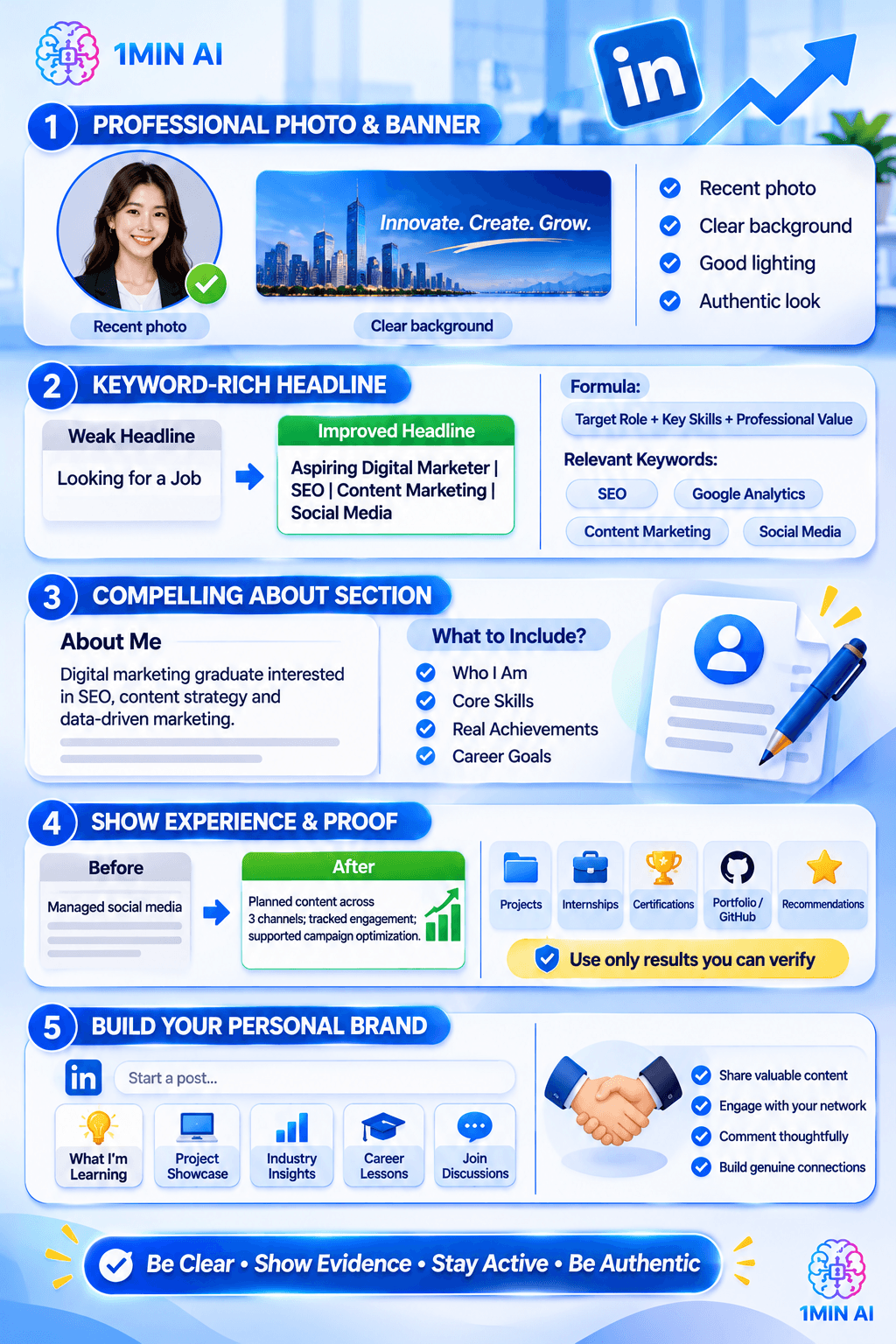
1. Use a Professional Profile Photo and Background Banner
<PRIVATE_PERSON> first impression often begins with your profile photo.
When recruiters visit your LinkedIn page, your photo is one of the first visual elements they notice. An unclear, outdated, or overly casual picture may make your profile look less polished.
You don't need an expensive photoshoot to create a professional image. A simple, clear headshot is usually enough.
How to Choose a Good LinkedIn Profile Photo
Follow these tips when selecting your photo:
- Use a recent picture: Make sure your appearance is reasonably current.
- Choose a clear background: Avoid distracting objects or crowded environments.
- Wear appropriate clothing: Choose something suitable for your target industry.
- Use good lighting: Make sure your face is easy to see.
- Look approachable: A natural expression can help create a friendly professional impression.
- Use a high-quality image: Avoid blurry, heavily filtered, or pixelated photos.
Your profile photo should look like you, not like a completely different person created through excessive editing.
Don't Forget Your Background Banner
Your LinkedIn banner is another opportunity to communicate your professional identity.
Instead of leaving it blank, consider creating a simple design that highlights your:
- Industry or area of expertise.
- Professional skills.
- Career interests.
- Portfolio or personal brand.
- Professional tagline.
For example, a graphic designer could use a banner featuring selected design work, while a software developer might highlight programming technologies and a portfolio link.
A business analyst could use a clean data visualization or a short tagline such as:
"Turning Business Data into Practical Insights."
1minAI tip: If you need help preparing a professional banner, you can explore AI image-generation tools on 1minAI. Use a prompt that describes your target industry, preferred colors, and professional identity. Review the result carefully and make sure the design does not include inaccurate qualifications or misleading claims.
2. Write a Keyword-Rich LinkedIn Headline That Shows Your Value
Your LinkedIn headline is one of the most important sections of your profile.
It appears near your name in several places, including search results and connection-related views. A clear headline helps people understand your professional focus without reading your entire profile.
One common mistake job seekers make is using a headline that only says:
"Looking for a Job."
Although this communicates your situation, it doesn't tell recruiters what you can do.
A stronger headline combines your target role, relevant skills, and professional value.
How to Write a Better LinkedIn Headline
A useful formula is:
Target Job Title + Key Skills + Industry or Professional Value
For example:
| Job seeker | Weak headline | Improved headline |
|---|---|---|
| Marketing graduate | Looking for Marketing Jobs | Marketing Graduate |
| Data analyst | Seeking New Opportunities | Aspiring Data Analyst |
| Software developer | Software Engineer | Junior Software Developer |
| Graphic designer | Open to Work | Graphic Designer |
| HR professional | HR Job Seeker | HR Specialist |
Notice that the improved headlines give recruiters more information about each candidate.
Include Keywords From Your Target Job Description
Recruiters often search for candidates using role titles, skills, and industry-related terms.
For example, if you are applying for digital marketing positions, relevant keywords might include:
- Digital Marketing.
- SEO.
- Google Analytics.
- Content Marketing.
- Social Media Management.
- Campaign Optimization.
Choose keywords that accurately reflect your experience and abilities. Don't add skills simply because they appear in job descriptions.
1minAI tip: Use 1minAI's LinkedIn profile creation guide to explore how AI can help develop your professional positioning, headline, and profile content.
You can also ask an AI writing assistant:
"Create five LinkedIn headline options for a job seeker applying for digital marketing positions. Include relevant keywords such as SEO, content marketing, and social media strategy. Keep the headlines professional, concise, and accurate to the candidate's experience."
Choose the version that best represents your real skills and career goals.
3. Create a Compelling About Section That Tells Your Professional Story
Your About section is where you can explain your background, strengths, interests, and career direction in more detail.
Think of it as a short professional introduction rather than another copy of your resume.
A weak About section might say:
"I am a hardworking person who wants to find a challenging job. I am passionate about learning and working with others."
This statement is positive, but it could describe almost any candidate.
A stronger introduction provides specific information about your expertise and the value you can bring.
What Should You Include in Your LinkedIn About Section?
A useful structure contains four elements.
1. Professional Introduction
Start by explaining who you are and what you specialize in.
Example:
"I'm a digital marketing graduate interested in helping businesses grow through SEO, content strategy, and data-driven marketing."
2. Your Main Skills
Highlight skills that are relevant to the positions you want.
Example:
"My experience includes keyword research, content optimization, social media planning, and performance analysis using marketing tools."
3. Your Achievements or Experience
Provide evidence of what you have accomplished.
Example:
"During my university projects, I developed a content strategy for a local business and helped organize a campaign that increased engagement across its social channels."
Use real achievements and measurable results when available. If you don't have professional experience, include relevant coursework, internships, volunteer projects, competitions, or personal projects.
4. Your Career Goals and Contact Invitation
Finish by explaining what opportunities interest you.
Example:
"I'm currently exploring opportunities in digital marketing where I can contribute my research and content skills while continuing to develop my professional experience. I'm always happy to connect with marketing professionals and recruiters."
Example LinkedIn About Section for a Recent Graduate
Here's a complete example you can adapt:
"I'm a recent Business Administration graduate with a strong interest in digital marketing, brand strategy, and business development.
Through academic projects and independent learning, I've developed practical knowledge of market research, content planning, social media management, and customer analysis.
I'm particularly interested in how businesses use digital tools and data to understand their customers and improve marketing performance.
I'm currently looking for entry-level opportunities where I can apply my skills, learn from experienced professionals, and contribute to meaningful business projects.
I'm always open to connecting with recruiters, marketing professionals, and people who share an interest in business growth."
This introduction works because it explains the candidate's background, relevant skills, interests, and career direction without exaggerating experience.
1minAI tip: You can use the 1minAI LinkedIn profile creation guide as a starting point for developing your About section. Provide your actual background, achievements, and target role so the generated content reflects your professional story.
4. Showcase Your Experience, Skills, and Achievements With Evidence
Your Experience section should explain more than where you worked and how long you stayed.
Recruiters want to understand what you actually did, which skills you used, and what results you achieved.
A common mistake is writing job descriptions as long lists of responsibilities without showing their impact.
For example:
Weak experience description:
- Responsible for managing social media.
- Created marketing content.
- Worked with the marketing team.
- Assisted with campaigns.
These statements explain the tasks but don't show much about your contribution.
Improved experience description:
- Planned and published social media content across three channels.
- Conducted keyword research to identify content opportunities.
- Supported marketing campaigns through content creation and performance tracking.
- Collaborated with designers to develop campaign visuals.
- Analyzed engagement data and prepared recommendations for future content.
If you have measurable results, include them:
"Improved organic website traffic by 25% over three months through keyword research and on-page content optimization."
Only use numbers you can verify and explain.
What If You Have No Work Experience?
You can still build a compelling LinkedIn profile without a long employment history.
Consider including:
- University projects.
- Internships.
- Volunteer experience.
- Freelance assignments.
- Personal projects.
- Student organizations.
- Relevant certifications.
- Online courses.
- Portfolio work.
For example, a student applying for software development roles could showcase a personal web application, explain the technologies used, and link to a GitHub repository.
A marketing graduate could highlight a sample SEO campaign, content calendar, or social media project.
The goal is to demonstrate your ability through real work, even if that work was not completed in a full-time position.
Organize Your Skills Around Your Target Role
Avoid listing every skill you have ever learned.
Instead, prioritize skills that are relevant to the positions you want.
| Target role | Skills to consider |
|---|---|
| Digital Marketer | SEO, Content Marketing, Google Analytics, Social Media |
| Data Analyst | SQL, Excel, Power BI, Data Visualization |
| Software Developer | Python, JavaScript, Git, API Development |
| Graphic Designer | Figma, Adobe Photoshop, Branding, UI Design |
| Project Coordinator | Project Management, Communication, Documentation, Planning |
You can also ask colleagues, classmates, or former supervisors to endorse skills they have personally seen you demonstrate.
Add Recommendations and Work Samples
Recommendations can provide additional context about your professional abilities.
Consider requesting a recommendation from someone who has worked with you directly, such as:
- A former manager.
- An internship supervisor.
- A university professor.
- A project teammate.
- A client.
You can also use LinkedIn's Featured section to highlight relevant work samples, presentations, articles, portfolios, or projects.
These details give recruiters more opportunities to evaluate your skills beyond your job titles.
5. Build Your Personal Brand by Sharing Valuable LinkedIn Content
A complete LinkedIn profile is a strong starting point, but your professional presence shouldn't end there.
Publishing useful content can help people understand your expertise, interests, and professional development.
For job seekers, this is an opportunity to demonstrate knowledge before getting an interview.
You don't need thousands of followers or viral posts. Start by sharing useful information that is relevant to your industry.
What Should Job Seekers Post on LinkedIn?
Here are five content ideas to help you build a professional presence.
1. Share What You're Learning
For example:
"Three things I learned while completing my first Power BI dashboard..."
This type of post shows curiosity and a willingness to develop your skills.
2. Share a Project You Have Completed
Explain the problem, your approach, the tools you used, and what you learned.
A project post can help recruiters understand your practical abilities.
3. Share Industry Insights
Comment on a relevant development in your field.
For example, a digital marketing candidate could discuss how AI is changing content research and campaign planning.
Make sure your post includes your own perspective rather than simply repeating a news headline.
4. Share Lessons From Your Professional Journey
You can talk about an internship, volunteer experience, university project, or challenge you overcame.
Personal experiences can make your professional profile more memorable.
5. Participate in Industry Discussions
Comment thoughtfully on posts from recruiters, industry experts, and companies you are interested in.
Ask useful questions and contribute relevant insights.
Professional networking is not only about publishing your own content. It also involves building genuine relationships with other people.
How 1minAI Can Help You Create LinkedIn Content
If you're unsure what to post or how to write professional content, AI tools can help organize your ideas.
The 1minAI AI Agent for Social Media Management introduces an AI-assisted approach to social content workflows.
You can also explore AI automation tools with 1minAI to learn how research, writing, visual creation, and publishing can be connected in one workflow.
For example, imagine you're a recent graduate applying for data analyst positions.
You could use this prompt to prepare a LinkedIn post:
"Write a professional LinkedIn post about my experience completing a beginner data analysis project using Excel and Power BI.
Target audience: Recruiters, data analysts, and hiring managers.
Include:
- A short introduction to the project.
- The business problem I explored.
- The tools and skills I used.
- One important lesson I learned.
- A question that encourages discussion.
Tone: Professional, authentic, and approachable. Do not invent results or exaggerate my experience."
Review the result, add details from your actual project, and publish only when it accurately represents your work.
The goal is to demonstrate your abilities, not create an artificial professional image.
How to Optimize Your LinkedIn Profile With 1minAI
Writing a complete LinkedIn profile can take time, especially if you're unsure how to present your experience or describe your skills.
1minAI can help you develop profile content and maintain a more consistent professional presence.
You can start with the 1minAI LinkedIn profile creation guide, which explores how to use AI to prepare professional profile sections.
Here is a simple workflow you can follow.
Step 1: Prepare Your Professional Information
Before asking AI to write your profile, gather the information it needs.
Prepare:
- Your education and qualifications.
- Previous jobs and internships.
- Relevant projects.
- Technical and professional skills.
- Certifications.
- Career interests.
- Target job titles.
- Achievements you can verify.
The more accurate your information is, the more useful the generated profile will be.
Step 2: Generate Your LinkedIn Headline and About Section
Use an AI writing assistant to generate several headline and About section options.
Example prompt:
"Act as a professional career branding writer. Help me create a LinkedIn headline and About section for a job seeker applying for [TARGET ROLE].
My background:
[INSERT EDUCATION AND EXPERIENCE]
My skills:
[INSERT RELEVANT SKILLS]
My achievements:
[INSERT VERIFIED ACHIEVEMENTS]
My career goal:
[INSERT TARGET CAREER]
Write three headline options and one professional About section. Use relevant industry keywords, keep the tone natural, and do not invent experience or qualifications."
Compare the results and choose the version that sounds most authentic.
Step 3: Improve Your Experience Descriptions
Your experience section should focus on contributions and outcomes.
Provide your existing job descriptions and ask AI to make them clearer.
Example prompt:
"Rewrite these LinkedIn experience bullet points to make them more concise, professional, and achievement-focused. Keep all facts accurate, preserve my actual responsibilities, and highlight relevant skills. Do not invent metrics or results."
Review the rewritten bullet points before adding them to LinkedIn.
Step 4: Prepare Content to Build Your Personal Brand
Once your profile is complete, plan a few posts related to your target industry.
Use AI to brainstorm topics, organize your ideas, and prepare initial drafts.
You can explore 1minAI's social content tools to support research, writing, visual creation, and publishing preparation.
Step 5: Review Your Profile Before Sharing It
Before making your profile public or sending it to recruiters, check:
- Is your profile photo professional and current?
- Does your headline communicate your target role?
- Does your About section explain your professional value?
- Are your experience descriptions accurate?
- Have you included relevant skills?
- Do your Featured items demonstrate your abilities?
- Is your contact information appropriate?
- Does your profile URL look professional?
A final manual review is essential. AI-generated text should always be checked for accuracy and consistency with your actual experience.
Conclusion
A strong LinkedIn profile can help job seekers communicate their professional value, attract relevant connections, and make a better impression on recruiters.
Start with these five essential tips:
- Use a professional photo and background banner.
- Write a keyword-rich headline that communicates your value.
- Create an About section that tells your professional story.
- Showcase your experience, skills, and achievements with evidence.
- Build your personal brand by sharing useful LinkedIn content.
Remember that your profile should reflect who you really are as a professional. Don't exaggerate qualifications or fill your profile with keywords that don't match your experience. Instead, focus on presenting your genuine strengths in a clear and compelling way.
If you need help getting started, explore 1minAI's LinkedIn profile creation guide. You can also use its AI writing and social media tools to improve your profile content and develop a consistent professional presence.
Make your LinkedIn profile more than an online resume. Turn it into a professional introduction that helps the right people understand what you can contribute.
For more AI capabilities, visit 1minAI Features and try the 1minAI Agent.
- #Information
Alternatives
Discover the best alternatives to 1minAI and compare features, pricing, and use cases.

1min.AI vs OpenRouter
1min.AI vs. OpenRouter: Compare the ready-to-use AI creation product against the technical API tool. Find out if you need a zero-code creative studio or a coding infrastructure hub.
 Ngoc Hong

1min.AI vs. Metricool: Which Platform Does More for Your Marketing Workflow?
Compare 1min.AI vs. Metricool across content creation, visual production, scheduling, analytics, MCP, and pricing to find the right platform for your marketing workflow.

1min.AI vs. Hootsuite: Which Social Media Tool Fits Your Workflow?
Compare 1min.AI vs. Hootsuite to explore their AI content creation, social media publishing, analytics, pricing, and collaboration features. Find the right tool for your workflow.
AI Tools
Discover the best AI tools to boost productivity, creativity, and everyday work.

Create Consistent Cartoon Content in Just a Few Steps
Create engaging cartoon videos for TikTok and Reels with 1min.AI. Research ideas, create characters, and turn images into animated videos in 3 simple steps.
 Lien Anh Vu

One Product, 10 UGC Creatives: How AI Makes Content Testing Easier
Create more authentic UGC with an AI UGC video generator, test more creative angles and scale affiliate content without filming every version.
Lien Anh Vu
Top 4 Affordable AI Tools for Startup Founders
Discover the top 4 affordable AI tools for startup founders to validate ideas, build products, create content, and launch faster without overspending.
 Tram Ta
AI Features
Comprehensive AI features that streamline workflows, improve efficiency, and empower teams to achieve more.
Create Consistent Cartoon Content in Just a Few Steps
Create engaging cartoon videos for TikTok and Reels with 1min.AI. Research ideas, create characters, and turn images into animated videos in 3 simple steps.
Lien Anh VuOne Product, 10 UGC Creatives: How AI Makes Content Testing Easier
Create more authentic UGC with an AI UGC video generator, test more creative angles and scale affiliate content without filming every version.
Lien Anh Vu
1minAI: Free AI Grammar Checker
Check grammar for free with 1minAI’s AI grammar checker. Find grammar, spelling, and writing mistakes, improve clarity, and polish your content in seconds.
Tram TaAI Use Cases
A curated collection of AI use cases for business, productivity, and industry-specific applications.
Create Consistent Cartoon Content in Just a Few Steps
Create engaging cartoon videos for TikTok and Reels with 1min.AI. Research ideas, create characters, and turn images into animated videos in 3 simple steps.
Lien Anh VuOne Product, 10 UGC Creatives: How AI Makes Content Testing Easier
Create more authentic UGC with an AI UGC video generator, test more creative angles and scale affiliate content without filming every version.
Lien Anh Vu
Best Time to Post on Instagram: A Practical Guide for Better Engagement
Discover the best time to post on Instagram, including the best days and times for different audiences, plus tips to find the ideal posting schedule for your account.
Tram TaAI Tutorials
Learn how to use AI with practical, step-by-step tutorials.

Black Friday AI Tool Deals in 2026
Discover what Black Friday AI tool deals 2026 has to offer. Find out how to secure the 1min.AI lifetime deal via AppSumo, Dealify, Stack Social, and verify on Trustpilot, Slashdot, and Software Advice.
 Hang Nguyen
Create Consistent Cartoon Content in Just a Few Steps
Create engaging cartoon videos for TikTok and Reels with 1min.AI. Research ideas, create characters, and turn images into animated videos in 3 simple steps.
Lien Anh Vu
[Seedance 2.5 New] Better AI Product Videos, Less Rework in 1min.AI
Use Seedance 2.5 image to video on 1min.AI to create more consistent AI product videos, reduce failed generations, save credits, and improve UGC workflows.
Lien Anh VuAI Guides
Learn AI faster with practical guides, real-world examples, and actionable best practices.

Safely Buy AI Tools Online: 2026 Black Friday Guide
Discover how to find and secure the best Black Friday AI deals online. Learn expert strategies to avoid scams, combat subscription fatigue, and verify software.
Hang NguyenCreate Consistent Cartoon Content in Just a Few Steps
Create engaging cartoon videos for TikTok and Reels with 1min.AI. Research ideas, create characters, and turn images into animated videos in 3 simple steps.
Lien Anh Vu[Seedance 2.5 New] Better AI Product Videos, Less Rework in 1min.AI
Use Seedance 2.5 image to video on 1min.AI to create more consistent AI product videos, reduce failed generations, save credits, and improve UGC workflows.
Lien Anh VuAI Solutions
Browse the best AI solutions for automation, coding, research, productivity, customer support, marketing, and business workflows.
Safely Buy AI Tools Online: 2026 Black Friday Guide
Discover how to find and secure the best Black Friday AI deals online. Learn expert strategies to avoid scams, combat subscription fatigue, and verify software.
Hang NguyenCreate Consistent Cartoon Content in Just a Few Steps
Create engaging cartoon videos for TikTok and Reels with 1min.AI. Research ideas, create characters, and turn images into animated videos in 3 simple steps.
Lien Anh VuOne Product, 10 UGC Creatives: How AI Makes Content Testing Easier
Create more authentic UGC with an AI UGC video generator, test more creative angles and scale affiliate content without filming every version.
Lien Anh VuAI Models
Explore the world's leading AI models in one place.
Create Consistent Cartoon Content in Just a Few Steps
Create engaging cartoon videos for TikTok and Reels with 1min.AI. Research ideas, create characters, and turn images into animated videos in 3 simple steps.
Lien Anh VuOne Product, 10 UGC Creatives: How AI Makes Content Testing Easier
Create more authentic UGC with an AI UGC video generator, test more creative angles and scale affiliate content without filming every version.
Lien Anh Vu[Seedance 2.5 New] Better AI Product Videos, Less Rework in 1min.AI
Use Seedance 2.5 image to video on 1min.AI to create more consistent AI product videos, reduce failed generations, save credits, and improve UGC workflows.
Lien Anh VuAI Comparisons
Compare AI tools, models, and platforms to find the best fit for your needs.

Kling AI Vs Veo 3: Which Model Wins?
Kling AI vs Veo 3: compare motion, native audio, pricing & free tiers to see which AI video generator wins for your project - try both on 1min.AI.
 Trang Tran
[Seedance 2.5 New] Better AI Product Videos, Less Rework in 1min.AI
Use Seedance 2.5 image to video on 1min.AI to create more consistent AI product videos, reduce failed generations, save credits, and improve UGC workflows.
Lien Anh Vu
DeepSeek V4 Pro vs Flash Comparison
Compare DeepSeek V4 Pro vs DeepSeek V4 Flash metrics. Optimize your agentic apps and improve AI fact checking on 1min.ai today.
Ngoc HongAI Integrations
Seamlessly integrate AI with the tools you already use to automate work and boost productivity.

POV: You Have 10+ Posts to Make Every Day
Learn how to build an AI content workflow that helps content creators produce 10+ social media posts a day faster with AI brainstorming, image generation, and content creation.
Lien Anh Vu
How to Use an AI Fashion Video Generator for Fashion Week 2026
Turn Fashion Week 2026 ideas into stunning fashion videos with AI. Learn how to brainstorm, create visuals, and transform images into videos with one simple workflow.
Lien Anh Vu
Stop Switching Between AI Apps: How AI Integration Transforms Employer Branding
Discover how AI integration helps HR teams streamline employer branding by combining AI writing, documents, images, video, and multiple AI models into one workspace.
Tram TaAI for Industries
Find the best AI tools and workflows for healthcare, finance, education, legal, manufacturing, retail, real estate, and more
Try Image To Video AI With Prompt Online Free
Try image to video AI with prompt online free, no login and no watermark. Upload a photo, type the motion you want, and get a short video in minutes.
Trang Tran
No Photoshoot? Create AI Fashion Videos With Seedance 2.5
No photoshoot needed! Create stunning AI fashion videos with Seedance 2.5 on 1min.AI using outfit references, cinematic prompts, and surreal scenes.
Lien Anh Vu
Voice Cloning AI Free: How to Clone Any Voice Online in Minutes
Try voice cloning AI free with 1min.AI. Upload a 5-second clip, pick an ElevenLabs model, choose from 32 languages, and turn text to speech in your own voice.
Trang TranAI Agents
Discover and run AI agents to automate tasks across your work and daily life.
1minAI: Free AI Grammar Checker
Check grammar for free with 1minAI’s AI grammar checker. Find grammar, spelling, and writing mistakes, improve clarity, and polish your content in seconds.
Tram Ta
AI Agents for Facebook
Use an AI Agent for Facebook to create content, generate images, schedule posts, and publish from your documents and conversations.
Ngoc Hong
AI Agent vs AI Assistant: Which One Actually Saves Designers More Time?
Learn the difference between AI Agent vs AI Assistant and discover which solution helps designers automate repetitive work, reduce revisions, and save more time.
Lien Anh VuAI Workflows
Explore ready-to-use AI workflows for productivity, marketing, sales, support, and more.
Create Consistent Cartoon Content in Just a Few Steps
Create engaging cartoon videos for TikTok and Reels with 1min.AI. Research ideas, create characters, and turn images into animated videos in 3 simple steps.
Lien Anh VuOne Product, 10 UGC Creatives: How AI Makes Content Testing Easier
Create more authentic UGC with an AI UGC video generator, test more creative angles and scale affiliate content without filming every version.
Lien Anh VuPOV: You Have 10+ Posts to Make Every Day
Learn how to build an AI content workflow that helps content creators produce 10+ social media posts a day faster with AI brainstorming, image generation, and content creation.
Lien Anh VuNewsletter
Weekly AI Innovations with 1minAI

🔮 Weekly AI Innovations #146: Mistral 3.5, Qwen Image & Cohere A+ are ready on 1min.ai
Deploy Mistral Large 3, Qwen Image 3.0, and Cohere Command A+ on 1min.ai. Boost RAG accuracy and cut visual generation latency in one unified AI workspace.
Hang Nguyen
🔮 Weekly AI Innovations #145: X Content Agent & GPT 6.1 Terra on 1min.ai
Scale viral reach with the X Content Agent on 1min.ai. Discover an end-to-end 4-stage pipeline with zero token burn, plus the launch of GPT 6.1 Terra.
Hang Nguyen
🔮 Weekly AI Innovations #144: LinkedIn Content Agent: Complete B2B Publishing Pipeline
Scale B2B influence with the LinkedIn Content Agent on 1min.ai. Discover an end-to-end 4-stage pipeline with zero redundant token burn and 1-click publishing.
Hang Nguyen