
Google AI: What It Is, Tools & How to Use in 2026

Tram Ta
October 8, 2026
Learn what Google AI is, how Gemini fits into Google's AI ecosystem, what you can do with it, and how to use Gemini through 1minAI.
Google AI is no longer just a chatbot. In 2026, Google's AI ecosystem includes Gemini, AI-powered Search, developer tools, AI agents, multimodal models, and creative AI experiences. This guide explains what Google AI means, how Gemini fits in, what you can use it for, and how to access Gemini alongside other AI models through 1minAI.
What Is Google AI?
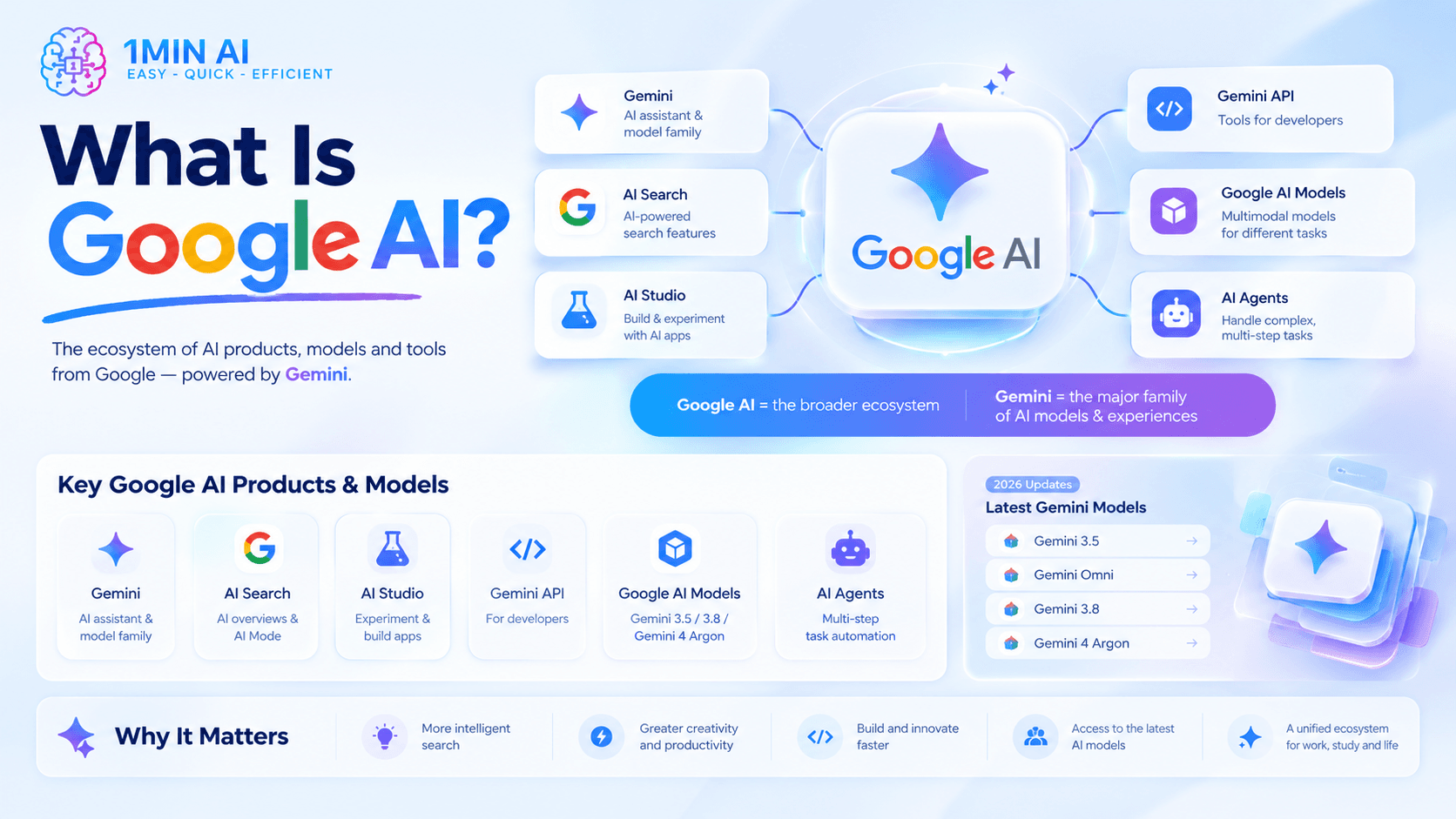
Google AI is the broader ecosystem of artificial intelligence products, models, research, and features developed by Google.
It includes consumer-facing products such as Gemini and AI-powered Search, as well as developer platforms and AI models for coding, reasoning, multimodal tasks, agents, image generation, audio, and video.
So when someone searches for "Google AI," they could be looking for several different things:
- Gemini — Google's AI assistant and model family
- Google AI Search — AI-powered features integrated into Google Search
- Google AI Studio — a platform for experimenting with and building AI applications
- Gemini API — tools for developers building with Gemini
- Google AI models — different Gemini models optimized for different tasks
- AI agents — systems designed to perform more complex, multi-step tasks
Google has continued expanding this ecosystem throughout 2026. At Google I/O, the company introduced Gemini 3.5 and Gemini Omni, while later updates added additional Gemini 3.8 models and announced Gemini 4 Argon.
The easiest way to think about it is:
Google AI = the broader ecosystem
Gemini = Google's major family of AI models and AI experiences
What Can You Do With Google AI?
Google AI can help with much more than answering questions.
1. Write and Edit Content
You can use Gemini to create and improve:
- Blog posts
- Social media content
- Emails
- Product descriptions
- Ad copy
- Scripts
- Headlines
- Outlines
- Business documents
Instead of asking: Write a blog about AI marketing.
Give the model more context: Write a 1,200-word practical guide for small business owners explaining how to use AI for marketing. Cover content creation, customer research, email marketing, and social media. Use a professional but conversational tone and avoid exaggerated claims.
The more clearly you define the audience, goal, and constraints, the easier it is to get a useful first draft.
2. Research and Summarize Information
Google is also integrating AI more deeply into Search.
AI Overviews can provide AI-generated summaries for certain searches, while AI Mode is designed for more conversational and complex searches. Google says AI Mode can break questions into subtopics and perform multiple searches to help answer more complicated requests.
For example, instead of searching: best laptop for video editing
you could ask: Compare laptops for video editing under $1,500. Prioritize GPU performance, display quality, RAM, battery life, and portability. Recommend three options for a freelance video editor.
You can then ask follow-up questions to narrow the results.
For important decisions, however, always check the underlying sources rather than relying entirely on an AI-generated answer.
3. Analyze Images and Documents
Gemini was designed as a multimodal AI model family, meaning Google's models can work across different types of information rather than being limited to text. Google's original Gemini architecture was designed to understand combinations of text, images, audio, video, and code.
Depending on the specific model and product, you can use Google AI to:
- Analyze an image
- Explain a chart
- Summarize a document
- Extract information from a file
- Review visual content
- Brainstorm from an image
- Work with multimedia information
This makes Google AI useful for students, researchers, marketers, designers, developers, and business teams.
4. Code and Solve Technical Problems
Google has increasingly positioned Gemini for software development and agentic coding.
At Google I/O 2026, Google introduced Gemini 3.5 Flash with a focus on coding and complex agentic workflows. Google says the model is designed to plan, build, and iterate on real-world tasks.
Developers can use Google's AI ecosystem to experiment with models, generate code, debug problems, and build applications around Gemini.
5. Create and Work With Multimedia
Google's AI ecosystem is also moving beyond text.
Gemini Omni was introduced as a multimodal model capable of taking different types of inputs and generating video, while Google's broader Gemini lineup continues to expand across image, audio, video, and live conversational experiences.
This means Google AI is increasingly becoming a platform for creating and working with different types of media, not simply a text chatbot.
Google AI Search: AI Overviews vs. AI Mode
If you search for "Google AI," you may also encounter Google's AI-powered Search features.
AI Overviews
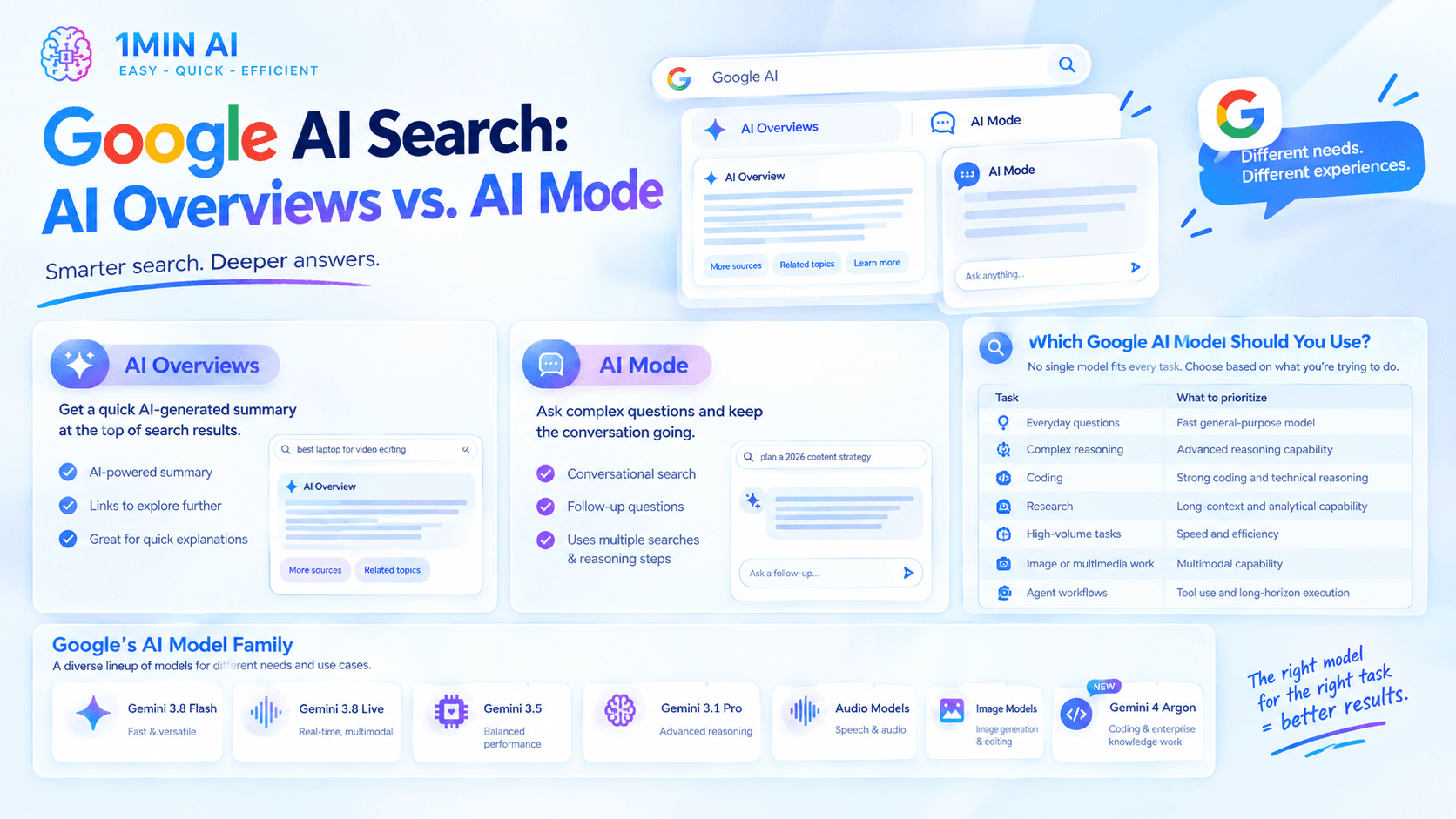
AI Overviews provide an AI-generated summary at the top of certain search results and include links for exploring the topic further.
They are useful when you want a quick explanation before deciding which sources to read.
AI Mode
AI Mode is designed for more complex, conversational searches.
You can ask a question, review the response, and continue with follow-up questions without restarting the search from scratch.
Google has described AI Mode as a deeper AI Search experience that can use multiple searches and reasoning steps to address complicated questions.
For example: I'm starting a small ecommerce business selling sustainable home products. Research the market, identify three customer segments, compare competitors, and suggest five content opportunities for each segment.
That type of query requires considerably more context than a traditional keyword search.
Which Google AI Model Should You Use?
There isn't one Google AI model that is best for every task.
Google's model family is now highly diverse. Its current catalog includes Gemini 3.8 Flash, Gemini 3.8 Live models, Gemini 3.5 variants, Gemini 3.1 Pro, specialized audio models, image models, and other systems. Google has also announced Gemini 4 Argon as its next frontier model for coding and enterprise knowledge work.
Rather than memorizing every model name, choose based on the task.
| Task | What to prioritize |
|---|---|
| Everyday questions | Fast general-purpose model |
| Complex reasoning | Advanced reasoning capability |
| Coding | Strong coding and technical reasoning |
| Research | Long-context and analytical capability |
| High-volume tasks | Speed and efficiency |
| Image or multimedia work | Multimodal capability |
| Agent workflows | Tool use and long-horizon execution |
The best model can also change as new versions are released.
That's why comparing models can sometimes be more useful than committing to one model for every task.
How to Use Google AI With 1minAI
If you want to experiment with Gemini while also comparing it with other AI models, 1minAI offers a multi-model AI workspace.
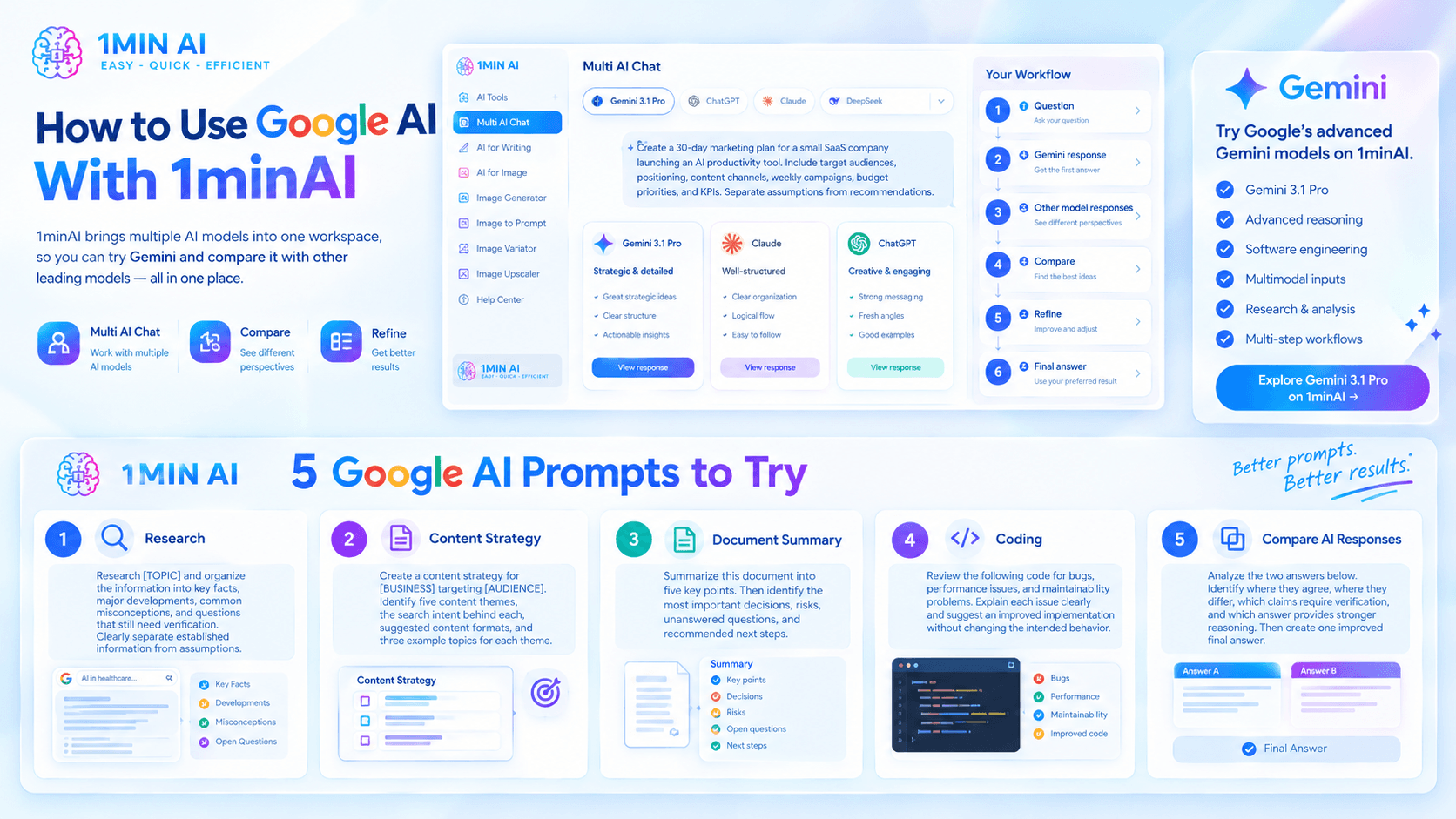
Its Multi AI Chat experience lets you work with multiple leading AI models from one place rather than constantly switching between separate AI platforms.
For example, you can use this workflow:
Question → Gemini response → Other model responses → Compare → Refine → Final answer
This can be especially useful when the quality of the answer matters.
Imagine you're creating a marketing strategy. Instead of asking one model and immediately accepting its answer, you could ask several models:
Create a 30-day marketing plan for a small SaaS company launching an AI productivity tool. Include target audiences, positioning, content channels, weekly campaigns, budget priorities, and KPIs. Separate assumptions from recommendations.
You can then compare the responses.
One model may produce stronger strategic ideas. Another may structure the plan more clearly. A third may provide better messaging.
The goal isn't to use more AI for the sake of it. The goal is to compare, verify, and refine before using the final output.
If you specifically want to try Google's advanced Gemini models, you can also explore [Free AI Chat with Gemini 3.1 Pro on 1minAI]. 1minAI's Gemini 3.1 Pro page positions the model for advanced reasoning, software engineering, multimodal inputs, research, and multi-step workflows.
5 Google AI Prompts to Try
Prompt 1: Research
Research [TOPIC] and organize the information into key facts, major developments, common misconceptions, and questions that still need verification. Clearly separate established information from assumptions.
Prompt 2: Content Strategy
Create a content strategy for [BUSINESS] targeting [AUDIENCE]. Identify five content themes, the search intent behind each, suggested content formats, and three example topics for each theme.
Prompt 3: Document Summary
Summarize this document into five key points. Then identify the most important decisions, risks, unanswered questions, and recommended next steps.
Prompt 4: Coding
Review the following code for bugs, performance issues, and maintainability problems. Explain each issue clearly and suggest an improved implementation without changing the intended behavior.
Prompt 5: Compare AI Responses
Analyze the two answers below. Identify where they agree, where they differ, which claims require verification, and which answer provides stronger reasoning. Then create one improved final answer.
Conclusion
Google AI has evolved from a single AI assistant into a much broader ecosystem.
Gemini remains one of Google's central AI experiences, while Google's AI capabilities now extend across Search, developer tools, multimodal models, agents, coding, and creative applications. The model lineup is also evolving quickly, with new Gemini versions and specialized models continuing to appear throughout 2026.
For users, the most useful question isn't simply "Which Google AI model is the best?"
It's:
"Which AI model is best for this task?"
And when you're unsure, comparing multiple models can give you a better way to evaluate the answer.
With 1minAI, you can access Gemini alongside other leading AI models, compare their responses, and refine the result in one AI workspace.
For further information, explore Free AI Chat with Gemini 3.1 Pro on 1minAI
Discover more AI features: https://1min.ai/features
Try 1minAI agent now: https://app.1min.ai/ai-agent-demo
Alternatives
Discover the best alternatives to 1minAI and compare features, pricing, and use cases.

1min.AI vs OpenRouter
1min.AI vs. OpenRouter: Compare the ready-to-use AI creation product against the technical API tool. Find out if you need a zero-code creative studio or a coding infrastructure hub.
 Ngoc Hong
1min.AI vs Lovart
Compare 1min.AI vs Lovart across features, pricing, credits, brand tools, and use cases to find the right AI platform for your workflow.
Ngoc Hong
1min. AI vs Dola AI
Looking for a Dola AI alternative? Compare 1min.AI vs Dola AI on video generation, free plans, pricing and privacy to pick the right AI app.
Ngoc HongAI Tools
Discover the best AI tools to boost productivity, creativity, and everyday work.

Create Consistent Cartoon Content in Just a Few Steps
Create engaging cartoon videos for TikTok and Reels with 1min.AI. Research ideas, create characters, and turn images into animated videos in 3 simple steps.
 Lien Anh Vu
One Product, 10 UGC Creatives: How AI Makes Content Testing Easier
Create more authentic UGC with an AI UGC video generator, test more creative angles and scale affiliate content without filming every version.
Lien Anh Vu
Top 4 Affordable AI Tools for Startup Founders
Discover the top 4 affordable AI tools for startup founders to validate ideas, build products, create content, and launch faster without overspending.
 Tram Ta
AI Features
Comprehensive AI features that streamline workflows, improve efficiency, and empower teams to achieve more.
Create Consistent Cartoon Content in Just a Few Steps
Create engaging cartoon videos for TikTok and Reels with 1min.AI. Research ideas, create characters, and turn images into animated videos in 3 simple steps.
Lien Anh VuOne Product, 10 UGC Creatives: How AI Makes Content Testing Easier
Create more authentic UGC with an AI UGC video generator, test more creative angles and scale affiliate content without filming every version.
Lien Anh Vu
1minAI: Free AI Grammar Checker
Check grammar for free with 1minAI’s AI grammar checker. Find grammar, spelling, and writing mistakes, improve clarity, and polish your content in seconds.
Tram TaAI Use Cases
A curated collection of AI use cases for business, productivity, and industry-specific applications.
Create Consistent Cartoon Content in Just a Few Steps
Create engaging cartoon videos for TikTok and Reels with 1min.AI. Research ideas, create characters, and turn images into animated videos in 3 simple steps.
Lien Anh VuOne Product, 10 UGC Creatives: How AI Makes Content Testing Easier
Create more authentic UGC with an AI UGC video generator, test more creative angles and scale affiliate content without filming every version.
Lien Anh Vu
Best Time to Post on Instagram: A Practical Guide for Better Engagement
Discover the best time to post on Instagram, including the best days and times for different audiences, plus tips to find the ideal posting schedule for your account.
Tram TaAI Tutorials
Learn how to use AI with practical, step-by-step tutorials.

Black Friday AI Tool Deals in 2026
Discover what Black Friday AI tool deals 2026 has to offer. Find out how to secure the 1min.AI lifetime deal via AppSumo, Dealify, Stack Social, and verify on Trustpilot, Slashdot, and Software Advice.
 Hang Nguyen
Create Consistent Cartoon Content in Just a Few Steps
Create engaging cartoon videos for TikTok and Reels with 1min.AI. Research ideas, create characters, and turn images into animated videos in 3 simple steps.
Lien Anh Vu
[Seedance 2.5 New] Better AI Product Videos, Less Rework in 1min.AI
Use Seedance 2.5 image to video on 1min.AI to create more consistent AI product videos, reduce failed generations, save credits, and improve UGC workflows.
Lien Anh VuAI Guides
Learn AI faster with practical guides, real-world examples, and actionable best practices.

Safely Buy AI Tools Online: 2026 Black Friday Guide
Discover how to find and secure the best Black Friday AI deals online. Learn expert strategies to avoid scams, combat subscription fatigue, and verify software.
Hang NguyenCreate Consistent Cartoon Content in Just a Few Steps
Create engaging cartoon videos for TikTok and Reels with 1min.AI. Research ideas, create characters, and turn images into animated videos in 3 simple steps.
Lien Anh Vu[Seedance 2.5 New] Better AI Product Videos, Less Rework in 1min.AI
Use Seedance 2.5 image to video on 1min.AI to create more consistent AI product videos, reduce failed generations, save credits, and improve UGC workflows.
Lien Anh VuAI Solutions
Browse the best AI solutions for automation, coding, research, productivity, customer support, marketing, and business workflows.
Safely Buy AI Tools Online: 2026 Black Friday Guide
Discover how to find and secure the best Black Friday AI deals online. Learn expert strategies to avoid scams, combat subscription fatigue, and verify software.
Hang NguyenCreate Consistent Cartoon Content in Just a Few Steps
Create engaging cartoon videos for TikTok and Reels with 1min.AI. Research ideas, create characters, and turn images into animated videos in 3 simple steps.
Lien Anh VuOne Product, 10 UGC Creatives: How AI Makes Content Testing Easier
Create more authentic UGC with an AI UGC video generator, test more creative angles and scale affiliate content without filming every version.
Lien Anh VuAI Models
Explore the world's leading AI models in one place.
Create Consistent Cartoon Content in Just a Few Steps
Create engaging cartoon videos for TikTok and Reels with 1min.AI. Research ideas, create characters, and turn images into animated videos in 3 simple steps.
Lien Anh VuOne Product, 10 UGC Creatives: How AI Makes Content Testing Easier
Create more authentic UGC with an AI UGC video generator, test more creative angles and scale affiliate content without filming every version.
Lien Anh Vu[Seedance 2.5 New] Better AI Product Videos, Less Rework in 1min.AI
Use Seedance 2.5 image to video on 1min.AI to create more consistent AI product videos, reduce failed generations, save credits, and improve UGC workflows.
Lien Anh VuAI Comparisons
Compare AI tools, models, and platforms to find the best fit for your needs.

Kling AI Vs Veo 3: Which Model Wins?
Kling AI vs Veo 3: compare motion, native audio, pricing & free tiers to see which AI video generator wins for your project - try both on 1min.AI.
 Trang Tran
[Seedance 2.5 New] Better AI Product Videos, Less Rework in 1min.AI
Use Seedance 2.5 image to video on 1min.AI to create more consistent AI product videos, reduce failed generations, save credits, and improve UGC workflows.
Lien Anh Vu
DeepSeek V4 Pro vs Flash Comparison
Compare DeepSeek V4 Pro vs DeepSeek V4 Flash metrics. Optimize your agentic apps and improve AI fact checking on 1min.ai today.
Ngoc HongAI Integrations
Seamlessly integrate AI with the tools you already use to automate work and boost productivity.

POV: You Have 10+ Posts to Make Every Day
Learn how to build an AI content workflow that helps content creators produce 10+ social media posts a day faster with AI brainstorming, image generation, and content creation.
Lien Anh Vu
How to Use an AI Fashion Video Generator for Fashion Week 2026
Turn Fashion Week 2026 ideas into stunning fashion videos with AI. Learn how to brainstorm, create visuals, and transform images into videos with one simple workflow.
Lien Anh Vu
Stop Switching Between AI Apps: How AI Integration Transforms Employer Branding
Discover how AI integration helps HR teams streamline employer branding by combining AI writing, documents, images, video, and multiple AI models into one workspace.
Tram TaAI for Industries
Find the best AI tools and workflows for healthcare, finance, education, legal, manufacturing, retail, real estate, and more

7 Low-Cost AI Business Ideas for Your Startup
Explore 7 low-cost AI business ideas you can start with a small budget, from content and video services to AI consulting, reselling, and automation.
Tram Ta
How to Start a One-Person AI Business: 7 Models You Can Run Solo
Learn how to start a one-person AI business with 7 practical models, from AI consulting and content services to automation and software reselling.
Tram Ta
Free AI Image Generator For Ecommerce
Turn phone photos into studio, white-background, and lifestyle product images. Try the best AI image generator for ecommerce online free with 1min.AI.
Trang TranAI Agents
Discover and run AI agents to automate tasks across your work and daily life.
1minAI: Free AI Grammar Checker
Check grammar for free with 1minAI’s AI grammar checker. Find grammar, spelling, and writing mistakes, improve clarity, and polish your content in seconds.
Tram Ta
AI Agents for Facebook
Use an AI Agent for Facebook to create content, generate images, schedule posts, and publish from your documents and conversations.
Ngoc Hong
AI Agent vs AI Assistant: Which One Actually Saves Designers More Time?
Learn the difference between AI Agent vs AI Assistant and discover which solution helps designers automate repetitive work, reduce revisions, and save more time.
Lien Anh VuAI Workflows
Explore ready-to-use AI workflows for productivity, marketing, sales, support, and more.
Create Consistent Cartoon Content in Just a Few Steps
Create engaging cartoon videos for TikTok and Reels with 1min.AI. Research ideas, create characters, and turn images into animated videos in 3 simple steps.
Lien Anh VuOne Product, 10 UGC Creatives: How AI Makes Content Testing Easier
Create more authentic UGC with an AI UGC video generator, test more creative angles and scale affiliate content without filming every version.
Lien Anh VuPOV: You Have 10+ Posts to Make Every Day
Learn how to build an AI content workflow that helps content creators produce 10+ social media posts a day faster with AI brainstorming, image generation, and content creation.
Lien Anh VuNewsletter
Weekly AI Innovations with 1minAI

🔮 Weekly AI Innovations #140: Deepseek 4.1 Flash & Gemini Upgrades
Explore Deepseek 4.1 Flash and new Gemini models on 1min.ai. Plus, check our update on your Billing - Usage page for better clarity.
Hang Nguyen
🔮 Weekly AI Innovations #136: Grok 4.6 and Smart Data Retention
Discover the latest 1min.ai updates! Upgrade to Grok 4.6 for blazing-fast AI, and check our new Data Retention policies to secure your files today.
Hang Nguyen
🔮 Weekly AI Innovations #139: Dawn of the next-gen AI
Discover the immense power of GPT-6 Astra and Claude Fable 5.1. Unlock next-generation AI models on 1min.ai to solve complex tasks effortlessly.
Hang Nguyen