
Use Claude Haiku 5.5 Free on 1minAI: Do You Know How?

Tram Ta
October 29, 2026
Learn how to try Claude Haiku 5.5 on 1minAI, explore its key features, discover practical prompts, and improve your AI chat workflow.
Want to try Claude Haiku 5.5 without building a complicated AI workflow? This latest Haiku model from Anthropic is designed for fast responses and efficient handling of everyday tasks, from summarizing documents to classifying information and assisting with coding.
With 1minAI, you can explore AI chat workflows, compare responses from multiple AI assistants, and organize your conversations in one workspace. If Claude Haiku 5.5 is available in your model selector and your account has sufficient free usage or credits, you can use the platform to try it without setting up a separate API integration.
In this guide, you'll learn what Claude Haiku 5.5 does, how to check whether you can access it on 1minAI, and how to get better results from your prompts.
What Is Claude Haiku 5.5?
Claude Haiku 5.5 is a language model developed by Anthropic and released on October 7, 2026. It is designed for speed, efficiency, and high-volume tasks where users need useful results without the overhead of a larger model. Anthropic highlights use cases such as summarization, classification, request routing, browser use, and supporting other AI agents.
The model is part of Anthropic's Claude 5.5 family, alongside Sonnet 5.5 and Opus 5.5. Each model serves different needs, so choosing the right one depends on the complexity of your task, the response quality you need, and your budget.
Key Features of Claude Haiku 5.5
Here are several reasons to explore this model:
- Fast responses: Designed for tasks where low latency matters, including interactive chat and quick information processing.
- Efficient everyday workflows: Useful for summarizing content, extracting information, classifying text, and handling repetitive requests.
- Coding assistance: Can help with scoped coding tasks and support more complex development workflows as a subagent.
- Adaptive thinking: Supports adjustable effort settings that let developers balance response quality and efficiency.
- Large context capacity: The Claude Platform documentation lists a context window of up to 1 million tokens, although the limits available to you can depend on the platform and integration.
These capabilities make Claude Haiku 5.5 worth trying for routine work, quick research, and structured text tasks. For especially difficult reasoning or complex coding projects, you may want to compare its output with a more capable model.
Why Use Claude Haiku 5.5 on 1minAI?
Accessing an AI model through a multi-model workspace can make it easier to experiment with different assistants without switching between separate interfaces for every task.
1minAI offers AI chat features that can support brainstorming, content creation, analysis, and other everyday workflows.
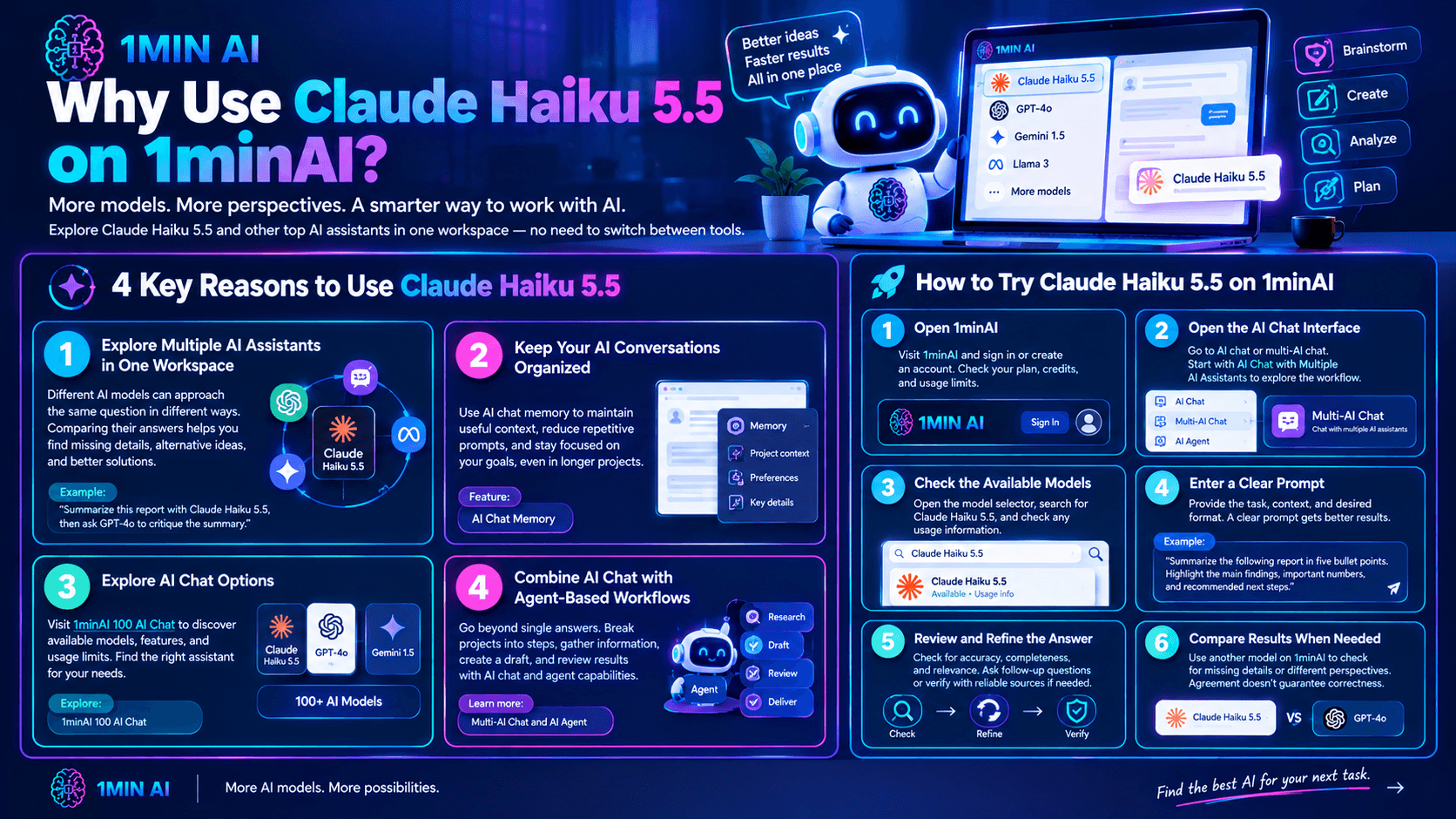
1. Explore Multiple AI Assistants in One Workspace
Different AI models can approach the same question in different ways. Comparing their answers can help you identify missing details, alternative ideas, and opportunities to improve a draft.
With 1minAI AI Chat with Multiple AI Assistants, you can explore a multi-model workflow instead of relying on only one assistant.
For example, you might ask Claude Haiku 5.5 to summarize a report, then use another available model to critique the summary or suggest improvements.
2. Keep Your AI Conversations Organized
When you're researching a topic or working on a long project, maintaining useful context can reduce repetitive prompting.
The 1minAI AI Chat Memory feature is worth exploring if you want to understand how conversational context and memory can support your workflow. Review the feature's current behavior and settings to see how it fits your needs.
3. Explore AI Chat Options
You can also visit 1minAI 100 AI Chat to explore the platform's AI chat offering and available model options.
Model availability, usage limits, and free access can change. Check the current interface and account terms before assuming that a particular model is included in your plan.
4. Combine AI Chat with Agent-Based Workflows
Some tasks involve more than generating one answer. You may need to break a project into steps, gather information, create a draft, and review the result.
The 1minAI Multi-AI Chat and AI Agent page introduces workflows that combine AI chat and agent capabilities. Explore the available options to see which tools are appropriate for your task.
How to Try Claude Haiku 5.5 on 1minAI
Follow these steps to check access and begin using the model.
Step 1: Open 1minAI
Visit 1minAI and sign in or create an account if required.
Review the current plan and usage information so you understand what free access, credits, or limits apply to your account.
Step 2: Open the AI Chat Interface
Navigate to the platform's AI chat or multi-AI chat feature.
You can start with AI Chat with Multiple AI Assistants to explore the available chat workflow.
Step 3: Check the Available Models
Open the model selector and search for Claude Haiku 5.5.
If the model appears, select it and check any usage information shown by the platform. If it does not appear, it may not currently be available in that interface or for your account.
Important: This guide does not assume that Claude Haiku 5.5 is always available for free on 1minAI. Model access, free credits, and usage restrictions may change, so verify the current listing before starting.
Step 4: Enter a Clear Prompt
Describe the task, provide the necessary context, and specify the format you want.
For example:
"Summarize the following report in five bullet points. Highlight the main findings, important numbers, and recommended next steps. Do not add information that is not supported by the report."
A clear prompt usually produces a more useful answer than a vague request such as "summarize this."
Step 5: Review and Refine the Answer
Check the response for accuracy, completeness, and relevance.
If the result is too general, ask a follow-up question. If the task involves facts, calculations, or important decisions, verify the answer against reliable sources or your original materials.
Step 6: Compare Results When Needed
For a task that requires more confidence, compare the response with another model available on 1minAI.
You can ask a second assistant to identify omissions, challenge assumptions, or suggest a clearer explanation. Different model outputs are useful for comparison, but agreement between models does not guarantee that an answer is correct.
5 Practical Ways to Use Claude Haiku 5.5
Claude Haiku 5.5 is particularly suited to quick, well-defined tasks. Here are five examples you can try if the model is available to you.
1. Summarize Long Text
Use the model to turn lengthy reports, articles, meeting notes, or research materials into concise summaries.
Prompt:
"Summarize the following text in no more than 200 words. Include the main argument, three important findings, and any stated limitations. Use only the information provided."
This approach is useful when you need to understand the main points before reading a full document.
2. Extract Key Information
AI can help convert unstructured text into a consistent format for easier review.
Prompt:
"Extract the company names, dates, products, and stated action items from the following text. Return the results in a table. Use 'Not specified' when a field is missing, and do not guess."
This is useful for organizing notes, reviewing business documents, or preparing information for further analysis. Always check extracted details against the original source before relying on them.
3. Draft and Improve Content
Claude Haiku 5.5 can help produce first drafts and revise existing text.
Prompt:
"Rewrite the following paragraph for a professional business audience. Keep the original meaning, remove repetition, improve clarity, and use a natural tone. Do not introduce new claims."
You can use this for email drafts, internal updates, short descriptions, and other routine writing tasks. Review the final text to ensure it reflects your intended meaning and voice.
4. Classify Feedback or Requests
If you receive many comments, messages, or support requests, the model can help group them into categories.
Prompt:
"Classify each customer message into one of these categories: Billing, Technical Issue, Feature Request, Account Access, or Other. Return a table with the original message, category, and a one-sentence explanation. Do not infer details that the message does not contain."
This type of structured classification is useful for organizing feedback. For sensitive customer information, follow your organization's privacy and data-handling policies.
5. Get Help with Simple Coding Tasks
Claude Haiku 5.5 can assist with explaining code, generating small functions, and reviewing scoped programming tasks.
Prompt:
"Review the following Python function. Explain what it does, identify likely bugs, and suggest a minimal correction. Preserve the existing behavior unless a change is necessary. Include a small test case for the correction."
For complex applications, security-sensitive code, or multi-step development projects, review the solution carefully and consider comparing it with a stronger coding model.
Claude Haiku 5.5 vs. Other Claude Models
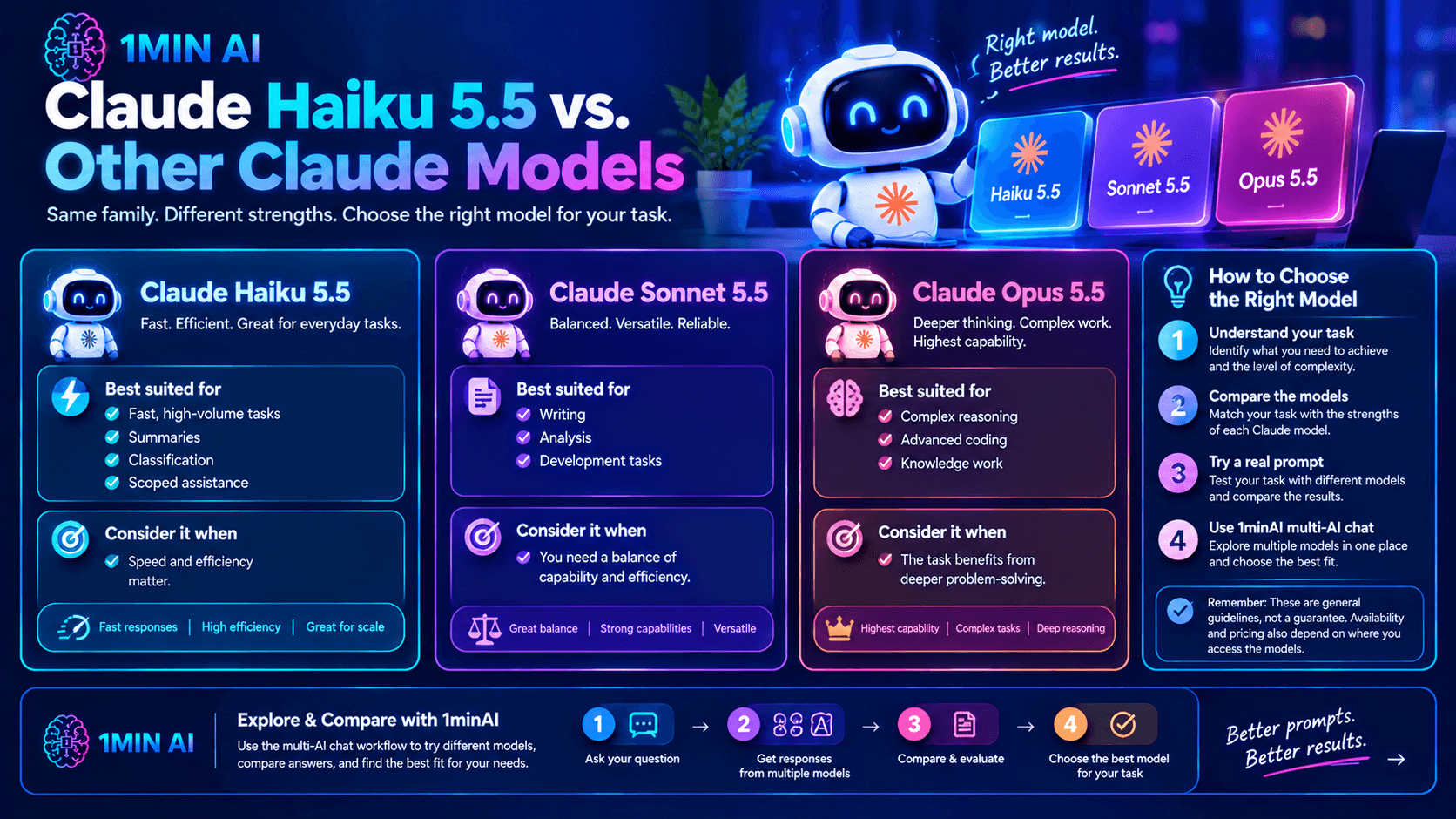
Claude Haiku 5.5, Sonnet 5.5, and Opus 5.5 are designed for different levels of work. The best choice depends on what you need rather than which model has the highest number in its name.
| Model | Best suited for | Consider it when |
|---|---|---|
| Claude Haiku 5.5 | Fast, high-volume tasks, summaries, classification, and scoped assistance | Speed and efficiency matter |
| Claude Sonnet 5.5 | A broader range of writing, analysis, and development tasks | You need a balance of capability and efficiency |
| Claude Opus 5.5 | More demanding reasoning, complex coding, and knowledge work | The task benefits from deeper problem-solving |
These are general selection guidelines, not a guarantee that one model will outperform another on every prompt. Availability and pricing also depend on where you access the models.
If you are unsure which model suits your task, try a representative prompt and compare the results. The 1minAI multi-AI chat workflow can help you explore available alternatives in one place.
Frequently Asked Questions
Is Claude Haiku 5.5 free on 1minAI?
Free access depends on the models and usage allowances currently offered through 1minAI. Check the model selector and your account's available credits or limits to confirm whether you can use Claude Haiku 5.5 without paying.
Do I need an API key to use Claude Haiku 5.5 on 1minAI?
If the model is available directly in 1minAI's chat interface, you can generally use the platform's interface rather than setting up your own direct API integration. Follow the current platform instructions and account requirements.
What is Claude Haiku 5.5 best at?
Anthropic positions Claude Haiku 5.5 for fast, efficient tasks such as summarization, classification, extraction, routing, and agent support. It can also help with writing and coding, although complex work may benefit from a more capable model or additional review.
Can I compare Claude Haiku 5.5 with other AI models?
Yes, if the relevant models are available in your workspace. Use 1minAI AI Chat with Multiple AI Assistants to explore multi-model workflows and compare responses to the same task.
How can I get more accurate answers?
Give clear instructions, provide relevant context, specify the expected output, and ask the model to identify uncertainty rather than guess. Verify important claims and test generated code before using it in production.
Conclusion
Claude Haiku 5.5 is designed to make fast, efficient AI assistance practical for everyday tasks, including summarization, information extraction, content revision, classification, and scoped coding work.
With 1minAI, you can explore AI chat, compare available assistants, and build a workflow that uses different models for different needs. To get started, open the platform, check whether Claude Haiku 5.5 is available to your account, and try one of the prompts in this guide.
Explore these 1minAI resources to continue:
For more AI capabilities, visit 1minAI Features and try the 1minAI Agent demo.
- #Commerce
Alternatives
Discover the best alternatives to 1minAI and compare features, pricing, and use cases.

1min.AI vs OpenRouter
1min.AI vs. OpenRouter: Compare the ready-to-use AI creation product against the technical API tool. Find out if you need a zero-code creative studio or a coding infrastructure hub.
 Ngoc Hong
1min.AI vs Lovart
Looking for a Lovart alternative? Compare creative workflows, pricing considerations, and practical prompts to see whether 1min.AI fits your team.
Ngoc Hong
1min.AI vs Jarvis AI
Compare 1min.AI vs Jarvis AI to discover which AI platform is better for writing, research, automation, and content creation. Find the best AI assistant for your workflow.
Ngoc HongAI Tools
Discover the best AI tools to boost productivity, creativity, and everyday work.

Create Consistent Cartoon Content in Just a Few Steps
Create engaging cartoon videos for TikTok and Reels with 1min.AI. Research ideas, create characters, and turn images into animated videos in 3 simple steps.
 Lien Anh Vu
One Product, 10 UGC Creatives: How AI Makes Content Testing Easier
Create more authentic UGC with an AI UGC video generator, test more creative angles and scale affiliate content without filming every version.
Lien Anh Vu
Top 4 Affordable AI Tools for Startup Founders
Discover the top 4 affordable AI tools for startup founders to validate ideas, build products, create content, and launch faster without overspending.
 Tram Ta
AI Features
Comprehensive AI features that streamline workflows, improve efficiency, and empower teams to achieve more.
Create Consistent Cartoon Content in Just a Few Steps
Create engaging cartoon videos for TikTok and Reels with 1min.AI. Research ideas, create characters, and turn images into animated videos in 3 simple steps.
Lien Anh VuOne Product, 10 UGC Creatives: How AI Makes Content Testing Easier
Create more authentic UGC with an AI UGC video generator, test more creative angles and scale affiliate content without filming every version.
Lien Anh Vu
1minAI: Free AI Grammar Checker
Check grammar for free with 1minAI’s AI grammar checker. Find grammar, spelling, and writing mistakes, improve clarity, and polish your content in seconds.
Tram TaAI Use Cases
A curated collection of AI use cases for business, productivity, and industry-specific applications.
Create Consistent Cartoon Content in Just a Few Steps
Create engaging cartoon videos for TikTok and Reels with 1min.AI. Research ideas, create characters, and turn images into animated videos in 3 simple steps.
Lien Anh VuOne Product, 10 UGC Creatives: How AI Makes Content Testing Easier
Create more authentic UGC with an AI UGC video generator, test more creative angles and scale affiliate content without filming every version.
Lien Anh Vu
Best Time to Post on Instagram: A Practical Guide for Better Engagement
Discover the best time to post on Instagram, including the best days and times for different audiences, plus tips to find the ideal posting schedule for your account.
Tram TaAI Tutorials
Learn how to use AI with practical, step-by-step tutorials.

Black Friday AI Tool Deals in 2026
Discover what Black Friday AI tool deals 2026 has to offer. Find out how to secure the 1min.AI lifetime deal via AppSumo, Dealify, Stack Social, and verify on Trustpilot, Slashdot, and Software Advice.
 Hang Nguyen
Create Consistent Cartoon Content in Just a Few Steps
Create engaging cartoon videos for TikTok and Reels with 1min.AI. Research ideas, create characters, and turn images into animated videos in 3 simple steps.
Lien Anh Vu
[Seedance 2.5 New] Better AI Product Videos, Less Rework in 1min.AI
Use Seedance 2.5 image to video on 1min.AI to create more consistent AI product videos, reduce failed generations, save credits, and improve UGC workflows.
Lien Anh VuAI Guides
Learn AI faster with practical guides, real-world examples, and actionable best practices.

Safely Buy AI Tools Online: 2026 Black Friday Guide
Discover how to find and secure the best Black Friday AI deals online. Learn expert strategies to avoid scams, combat subscription fatigue, and verify software.
Hang NguyenCreate Consistent Cartoon Content in Just a Few Steps
Create engaging cartoon videos for TikTok and Reels with 1min.AI. Research ideas, create characters, and turn images into animated videos in 3 simple steps.
Lien Anh Vu[Seedance 2.5 New] Better AI Product Videos, Less Rework in 1min.AI
Use Seedance 2.5 image to video on 1min.AI to create more consistent AI product videos, reduce failed generations, save credits, and improve UGC workflows.
Lien Anh VuAI Solutions
Browse the best AI solutions for automation, coding, research, productivity, customer support, marketing, and business workflows.
Safely Buy AI Tools Online: 2026 Black Friday Guide
Discover how to find and secure the best Black Friday AI deals online. Learn expert strategies to avoid scams, combat subscription fatigue, and verify software.
Hang NguyenCreate Consistent Cartoon Content in Just a Few Steps
Create engaging cartoon videos for TikTok and Reels with 1min.AI. Research ideas, create characters, and turn images into animated videos in 3 simple steps.
Lien Anh VuOne Product, 10 UGC Creatives: How AI Makes Content Testing Easier
Create more authentic UGC with an AI UGC video generator, test more creative angles and scale affiliate content without filming every version.
Lien Anh VuAI Models
Explore the world's leading AI models in one place.
Create Consistent Cartoon Content in Just a Few Steps
Create engaging cartoon videos for TikTok and Reels with 1min.AI. Research ideas, create characters, and turn images into animated videos in 3 simple steps.
Lien Anh VuOne Product, 10 UGC Creatives: How AI Makes Content Testing Easier
Create more authentic UGC with an AI UGC video generator, test more creative angles and scale affiliate content without filming every version.
Lien Anh Vu[Seedance 2.5 New] Better AI Product Videos, Less Rework in 1min.AI
Use Seedance 2.5 image to video on 1min.AI to create more consistent AI product videos, reduce failed generations, save credits, and improve UGC workflows.
Lien Anh VuAI Comparisons
Compare AI tools, models, and platforms to find the best fit for your needs.

Kling AI Vs Veo 3: Which Model Wins?
Kling AI vs Veo 3: compare motion, native audio, pricing & free tiers to see which AI video generator wins for your project - try both on 1min.AI.
 Trang Tran
[Seedance 2.5 New] Better AI Product Videos, Less Rework in 1min.AI
Use Seedance 2.5 image to video on 1min.AI to create more consistent AI product videos, reduce failed generations, save credits, and improve UGC workflows.
Lien Anh Vu
DeepSeek V4 Pro vs Flash Comparison
Compare DeepSeek V4 Pro vs DeepSeek V4 Flash metrics. Optimize your agentic apps and improve AI fact checking on 1min.ai today.
Ngoc HongAI Integrations
Seamlessly integrate AI with the tools you already use to automate work and boost productivity.

POV: You Have 10+ Posts to Make Every Day
Learn how to build an AI content workflow that helps content creators produce 10+ social media posts a day faster with AI brainstorming, image generation, and content creation.
Lien Anh Vu
How to Use an AI Fashion Video Generator for Fashion Week 2026
Turn Fashion Week 2026 ideas into stunning fashion videos with AI. Learn how to brainstorm, create visuals, and transform images into videos with one simple workflow.
Lien Anh Vu
Stop Switching Between AI Apps: How AI Integration Transforms Employer Branding
Discover how AI integration helps HR teams streamline employer branding by combining AI writing, documents, images, video, and multiple AI models into one workspace.
Tram TaAI for Industries
Find the best AI tools and workflows for healthcare, finance, education, legal, manufacturing, retail, real estate, and more

Free AI Product Description Generator
Write product descriptions that sell in minutes. Use this free AI product description generator to turn details or a photo into on-brand copy. Try 1min.AI.
Trang Tran
Best Business Productivity Tools for Startups to Maximize Profits | 1minAI
Discover the best business productivity tools for startups to save time, streamline workflows, reduce repetitive tasks, and support profitable growth with AI.
Tram Ta
Best AI Tool for Content Marketing |1minAI
Looking for the best AI tool for content marketing? See how 1minAI helps marketers research, write, repurpose, create visuals, and scale content from one AI workspace.
Tram TaAI Agents
Discover and run AI agents to automate tasks across your work and daily life.
1minAI: Free AI Grammar Checker
Check grammar for free with 1minAI’s AI grammar checker. Find grammar, spelling, and writing mistakes, improve clarity, and polish your content in seconds.
Tram Ta
AI Agents for Facebook
Use an AI Agent for Facebook to create content, generate images, schedule posts, and publish from your documents and conversations.
Ngoc Hong
AI Agent vs AI Assistant: Which One Actually Saves Designers More Time?
Learn the difference between AI Agent vs AI Assistant and discover which solution helps designers automate repetitive work, reduce revisions, and save more time.
Lien Anh VuAI Workflows
Explore ready-to-use AI workflows for productivity, marketing, sales, support, and more.
Create Consistent Cartoon Content in Just a Few Steps
Create engaging cartoon videos for TikTok and Reels with 1min.AI. Research ideas, create characters, and turn images into animated videos in 3 simple steps.
Lien Anh VuOne Product, 10 UGC Creatives: How AI Makes Content Testing Easier
Create more authentic UGC with an AI UGC video generator, test more creative angles and scale affiliate content without filming every version.
Lien Anh VuPOV: You Have 10+ Posts to Make Every Day
Learn how to build an AI content workflow that helps content creators produce 10+ social media posts a day faster with AI brainstorming, image generation, and content creation.
Lien Anh VuNewsletter
Weekly AI Innovations with 1minAI

🔮 Weekly AI Innovations #143: Update Update GPT-6, GPT-6.1 & Ideogram 4.0 & Ideogram 4.0
Access GPT-6 Sol, Luna, GPT-6.1 Sol, and Ideogram 4.0 on 1min.ai. Boost typography accuracy to 98.4% and cut reasoning latency by 45% in one platform.
Hang Nguyen
🔮 Weekly AI Innovations #142: Grok 4.7, Opus 5.5 & Sonnet 5.5 on 1min.ai
Access Grok 4.7, Claude Opus 5.5, and Sonnet 5.5 on 1min.ai. Cut subscription costs by up to 70% and process millions tokens in a single unified workspace.
Hang Nguyen
🔮 Weekly AI Innovations #141: Seedance 2.5 & Stable Audio 3: Next-Gen AI
Explore Seedance 2.0, 2.5, and StabilityAI's Stable Audio 3 on 1min.ai. Generate studio-grade audio and synchronized motion with next-gen generative AI.
Hang Nguyen