
Best Retro Dreamcore AI Prompts for Surreal Images & Videos

Lien Anh Vu
October 8, 2026
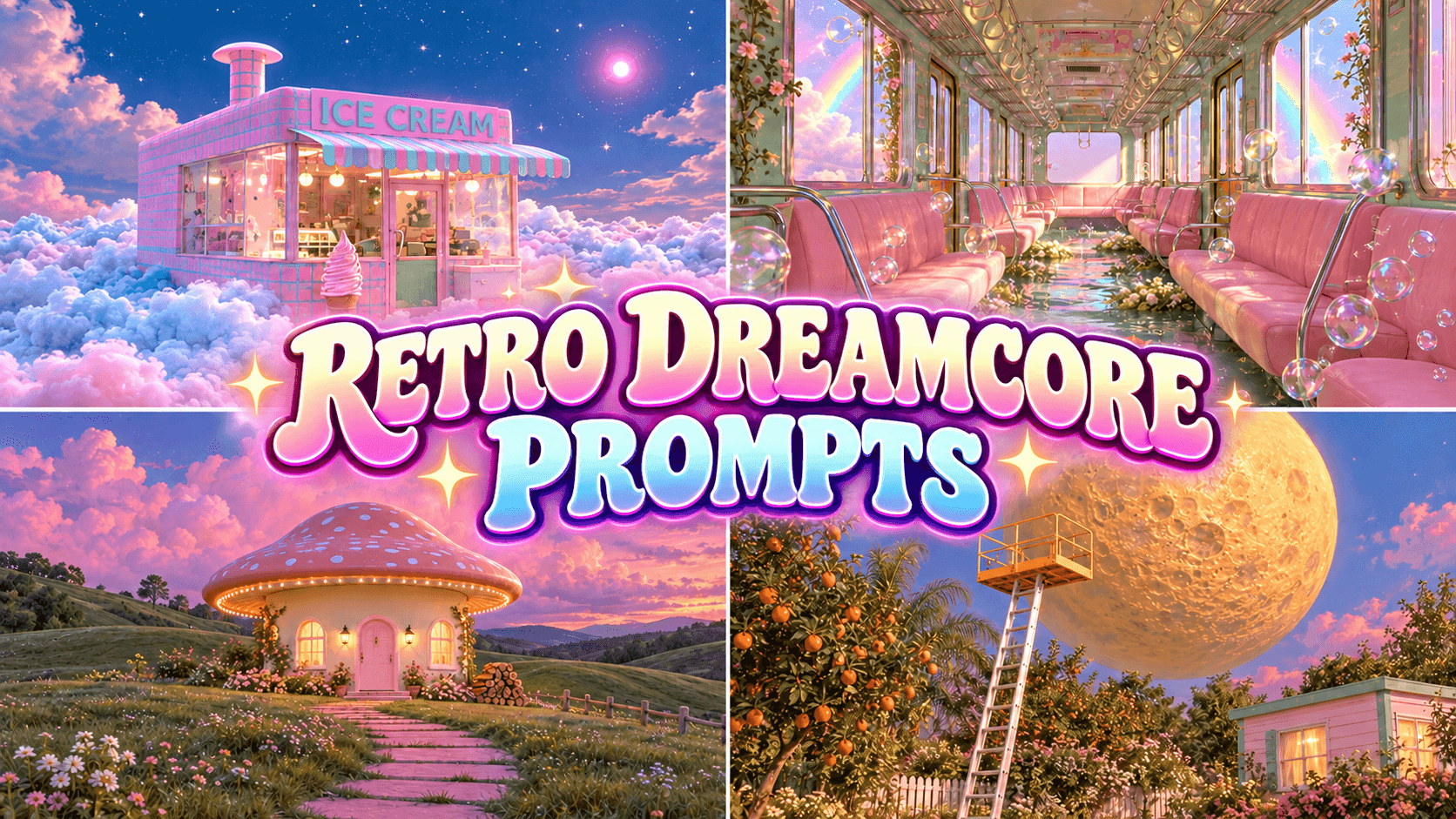
Explore Retro Dreamcore AI prompts for surreal images and videos. Create nostalgic dreamlike scenes, then turn them into cinematic AI videos with 1min.AI.
A man walks along the bottom of a lake and collects reflections of the moon in a shopping cart. A woman on a tiled rooftop carefully stitches a torn holographic cloud. A maintenance worker climbs a ladder to install what looks like a miniature sun inside an old street lamp.
These scenes are impossible, yet each one can be understood immediately because the setting and the action remain familiar. This contrast is one of the strongest characteristics of Retro Dreamcore. Instead of making every part of the image strange, the style usually begins with an ordinary environment and changes one rule of reality.
A good Retro Dreamcore prompt therefore needs more than words such as dreamy, surreal, or retro. It should establish the subject, environment, impossible action, lighting, palette, photographic texture, and the details that should remain realistic. For video, it also needs to explain exactly how the action develops and what should remain unchanged from the reference image.
This guide provides image and video prompts you can try with 1min.AI, along with a practical framework for creating your own Retro Dreamcore scenes.
What Is Retro Dreamcore?

Retro Dreamcore combines nostalgic visual elements with surreal, dreamlike imagery. The retro aesthetic may come from analog film textures, soft focus, faded colors, vintage clothing, older architecture, and the visual imperfections associated with older photography and media.
Dreamcore introduces impossible elements into familiar environments. A cloud can be repaired with a needle and thread. Moonlight can behave like a physical object. Stars can be collected, moved, or stored. A street lamp can use a miniature sun instead of a normal bulb.
These scenes can range from photorealistic compositions to stylized 3D CGI. The key is to establish a recognizable visual world before introducing an impossible action. A familiar setting makes the surreal element easier to understand and gives the scene a stronger visual identity.
Rather than applying surreal effects to every element, focus on one central visual transformation. A holographic cloud, for example, can stand out against an otherwise realistic rooftop, while a fully CGI environment can use exaggerated colors and scale to create a more fantastical atmosphere.
What Makes a Good Retro Dreamcore Prompt?
A strong Retro Dreamcore prompt starts with a scene that already makes sense without the fantasy element. Gardens, rooftops, lakes, old houses, streets, bedrooms, ladders, shopping carts, sewing tools, and household objects all work well because the viewer understands their normal purpose.
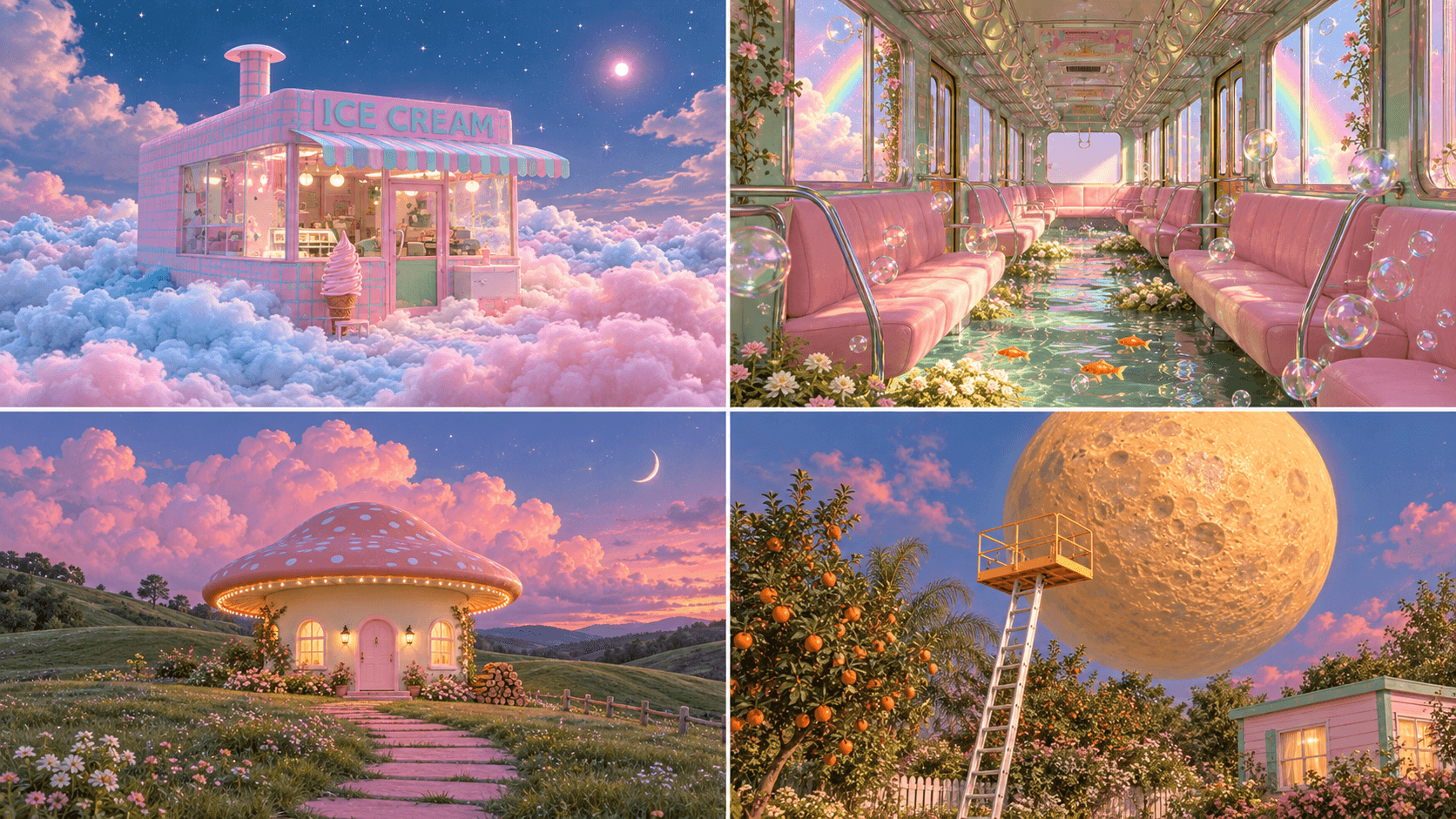
The next step is to introduce one impossible action. This action should be simple enough to understand immediately. “A woman sitting on the moon and fishing for stars” gives the scene a clear visual story. By comparison, combining several unrelated ideas such as floating furniture, three moons, glowing animals, melting buildings, and levitating flowers can make the image visually busy without giving it a stronger concept.
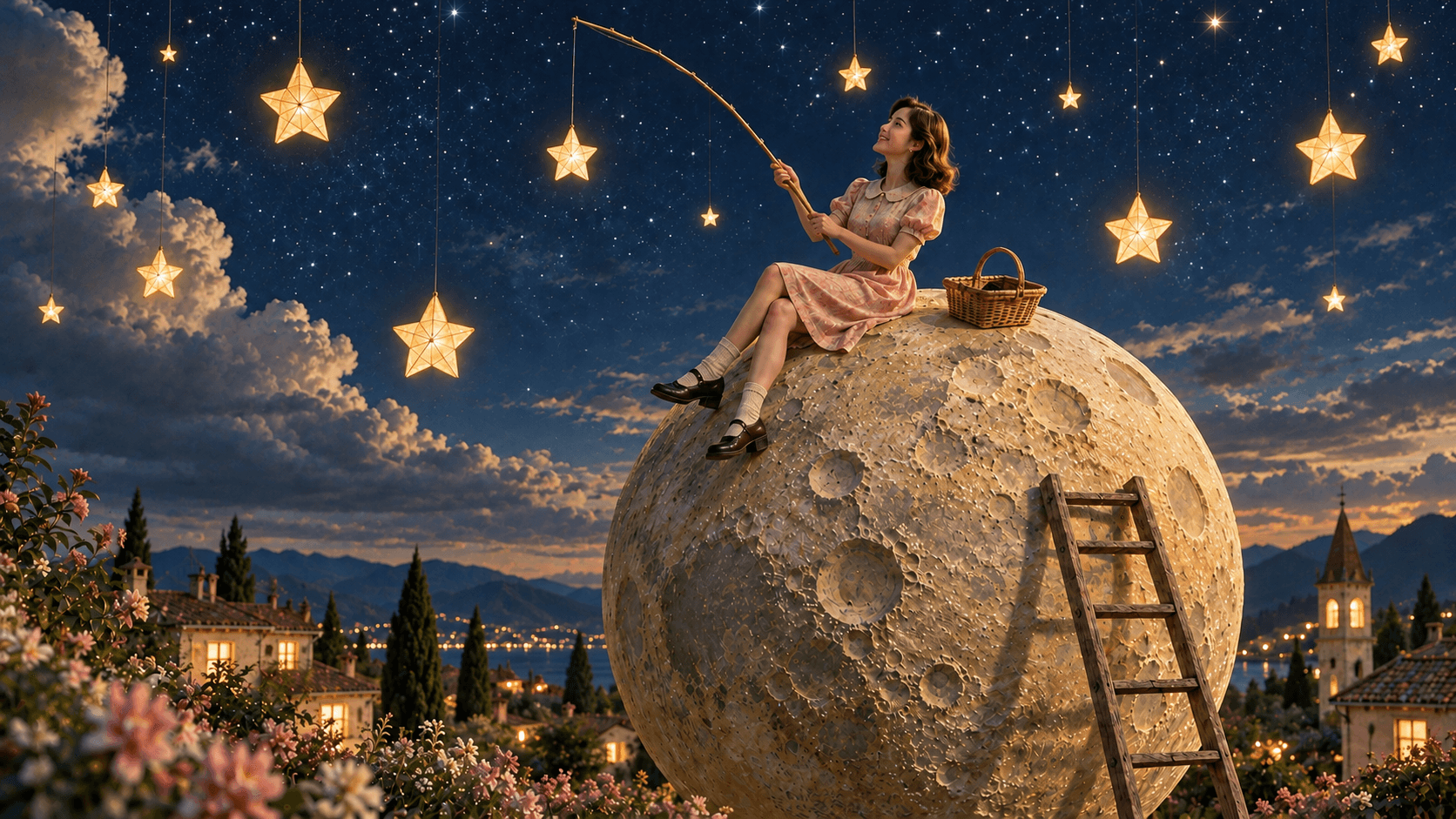
The person should generally remain realistic. Natural facial proportions, believable skin texture, correct hands, relaxed expressions, and physically understandable poses create a useful contrast with the surreal object. The fantasy should come mainly from what the person is doing or interacting with, not from turning the person into a stylized 3D character.
Retro photography then supports the mood. Details such as subtle 35mm grain, slightly faded colors, gentle bloom, soft highlights, mild focus falloff, and small optical imperfections can help the scene feel like an old memory. These effects should remain controlled. Heavy VHS distortion, excessive chromatic aberration, or strong rainbow flare across the entire frame can quickly overpower the actual concept.
Try These Retro Dreamcore Image Prompts
The following prompts are built around a simple creative principle: an ordinary person performs an impossible but visually understandable task. You can use them directly in an AI Image Generator or change the clothing, setting, era, palette, or character to create your own variation. Each example also demonstrates how to control the surreal element while maintaining a recognizable environment and a clear visual story..
Collecting Moonlight Underwater
This concept uses a familiar shopping action in a completely impossible environment. The important visual rule is that there is still only one real moon. Everything seen beneath the water should behave as its reflection rather than as a second celestial object.
Image Prompt
Create a realistic cinematic Retro Dreamcore scene at night, featuring a split view above and below a calm lake. The waterline clearly divides the composition, revealing both the peaceful lakeside scenery above and a surreal underwater scene below.
Above the water, show a deep navy-blue night sky with a single crescent moon and a few subtle stars. In the distance, add charming pastel European houses with warm glowing windows, dark cypress trees, and scattered flowers along the lakeshore.
Beneath the water, a photorealistic man wearing a vintage pale pink cardigan, loose beige trousers, and white retro sneakers stands on the lakebed beside an old metal shopping cart. He gently reaches toward the glowing crescent-shaped reflection of the moon, as if trying to collect it. The crescent is a reflection of the single moon above, shimmering naturally through the water—not a second moon or a solid object.
Surround the man with realistic rocks, muted green aquatic plants, and soft lavender flowers. Add delicate rays of moonlight filtering through the water, with shimmering reflections connecting the moon above to its crescent reflection below.
Visual style: realistic cinematic Retro Dreamcore, nostalgic 1970s European film photography, muted moss green, dusty pink, faded cream, soft blue, gentle 35mm analog film grain, slightly faded colors, soft cinematic focus, natural skin texture, warm golden highlights, and restrained optical bloom. Use deep navy tones in the sky, subtle teal hues underwater, and soft golden reflections on the lake.
Keep the composition atmospheric and visually coherent. The man should have natural human proportions and realistic clothing, while the underwater environment remains believable and detailed. The contrast between the peaceful lakeside and the surreal act of collecting the moon's reflection should create a quiet, dreamlike mood.
There must be exactly one real crescent moon in the sky. The underwater crescent must appear only as its shimmering reflection on the lakebed, not as a separate moon or physical object. No extra moons, no additional characters, no text, no logos, and no unrelated surreal elements.

When you try this on 1min.AI, pay particular attention to the relationship between the moon and its reflection. If the model begins generating multiple moons, strengthen the instruction that the underwater shape is reflected light rather than a separate object.
Installing a Miniature Sun
This scene works because the setup looks like an ordinary maintenance job. The worker, ladder, and street lamp establish a clear physical relationship before anything surreal happens.
Image Prompt
Create a realistic cinematic Retro Dreamcore night scene in a lush vintage European hillside garden. A young European countryside worker wearing a vintage cream shirt with rolled-up sleeves, moss green overalls, a matching work cap, and brown leather boots is climbing a sturdy metal ladder leaning directly against a tall, antique black street lamp. He holds a single pale, moon-like spherical bulb in one hand, preparing to install it into the empty lamp fixture.
The street lamp must be completely empty and unlit, with no bulb inside. The worker is holding the only moon-like bulb, which is a simple, smooth sphere with subtle lunar details and no base, socket, or attached components.
Surround the scene with lush green grass, scattered pink, red, cream, and dusty lavender flowers, stone steps, dark cypress trees, and charming pastel cottages with warm glowing windows. A distant coastline lies beneath a deep navy-blue night sky with a few subtle stars.
Use realistic textures, natural human proportions, detailed facial features, and cinematic lighting. The moon-like bulb held by the worker should be the only surreal element.
Visual style: nostalgic 1970s European film photography, muted moss green, dusty pink, faded cream, soft blue, gentle 35mm film grain, slightly faded colors, soft cinematic focus, natural skin texture, warm practical lighting, and restrained optical bloom.
Keep the composition simple and visually coherent, with the worker climbing the ladder and holding the single moon-like bulb. The ladder must lean directly against the empty street lamp post. No bulb inside the lamp, no extra bulbs, no bulb base, no extra tools, no additional characters, no floating objects, no extra moons, no text, no logos, or unrelated surreal elements.
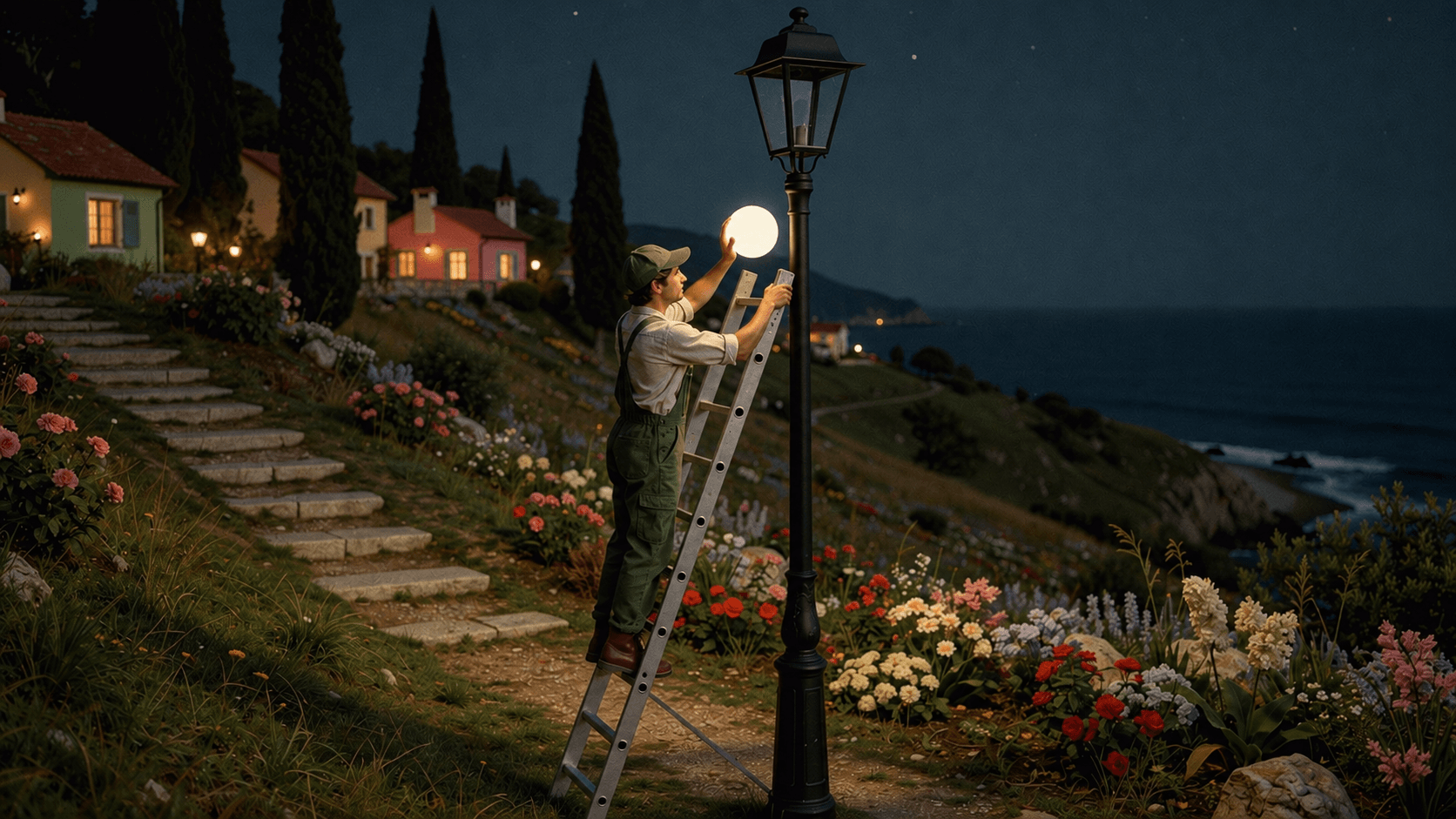
This image works especially well as a first frame for video because the viewer can immediately understand the next action. The ladder has a clear purpose, the lamp is visibly empty, and the bulb is still in the worker’s hand.
Sewing a Holographic Cloud
The visual contrast is stronger when the woman and rooftop remain photographic while the cloud carries most of the holographic treatment.
Image Prompt
Create a realistic cinematic Retro Dreamcore night scene featuring a young French woman in elegant 19th-century clothing, standing on a tiled rooftop overlooking a quiet coastal village. She wears a vintage dusty rose and cream dress with puff sleeves, a fitted waist, and naturally styled dark brown hair.
In front of her floats one enormous, fluffy cloud with a visible tear. She gently holds a delicate metal needle and glowing silver thread, preparing to sew the torn cloud back together. The cloud features subtle iridescent pastel hues of pearl white, lavender, pale cyan, blush pink, and soft gold.
Use a deep navy night sky with a single crescent moon, warm glowing village windows, dark cypress trees, and distant water reflections. Maintain a realistic environment with natural proportions, detailed textures, and cinematic lighting.
Visual style: realistic cinematic Retro Dreamcore, nostalgic 1970s European film photography, muted moss green, dusty pink, faded cream, soft blue, subtle 35mm film grain, slightly faded colors, soft focus, and restrained optical bloom. Keep the holographic effect exclusive to the cloud.
Composition: one woman stitching one enormous torn cloud on a rooftop at night. Keep the scene simple, atmospheric, and visually coherent. No extra characters, floating objects, additional moons, text, logos, or unrelated surreal elements.
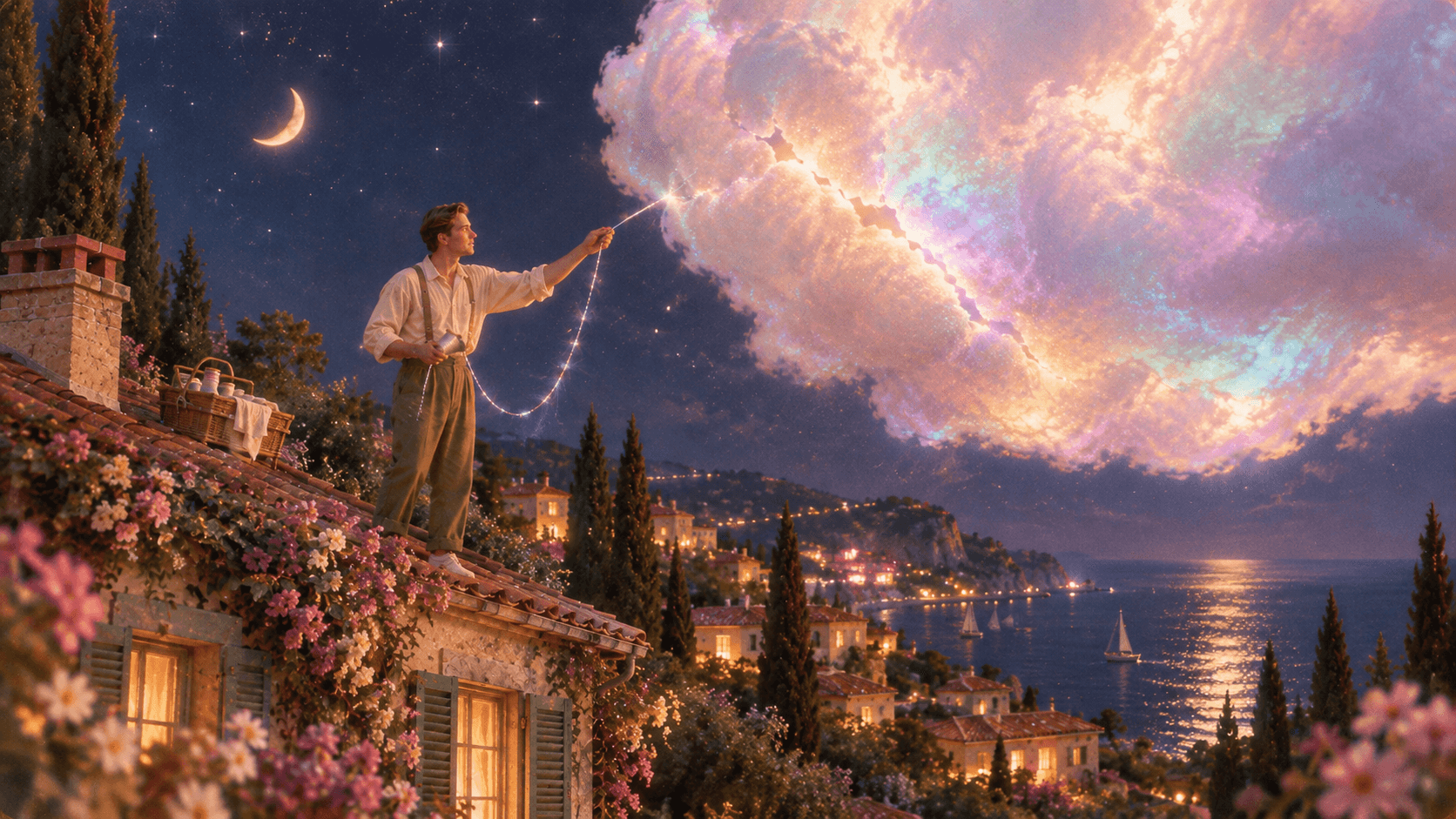
If the generated image becomes too rainbow heavy, reduce the holographic treatment everywhere except the cloud. The style becomes more convincing when one object appears impossible inside an otherwise believable world.
Balancing on a Rolling Moon
This concept turns a simple act of keeping balance on a hillside into one clear surreal action. The environment, clothing, lighting, and human appearance stay realistic, while the oversized rolling moon becomes the only impossible element.
Image Prompt
Create a realistic cinematic Retro Dreamcore scene on a lush sloping hillside. A young man wearing a vintage white rolled-sleeve shirt, moss green overalls, a small matching work cap, and simple retro shoes is carefully balancing while walking on top of an enormous spherical moon that is rolling down the grassy hill. Keep the man photorealistic, naturally proportioned, and similar in styling to a 1970s European countryside worker. His arms and body subtly adjust for balance as the giant moon rolls beneath his feet.
Surround the hillside with natural green grass, scattered red, pink, cream, and dusty lavender flowers, a small pastel cottage partially visible near the lower slope, and a wide open sky. The moon should look physically solid and highly realistic, with detailed lunar craters and a slightly soft vintage photographic texture.
Use the same Retro Dreamcore visual direction: muted moss green, dusty pink, faded cream, soft sky blue, subtle warm highlights, gentle 35mm analog film grain, slightly faded colors, soft cinematic focus, natural skin texture, restrained bloom, and nostalgic 1970s film photography.
Keep the composition visually simple and easy to understand: one man balancing on one enormous rolling moon on a hillside. No extra moons, no floating objects, no glowing animals, no additional characters, no text, no logos, and no unrelated surreal elements.

Hanging Stars to Dry
This idea works because hanging objects on a clothesline is completely familiar, while the objects themselves are impossible.
Image Prompt
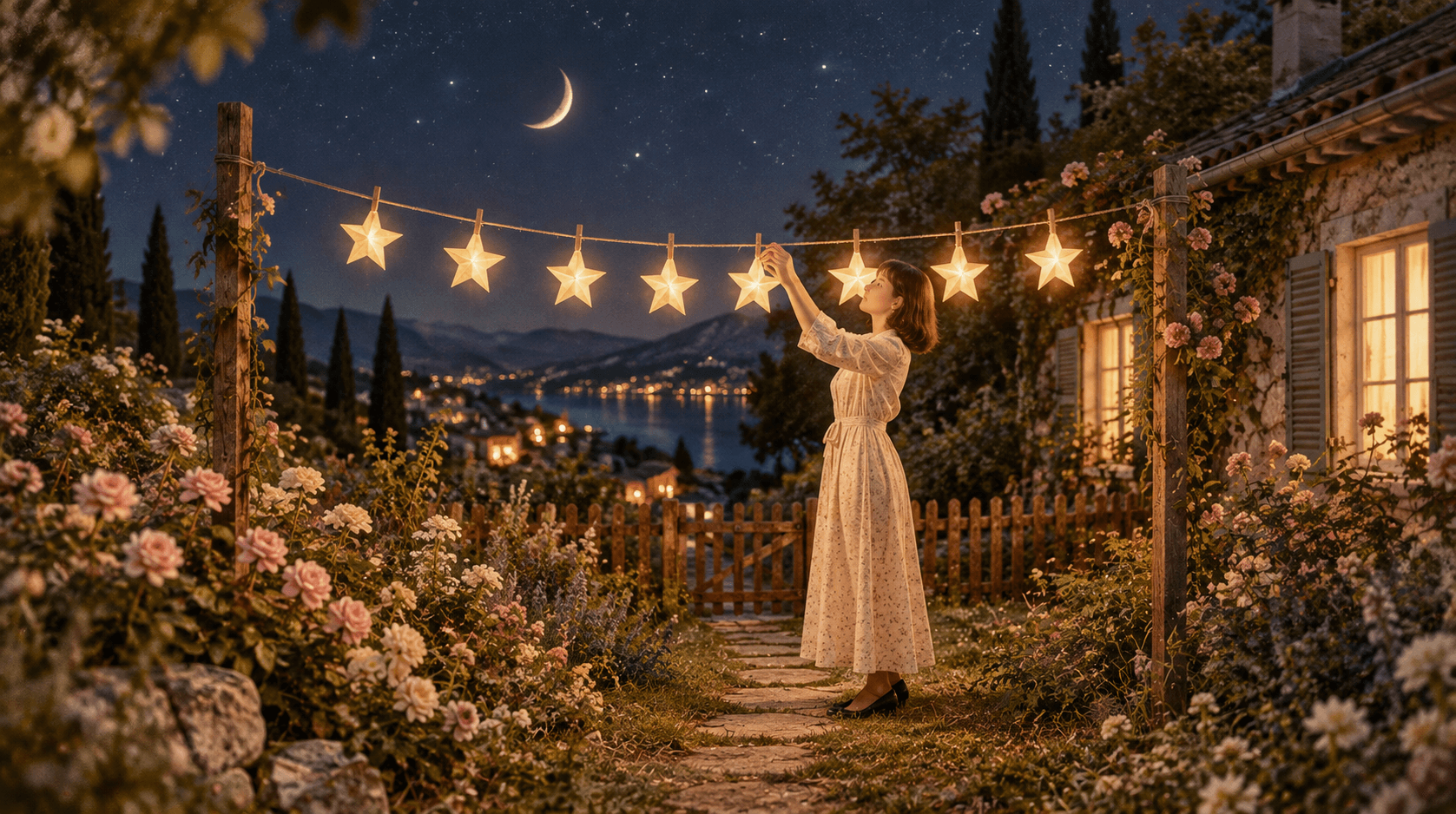
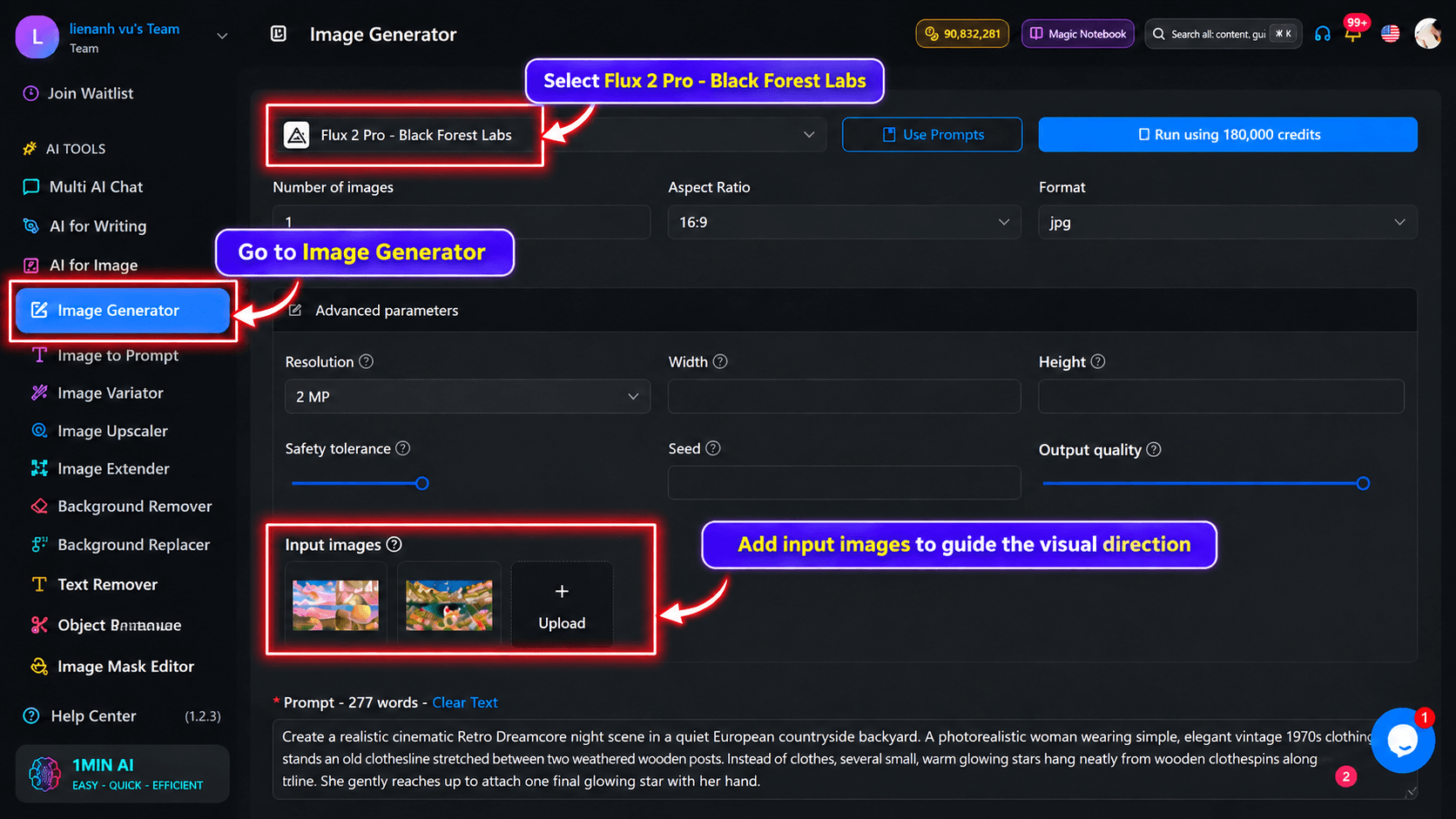
Create a realistic cinematic Retro Dreamcore night scene in a quiet European countryside backyard. A photorealistic woman wearing simple, elegant vintage 1970s clothing stands beside an old clothesline stretched between two weathered wooden posts. Instead of clothes, several small, warm glowing stars hang neatly from wooden clothespins along the line. She gently reaches up to attach one final glowing star with her hand.
The stars should look like small, delicate five-pointed stars, softly glowing with warm golden light. They must hang naturally from the clothespins, just like real laundry, with no floating or scattered stars around them.
Surround the backyard with lush muted green vegetation, realistic flowers in dusty pink and faded cream, a small rustic wooden fence, and an old European countryside house with softly glowing windows. Add subtle details such as worn stone pathways and natural garden textures to create a lived-in, nostalgic atmosphere.
The background features a deep navy-blue night sky with a few sparse stars. Use gentle moonlight, warm amber highlights from the hanging stars and house windows, and soft cinematic shadows.
Visual style: realistic cinematic Retro Dreamcore, nostalgic 1970s European film photography, muted moss green, dusty pink, faded cream, soft blue, gentle 35mm analog film grain, slightly faded colors, soft cinematic focus, natural skin texture, subtle photographic imperfections, and restrained optical bloom.
Keep the woman naturally proportioned and photorealistic, with a calm, peaceful expression. Make the clothesline and glowing stars the main focus, with a simple, balanced composition and a quiet, magical atmosphere.
No actual clothing on the line, no extra people, no floating stars, no exaggerated magical effects, no additional light sources, no text, no logos, and no unrelated surreal elements.
Ironing the Night Sky
This concept is effective because the sky behaves like fabric while everything else keeps its normal physical structure.
Image Prompt
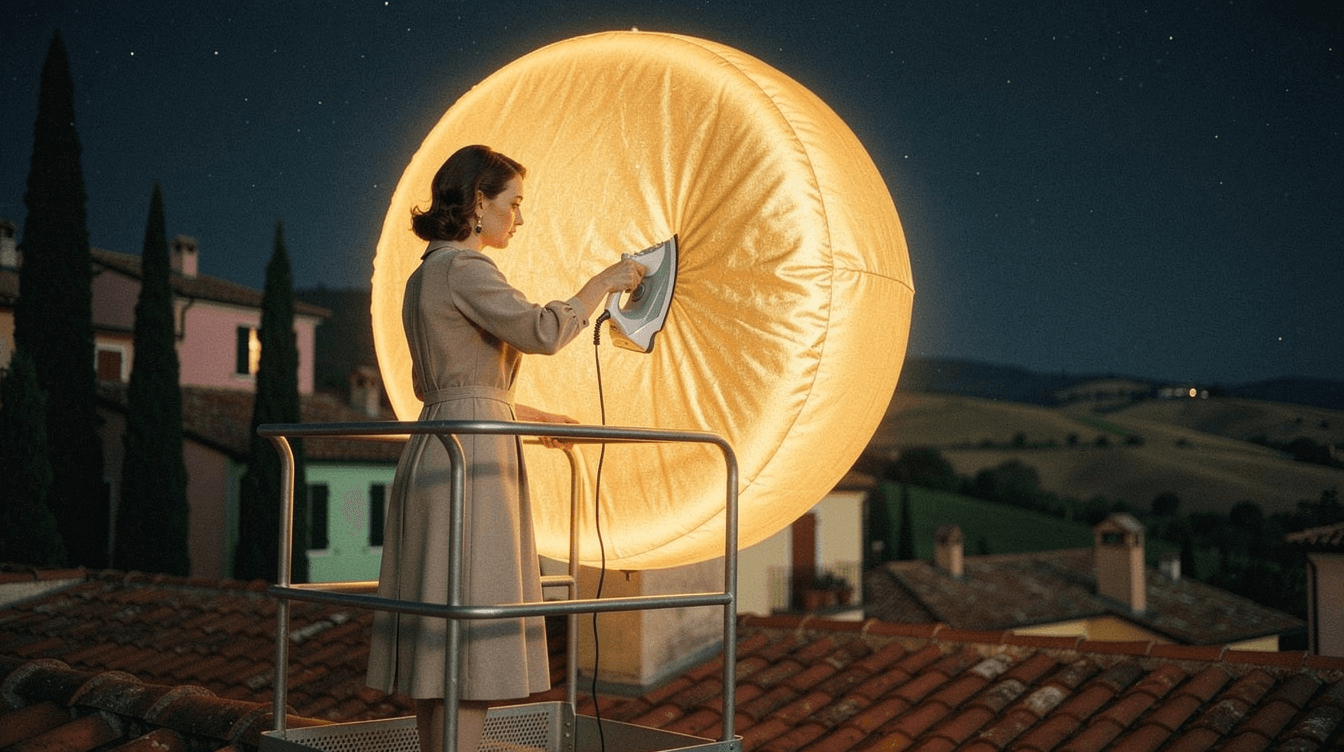
Create a realistic cinematic Retro Dreamcore night scene on the rooftop of a quiet European countryside village. A photorealistic woman wearing a simple, elegant vintage 1970s dress stands on a sturdy metal maintenance platform, ironing the surface of an enormous, clearly recognizable sun.
The sun must be a complete, perfectly round sphere, like a giant glowing golden sun, with a clearly visible circular outline. Its front surface has a few subtle wrinkles, like delicate fabric stretched tightly over a sphere. The sun must look like a celestial body, not a curtain, blanket, or flat piece of fabric.
The woman stands directly in front of the sun and presses a vintage iron flat against its front surface, as if ironing the sun itself. The iron's metal soleplate must make direct contact with the sun's spherical surface. Show her hand firmly holding the iron and visibly pushing it against the sun. The area beneath the iron becomes smooth, while a few wrinkles remain around it.
Composition: The giant round sun fills most of the background and is positioned directly in front of the woman. Show the woman in side profile, clearly facing the sun as she irons it. Keep the iron and its contact with the sun fully visible. Do not place the sun behind the woman or turn it into a flat sheet.
Below the platform, show realistic terracotta rooftops, charming pastel European houses, dark cypress trees, distant rolling hills, and a few flowers. Warm golden light from the sun illuminates the rooftop and contrasts with the deep navy night sky, where a few small stars are visible.
Visual style: realistic cinematic Retro Dreamcore, nostalgic 1970s European film photography, muted moss green, dusty pink, faded cream, soft blue, gentle 35mm analog film grain, slightly faded colors, natural skin texture, soft cinematic focus, and restrained optical bloom.
Keep the woman naturally proportioned and photorealistic, with a calm, focused expression. The scene should feel quiet, surreal, and dreamlike while maintaining a realistic environment.
Important: The sun must remain a clearly recognizable, complete spherical celestial body. The woman must iron directly onto its front surface, not on a separate ironing board or a hanging piece of fabric. No sun-shaped curtains, no flat fabric, no additional suns, no extra characters, no text, no logos, and no unrelated surreal elements.
Turn Retro Dreamcore Images Into Videos
An image prompt mainly defines what the world looks like. A video prompt must explain what happens inside that world. This means that visual description alone is not enough. The model also needs a clear sequence of movement, a physical reaction from the surreal object, an ending state, and instructions about which elements must remain unchanged.
Short AI videos are usually more consistent when the action follows one simple chain. A sequence such as “climb, position, install, illuminate” is easier to control than a prompt that asks the character to climb, look around, smile, wave, install the bulb, trigger a sunrise, make the flowers bloom, and then fly the camera across the city.
The same principle applies to small gestures. If a woman is sewing a cloud, tell the model how the needle enters the cloud, how the thread is pulled, how the cloud edges respond, and where the action should end. The clearer the physical logic, the less likely the model is to invent unnecessary motion.
Try These Retro Dreamcore Image to Video Prompts
Installing the Miniature Sun
In this scene, the surreal transformation should happen only after the worker physically completes the installation.
Video Prompt
Preserve the original character, ladder, street lamp, houses, flowers, night sky, clothing, environment, lighting, and composition. The worker begins by holding the pale moon like bulb in one hand while using the other hand to stabilize himself on the ladder. He climbs naturally, one rung at a time, until he reaches the empty lamp fixture.
He carefully raises the bulb, aligns it with the fixture, and installs it using one clear twisting motion. The bulb keeps the same size and shape throughout the action. Only after it is securely installed does its surface gradually change from a pale moon like appearance into a warm golden miniature sun.
The new light creates a localized amber glow around the lamp, but the surrounding night environment remains unchanged. Keep the man's face natural, photorealistic, stable, and consistent. His expression remains calm and slightly pleased, while his hands, grip, balance, and climbing motion stay anatomically realistic.
Use one uninterrupted shot with an almost locked camera. Do not add new objects, lights, people, text, subtitles, logos, voice over, or narration. Audio should contain only soft nighttime ambience, subtle ladder contact, a quiet mechanical twist, and one gentle shimmer when the bulb lights.
The most important constraint is that the bulb is the only object allowed to transform.
Collecting Moon Reflections
For this concept, consistency depends on keeping the moon in the sky while treating the underwater crescent as reflected light.
Video Prompt
Preserve the exact underwater environment, character, shopping cart, lake surface, moon, stars, plants, rocks, flowers, lighting, colors, and composition. The man slowly reaches toward the existing shimmering crescent reflection beneath the water. He gently gathers the reflected moonlight with both hands, lowers it toward the shopping cart, and carefully places the glowing reflection inside.
Afterward, he reaches toward one existing star reflection and gently places it into the cart. His movements remain slow, calm, deliberate, and physically understandable, while his face stays realistic and relaxed.
The real moon remains in the sky throughout the entire shot. The underwater crescent is only its watery reflection and never becomes a second physical moon. Keep the camera stable with a slow cinematic push in. Do not add new objects, additional stars, extra moons, scene changes, text, dialogue, or narration. Use only soft underwater ambience, subtle water movement, and delicate shimmering sounds.
The defining rule is that there is only one real moon, and the underwater crescent must remain visually understandable as reflected moonlight.
How to Write a Retro Dreamcore Image Prompt
A well-structured Retro Dreamcore image prompt combines clear scene descriptions with specific visual details. You can build one using the following formula:
Subject + Setting + Surreal Action + Retro Styling + Dreamcore Element + Lighting + Color Palette + Camera Texture + Realism Constraints
Start by defining the subject and setting to establish the main focus and create a believable environment. Next, describe the surreal action in precise, visual terms so the AI can understand exactly what the subject is doing and how the impossible element interacts with the scene.
Then, specify the retro styling, including clothing, architecture, and period details, to establish the desired nostalgic atmosphere. Use lighting, color palettes, and analog camera textures to reinforce the Retro Dreamcore aesthetic. Finally, add realism constraints to clarify which elements should remain photorealistic and which should appear surreal.
For example, instead of simply prompting “a dreamy woman fixing a cloud,” describe a realistic French woman in a 19th-century-inspired dress standing on a tiled rooftop at night, carefully sewing a torn, iridescent cloud with a needle and glowing silver thread. Specify the cloud's size, texture, and position, along with the woman's appearance and the way she interacts with it. Complete the prompt with moonlit lighting, a muted palette of navy, lavender, and pearl, subtle 35mm film grain, and realistic human proportions.
The key is to make the surreal action visually unambiguous while keeping the surrounding environment realistic. Specific descriptions of composition, object placement, textures, and interactions help the AI interpret the concept more accurately than broad style labels alone.
How to Write a Retro Dreamcore Video Prompt
Video prompts need a different structure because they must control time as well as appearance. A practical formula is:
Reference Frame + Starting State + Continuous Action + Object Reaction + End State + Camera + Audio + Constraints
The reference frame defines what should remain visually consistent. The starting state makes the first action unambiguous. The continuous action explains how the movement develops, while the object reaction describes how the surreal element responds physically. The end state prevents the model from inventing an unnecessary conclusion.
For example, a cloud sewing prompt might preserve the rooftop and woman, begin with the needle already near the torn edge, describe one slow stitch at a time, make the cloud edges move slightly closer after each pull, and finish while the woman is still sewing. A stable camera and ambient sound can then support the scene without distracting from the main action.
Use Multi AI Chat to Build Your Prompt
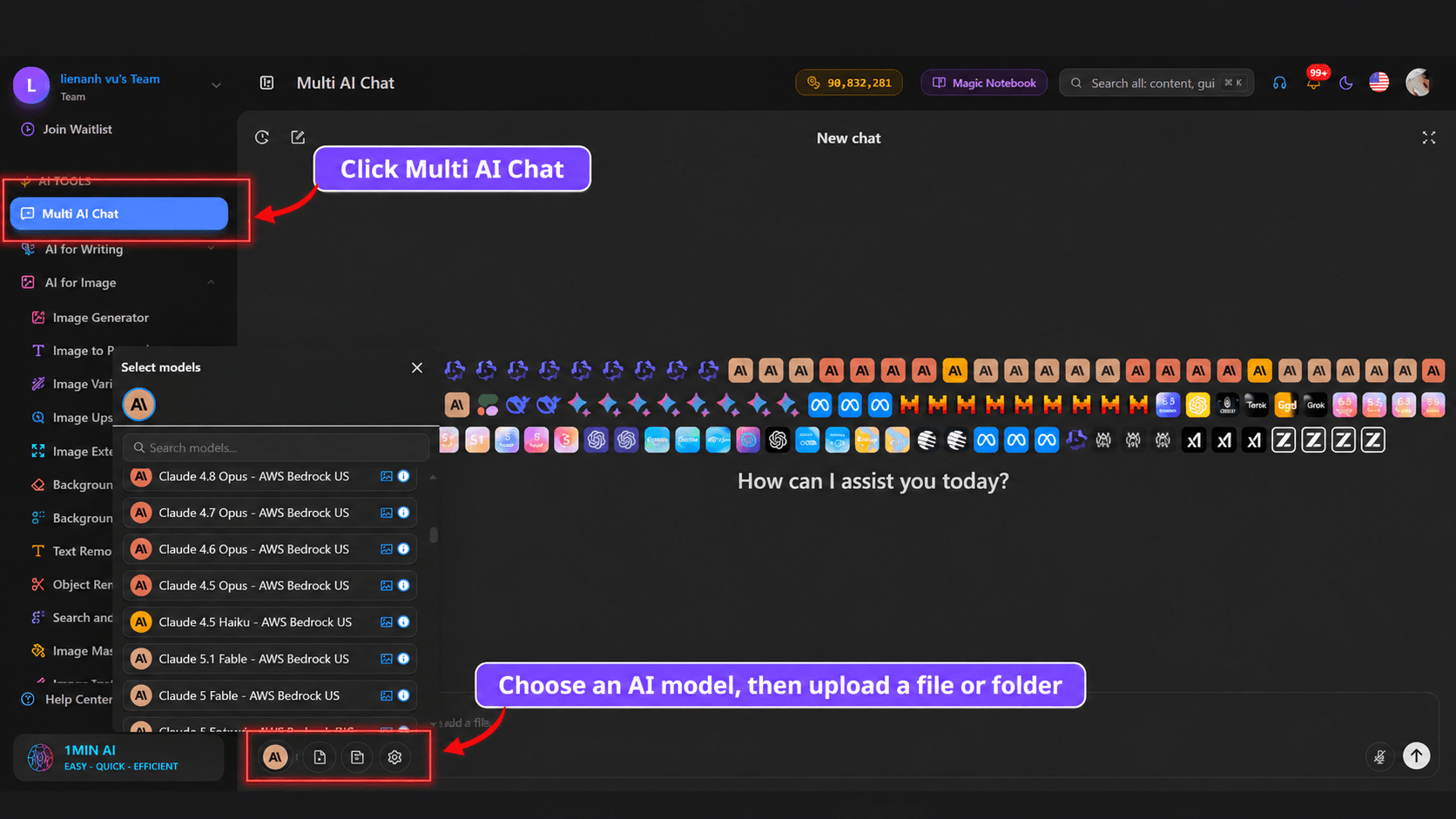
You do not have to write every part of the prompt manually. Multi AI Chat on 1min.AI can be used as an optional step when you have an idea but have not yet converted it into a structured image or video prompt.
You can describe the concept in ordinary language and ask available AI models such as ChatGPT, Claude, or other supported models to turn it into a generation prompt. For example, you might write that you want a realistic woman on a rooftop sewing a torn holographic cloud at night, with pastel iridescent colors, analog film texture, and no additional objects. The model can then organize those requirements into a more complete image prompt.
For video, give the AI the action logic as well as the visual goal. You might ask it to make the woman sew slowly and realistically, one stitch at a time, while preserving the environment and ending before she has completely finished. This step remains optional. If you already have a finished prompt, you can move directly to image or video generation.
How to Create Retro Dreamcore Images and Videos With 1min.AI
Creating Retro Dreamcore images and videos with AI is easier when you separate the process into distinct stages: developing the concept, generating reference images, and animating the scene. This workflow helps maintain visual consistency while giving you more control over the final result.
Step 1: Develop a Clear Concept
Start with one familiar setting and one surreal action. For example, a rooftop can become a place where someone repairs a torn cloud, a garden can feature flowers being watered with moonlight, or a street lamp can become the setting for installing a miniature sun.
If you need help developing your idea, use Multi AI Chat on 1min.AI to turn a rough description into a detailed image prompt. Define the main subject, setting, surreal action, and visual style before adding details about lighting, camera angles, and textures.
Keeping the concept simple makes it easier for the AI to interpret the scene and helps prevent unnecessary visual elements.
Step 2: Generate the Image
Once your concept and prompt are ready, use an AI image generator on 1min.AI to create the initial image. You can also upload a reference image to guide the generation and achieve a result that more closely matches your intended composition, character, or visual style.
Pay attention to the subject's appearance, object placement, lighting, and background. If the first result is not accurate, refine the prompt or adjust your reference image before moving on to video generation.
Step 3: Create First and Last Frames
For smoother and more controlled video generation, create both a first frame and a last frame before animating the scene.
The first frame establishes how the video begins, while the last frame defines the intended ending. Make sure both images have consistent characters, environments, colors, and composition. The difference between them should reflect the movement or transformation you want to show.
For example, the first frame might show a woman holding a needle beside a torn cloud, while the last frame shows her finishing the repair. These two images give the video model clearer visual guidance for the transition.
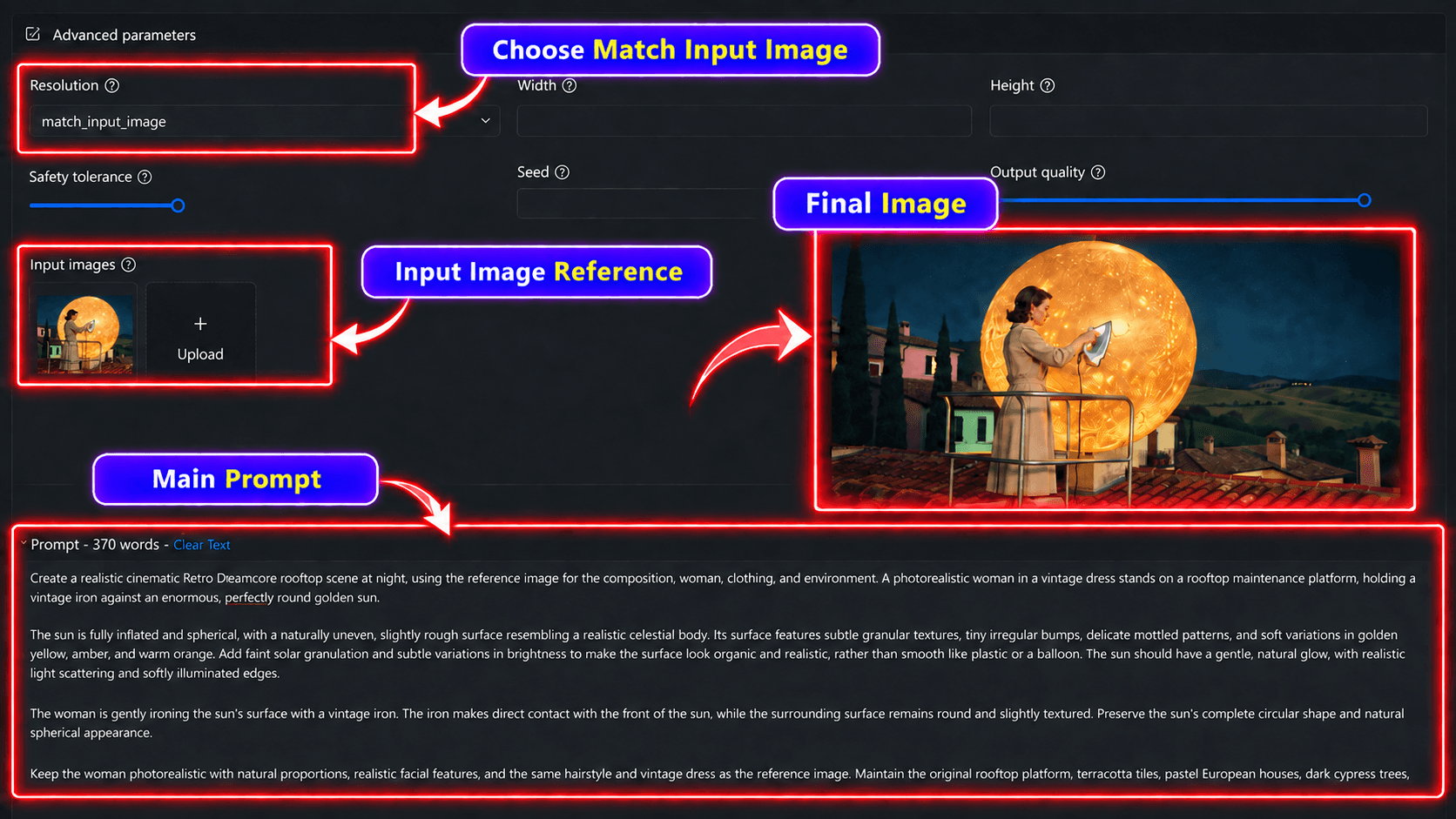
Step 4: Use the Images as Video References
Once your reference images are ready, upload them to an AI video generator on 1min.AI. Use the first and last frames to guide the video and describe how the scene should transition between them.
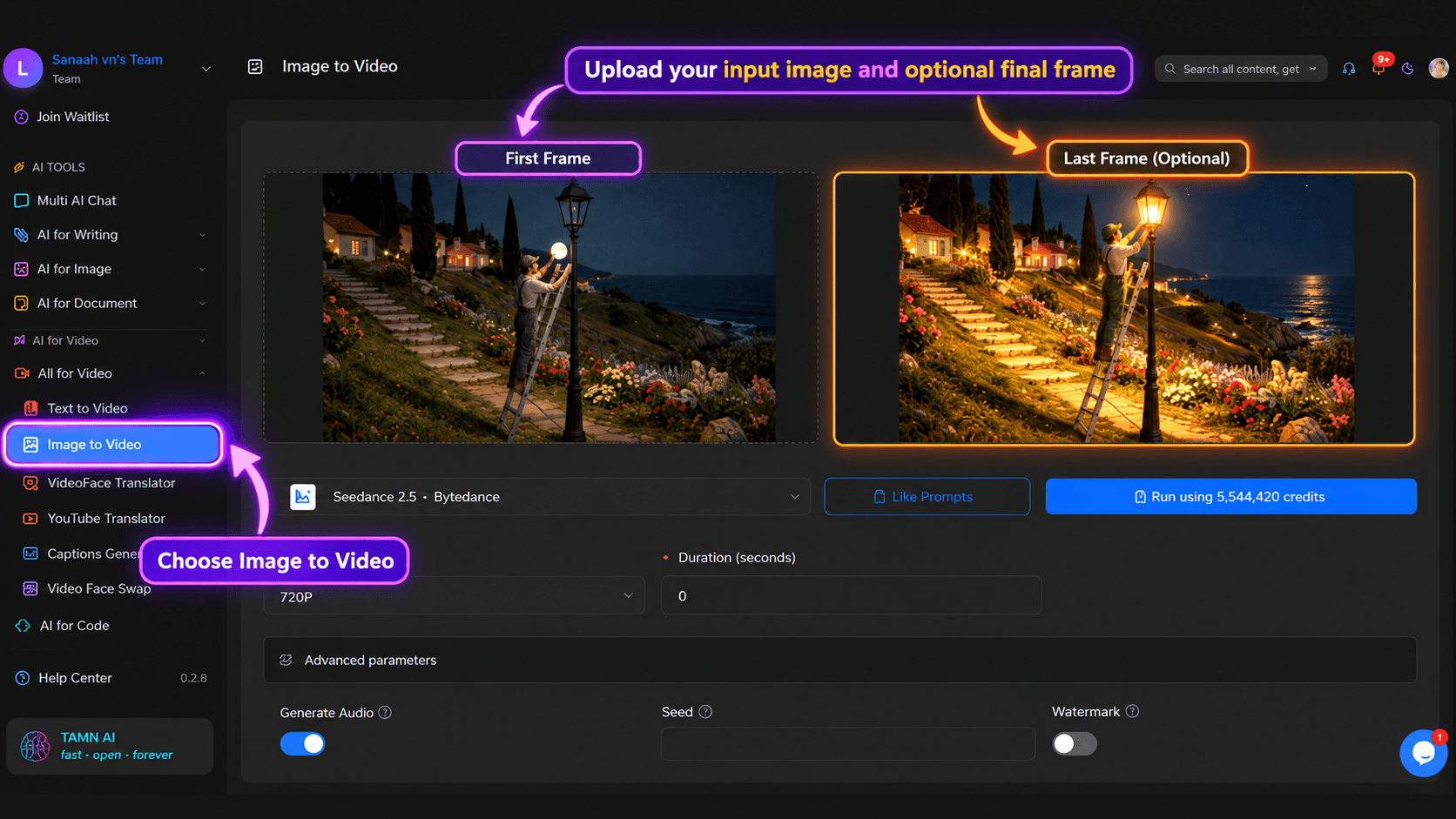
At this stage, focus your prompt on movement rather than repeating every visual detail from the image. Explain what moves, how the action progresses, how the surreal element responds, and where the action should end.
Include only the essential environmental details that need to remain consistent, such as the character's appearance, the background, or the camera position. This helps the model focus on generating the intended motion without unnecessarily changing the scene.
Step 5: Keep the Motion Simple
Short AI videos are generally easier to control when they contain one clear sequence of actions. For example, "climb, install, light" describes a simple sequence for a street lamp scene. Similarly, "insert the needle, pull the thread, tighten" provides a clear progression for a cloud-repair scene.
Avoid combining too many movements or unrelated actions in a single clip. Complex sequences can increase the risk of distorted hands, inconsistent characters, duplicated objects, or unexpected scene changes.
If one surreal action is enough to communicate your concept, keep the video focused on that action. Simple, deliberate movement can help preserve the original composition and make the final video feel more coherent.
Step 6: Review Visual Consistency and Refine
After generating the video, review more than its overall aesthetic. Check the character's face and hands, object continuity, camera movement, background details, and final frame.
Even when a video captures the intended Retro Dreamcore atmosphere, small inconsistencies can affect the result. A character's appearance may change, an object may disappear, or the background may shift unexpectedly.
If you notice a specific issue, refine the instruction related to that element instead of rewriting the entire prompt. For example, clarify the character's hand movement, specify that the camera must remain stationary, or reinforce the position of a surreal object.
A focused review and refinement process helps you maintain the original concept while improving the visual consistency of your final Retro Dreamcore video.
Common Retro Dreamcore Prompt Mistakes
Too Much Glow
Dreamcore does not require every surface to emit light. When skin, plants, buildings, clothing, sky, and props all become holographic, the image loses visual hierarchy and can start to resemble a synthetic render.
Choose one main surreal object to carry the strongest effect. If the cloud is holographic, the woman and rooftop can remain natural. If the moonlight is glowing, the surrounding plants do not also need to become neon.
Too Many Surreal Ideas
One impossible rule usually creates a stronger concept than several unrelated surreal effects. A woman sewing a cloud already gives the viewer a complete visual story. Adding floating whales, melting buildings, three moons, glowing plants, and levitating furniture can make the scene harder to understand rather than more creative.
No Clear Action
A visually attractive environment may be enough for an image, but video needs a readable action. The character should be doing something that can be described as a continuous physical sequence.
If the action cannot be summarized clearly, it may be too complicated for a short image to video clip.
The Human Looks Like CGI
The person should not inherit all the fantasy styling applied to the environment. Ask for realistic facial structure, natural skin texture, correct anatomy, believable hands, and normal expressions. Keep the strongest holographic, prismatic, or magical language focused on the surreal object.
Objects Appear From Nowhere
Unexpected objects often appear when the video prompt leaves too much freedom. Tell the model which objects are already present and, when necessary, state clearly that no new people, props, celestial objects, lights, or decorative elements should be introduced.
The Ending Is Not Defined
The final state matters because the model may otherwise invent its own conclusion. “End while she is still sewing the cloud” produces a different result from “end after the cloud has been completely repaired.”
Similarly, “end immediately after the bulb begins glowing” gives the miniature sun scene a clear stopping point. A strong video prompt should define not only what happens, but where the action stops.
Frequently Asked Questions
What is a Retro Dreamcore prompt?
A Retro Dreamcore prompt describes a nostalgic, dreamlike visual that combines a familiar environment with an impossible idea. Retro characteristics such as analog film texture, faded colors, vintage styling, soft focus, and practical lighting help the scene feel like a memory rather than a modern digital render.
How do I make an AI image look Dreamcore?
Start with a recognizable setting and change one rule of reality. Add soft or nostalgic lighting, controlled color treatment, subtle film texture, and a clear surreal relationship between the character and the environment. Avoid relying only on heavy glow, distortion, or rainbow effects.
How do I turn a Dreamcore image into a video?
Use the generated image as a reference frame and write a separate prompt focused on motion. Define the starting state, action sequence, physical response of the surreal object, camera behavior, and final state. The video prompt should explain what changes while also identifying what must remain visually consistent.
How do I keep people realistic in Dreamcore scenes?
Keep the fantasy language focused mainly on the environment or surreal object. Describe the human subject with realistic facial proportions, natural skin texture, correct anatomy, stable identity, and restrained expressions. This contrast often makes the Dreamcore concept more convincing.
How do I stop AI video from adding new objects?
Limit the number of actions and explicitly preserve the existing environment. When consistency is important, state that no new people, props, lights, celestial objects, text, or decorative details should appear. A simpler motion sequence also gives the model fewer opportunities to invent additional elements.
Final Thoughts
The strongest Retro Dreamcore scenes usually begin with something ordinary and change only one rule of reality. A shopping cart becomes a container for moonlight, a needle repairs a cloud, or a street lamp receives a miniature sun.
Once that central idea is clear, retro photography, controlled color, realistic human subjects, and simple physical motion can make the scene feel like a strange memory rather than an arbitrary fantasy image. The same principle applies to both still images and video: keep the environment understandable, make the impossible action easy to read, and clearly define what the AI is allowed to change.
🚀 Create your own Retro Dreamcore images and videos with 1min.AI.
Alternatives
Discover the best alternatives to 1minAI and compare features, pricing, and use cases.

1min.AI vs OpenRouter
1min.AI vs. OpenRouter: Compare the ready-to-use AI creation product against the technical API tool. Find out if you need a zero-code creative studio or a coding infrastructure hub.
 Ngoc Hong
1min.AI vs Lovart
Compare 1min.AI vs Lovart across features, pricing, credits, brand tools, and use cases to find the right AI platform for your workflow.
Ngoc Hong
1min. AI vs Dola AI
Looking for a Dola AI alternative? Compare 1min.AI vs Dola AI on video generation, free plans, pricing and privacy to pick the right AI app.
Ngoc HongAI Tools
Discover the best AI tools to boost productivity, creativity, and everyday work.

Create Consistent Cartoon Content in Just a Few Steps
Create engaging cartoon videos for TikTok and Reels with 1min.AI. Research ideas, create characters, and turn images into animated videos in 3 simple steps.
 Lien Anh Vu
One Product, 10 UGC Creatives: How AI Makes Content Testing Easier
Create more authentic UGC with an AI UGC video generator, test more creative angles and scale affiliate content without filming every version.
Lien Anh Vu
Top 4 Affordable AI Tools for Startup Founders
Discover the top 4 affordable AI tools for startup founders to validate ideas, build products, create content, and launch faster without overspending.
 Tram Ta
AI Features
Comprehensive AI features that streamline workflows, improve efficiency, and empower teams to achieve more.
Create Consistent Cartoon Content in Just a Few Steps
Create engaging cartoon videos for TikTok and Reels with 1min.AI. Research ideas, create characters, and turn images into animated videos in 3 simple steps.
Lien Anh VuOne Product, 10 UGC Creatives: How AI Makes Content Testing Easier
Create more authentic UGC with an AI UGC video generator, test more creative angles and scale affiliate content without filming every version.
Lien Anh Vu
1minAI: Free AI Grammar Checker
Check grammar for free with 1minAI’s AI grammar checker. Find grammar, spelling, and writing mistakes, improve clarity, and polish your content in seconds.
Tram TaAI Use Cases
A curated collection of AI use cases for business, productivity, and industry-specific applications.
Create Consistent Cartoon Content in Just a Few Steps
Create engaging cartoon videos for TikTok and Reels with 1min.AI. Research ideas, create characters, and turn images into animated videos in 3 simple steps.
Lien Anh VuOne Product, 10 UGC Creatives: How AI Makes Content Testing Easier
Create more authentic UGC with an AI UGC video generator, test more creative angles and scale affiliate content without filming every version.
Lien Anh Vu
Best Time to Post on Instagram: A Practical Guide for Better Engagement
Discover the best time to post on Instagram, including the best days and times for different audiences, plus tips to find the ideal posting schedule for your account.
Tram TaAI Tutorials
Learn how to use AI with practical, step-by-step tutorials.

Black Friday AI Tool Deals in 2026
Discover what Black Friday AI tool deals 2026 has to offer. Find out how to secure the 1min.AI lifetime deal via AppSumo, Dealify, Stack Social, and verify on Trustpilot, Slashdot, and Software Advice.
 Hang Nguyen
Create Consistent Cartoon Content in Just a Few Steps
Create engaging cartoon videos for TikTok and Reels with 1min.AI. Research ideas, create characters, and turn images into animated videos in 3 simple steps.
Lien Anh Vu
[Seedance 2.5 New] Better AI Product Videos, Less Rework in 1min.AI
Use Seedance 2.5 image to video on 1min.AI to create more consistent AI product videos, reduce failed generations, save credits, and improve UGC workflows.
Lien Anh VuAI Guides
Learn AI faster with practical guides, real-world examples, and actionable best practices.

Safely Buy AI Tools Online: 2026 Black Friday Guide
Discover how to find and secure the best Black Friday AI deals online. Learn expert strategies to avoid scams, combat subscription fatigue, and verify software.
Hang NguyenCreate Consistent Cartoon Content in Just a Few Steps
Create engaging cartoon videos for TikTok and Reels with 1min.AI. Research ideas, create characters, and turn images into animated videos in 3 simple steps.
Lien Anh Vu[Seedance 2.5 New] Better AI Product Videos, Less Rework in 1min.AI
Use Seedance 2.5 image to video on 1min.AI to create more consistent AI product videos, reduce failed generations, save credits, and improve UGC workflows.
Lien Anh VuAI Solutions
Browse the best AI solutions for automation, coding, research, productivity, customer support, marketing, and business workflows.
Safely Buy AI Tools Online: 2026 Black Friday Guide
Discover how to find and secure the best Black Friday AI deals online. Learn expert strategies to avoid scams, combat subscription fatigue, and verify software.
Hang NguyenCreate Consistent Cartoon Content in Just a Few Steps
Create engaging cartoon videos for TikTok and Reels with 1min.AI. Research ideas, create characters, and turn images into animated videos in 3 simple steps.
Lien Anh VuOne Product, 10 UGC Creatives: How AI Makes Content Testing Easier
Create more authentic UGC with an AI UGC video generator, test more creative angles and scale affiliate content without filming every version.
Lien Anh VuAI Models
Explore the world's leading AI models in one place.
Create Consistent Cartoon Content in Just a Few Steps
Create engaging cartoon videos for TikTok and Reels with 1min.AI. Research ideas, create characters, and turn images into animated videos in 3 simple steps.
Lien Anh VuOne Product, 10 UGC Creatives: How AI Makes Content Testing Easier
Create more authentic UGC with an AI UGC video generator, test more creative angles and scale affiliate content without filming every version.
Lien Anh Vu[Seedance 2.5 New] Better AI Product Videos, Less Rework in 1min.AI
Use Seedance 2.5 image to video on 1min.AI to create more consistent AI product videos, reduce failed generations, save credits, and improve UGC workflows.
Lien Anh VuAI Comparisons
Compare AI tools, models, and platforms to find the best fit for your needs.

Kling AI Vs Veo 3: Which Model Wins?
Kling AI vs Veo 3: compare motion, native audio, pricing & free tiers to see which AI video generator wins for your project - try both on 1min.AI.
 Trang Tran
[Seedance 2.5 New] Better AI Product Videos, Less Rework in 1min.AI
Use Seedance 2.5 image to video on 1min.AI to create more consistent AI product videos, reduce failed generations, save credits, and improve UGC workflows.
Lien Anh Vu
DeepSeek V4 Pro vs Flash Comparison
Compare DeepSeek V4 Pro vs DeepSeek V4 Flash metrics. Optimize your agentic apps and improve AI fact checking on 1min.ai today.
Ngoc HongAI Integrations
Seamlessly integrate AI with the tools you already use to automate work and boost productivity.

POV: You Have 10+ Posts to Make Every Day
Learn how to build an AI content workflow that helps content creators produce 10+ social media posts a day faster with AI brainstorming, image generation, and content creation.
Lien Anh Vu
How to Use an AI Fashion Video Generator for Fashion Week 2026
Turn Fashion Week 2026 ideas into stunning fashion videos with AI. Learn how to brainstorm, create visuals, and transform images into videos with one simple workflow.
Lien Anh Vu
Stop Switching Between AI Apps: How AI Integration Transforms Employer Branding
Discover how AI integration helps HR teams streamline employer branding by combining AI writing, documents, images, video, and multiple AI models into one workspace.
Tram TaAI for Industries
Find the best AI tools and workflows for healthcare, finance, education, legal, manufacturing, retail, real estate, and more

How to Start a One-Person AI Business: 7 Models You Can Run Solo
Learn how to start a one-person AI business with 7 practical models, from AI consulting and content services to automation and software reselling.
Tram Ta
7 Low-Cost AI Business Ideas for Your Startup
Explore 7 low-cost AI business ideas you can start with a small budget, from content and video services to AI consulting, reselling, and automation.
Tram Ta
Free AI Image Generator For Ecommerce
Turn phone photos into studio, white-background, and lifestyle product images. Try the best AI image generator for ecommerce online free with 1min.AI.
Trang TranAI Agents
Discover and run AI agents to automate tasks across your work and daily life.
1minAI: Free AI Grammar Checker
Check grammar for free with 1minAI’s AI grammar checker. Find grammar, spelling, and writing mistakes, improve clarity, and polish your content in seconds.
Tram Ta
AI Agents for Facebook
Use an AI Agent for Facebook to create content, generate images, schedule posts, and publish from your documents and conversations.
Ngoc Hong
AI Agent vs AI Assistant: Which One Actually Saves Designers More Time?
Learn the difference between AI Agent vs AI Assistant and discover which solution helps designers automate repetitive work, reduce revisions, and save more time.
Lien Anh VuAI Workflows
Explore ready-to-use AI workflows for productivity, marketing, sales, support, and more.
Create Consistent Cartoon Content in Just a Few Steps
Create engaging cartoon videos for TikTok and Reels with 1min.AI. Research ideas, create characters, and turn images into animated videos in 3 simple steps.
Lien Anh VuOne Product, 10 UGC Creatives: How AI Makes Content Testing Easier
Create more authentic UGC with an AI UGC video generator, test more creative angles and scale affiliate content without filming every version.
Lien Anh VuPOV: You Have 10+ Posts to Make Every Day
Learn how to build an AI content workflow that helps content creators produce 10+ social media posts a day faster with AI brainstorming, image generation, and content creation.
Lien Anh VuNewsletter
Weekly AI Innovations with 1minAI

🔮 Weekly AI Innovations #140: Deepseek 4.1 Flash & Gemini Upgrades
Explore Deepseek 4.1 Flash and new Gemini models on 1min.ai. Plus, check our update on your Billing - Usage page for better clarity.
Hang Nguyen
🔮 Weekly AI Innovations #136: Grok 4.6 and Smart Data Retention
Discover the latest 1min.ai updates! Upgrade to Grok 4.6 for blazing-fast AI, and check our new Data Retention policies to secure your files today.
Hang Nguyen
🔮 Weekly AI Innovations #139: Dawn of the next-gen AI
Discover the immense power of GPT-6 Astra and Claude Fable 5.1. Unlock next-generation AI models on 1min.ai to solve complex tasks effortlessly.
Hang Nguyen