
10+ AI Pixel Art Ideas for Indie Game Developers: Characters, Sprites, Tiles & More

Tram Ta
September 17, 2026
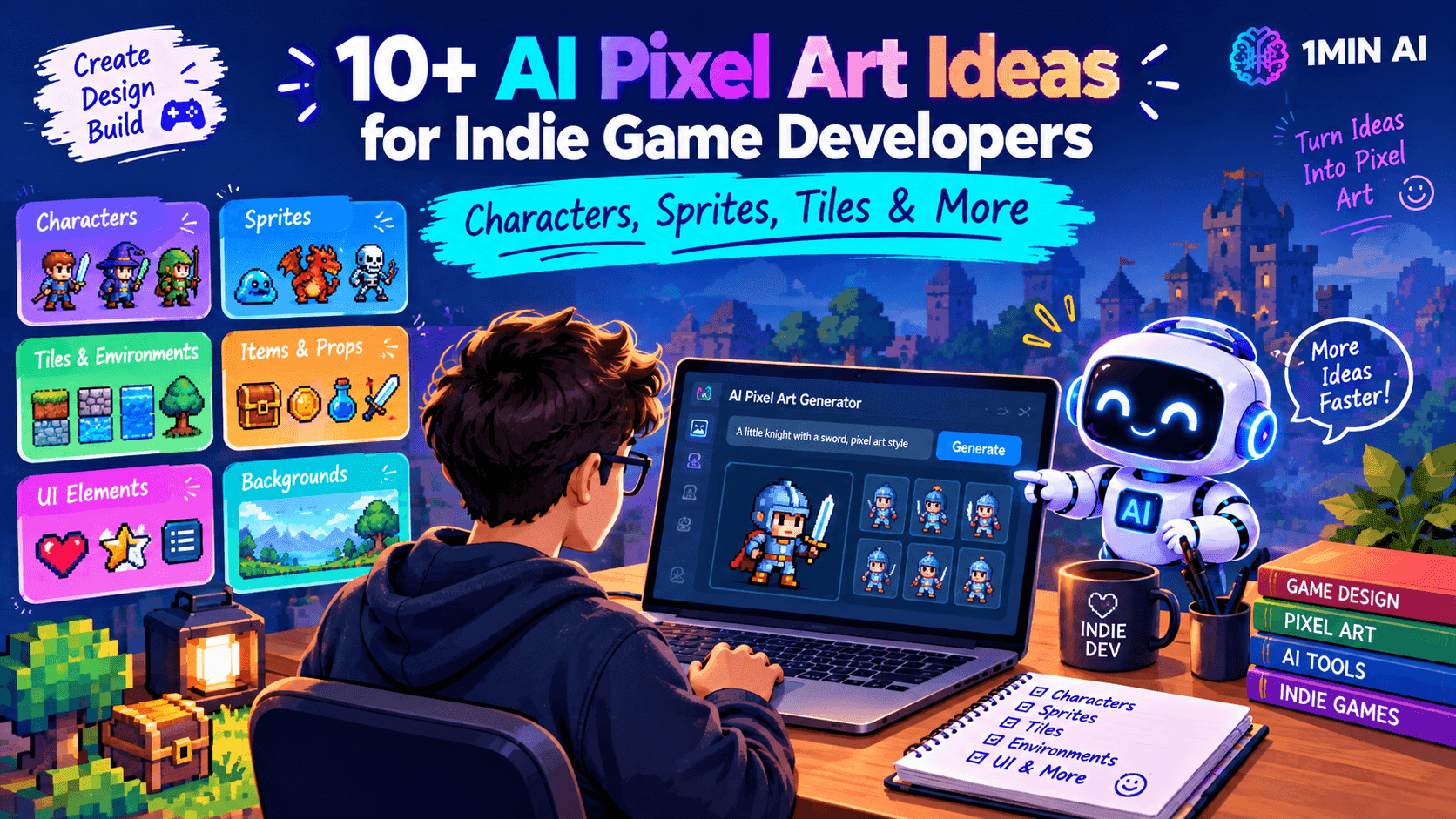
Explore 10+ AI pixel art ideas for indie games, including characters, sprites, tiles, backgrounds, items, UI assets, and animation sheets, with practical prompts.
Creating pixel art for an indie game can take a huge amount of time. A single game may need characters, enemies, environments, objects, items, UI elements, animations, and dozens of variations.
For solo developers and small teams, AI pixel art can help speed up the creative process. Instead of creating every asset from scratch, you can use AI to explore visual concepts, generate game assets, and build a consistent art direction before refining the final files.
Here are 10+ practical AI pixel art ideas you can use for your next indie game.
Why Use AI Pixel Art for Indie Game Development?
Pixel art has strict visual requirements. Small changes to proportions, colors, perspective, or lighting can make assets feel inconsistent.
AI pixel art tools can help developers quickly experiment with:
- Character designs
- Enemy sprites
- Game environments
- Tilesets
- Weapons and items
- Backgrounds
- UI elements
- Portraits
- Animation frames
- Game icons
The biggest advantage is speed. You can test multiple concepts before spending time manually refining the assets you want to use.
AI can also be useful during the prototyping stage. You can generate temporary assets while testing gameplay, then replace or refine them later.
1. Create Main Character Sprites
Your protagonist is one of the most important visual elements in a game. AI can help you explore different character designs, outfits, poses, and color palettes.
For example, you could create a pixel-art hero for a fantasy RPG, platformer, or adventure game.
Prompt: Create a 32-bit pixel art hero sprite, young fantasy adventurer wearing a blue cloak and leather armor, standing pose, front-facing, limited color palette, clean pixel edges, transparent background, classic RPG game style.
Generate several variations and compare the character's silhouette, colors, and proportions before choosing a direction.
2. Design Enemy Characters
Games often need many enemies, and creating each one manually can become repetitive.
AI pixel art can help you experiment with different enemy types, from small creatures to large bosses.
Prompt: Pixel art enemy sprite of a small forest monster with glowing eyes, dark green body, sharp claws, three-quarter view, limited color palette, 32×32 game sprite, clean retro aesthetic.
You can then create different versions for weak, normal, and elite enemies.
3. Generate NPCs and Supporting Characters
NPCs make game worlds feel populated and can also communicate different roles.
Try generating merchants, guards, villagers, blacksmiths, farmers, mages, or quest characters.
Prompt: Retro pixel art NPC sprite of a village blacksmith, holding a hammer, brown apron, gray hair, warm color palette, front-facing RPG sprite, simple readable silhouette.
Keeping similar proportions and palettes across characters can help your game's visual style feel more cohesive.
4. Create Weapons and Items
Pixel art is particularly useful for inventory items because players need to recognize them quickly.
You can generate:
- Swords
- Shields
- Potions
- Armor
- Magic items
- Keys
- Tools
- Food
- Treasure
Prompt: Pixel art RPG inventory icon of a glowing purple magic potion inside a small glass bottle, dark outline, limited color palette, centered object, transparent background, retro game aesthetic.
Create several item variations while keeping the same visual language.
5. Build Tilesets for Game Environments
Tilesets are essential for many 2D games. A collection might include grass, dirt, stone, water, walls, floors, roads, and other environmental pieces.
AI can help you explore the appearance of these tiles before assembling a complete environment.
Prompt: Seamless pixel art tileset for a medieval fantasy village, grass, dirt path, stone floor, wooden floor and stone wall tiles, top-down RPG perspective, consistent palette, clean repeating edges.
For production use, consistency and seamless edges are particularly important, so generated tiles may still require manual refinement.
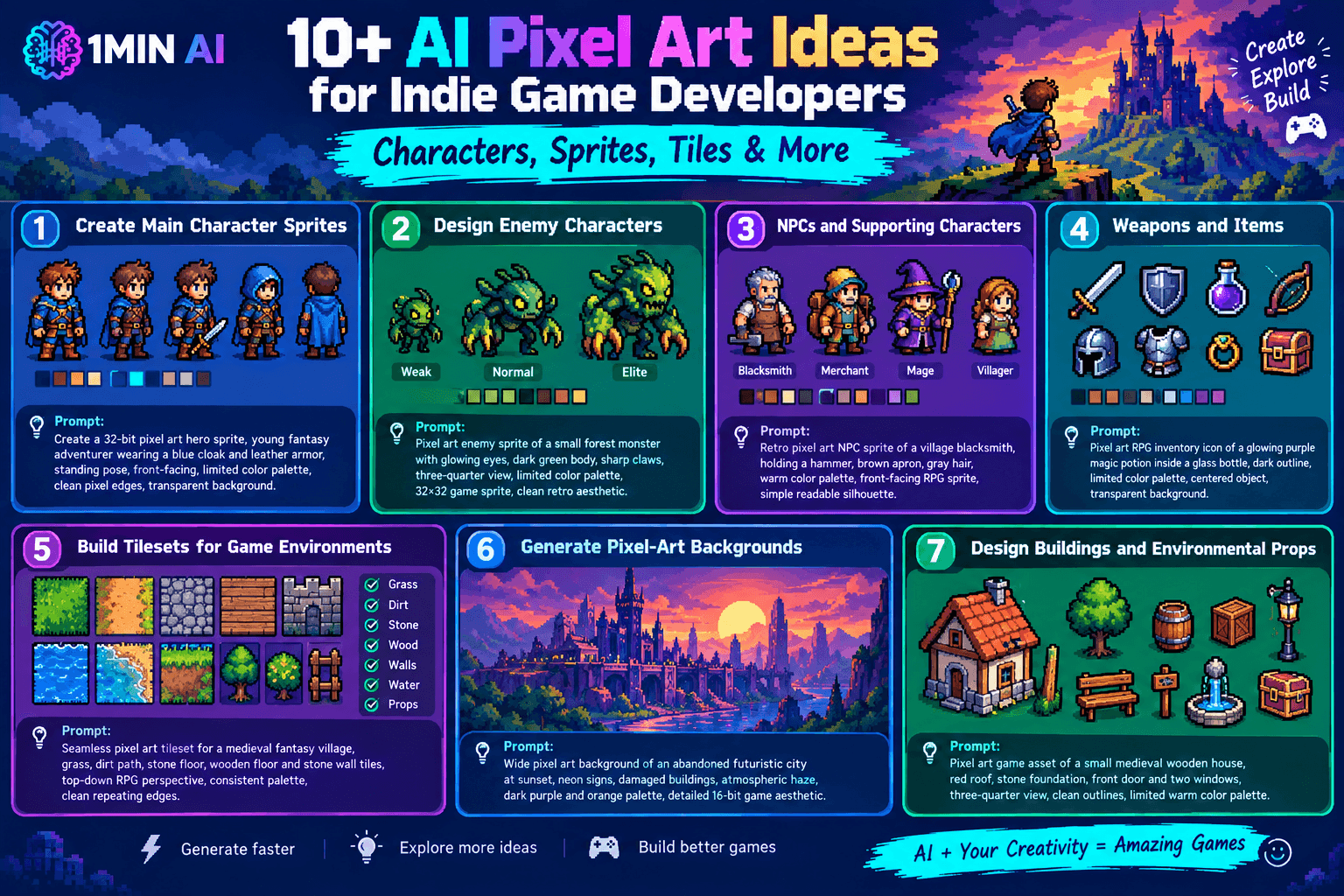
6. Generate Pixel-Art Backgrounds
Backgrounds can establish the mood of an entire game level.
Try generating forests, caves, castles, futuristic cities, deserts, villages, or alien planets.
Prompt: Wide pixel art background of an abandoned futuristic city at sunset, neon signs, damaged buildings, atmospheric haze, dark purple and orange palette, detailed 16-bit game aesthetic.
You can create different environments for different levels while maintaining a consistent palette and perspective.
7. Design Buildings and Environmental Props
Small environmental objects can make a level feel much more detailed.
Examples include:
- Houses
- Trees
- Barrels
- Crates
- Lamps
- Signs
- Fountains
- Rocks
- Benches
- Chests
Prompt: Pixel art game asset of a small medieval wooden house, red roof, stone foundation, front door and two windows, three-quarter view, clean outlines, limited warm color palette.
Generating props individually can also help you build a library of reusable assets.
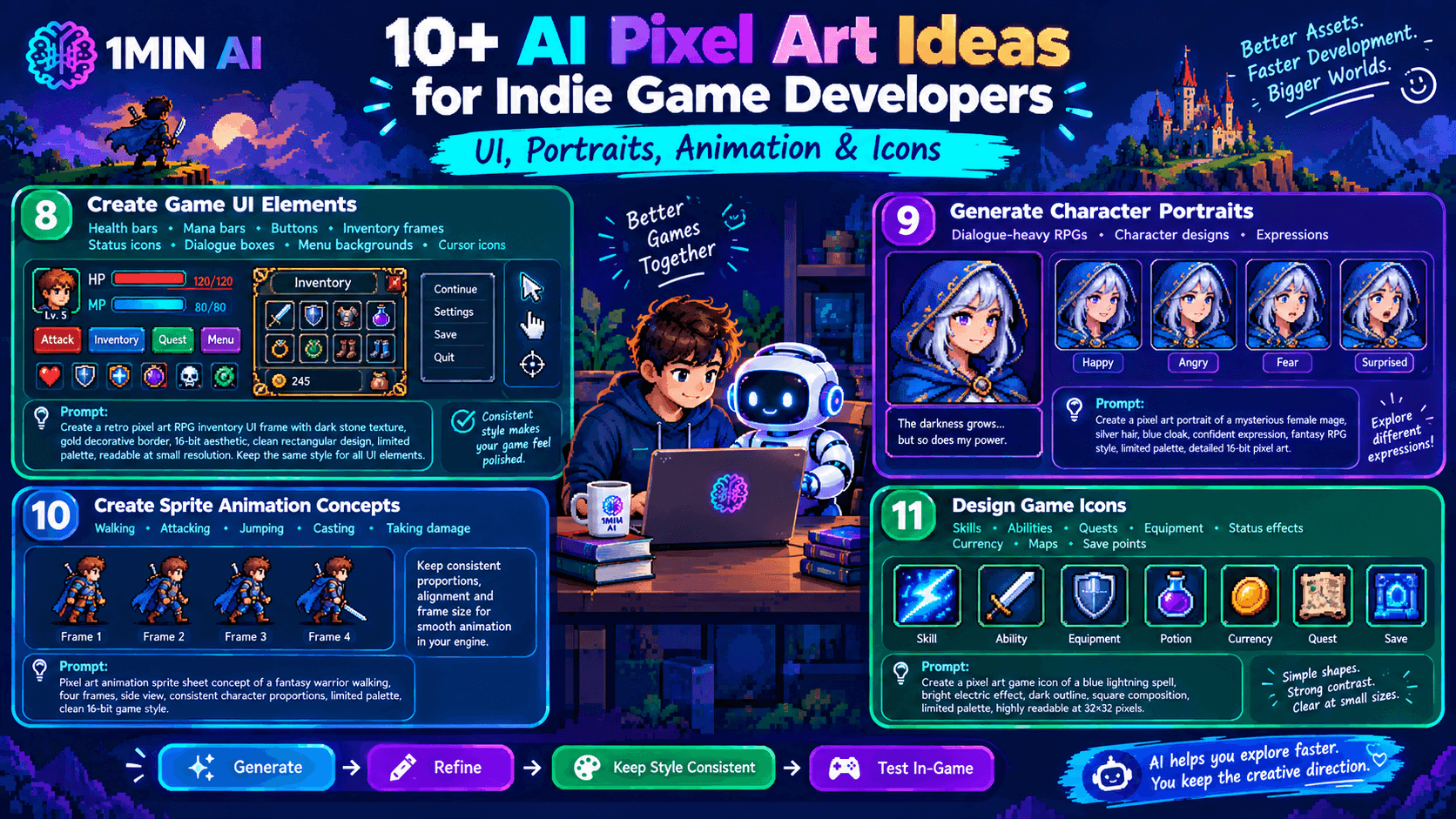
8. Create Game UI Elements
Pixel art doesn't have to be limited to the game world. You can use the same style for menus and interfaces.
Generate:
- Health bars
- Mana bars
- Buttons
- Inventory frames
- Status icons
- Dialogue boxes
- Menu backgrounds
- Cursor icons
Prompt: Retro pixel art RPG inventory UI frame, dark stone texture, gold decorative border, 16-bit aesthetic, clean rectangular design, limited color palette, readable at small resolution.
A consistent UI style can make the entire game feel more polished.
9. Generate Character Portraits
Dialogue-heavy RPGs often need portraits for characters.
AI can help you experiment with expressions and character designs before creating a complete portrait set.
Prompt: Pixel art portrait of a mysterious female mage, silver hair, blue cloak, confident expression, fantasy RPG dialogue portrait, limited palette, detailed 16-bit pixel style.
You can then create variations showing different emotions such as happiness, anger, fear, or surprise.
10. Create Sprite Animation Concepts
Movement animations can require many frames. AI can help you explore concepts for walking, attacking, jumping, casting spells, or taking damage.
Prompt: Pixel art animation sprite sheet concept of a fantasy warrior walking, four distinct frames, side view, consistent character proportions, limited color palette, clean 16-bit game sprite style.
For final implementation, make sure each frame uses consistent dimensions and alignment so the animation works correctly in your game engine.
11. Design Game Icons
Small icons can communicate information quickly to players.
You can generate icons for:
- Skills
- Abilities
- Quests
- Equipment
- Status effects
- Currency
- Maps
- Save points
Prompt: Pixel art game icon of a blue lightning spell, bright electric effect, dark outline, square composition, limited palette, highly readable at 32×32 pixels, classic RPG UI style.
Simple silhouettes and strong contrast are especially important when icons are displayed at small sizes.
A Simple AI Pixel Art Workflow for Indie Developers
A practical workflow can look like this:
1. Define your art direction → Choose resolution, palette, perspective, and style.
2. Generate concepts → Create several versions of characters, environments, and objects.
3. Select the strongest designs → Keep the assets that fit your game's visual direction.
4. Refine the assets → Fix proportions, colors, edges, animation frames, or other details.
5. Organize your asset library → Separate sprites, tiles, backgrounds, icons, and UI elements.
6. Import into your game engine → Test the assets in the actual gameplay environment.
This approach lets AI handle more of the early experimentation while keeping the developer in control of the final game.
Create AI Pixel Art With Retro Diffusion on 1minAI
1minAI makes it easier to experiment with AI-generated pixel art using Retro Diffusion. The platform provides access to different Retro Diffusion options for creating pixel-art assets, including tools designed for different generation and animation needs.
You can use it to explore character sprites, game environments, tiles, icons, and other retro-style assets, then refine the results for your project.
For further information, read here: Free AI Pixel Art Generation With Retro Diffusion
Alternatives
Discover the best alternatives to 1minAI and compare features, pricing, and use cases.

1min.AI vs OpenRouter
1min.AI vs. OpenRouter: Compare the ready-to-use AI creation product against the technical API tool. Find out if you need a zero-code creative studio or a coding infrastructure hub.
 Ngoc Hong
1min.AI vs Lovart
Compare 1min.AI vs Lovart across features, pricing, credits, brand tools, and use cases to find the right AI platform for your workflow.
Ngoc Hong
1min.AI vs Chatplayground AI
Compare 1min.AI (Voice Cloning, Object Removal, Team Plans) vs. ChatPlayground AI (14+ Models, Teams/O365 Integration). Discover the superior platform for predictable pricing and long-term content production growth.
Ngoc HongAI Tools
Discover the best AI tools to boost productivity, creativity, and everyday work.

Top 4 Affordable AI Tools for Startup Founders
Discover the top 4 affordable AI tools for startup founders to validate ideas, build products, create content, and launch faster without overspending.
 Tram Ta
[Seedance 2.5 New] Better AI Product Videos, Less Rework in 1min.AI
Discover how AI image-to-video product consistency helps creators reduce failed generations, save AI credits, and produce more usable commercial and UGC content.
 Lien Anh Vu
Turn “Make It Better” Into Better Content With AI
Use AI to turn vague client feedback into clear revisions, reduce unnecessary edits, and deliver better content faster.
Lien Anh VuAI Features
Comprehensive AI features that streamline workflows, improve efficiency, and empower teams to achieve more.

One Product, 10 UGC Creatives: How AI Makes Content Testing Easier
Create more authentic UGC with an AI UGC video generator, test more creative angles and scale affiliate content without filming every version.
Lien Anh Vu
Create Consistent Cartoon Content in Just a Few Steps
Create cartoon videos for TikTok and Reels in 3 simple steps with 1min.AI, from researching ideas to characters and animated videos.
Lien Anh Vu
1minAI: Free AI Grammar Checker
Check grammar for free with 1minAI’s AI grammar checker. Find grammar, spelling, and writing mistakes, improve clarity, and polish your content in seconds.
Tram TaAI Use Cases
A curated collection of AI use cases for business, productivity, and industry-specific applications.
One Product, 10 UGC Creatives: How AI Makes Content Testing Easier
Create more authentic UGC with an AI UGC video generator, test more creative angles and scale affiliate content without filming every version.
Lien Anh Vu
Best Time to Post on Instagram: A Practical Guide for Better Engagement
Discover the best time to post on Instagram, including the best days and times for different audiences, plus tips to find the ideal posting schedule for your account.
Tram Ta
Build a Portfolio Website Faster with 1min.AI
Learn how freelance creatives can use 1min.AI to plan, write, design, and generate a professional portfolio website faster, even without strong coding skills.
Lien Anh VuAI Tutorials
Learn how to use AI with practical, step-by-step tutorials.

Black Friday AI Tool Deals in 2026
Discover what Black Friday AI tool deals 2026 has to offer. Find out how to secure the 1min.AI lifetime deal via AppSumo, Dealify, Stack Social, and verify on Trustpilot, Slashdot, and Software Advice.
 Hang Nguyen
Create Consistent Cartoon Content in Just a Few Steps
Create cartoon videos for TikTok and Reels in 3 simple steps with 1min.AI, from researching ideas to characters and animated videos.
Lien Anh Vu[Seedance 2.5 New] Better AI Product Videos, Less Rework in 1min.AI
Discover how AI image-to-video product consistency helps creators reduce failed generations, save AI credits, and produce more usable commercial and UGC content.
Lien Anh VuAI Guides
Learn AI faster with practical guides, real-world examples, and actionable best practices.

Safely Buy AI Tools Online: 2026 Black Friday Guide
Discover how to find and secure the best Black Friday AI deals online. Learn expert strategies to avoid scams, combat subscription fatigue, and verify software.
Hang NguyenCreate Consistent Cartoon Content in Just a Few Steps
Create cartoon videos for TikTok and Reels in 3 simple steps with 1min.AI, from researching ideas to characters and animated videos.
Lien Anh Vu[Seedance 2.5 New] Better AI Product Videos, Less Rework in 1min.AI
Discover how AI image-to-video product consistency helps creators reduce failed generations, save AI credits, and produce more usable commercial and UGC content.
Lien Anh VuAI Solutions
Browse the best AI solutions for automation, coding, research, productivity, customer support, marketing, and business workflows.

Free AI Tattoo Generator: Custom Designs
Turn any idea into a custom tattoo design with 1min.AI's free AI tattoo generator. Describe your idea, pick a style, and download in seconds.
 Trang Tran
Safely Buy AI Tools Online: 2026 Black Friday Guide
Discover how to find and secure the best Black Friday AI deals online. Learn expert strategies to avoid scams, combat subscription fatigue, and verify software.
Hang Nguyen[Seedance 2.5 New] Better AI Product Videos, Less Rework in 1min.AI
Discover how AI image-to-video product consistency helps creators reduce failed generations, save AI credits, and produce more usable commercial and UGC content.
Lien Anh VuAI Models
Explore the world's leading AI models in one place.
One Product, 10 UGC Creatives: How AI Makes Content Testing Easier
Create more authentic UGC with an AI UGC video generator, test more creative angles and scale affiliate content without filming every version.
Lien Anh VuCreate Consistent Cartoon Content in Just a Few Steps
Create cartoon videos for TikTok and Reels in 3 simple steps with 1min.AI, from researching ideas to characters and animated videos.
Lien Anh Vu[Seedance 2.5 New] Better AI Product Videos, Less Rework in 1min.AI
Discover how AI image-to-video product consistency helps creators reduce failed generations, save AI credits, and produce more usable commercial and UGC content.
Lien Anh VuAI Comparisons
Compare AI tools, models, and platforms to find the best fit for your needs.

Kling AI Vs Veo 3: Which Model Wins?
Kling AI vs Veo 3: compare motion, native audio, pricing & free tiers to see which AI video generator wins for your project - try both on 1min.AI.
Trang Tran[Seedance 2.5 New] Better AI Product Videos, Less Rework in 1min.AI
Discover how AI image-to-video product consistency helps creators reduce failed generations, save AI credits, and produce more usable commercial and UGC content.
Lien Anh Vu
DeepSeek V4 Pro vs Flash Comparison
Compare DeepSeek V4 Pro vs DeepSeek V4 Flash metrics. Optimize your agentic apps and improve AI fact checking on 1min.ai today.
Ngoc HongAI Integrations
Seamlessly integrate AI with the tools you already use to automate work and boost productivity.

POV: You Have 10+ Posts to Make Every Day
Learn how to build an AI content workflow that helps content creators produce 10+ social media posts a day faster with AI brainstorming, image generation, and content creation.
Lien Anh Vu
How to Use an AI Fashion Video Generator for Fashion Week 2026
Turn Fashion Week 2026 ideas into stunning fashion videos with AI. Learn how to brainstorm, create visuals, and transform images into videos with one simple workflow.
Lien Anh Vu
Stop Switching Between AI Apps: How AI Integration Transforms Employer Branding
Discover how AI integration helps HR teams streamline employer branding by combining AI writing, documents, images, video, and multiple AI models into one workspace.
Tram TaAI for Industries
Find the best AI tools and workflows for healthcare, finance, education, legal, manufacturing, retail, real estate, and more

The Problem With AI Design? It Looks Too AI
AI-generated designs can look polished but still feel artificial. Here are 5 prompt techniques designers can use to create more realistic, intentional visuals.
Lien Anh Vu
Free AI Real Estate Video Generator
Turn listing photos into narrated property videos with AI real estate video tools. See how 1min.AI creates walkthroughs, voiceovers & captions in minutes.
Trang Tran
How to Launch an AI SaaS Without Building AI Models From Scratch
Learn how to launch an AI SaaS without building AI models from scratch. Explore white-label AI, product strategy, branding, pricing, and how 1minAI can help.
Tram TaAI Agents
Discover and run AI agents to automate tasks across your work and daily life.
1minAI: Free AI Grammar Checker
Check grammar for free with 1minAI’s AI grammar checker. Find grammar, spelling, and writing mistakes, improve clarity, and polish your content in seconds.
Tram Ta
AI Agents for Facebook
Use an AI Agent for Facebook to create content, generate images, schedule posts, and publish from your documents and conversations.
Ngoc Hong
AI Agent vs AI Assistant: Which One Actually Saves Designers More Time?
Learn the difference between AI Agent vs AI Assistant and discover which solution helps designers automate repetitive work, reduce revisions, and save more time.
Lien Anh VuAI Workflows
Explore ready-to-use AI workflows for productivity, marketing, sales, support, and more.
Create Consistent Cartoon Content in Just a Few Steps
Create cartoon videos for TikTok and Reels in 3 simple steps with 1min.AI, from researching ideas to characters and animated videos.
Lien Anh VuPOV: You Have 10+ Posts to Make Every Day
Learn how to build an AI content workflow that helps content creators produce 10+ social media posts a day faster with AI brainstorming, image generation, and content creation.
Lien Anh VuHow to Use an AI Fashion Video Generator for Fashion Week 2026
Turn Fashion Week 2026 ideas into stunning fashion videos with AI. Learn how to brainstorm, create visuals, and transform images into videos with one simple workflow.
Lien Anh VuNewsletter
Weekly AI Innovations with 1minAI

🔮 Weekly AI Innovations #137: ElevenLabs Music & AI social Profile Control
The newest 1min.ai updates deliver professional music generation and highly requested privacy tools. Dive into a seamless workflow today!
Hang Nguyen
🔮 Weekly AI Innovations #136: Grok 4.6 and Smart Data Retention
Discover the latest 1min.ai updates! Upgrade to Grok 4.6 for blazing-fast AI, and check our new Data Retention policies to secure your files today.
Hang Nguyen
🔮 Weekly AI Innovations #135: Claude Opus 5 and new AI Social Features
Experience the powerful Claude Opus 5 model, and explore new AI Social features like User Pages and Following creators.
Hang Nguyen