
Free Online Voice Changer Tool You Must Try | 1minAI

Tram Ta
October 14, 2026
Try a free online voice changer to transform recorded audio with AI. Learn how to change your voice and explore voice tools with 1minAI.
Have you ever wanted to change your voice for a video, podcast, game character, or social media post without recording everything again? A voice changer makes it easier to experiment with different vocal styles using an existing audio recording. With 1minAI, you can upload an audio file, choose an AI voice option, and generate a transformed version—all in one online workspace.
What Is a Voice Changer?
A voice changer is a tool that transforms the sound of a person's voice. Depending on the technology, it can adjust vocal characteristics such as tone, pitch, or overall voice style while keeping the original spoken content recognizable.
Traditional voice changers often rely on basic audio effects. AI voice changers can offer more natural-sounding transformations by processing recorded speech and generating a different vocal style.
For example, you might use a voice changer to:
- Give narration a different tone for a YouTube video.
- Create distinct voices for fictional characters.
- Experiment with voice styles for a podcast or short-form video.
- Produce alternative voiceovers for an advertisement.
- Make creative audio for a game, animation, or storytelling project.
An AI voice changer is especially useful when you want to test several voice styles without recording the same script repeatedly.
Why Use an Online Voice Changer?
An online voice changer can simplify audio production by reducing the need for complicated editing software or additional recording sessions. You can work with an existing recording and experiment with alternative voice styles from your browser.
Here are some practical benefits.
1. Transform Existing Audio
If you already have a voice recording, you may not need to start from scratch. Upload the audio and use an AI voice changer to generate a new version while retaining the original spoken content.
2. Explore Different Voice Styles
Different projects call for different vocal personalities. A friendly, conversational voice might suit a tutorial, while a more dramatic style could work better for fictional storytelling.
3. Save Time on Creative Experiments
Instead of recording multiple takes, you can test different AI-generated voice options and compare the results before choosing one for your project.
4. Support Different Content Formats
Voice changing can be useful for YouTube videos, podcasts, social media clips, presentations, educational content, and game development.
5. Keep Your Audio Workflow Together
When your voice changer is part of a broader AI audio workspace, you can also explore related tools for generating speech, designing original voices, or cloning an authorized voice.
How to Use a Free Online Voice Changer With 1minAI
1minAI's Voice Changer lets you upload an existing audio recording and transform it using an available AI voice model. The interface includes audio upload, an audio URL field, voice selection, output format, model selection, and advanced parameters.
Follow these steps to get started.
Step 1: Open the 1minAI Voice Changer
Visit the 1minAI Voice Changer page and open the tool.
Step 2: Upload Your Audio File
Click the upload area or drag your recording into it. The interface shown supports a single MP3, M4A, OGG, WAV, or FLAC file up to 50 MB.
Choose a clear recording with minimal background noise for a better starting point. You can also use the audio URL field if you have a suitable audio link.
Step 3: Select the Voice Changer Model
Choose the available voice changer option. In the interface shown, the selected option is Voice Changer – ElevenLabs.
Available models and settings may change, so check the options displayed in your account when you use the tool.
Step 4: Choose a Voice and Output Format
Select a voice from the available options and choose an output format. The screenshot shows an output format option labeled mp3_44100_128 and a model field labeled Eleven English v2.
Your preferred settings will depend on the intended use. For example, a short social media narration may have different requirements from audio intended for a longer video.
Step 5: Adjust Advanced Parameters if Needed
Open Advanced parameters to review additional controls. The visible interface includes a seed setting and a Remove Background Noise option.
If you're new to voice changing, start with the default settings where appropriate. Change advanced options only when you have a specific result in mind.
Step 6: Run and Review the Result
Click Run to process your audio. Listen to the output carefully before using it in your project.
Check whether the words remain clear, the voice suits your intended audience, and the result sounds natural enough for the context. If needed, try another voice or adjust the settings and generate a new version.
Quick workflow: Upload audio → Select voice changer model → Choose voice and output format → Adjust settings → Run → Review the result.
Best Ways to Use an AI Voice Changer
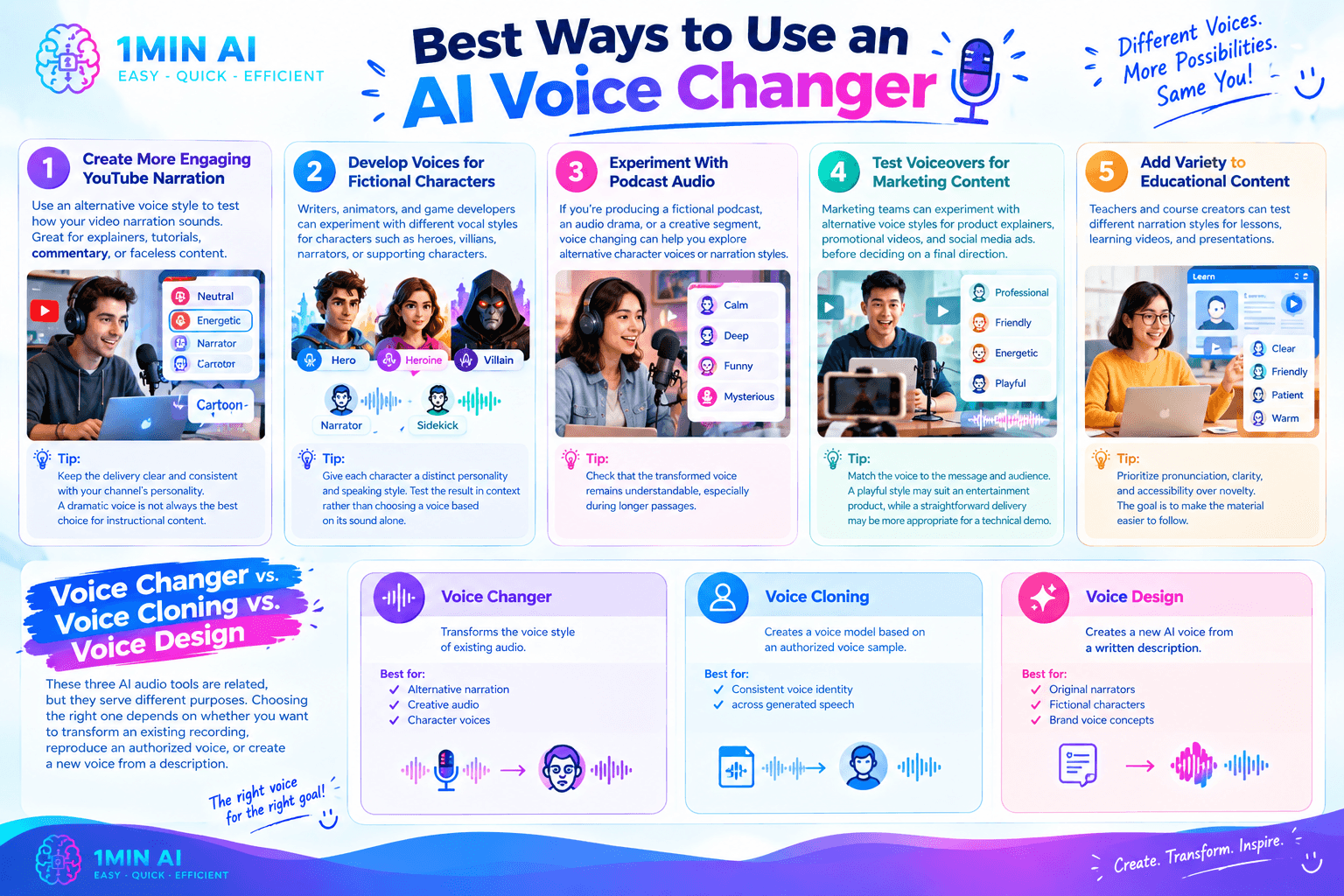
A voice changer becomes more useful when you match the transformation to a specific creative goal. Here are five ideas worth trying.
1. Create More Engaging YouTube Narration
Use an alternative voice style to test how your video narration sounds. This can help when developing explainers, tutorials, commentary, or faceless video content.
Tip: Keep the delivery clear and consistent with your channel's personality. A dramatic voice is not always the best choice for instructional content.
2. Develop Voices for Fictional Characters
Writers, animators, and game developers can experiment with different vocal styles for characters such as heroes, villains, narrators, or supporting characters.
Tip: Give each character a distinct personality and speaking style. Test the result in context rather than choosing a voice based on its sound alone.
3. Experiment With Podcast Audio
If you're producing a fictional podcast, an audio drama, or a creative segment, voice changing can help you explore alternative character voices or narration styles.
Tip: Check that the transformed voice remains understandable, especially during longer passages.
4. Test Voiceovers for Marketing Content
Marketing teams can experiment with alternative voice styles for product explainers, promotional videos, and social media advertisements before deciding on a final direction.
Tip: Match the voice to the message and audience. A playful style may suit an entertainment product, while a straightforward delivery may be more appropriate for a technical demonstration.
5. Add Variety to Educational Content
Teachers and course creators can test different narration styles for lessons, learning videos, and presentations.
Tip: Prioritize pronunciation, clarity, and accessibility over novelty. The goal is to make the material easier to follow.
Voice Changer vs. Voice Cloning vs. Voice Design
These three AI audio tools are related, but they serve different purposes. Choosing the right one depends on whether you want to transform an existing recording, reproduce an authorized voice, or create a new voice from a description.
| Tool | Main purpose | Best for |
|---|---|---|
| Voice Changer | Transforms the voice style of existing audio | Alternative narration, creative audio, character voices |
| Voice Cloning | Creates a voice model based on an authorized voice sample | Consistent voice identity across generated speech |
| Voice Design | Creates a new AI voice from a written description | Original narrators, fictional characters, and brand voice concepts |
Voice Changer
Choose a voice changer when you already have a recording and want to transform how it sounds without rewriting the spoken content.
Voice Cloning
Use 1minAI Voice Cloning when your goal is to create a model based on a voice you own or have permission to use. Voice cloning is about reproducing a particular voice identity, rather than simply applying a different vocal style to a recording.
Voice Design
Try 1minAI Voice Design when you want to create a new voice by describing its characteristics, such as tone, accent, personality, or speaking style. This can be useful when you need a voice concept that doesn't correspond to an existing speaker.
Tips for Getting Better Voice-Changing Results
The quality of the original recording and your choice of voice can both affect the final output. Use these tips to improve your workflow.
- Start with clear audio. Reduce background noise and avoid recordings where the speaker is difficult to understand.
- Use a suitable recording format. Check that your file is supported and meets the tool's upload requirements.
- Choose a voice that fits the content. Consider the audience, subject, and intended mood before selecting a voice.
- Test a short clip first. A short sample makes it easier to evaluate the result before processing a longer recording.
- Listen for pronunciation issues. Check names, technical terms, numbers, and other words that may be important to your message.
- Compare alternatives. If the first result doesn't fit, try another available voice or adjust the settings.
- Review the finished audio. Listen from beginning to end and check volume, clarity, pacing, and consistency before publishing.
AI-generated audio may not preserve every nuance of the original recording. Always review the output instead of assuming that every transformation will sound natural.
Frequently Asked Questions
What is the best voice changer for beginners?
A good beginner voice changer should have a straightforward upload process, understandable voice options, and a simple way to preview or review the output. 1minAI offers an online workflow with audio upload, voice selection, output format, and model settings.
Can I change my voice without recording it again?
Yes. A voice changer such as 1minAI's can process an existing supported audio recording, so you can experiment with a different voice style without rerecording the entire script.
What audio formats does the 1minAI Voice Changer support?
The interface shown supports MP3, M4A, OGG, WAV, and FLAC files, with a single-file upload limit of 50 MB. Check the current interface for the latest requirements.
Is voice changing the same as text to speech?
No. A voice changer transforms existing recorded speech, while text to speech generates spoken audio from written text. They solve different problems, although both can be useful in the same content workflow.
Is voice cloning the same as a voice changer?
No. Voice cloning aims to reproduce an authorized speaker's voice identity, while a voice changer transforms the sound of an existing recording. Choose the tool based on the result you need.
Can I use AI voice changing for commercial projects?
That depends on the tool's terms, your usage rights, and the content of the recording. Review the applicable terms and make sure you have permission to use the audio and any voice identity involved.
Final Thoughts
An online voice changer makes it easier to experiment with voice styles for videos, podcasts, games, marketing, and educational content. The key is to start with a clear recording, select a voice that suits your project, and review the transformed audio before publishing it.
With 1minAI Voice Changer, you can explore AI-powered voice transformation in a simple online workflow. If you need a consistent replica of an authorized voice, explore Voice Cloning; if you want to create a completely new voice from a description, try AI Voice Design.
For further information, explore 1minAI Voice Changer
Discover more AI features: https://1min.ai/features
Try 1minAI agent now: https://app.1min.ai/ai-agent-demo
- #Commerce
Alternatives
Discover the best alternatives to 1minAI and compare features, pricing, and use cases.

1min.AI vs OpenRouter
1min.AI vs. OpenRouter: Compare the ready-to-use AI creation product against the technical API tool. Find out if you need a zero-code creative studio or a coding infrastructure hub.
 Ngoc Hong
1min.AI vs Jarvis AI
Compare 1min.AI vs Jarvis AI to discover which AI platform is better for writing, research, automation, and content creation. Find the best AI assistant for your workflow.
Ngoc Hong
1min.AI vs Taskade
Compare 1min.AI vs Taskade for AI content creation, automation, agents, and creative workflows to find the right workspace.
Ngoc HongAI Tools
Discover the best AI tools to boost productivity, creativity, and everyday work.

Create Consistent Cartoon Content in Just a Few Steps
Create engaging cartoon videos for TikTok and Reels with 1min.AI. Research ideas, create characters, and turn images into animated videos in 3 simple steps.
 Lien Anh Vu
One Product, 10 UGC Creatives: How AI Makes Content Testing Easier
Create more authentic UGC with an AI UGC video generator, test more creative angles and scale affiliate content without filming every version.
Lien Anh Vu
Top 4 Affordable AI Tools for Startup Founders
Discover the top 4 affordable AI tools for startup founders to validate ideas, build products, create content, and launch faster without overspending.
 Tram Ta
AI Features
Comprehensive AI features that streamline workflows, improve efficiency, and empower teams to achieve more.
Create Consistent Cartoon Content in Just a Few Steps
Create engaging cartoon videos for TikTok and Reels with 1min.AI. Research ideas, create characters, and turn images into animated videos in 3 simple steps.
Lien Anh VuOne Product, 10 UGC Creatives: How AI Makes Content Testing Easier
Create more authentic UGC with an AI UGC video generator, test more creative angles and scale affiliate content without filming every version.
Lien Anh Vu
1minAI: Free AI Grammar Checker
Check grammar for free with 1minAI’s AI grammar checker. Find grammar, spelling, and writing mistakes, improve clarity, and polish your content in seconds.
Tram TaAI Use Cases
A curated collection of AI use cases for business, productivity, and industry-specific applications.
Create Consistent Cartoon Content in Just a Few Steps
Create engaging cartoon videos for TikTok and Reels with 1min.AI. Research ideas, create characters, and turn images into animated videos in 3 simple steps.
Lien Anh VuOne Product, 10 UGC Creatives: How AI Makes Content Testing Easier
Create more authentic UGC with an AI UGC video generator, test more creative angles and scale affiliate content without filming every version.
Lien Anh Vu
Best Time to Post on Instagram: A Practical Guide for Better Engagement
Discover the best time to post on Instagram, including the best days and times for different audiences, plus tips to find the ideal posting schedule for your account.
Tram TaAI Tutorials
Learn how to use AI with practical, step-by-step tutorials.

Black Friday AI Tool Deals in 2026
Discover what Black Friday AI tool deals 2026 has to offer. Find out how to secure the 1min.AI lifetime deal via AppSumo, Dealify, Stack Social, and verify on Trustpilot, Slashdot, and Software Advice.
 Hang Nguyen
Create Consistent Cartoon Content in Just a Few Steps
Create engaging cartoon videos for TikTok and Reels with 1min.AI. Research ideas, create characters, and turn images into animated videos in 3 simple steps.
Lien Anh Vu
[Seedance 2.5 New] Better AI Product Videos, Less Rework in 1min.AI
Use Seedance 2.5 image to video on 1min.AI to create more consistent AI product videos, reduce failed generations, save credits, and improve UGC workflows.
Lien Anh VuAI Guides
Learn AI faster with practical guides, real-world examples, and actionable best practices.

Safely Buy AI Tools Online: 2026 Black Friday Guide
Discover how to find and secure the best Black Friday AI deals online. Learn expert strategies to avoid scams, combat subscription fatigue, and verify software.
Hang NguyenCreate Consistent Cartoon Content in Just a Few Steps
Create engaging cartoon videos for TikTok and Reels with 1min.AI. Research ideas, create characters, and turn images into animated videos in 3 simple steps.
Lien Anh Vu[Seedance 2.5 New] Better AI Product Videos, Less Rework in 1min.AI
Use Seedance 2.5 image to video on 1min.AI to create more consistent AI product videos, reduce failed generations, save credits, and improve UGC workflows.
Lien Anh VuAI Solutions
Browse the best AI solutions for automation, coding, research, productivity, customer support, marketing, and business workflows.
Safely Buy AI Tools Online: 2026 Black Friday Guide
Discover how to find and secure the best Black Friday AI deals online. Learn expert strategies to avoid scams, combat subscription fatigue, and verify software.
Hang NguyenCreate Consistent Cartoon Content in Just a Few Steps
Create engaging cartoon videos for TikTok and Reels with 1min.AI. Research ideas, create characters, and turn images into animated videos in 3 simple steps.
Lien Anh VuOne Product, 10 UGC Creatives: How AI Makes Content Testing Easier
Create more authentic UGC with an AI UGC video generator, test more creative angles and scale affiliate content without filming every version.
Lien Anh VuAI Models
Explore the world's leading AI models in one place.
Create Consistent Cartoon Content in Just a Few Steps
Create engaging cartoon videos for TikTok and Reels with 1min.AI. Research ideas, create characters, and turn images into animated videos in 3 simple steps.
Lien Anh VuOne Product, 10 UGC Creatives: How AI Makes Content Testing Easier
Create more authentic UGC with an AI UGC video generator, test more creative angles and scale affiliate content without filming every version.
Lien Anh Vu[Seedance 2.5 New] Better AI Product Videos, Less Rework in 1min.AI
Use Seedance 2.5 image to video on 1min.AI to create more consistent AI product videos, reduce failed generations, save credits, and improve UGC workflows.
Lien Anh VuAI Comparisons
Compare AI tools, models, and platforms to find the best fit for your needs.

Kling AI Vs Veo 3: Which Model Wins?
Kling AI vs Veo 3: compare motion, native audio, pricing & free tiers to see which AI video generator wins for your project - try both on 1min.AI.
 Trang Tran
[Seedance 2.5 New] Better AI Product Videos, Less Rework in 1min.AI
Use Seedance 2.5 image to video on 1min.AI to create more consistent AI product videos, reduce failed generations, save credits, and improve UGC workflows.
Lien Anh Vu
DeepSeek V4 Pro vs Flash Comparison
Compare DeepSeek V4 Pro vs DeepSeek V4 Flash metrics. Optimize your agentic apps and improve AI fact checking on 1min.ai today.
Ngoc HongAI Integrations
Seamlessly integrate AI with the tools you already use to automate work and boost productivity.

POV: You Have 10+ Posts to Make Every Day
Learn how to build an AI content workflow that helps content creators produce 10+ social media posts a day faster with AI brainstorming, image generation, and content creation.
Lien Anh Vu
How to Use an AI Fashion Video Generator for Fashion Week 2026
Turn Fashion Week 2026 ideas into stunning fashion videos with AI. Learn how to brainstorm, create visuals, and transform images into videos with one simple workflow.
Lien Anh Vu
Stop Switching Between AI Apps: How AI Integration Transforms Employer Branding
Discover how AI integration helps HR teams streamline employer branding by combining AI writing, documents, images, video, and multiple AI models into one workspace.
Tram TaAI for Industries
Find the best AI tools and workflows for healthcare, finance, education, legal, manufacturing, retail, real estate, and more

Best Business Productivity Tools for Startups to Maximize Profits | 1minAI
Discover the best business productivity tools for startups to save time, streamline workflows, reduce repetitive tasks, and support profitable growth with AI.
Tram Ta
Best AI Tool for Content Marketing |1minAI
Looking for the best AI tool for content marketing? See how 1minAI helps marketers research, write, repurpose, create visuals, and scale content from one AI workspace.
Tram Ta
7 Low-Cost AI Business Ideas for Your Startup
Explore 7 low-cost AI business ideas you can start with a small budget, from content and video services to AI consulting, reselling, and automation.
Tram TaAI Agents
Discover and run AI agents to automate tasks across your work and daily life.
1minAI: Free AI Grammar Checker
Check grammar for free with 1minAI’s AI grammar checker. Find grammar, spelling, and writing mistakes, improve clarity, and polish your content in seconds.
Tram Ta
AI Agents for Facebook
Use an AI Agent for Facebook to create content, generate images, schedule posts, and publish from your documents and conversations.
Ngoc Hong
AI Agent vs AI Assistant: Which One Actually Saves Designers More Time?
Learn the difference between AI Agent vs AI Assistant and discover which solution helps designers automate repetitive work, reduce revisions, and save more time.
Lien Anh VuAI Workflows
Explore ready-to-use AI workflows for productivity, marketing, sales, support, and more.
Create Consistent Cartoon Content in Just a Few Steps
Create engaging cartoon videos for TikTok and Reels with 1min.AI. Research ideas, create characters, and turn images into animated videos in 3 simple steps.
Lien Anh VuOne Product, 10 UGC Creatives: How AI Makes Content Testing Easier
Create more authentic UGC with an AI UGC video generator, test more creative angles and scale affiliate content without filming every version.
Lien Anh VuPOV: You Have 10+ Posts to Make Every Day
Learn how to build an AI content workflow that helps content creators produce 10+ social media posts a day faster with AI brainstorming, image generation, and content creation.
Lien Anh VuNewsletter
Weekly AI Innovations with 1minAI

🔮 Weekly AI Innovations #141: Seedance 2.5 & Stable Audio 3: Next-Gen AI
Explore Seedance 2.0, 2.5, and StabilityAI's Stable Audio 3 on 1min.ai. Generate studio-grade audio and synchronized motion with next-gen generative AI.
Hang Nguyen
🔮 Weekly AI Innovations #140: Deepseek 4.1 Flash & Gemini Upgrades
Explore Deepseek 4.1 Flash and new Gemini models on 1min.ai. Plus, check our update on your Billing - Usage page for better clarity.
Hang Nguyen
🔮 Weekly AI Innovations #139: Dawn of the next-gen AI
Discover the immense power of GPT-6 Astra and Claude Fable 5.1. Unlock next-generation AI models on 1min.ai to solve complex tasks effortlessly.
Hang Nguyen