
Free AI Video Maker: No Restrictions for Beginners from A to Z

Tram Ta
November 16, 2026
Learn how to use a free AI video maker from A to Z. Create videos from text and images, explore prompts, and discover beginner-friendly tools on 1minAI.
Creating videos used to require cameras, editing software, design skills, and hours of production work. Today, a free AI video maker can help beginners turn simple ideas, text prompts, and images into engaging video clips without mastering professional editing tools.
Whether you want to make TikTok videos, YouTube Shorts, product advertisements, educational content, or cinematic scenes, AI video generation gives you a faster way to experiment with creative ideas.
But which tool should you choose? How do you write a good video prompt? Can you create videos from images? And what does "no restrictions" actually mean when using a free AI video maker?
This beginner-friendly A-to-Z guide answers those questions. You'll learn the basic video creation workflow, discover useful prompt examples, understand common limitations, and see how to create AI videos with 1minAI.
What Is a Free AI Video Maker?
A free AI video maker is an online tool that uses artificial intelligence to generate or transform video content from different types of input.
Depending on the platform and available model, you can start with:
- Text prompts: Describe a scene, and AI generates a video based on your instructions.
- Images: Upload a photograph or illustration and animate it into a video.
- Existing video: Use supported AI editing tools to transform or modify footage.
- Creative concepts: Develop short scenes, product showcases, advertisements, and storytelling clips.
For example, imagine you sell skincare products and want to create a short promotional video.
Instead of arranging a photoshoot, you could upload a product image and write:
A premium skincare bottle stands on a white marble surface. Soft sunlight moves across the bottle as the camera slowly zooms in. Fresh green leaves move gently in the background. Clean luxury advertising style.
An AI video model can use the image and prompt to create a short animated product scene.
How does AI video generation work?
Most beginner workflows follow four basic stages:
- Input: Provide a written prompt, reference image, or supported video.
- Interpretation: The AI model processes the subject, scene, movement, and visual instructions.
- Generation: The model creates a short video based on the input and selected settings.
- Review: Preview the result, adjust your prompt, and generate another version if necessary.
Types of Videos You Can Create with AI
Before choosing a video maker, decide what kind of video you want to produce. Different formats require different inputs and prompting techniques.
1. Text-to-video
Text-to-video is the easiest starting point when you have an idea but no visual materials.
You simply describe the scene, and the AI generates a video based on your instructions.
Example prompt:
A small modern coffee shop on a rainy evening. Warm yellow lights shine through the windows as people walk past with umbrellas. The camera slowly moves toward the entrance. Cinematic atmosphere, realistic lighting, natural movement.
2. Image-to-video
Image-to-video is useful when you already have a photograph, product image, character illustration, or other visual asset.
Instead of generating the entire scene from scratch, you upload an image and describe how it should move.
Example prompt:
Animate this product photograph. The perfume bottle rotates slowly on the display surface while soft studio light reflects across the glass. Keep the bottle's shape, label, and original colors consistent. Luxury commercial style.
Try the 1minAI Free AI Video Generator from Image to explore this workflow.
3. AI-assisted video creation
Some AI tools can also help transform existing footage or create specific visual effects.
Depending on the available features, you may be able to create variations, extend scenes, or apply targeted transformations.
How to Make Your First AI Video with 1minAI: A Step-by-Step Guide
Now let's move from theory to practice.
You can use 1minAI to explore AI video generation workflows without needing advanced video editing experience.
Step 1: Open 1minAI
Visit 1minAI and explore its AI video generation options.
Choose the video workflow that matches your starting material:
- Start with text if you want to create a scene from an idea.
- Choose image-to-video if you already have a photograph or visual asset.
- Explore a specific model if you want to experiment with its generation style.
Step 2: Choose your AI video generator
Select the model or workflow that fits your project.
For example:
- Luma: Explore AI-powered video creation from a written concept or visual input through the available Luma workflow.
- Veo 3.1: Try cinematic scene generation and supported audio features.
- Image-to-video: Animate an existing image instead of creating every visual element from scratch.
You can start with Luma AI Video Generator or explore Veo 3.1 video generation.
The available models and settings may change, so use the options currently displayed in the generator.
Step 3: Write your video prompt
Your prompt tells the AI what to create.
A useful beginner formula is:
Subject + Action + Environment + Camera Movement + Lighting + Visual Style
For example:
A young woman wearing a beige coat walks through a modern city street. Autumn leaves move gently in the wind. The camera follows her from behind with a slow tracking movement. Warm afternoon sunlight, realistic cinematic style.
You do not need to write a long paragraph. Focus on one clear subject and one main action.
Step 4: Select your video settings
Depending on the selected model, you may be able to configure:
- Video duration.
- Aspect ratio.
- Resolution.
- Reference image or frame.
- Audio generation.
- Other model-specific options.
For your first attempt, use simple settings and a short duration.
Check the estimated credit cost before generating.
Step 5: Generate and review your video
Start the generation process and wait for the result.
When the video is ready, review it carefully:
- Does the subject look correct?
- Is the movement natural?
- Does the camera move as expected?
- Are there any visual distortions?
- Does the result match your original idea?
Do not expect every generation to be perfect. AI video creation often involves testing and refining.
Step 6: Improve the result and download it
If the first result is not quite right, change one part of your prompt at a time.
For example:
- Replace "fast camera movement" with "slow cinematic camera movement."
- Add "keep the product shape consistent."
- Change "bright lighting" to "soft natural morning light."
- Remove unnecessary background actions.
Once you are happy with the result, use the available preview and download options to save your video.
5 AI Video Prompts Beginners Can Copy and Use
Writing prompts can feel difficult when you are new to AI video generation. These examples provide a starting point for different creative projects.
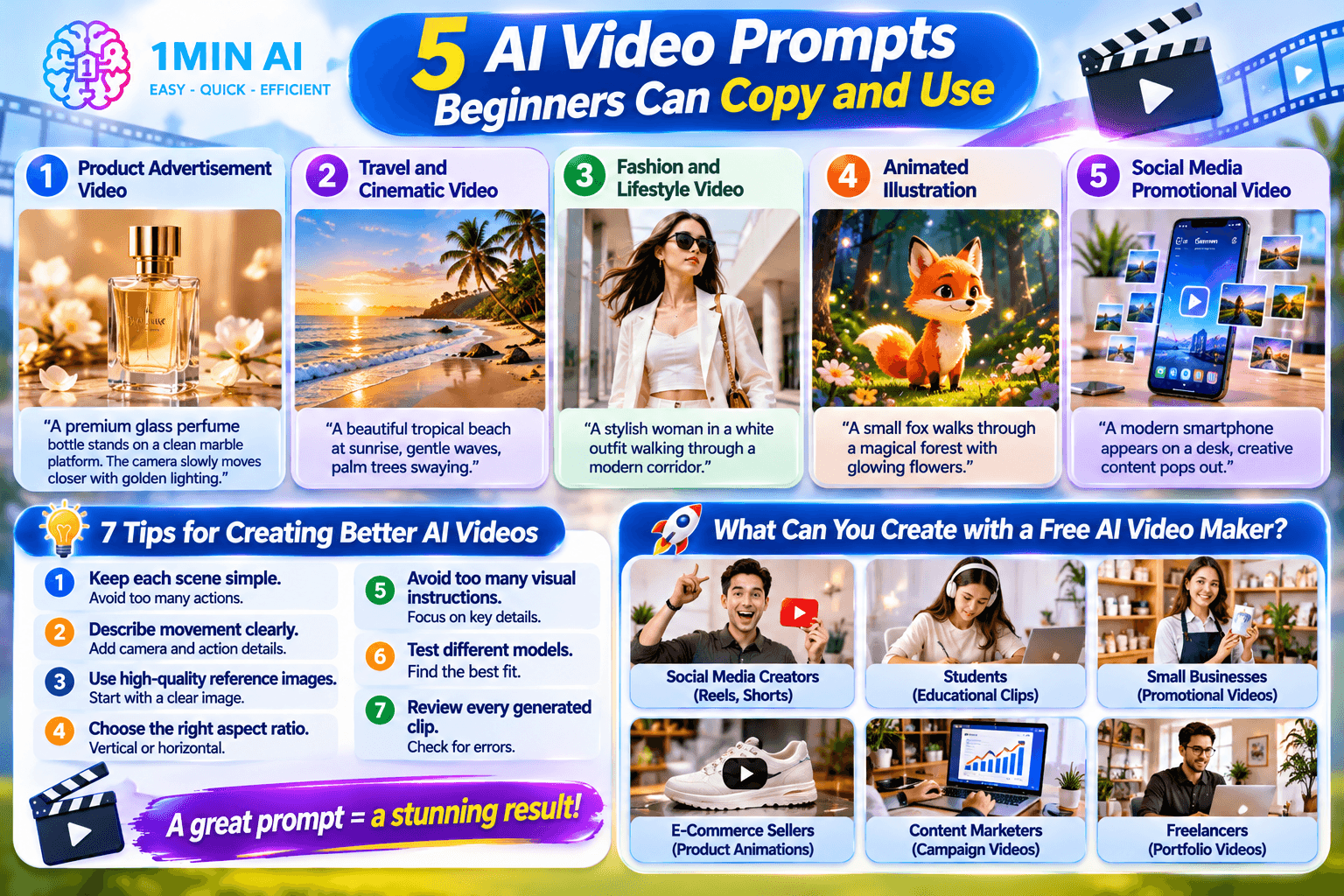
1. Product advertisement video
Prompt:
A premium glass perfume bottle stands on a clean beige marble platform. The camera slowly moves closer as soft golden studio lighting reflects across the bottle. A few delicate flower petals move gently in the background. Elegant luxury advertising style, realistic product details, smooth camera movement.
2. Travel and cinematic video
Prompt:
A beautiful tropical beach at sunrise, gentle ocean waves moving toward the shore, palm trees swaying in the breeze. The camera slowly pans across the coastline. Warm golden sunlight, peaceful atmosphere, cinematic travel film style.
3. Fashion and lifestyle video
Prompt:
A stylish woman wearing a minimalist white outfit walks through a modern architectural corridor. Her hair moves naturally as she walks. The camera follows with a smooth tracking shot. Soft natural lighting, elegant fashion editorial style, realistic movement.
4. Animated illustration
Prompt:
A small illustrated fox walks through a magical forest filled with glowing flowers. Fireflies move gently around the character while leaves float through the air. The camera slowly pans to the right. Whimsical storybook illustration style, smooth animation.
5. Social media promotional video
Prompt:
A modern smartphone appears on a clean white desk. The camera quickly pushes toward the screen as colorful creative content appears around it. Dynamic but smooth movement, bright professional lighting, modern technology advertising style, vertical video composition.
Beginner tip: Generate a short draft first. If the subject or movement is incorrect, refine the prompt before spending more credits on another version.
How to Create Better AI Videos: 7 Tips for Beginners
Getting a good result is not only about choosing a powerful AI model. The way you prepare your input and write your prompt also matters.
1. Keep each scene simple
Avoid asking the AI to perform too many actions in one clip.
A scene with one person walking toward a camera is easier to control than a scene with multiple people, several locations, and complicated transitions.
2. Describe movement clearly
AI video generation needs movement instructions, not just descriptions of appearance.
Instead of writing:
A beautiful car in the city.
Try:
A black sports car drives slowly through a modern city street. The camera follows from a low rear angle as reflections move across the bodywork.
3. Use high-quality reference images
If you are creating an image-to-video clip, start with a clear image.
A sharp photograph with a recognizable subject and uncluttered background can make it easier to guide the animation.
4. Choose the right aspect ratio
Think about where your video will be published before generating it.
A vertical video works well for short-form social content, while a horizontal video is more suitable for standard YouTube videos and many website placements.
5. Avoid too many visual instructions
Long prompts with conflicting instructions can make the output less predictable.
Prioritize the subject, action, camera movement, and lighting.
6. Test different models
If the first model does not produce the result you want, try another available option.
One model may work better for cinematic scenes, while another may be more suitable for product movement or stylized visuals.
7. Review every generated clip
Always watch the entire video before publishing.
Check for inconsistent objects, distorted faces, unnatural movement, incorrect text, and audio problems.
AI-generated content still needs human review.
What Can You Create with a Free AI Video Maker?
AI video generation is useful for more than entertainment. Beginners, creators, and businesses can apply it to many different projects.
| User | Video ideas | Potential benefit |
|---|---|---|
| Social media creators | Reels, Shorts, visual stories | Publish more visual content |
| Students | Educational clips, presentations | Explain ideas visually |
| Small businesses | Product showcases, promotional videos | Create marketing assets |
| E-commerce sellers | Product animations, advertisements | Present products more dynamically |
| Content marketers | Campaign videos, blog visuals | Repurpose existing content |
| Freelancers | Portfolio videos, creative concepts | Demonstrate creative skills |
For businesses: Create product and marketing videos
Businesses can use AI video generation to develop product showcases, advertisements, campaign concepts, and short promotional clips.
For example, a small online store could turn existing product photographs into short promotional videos for its social media accounts.
If you want to explore business-focused workflows, visit the 1minAI AI Video Generator for Business page.
For creators: Turn ideas into short-form content
Creators can use text-to-video to test visual concepts or image-to-video to animate existing illustrations and photographs.
This can help them experiment with different styles without filming every scene manually.
For education: Make complex topics easier to understand
Teachers and students can use AI-generated visuals to illustrate science concepts, historical scenes, and educational presentations.
However, important facts and educational details should always be checked before publishing.
Conclusion: Start Creating Videos with 1minAI
A free AI video maker can make video creation more accessible, even if you have never used professional editing software.
You can start with a simple text prompt, animate an existing photograph, or experiment with different AI models to find a visual style that fits your idea.
The key is to begin with a small project, write clear prompts, choose suitable settings, and improve your results one generation at a time.
With 1minAI, you can explore multiple AI video generation workflows in one workspace, including Luma, Veo 3.1, and image-to-video creation.
Ready to make your first AI video?
Visit 1minAI and explore its free AI video generation options. Start with one idea, create a short clip, and bring your imagination to life.
Note: Free credits, available models, generation settings, watermarks, and usage rights may change. Check the current terms and displayed credit requirements before generating or publishing videos.
- #Commerce
Alternatives
Discover the best alternatives to 1minAI and compare features, pricing, and use cases.

1min.AI vs OpenRouter
1min.AI vs. OpenRouter: Compare the ready-to-use AI creation product against the technical API tool. Find out if you need a zero-code creative studio or a coding infrastructure hub.
 Ngoc Hong

1min.AI vs. Metricool: Which Platform Does More for Your Marketing Workflow?
Compare 1min.AI vs. Metricool across content creation, visual production, scheduling, analytics, MCP, and pricing to find the right platform for your marketing workflow.

1min.AI vs. Hootsuite: Which Social Media Tool Fits Your Workflow?
Compare 1min.AI vs. Hootsuite to explore their AI content creation, social media publishing, analytics, pricing, and collaboration features. Find the right tool for your workflow.
AI Tools
Discover the best AI tools to boost productivity, creativity, and everyday work.

Create Consistent Cartoon Content in Just a Few Steps
Create engaging cartoon videos for TikTok and Reels with 1min.AI. Research ideas, create characters, and turn images into animated videos in 3 simple steps.
 Lien Anh Vu

One Product, 10 UGC Creatives: How AI Makes Content Testing Easier
Create more authentic UGC with an AI UGC video generator, test more creative angles and scale affiliate content without filming every version.
Lien Anh Vu
Top 4 Affordable AI Tools for Startup Founders
Discover the top 4 affordable AI tools for startup founders to validate ideas, build products, create content, and launch faster without overspending.
 Tram Ta
AI Features
Comprehensive AI features that streamline workflows, improve efficiency, and empower teams to achieve more.
Create Consistent Cartoon Content in Just a Few Steps
Create engaging cartoon videos for TikTok and Reels with 1min.AI. Research ideas, create characters, and turn images into animated videos in 3 simple steps.
Lien Anh VuOne Product, 10 UGC Creatives: How AI Makes Content Testing Easier
Create more authentic UGC with an AI UGC video generator, test more creative angles and scale affiliate content without filming every version.
Lien Anh Vu
1minAI: Free AI Grammar Checker
Check grammar for free with 1minAI’s AI grammar checker. Find grammar, spelling, and writing mistakes, improve clarity, and polish your content in seconds.
Tram TaAI Use Cases
A curated collection of AI use cases for business, productivity, and industry-specific applications.
Create Consistent Cartoon Content in Just a Few Steps
Create engaging cartoon videos for TikTok and Reels with 1min.AI. Research ideas, create characters, and turn images into animated videos in 3 simple steps.
Lien Anh VuOne Product, 10 UGC Creatives: How AI Makes Content Testing Easier
Create more authentic UGC with an AI UGC video generator, test more creative angles and scale affiliate content without filming every version.
Lien Anh Vu
Best Time to Post on Instagram: A Practical Guide for Better Engagement
Discover the best time to post on Instagram, including the best days and times for different audiences, plus tips to find the ideal posting schedule for your account.
Tram TaAI Tutorials
Learn how to use AI with practical, step-by-step tutorials.

Black Friday AI Tool Deals in 2026
Discover what Black Friday AI tool deals 2026 has to offer. Find out how to secure the 1min.AI lifetime deal via AppSumo, Dealify, Stack Social, and verify on Trustpilot, Slashdot, and Software Advice.
 Hang Nguyen
Create Consistent Cartoon Content in Just a Few Steps
Create engaging cartoon videos for TikTok and Reels with 1min.AI. Research ideas, create characters, and turn images into animated videos in 3 simple steps.
Lien Anh Vu
[Seedance 2.5 New] Better AI Product Videos, Less Rework in 1min.AI
Use Seedance 2.5 image to video on 1min.AI to create more consistent AI product videos, reduce failed generations, save credits, and improve UGC workflows.
Lien Anh VuAI Guides
Learn AI faster with practical guides, real-world examples, and actionable best practices.

Safely Buy AI Tools Online: 2026 Black Friday Guide
Discover how to find and secure the best Black Friday AI deals online. Learn expert strategies to avoid scams, combat subscription fatigue, and verify software.
Hang NguyenCreate Consistent Cartoon Content in Just a Few Steps
Create engaging cartoon videos for TikTok and Reels with 1min.AI. Research ideas, create characters, and turn images into animated videos in 3 simple steps.
Lien Anh Vu[Seedance 2.5 New] Better AI Product Videos, Less Rework in 1min.AI
Use Seedance 2.5 image to video on 1min.AI to create more consistent AI product videos, reduce failed generations, save credits, and improve UGC workflows.
Lien Anh VuAI Solutions
Browse the best AI solutions for automation, coding, research, productivity, customer support, marketing, and business workflows.
Safely Buy AI Tools Online: 2026 Black Friday Guide
Discover how to find and secure the best Black Friday AI deals online. Learn expert strategies to avoid scams, combat subscription fatigue, and verify software.
Hang NguyenCreate Consistent Cartoon Content in Just a Few Steps
Create engaging cartoon videos for TikTok and Reels with 1min.AI. Research ideas, create characters, and turn images into animated videos in 3 simple steps.
Lien Anh VuOne Product, 10 UGC Creatives: How AI Makes Content Testing Easier
Create more authentic UGC with an AI UGC video generator, test more creative angles and scale affiliate content without filming every version.
Lien Anh VuAI Models
Explore the world's leading AI models in one place.
Create Consistent Cartoon Content in Just a Few Steps
Create engaging cartoon videos for TikTok and Reels with 1min.AI. Research ideas, create characters, and turn images into animated videos in 3 simple steps.
Lien Anh VuOne Product, 10 UGC Creatives: How AI Makes Content Testing Easier
Create more authentic UGC with an AI UGC video generator, test more creative angles and scale affiliate content without filming every version.
Lien Anh Vu[Seedance 2.5 New] Better AI Product Videos, Less Rework in 1min.AI
Use Seedance 2.5 image to video on 1min.AI to create more consistent AI product videos, reduce failed generations, save credits, and improve UGC workflows.
Lien Anh VuAI Comparisons
Compare AI tools, models, and platforms to find the best fit for your needs.

Kling AI Vs Veo 3: Which Model Wins?
Kling AI vs Veo 3: compare motion, native audio, pricing & free tiers to see which AI video generator wins for your project - try both on 1min.AI.
 Trang Tran
[Seedance 2.5 New] Better AI Product Videos, Less Rework in 1min.AI
Use Seedance 2.5 image to video on 1min.AI to create more consistent AI product videos, reduce failed generations, save credits, and improve UGC workflows.
Lien Anh Vu
DeepSeek V4 Pro vs Flash Comparison
Compare DeepSeek V4 Pro vs DeepSeek V4 Flash metrics. Optimize your agentic apps and improve AI fact checking on 1min.ai today.
Ngoc HongAI Integrations
Seamlessly integrate AI with the tools you already use to automate work and boost productivity.

POV: You Have 10+ Posts to Make Every Day
Learn how to build an AI content workflow that helps content creators produce 10+ social media posts a day faster with AI brainstorming, image generation, and content creation.
Lien Anh Vu
How to Use an AI Fashion Video Generator for Fashion Week 2026
Turn Fashion Week 2026 ideas into stunning fashion videos with AI. Learn how to brainstorm, create visuals, and transform images into videos with one simple workflow.
Lien Anh Vu
Stop Switching Between AI Apps: How AI Integration Transforms Employer Branding
Discover how AI integration helps HR teams streamline employer branding by combining AI writing, documents, images, video, and multiple AI models into one workspace.
Tram TaAI for Industries
Find the best AI tools and workflows for healthcare, finance, education, legal, manufacturing, retail, real estate, and more

No Photoshoot? Create AI Fashion Videos With Seedance 2.5
No photoshoot needed! Create stunning AI fashion videos with Seedance 2.5 on 1min.AI using outfit references, cinematic prompts, and surreal scenes.
Lien Anh Vu
Voice Cloning AI Free: How to Clone Any Voice Online in Minutes
Try voice cloning AI free with 1min.AI. Upload a 5-second clip, pick an ElevenLabs model, choose from 32 languages, and turn text to speech in your own voice.
Trang Tran
Text To Video AI Free Without Watermark Online
Create text to video AI free without watermark online with 1min.AI. Pick top models, turn prompts into HD clips, and download clean videos fast. Try it free.
Trang TranAI Agents
Discover and run AI agents to automate tasks across your work and daily life.
1minAI: Free AI Grammar Checker
Check grammar for free with 1minAI’s AI grammar checker. Find grammar, spelling, and writing mistakes, improve clarity, and polish your content in seconds.
Tram Ta
AI Agents for Facebook
Use an AI Agent for Facebook to create content, generate images, schedule posts, and publish from your documents and conversations.
Ngoc Hong
AI Agent vs AI Assistant: Which One Actually Saves Designers More Time?
Learn the difference between AI Agent vs AI Assistant and discover which solution helps designers automate repetitive work, reduce revisions, and save more time.
Lien Anh VuAI Workflows
Explore ready-to-use AI workflows for productivity, marketing, sales, support, and more.
Create Consistent Cartoon Content in Just a Few Steps
Create engaging cartoon videos for TikTok and Reels with 1min.AI. Research ideas, create characters, and turn images into animated videos in 3 simple steps.
Lien Anh VuOne Product, 10 UGC Creatives: How AI Makes Content Testing Easier
Create more authentic UGC with an AI UGC video generator, test more creative angles and scale affiliate content without filming every version.
Lien Anh VuPOV: You Have 10+ Posts to Make Every Day
Learn how to build an AI content workflow that helps content creators produce 10+ social media posts a day faster with AI brainstorming, image generation, and content creation.
Lien Anh VuNewsletter
Weekly AI Innovations with 1minAI

🔮 Weekly AI Innovations #145: X Content Agent & GPT 6.1 Terra on 1min.ai
Scale viral reach with the X Content Agent on 1min.ai. Discover an end-to-end 4-stage pipeline with zero token burn, plus the launch of GPT 6.1 Terra.
Hang Nguyen
🔮 Weekly AI Innovations #144: LinkedIn Content Agent: Complete B2B Publishing Pipeline
Scale B2B influence with the LinkedIn Content Agent on 1min.ai. Discover an end-to-end 4-stage pipeline with zero redundant token burn and 1-click publishing.
Hang Nguyen
🔮 Weekly AI Innovations #143: Update GPT-6, GPT-6.1 & Ideogram 4.0
Access GPT-6 Sol, Luna, GPT-6.1 Sol, and Ideogram 4.0 on 1min.ai. Boost typography accuracy to 98.4% and cut reasoning latency by 45% in one platform.
Hang Nguyen