
OpenClaw Agent vs. 1minAI Agent: Which AI Agent Is Better for Your Workflow?

Tram Ta
November 16, 2026
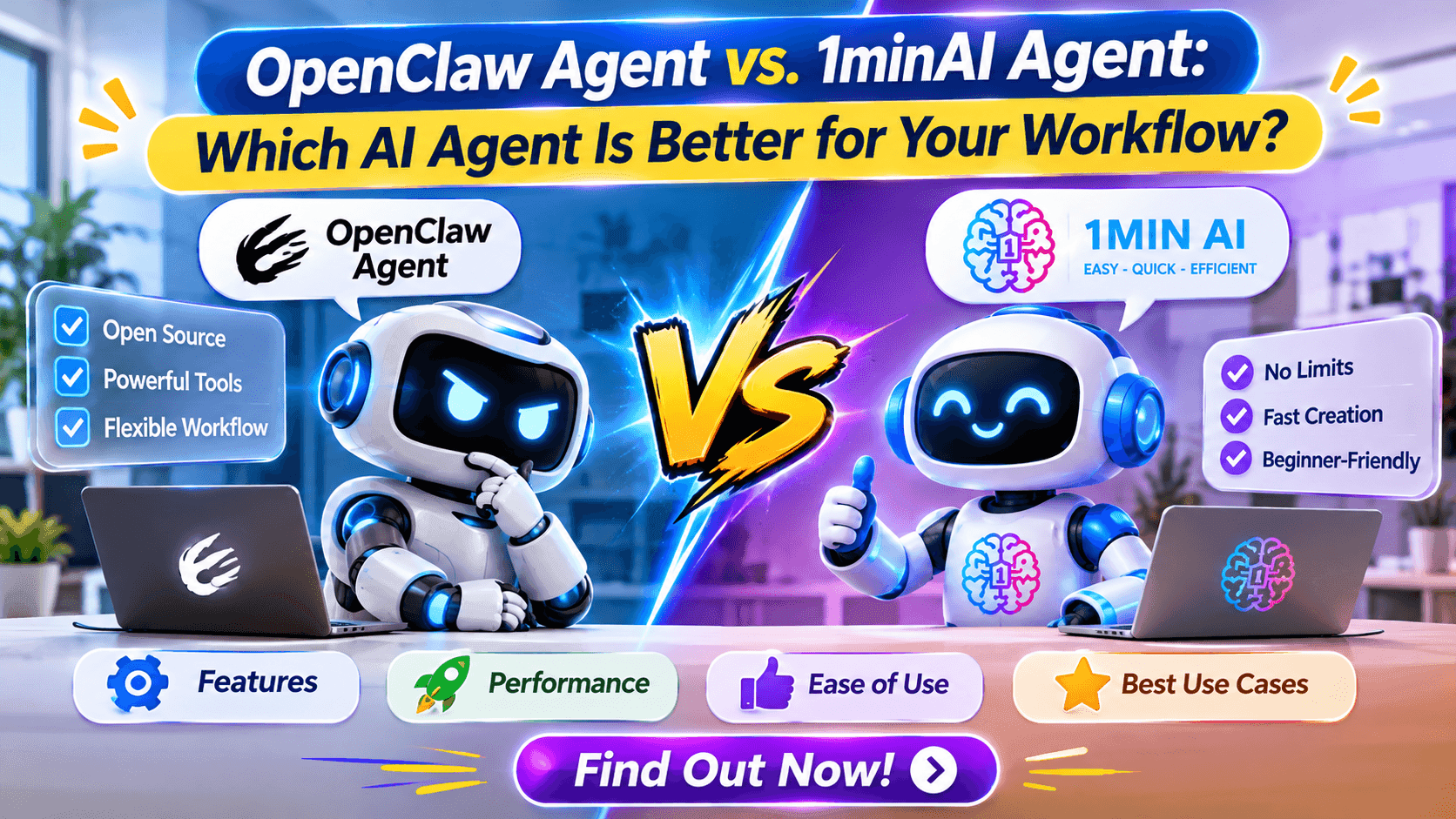
Compare OpenClaw Agent vs 1minAI Agent. Explore their features, AI models, automation, social media workflows, costs, and best use cases.
Two options worth exploring are OpenClaw Agent and 1minAI Agent. Both belong to the growing AI agent ecosystem, but they approach automation differently.
OpenClaw is an open-source, self-hosted AI assistant framework designed for users who want to connect AI models, messaging platforms, and external tools. 1minAI, on the other hand, offers an AI workspace with multiple models, AI-powered tools, and specialized agents for practical workflows such as social media management.
So, which one should you choose?
If you want to build and customize your own AI assistant, OpenClaw may be a good fit. If you want to access AI capabilities and specialized agents for everyday business tasks without managing your own agent infrastructure, 1minAI may be more convenient.
In this guide, we compare OpenClaw Agent vs. 1minAI Agent, covering their features, workflows, advantages, limitations, and ideal use cases.
What Is OpenClaw Agent?
OpenClaw is an open-source AI assistant that can run on a user's own computer or server. It connects AI models with messaging platforms, tools, and other systems through a central component called the Gateway.
Unlike a conventional chatbot, OpenClaw is designed to help users perform actions through connected tools.
Depending on its configuration and permissions, it can support workflows such as:
- Searching for information online.
- Interacting with supported browser sessions.
- Reading and organizing files.
- Running approved commands.
- Sending messages through connected channels.
- Managing scheduled tasks.
- Coordinating multiple agents.
OpenClaw can connect to supported hosted AI model providers or local models. This gives technical users flexibility when choosing the model that powers their assistant.
How Does OpenClaw Agent Work?
OpenClaw uses several components to coordinate its activities.
1. Gateway
The Gateway is the central communication layer. It manages connections between messaging channels, sessions, and agents.
2. AI model
A connected language model interprets instructions, reasons about tasks, and determines which tools may be useful.
3. Tools and integrations
Tools allow the agent to interact with external systems. Depending on configuration, these may include browser interaction, file operations, code execution, and messaging integrations.
4. Memory and sessions
OpenClaw supports sessions and memory-related capabilities that help maintain useful context across interactions.
5. Automation
Users can configure scheduled tasks and other automation mechanisms to perform recurring activities.
The main advantage is flexibility: users can configure how their assistant operates and which systems it can access.
However, that flexibility comes with responsibility. Installation, maintenance, permissions, integrations, and security need to be managed carefully.
What Is 1minAI Agent?
1minAI is an AI workspace that brings different AI models and AI-powered capabilities together in one platform.
Instead of requiring users to build an entire AI agent infrastructure, 1minAI provides access to AI chat, specialized tools, and agent-oriented workflows.
Its capabilities cover several areas, including:
- AI chat and multi-model conversations.
- Writing and content assistance.
- Image generation and editing.
- Video and audio tools.
- Document-related AI tasks.
- AI agents and social media workflows.
For users who want to apply AI to practical work, this approach can reduce the need to configure separate tools for every activity.
What Can You Do with 1minAI Agent?
One particularly relevant use case is social media management.
Through 1minAI Social Agents, users can explore AI agent capabilities designed around social media workflows.
Depending on the available agent features, these workflows can help with activities such as:
- Developing content ideas.
- Preparing social media drafts.
- Organizing content activities.
- Supporting social media management.
- Reducing repetitive content work.
Beyond social media, users can explore 1minAI's AI chat and other specialized capabilities for research, writing, and content production.
The key difference is that 1minAI focuses on making AI capabilities accessible through a platform, rather than requiring every user to configure a self-hosted assistant from scratch.
OpenClaw Agent vs. 1minAI Agent: Key Differences
Although both platforms are part of the AI agent ecosystem, they serve different purposes.
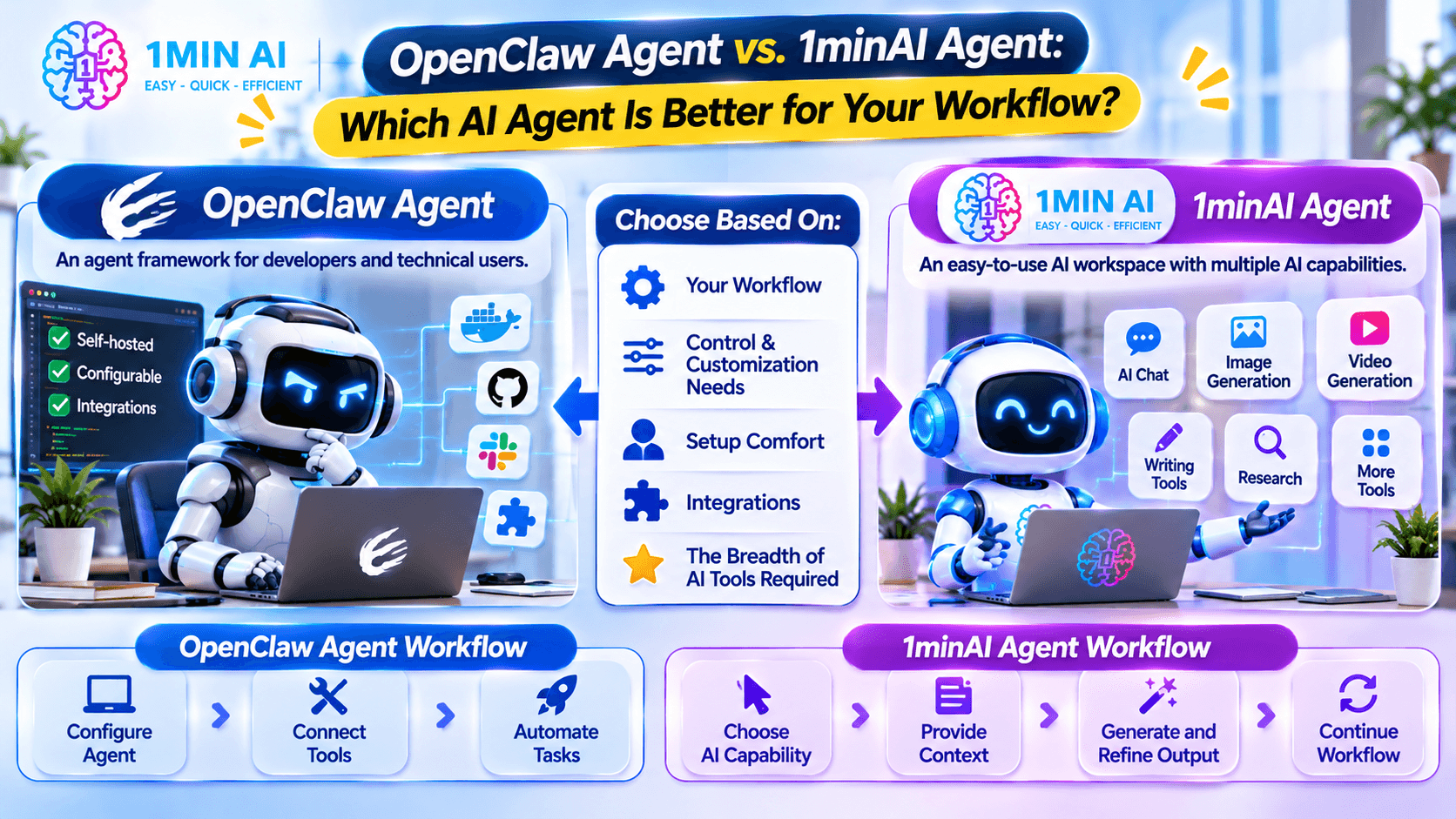
OpenClaw is primarily an agent framework. 1minAI is an AI workspace with multiple AI capabilities and specialized agent workflows.
Here is a practical comparison.
| Comparison | OpenClaw Agent | 1minAI Agent |
|---|---|---|
| Main purpose | Build and operate a configurable AI assistant | Access AI tools, models, and specialized agent workflows |
| Deployment | Self-hosted | Platform-based access |
| Target users | Developers, technical users, and teams | Individuals, creators, marketers, and businesses |
| Model options | Supported hosted providers and local models | Multiple AI models available through supported platform tools |
| Customization | Extensive configuration and integration options | Platform-guided AI capabilities and workflows |
| Integrations | Configurable messaging channels, tools, and plugins | Available platform tools and agent capabilities |
| Automation | Configurable tasks and tool-based workflows | Specialized AI workflows and agent features |
| Technical requirements | Installation, configuration, and maintenance | Generally less infrastructure management for users |
| Social media use | Requires suitable integrations and configuration | Dedicated Social Agents entry point |
| Best suited for | Building a customizable AI assistant | Applying AI to everyday tasks and business workflows |
The most important difference is not which platform has more features. It is how much control and setup you want.
OpenClaw gives technical users more control over their own assistant infrastructure. 1minAI offers a more accessible way to explore AI models, tools, and specialized workflows.
1. Setup and Ease of Use
One of the biggest differences between OpenClaw and 1minAI is the amount of technical setup involved.
OpenClaw: More Control, More Configuration
To use OpenClaw, you generally need to:
- Prepare a computer or server.
- Install the OpenClaw software.
- Configure a supported AI model provider.
- Set up the Gateway.
- Connect messaging channels.
- Configure tools and permissions.
- Test and maintain your workflows.
This process gives you greater control over your environment, but it can require command-line experience and technical troubleshooting.
For developers, this flexibility can be valuable. For someone who simply wants help creating content or researching a topic, the setup may be unnecessary.
1minAI: Access AI Capabilities Through a Workspace
With 1minAI, users can explore AI chat and specialized tools through the platform.
You do not need to build your own Gateway or configure a self-hosted agent environment just to start using its AI capabilities.
For example, you can explore different AI models, use AI chat for research, and access specialized tools for content-related tasks.
Verdict: OpenClaw is more suitable when you want to configure your own assistant infrastructure. 1minAI is more convenient when you want to start using AI tools and agent workflows without managing that infrastructure.
2. AI Model Flexibility and Multi-Model Chat
The AI model powering an agent has a significant impact on its output.
Different models may perform differently in reasoning, writing, coding, summarization, and tool use.
OpenClaw: Connect Supported Model Providers
OpenClaw is designed to work with supported AI model providers and local models.
This allows technical users to choose a model based on their requirements, such as:
- Reasoning capabilities.
- Coding performance.
- Context length.
- Tool-calling support.
- API costs.
- Deployment preferences.
The user is responsible for configuring the provider and managing the associated credentials and usage costs.
1minAI: Explore Multiple AI Models
1minAI provides a multi-model AI chat experience, allowing users to explore different supported AI models through one workspace.
For example, users can explore:
This can be useful when you want to compare different approaches to a question or use different AI models for different tasks.
For example, you might ask one model to create a content outline and another to review its clarity and structure.
Verdict: OpenClaw is attractive to users who want to configure their own model providers. 1minAI is useful for people who want to explore multiple AI models through an accessible AI chat workspace.
3. Automation and AI Agent Capabilities
Both options can support AI-powered workflows, but their automation approaches are different.
OpenClaw: Build Custom Agent Workflows
OpenClaw is designed for users who want to connect an AI assistant with external tools.
Depending on configuration, an agent can:
- Collect information from websites.
- Read and organize files.
- Interact with supported applications.
- Run approved commands.
- Send messages through connected channels.
- Perform scheduled tasks.
For example, a developer could configure an assistant to collect research, summarize the findings, save a report, and send a notification through a messaging channel.
The workflow depends on the tools, integrations, and permissions that the user configures.
1minAI: Use Specialized AI Workflows
1minAI approaches AI tasks through its workspace and specialized capabilities.
Instead of building every workflow from scratch, users can explore tools designed for activities such as writing, image creation, video, audio, document work, and social media.
For example, a marketer may use AI chat to research a campaign idea, writing tools to prepare content, and Social Agents to support social media activities.
This is useful when the goal is to complete a practical task rather than develop a custom agent system.
Verdict: OpenClaw is more flexible for custom tool-based automation. 1minAI is a practical option for accessing specialized AI capabilities without building every workflow independently.
4. Social Media Management: OpenClaw vs. 1minAI Social Agents
Social media is an interesting area for comparing these approaches.
Businesses need to research topics, create content, organize publishing activities, and maintain consistent communication with their audiences.
Can both platforms help?
OpenClaw for Social Media Automation
OpenClaw can support social media-related workflows when connected to suitable integrations and tools.
For example, a technical user might configure an agent to:
- Collect information about a topic.
- Generate draft post ideas.
- Organize the content in a file.
- Send drafts to a team for review.
- Trigger supported publishing workflows if properly integrated.
However, the user must configure the required integrations and permissions. Social media publishing should not be assumed to work automatically out of the box.
1minAI Social Agents for Content Workflows
For users who want to focus on social media tasks rather than build an automation framework, 1minAI Social Agents provide a more specialized starting point.
You can explore AI agent capabilities designed around social media activities and content workflows.
A potential workflow for a marketing team includes:
- Brainstorming content ideas.
- Preparing platform-specific post drafts.
- Organizing content activities.
- Supporting recurring social media tasks.
This approach is particularly relevant to creators, marketers, and businesses that want to apply AI to content operations.
Verdict: OpenClaw offers flexibility for custom social media automation when the necessary integrations are configured. 1minAI Social Agents are worth exploring if your primary objective is to support social media work through specialized AI capabilities.
5. Customization and Control
Customization is another important consideration.
OpenClaw: Designed for Technical Customization
OpenClaw is open-source software, so users can configure its deployment, model providers, integrations, tools, and agent behavior.
This is useful when you have specific requirements that cannot easily be addressed by a standard AI application.
For example, a developer might want to connect an assistant to an internal knowledge source, configure custom tool permissions, and create a specialized workflow for a development team.
However, more control also means more responsibility for maintenance and security.
1minAI: A More Platform-Guided Experience
1minAI focuses on making different AI capabilities accessible through one platform.
Users can choose tools based on their tasks without needing to manage the underlying agent infrastructure.
This can be a better fit for people who prioritize convenience and want to spend more time using AI than configuring it.
Verdict: Choose OpenClaw if deep technical customization is a priority. Choose 1minAI if you prefer a platform-guided experience for everyday AI work.
6. Cost and Resource Considerations
Cost is not simply a matter of whether software is open-source or platform-based.
You should consider the resources needed to operate each solution.
OpenClaw Costs
OpenClaw is open-source software, but operating it may involve costs such as:
- Server or computer resources.
- AI model API usage.
- Third-party services.
- Storage and networking.
- Maintenance and troubleshooting time.
If you use hosted AI models, API charges may depend on the provider, model, and amount of input and output processed.
Local models can reduce dependence on hosted API usage, but they require suitable hardware and may involve additional infrastructure costs.
1minAI Costs
1minAI provides platform-based access to its AI tools and models. The applicable usage limits, credits, and plan conditions depend on the current platform offering.
Users should review the current pricing and usage information before choosing a plan.
It is also important to consider the value of time saved. A solution that requires less technical maintenance may be worthwhile for a small team even if it is not designed for the same level of customization as a self-hosted framework.
Verdict: OpenClaw requires users to consider infrastructure, provider usage, and maintenance. 1minAI offers a platform-based approach, with costs and usage depending on its current plans and features.
OpenClaw Agent vs. 1minAI Agent: Which One Should You Choose?
There is no universal winner. The right option depends on your technical skills, business needs, and preferred way of working.
Here is a quick decision guide.
| Your situation | Recommended option | Why |
|---|---|---|
| You want to build your own AI assistant | OpenClaw | Offers self-hosting and extensive configuration |
| You are comfortable with technical setup | OpenClaw | Gives you more control over tools and integrations |
| You want to experiment with agent frameworks | OpenClaw | Provides an open-source environment |
| You want to explore multiple AI models | 1minAI | Provides a multi-model chat workspace |
| You need AI for writing and content creation | 1minAI | Offers specialized AI content tools |
| You want AI support for social media workflows | 1minAI Social Agents | Provides a dedicated social agent entry point |
| You want to use AI without maintaining your own Gateway | 1minAI | Reduces the need to manage self-hosted infrastructure |
Choose OpenClaw If You Want to Build and Customize
OpenClaw is a strong option to explore if you are:
- A developer building AI-powered workflows.
- A technical user who prefers self-hosting.
- A team that needs custom tool integrations.
- Someone who wants more control over an AI assistant's environment.
Choose 1minAI If You Want to Apply AI to Everyday Work
1minAI may be more suitable if you are:
- A business owner who wants practical AI assistance.
- A marketer creating content regularly.
- A creator who works with text, images, and video.
- A user who wants to explore multiple AI models.
- A team looking for specialized AI capabilities without building an agent framework.
You do not need to choose an advanced agent architecture for every task. Sometimes the most useful solution is simply the one that helps you finish your work efficiently.
How to Get Started with 1minAI Agent Workflows
If you want to explore 1minAI instead of building your own OpenClaw environment, start with a workflow that matches your actual needs.
Here are three practical examples.
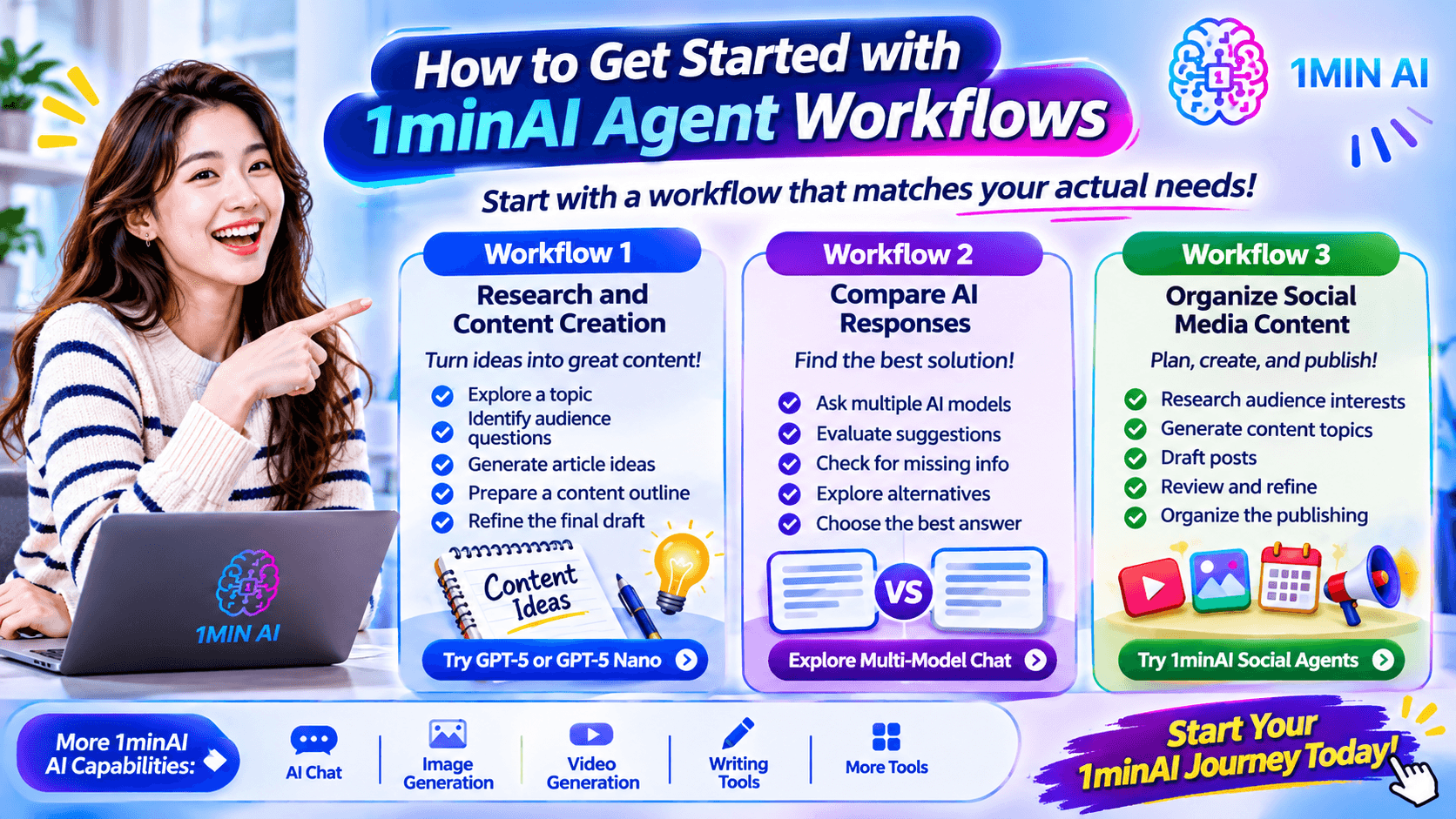
Workflow 1: Research and Content Creation
For marketers and business owners, content creation often begins with research.
You can use AI chat to:
- Explore a topic.
- Identify audience questions.
- Generate article ideas.
- Prepare a content outline.
- Refine the final draft.
Try GPT-5 on 1minAI or GPT-5 Nano to explore AI-assisted research and writing tasks.
Workflow 2: Compare AI Responses
Sometimes one AI response is not enough.
You can explore different models and compare their suggestions to identify missing information or alternative approaches.
For example, ask AI models to review the same marketing strategy and evaluate:
- Audience relevance.
- Content clarity.
- Practicality.
- Potential weaknesses.
- Suggested improvements.
Explore 1minAI's ChatGPT alternative and multi-model chat capabilities to find an AI workflow that suits your needs.
Workflow 3: Organize Social Media Content
If social media is your primary business activity, start with a repeatable content workflow.
For example:
- Research audience interests.
- Generate weekly content topics.
- Draft posts for your target platforms.
- Review and refine the content.
- Organize the publishing process.
You can explore 1minAI Social Agents to see how specialized AI agents can support social media activities.
For other AI capabilities, visit 1minAI's AI features.
Frequently Asked Questions About OpenClaw Agent vs. 1minAI Agent
Is OpenClaw better than 1minAI?
It depends on your needs. OpenClaw is better suited to users who want to build and configure a self-hosted AI assistant. 1minAI is more convenient for users who want to explore multiple AI models, specialized AI tools, and agent-oriented workflows through a platform.
Is OpenClaw free to use?
OpenClaw is open-source software, but running it may involve costs for hosting, hardware, model API usage, and third-party services. Your total cost depends on your configuration.
Is 1minAI an AI agent platform?
1minAI provides an AI workspace with multi-model chat, specialized AI tools, and agent capabilities, including Social Agents. It is a platform-based approach rather than a self-hosted framework like OpenClaw.
Can OpenClaw connect to different AI models?
Yes. OpenClaw is designed to support multiple model providers and supported local models. The exact options depend on the current integrations and configuration.
Can 1minAI replace OpenClaw?
Not in every situation. If you need a self-hosted assistant with custom integrations and control over its execution environment, OpenClaw serves a different purpose. If you mainly need AI chat, content creation, and specialized workflows, 1minAI may cover more of your everyday requirements.
Which is better for social media management?
For users who want to build custom automation, OpenClaw may be useful when the necessary integrations are available and configured. For users who want a more specialized starting point for social media workflows, 1minAI Social Agents are worth exploring.
Which is better for beginners?
1minAI is generally easier to approach for everyday AI tasks because users can access platform capabilities without setting up a self-hosted Gateway. OpenClaw may require more technical knowledge, particularly when configuring integrations and permissions.
Final: OpenClaw Agent vs. 1minAI Agent
OpenClaw and 1minAI represent two different approaches to using AI agents.
OpenClaw is designed for flexibility and control. It gives developers and technical users an open-source framework for connecting AI models, messaging channels, and external tools to build customized assistants.
1minAI focuses on accessible AI capabilities and practical workflows. It brings multiple AI models, content tools, and specialized agents together so users can apply AI to everyday tasks without building their own agent infrastructure.
If you enjoy experimenting with agent frameworks and want to manage your own AI environment, OpenClaw is worth exploring.
But if your goal is to use AI for research, writing, content creation, and social media activities, 1minAI offers a more straightforward starting point.
Explore 1minAI's AI features, try GPT-5, or discover 1minAI Social Agents to find the AI capabilities that fit your workflow.
The best AI agent is ultimately the one that solves your real problems—not necessarily the one that requires the most complicated setup.
- #Commerce
- #Information
Alternatives
Discover the best alternatives to 1minAI and compare features, pricing, and use cases.

1min.AI vs OpenRouter
1min.AI vs. OpenRouter: Compare the ready-to-use AI creation product against the technical API tool. Find out if you need a zero-code creative studio or a coding infrastructure hub.
 Ngoc Hong

1min.AI vs. Metricool: Which Platform Does More for Your Marketing Workflow?
Compare 1min.AI vs. Metricool across content creation, visual production, scheduling, analytics, MCP, and pricing to find the right platform for your marketing workflow.

1min.AI vs. Hootsuite: Which Social Media Tool Fits Your Workflow?
Compare 1min.AI vs. Hootsuite to explore their AI content creation, social media publishing, analytics, pricing, and collaboration features. Find the right tool for your workflow.
AI Tools
Discover the best AI tools to boost productivity, creativity, and everyday work.

Create Consistent Cartoon Content in Just a Few Steps
Create engaging cartoon videos for TikTok and Reels with 1min.AI. Research ideas, create characters, and turn images into animated videos in 3 simple steps.
 Lien Anh Vu

One Product, 10 UGC Creatives: How AI Makes Content Testing Easier
Create more authentic UGC with an AI UGC video generator, test more creative angles and scale affiliate content without filming every version.
Lien Anh Vu
Top 4 Affordable AI Tools for Startup Founders
Discover the top 4 affordable AI tools for startup founders to validate ideas, build products, create content, and launch faster without overspending.
 Tram Ta
AI Features
Comprehensive AI features that streamline workflows, improve efficiency, and empower teams to achieve more.
Create Consistent Cartoon Content in Just a Few Steps
Create engaging cartoon videos for TikTok and Reels with 1min.AI. Research ideas, create characters, and turn images into animated videos in 3 simple steps.
Lien Anh VuOne Product, 10 UGC Creatives: How AI Makes Content Testing Easier
Create more authentic UGC with an AI UGC video generator, test more creative angles and scale affiliate content without filming every version.
Lien Anh Vu
1minAI: Free AI Grammar Checker
Check grammar for free with 1minAI’s AI grammar checker. Find grammar, spelling, and writing mistakes, improve clarity, and polish your content in seconds.
Tram TaAI Use Cases
A curated collection of AI use cases for business, productivity, and industry-specific applications.
Create Consistent Cartoon Content in Just a Few Steps
Create engaging cartoon videos for TikTok and Reels with 1min.AI. Research ideas, create characters, and turn images into animated videos in 3 simple steps.
Lien Anh VuOne Product, 10 UGC Creatives: How AI Makes Content Testing Easier
Create more authentic UGC with an AI UGC video generator, test more creative angles and scale affiliate content without filming every version.
Lien Anh Vu
Best Time to Post on Instagram: A Practical Guide for Better Engagement
Discover the best time to post on Instagram, including the best days and times for different audiences, plus tips to find the ideal posting schedule for your account.
Tram TaAI Tutorials
Learn how to use AI with practical, step-by-step tutorials.

Black Friday AI Tool Deals in 2026
Discover what Black Friday AI tool deals 2026 has to offer. Find out how to secure the 1min.AI lifetime deal via AppSumo, Dealify, Stack Social, and verify on Trustpilot, Slashdot, and Software Advice.
 Hang Nguyen
Create Consistent Cartoon Content in Just a Few Steps
Create engaging cartoon videos for TikTok and Reels with 1min.AI. Research ideas, create characters, and turn images into animated videos in 3 simple steps.
Lien Anh Vu
[Seedance 2.5 New] Better AI Product Videos, Less Rework in 1min.AI
Use Seedance 2.5 image to video on 1min.AI to create more consistent AI product videos, reduce failed generations, save credits, and improve UGC workflows.
Lien Anh VuAI Guides
Learn AI faster with practical guides, real-world examples, and actionable best practices.

Safely Buy AI Tools Online: 2026 Black Friday Guide
Discover how to find and secure the best Black Friday AI deals online. Learn expert strategies to avoid scams, combat subscription fatigue, and verify software.
Hang NguyenCreate Consistent Cartoon Content in Just a Few Steps
Create engaging cartoon videos for TikTok and Reels with 1min.AI. Research ideas, create characters, and turn images into animated videos in 3 simple steps.
Lien Anh Vu[Seedance 2.5 New] Better AI Product Videos, Less Rework in 1min.AI
Use Seedance 2.5 image to video on 1min.AI to create more consistent AI product videos, reduce failed generations, save credits, and improve UGC workflows.
Lien Anh VuAI Solutions
Browse the best AI solutions for automation, coding, research, productivity, customer support, marketing, and business workflows.
Safely Buy AI Tools Online: 2026 Black Friday Guide
Discover how to find and secure the best Black Friday AI deals online. Learn expert strategies to avoid scams, combat subscription fatigue, and verify software.
Hang NguyenCreate Consistent Cartoon Content in Just a Few Steps
Create engaging cartoon videos for TikTok and Reels with 1min.AI. Research ideas, create characters, and turn images into animated videos in 3 simple steps.
Lien Anh VuOne Product, 10 UGC Creatives: How AI Makes Content Testing Easier
Create more authentic UGC with an AI UGC video generator, test more creative angles and scale affiliate content without filming every version.
Lien Anh VuAI Models
Explore the world's leading AI models in one place.
Create Consistent Cartoon Content in Just a Few Steps
Create engaging cartoon videos for TikTok and Reels with 1min.AI. Research ideas, create characters, and turn images into animated videos in 3 simple steps.
Lien Anh VuOne Product, 10 UGC Creatives: How AI Makes Content Testing Easier
Create more authentic UGC with an AI UGC video generator, test more creative angles and scale affiliate content without filming every version.
Lien Anh Vu[Seedance 2.5 New] Better AI Product Videos, Less Rework in 1min.AI
Use Seedance 2.5 image to video on 1min.AI to create more consistent AI product videos, reduce failed generations, save credits, and improve UGC workflows.
Lien Anh VuAI Comparisons
Compare AI tools, models, and platforms to find the best fit for your needs.

Kling AI Vs Veo 3: Which Model Wins?
Kling AI vs Veo 3: compare motion, native audio, pricing & free tiers to see which AI video generator wins for your project - try both on 1min.AI.
 Trang Tran
[Seedance 2.5 New] Better AI Product Videos, Less Rework in 1min.AI
Use Seedance 2.5 image to video on 1min.AI to create more consistent AI product videos, reduce failed generations, save credits, and improve UGC workflows.
Lien Anh Vu
DeepSeek V4 Pro vs Flash Comparison
Compare DeepSeek V4 Pro vs DeepSeek V4 Flash metrics. Optimize your agentic apps and improve AI fact checking on 1min.ai today.
Ngoc HongAI Integrations
Seamlessly integrate AI with the tools you already use to automate work and boost productivity.

POV: You Have 10+ Posts to Make Every Day
Learn how to build an AI content workflow that helps content creators produce 10+ social media posts a day faster with AI brainstorming, image generation, and content creation.
Lien Anh Vu
How to Use an AI Fashion Video Generator for Fashion Week 2026
Turn Fashion Week 2026 ideas into stunning fashion videos with AI. Learn how to brainstorm, create visuals, and transform images into videos with one simple workflow.
Lien Anh Vu
Stop Switching Between AI Apps: How AI Integration Transforms Employer Branding
Discover how AI integration helps HR teams streamline employer branding by combining AI writing, documents, images, video, and multiple AI models into one workspace.
Tram TaAI for Industries
Find the best AI tools and workflows for healthcare, finance, education, legal, manufacturing, retail, real estate, and more

No Photoshoot? Create AI Fashion Videos With Seedance 2.5
No photoshoot needed! Create stunning AI fashion videos with Seedance 2.5 on 1min.AI using outfit references, cinematic prompts, and surreal scenes.
Lien Anh Vu
Voice Cloning AI Free: How to Clone Any Voice Online in Minutes
Try voice cloning AI free with 1min.AI. Upload a 5-second clip, pick an ElevenLabs model, choose from 32 languages, and turn text to speech in your own voice.
Trang Tran
Text To Video AI Free Without Watermark Online
Create text to video AI free without watermark online with 1min.AI. Pick top models, turn prompts into HD clips, and download clean videos fast. Try it free.
Trang TranAI Agents
Discover and run AI agents to automate tasks across your work and daily life.
1minAI: Free AI Grammar Checker
Check grammar for free with 1minAI’s AI grammar checker. Find grammar, spelling, and writing mistakes, improve clarity, and polish your content in seconds.
Tram Ta
AI Agents for Facebook
Use an AI Agent for Facebook to create content, generate images, schedule posts, and publish from your documents and conversations.
Ngoc Hong
AI Agent vs AI Assistant: Which One Actually Saves Designers More Time?
Learn the difference between AI Agent vs AI Assistant and discover which solution helps designers automate repetitive work, reduce revisions, and save more time.
Lien Anh VuAI Workflows
Explore ready-to-use AI workflows for productivity, marketing, sales, support, and more.
Create Consistent Cartoon Content in Just a Few Steps
Create engaging cartoon videos for TikTok and Reels with 1min.AI. Research ideas, create characters, and turn images into animated videos in 3 simple steps.
Lien Anh VuOne Product, 10 UGC Creatives: How AI Makes Content Testing Easier
Create more authentic UGC with an AI UGC video generator, test more creative angles and scale affiliate content without filming every version.
Lien Anh VuPOV: You Have 10+ Posts to Make Every Day
Learn how to build an AI content workflow that helps content creators produce 10+ social media posts a day faster with AI brainstorming, image generation, and content creation.
Lien Anh VuNewsletter
Weekly AI Innovations with 1minAI

🔮 Weekly AI Innovations #145: X Content Agent & GPT 6.1 Terra on 1min.ai
Scale viral reach with the X Content Agent on 1min.ai. Discover an end-to-end 4-stage pipeline with zero token burn, plus the launch of GPT 6.1 Terra.
Hang Nguyen
🔮 Weekly AI Innovations #144: LinkedIn Content Agent: Complete B2B Publishing Pipeline
Scale B2B influence with the LinkedIn Content Agent on 1min.ai. Discover an end-to-end 4-stage pipeline with zero redundant token burn and 1-click publishing.
Hang Nguyen
🔮 Weekly AI Innovations #143: Update GPT-6, GPT-6.1 & Ideogram 4.0
Access GPT-6 Sol, Luna, GPT-6.1 Sol, and Ideogram 4.0 on 1min.ai. Boost typography accuracy to 98.4% and cut reasoning latency by 45% in one platform.
Hang Nguyen