
Claude for Personal Finance: How to Use Claude to Manage Your Finance with 1minAI

Tram Ta
November 16, 2026

Learn how Claude for personal finance works and discover how to use Claude on 1minAI to analyze expenses, create budgets, and manage your money.
Managing personal finances often means spending hours reviewing bank statements, tracking subscriptions, categorizing expenses, and trying to understand where your money goes. AI tools can make this process easier by helping you organize financial information and turn complicated numbers into clear explanations.
That is why Claude for personal finance is becoming a popular search topic. Anthropic has introduced Personal Finance in Claude, a feature that allows eligible users to connect financial accounts and ask questions about their money in everyday language.
However, direct bank connections are not available to everyone. If you cannot access Anthropic's Personal Finance feature, you can still use Claude as an AI assistant to review budgets, analyze expense summaries, and understand financial concepts.
In this guide, we'll explain what Personal Finance in Claude does, who can use it, and how to use Claude on 1minAI for practical personal finance tasks.
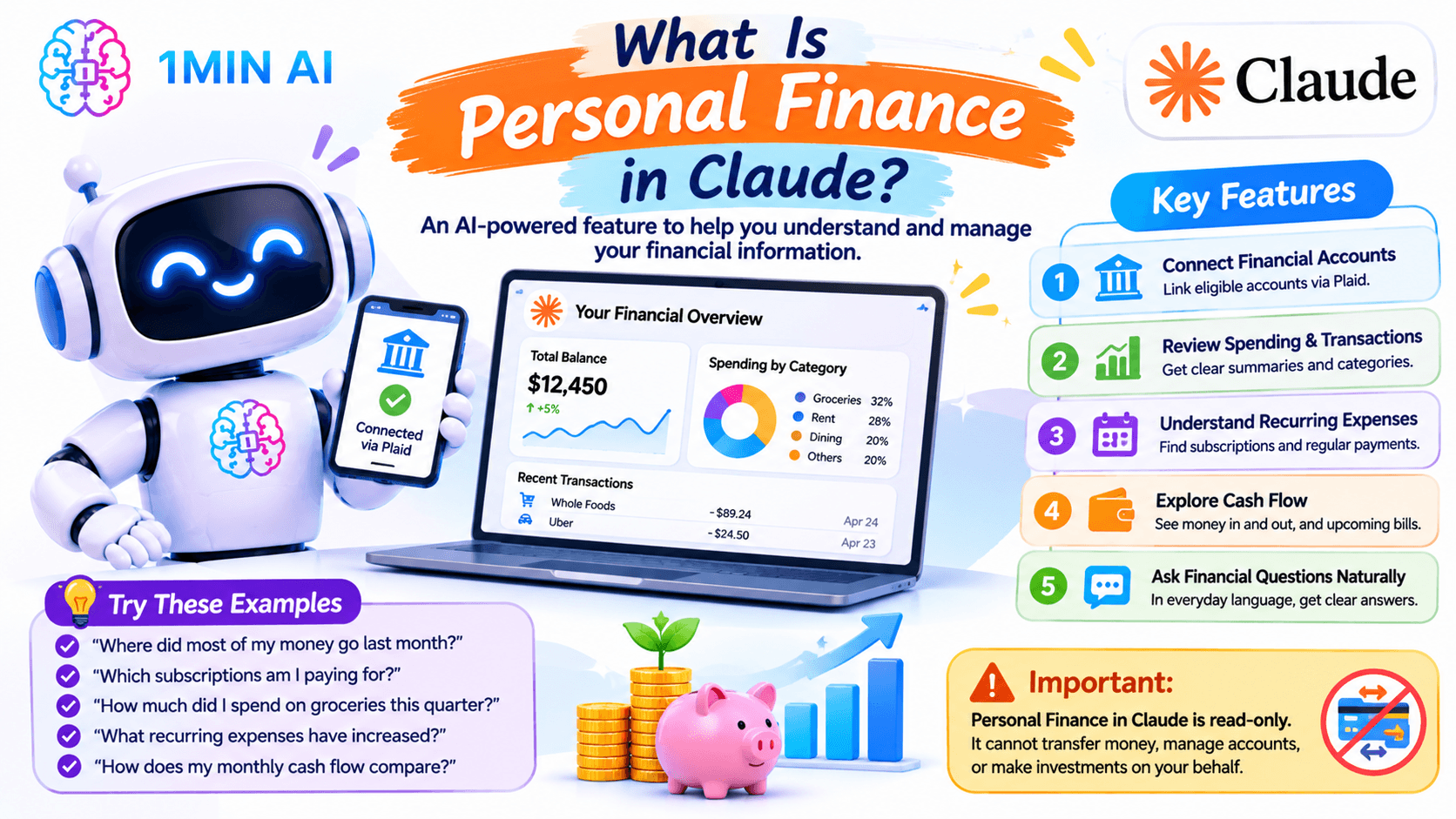
What Is Personal Finance in Claude?
Personal Finance in Claude is an Anthropic feature designed to help users understand their financial information through AI-powered conversations.
Instead of manually checking multiple banking apps, users in supported regions can connect eligible financial accounts through Plaid. Claude can then read selected account information and answer questions about balances, transactions, spending patterns, and recurring payments.
For example, you could ask:
- Where did most of my money go last month?
- Which subscriptions am I paying for?
- How much did I spend on groceries this quarter?
- What recurring expenses have increased?
- How does my monthly cash flow compare with the previous month?
Claude can organize financial information into summaries, charts, and explanations to help users understand their spending.
Key features of Personal Finance in Claude
1. Connect financial accounts
Eligible users can connect supported bank and financial accounts through Plaid. Claude can access selected financial information after users authorize the connection.
2. Review spending and transactions
Claude can summarize transactions, categorize spending, and help identify patterns across different periods.
3. Understand recurring expenses
Users can ask Claude to identify subscriptions, recurring payments, and other expenses that may deserve a closer look.
4. Explore cash flow
Claude can help users understand money coming in and going out, review upcoming bills, and examine how spending affects their available balance.
5. Ask financial questions in everyday language
You do not need to write formulas or manually calculate every figure. You can ask questions naturally and request explanations of terms such as APR, interest, and cash flow.
Important: Personal Finance in Claude is read-only. It cannot transfer money, manage accounts, or make investments on your behalf.
How to Use Claude for Personal Finance Without Direct Bank Sync
Even without a direct bank connection, Claude can help you understand your personal finances through information you provide.
The key is to prepare your data in a clear format and ask specific questions.
Step 1: Prepare your financial information
Start with a bank statement, credit card transaction history, or personal budget spreadsheet.
You can organize your information into a simple table:
| Date | Description | Category | Amount |
|---|---|---|---|
| Nov 01 | Supermarket | Groceries | $65 |
| Nov 03 | Monthly streaming plan | Entertainment | $15 |
| Nov 05 | Electricity bill | Utilities | $48 |
| Nov 08 | Restaurant | Dining | $32 |
| Nov 10 | Public transportation | Transport | $20 |
You can paste a small transaction table directly into a Claude conversation. If you work with a larger statement, prepare a clean summary or a manageable set of transaction rows first.
Protect your privacy before sharing financial information. Remove full account numbers, card numbers, login credentials, addresses, and other personal identifiers. Do not share banking passwords or authentication codes.
Step 2: Ask Claude to categorize your expenses
Once you have prepared the data, ask Claude to organize your transactions.
Try this prompt:
Act as a personal budgeting assistant. Review the financial transactions below and categorize each expense into groceries, housing, transportation, utilities, entertainment, healthcare, shopping, dining, and other.
Calculate the total spending for each category and the percentage of total expenses represented by each category.
Do not invent missing information. If a transaction is unclear, place it in an "Uncategorized" group and explain why.
Here are my transactions:
[Paste your sanitized transaction data]
Claude can return an organized table that makes it easier to see which categories account for the largest share of your spending.
Step 3: Identify unnecessary or recurring expenses
After categorizing your transactions, look for recurring charges and spending patterns.
Use this prompt:
Analyze the transactions below and identify recurring expenses, subscriptions, and possible unnecessary spending.
For each recurring expense, show:
- Merchant or description
- Estimated payment frequency
- Amount per payment
- Estimated monthly cost
Highlight charges that appear unusual or have increased compared with earlier transactions, but clearly distinguish confirmed changes from possible patterns.
This can help you notice subscriptions you no longer use or expenses that have gradually increased.
Remember that a transaction list may not contain enough history to confirm whether a charge is recurring. Ask Claude to label uncertain findings rather than treating every repeated merchant as a subscription.
Step 4: Build a monthly budget
After understanding your spending, you can ask Claude to create a practical budget.
For example:
Based on the income and expense information below, help me create a monthly budget.
My monthly income is [amount].
My fixed expenses are [list].
My variable expenses are [list].
I want to save [amount or percentage] each month.
Create a budget with categories, suggested spending limits, and the remaining balance. Show the calculations and explain any assumptions you make.
Claude can help turn scattered numbers into a structured budget that is easier to review and adjust.
Step 5: Compare your spending over time
If you have transaction summaries from several months, Claude can help identify changes.
Try:
Compare my spending in October and November using the data below.
Show:
- Total spending in each month.
- The categories with the biggest increases and decreases.
- Changes in recurring expenses.
- Any unusual spending patterns worth reviewing.
- Three practical questions I should consider before setting next month's budget.
Use only the figures provided and show the calculations.
This is useful for people who want to understand whether their spending habits are changing rather than looking at a single month's expenses in isolation.
How to Use Claude for Personal Finance on 1minAI
If you want to try Claude for personal finance without setting up a separate Anthropic workflow, you can access Claude through 1minAI.
1minAI is an all-in-one AI workspace with Multi AI Chat, where users can explore available AI models in one place. You can open a Claude chat, provide sanitized financial information, and ask questions about budgeting, spending, or financial concepts.
It is important to understand the difference: using Claude through 1minAI does not automatically connect your bank account through Plaid or unlock Anthropic's Personal Finance dashboard. Instead, you provide the financial information you want Claude to analyze.
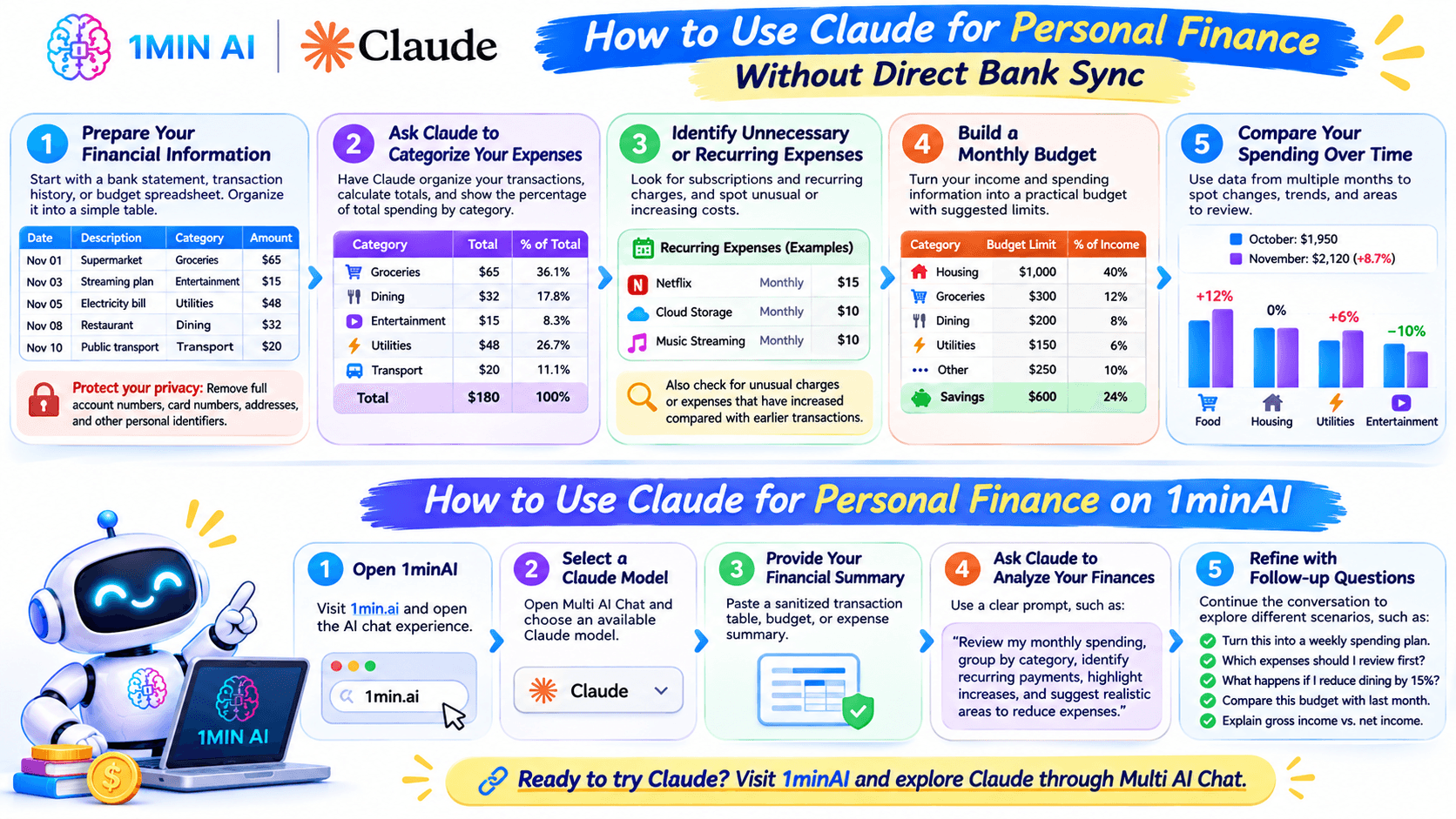
Step 1: Open 1minAI
Visit 1minAI and open the AI chat experience.
You can explore the platform and its available AI tools before choosing the workflow you need.
Step 2: Select a Claude model
Open Multi AI Chat and choose an available Claude model.
You can also visit the Claude 5 Fable page on 1minAI to explore Claude access through the platform.
Model availability and names can change, so check the model selector for the options currently offered in your account.
Step 3: Provide your financial summary
Prepare a sanitized transaction table, monthly expense summary, or budget information.
Paste the information into your Claude conversation. Avoid sharing sensitive banking credentials, full account numbers, or unnecessary personal information.
Step 4: Ask Claude to analyze your finances
Use a clear prompt that explains your goal.
For example:
I want to understand my monthly spending and improve my budget.
Review the financial summary below and:
- Calculate total monthly expenses.
- Group expenses by category.
- Identify recurring payments.
- Highlight categories where spending is increasing.
- Suggest realistic areas where I could reduce expenses.
Present the result in a table and explain the calculations. Do not assume that any expense is unnecessary without explaining why.
My financial summary:
[Paste your sanitized data]
Step 5: Refine the results with follow-up questions
You do not have to get everything right in the first prompt.
Continue the conversation with questions such as:
- Can you turn this into a weekly spending plan?
- Which expenses should I review first?
- What happens if I reduce my dining budget by 15%?
- Can you compare this budget with last month's figures?
- Can you explain the difference between gross income and net income?
This conversational approach makes it easier to explore different budgeting scenarios and understand your numbers.
Ready to try Claude? Visit 1minAI and explore Claude through Multi AI Chat.
7 Useful Claude Prompts for Personal Finance
You can use these prompts on Claude through 1minAI or another supported Claude interface. Replace the bracketed information with your own sanitized data.
1. Monthly expense analysis
Analyze my monthly expenses using the transaction list below. Calculate total spending, group expenses by category, and identify the three largest spending categories. Present the results in a table and explain the calculations.
2. Subscription tracker
Review my transaction history and identify payments that may be subscriptions or recurring bills. Group them by merchant, payment frequency, and estimated monthly cost. Mark uncertain matches for manual review.
3. Budget planner
Help me create a monthly budget based on my income of [amount], fixed expenses of [amount], and savings goal of [amount]. Suggest spending limits for variable categories and show how much money remains.
4. Savings scenario calculator
My current monthly income is [amount], and my average monthly expenses are [amount]. Calculate how much I could save if I reduced my spending by 5%, 10%, and 15%. Show the monthly and annual differences. State your assumptions.
5. Spending comparison
Compare my financial summaries for [Month A] and [Month B]. Identify the biggest changes in spending, explain which categories increased or decreased, and highlight any figures that need further verification.
6. Understand financial terms
Explain the following financial terms in simple language: APR, compound interest, minimum credit card payment, emergency fund, and cash flow. Give a practical example of each and explain what information I should check before making a financial decision.
7. Personal finance action plan
Based on the budget information below, create a practical 30-day personal finance review plan. Include weekly tasks for tracking spending, reviewing subscriptions, checking bills, and evaluating savings progress. Do not recommend specific financial products or investments.
Claude for Personal Finance vs. Claude on 1minAI: What's the Difference?
Both options can help users work with financial information, but they serve different purposes.
| Capability | Personal Finance in Claude | Claude on 1minAI |
|---|---|---|
| Direct bank connection | Yes, through Plaid for eligible US users | Not provided by the Claude chat page |
| Analyze provided transaction data | Yes | Yes, through prompts and information you provide |
| Categorize expenses | Yes | Can be requested in chat |
| Review budget information | Yes | Can be requested in chat |
| Personal Finance dashboard | Yes, for eligible users | Not the same dedicated dashboard |
| Availability | US-only beta, eligible plans | Depends on 1minAI account and model availability |
| Main purpose | Connected personal finance overview | Flexible AI chat and analysis |
Choose Anthropic's Personal Finance feature if you are eligible and want a direct connection to supported US financial accounts.
Choose Claude on 1minAI if you want to explore Claude through a multi-model AI workspace and work with financial summaries or transaction data you provide yourself.
Is Claude Safe to Use for Personal Finance?
AI can make financial information easier to understand, but privacy and accuracy should come first.
Keep these practices in mind:
- Remove sensitive information: Never paste passwords, full card numbers, authentication codes, or complete account identifiers into a chat.
- Share only what is necessary: A categorized expense summary may be enough for a budgeting question.
- Verify calculations: Compare important totals with your original statements or spreadsheet.
- Check assumptions: Ask Claude to show how it calculated a number and identify missing information.
- Do not treat AI as a financial adviser: Use its explanations as a starting point, not as a replacement for qualified financial advice.
- Review financial decisions carefully: Do not make investment, tax, loan, or major spending decisions based only on an AI response.
If you use Anthropic's connected Personal Finance feature, review its Plaid permissions and privacy documentation separately. Its data-handling terms are not automatically the same as those of a third-party platform.
Final Thoughts: Try Claude for Personal Finance on 1minAI
Claude can make personal finance tasks easier by turning transaction data and budget summaries into understandable insights. Anthropic's new Personal Finance feature takes this further for eligible US users by connecting supported accounts through Plaid.
But direct bank syncing is not the only way to use AI for money management.
If you are outside the supported region or prefer to provide your own financial summaries, you can use Claude through 1minAI to review expenses, build budgets, compare monthly spending, and understand financial concepts.
Visit 1minAI and explore Claude through Multi AI Chat.** Start with a simple, sanitized expense summary and see how AI can help you understand your spending more clearly.
Disclaimer: This article is for educational purposes only. AI-generated financial analysis may contain errors and is not professional financial, tax, legal, or investment advice. Always verify important figures and consult a qualified professional when appropriate.
- #Information
- #Commerce
Alternatives
Discover the best alternatives to 1minAI and compare features, pricing, and use cases.

1min.AI vs OpenRouter
1min.AI vs. OpenRouter: Compare the ready-to-use AI creation product against the technical API tool. Find out if you need a zero-code creative studio or a coding infrastructure hub.
 Ngoc Hong

1min.AI vs. Metricool: Which Platform Does More for Your Marketing Workflow?
Compare 1min.AI vs. Metricool across content creation, visual production, scheduling, analytics, MCP, and pricing to find the right platform for your marketing workflow.
 Uyen Hoang

1min.AI vs. Hootsuite: Which Social Media Tool Fits Your Workflow?
Compare 1min.AI vs. Hootsuite to explore their AI content creation, social media publishing, analytics, pricing, and collaboration features. Find the right tool for your workflow.
Uyen HoangAI Tools
Discover the best AI tools to boost productivity, creativity, and everyday work.

Create Consistent Cartoon Content in Just a Few Steps
Create engaging cartoon videos for TikTok and Reels with 1min.AI. Research ideas, create characters, and turn images into animated videos in 3 simple steps.
 Lien Anh Vu

One Product, 10 UGC Creatives: How AI Makes Content Testing Easier
Create more authentic UGC with an AI UGC video generator, test more creative angles and scale affiliate content without filming every version.
Lien Anh Vu
Top 4 Affordable AI Tools for Startup Founders
Discover the top 4 affordable AI tools for startup founders to validate ideas, build products, create content, and launch faster without overspending.
 Tram Ta
AI Features
Comprehensive AI features that streamline workflows, improve efficiency, and empower teams to achieve more.
Create Consistent Cartoon Content in Just a Few Steps
Create engaging cartoon videos for TikTok and Reels with 1min.AI. Research ideas, create characters, and turn images into animated videos in 3 simple steps.
Lien Anh VuOne Product, 10 UGC Creatives: How AI Makes Content Testing Easier
Create more authentic UGC with an AI UGC video generator, test more creative angles and scale affiliate content without filming every version.
Lien Anh Vu
1minAI: Free AI Grammar Checker
Check grammar for free with 1minAI’s AI grammar checker. Find grammar, spelling, and writing mistakes, improve clarity, and polish your content in seconds.
Tram TaAI Use Cases
A curated collection of AI use cases for business, productivity, and industry-specific applications.
Create Consistent Cartoon Content in Just a Few Steps
Create engaging cartoon videos for TikTok and Reels with 1min.AI. Research ideas, create characters, and turn images into animated videos in 3 simple steps.
Lien Anh VuOne Product, 10 UGC Creatives: How AI Makes Content Testing Easier
Create more authentic UGC with an AI UGC video generator, test more creative angles and scale affiliate content without filming every version.
Lien Anh Vu
Best Time to Post on Instagram: A Practical Guide for Better Engagement
Discover the best time to post on Instagram, including the best days and times for different audiences, plus tips to find the ideal posting schedule for your account.
Tram TaAI Tutorials
Learn how to use AI with practical, step-by-step tutorials.

Black Friday AI Tool Deals in 2026
Discover what Black Friday AI tool deals 2026 has to offer. Find out how to secure the 1min.AI lifetime deal via AppSumo, Dealify, Stack Social, and verify on Trustpilot, Slashdot, and Software Advice.
 Hang Nguyen
Create Consistent Cartoon Content in Just a Few Steps
Create engaging cartoon videos for TikTok and Reels with 1min.AI. Research ideas, create characters, and turn images into animated videos in 3 simple steps.
Lien Anh Vu
[Seedance 2.5 New] Better AI Product Videos, Less Rework in 1min.AI
Use Seedance 2.5 image to video on 1min.AI to create more consistent AI product videos, reduce failed generations, save credits, and improve UGC workflows.
Lien Anh VuAI Guides
Learn AI faster with practical guides, real-world examples, and actionable best practices.

Safely Buy AI Tools Online: 2026 Black Friday Guide
Discover how to find and secure the best Black Friday AI deals online. Learn expert strategies to avoid scams, combat subscription fatigue, and verify software.
Hang NguyenCreate Consistent Cartoon Content in Just a Few Steps
Create engaging cartoon videos for TikTok and Reels with 1min.AI. Research ideas, create characters, and turn images into animated videos in 3 simple steps.
Lien Anh Vu[Seedance 2.5 New] Better AI Product Videos, Less Rework in 1min.AI
Use Seedance 2.5 image to video on 1min.AI to create more consistent AI product videos, reduce failed generations, save credits, and improve UGC workflows.
Lien Anh VuAI Solutions
Browse the best AI solutions for automation, coding, research, productivity, customer support, marketing, and business workflows.
Safely Buy AI Tools Online: 2026 Black Friday Guide
Discover how to find and secure the best Black Friday AI deals online. Learn expert strategies to avoid scams, combat subscription fatigue, and verify software.
Hang NguyenCreate Consistent Cartoon Content in Just a Few Steps
Create engaging cartoon videos for TikTok and Reels with 1min.AI. Research ideas, create characters, and turn images into animated videos in 3 simple steps.
Lien Anh VuOne Product, 10 UGC Creatives: How AI Makes Content Testing Easier
Create more authentic UGC with an AI UGC video generator, test more creative angles and scale affiliate content without filming every version.
Lien Anh VuAI Models
Explore the world's leading AI models in one place.
Create Consistent Cartoon Content in Just a Few Steps
Create engaging cartoon videos for TikTok and Reels with 1min.AI. Research ideas, create characters, and turn images into animated videos in 3 simple steps.
Lien Anh VuOne Product, 10 UGC Creatives: How AI Makes Content Testing Easier
Create more authentic UGC with an AI UGC video generator, test more creative angles and scale affiliate content without filming every version.
Lien Anh Vu[Seedance 2.5 New] Better AI Product Videos, Less Rework in 1min.AI
Use Seedance 2.5 image to video on 1min.AI to create more consistent AI product videos, reduce failed generations, save credits, and improve UGC workflows.
Lien Anh VuAI Comparisons
Compare AI tools, models, and platforms to find the best fit for your needs.

Kling AI Vs Veo 3: Which Model Wins?
Kling AI vs Veo 3: compare motion, native audio, pricing & free tiers to see which AI video generator wins for your project - try both on 1min.AI.
 Trang Tran
[Seedance 2.5 New] Better AI Product Videos, Less Rework in 1min.AI
Use Seedance 2.5 image to video on 1min.AI to create more consistent AI product videos, reduce failed generations, save credits, and improve UGC workflows.
Lien Anh Vu
DeepSeek V4 Pro vs Flash Comparison
Compare DeepSeek V4 Pro vs DeepSeek V4 Flash metrics. Optimize your agentic apps and improve AI fact checking on 1min.ai today.
Ngoc HongAI Integrations
Seamlessly integrate AI with the tools you already use to automate work and boost productivity.

POV: You Have 10+ Posts to Make Every Day
Learn how to build an AI content workflow that helps content creators produce 10+ social media posts a day faster with AI brainstorming, image generation, and content creation.
Lien Anh Vu
How to Use an AI Fashion Video Generator for Fashion Week 2026
Turn Fashion Week 2026 ideas into stunning fashion videos with AI. Learn how to brainstorm, create visuals, and transform images into videos with one simple workflow.
Lien Anh Vu
Stop Switching Between AI Apps: How AI Integration Transforms Employer Branding
Discover how AI integration helps HR teams streamline employer branding by combining AI writing, documents, images, video, and multiple AI models into one workspace.
Tram TaAI for Industries
Find the best AI tools and workflows for healthcare, finance, education, legal, manufacturing, retail, real estate, and more

No Photoshoot? Create AI Fashion Videos With Seedance 2.5
No photoshoot needed! Create stunning AI fashion videos with Seedance 2.5 on 1min.AI using outfit references, cinematic prompts, and surreal scenes.
Lien Anh Vu
Voice Cloning AI Free: How to Clone Any Voice Online in Minutes
Try voice cloning AI free with 1min.AI. Upload a 5-second clip, pick an ElevenLabs model, choose from 32 languages, and turn text to speech in your own voice.
Trang Tran
Text To Video AI Free Without Watermark Online
Create text to video AI free without watermark online with 1min.AI. Pick top models, turn prompts into HD clips, and download clean videos fast. Try it free.
Trang TranAI Agents
Discover and run AI agents to automate tasks across your work and daily life.
1minAI: Free AI Grammar Checker
Check grammar for free with 1minAI’s AI grammar checker. Find grammar, spelling, and writing mistakes, improve clarity, and polish your content in seconds.
Tram Ta
AI Agents for Facebook
Use an AI Agent for Facebook to create content, generate images, schedule posts, and publish from your documents and conversations.
Ngoc Hong
AI Agent vs AI Assistant: Which One Actually Saves Designers More Time?
Learn the difference between AI Agent vs AI Assistant and discover which solution helps designers automate repetitive work, reduce revisions, and save more time.
Lien Anh VuAI Workflows
Explore ready-to-use AI workflows for productivity, marketing, sales, support, and more.
Create Consistent Cartoon Content in Just a Few Steps
Create engaging cartoon videos for TikTok and Reels with 1min.AI. Research ideas, create characters, and turn images into animated videos in 3 simple steps.
Lien Anh VuOne Product, 10 UGC Creatives: How AI Makes Content Testing Easier
Create more authentic UGC with an AI UGC video generator, test more creative angles and scale affiliate content without filming every version.
Lien Anh VuPOV: You Have 10+ Posts to Make Every Day
Learn how to build an AI content workflow that helps content creators produce 10+ social media posts a day faster with AI brainstorming, image generation, and content creation.
Lien Anh VuNewsletter
Weekly AI Innovations with 1minAI

🔮 Weekly AI Innovations #145: X Content Agent & GPT 6.1 Terra on 1min.ai
Scale viral reach with the X Content Agent on 1min.ai. Discover an end-to-end 4-stage pipeline with zero token burn, plus the launch of GPT 6.1 Terra.
Hang Nguyen
🔮 Weekly AI Innovations #144: LinkedIn Content Agent: Complete B2B Publishing Pipeline
Scale B2B influence with the LinkedIn Content Agent on 1min.ai. Discover an end-to-end 4-stage pipeline with zero redundant token burn and 1-click publishing.
Hang Nguyen
🔮 Weekly AI Innovations #143: Update GPT-6, GPT-6.1 & Ideogram 4.0
Access GPT-6 Sol, Luna, GPT-6.1 Sol, and Ideogram 4.0 on 1min.ai. Boost typography accuracy to 98.4% and cut reasoning latency by 45% in one platform.
Hang Nguyen