
Free AI Video Generator From Text Without Watermark You Must Try

Tram Ta
October 12, 2026
Looking for an AI video generator without a watermark? Discover how to turn text into videos, explore AI models, and create content with 1minAI.
An AI video generator turns text prompts, images, or other visual inputs into video clips. Instead of filming every scene or manually animating each element, you describe what you want to see and let an AI model generate the video.
For example, you can describe a skincare product on a studio table, a cinematic city at night, or a character walking through a fantasy landscape. Depending on the model, you may be able to control camera movement, lighting, visual style, and audio.
AI video generators are useful for:
- Content creators: Make short videos for TikTok, Instagram Reels, and YouTube Shorts.
- Marketers: Explore advertising concepts and promotional videos.
- Ecommerce sellers: Turn product images into dynamic visual content.
- Small businesses: Create video concepts without organizing a full production shoot.
- Educators: Visualize topics and create supporting learning materials.
- Developers: Integrate video generation into applications and automated workflows.
If you're looking for an AI video generator from text without a watermark, the key is to check both the output policy and the pricing or credit requirements. A tool may produce watermark-free videos while still charging credits for generation.
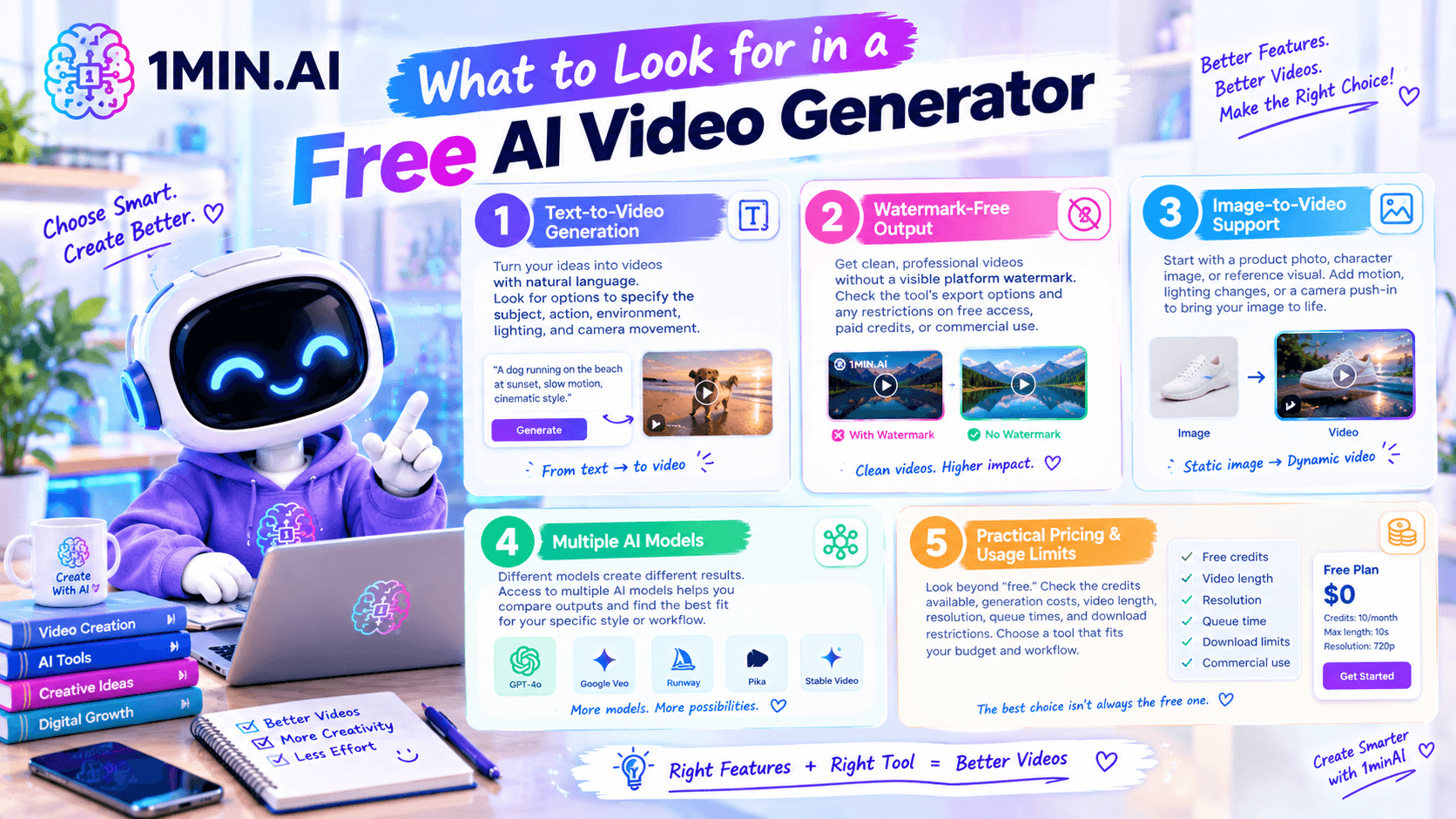
What to Look for in a Free AI Video Generator
Not every AI video tool offers the same features. Before choosing one, consider the following criteria.
1. Text-to-Video Generation
A text-to-video tool should let you describe a scene in natural language and generate a video from your instructions.
Look for options to specify the subject, action, environment, lighting, and camera movement. More detailed instructions can help you communicate your creative intent.
2. Watermark-Free Output
A watermark can affect how professional a video looks, especially in marketing materials or client presentations.
Check whether the tool exports videos without a visible platform watermark, and confirm any restrictions that apply to free access, paid credits, or commercial use. Watermark-free output does not automatically mean that every feature is free.
3. Image-to-Video Support
Text-to-video is useful when you're starting from an idea. Image-to-video is helpful when you already have a product photo, character image, or reference visual.
For example, an ecommerce seller can start with a product photo and prompt the AI to add a slow camera push-in, natural lighting changes, or subtle movement.
4. Multiple AI Models
Different models can produce different results from the same prompt. One may suit cinematic scenes, while another may better fit a specific image-to-video workflow.
A platform that provides access to multiple models can help you compare outputs without rebuilding your workflow across several separate tools.
5. Practical Pricing and Usage Limits
Look beyond the word “free.” Check the credits available, generation costs, video length, resolution, queue times, and download restrictions.
For frequent production, the most useful tool is one that fits your budget and workflow—not necessarily the one with the most generous-sounding free offer.
How to Generate Videos From Text With 1minAI
1minAI brings AI video generation together with other creative tools in one workspace. Its available features include Text to Video and Image to Video, alongside tools such as video face swapping and caption generation. You can explore the 1minAI AI video features to see the available options.
Here's a simple workflow to get started.
Step 1: Open the Text-to-Video Tool
Visit 1minAI and navigate to AI for Video → Text to Video.
Start with a clear idea of what you want to create, such as a product advertisement, a cinematic scene, or a short social media clip.
Step 2: Choose an Available Video Model
Select an available model in the interface. Depending on your project, you can explore options such as Veo 3.1 or Luma.
For model-specific workflows, see:
Check the current model options and credit requirements before generating.
Step 3: Write a Detailed Prompt
A useful video prompt describes the subject, action, setting, camera movement, lighting, and style.
Instead of writing “make a product video,” describe how the product should appear, how the camera should move, and what atmosphere you want to create.
Step 4: Configure Your Video
Choose the available settings that fit your intended platform, such as a horizontal video for YouTube or a vertical clip for short-form social content.
Available controls vary by model.
Step 5: Generate and Review
Run the generation process and inspect the result. Check whether the movement looks natural, the subject remains consistent, and the video matches your prompt.
If the result isn't quite right, simplify the prompt or change one instruction at a time.
Step 6: Download and Prepare for Publishing
Once you're satisfied, export the video using the available options. Confirm the watermark policy, usage rights, and any commercial-use conditions that apply to your chosen model and account.
7 AI Video Generator Prompts You Can Copy
You don't need to write complicated instructions to start. Try these prompts and adapt them to your project.
1. Cinematic Product Advertisement
Prompt:
Create a cinematic product advertisement featuring a premium glass perfume bottle on a minimalist studio table. The camera slowly pushes toward the bottle as soft golden light moves across the glass. Use realistic reflections, elegant shadows, a clean background, premium commercial photography, and smooth camera motion. Keep the bottle shape and label consistent. No added text or extra objects.
2. Ecommerce Product Showcase
Prompt:
Create a clean promotional video of a modern reusable water bottle against a bright minimalist background. Use a slow rotating camera movement to showcase the product from multiple angles. Add soft studio lighting, realistic shadows, crisp details, and a polished ecommerce advertising style. Keep the product proportions and colors consistent throughout the clip.
3. Cinematic City at Night
Prompt:
Generate a cinematic nighttime city scene with glowing storefronts, wet streets, and colorful reflections. The camera moves smoothly along the sidewalk as cars pass in the distance. Use realistic lighting, subtle motion blur, atmospheric depth, and a modern film aesthetic. Avoid flickering signs, distorted buildings, and sudden camera cuts.
4. Travel Video at Golden Hour
Prompt:
Create a cinematic travel video of a coastal village at golden hour. Show the ocean, colorful buildings, and narrow streets as the camera slowly moves forward. Use warm sunlight, natural shadows, gentle environmental movement, and realistic textures. Make the scene feel inviting and documentary-inspired.
5. Social Media Fashion Clip
Prompt:
Create a stylish fashion video featuring a model walking confidently through a modern urban setting. Use a smooth tracking shot, natural walking motion, soft daylight, and editorial fashion-film styling. Keep the outfit consistent, preserve realistic body proportions, and use a clean composition suitable for vertical social media content.
6. Educational Science Visualization
Prompt:
Create a clear educational animation showing how water moves through a simple filtration system. Show water entering the container, passing through visible filter layers, and emerging into a clean collection chamber. Use smooth movement, a bright background, accurate visual relationships, and a simple educational-video style. Keep the sequence easy to follow.
7. Fantasy World Reveal
Prompt:
Create a cinematic fantasy scene showing an ancient castle on a mountain surrounded by drifting clouds. The camera slowly rises to reveal the castle, distant peaks, and a glowing sunrise. Use atmospheric lighting, detailed stone architecture, gentle cloud movement, and an epic fantasy-film aesthetic. Maintain consistent castle geometry and smooth camera motion.
Prompt-writing tip: Start with one main action and one camera movement. Once the basic result looks right, add more details about lighting, atmosphere, or visual style.
AI Video Generator for Business: Practical Use Cases
AI video generation isn't just for entertainment. Businesses can use it to explore creative concepts, test messaging, and produce supporting visuals.
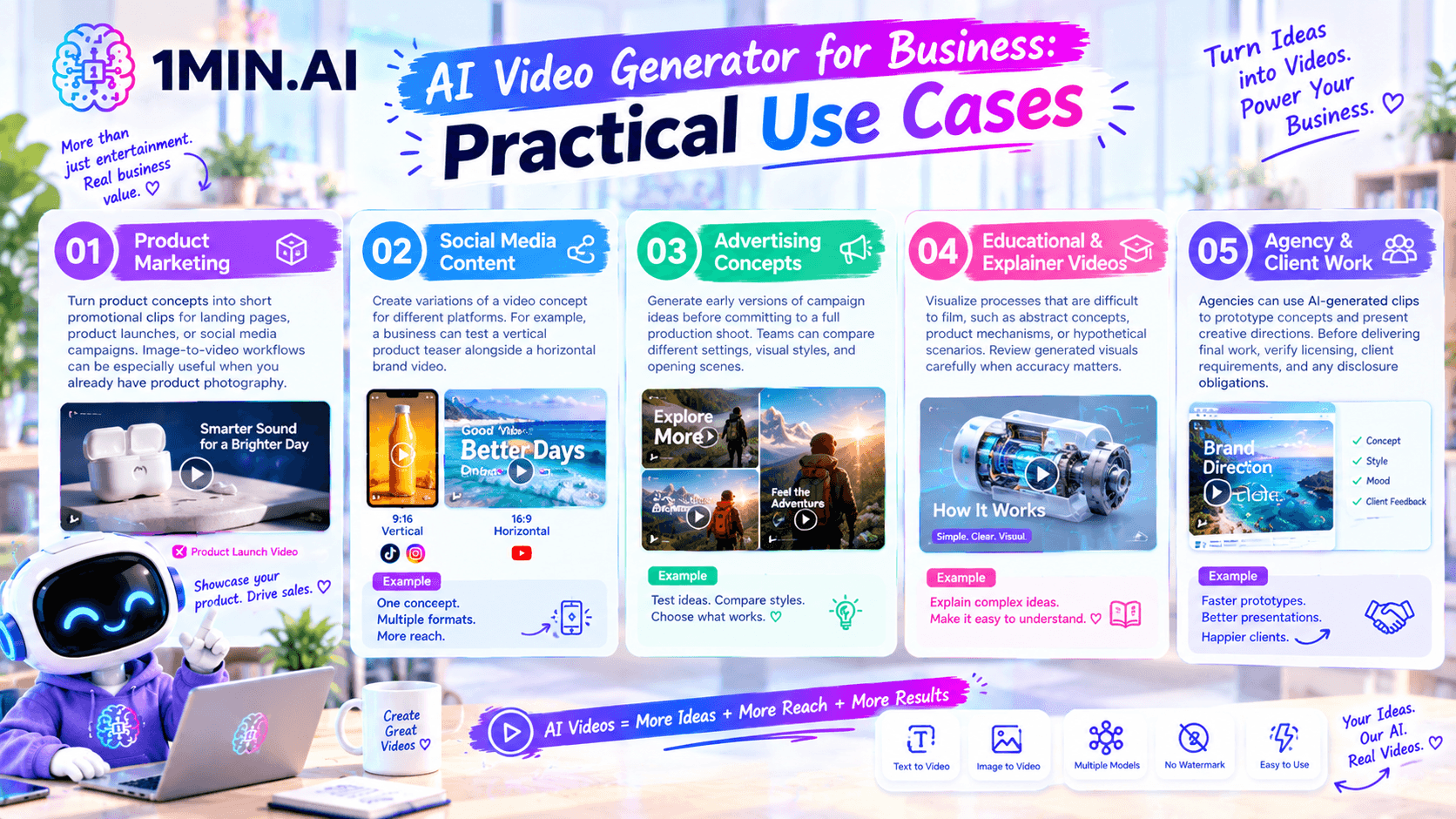
Product Marketing
Turn product concepts into short promotional clips for landing pages, product launches, or social media campaigns. Image-to-video workflows can be especially useful when you already have product photography.
Social Media Content
Create variations of a video concept for different platforms. For example, a business can test a vertical product teaser alongside a horizontal brand video.
Advertising Concepts
Generate early versions of campaign ideas before committing to a full production shoot. Teams can compare different settings, visual styles, and opening scenes.
Educational and Explainer Videos
Visualize processes that are difficult to film, such as abstract concepts, product mechanisms, or hypothetical scenarios. Review generated visuals carefully when accuracy matters.
Agency and Client Work
Agencies can use AI-generated clips to prototype concepts and present creative directions. Before delivering final work, verify licensing, client requirements, and any disclosure obligations.
For a business-focused overview, explore AI Video Generator for Business on 1minAI.
Text-to-Video vs. Image-to-Video: Which Should You Use?
Both workflows can create video, but they serve different starting points.
| Feature | Text-to-Video | Image-to-Video |
|---|---|---|
| Starting point | A written prompt | An existing image |
| Best for | Creating a new scene from an idea | Animating a product photo or reference image |
| Creative control | Describe the subject, setting, and motion | Use the image as a visual starting point |
| Example | Generate a cinematic city scene | Animate a product image with camera movement |
| Main consideration | The model interprets the scene from text | The output depends partly on the reference image |
If you want to create an entirely new scene, start with text-to-video. If you already have a visual that needs movement, image-to-video may be the more suitable option.
For developers who want to integrate image-to-video generation into an application, the 1minAI Kling AI Image to Video API documentation is a useful technical starting point.
Frequently Asked Questions
Is there a free AI video generator without a watermark?
Some tools offer watermark-free output, but free access and generation costs vary. With 1minAI, check the current video-generation credit requirements and model-specific conditions before starting a project.
Can I generate videos from text with 1minAI?
Yes. 1minAI provides a Text to Video workflow that lets you describe a scene and generate a video using an available model. The result depends on the model, prompt, and selected settings.
What is the difference between text-to-video and image-to-video?
Text-to-video creates a scene from written instructions. Image-to-video uses an existing image as the visual starting point and adds movement.
Can businesses use AI-generated videos commercially?
Potentially, but commercial use depends on the terms of the platform, model, and assets used. Review the applicable licensing terms before using generated clips in advertisements or client deliverables.
Which AI video generator should beginners try?
Start with a tool that has a clear interface, accessible prompt controls, and a workflow suited to your project. Testing the same prompt across available models can help you identify which output best fits your needs.
Conclusion
An AI video generator can help you turn written ideas into promotional clips, cinematic scenes, educational visuals, and social media content without filming every shot yourself.
For better results, start with a clear prompt, choose text-to-video or image-to-video based on your starting asset, and review each generation before publishing. If watermark-free output is important, verify the export conditions and credit requirements rather than assuming every free option is unlimited.
Explore 1minAI's AI Video Generator for Business to discover how AI video workflows can support content creation and marketing projects.
For further information, explore AI Video Generation With Veo 3.1.
Discover more AI features: https://1min.ai/features
Try 1minAI agent now: https://app.1min.ai/ai-agent-demo
- #Commerce
Alternatives
Discover the best alternatives to 1minAI and compare features, pricing, and use cases.

1min.AI vs OpenRouter
1min.AI vs. OpenRouter: Compare the ready-to-use AI creation product against the technical API tool. Find out if you need a zero-code creative studio or a coding infrastructure hub.
 Ngoc Hong
1min.AI vs Jarvis AI
Compare 1min.AI vs Jarvis AI to discover which AI platform is better for writing, research, automation, and content creation. Find the best AI assistant for your workflow.
Ngoc Hong
1min.AI vs Taskade
Compare 1min.AI vs Taskade for AI content creation, automation, agents, and creative workflows to find the right workspace.
Ngoc HongAI Tools
Discover the best AI tools to boost productivity, creativity, and everyday work.

Create Consistent Cartoon Content in Just a Few Steps
Create engaging cartoon videos for TikTok and Reels with 1min.AI. Research ideas, create characters, and turn images into animated videos in 3 simple steps.
 Lien Anh Vu
One Product, 10 UGC Creatives: How AI Makes Content Testing Easier
Create more authentic UGC with an AI UGC video generator, test more creative angles and scale affiliate content without filming every version.
Lien Anh Vu
Top 4 Affordable AI Tools for Startup Founders
Discover the top 4 affordable AI tools for startup founders to validate ideas, build products, create content, and launch faster without overspending.
 Tram Ta
AI Features
Comprehensive AI features that streamline workflows, improve efficiency, and empower teams to achieve more.
Create Consistent Cartoon Content in Just a Few Steps
Create engaging cartoon videos for TikTok and Reels with 1min.AI. Research ideas, create characters, and turn images into animated videos in 3 simple steps.
Lien Anh VuOne Product, 10 UGC Creatives: How AI Makes Content Testing Easier
Create more authentic UGC with an AI UGC video generator, test more creative angles and scale affiliate content without filming every version.
Lien Anh Vu
1minAI: Free AI Grammar Checker
Check grammar for free with 1minAI’s AI grammar checker. Find grammar, spelling, and writing mistakes, improve clarity, and polish your content in seconds.
Tram TaAI Use Cases
A curated collection of AI use cases for business, productivity, and industry-specific applications.
Create Consistent Cartoon Content in Just a Few Steps
Create engaging cartoon videos for TikTok and Reels with 1min.AI. Research ideas, create characters, and turn images into animated videos in 3 simple steps.
Lien Anh VuOne Product, 10 UGC Creatives: How AI Makes Content Testing Easier
Create more authentic UGC with an AI UGC video generator, test more creative angles and scale affiliate content without filming every version.
Lien Anh Vu
Best Time to Post on Instagram: A Practical Guide for Better Engagement
Discover the best time to post on Instagram, including the best days and times for different audiences, plus tips to find the ideal posting schedule for your account.
Tram TaAI Tutorials
Learn how to use AI with practical, step-by-step tutorials.

Black Friday AI Tool Deals in 2026
Discover what Black Friday AI tool deals 2026 has to offer. Find out how to secure the 1min.AI lifetime deal via AppSumo, Dealify, Stack Social, and verify on Trustpilot, Slashdot, and Software Advice.
 Hang Nguyen
Create Consistent Cartoon Content in Just a Few Steps
Create engaging cartoon videos for TikTok and Reels with 1min.AI. Research ideas, create characters, and turn images into animated videos in 3 simple steps.
Lien Anh Vu
[Seedance 2.5 New] Better AI Product Videos, Less Rework in 1min.AI
Use Seedance 2.5 image to video on 1min.AI to create more consistent AI product videos, reduce failed generations, save credits, and improve UGC workflows.
Lien Anh VuAI Guides
Learn AI faster with practical guides, real-world examples, and actionable best practices.

Safely Buy AI Tools Online: 2026 Black Friday Guide
Discover how to find and secure the best Black Friday AI deals online. Learn expert strategies to avoid scams, combat subscription fatigue, and verify software.
Hang NguyenCreate Consistent Cartoon Content in Just a Few Steps
Create engaging cartoon videos for TikTok and Reels with 1min.AI. Research ideas, create characters, and turn images into animated videos in 3 simple steps.
Lien Anh Vu[Seedance 2.5 New] Better AI Product Videos, Less Rework in 1min.AI
Use Seedance 2.5 image to video on 1min.AI to create more consistent AI product videos, reduce failed generations, save credits, and improve UGC workflows.
Lien Anh VuAI Solutions
Browse the best AI solutions for automation, coding, research, productivity, customer support, marketing, and business workflows.
Safely Buy AI Tools Online: 2026 Black Friday Guide
Discover how to find and secure the best Black Friday AI deals online. Learn expert strategies to avoid scams, combat subscription fatigue, and verify software.
Hang NguyenCreate Consistent Cartoon Content in Just a Few Steps
Create engaging cartoon videos for TikTok and Reels with 1min.AI. Research ideas, create characters, and turn images into animated videos in 3 simple steps.
Lien Anh VuOne Product, 10 UGC Creatives: How AI Makes Content Testing Easier
Create more authentic UGC with an AI UGC video generator, test more creative angles and scale affiliate content without filming every version.
Lien Anh VuAI Models
Explore the world's leading AI models in one place.
Create Consistent Cartoon Content in Just a Few Steps
Create engaging cartoon videos for TikTok and Reels with 1min.AI. Research ideas, create characters, and turn images into animated videos in 3 simple steps.
Lien Anh VuOne Product, 10 UGC Creatives: How AI Makes Content Testing Easier
Create more authentic UGC with an AI UGC video generator, test more creative angles and scale affiliate content without filming every version.
Lien Anh Vu[Seedance 2.5 New] Better AI Product Videos, Less Rework in 1min.AI
Use Seedance 2.5 image to video on 1min.AI to create more consistent AI product videos, reduce failed generations, save credits, and improve UGC workflows.
Lien Anh VuAI Comparisons
Compare AI tools, models, and platforms to find the best fit for your needs.

Kling AI Vs Veo 3: Which Model Wins?
Kling AI vs Veo 3: compare motion, native audio, pricing & free tiers to see which AI video generator wins for your project - try both on 1min.AI.
 Trang Tran
[Seedance 2.5 New] Better AI Product Videos, Less Rework in 1min.AI
Use Seedance 2.5 image to video on 1min.AI to create more consistent AI product videos, reduce failed generations, save credits, and improve UGC workflows.
Lien Anh Vu
DeepSeek V4 Pro vs Flash Comparison
Compare DeepSeek V4 Pro vs DeepSeek V4 Flash metrics. Optimize your agentic apps and improve AI fact checking on 1min.ai today.
Ngoc HongAI Integrations
Seamlessly integrate AI with the tools you already use to automate work and boost productivity.

POV: You Have 10+ Posts to Make Every Day
Learn how to build an AI content workflow that helps content creators produce 10+ social media posts a day faster with AI brainstorming, image generation, and content creation.
Lien Anh Vu
How to Use an AI Fashion Video Generator for Fashion Week 2026
Turn Fashion Week 2026 ideas into stunning fashion videos with AI. Learn how to brainstorm, create visuals, and transform images into videos with one simple workflow.
Lien Anh Vu
Stop Switching Between AI Apps: How AI Integration Transforms Employer Branding
Discover how AI integration helps HR teams streamline employer branding by combining AI writing, documents, images, video, and multiple AI models into one workspace.
Tram TaAI for Industries
Find the best AI tools and workflows for healthcare, finance, education, legal, manufacturing, retail, real estate, and more

Best AI Tool for Content Marketing |1minAI
Looking for the best AI tool for content marketing? See how 1minAI helps marketers research, write, repurpose, create visuals, and scale content from one AI workspace.
Tram Ta
7 Low-Cost AI Business Ideas for Your Startup
Explore 7 low-cost AI business ideas you can start with a small budget, from content and video services to AI consulting, reselling, and automation.
Tram Ta
How to Start a One-Person AI Business: 7 Models You Can Run Solo
Learn how to start a one-person AI business with 7 practical models, from AI consulting and content services to automation and software reselling.
Tram TaAI Agents
Discover and run AI agents to automate tasks across your work and daily life.
1minAI: Free AI Grammar Checker
Check grammar for free with 1minAI’s AI grammar checker. Find grammar, spelling, and writing mistakes, improve clarity, and polish your content in seconds.
Tram Ta
AI Agents for Facebook
Use an AI Agent for Facebook to create content, generate images, schedule posts, and publish from your documents and conversations.
Ngoc Hong
AI Agent vs AI Assistant: Which One Actually Saves Designers More Time?
Learn the difference between AI Agent vs AI Assistant and discover which solution helps designers automate repetitive work, reduce revisions, and save more time.
Lien Anh VuAI Workflows
Explore ready-to-use AI workflows for productivity, marketing, sales, support, and more.
Create Consistent Cartoon Content in Just a Few Steps
Create engaging cartoon videos for TikTok and Reels with 1min.AI. Research ideas, create characters, and turn images into animated videos in 3 simple steps.
Lien Anh VuOne Product, 10 UGC Creatives: How AI Makes Content Testing Easier
Create more authentic UGC with an AI UGC video generator, test more creative angles and scale affiliate content without filming every version.
Lien Anh VuPOV: You Have 10+ Posts to Make Every Day
Learn how to build an AI content workflow that helps content creators produce 10+ social media posts a day faster with AI brainstorming, image generation, and content creation.
Lien Anh VuNewsletter
Weekly AI Innovations with 1minAI

🔮 Weekly AI Innovations #140: Deepseek 4.1 Flash & Gemini Upgrades
Explore Deepseek 4.1 Flash and new Gemini models on 1min.ai. Plus, check our update on your Billing - Usage page for better clarity.
Hang Nguyen
🔮 Weekly AI Innovations #139: Dawn of the next-gen AI
Discover the immense power of GPT-6 Astra and Claude Fable 5.1. Unlock next-generation AI models on 1min.ai to solve complex tasks effortlessly.
Hang Nguyen
🔮 Weekly AI Innovations #138: Claude Sonnet 5, Fable 5 & Wan 2.7
Explode your creative potential with massive 1min.ai updates! Access Claude Sonnet 5, Fable 5, and Alibaba Wan 2.7 for unmatched multi-modal generation today.
Hang Nguyen