
5+ Trending AI Car Driving Video Prompts

Tram Ta
October 9, 2026
Try trending AI car driving video prompts to create cinematic car scenes, luxury driving clips, and realistic automotive videos with AI.
Create stunning AI car driving videos with prompts for luxury cars, scenic highways, neon-lit cities, and more. Explore 7 ready-to-use prompts and learn how to turn car images into cinematic videos with 1minAI’s Image to Video and Video Face Swap tools.
What Is the AI Car Driving Video Trend?
AI car driving videos turn creative ideas or still images into cinematic scenes of cars moving through different environments. Think luxury cars cruising along coastal highways, supercars on mountain roads, or futuristic vehicles passing through neon-lit cities.
These videos can be useful for TikTok, Instagram Reels, YouTube Shorts, automotive marketing, and creative experiments. Instead of filming every scene, creators can use AI video generation to explore different visual styles, camera angles, and driving environments.
The key is choosing the right prompt. Describe the car, setting, lighting, camera movement, and action clearly to give the AI a better starting point.
7 Trending AI Car Driving Video Prompts
Copy these prompts into your preferred AI video generator and adjust the car, setting, and visual style to match your idea.
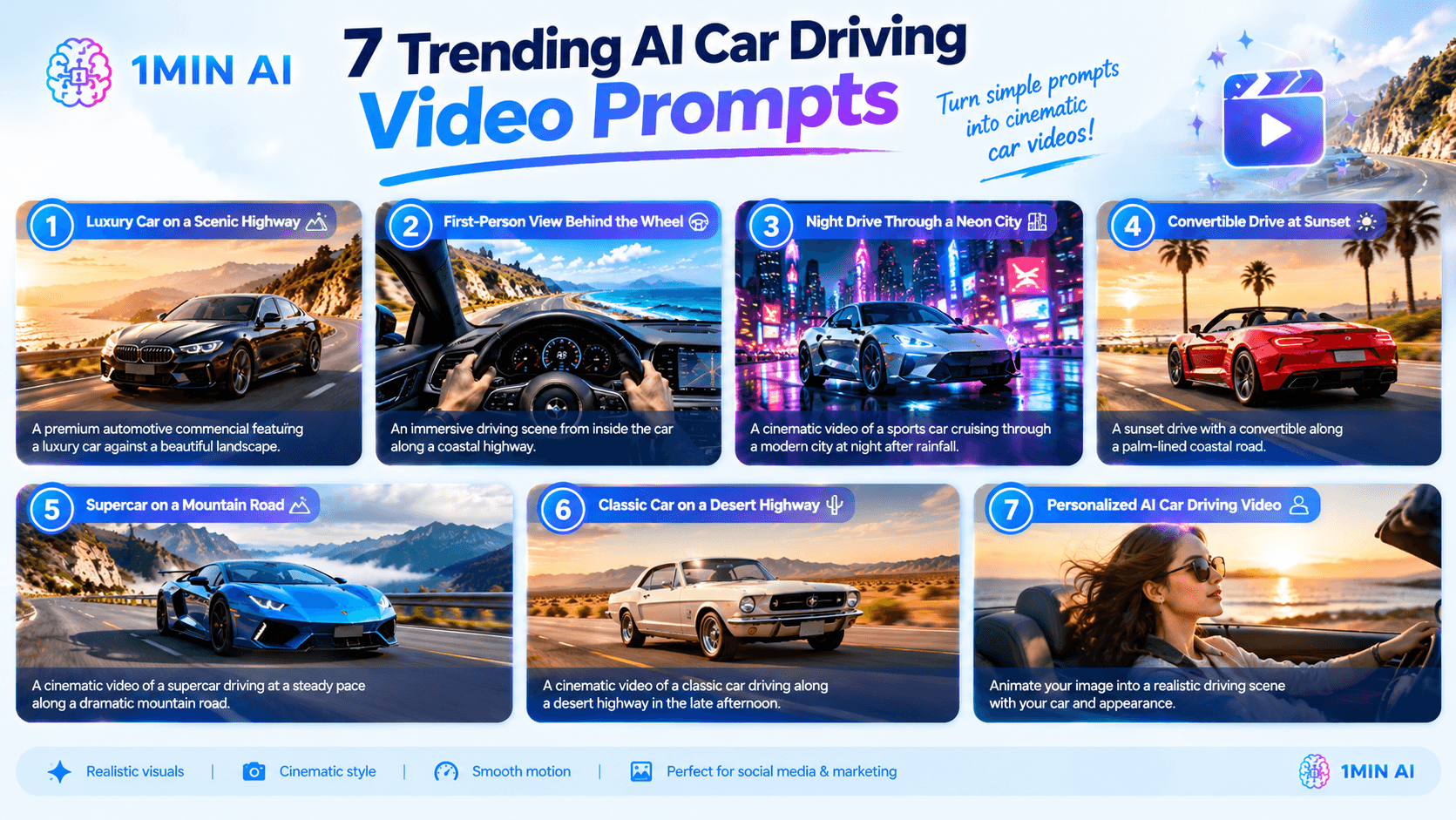
1. Luxury Car on a Scenic Highway
Create a premium automotive commercial featuring a luxury car against a beautiful landscape.
Prompt:
Create a photorealistic cinematic video of a sleek black luxury sedan driving smoothly along a winding mountain highway at golden hour. Use a low side-tracking camera that follows the car as sunlight reflects naturally across its body. Show distant mountains, realistic wheel rotation, subtle suspension movement, and natural road motion. Premium automotive advertising style, smooth camera movement, detailed environment, realistic reflections, consistent vehicle proportions, no distorted car parts, no added text or logos.
2. First-Person View Behind the Wheel
Use this prompt to create an immersive driving scene from inside the car.
Prompt:
Generate a realistic first-person driving video from inside a modern sports car traveling along a coastal highway. Show the steering wheel and dashboard in the foreground, with the ocean, cliffs, and road visible through the windshield. The road passes naturally as the car moves forward. Use a stable dashboard-mounted camera, realistic daylight, subtle changes in reflections, and cinematic color grading. Keep the dashboard and steering wheel consistent, with no sudden camera cuts or warped interior details.
3. Night Drive Through a Neon City
This concept works well for futuristic visuals and moody social media content.
Prompt:
Create a cinematic video of a metallic silver sports car cruising through a modern city at night after rainfall. Neon signs and streetlights reflect across the wet road and car body. Use a smooth front three-quarter tracking shot as the vehicle moves through the city. Include realistic headlights, subtle motion blur, blue and magenta lighting, detailed reflections, and photorealistic surroundings. Maintain consistent car geometry and avoid flickering lights or distorted wheels.
4. Convertible Drive at Sunset
A sunset drive creates a warm, aspirational road-trip aesthetic.
Prompt:
Create a photorealistic cinematic video of a red convertible driving along a palm-lined coastal road at sunset. Follow the car from a passenger-side rear angle as the ocean and palm trees pass in the background. Use warm golden light, natural shadows, gentle wind movement, realistic reflections, and a premium travel-commercial style. Keep the car's color, body shape, and details consistent throughout the scene.
5. Supercar on a Mountain Road
Use dramatic scenery and controlled movement to create a high-end automotive visual.
Prompt:
Generate a cinematic video of a blue supercar driving at a steady pace along a dramatic mountain road. Use a low front three-quarter tracking shot as the car follows a gentle curve. Include misty mountains, soft morning light, detailed asphalt, realistic tire movement, natural reflections, and cinematic depth. Preserve the vehicle's proportions, wheel design, and paint color. Avoid collisions, abrupt maneuvers, and visual distortions.
6. Classic Car on a Desert Highway
Try a retro road-trip look for content inspired by vintage automotive photography.
Prompt:
Create a cinematic video of a cream-colored vintage coupe driving along a long desert highway in the late afternoon. Use a wide tracking shot that captures the vehicle against an open landscape and distant mountains. Add warm dusty sunlight, subtle film grain, muted retro colors, realistic road movement, rotating wheels, and soft shadows. Maintain the classic car's original body shape and details throughout the clip.
7. Personalized AI Car Driving Video
Want to create a video featuring yourself or personalize an existing driving clip? Choose the workflow based on the asset you have.
Prompt for image-to-video generation:
Animate the supplied image into a realistic cinematic driving scene. Preserve the car's original design and the main subject's recognizable appearance. Add subtle natural movement, realistic reflections on the windows and bodywork, and a smooth forward-driving sensation. Use a scenic highway at golden hour with soft sunlight and a stable camera. Avoid changing facial features, distorting the vehicle, adding extra people, or introducing inconsistent details between frames.
For an existing video featuring a person, a face-swap workflow may be more suitable. Use footage and face images you have permission to use, and review the result before publishing.
Want to experiment with different video-generation models? Try the Free AI Luma Video Generator or explore AI video generation with Veo 3.1 on 1minAI. Test the same prompt with different approaches and compare which result best matches your intended camera movement and visual style.
Create an AI Car Driving Video With 1minAI
1minAI offers two useful workflows for car-driving content: Image to Video and Video Face Swap. Choose the one that matches your starting asset and creative goal.
Option 1: Turn a Car Image Into a Driving Video
Use Image to Video when you already have a car photo or AI-generated automotive image and want to animate it.
Step 1: Prepare Your Image
Choose a clear image showing the car and its surroundings. A well-defined vehicle makes it easier to communicate the intended movement.
Step 2: Open Image to Video
Go to 1minAI Image to Video.
Step 3: Upload Your Image
Upload the car image you want to animate.
Step 4: Enter Your Prompt
Describe the driving action, camera angle, lighting, environment, and visual style. You can start with one of the seven prompts above.
Step 5: Select a Model and Generate
Choose an available video model in the interface, review the displayed credit estimate, and run the generation process.
Step 6: Review and Refine
Check whether the car moves naturally and maintains its original appearance. If needed, simplify the movement or adjust the camera instructions and generate another version.
For another image-to-video option, explore the Free AI Luma Video Generator. You can also try Veo 3.1 on 1minAI to experiment with a different model and visual direction.
Option 2: Personalize an Existing Driving Video With Video Face Swap
Use Video Face Swap when you already have a driving video and want to replace a face in the footage. This is different from generating a new driving scene from a still image.
Step 1: Open Video Face Swap
In 1minAI, navigate to AI for Video → Video Face Swap.
Step 2: Upload the Target Video
Under Target Video, upload the existing driving clip containing the face you want to replace.
Step 3: Upload the Swap Image
Under Swap Image, upload a clear image of the face you want to use.
Step 4: Run the Face Swap
Check both uploaded assets, configure face pairs if the workflow requires it, and run the process.
Step 5: Review the Result
Check facial alignment, lighting, and consistency throughout the video. Make sure you have permission to use the footage and face image.
Which workflow should you choose?
- Image to Video: Best when you want to animate a still car image into a driving scene.
- Video Face Swap: Best when you want to replace a face in an existing video.
Developers who want to integrate image-to-video generation into their own applications can also consult the 1minAI Luma AI Image to Video API documentation.
Conclusion
AI car driving videos let creators experiment with automotive visuals without filming every scene themselves. Start with one clear concept, describe the vehicle and its movement, and refine the result based on what the first generation gets right or wrong.
Whether you're creating a luxury-car commercial, a scenic road trip, or a personalized social media clip, a focused prompt and suitable reference asset can help you build a more consistent result.
For further information, explore AI Image to Video.
Discover more AI features: https://1min.ai/features
Try 1minAI agent now: https://app.1min.ai/ai-agent-demo
- #Information
Alternatives
Discover the best alternatives to 1minAI and compare features, pricing, and use cases.

1min.AI vs OpenRouter
1min.AI vs. OpenRouter: Compare the ready-to-use AI creation product against the technical API tool. Find out if you need a zero-code creative studio or a coding infrastructure hub.
 Ngoc Hong
1min.AI vs Easy Peasy AI
Looking for an Easy Peasy AI alternative? Compare pricing, free plan, features and reviews of Easy-Peasy.AI vs 1min.AI before you choose.
Ngoc Hong
1min.AI vs Lovart
Compare 1min.AI vs Lovart across features, pricing, credits, brand tools, and use cases to find the right AI platform for your workflow.
Ngoc HongAI Tools
Discover the best AI tools to boost productivity, creativity, and everyday work.

Create Consistent Cartoon Content in Just a Few Steps
Create engaging cartoon videos for TikTok and Reels with 1min.AI. Research ideas, create characters, and turn images into animated videos in 3 simple steps.
 Lien Anh Vu
One Product, 10 UGC Creatives: How AI Makes Content Testing Easier
Create more authentic UGC with an AI UGC video generator, test more creative angles and scale affiliate content without filming every version.
Lien Anh Vu
Top 4 Affordable AI Tools for Startup Founders
Discover the top 4 affordable AI tools for startup founders to validate ideas, build products, create content, and launch faster without overspending.
 Tram Ta
AI Features
Comprehensive AI features that streamline workflows, improve efficiency, and empower teams to achieve more.
Create Consistent Cartoon Content in Just a Few Steps
Create engaging cartoon videos for TikTok and Reels with 1min.AI. Research ideas, create characters, and turn images into animated videos in 3 simple steps.
Lien Anh VuOne Product, 10 UGC Creatives: How AI Makes Content Testing Easier
Create more authentic UGC with an AI UGC video generator, test more creative angles and scale affiliate content without filming every version.
Lien Anh Vu
1minAI: Free AI Grammar Checker
Check grammar for free with 1minAI’s AI grammar checker. Find grammar, spelling, and writing mistakes, improve clarity, and polish your content in seconds.
Tram TaAI Use Cases
A curated collection of AI use cases for business, productivity, and industry-specific applications.
Create Consistent Cartoon Content in Just a Few Steps
Create engaging cartoon videos for TikTok and Reels with 1min.AI. Research ideas, create characters, and turn images into animated videos in 3 simple steps.
Lien Anh VuOne Product, 10 UGC Creatives: How AI Makes Content Testing Easier
Create more authentic UGC with an AI UGC video generator, test more creative angles and scale affiliate content without filming every version.
Lien Anh Vu
Best Time to Post on Instagram: A Practical Guide for Better Engagement
Discover the best time to post on Instagram, including the best days and times for different audiences, plus tips to find the ideal posting schedule for your account.
Tram TaAI Tutorials
Learn how to use AI with practical, step-by-step tutorials.

Black Friday AI Tool Deals in 2026
Discover what Black Friday AI tool deals 2026 has to offer. Find out how to secure the 1min.AI lifetime deal via AppSumo, Dealify, Stack Social, and verify on Trustpilot, Slashdot, and Software Advice.
 Hang Nguyen
Create Consistent Cartoon Content in Just a Few Steps
Create engaging cartoon videos for TikTok and Reels with 1min.AI. Research ideas, create characters, and turn images into animated videos in 3 simple steps.
Lien Anh Vu
[Seedance 2.5 New] Better AI Product Videos, Less Rework in 1min.AI
Use Seedance 2.5 image to video on 1min.AI to create more consistent AI product videos, reduce failed generations, save credits, and improve UGC workflows.
Lien Anh VuAI Guides
Learn AI faster with practical guides, real-world examples, and actionable best practices.

Safely Buy AI Tools Online: 2026 Black Friday Guide
Discover how to find and secure the best Black Friday AI deals online. Learn expert strategies to avoid scams, combat subscription fatigue, and verify software.
Hang NguyenCreate Consistent Cartoon Content in Just a Few Steps
Create engaging cartoon videos for TikTok and Reels with 1min.AI. Research ideas, create characters, and turn images into animated videos in 3 simple steps.
Lien Anh Vu[Seedance 2.5 New] Better AI Product Videos, Less Rework in 1min.AI
Use Seedance 2.5 image to video on 1min.AI to create more consistent AI product videos, reduce failed generations, save credits, and improve UGC workflows.
Lien Anh VuAI Solutions
Browse the best AI solutions for automation, coding, research, productivity, customer support, marketing, and business workflows.
Safely Buy AI Tools Online: 2026 Black Friday Guide
Discover how to find and secure the best Black Friday AI deals online. Learn expert strategies to avoid scams, combat subscription fatigue, and verify software.
Hang NguyenCreate Consistent Cartoon Content in Just a Few Steps
Create engaging cartoon videos for TikTok and Reels with 1min.AI. Research ideas, create characters, and turn images into animated videos in 3 simple steps.
Lien Anh VuOne Product, 10 UGC Creatives: How AI Makes Content Testing Easier
Create more authentic UGC with an AI UGC video generator, test more creative angles and scale affiliate content without filming every version.
Lien Anh VuAI Models
Explore the world's leading AI models in one place.
Create Consistent Cartoon Content in Just a Few Steps
Create engaging cartoon videos for TikTok and Reels with 1min.AI. Research ideas, create characters, and turn images into animated videos in 3 simple steps.
Lien Anh VuOne Product, 10 UGC Creatives: How AI Makes Content Testing Easier
Create more authentic UGC with an AI UGC video generator, test more creative angles and scale affiliate content without filming every version.
Lien Anh Vu[Seedance 2.5 New] Better AI Product Videos, Less Rework in 1min.AI
Use Seedance 2.5 image to video on 1min.AI to create more consistent AI product videos, reduce failed generations, save credits, and improve UGC workflows.
Lien Anh VuAI Comparisons
Compare AI tools, models, and platforms to find the best fit for your needs.

Kling AI Vs Veo 3: Which Model Wins?
Kling AI vs Veo 3: compare motion, native audio, pricing & free tiers to see which AI video generator wins for your project - try both on 1min.AI.
 Trang Tran
[Seedance 2.5 New] Better AI Product Videos, Less Rework in 1min.AI
Use Seedance 2.5 image to video on 1min.AI to create more consistent AI product videos, reduce failed generations, save credits, and improve UGC workflows.
Lien Anh Vu
DeepSeek V4 Pro vs Flash Comparison
Compare DeepSeek V4 Pro vs DeepSeek V4 Flash metrics. Optimize your agentic apps and improve AI fact checking on 1min.ai today.
Ngoc HongAI Integrations
Seamlessly integrate AI with the tools you already use to automate work and boost productivity.

POV: You Have 10+ Posts to Make Every Day
Learn how to build an AI content workflow that helps content creators produce 10+ social media posts a day faster with AI brainstorming, image generation, and content creation.
Lien Anh Vu
How to Use an AI Fashion Video Generator for Fashion Week 2026
Turn Fashion Week 2026 ideas into stunning fashion videos with AI. Learn how to brainstorm, create visuals, and transform images into videos with one simple workflow.
Lien Anh Vu
Stop Switching Between AI Apps: How AI Integration Transforms Employer Branding
Discover how AI integration helps HR teams streamline employer branding by combining AI writing, documents, images, video, and multiple AI models into one workspace.
Tram TaAI for Industries
Find the best AI tools and workflows for healthcare, finance, education, legal, manufacturing, retail, real estate, and more

Best AI Tool for Content Marketing |1minAI
Looking for the best AI tool for content marketing? See how 1minAI helps marketers research, write, repurpose, create visuals, and scale content from one AI workspace.
Tram Ta
7 Low-Cost AI Business Ideas for Your Startup
Explore 7 low-cost AI business ideas you can start with a small budget, from content and video services to AI consulting, reselling, and automation.
Tram Ta
How to Start a One-Person AI Business: 7 Models You Can Run Solo
Learn how to start a one-person AI business with 7 practical models, from AI consulting and content services to automation and software reselling.
Tram TaAI Agents
Discover and run AI agents to automate tasks across your work and daily life.
1minAI: Free AI Grammar Checker
Check grammar for free with 1minAI’s AI grammar checker. Find grammar, spelling, and writing mistakes, improve clarity, and polish your content in seconds.
Tram Ta
AI Agents for Facebook
Use an AI Agent for Facebook to create content, generate images, schedule posts, and publish from your documents and conversations.
Ngoc Hong
AI Agent vs AI Assistant: Which One Actually Saves Designers More Time?
Learn the difference between AI Agent vs AI Assistant and discover which solution helps designers automate repetitive work, reduce revisions, and save more time.
Lien Anh VuAI Workflows
Explore ready-to-use AI workflows for productivity, marketing, sales, support, and more.
Create Consistent Cartoon Content in Just a Few Steps
Create engaging cartoon videos for TikTok and Reels with 1min.AI. Research ideas, create characters, and turn images into animated videos in 3 simple steps.
Lien Anh VuOne Product, 10 UGC Creatives: How AI Makes Content Testing Easier
Create more authentic UGC with an AI UGC video generator, test more creative angles and scale affiliate content without filming every version.
Lien Anh VuPOV: You Have 10+ Posts to Make Every Day
Learn how to build an AI content workflow that helps content creators produce 10+ social media posts a day faster with AI brainstorming, image generation, and content creation.
Lien Anh VuNewsletter
Weekly AI Innovations with 1minAI

🔮 Weekly AI Innovations #140: Deepseek 4.1 Flash & Gemini Upgrades
Explore Deepseek 4.1 Flash and new Gemini models on 1min.ai. Plus, check our update on your Billing - Usage page for better clarity.
Hang Nguyen
🔮 Weekly AI Innovations #136: Grok 4.6 and Smart Data Retention
Discover the latest 1min.ai updates! Upgrade to Grok 4.6 for blazing-fast AI, and check our new Data Retention policies to secure your files today.
Hang Nguyen
🔮 Weekly AI Innovations #139: Dawn of the next-gen AI
Discover the immense power of GPT-6 Astra and Claude Fable 5.1. Unlock next-generation AI models on 1min.ai to solve complex tasks effortlessly.
Hang Nguyen