
AI Photoshoot Generator from One Selfie

Lien Anh Vu
October 11, 2026
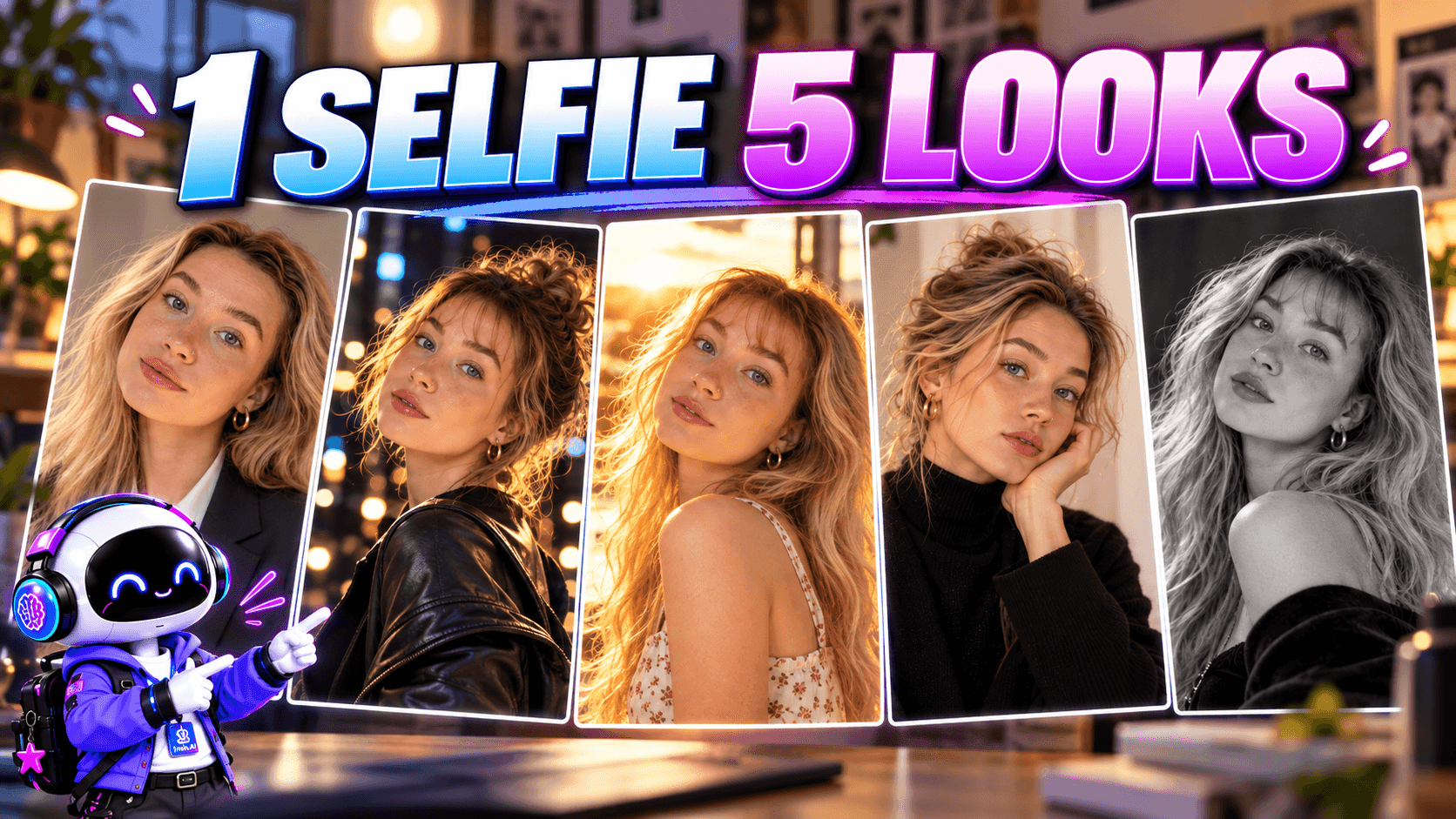
Turn one selfie into realistic AI portraits for work, social media, and personal branding with prompts and 1min.AI.
What if one ordinary selfie could become a professional LinkedIn headshot, a cinematic portrait, a golden-hour lifestyle photo, or an elegant Hollywood-inspired photoshoot?
You don't need five different outfits, expensive camera equipment, or a professional photography studio to experiment with these looks.
With an AI photoshoot generator, you can use a single selfie as your starting point and create portraits with different backgrounds, lighting, outfits, and photography styles.
But there's one challenge: making sure the results actually look like you.
Some AI portraits look beautiful at first glance but change facial features, smooth the skin too much, or create lighting that feels unnatural.
In this guide, we'll show you how to create five realistic AI photoshoot styles with 1min.AI, share copy-and-paste prompts, and explain how to keep your portraits natural while experimenting with different looks.
What Is an AI Photoshoot Generator?
An AI photoshoot generator uses artificial intelligence to create or transform portrait images based on text prompts, reference photos, or both.
Instead of organizing a traditional photoshoot, you can describe the result you want and let AI generate a new image.
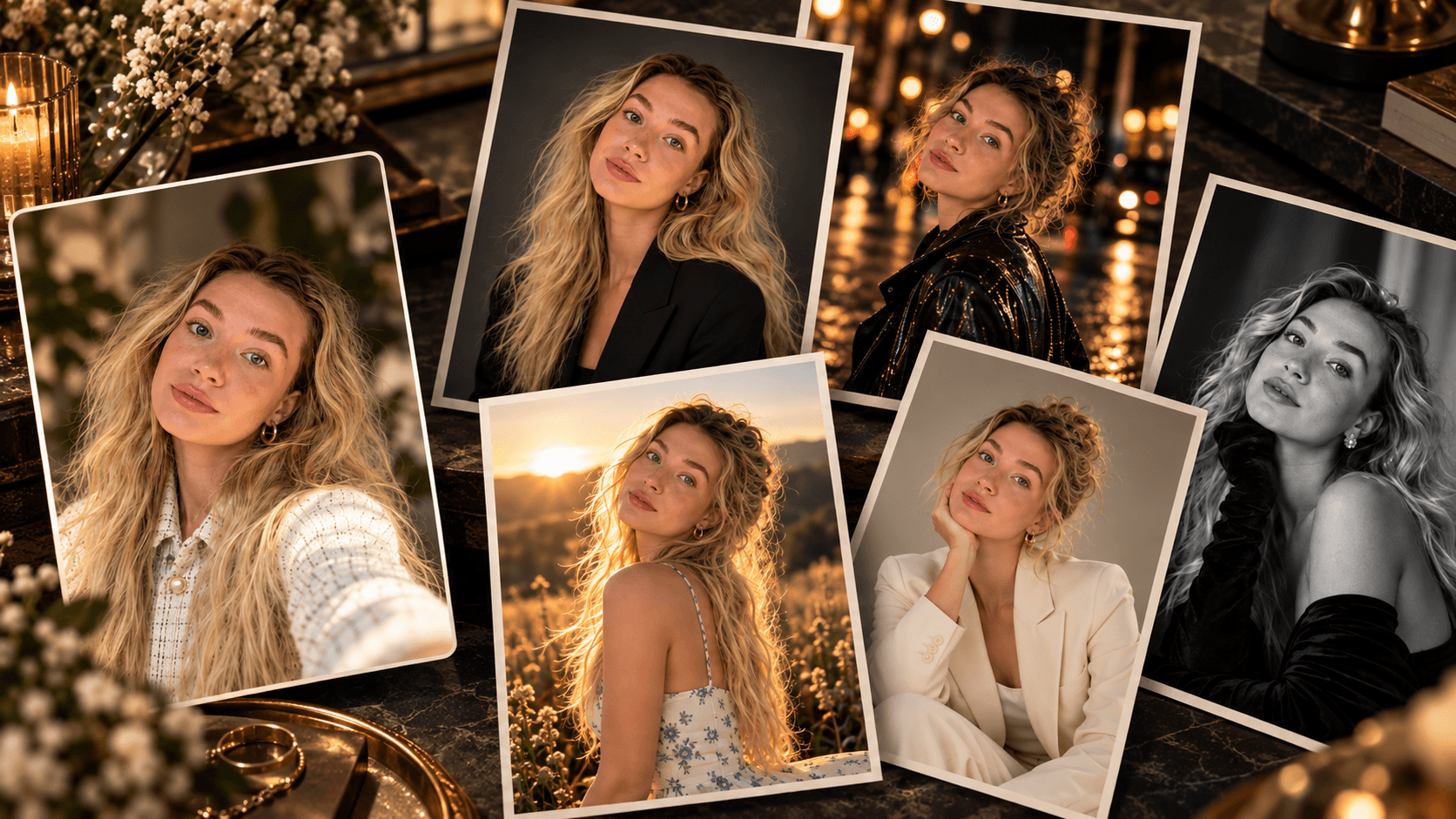
For example, you could start with a casual selfie taken in your bedroom and transform it into:
- A professional headshot with soft studio lighting.
- A cinematic portrait on a rainy city street.
- A natural outdoor photograph at golden hour.
- A minimalist fashion editorial.
- A classic black-and-white Hollywood portrait.
Each result can have a completely different atmosphere while using your original selfie as the identity reference.
The important distinction is that AI image generation doesn't automatically guarantee facial consistency. The model and reference-image workflow you choose can make a significant difference.
With 1min.AI, you can experiment with different AI image models, upload reference photos with supported models, and use image editing tools within the same platform.
How to Create an AI Photoshoot from One Selfie with 1min.AI
Before exploring the different photoshoot styles, let's build a simple workflow you can reuse for every concept.
Step 1: Choose the Right Selfie
Your original photo matters more than you might think.
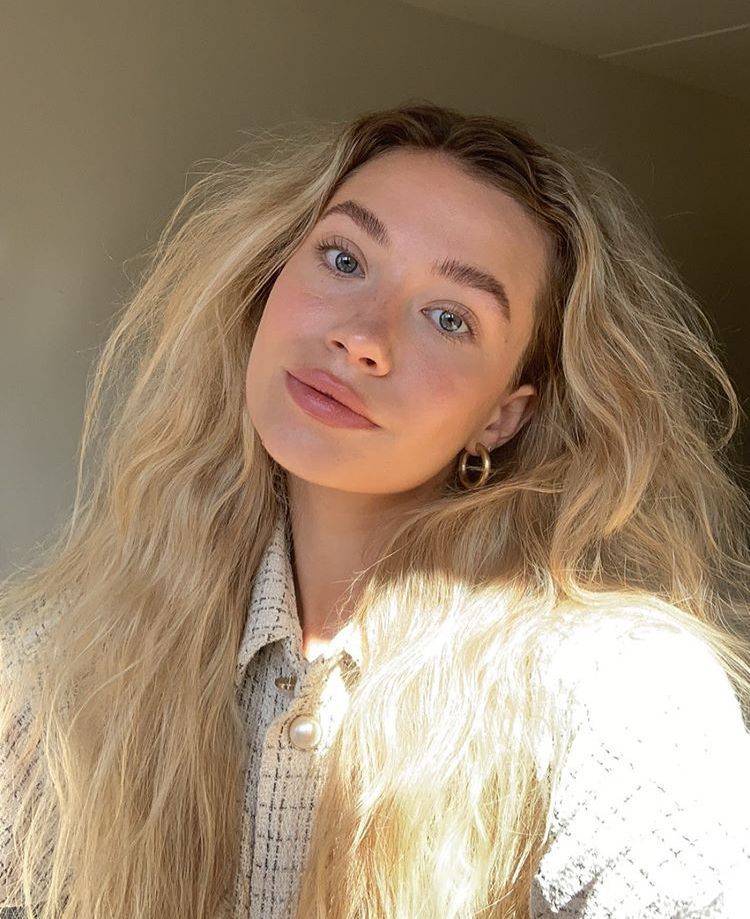
Start with a clear selfie where your face is visible, your expression looks natural, and the lighting is reasonably balanced.
For better results:
- Face the camera directly or at a slight angle.
- Avoid sunglasses, heavy filters, and anything covering important facial features.
- Use a sharp image with natural skin texture.
- Avoid strong shadows across your eyes or nose.
- Choose a photo that accurately represents your usual appearance.
You don't need professional equipment. A simple smartphone photo taken near a window is a good starting point.
Demo: Use one casual selfie as the reference for all five AI photoshoots so readers can compare the results.
Step 2: Open the Image Generator on 1min.AI
Go to 1min.AI and navigate to:
AI for Image → Image Generator
Choose an AI model that supports uploaded reference images.
Not every AI image model accepts the same inputs. Some generate images from text alone, while others allow you to upload your original photo.
For a photoshoot where facial identity matters, select a model with image-reference support.
Step 3: Upload Your Selfie and Write a Prompt
Upload your selfie and describe the type of photoshoot you want.
A basic prompt might look like this:
Turn this selfie into a professional studio portrait.
But that leaves too many decisions to the AI.
A more detailed instruction can describe the clothing, background, lighting, camera framing, and realistic appearance.
Base Prompt — Realistic AI Photoshoot
Use the uploaded selfie as the identity reference for a realistic professional photoshoot.

Preserve the person's recognizable facial features, face shape, eye shape, nose, lips, natural skin tone, hairstyle, and overall identity.

Change only the outfit, background, pose, lighting, and photography style as described.

Create a photorealistic portrait with natural skin texture, realistic facial proportions, subtle imperfections, authentic lighting, and professional camera quality.

Avoid excessive skin smoothing, artificial facial symmetry, exaggerated beauty filters, distorted anatomy, or a plastic-looking appearance.
You can combine these identity instructions with any of the five creative prompts below.
Step 4: Generate with Flux 2 Max and Compare the Result
For this photoshoot workflow, select Flux 2 Max - Black Forest Labs as the image model. Upload your selfie as the reference image, paste your prompt, and generate the first result.
Then compare the generated image with your original selfie. Check whether the face is still recognizable, especially the eyes, nose, mouth, face shape, hairstyle, and overall identity. Also review the skin texture, lighting, hands, clothing, and background to make sure the image still looks like a real photograph rather than an AI render.
If the face changes too much, strengthen the identity instructions in your prompt, simplify unnecessary styling details, or regenerate with a clearer reference photo.
Once Flux 2 Max gives you a result that still looks like the same person, keep that workflow and start testing different photoshoot styles from the same selfie.
5 Realistic AI Photoshoot Ideas with Copy-and-Paste Prompts
Here's where one selfie becomes five completely different photoshoots.
Each idea has a distinct purpose, from professional profiles to creative social media content.
1. Professional Studio Headshot
Best for: LinkedIn profiles, resumes, business websites, and personal branding.
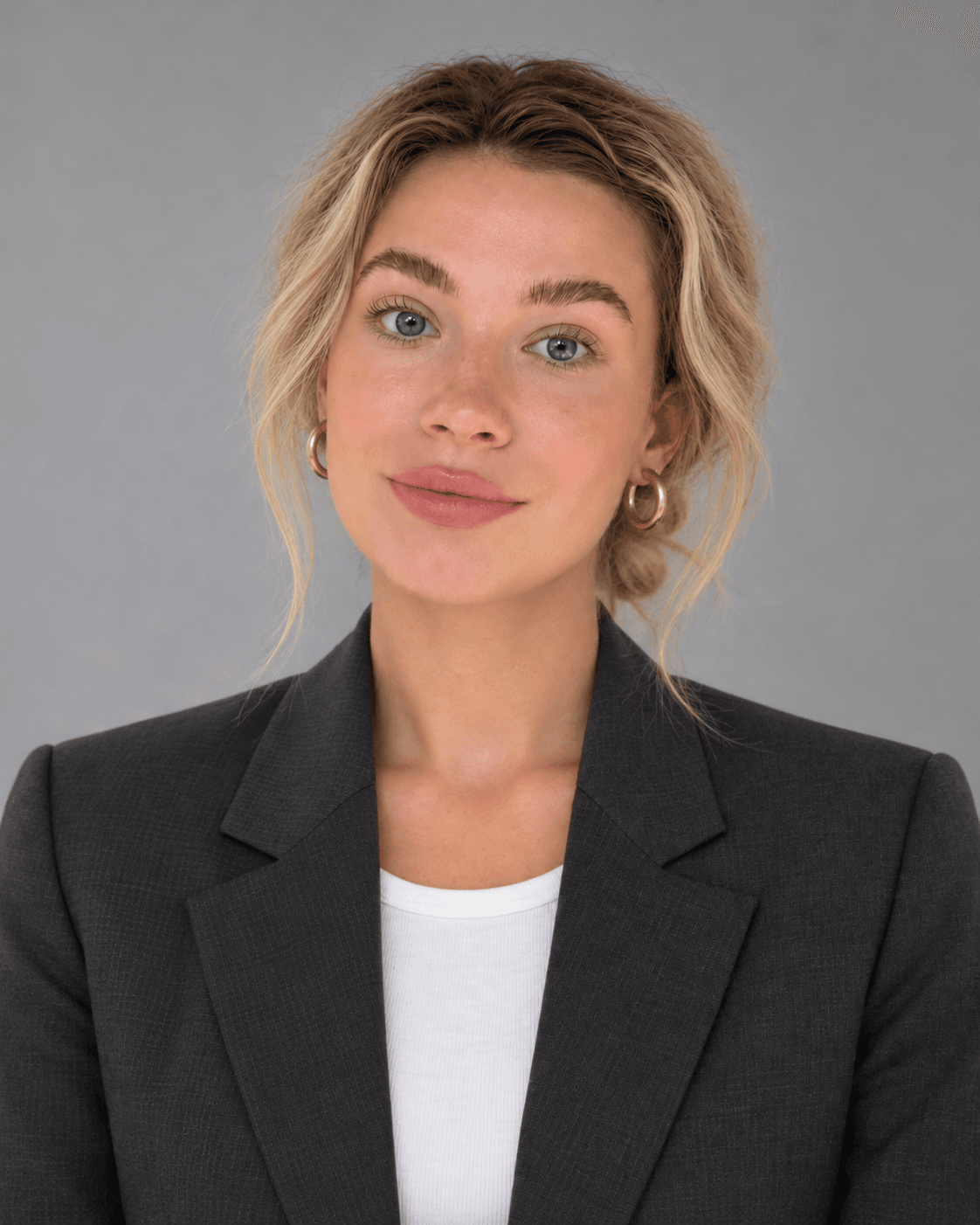
A professional headshot should look clean, approachable, and confident without appearing overly retouched.
Rather than adding dramatic visual effects, focus on natural facial expressions, simple backgrounds, and flattering studio lighting.
AI Photoshoot Prompt
Using the uploaded selfie as the identity reference, create a photorealistic professional studio headshot of the same person.

Preserve the original facial identity, face shape, eye shape, nose, lips, hairstyle, and natural skin tone.

Dress the person in a tailored dark charcoal blazer over a simple neutral-colored shirt.

Use a clean light gray studio background with soft, diffused lighting from a large softbox positioned slightly to the left.

Frame the portrait from the chest upward, with an eye-level camera angle, relaxed shoulders, natural posture, and a subtle confident smile.

Simulate professional portrait photography with an 85mm lens, realistic depth of field, balanced exposure, natural skin texture, and accurate facial proportions.

No excessive retouching, artificial beauty filters, altered facial features, or unrealistic skin.
Creative Tip: Keep the background neutral and the expression natural. A professional headshot should feel believable, not like a luxury fashion advertisement.
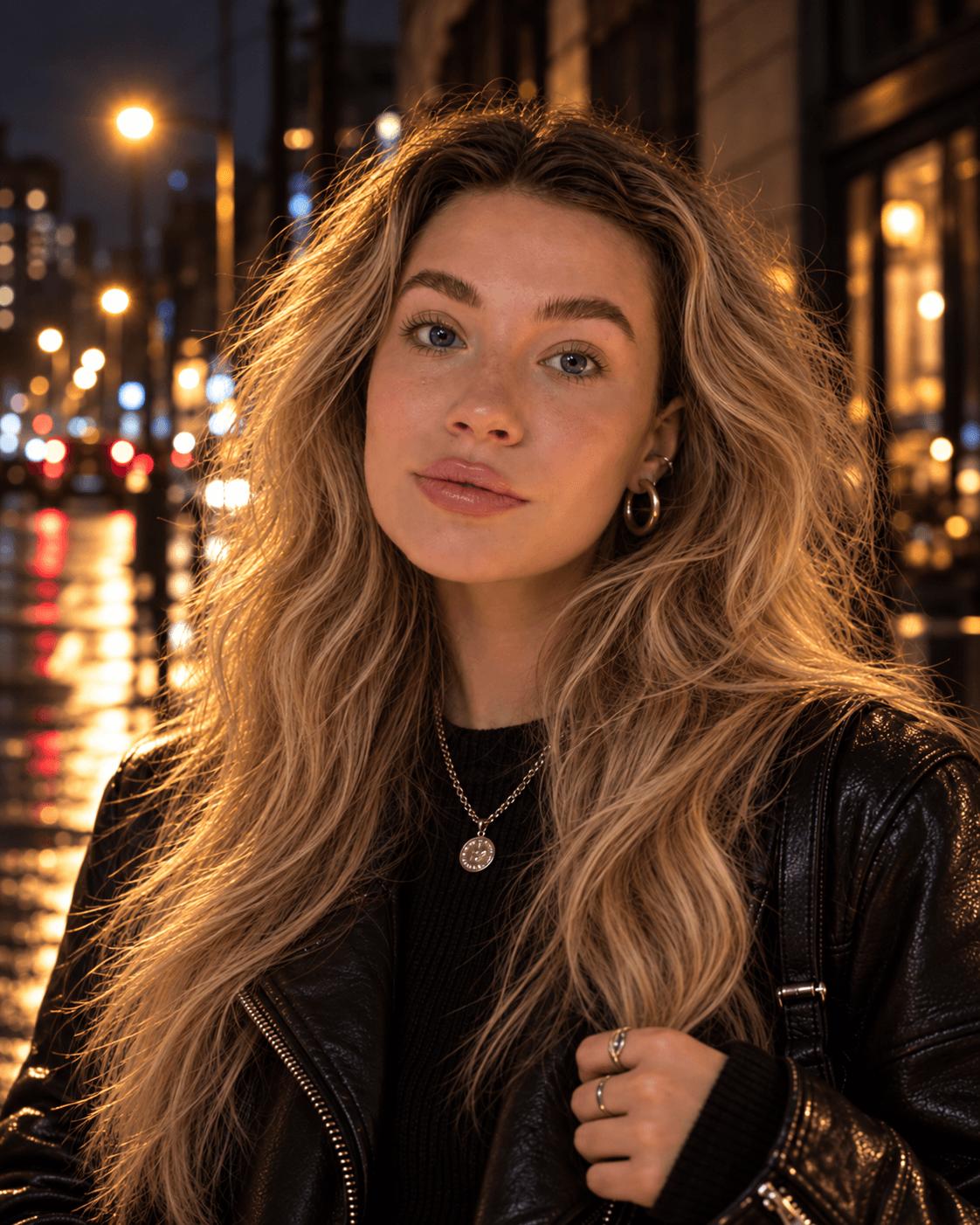
2. Cinematic Night Portrait
Best for: Instagram, creative portfolios, music visuals, and cinematic social media content.
If you want something more dramatic, try creating a portrait inspired by nighttime city photography.
Imagine standing on a quiet street after the rain, with warm streetlights and soft reflections in the background.
The secret is balancing the cinematic atmosphere with realistic photography.
AI Photoshoot Prompt
Using the uploaded selfie as the identity reference, create a photorealistic cinematic night portrait of the same person.

Preserve the exact facial identity, face shape, eyes, nose, lips, and natural skin tone. Keep the head straight, shoulders balanced, and the gaze directed confidently at the camera.

Style the person with a cool, confident attitude, wearing a black leather jacket over a dark outfit, with subtle accessories for a stylish cinematic look.

Place the person on a quiet city street at night after light rain, with softly blurred city lights and wet pavement reflections in the background.

Use moody cinematic lighting with warm streetlight hitting one side of the face, natural shadows, realistic skin texture, and restrained color grading.

Frame as a medium close-up at eye level, using a realistic 50mm lens and shallow depth of field.

Avoid head tilt, beauty filters, exaggerated neon glow, unrealistic lighting, facial changes, or an AI-generated look.
Creative Tip: Too many neon lights and dramatic effects can make AI photos look artificial. Use subtle background lighting and realistic skin tones for a more convincing result.
3. Golden Hour Lifestyle Photoshoot
Best for: Personal blogs, Instagram profiles, lifestyle creators, and casual portraits.
Not every AI photoshoot needs to look dramatic or glamorous.
Sometimes, a natural outdoor photo is more appealing because it feels spontaneous.
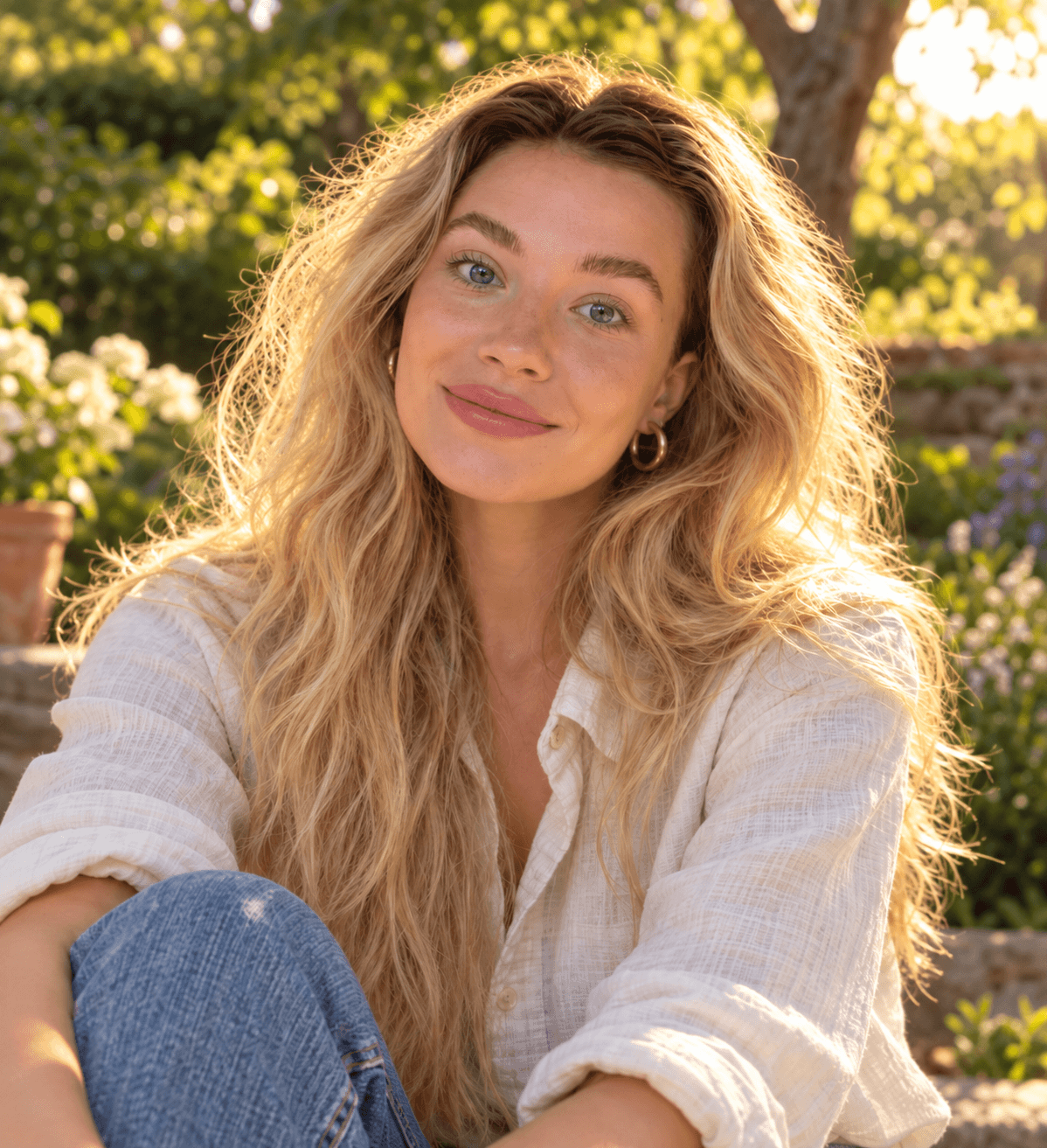
Golden-hour photography uses the warm, soft sunlight that appears shortly after sunrise or before sunset.
AI Photoshoot Prompt
 Use the uploaded selfie to create a photorealistic golden-hour lifestyle portrait of the same person. Preserve her recognizable face, natural skin tone, facial structure,

 hairstyle, and authentic appearance. Keep her head straight, looking directly at the camera with a bright, natural smile. Dress her in a cream linen shirt and casual jeans,

 seated comfortably in a peaceful garden. Use warm backlight through the trees, soft facial shadows, realistic skin texture, slightly tousled hair, a blurred green

 background, and a natural 50mm portrait look. Avoid beauty filters, plastic skin, dramatic posing, excessive orange tones, or artificial lens flare.
Creative Tip: Instead of asking for a perfect pose, use words like "candid," "relaxed," and "natural expression" to encourage a more authentic result.
4. Minimalist Fashion Editorial
Best for: Creative portfolios, fashion content, personal branding, and social media campaigns.
Fashion photography doesn't always require dramatic outfits or elaborate backgrounds.
A minimalist editorial can create a premium look through composition, sophisticated styling, and controlled lighting.
This concept focuses on a clean, contemporary portrait rather than a magazine-cover design.
AI Photoshoot Prompt
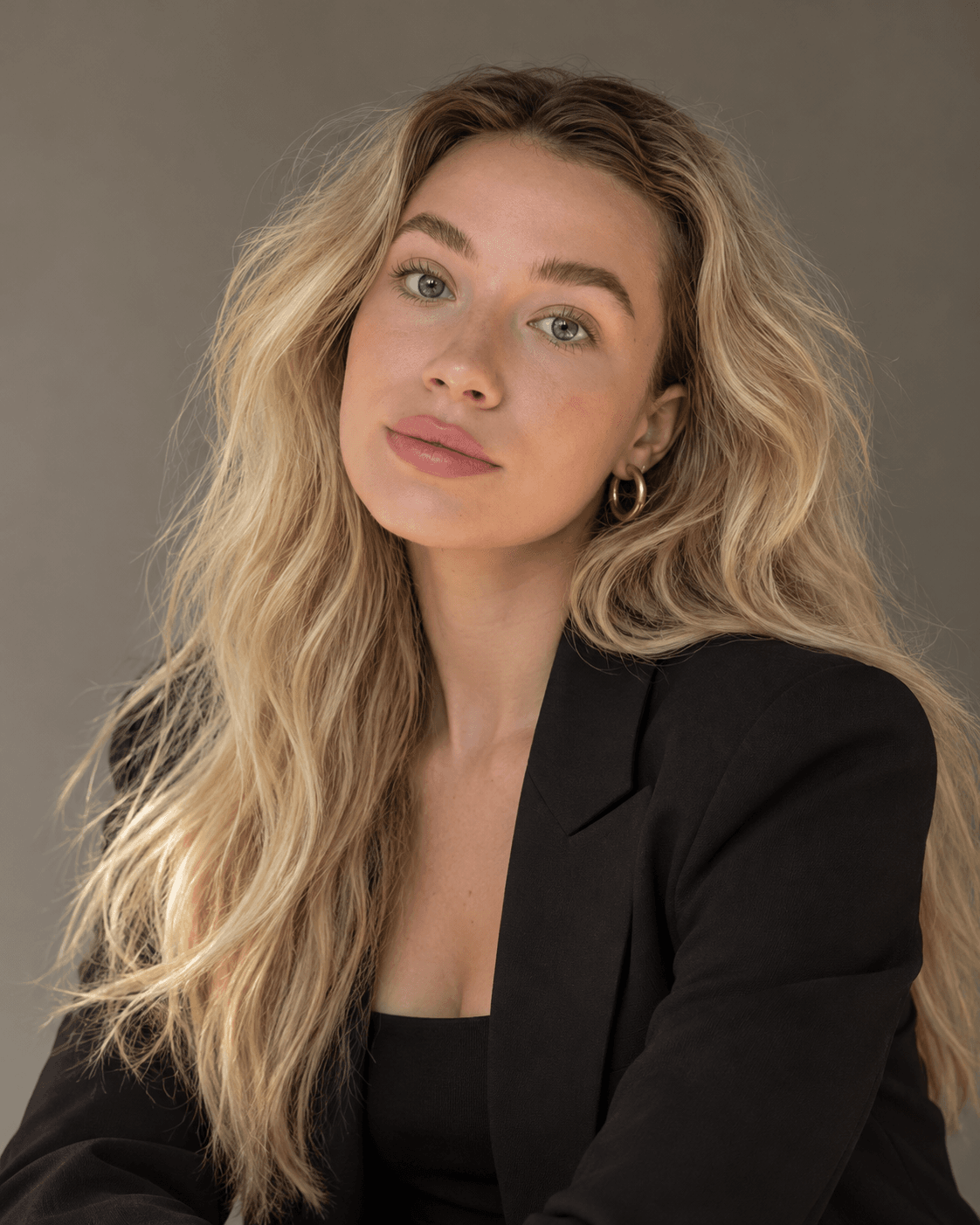
Using the uploaded selfie as the identity reference, create a photorealistic minimalist fashion editorial portrait.

Preserve the person’s exact facial identity, face shape, eyes, nose, lips, natural skin tone, and blonde hair. Keep the head straight, shoulders balanced, and gaze directly at the camera.

Style the person in a modern tailored black outfit with minimal accessories. Place the subject against a smooth warm-gray studio background.

Use soft directional studio lighting, subtle shadows, realistic skin texture, and natural neutral color grading. Compose as a clean three-quarter portrait with an elegant, calm expression and realistic body proportions.

Shoot with an 85mm portrait lens, high-end editorial composition, and shallow depth of field.

Avoid head tilt, beauty filters, plastic skin, distorted anatomy, text, logos, or an AI-generated look.
Creative Tip: Let lighting, framing, and styling create the premium atmosphere. Avoid adding too many props or decorative effects.
5. Classic Hollywood Black-and-White Portrait
Best for: Artistic portraits, vintage-inspired content, creative storytelling, and personal photo collections.
For the final concept, let's explore something timeless.
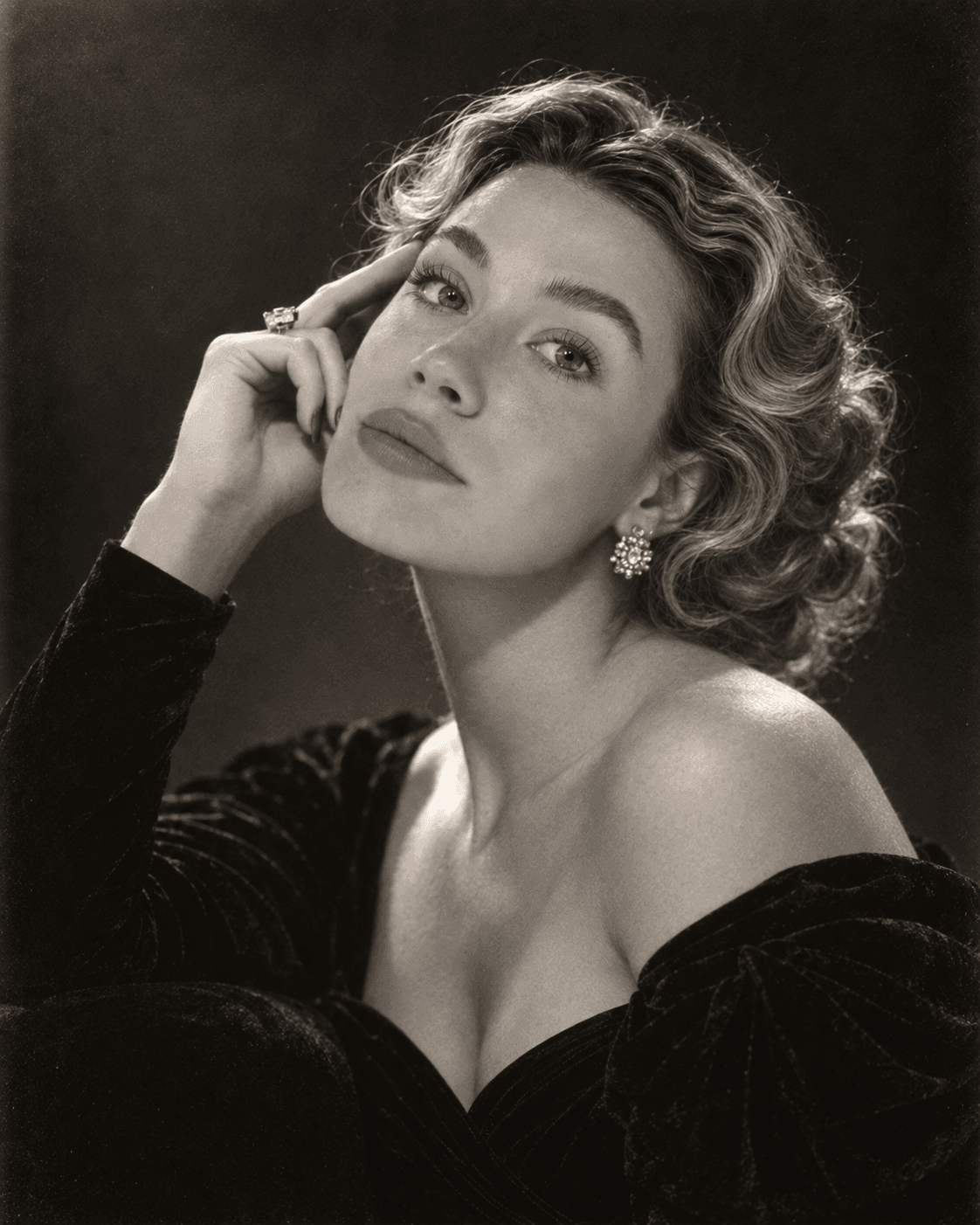
Classic Hollywood photography is known for elegant studio compositions, expressive lighting, and sophisticated black-and-white tones.
Unlike a colorful retro filter, this look depends heavily on light, shadow, and photographic texture.
AI Photoshoot Prompt
Using the uploaded selfie as the identity reference, create a photorealistic classic Hollywood black-and-white portrait of the same person.

Preserve the exact facial identity, face shape, eyes, nose, lips, and natural features. Style the hair in a neat vintage updo with soft classic curls.

Pose the person in an elegant old-Hollywood style with the face turned slightly to the side, chin lifted gently, and one hand placed near the temple for a graceful cinematic pose.

Dress the person in a timeless black velvet evening gown with subtle vintage jewelry. Use dramatic classic Hollywood studio lighting, a dark studio background, soft sculpted shadows, realistic skin texture, and authentic monochrome tones with subtle film grain.

Shoot as a refined head-and-shoulders portrait with an 85mm lens, elegant composition, and a realistic vintage glamour look.

Avoid modern styling, beauty filters, plastic skin, exaggerated retouching, distorted anatomy, or an AI-generated look.
Creative Tip: For a convincing black-and-white portrait, focus on tonal contrast and soft directional lighting instead of heavy vintage filters.
How to Keep Your Face Consistent in AI Photoshoots
One of the most common problems with AI photoshoot generators is identity drift.
You upload a selfie, request a new hairstyle or photoshoot setting, and the resulting portrait looks similar to you but not quite right.
Sometimes, the AI changes the eyes, jawline, nose, or even the overall shape of the face.
Here are a few ways to improve consistency.
1. Always Use the Same Reference Selfie
For a controlled comparison, start each new photoshoot from your original image rather than from a previously generated portrait.
Repeatedly transforming AI-generated images can introduce additional changes to facial features.
2. Put Identity Preservation First
Start your prompts with the most important instruction:
"Preserve the person's recognizable facial identity and natural facial features."
Then describe the changes you want to make.
This helps clarify that the background, clothing, pose, and lighting should change while the person's appearance stays recognizable.
However, prompt instructions alone cannot guarantee an exact facial match.
3. Avoid Extreme Changes to Facial Features
If your goal is to look like yourself, avoid asking the AI to change too many identity-related features at once.
Changing the face shape, eye shape, hairline, expression, and camera angle simultaneously makes consistency more difficult.
Start with smaller adjustments and build from there.
4. Experiment with Different AI Models
Different AI image models interpret reference photos and identity instructions differently.
Some are better suited to stylized visuals, while others may produce more convincing photographic details.
1min.AI allows you to experiment with multiple supported image models in one workspace.
Compare results using the same selfie and similar prompts to find the most suitable option for your project.
5. Use Face Swap When Necessary
If the generated portrait looks great but the face is noticeably different, another approach is to generate the scene first and then use a Face Swap tool with your own selfie.
This can help personalize a generated portrait, although it may still require additional checks for lighting, proportions, and facial accuracy.
Only use photos of yourself or people who have given you permission.
How to Make AI Portraits Look More Realistic
A detailed prompt helps, but realism also depends on avoiding common image-generation mistakes.
| Common Problem | How to Improve It |
|---|---|
| Plastic-looking skin | Request natural skin texture and subtle imperfections |
| Face looks different | Use a clear reference photo and explicit identity instructions |
| Unrealistic lighting | Specify the light source and direction |
| Overly dramatic effects | Reduce glow, saturation, and unnecessary visual elements |
| Awkward body proportions | Use natural poses and realistic anatomy instructions |
| Background looks artificial | Add believable materials, depth of field, and contact shadows |
| Portrait looks overedited | Ask for restrained color grading and minimal retouching |
The Realism Prompt Add-On
You can add the following instruction to any photoshoot prompt when the result looks too artificial.
Prioritize photographic realism. Maintain natural skin texture, realistic facial anatomy, subtle imperfections, accurate lighting direction, believable shadows, realistic hair strands, and natural camera perspective.

Use restrained professional color grading with realistic contrast and exposure.

Avoid plastic skin, exaggerated facial symmetry, beauty filters, oversaturated colors, excessive glow, distorted facial features, artificial eyes, and unrealistic body proportions.

The final image should resemble a genuine professional photograph rather than an obviously AI-generated portrait.
This won't eliminate every generation error, but it gives the model clearer guidance about the visual result you want.
Which AI Photoshoot Style Should You Choose?
The best style depends on where and how you plan to use the image.
| Photoshoot Style | Recommended Use | Visual Mood |
|---|---|---|
| Professional Headshot | LinkedIn, CV, websites | Clean and trustworthy |
| Cinematic Night Portrait | Social media, creative projects | Moody and dramatic |
| Golden Hour Lifestyle | Personal brands, blogs | Warm and natural |
| Minimalist Fashion Editorial | Portfolios, fashion content | Modern and sophisticated |
| Classic Hollywood | Artistic portraits, vintage content | Timeless and elegant |
You don't need to generate every style.
If you need a business profile, start with the professional headshot. For Instagram or a personal creative project, experiment with cinematic or lifestyle photography.
The advantage of an AI photoshoot generator is the freedom to test different visual directions before choosing your favorite.
Frequently Asked Questions
Can AI turn a selfie into a professional photo?
Yes. AI image tools can transform a casual selfie into a professional-looking portrait by adjusting clothing, lighting, background, and photographic styling. The quality and accuracy depend on the source image, model, and prompt.
What is the best AI photoshoot prompt?
A good prompt describes the subject, identity requirements, outfit, background, lighting, framing, camera style, and desired realism. Specific photographic instructions usually provide more control than generic descriptions such as "make this photo professional."
Can I create an AI photoshoot for free?
Some platforms, including 1min.AI, offer free access to selected AI image tools with usage limits or credits. Available models and generation allowances may vary.
How do I make AI photos look like me?
Use a clear reference selfie, select an AI model that supports image input, and include facial identity preservation instructions. Compare the result with the original and regenerate if important features change. Exact identity preservation is not guaranteed.
Can I create multiple AI portraits from one photo?
Yes. You can reuse one selfie as the reference for multiple AI-generated styles, including professional headshots, cinematic portraits, lifestyle photography, and artistic studio images.
Can I use AI photos for social media or LinkedIn?
AI portraits can be used for many personal and creative purposes, subject to platform rules. For professional profiles, choose an image that accurately represents your appearance. Avoid presenting heavily altered or misleading visuals as authentic documentary photographs.
Final Thoughts: One Selfie, Five Different Looks
A professional-looking photoshoot doesn't always have to begin with a camera, a studio, or an expensive wardrobe.
With the right reference photo and a carefully written prompt, you can experiment with different styles, environments, and photographic moods from a single selfie.
Whether you're creating a professional headshot, a cinematic portrait, or a natural lifestyle image, the key is finding the right balance between creativity and realism.
Start with one clear selfie. Choose a style that fits your goal. Experiment with the lighting and composition, and keep adjusting until the result feels natural and recognizable.
- #Commercial
Alternatives
Discover the best alternatives to 1minAI and compare features, pricing, and use cases.

1min.AI vs OpenRouter
1min.AI vs. OpenRouter: Compare the ready-to-use AI creation product against the technical API tool. Find out if you need a zero-code creative studio or a coding infrastructure hub.
 Ngoc Hong
1min.AI vs Jarvis AI
Compare 1min.AI vs Jarvis AI to discover which AI platform is better for writing, research, automation, and content creation. Find the best AI assistant for your workflow.
Ngoc Hong
1min.AI vs Taskade
Compare 1min.AI vs Taskade for AI content creation, automation, agents, and creative workflows to find the right workspace.
Ngoc HongAI Tools
Discover the best AI tools to boost productivity, creativity, and everyday work.

Create Consistent Cartoon Content in Just a Few Steps
Create engaging cartoon videos for TikTok and Reels with 1min.AI. Research ideas, create characters, and turn images into animated videos in 3 simple steps.
 Lien Anh Vu
One Product, 10 UGC Creatives: How AI Makes Content Testing Easier
Create more authentic UGC with an AI UGC video generator, test more creative angles and scale affiliate content without filming every version.
Lien Anh Vu
Top 4 Affordable AI Tools for Startup Founders
Discover the top 4 affordable AI tools for startup founders to validate ideas, build products, create content, and launch faster without overspending.
 Tram Ta
AI Features
Comprehensive AI features that streamline workflows, improve efficiency, and empower teams to achieve more.
Create Consistent Cartoon Content in Just a Few Steps
Create engaging cartoon videos for TikTok and Reels with 1min.AI. Research ideas, create characters, and turn images into animated videos in 3 simple steps.
Lien Anh VuOne Product, 10 UGC Creatives: How AI Makes Content Testing Easier
Create more authentic UGC with an AI UGC video generator, test more creative angles and scale affiliate content without filming every version.
Lien Anh Vu
1minAI: Free AI Grammar Checker
Check grammar for free with 1minAI’s AI grammar checker. Find grammar, spelling, and writing mistakes, improve clarity, and polish your content in seconds.
Tram TaAI Use Cases
A curated collection of AI use cases for business, productivity, and industry-specific applications.
Create Consistent Cartoon Content in Just a Few Steps
Create engaging cartoon videos for TikTok and Reels with 1min.AI. Research ideas, create characters, and turn images into animated videos in 3 simple steps.
Lien Anh VuOne Product, 10 UGC Creatives: How AI Makes Content Testing Easier
Create more authentic UGC with an AI UGC video generator, test more creative angles and scale affiliate content without filming every version.
Lien Anh Vu
Best Time to Post on Instagram: A Practical Guide for Better Engagement
Discover the best time to post on Instagram, including the best days and times for different audiences, plus tips to find the ideal posting schedule for your account.
Tram TaAI Tutorials
Learn how to use AI with practical, step-by-step tutorials.

Black Friday AI Tool Deals in 2026
Discover what Black Friday AI tool deals 2026 has to offer. Find out how to secure the 1min.AI lifetime deal via AppSumo, Dealify, Stack Social, and verify on Trustpilot, Slashdot, and Software Advice.
 Hang Nguyen
Create Consistent Cartoon Content in Just a Few Steps
Create engaging cartoon videos for TikTok and Reels with 1min.AI. Research ideas, create characters, and turn images into animated videos in 3 simple steps.
Lien Anh Vu
[Seedance 2.5 New] Better AI Product Videos, Less Rework in 1min.AI
Use Seedance 2.5 image to video on 1min.AI to create more consistent AI product videos, reduce failed generations, save credits, and improve UGC workflows.
Lien Anh VuAI Guides
Learn AI faster with practical guides, real-world examples, and actionable best practices.

Safely Buy AI Tools Online: 2026 Black Friday Guide
Discover how to find and secure the best Black Friday AI deals online. Learn expert strategies to avoid scams, combat subscription fatigue, and verify software.
Hang NguyenCreate Consistent Cartoon Content in Just a Few Steps
Create engaging cartoon videos for TikTok and Reels with 1min.AI. Research ideas, create characters, and turn images into animated videos in 3 simple steps.
Lien Anh Vu[Seedance 2.5 New] Better AI Product Videos, Less Rework in 1min.AI
Use Seedance 2.5 image to video on 1min.AI to create more consistent AI product videos, reduce failed generations, save credits, and improve UGC workflows.
Lien Anh VuAI Solutions
Browse the best AI solutions for automation, coding, research, productivity, customer support, marketing, and business workflows.
Safely Buy AI Tools Online: 2026 Black Friday Guide
Discover how to find and secure the best Black Friday AI deals online. Learn expert strategies to avoid scams, combat subscription fatigue, and verify software.
Hang NguyenCreate Consistent Cartoon Content in Just a Few Steps
Create engaging cartoon videos for TikTok and Reels with 1min.AI. Research ideas, create characters, and turn images into animated videos in 3 simple steps.
Lien Anh VuOne Product, 10 UGC Creatives: How AI Makes Content Testing Easier
Create more authentic UGC with an AI UGC video generator, test more creative angles and scale affiliate content without filming every version.
Lien Anh VuAI Models
Explore the world's leading AI models in one place.
Create Consistent Cartoon Content in Just a Few Steps
Create engaging cartoon videos for TikTok and Reels with 1min.AI. Research ideas, create characters, and turn images into animated videos in 3 simple steps.
Lien Anh VuOne Product, 10 UGC Creatives: How AI Makes Content Testing Easier
Create more authentic UGC with an AI UGC video generator, test more creative angles and scale affiliate content without filming every version.
Lien Anh Vu[Seedance 2.5 New] Better AI Product Videos, Less Rework in 1min.AI
Use Seedance 2.5 image to video on 1min.AI to create more consistent AI product videos, reduce failed generations, save credits, and improve UGC workflows.
Lien Anh VuAI Comparisons
Compare AI tools, models, and platforms to find the best fit for your needs.

Kling AI Vs Veo 3: Which Model Wins?
Kling AI vs Veo 3: compare motion, native audio, pricing & free tiers to see which AI video generator wins for your project - try both on 1min.AI.
 Trang Tran
[Seedance 2.5 New] Better AI Product Videos, Less Rework in 1min.AI
Use Seedance 2.5 image to video on 1min.AI to create more consistent AI product videos, reduce failed generations, save credits, and improve UGC workflows.
Lien Anh Vu
DeepSeek V4 Pro vs Flash Comparison
Compare DeepSeek V4 Pro vs DeepSeek V4 Flash metrics. Optimize your agentic apps and improve AI fact checking on 1min.ai today.
Ngoc HongAI Integrations
Seamlessly integrate AI with the tools you already use to automate work and boost productivity.

POV: You Have 10+ Posts to Make Every Day
Learn how to build an AI content workflow that helps content creators produce 10+ social media posts a day faster with AI brainstorming, image generation, and content creation.
Lien Anh Vu
How to Use an AI Fashion Video Generator for Fashion Week 2026
Turn Fashion Week 2026 ideas into stunning fashion videos with AI. Learn how to brainstorm, create visuals, and transform images into videos with one simple workflow.
Lien Anh Vu
Stop Switching Between AI Apps: How AI Integration Transforms Employer Branding
Discover how AI integration helps HR teams streamline employer branding by combining AI writing, documents, images, video, and multiple AI models into one workspace.
Tram TaAI for Industries
Find the best AI tools and workflows for healthcare, finance, education, legal, manufacturing, retail, real estate, and more

Best AI Tool for Content Marketing |1minAI
Looking for the best AI tool for content marketing? See how 1minAI helps marketers research, write, repurpose, create visuals, and scale content from one AI workspace.
Tram Ta
7 Low-Cost AI Business Ideas for Your Startup
Explore 7 low-cost AI business ideas you can start with a small budget, from content and video services to AI consulting, reselling, and automation.
Tram Ta
How to Start a One-Person AI Business: 7 Models You Can Run Solo
Learn how to start a one-person AI business with 7 practical models, from AI consulting and content services to automation and software reselling.
Tram TaAI Agents
Discover and run AI agents to automate tasks across your work and daily life.
1minAI: Free AI Grammar Checker
Check grammar for free with 1minAI’s AI grammar checker. Find grammar, spelling, and writing mistakes, improve clarity, and polish your content in seconds.
Tram Ta
AI Agents for Facebook
Use an AI Agent for Facebook to create content, generate images, schedule posts, and publish from your documents and conversations.
Ngoc Hong
AI Agent vs AI Assistant: Which One Actually Saves Designers More Time?
Learn the difference between AI Agent vs AI Assistant and discover which solution helps designers automate repetitive work, reduce revisions, and save more time.
Lien Anh VuAI Workflows
Explore ready-to-use AI workflows for productivity, marketing, sales, support, and more.
Create Consistent Cartoon Content in Just a Few Steps
Create engaging cartoon videos for TikTok and Reels with 1min.AI. Research ideas, create characters, and turn images into animated videos in 3 simple steps.
Lien Anh VuOne Product, 10 UGC Creatives: How AI Makes Content Testing Easier
Create more authentic UGC with an AI UGC video generator, test more creative angles and scale affiliate content without filming every version.
Lien Anh VuPOV: You Have 10+ Posts to Make Every Day
Learn how to build an AI content workflow that helps content creators produce 10+ social media posts a day faster with AI brainstorming, image generation, and content creation.
Lien Anh VuNewsletter
Weekly AI Innovations with 1minAI

🔮 Weekly AI Innovations #140: Deepseek 4.1 Flash & Gemini Upgrades
Explore Deepseek 4.1 Flash and new Gemini models on 1min.ai. Plus, check our update on your Billing - Usage page for better clarity.
Hang Nguyen
🔮 Weekly AI Innovations #139: Dawn of the next-gen AI
Discover the immense power of GPT-6 Astra and Claude Fable 5.1. Unlock next-generation AI models on 1min.ai to solve complex tasks effortlessly.
Hang Nguyen
🔮 Weekly AI Innovations #138: Claude Sonnet 5, Fable 5 & Wan 2.7
Explode your creative potential with massive 1min.ai updates! Access Claude Sonnet 5, Fable 5, and Alibaba Wan 2.7 for unmatched multi-modal generation today.
Hang Nguyen