
Free AI Chat Online: Multiple AI Models in 1minAI

Tram Ta
October 6, 2026
Try free AI chat online with multiple AI models in 1minAI. Compare GPT, Claude, Gemini, DeepSeek, Grok, and 100+ AI models in one workspace.
If you are looking for AI chat online, you no longer have to choose a single chatbot and stay with it for every task. Different AI models can produce noticeably different results for writing, coding, research, brainstorming, summarization, and everyday questions.
The challenge is that using several AI assistants usually means opening multiple websites, copying the same prompt into each one, and manually comparing the responses.
1minAI takes a different approach: it brings multiple AI models into one online AI chat workspace. With Multi AI Chat, you can send one prompt to several leading models and compare their responses side by side. 1minAI also offers access to 100+ AI models, including GPT, Claude, Gemini, DeepSeek, Grok, Perplexity, Qwen, Llama, Mistral, and others.
This guide explains how to use free AI chat online more effectively and how a multi-model workflow can help you get better results without constantly switching between AI platforms.
What Is AI Chat Online?
AI chat online refers to AI-powered conversational tools that you can access through a web browser to ask questions, generate content, solve problems, analyze information, brainstorm ideas, or complete other tasks through natural-language conversations.
Instead of learning a complicated interface, you can simply type what you need.
For example:
- “Explain quantum computing in simple terms.”
- “Rewrite this email professionally.”
- “Help me debug this Python function.”
- “Summarize these notes into a study guide.”
- “Give me 20 ideas for a marketing campaign.”
- “Create an outline for a research paper.”
- “Translate this paragraph into Spanish.”
The conversational format makes AI accessible because you can continue asking follow-up questions instead of starting from scratch every time.
However, there is an important limitation with a single-model workflow: one AI model may not always be the best fit for every task.
A model that gives you an excellent writing draft may not produce the coding solution you want. Another model may explain a technical topic more clearly. A third may generate more creative ideas.
That is why multi-model AI chat can be useful.
Why Use Multiple AI Models for Online AI Chat?
Imagine you have a difficult question.
You could ask one AI model, receive an answer, and immediately use it.
Or you could ask several models the same question and compare the results.
The second approach gives you more information before deciding what to use.
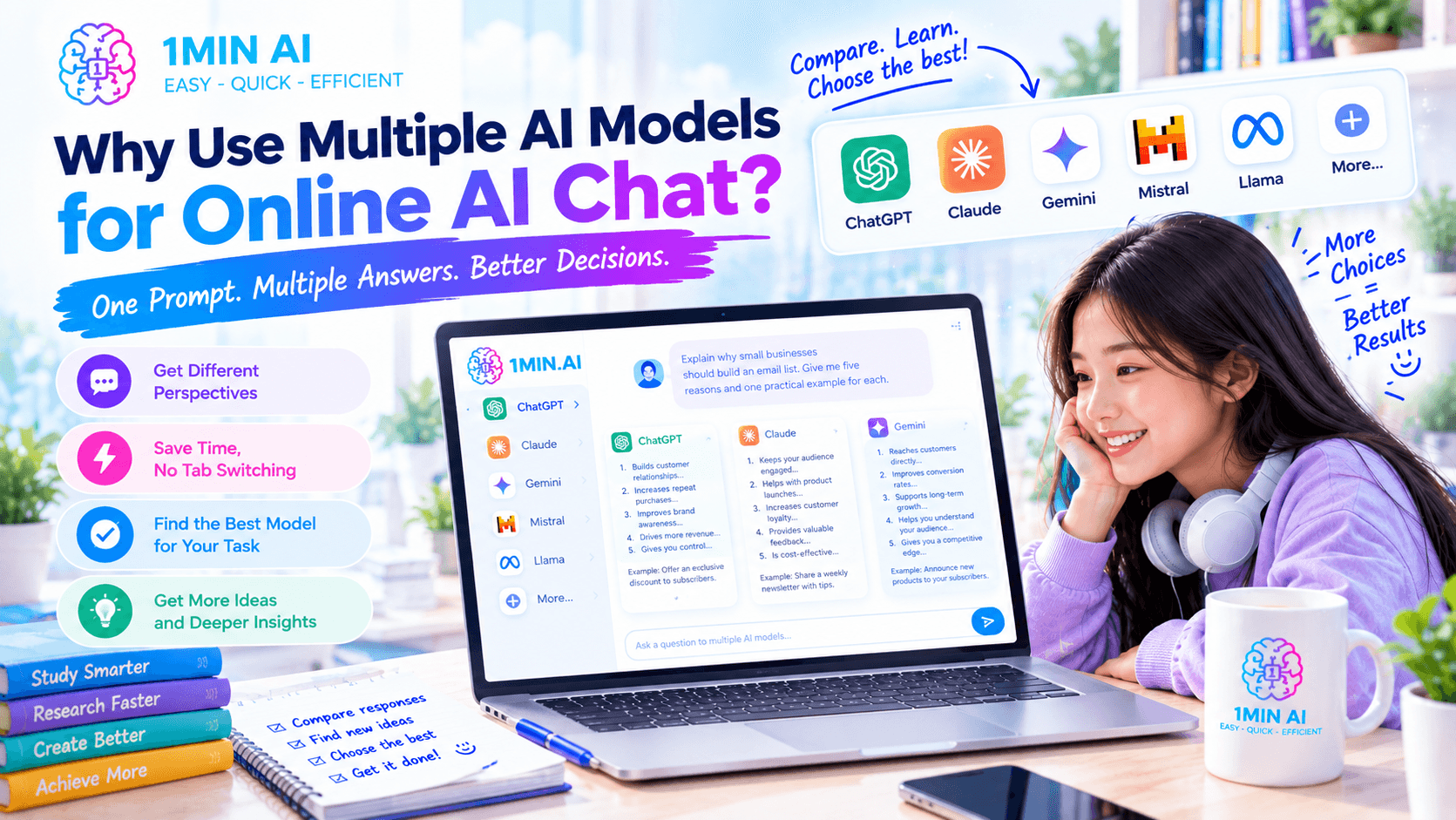
1minAI's Multi AI Chat is designed around this workflow. You can send one prompt to multiple AI models and review their responses in the same workspace rather than manually switching between different AI websites.
1. Different models can approach the same task differently
AI models can vary in their writing style, reasoning approach, creativity, coding suggestions, and ability to follow particular instructions.
For example, ask several models:
Prompt: Explain why small businesses should build an email list. Give me five reasons and one practical example for each.
One model may produce a concise marketing explanation.
Another may focus on customer retention.
Another may give you more creative examples.
Comparing those responses can help you identify useful ideas that you might have missed by asking only one chatbot.
2. You can reduce repetitive copy and paste
A traditional multi-AI workflow can look like this:
Open ChatGPT → copy prompt → paste → copy answer → open Claude → paste → repeat with Gemini → compare responses
This becomes frustrating when you use AI every day.
With Multi AI Chat, the same prompt can be sent to multiple models inside one workspace.
That means less tab switching and less repetitive work.
3. You can test which model fits your task
Instead of asking:
“Which AI model is the best?”
A more useful question is:
“Which model works best for this particular task?”
For example, you might test models for:
| Task | What to compare |
|---|---|
| Blog writing | Structure, tone, originality |
| Coding | Correctness, explanation, maintainability |
| Research | Completeness, reasoning, source awareness |
| Brainstorming | Variety and creativity |
| Summarization | Accuracy and clarity |
| Translation | Natural language and meaning |
| Business planning | Logic, detail, practicality |
There is no requirement to use the same model for everything.
A multi-model workspace lets you adapt your AI workflow to the job.
How to Use Free AI Chat Online With 1minAI
Using a multi-model AI chat workflow does not need to be complicated.
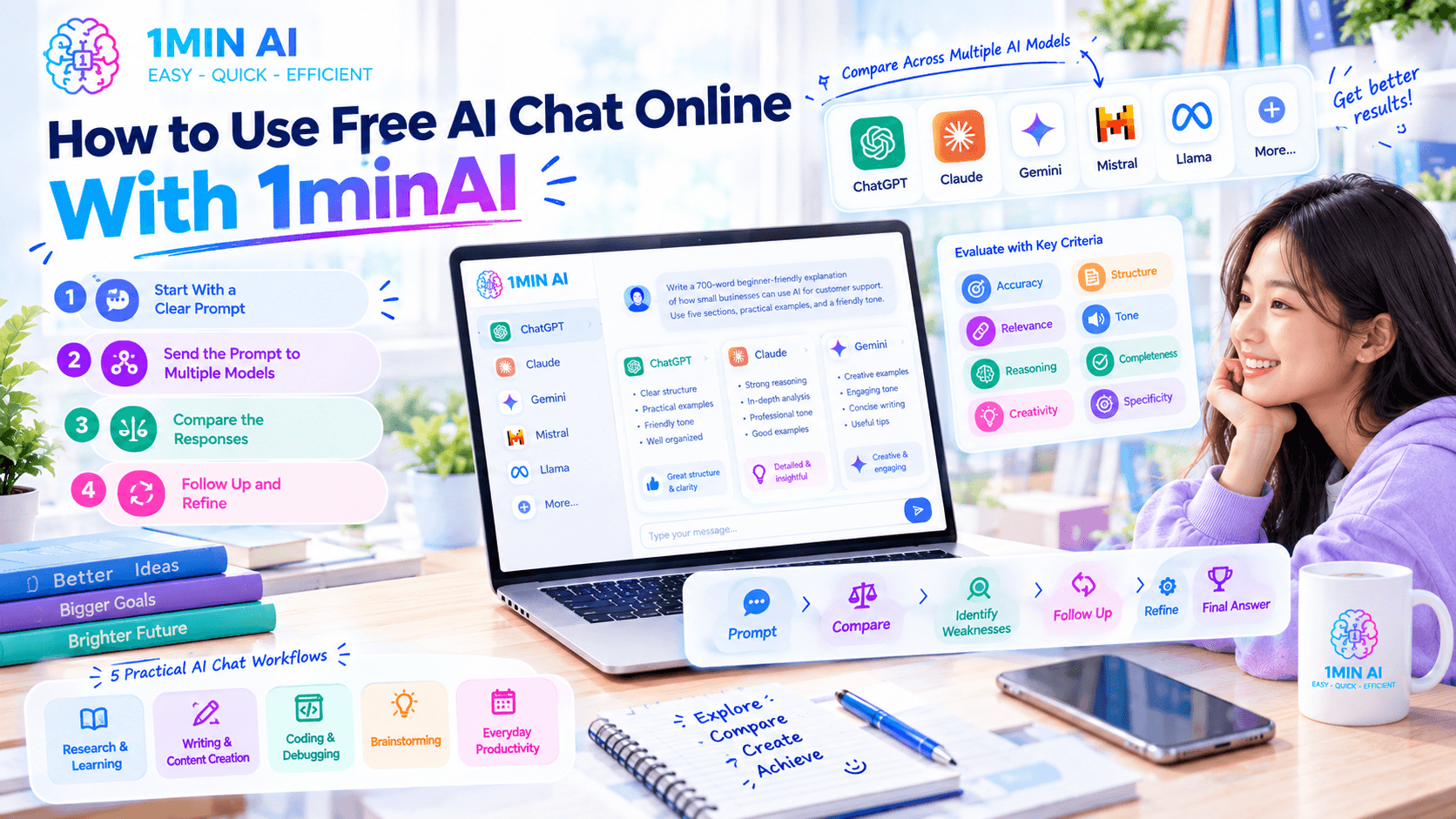
Step 1: Start With a Clear Prompt
The quality of the output still depends heavily on the quality of your instructions.
Instead of: “Write about AI.”
Give the model context: “Write a 700-word beginner-friendly explanation of how small businesses can use AI for customer support. Use five sections, practical examples, and a professional but conversational tone.”
A useful prompt generally includes:
Context + Task + Requirements + Output format
This structure gives AI enough information to understand what you actually want.
Step 2: Send the Prompt to Multiple Models
With 1minAI Multi AI Chat, you can send the same prompt to multiple AI models and compare their responses in one workspace.
This is especially useful when you are unsure which model will produce the best result.
For example, a content creator could compare several models on: “Give me 10 YouTube video ideas for a channel about personal productivity. Focus on topics that solve specific problems for busy professionals.”
Instead of choosing the first response, you can examine multiple approaches.
Step 3: Compare the Responses
Do not simply choose the longest answer.
Look at:
- Accuracy
- Relevance
- Reasoning
- Creativity
- Structure
- Tone
- Completeness
- Specificity
- Useful examples
You may find that one response contains the strongest structure while another contains better examples.
That gives you the opportunity to combine the useful parts.
Step 4: Follow Up and Refine
AI chat works best as an iterative process.
Your workflow can be:
Prompt → Compare → Identify weaknesses → Follow up → Refine → Final answer
For example:
First prompt: Create a marketing plan for a new productivity app.
After reviewing the answers, you might ask: “Combine the strongest ideas from these responses into a 30-day marketing plan. Prioritize low-cost acquisition channels and explain the reasoning behind each recommendation.”
The second prompt is more useful because you now understand what was missing from the first response.
5 Practical AI Chat Online Workflows
1. Research and Learning
AI chat can help you understand unfamiliar topics before you conduct deeper research.
For example: “Explain blockchain technology to a beginner. Start with the basic concept, then explain how transactions are verified. Give me a simple real-world analogy.”
You can then ask follow-up questions to explore confusing sections.
For important academic, medical, legal, financial, or professional information, verify important claims with authoritative sources rather than treating an AI response as definitive.
2. Writing and Content Creation
AI chat is useful for generating:
- Blog outlines
- Social media posts
- Email drafts
- Product descriptions
- Video scripts
- Headlines
- Content ideas
- Reports
A multi-model workflow can be particularly useful during the ideation stage.
For example: “Give me 15 content ideas for a SaaS company targeting freelance designers. Make each idea solve a specific customer problem.”
After comparing the responses, select the strongest concepts and ask AI to develop them further.
3. Coding and Debugging
Developers can use online AI chat to explain code, find potential bugs, generate examples, and explore different implementation approaches.
Try: “Review this JavaScript function. Identify potential bugs, explain why they occur, and provide a corrected version. Do not change the function's intended behavior.”
With multiple models, you can compare different debugging approaches.
You should still test AI-generated code, particularly before using it in production systems.
4. Brainstorming
Brainstorming is one of the clearest use cases for multiple AI models.
Ask: “Generate 20 startup ideas for AI tools targeting small businesses. Avoid generic chatbot ideas. For each idea, describe the customer problem, target user, and possible business model.”
Different models may interpret the same constraints differently, giving you a broader range of ideas.
You can then ask a second prompt to organize the results by market, difficulty, or target customer.
5. Everyday Productivity
You do not need a complicated project to benefit from AI chat.
You can use it for:
- Planning a trip
- Writing an email
- Creating a weekly schedule
- Explaining a difficult concept
- Summarizing notes
- Preparing interview questions
- Practicing a language
- Creating a checklist
- Rewriting text
- Generating ideas
The key advantage is that you can continue the conversation rather than repeatedly starting over.
AI Chat Memory: Keep Important Context Across Conversations
One common problem with online AI chat is having to repeat the same information.
Imagine you are using AI to manage a long-term project.
Every new conversation might require you to explain:
- Your target audience
- Your writing style
- Your project goals
- Your preferred format
- Your brand guidelines
- Your recurring requirements
That repetition quickly becomes inefficient.
1minAI's AI Chat Memory is designed to let users manually save important information and reuse that context across future conversations. This can include project details, writing preferences, brand guidelines, and recurring workflows.
For example, a content marketer could save:
“Write in a clear, practical style. Use short paragraphs. Target beginners. Avoid exaggerated claims. Include actionable examples.”
Instead of adding those instructions to every conversation, saved memory can provide reusable context.
This is particularly useful for long-term projects where consistency matters.
What Is 100+ AI Chat?
If you want broader model access, 1minAI also offers 100+ AI Chat.
The service provides access to more than 100 AI models from multiple providers, including GPT, Claude, Gemini, DeepSeek, Grok, Perplexity, Qwen, Llama, and Mistral.
This is useful for people who work across several types of AI tasks.
For example:
Content creator: Generate ideas → compare writing styles → refine the final draft
Developer: Generate code → compare implementations → test the preferred solution
Researcher: Ask several models → compare explanations → investigate important claims
Student: Ask for explanations → compare teaching styles → create study notes
The important benefit is flexibility. You are not forced to use one model simply because it is the AI assistant you opened first.
AI Chat Online vs. Using Separate AI Websites
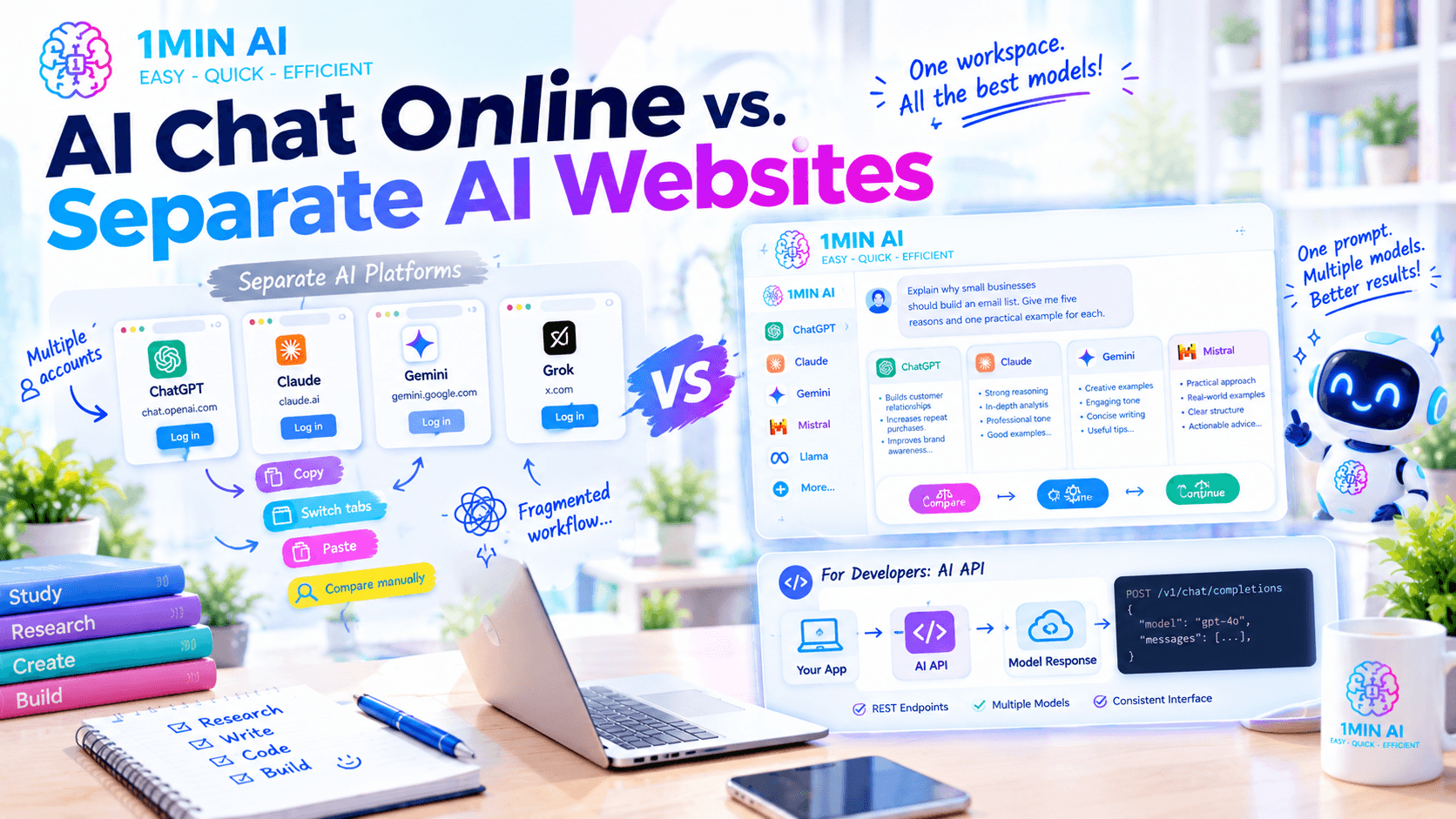
There are two basic approaches.
Separate AI platforms
You might use one website for GPT, another for Claude, another for Gemini, and another for a different model.
This gives you direct access to individual platforms, but it can also create a fragmented workflow.
You may need to:
- Manage multiple accounts
- Remember different interfaces
- Switch browser tabs
- Copy prompts repeatedly
- Compare answers manually
- Maintain several subscriptions
Multi-model AI workspace
A multi-model workspace puts several models into one environment.
The workflow becomes:
Write one prompt → run multiple models → compare → refine → continue
1minAI's Multi AI Chat is built around this approach, allowing users to compare responses from multiple leading models without leaving the same workspace.
The right approach depends on your workflow. If you frequently compare AI responses, having multiple models available in one place can reduce unnecessary switching.
AI Chat Online for Developers: Beyond the Chat Interface
AI chat is not limited to manually typing questions into a browser.
Developers can also integrate AI capabilities into applications through APIs.
1minAI provides developer documentation and API access for AI capabilities, with REST endpoints and support for multiple AI models through a consistent interface.
You can explore the 1minAI Chat with AI API documentation if you are building an application that needs AI-powered conversations.
This creates another workflow:
User input → Your application → AI API → Model response → Your application
For developers, this can be useful when AI chat needs to become part of a product rather than remaining a standalone web tool.
Why Use 1minAI for AI Chat Online?
If you only need a basic chatbot, there are many options available online. The more interesting question is what happens when you want more flexibility from your AI chat workflow.
1minAI combines several AI chat capabilities in one workspace.
With Multi AI Chat, you can send one prompt to multiple models and compare the responses side by side. With 100+ AI Chat, you can access a broad selection of AI models without constantly moving between separate platforms.
You can also use AI Chat Memory when you want reusable project context across conversations, while the dedicated GPT-3.5 AI Chat provides a straightforward model-specific conversation experience.
The broader advantage is that chat does not have to be the end of the workflow. 1minAI's platform also includes AI capabilities for writing, images, documents, audio, video, and agents, allowing you to move from an AI conversation into a production task without rebuilding your workflow in another application.
For developers, the 1minAI AI API provides another way to bring AI chat capabilities into software and custom workflows.
So instead of thinking about AI chat online as simply a place to ask questions, think of it as the starting point of a larger workflow:
Ask → Compare → Refine → Create → Complete
That approach can make AI more useful for research, writing, coding, learning, brainstorming, and everyday productivity.
Discover more AI features: https://1min.ai/features
Try 1minAI agent now: https://app.1min.ai/ai-agent-demo
Alternatives
Discover the best alternatives to 1minAI and compare features, pricing, and use cases.

1min.AI vs OpenRouter
1min.AI vs. OpenRouter: Compare the ready-to-use AI creation product against the technical API tool. Find out if you need a zero-code creative studio or a coding infrastructure hub.
 Ngoc Hong
1min.AI vs Lovart
Compare 1min.AI vs Lovart across features, pricing, credits, brand tools, and use cases to find the right AI platform for your workflow.
Ngoc Hong
1min. AI vs Dola AI
Looking for a Dola AI alternative? Compare 1min.AI vs Dola AI on video generation, free plans, pricing and privacy to pick the right AI app.
Ngoc HongAI Tools
Discover the best AI tools to boost productivity, creativity, and everyday work.

Create Consistent Cartoon Content in Just a Few Steps
Create engaging cartoon videos for TikTok and Reels with 1min.AI. Research ideas, create characters, and turn images into animated videos in 3 simple steps.
 Lien Anh Vu
One Product, 10 UGC Creatives: How AI Makes Content Testing Easier
Create more authentic UGC with an AI UGC video generator, test more creative angles and scale affiliate content without filming every version.
Lien Anh Vu
Top 4 Affordable AI Tools for Startup Founders
Discover the top 4 affordable AI tools for startup founders to validate ideas, build products, create content, and launch faster without overspending.
 Tram Ta
AI Features
Comprehensive AI features that streamline workflows, improve efficiency, and empower teams to achieve more.
Create Consistent Cartoon Content in Just a Few Steps
Create engaging cartoon videos for TikTok and Reels with 1min.AI. Research ideas, create characters, and turn images into animated videos in 3 simple steps.
Lien Anh VuOne Product, 10 UGC Creatives: How AI Makes Content Testing Easier
Create more authentic UGC with an AI UGC video generator, test more creative angles and scale affiliate content without filming every version.
Lien Anh Vu
1minAI: Free AI Grammar Checker
Check grammar for free with 1minAI’s AI grammar checker. Find grammar, spelling, and writing mistakes, improve clarity, and polish your content in seconds.
Tram TaAI Use Cases
A curated collection of AI use cases for business, productivity, and industry-specific applications.
Create Consistent Cartoon Content in Just a Few Steps
Create engaging cartoon videos for TikTok and Reels with 1min.AI. Research ideas, create characters, and turn images into animated videos in 3 simple steps.
Lien Anh VuOne Product, 10 UGC Creatives: How AI Makes Content Testing Easier
Create more authentic UGC with an AI UGC video generator, test more creative angles and scale affiliate content without filming every version.
Lien Anh Vu
Best Time to Post on Instagram: A Practical Guide for Better Engagement
Discover the best time to post on Instagram, including the best days and times for different audiences, plus tips to find the ideal posting schedule for your account.
Tram TaAI Tutorials
Learn how to use AI with practical, step-by-step tutorials.

Black Friday AI Tool Deals in 2026
Discover what Black Friday AI tool deals 2026 has to offer. Find out how to secure the 1min.AI lifetime deal via AppSumo, Dealify, Stack Social, and verify on Trustpilot, Slashdot, and Software Advice.
 Hang Nguyen
Create Consistent Cartoon Content in Just a Few Steps
Create engaging cartoon videos for TikTok and Reels with 1min.AI. Research ideas, create characters, and turn images into animated videos in 3 simple steps.
Lien Anh Vu
[Seedance 2.5 New] Better AI Product Videos, Less Rework in 1min.AI
Use Seedance 2.5 image to video on 1min.AI to create more consistent AI product videos, reduce failed generations, save credits, and improve UGC workflows.
Lien Anh VuAI Guides
Learn AI faster with practical guides, real-world examples, and actionable best practices.

Safely Buy AI Tools Online: 2026 Black Friday Guide
Discover how to find and secure the best Black Friday AI deals online. Learn expert strategies to avoid scams, combat subscription fatigue, and verify software.
Hang NguyenCreate Consistent Cartoon Content in Just a Few Steps
Create engaging cartoon videos for TikTok and Reels with 1min.AI. Research ideas, create characters, and turn images into animated videos in 3 simple steps.
Lien Anh Vu[Seedance 2.5 New] Better AI Product Videos, Less Rework in 1min.AI
Use Seedance 2.5 image to video on 1min.AI to create more consistent AI product videos, reduce failed generations, save credits, and improve UGC workflows.
Lien Anh VuAI Solutions
Browse the best AI solutions for automation, coding, research, productivity, customer support, marketing, and business workflows.
Safely Buy AI Tools Online: 2026 Black Friday Guide
Discover how to find and secure the best Black Friday AI deals online. Learn expert strategies to avoid scams, combat subscription fatigue, and verify software.
Hang NguyenCreate Consistent Cartoon Content in Just a Few Steps
Create engaging cartoon videos for TikTok and Reels with 1min.AI. Research ideas, create characters, and turn images into animated videos in 3 simple steps.
Lien Anh VuOne Product, 10 UGC Creatives: How AI Makes Content Testing Easier
Create more authentic UGC with an AI UGC video generator, test more creative angles and scale affiliate content without filming every version.
Lien Anh VuAI Models
Explore the world's leading AI models in one place.
Create Consistent Cartoon Content in Just a Few Steps
Create engaging cartoon videos for TikTok and Reels with 1min.AI. Research ideas, create characters, and turn images into animated videos in 3 simple steps.
Lien Anh VuOne Product, 10 UGC Creatives: How AI Makes Content Testing Easier
Create more authentic UGC with an AI UGC video generator, test more creative angles and scale affiliate content without filming every version.
Lien Anh Vu[Seedance 2.5 New] Better AI Product Videos, Less Rework in 1min.AI
Use Seedance 2.5 image to video on 1min.AI to create more consistent AI product videos, reduce failed generations, save credits, and improve UGC workflows.
Lien Anh VuAI Comparisons
Compare AI tools, models, and platforms to find the best fit for your needs.

Kling AI Vs Veo 3: Which Model Wins?
Kling AI vs Veo 3: compare motion, native audio, pricing & free tiers to see which AI video generator wins for your project - try both on 1min.AI.
 Trang Tran
[Seedance 2.5 New] Better AI Product Videos, Less Rework in 1min.AI
Use Seedance 2.5 image to video on 1min.AI to create more consistent AI product videos, reduce failed generations, save credits, and improve UGC workflows.
Lien Anh Vu
DeepSeek V4 Pro vs Flash Comparison
Compare DeepSeek V4 Pro vs DeepSeek V4 Flash metrics. Optimize your agentic apps and improve AI fact checking on 1min.ai today.
Ngoc HongAI Integrations
Seamlessly integrate AI with the tools you already use to automate work and boost productivity.

POV: You Have 10+ Posts to Make Every Day
Learn how to build an AI content workflow that helps content creators produce 10+ social media posts a day faster with AI brainstorming, image generation, and content creation.
Lien Anh Vu
How to Use an AI Fashion Video Generator for Fashion Week 2026
Turn Fashion Week 2026 ideas into stunning fashion videos with AI. Learn how to brainstorm, create visuals, and transform images into videos with one simple workflow.
Lien Anh Vu
Stop Switching Between AI Apps: How AI Integration Transforms Employer Branding
Discover how AI integration helps HR teams streamline employer branding by combining AI writing, documents, images, video, and multiple AI models into one workspace.
Tram TaAI for Industries
Find the best AI tools and workflows for healthcare, finance, education, legal, manufacturing, retail, real estate, and more

How to Start a One-Person AI Business: 7 Models You Can Run Solo
Learn how to start a one-person AI business with 7 practical models, from AI consulting and content services to automation and software reselling.
Tram Ta
7 Low-Cost AI Business Ideas for Your Startup
Explore 7 low-cost AI business ideas you can start with a small budget, from content and video services to AI consulting, reselling, and automation.
Tram Ta
Free AI Image Generator For Ecommerce
Turn phone photos into studio, white-background, and lifestyle product images. Try the best AI image generator for ecommerce online free with 1min.AI.
Trang TranAI Agents
Discover and run AI agents to automate tasks across your work and daily life.
1minAI: Free AI Grammar Checker
Check grammar for free with 1minAI’s AI grammar checker. Find grammar, spelling, and writing mistakes, improve clarity, and polish your content in seconds.
Tram Ta
AI Agents for Facebook
Use an AI Agent for Facebook to create content, generate images, schedule posts, and publish from your documents and conversations.
Ngoc Hong
AI Agent vs AI Assistant: Which One Actually Saves Designers More Time?
Learn the difference between AI Agent vs AI Assistant and discover which solution helps designers automate repetitive work, reduce revisions, and save more time.
Lien Anh VuAI Workflows
Explore ready-to-use AI workflows for productivity, marketing, sales, support, and more.
Create Consistent Cartoon Content in Just a Few Steps
Create engaging cartoon videos for TikTok and Reels with 1min.AI. Research ideas, create characters, and turn images into animated videos in 3 simple steps.
Lien Anh VuOne Product, 10 UGC Creatives: How AI Makes Content Testing Easier
Create more authentic UGC with an AI UGC video generator, test more creative angles and scale affiliate content without filming every version.
Lien Anh VuPOV: You Have 10+ Posts to Make Every Day
Learn how to build an AI content workflow that helps content creators produce 10+ social media posts a day faster with AI brainstorming, image generation, and content creation.
Lien Anh VuNewsletter
Weekly AI Innovations with 1minAI

🔮 Weekly AI Innovations #140: Deepseek 4.1 Flash & Gemini Upgrades
Explore Deepseek 4.1 Flash and new Gemini models on 1min.ai. Plus, check our update on your Billing - Usage page for better clarity.
Hang Nguyen
🔮 Weekly AI Innovations #136: Grok 4.6 and Smart Data Retention
Discover the latest 1min.ai updates! Upgrade to Grok 4.6 for blazing-fast AI, and check our new Data Retention policies to secure your files today.
Hang Nguyen
🔮 Weekly AI Innovations #139: Dawn of the next-gen AI
Discover the immense power of GPT-6 Astra and Claude Fable 5.1. Unlock next-generation AI models on 1min.ai to solve complex tasks effortlessly.
Hang Nguyen