DeepSeek V4 Flash: The AI Agent Model You Need to Know

Tram Ta
November 9, 2026

Discover DeepSeek V4 Flash, its AI agent capabilities, 1M-token context, tool calling, and cost efficiency. Explore how to use DeepSeek with 1minAI.
AI agents are changing how people work with artificial intelligence. Instead of simply answering questions, AI-powered systems can plan tasks, use tools, process information, and help complete multi-step workflows.
One model attracting attention in this space is DeepSeek V4 Flash. Designed with efficiency, long-context processing, and agent-oriented capabilities in mind, it offers an interesting option for developers and users exploring AI-powered automation.
But what makes it useful for AI agents? Can it help with coding, research, and everyday productivity? And how can you explore DeepSeek-powered agent workflows without building everything from scratch?
Let's take a closer look at DeepSeek V4 Flash and how you can put AI agents to work with 1minAI.
What Is DeepSeek V4 Flash?
DeepSeek V4 Flash is a model in DeepSeek's V4 family, designed to deliver fast and cost-efficient AI performance.
It was introduced as a lighter alternative to DeepSeek V4 Pro, with a focus on efficient inference, long-context processing, and practical AI tasks.
One important naming update: DeepSeek subsequently introduced DeepSeek-V4.1-Flash, which supersedes the original V4-Flash release. The current API model identifier is deepseek-flash. Legacy identifiers such as deepseek-v4-flash are still accepted but route to the updated model.
For this article, "DeepSeek V4 Flash" refers to the V4 Flash model family, with current technical details referring to V4.1-Flash where applicable.
Key Features of DeepSeek V4 Flash
1. Efficient AI performance
DeepSeek V4 Flash is designed to balance response speed, capability, and computational efficiency.
This makes it relevant to applications that handle frequent requests, including chat assistants, information extraction, and automated workflows.
2. Long-context processing
The DeepSeek V4 family supports a 1-million-token context window.
A large context window is useful when an AI application needs to work with extensive information, such as long documents, codebases, research materials, or multiple pieces of reference content.
3. Thinking and non-thinking modes
The current DeepSeek Flash API supports both thinking and non-thinking modes.
- Non-thinking mode is useful for straightforward requests where speed matters.
- Thinking mode is useful for tasks that benefit from additional reasoning.
Developers can select the appropriate mode based on the complexity of the task.
4. Tool calling for AI agent workflows
One of the most relevant capabilities for agent development is tool calling.
Tool calling allows a model to request actions from external tools or functions. For example, an AI application can connect a model to a search tool, calculator, database, or other supported service.
The model helps decide what information or action is needed, while the surrounding application executes the tool call.
5. Multimodal capabilities
The current V4.1-Flash release supports native multimodal capabilities, including vision.
This expands the types of information an application can process beyond text alone, depending on the supported input format and integration.
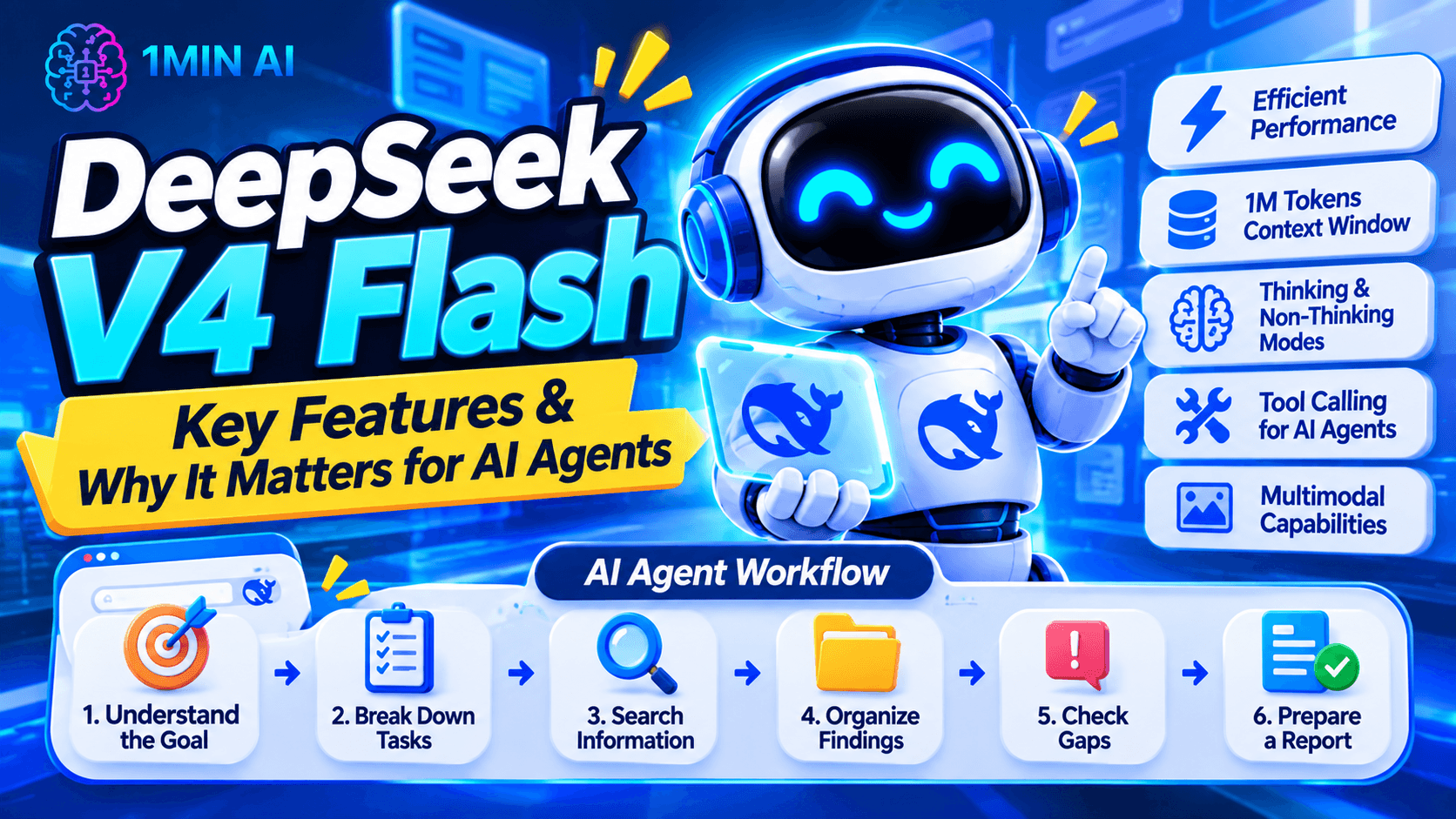
5 Ways DeepSeek V4 Flash Can Support AI Agent Workflows
Here are five practical areas where a DeepSeek-powered agent can be useful.
1. Research and Information Gathering
Research often involves collecting information from different sources, comparing findings, and organizing the results.
An AI agent powered by DeepSeek can be connected to search or retrieval tools to help with this process.
For example, a marketing research workflow could:
- Search for information about a target industry.
- Collect relevant findings.
- Group information by topic.
- Identify recurring customer problems.
- Prepare a research summary.
Example prompt:
"Research the latest content marketing trends for small businesses. Organize the findings into five major trends, explain why each matters, and suggest practical opportunities for a startup."
The actual research process depends on the search tools and data sources connected to the agent.
2. Coding and Software Development
AI agents are becoming useful assistants for developers because software development involves many connected tasks.
A coding agent can help:
- Understand project requirements.
- Generate code snippets.
- Explain existing functions.
- Identify potential bugs.
- Draft test cases.
- Review implementation approaches.
DeepSeek V4 Flash's agent-oriented capabilities make it relevant to coding workflows, particularly when developers want an efficient model for repeated tasks.
Example prompt:
"Review this Python function. Identify potential bugs, explain why they occur, and suggest a cleaner implementation. Include test cases for common edge cases."
Always review generated code and test it in an appropriate environment before using it in production.
3. Content Creation and Marketing
Content marketing involves more than writing a single article. Marketers often need to research topics, plan content, draft posts, and adapt messages for different channels.
An AI agent can help coordinate these activities.
For example, a content workflow could:
- Research a topic and target audience.
- Generate content ideas.
- Create an editorial outline.
- Draft a blog post.
- Adapt key ideas into social media posts.
Example prompt:
"Act as a content marketing assistant. Create a one-week content plan for a productivity software brand. Include five post ideas, their target audience, suggested hooks, and recommended content formats."
The agent can help organize the work, while a human should review the strategy, brand voice, and final content.
4. Document Analysis and Summarization
Businesses and researchers often work with lengthy documents, reports, and reference materials.
With a large context window, DeepSeek V4 Flash can be useful in applications that need to process substantial amounts of text.
A document-focused agent could:
- Extract key information.
- Summarize long documents.
- Compare different versions.
- Identify important sections.
- Answer questions using supplied reference materials.
Example prompt:
"Analyze the following business report. Summarize its main findings, identify three important risks, and list the recommendations. Separate information explicitly stated in the report from your own interpretation."
For important business or legal decisions, verify the agent's output against the original documents.
5. Everyday Productivity Automation
AI agents can also help with routine work that involves several steps.
Depending on the connected tools and permissions, an agent workflow might assist with:
- Organizing information.
- Drafting emails.
- Preparing meeting summaries.
- Creating task lists.
- Transforming notes into structured documents.
For example, you could provide meeting notes and ask an agent to extract decisions, action items, responsible people, and deadlines.
This can reduce repetitive administrative work while leaving final approval and sensitive actions under human control.
DeepSeek V4 Flash vs DeepSeek V4 Pro: Which One Should You Choose?
DeepSeek V4 Flash and V4 Pro are designed for different priorities.
Flash focuses on efficiency and cost-effective performance, while Pro is positioned for more demanding reasoning and agentic tasks.
| Comparison | DeepSeek V4 Flash / V4.1-Flash | DeepSeek V4 Pro |
|---|---|---|
| Main positioning | Efficient, economical model | Higher-capability model |
| Context window | 1 million tokens | 1 million tokens |
| Thinking mode | Supported | Supported |
| Tool calling | Supported | Supported |
| Vision | Supported in V4.1-Flash | Check current model specifications |
| Best for | Frequent requests and everyday agent workflows | More demanding reasoning and coding tasks |
| API cost | Lower | Higher |
When Should You Choose DeepSeek V4 Flash?
Flash is a sensible starting point when you need:
- Frequent AI requests.
- Fast, efficient responses.
- Information extraction and classification.
- Chat and content-generation workflows.
- Tool-calling applications.
- Cost-conscious AI agent development.
When Should You Choose DeepSeek V4 Pro?
Pro may be more suitable when your application needs:
- More demanding multi-step reasoning.
- Complex coding and debugging.
- Advanced agent planning.
- Difficult technical or analytical tasks.
A practical approach is to use Flash for most requests and route especially challenging tasks to Pro when necessary. This can help balance performance and API costs.
How Much Does DeepSeek V4 Flash Cost?
Cost efficiency is one of the reasons developers consider DeepSeek Flash for AI applications.
DeepSeek's current API pricing uses different rates for peak and off-peak periods.
For DeepSeek-V4.1-Flash, the published rates per 1 million tokens are:
| API usage | Off-peak | Peak |
|---|---|---|
| Input – cache miss | $0.15 | $0.30 |
| Input – cache hit | $0.003 | $0.006 |
| Output | $0.60 | $1.20 |
Peak pricing applies during specified weekday hours, while off-peak rates are half the peak rates. Check DeepSeek's official pricing page for the current schedule and any updates.
These are API rates, not necessarily the prices charged by third-party platforms. Your actual costs depend on input and output tokens, caching, and how your application uses the model.
For developers building AI agents, this distinction is important. An agent may make multiple model requests and tool calls to complete one task, so total cost depends on the entire workflow rather than a single prompt.
How to Explore DeepSeek AI Agents with 1minAI
You don't necessarily need to build an entire agent framework to start exploring AI-powered workflows.
1minAI offers AI agent-related experiences that can help users discover how AI assistants support different tasks.
1. Explore DeepSeek Super Agent
Start with 1minAI DeepSeek Super Agent.
This is the most relevant starting point if you want to explore a DeepSeek-focused agent experience through 1minAI.
You can use the available interface and instructions to understand how the agent handles your task. Check the page for its current supported capabilities and usage conditions.
. Discover Multi AI Chat and AI Agent Workflows
Visit 1minAI Multi AI Chat & AI Agent to explore the broader AI assistant and agent experience.
Working with different AI models can help you approach a task from multiple perspectives.
For example, you might compare responses to a research question, evaluate different writing approaches, or use a model that better fits a particular task.
3. Explore AI Agents for Social Media Management
Social media management involves several recurring activities, including researching topics, planning posts, drafting captions, and maintaining a consistent publishing schedule.
If you're interested in applying AI agents to this area, explore 1minAI AI Agent for Social Media Management.
This is especially relevant for marketers, creators, and small business owners who want to make their content workflow more organized.
4. Discover More AI Agent Applications
You can also visit the 1minAI AI Agents page to explore other agent-related capabilities.
Think about the repetitive tasks in your daily workflow. Whether you need help with research, writing, planning, or social media, identifying a specific use case is a good first step toward using AI agents effectively.
Frequently Asked Questions
1. What is DeepSeek V4 Flash?
DeepSeek V4 Flash is an efficient AI model in DeepSeek's V4 family, designed for fast responses, long-context processing, and cost-effective AI applications. Its updated successor is DeepSeek-V4.1-Flash, which is currently served through the deepseek-flash API model identifier.
2. Is DeepSeek V4 Flash an AI agent?
No. DeepSeek V4 Flash is an AI model that can power an AI agent. To create a functioning agent, it needs an execution framework, instructions, connected tools, and permissions that allow it to perform tasks.
3. Can DeepSeek V4 Flash support AI agent workflows?
Yes. Its API supports tool calling, thinking and non-thinking modes, and a 1-million-token context window. These capabilities make it suitable for applications involving research, coding, information processing, and multi-step workflows.
4. What is the difference between DeepSeek V4 Flash and V4 Pro?
Flash prioritizes efficiency and lower costs, while Pro is positioned for more demanding reasoning and agentic tasks. Both support a 1-million-token context window and tool calling.
5. Does DeepSeek V4 Flash support a 1-million-token context window?
Yes. DeepSeek's V4 family supports a 1-million-token context window. This can help applications process long documents, extensive reference materials, and large amounts of contextual information.
Final: Is DeepSeek V4 Flash Worth Exploring?
DeepSeek V4 Flash is an interesting option for anyone exploring efficient AI models and agent-powered workflows.
Its long-context capabilities, tool-calling support, and cost-conscious design make it relevant to applications ranging from research and coding to content creation and productivity automation.
But remember: the model itself is only one part of an AI agent. The tools, instructions, integrations, and safeguards around it determine what the agent can actually accomplish.
If you want to explore practical AI agent applications, start with 1minAI DeepSeek Super Agent, then discover more possibilities through 1minAI AI Agents.
The best way to understand AI agents is to start with one real task, test the workflow, and see how much repetitive work you can simplify.
- #Commerce
- #Information
Alternatives
Discover the best alternatives to 1minAI and compare features, pricing, and use cases.

1min.AI vs OpenRouter
1min.AI vs. OpenRouter: Compare the ready-to-use AI creation product against the technical API tool. Find out if you need a zero-code creative studio or a coding infrastructure hub.
 Ngoc Hong

1min.AI vs ContentStudio Alternative
Compare 1min.AI vs ContentStudio for Facebook content creation, brand context, AI images, publishing, team workflows, and pricing.
Ngoc Hong
Meta Muse Alternatives: 6 Options for Every Workflow
Looking for Meta Muse alternatives? Compare ChatGPT, Gemini, Claude, Perplexity, OpenClaw and 1min.AI by price, availability, and privacy.
Ngoc HongAI Tools
Discover the best AI tools to boost productivity, creativity, and everyday work.
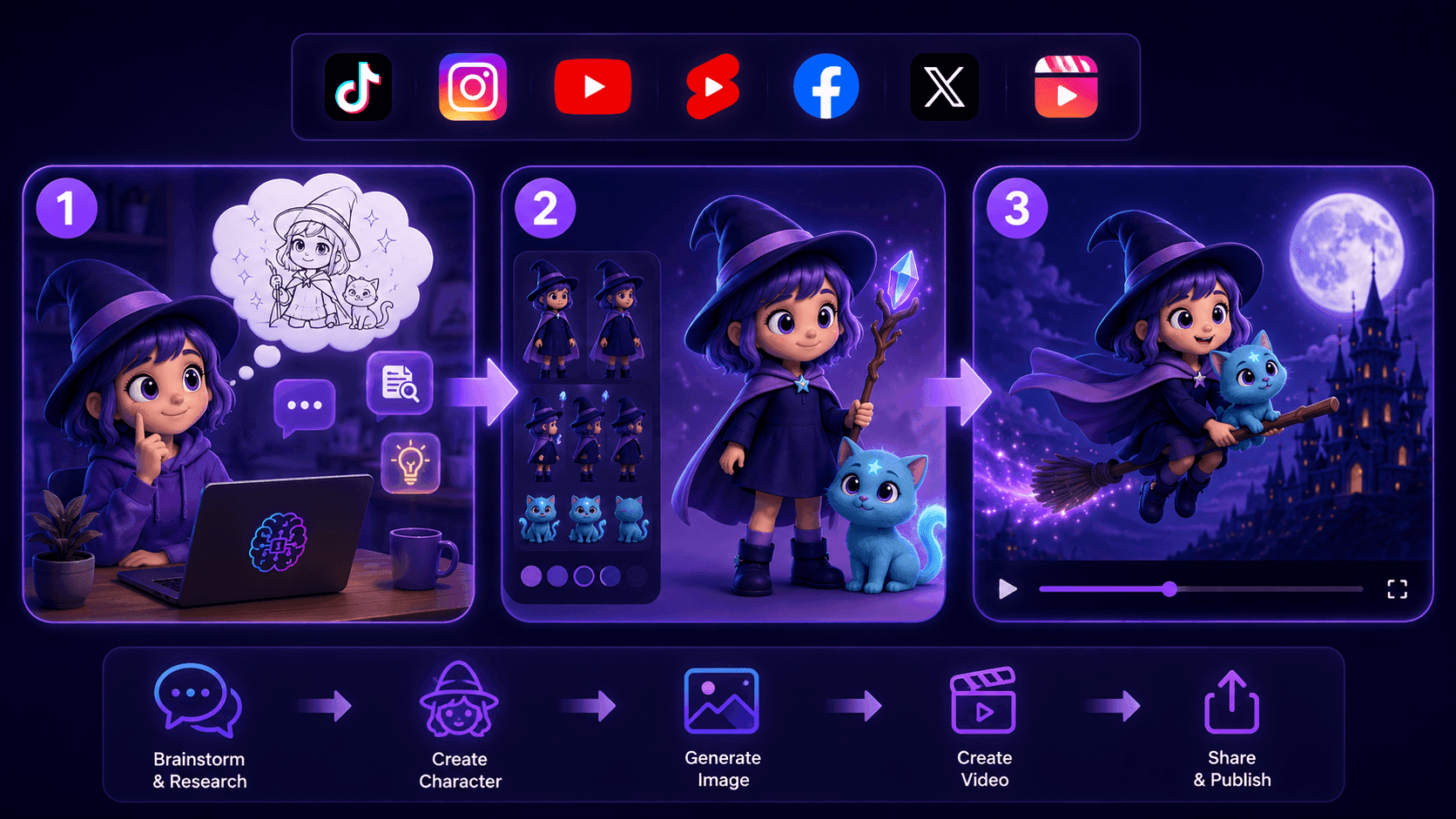
Create Consistent Cartoon Content in Just a Few Steps
Create engaging cartoon videos for TikTok and Reels with 1min.AI. Research ideas, create characters, and turn images into animated videos in 3 simple steps.
 Lien Anh Vu
One Product, 10 UGC Creatives: How AI Makes Content Testing Easier
Create more authentic UGC with an AI UGC video generator, test more creative angles and scale affiliate content without filming every version.
Lien Anh Vu
Top 4 Affordable AI Tools for Startup Founders
Discover the top 4 affordable AI tools for startup founders to validate ideas, build products, create content, and launch faster without overspending.
 Tram Ta
AI Features
Comprehensive AI features that streamline workflows, improve efficiency, and empower teams to achieve more.
Create Consistent Cartoon Content in Just a Few Steps
Create engaging cartoon videos for TikTok and Reels with 1min.AI. Research ideas, create characters, and turn images into animated videos in 3 simple steps.
Lien Anh VuOne Product, 10 UGC Creatives: How AI Makes Content Testing Easier
Create more authentic UGC with an AI UGC video generator, test more creative angles and scale affiliate content without filming every version.
Lien Anh Vu
1minAI: Free AI Grammar Checker
Check grammar for free with 1minAI’s AI grammar checker. Find grammar, spelling, and writing mistakes, improve clarity, and polish your content in seconds.
Tram TaAI Use Cases
A curated collection of AI use cases for business, productivity, and industry-specific applications.
Create Consistent Cartoon Content in Just a Few Steps
Create engaging cartoon videos for TikTok and Reels with 1min.AI. Research ideas, create characters, and turn images into animated videos in 3 simple steps.
Lien Anh VuOne Product, 10 UGC Creatives: How AI Makes Content Testing Easier
Create more authentic UGC with an AI UGC video generator, test more creative angles and scale affiliate content without filming every version.
Lien Anh Vu
Best Time to Post on Instagram: A Practical Guide for Better Engagement
Discover the best time to post on Instagram, including the best days and times for different audiences, plus tips to find the ideal posting schedule for your account.
Tram TaAI Tutorials
Learn how to use AI with practical, step-by-step tutorials.

Black Friday AI Tool Deals in 2026
Discover what Black Friday AI tool deals 2026 has to offer. Find out how to secure the 1min.AI lifetime deal via AppSumo, Dealify, Stack Social, and verify on Trustpilot, Slashdot, and Software Advice.
 Hang Nguyen
Create Consistent Cartoon Content in Just a Few Steps
Create engaging cartoon videos for TikTok and Reels with 1min.AI. Research ideas, create characters, and turn images into animated videos in 3 simple steps.
Lien Anh Vu
[Seedance 2.5 New] Better AI Product Videos, Less Rework in 1min.AI
Use Seedance 2.5 image to video on 1min.AI to create more consistent AI product videos, reduce failed generations, save credits, and improve UGC workflows.
Lien Anh VuAI Guides
Learn AI faster with practical guides, real-world examples, and actionable best practices.

Safely Buy AI Tools Online: 2026 Black Friday Guide
Discover how to find and secure the best Black Friday AI deals online. Learn expert strategies to avoid scams, combat subscription fatigue, and verify software.
Hang NguyenCreate Consistent Cartoon Content in Just a Few Steps
Create engaging cartoon videos for TikTok and Reels with 1min.AI. Research ideas, create characters, and turn images into animated videos in 3 simple steps.
Lien Anh Vu[Seedance 2.5 New] Better AI Product Videos, Less Rework in 1min.AI
Use Seedance 2.5 image to video on 1min.AI to create more consistent AI product videos, reduce failed generations, save credits, and improve UGC workflows.
Lien Anh VuAI Solutions
Browse the best AI solutions for automation, coding, research, productivity, customer support, marketing, and business workflows.
Safely Buy AI Tools Online: 2026 Black Friday Guide
Discover how to find and secure the best Black Friday AI deals online. Learn expert strategies to avoid scams, combat subscription fatigue, and verify software.
Hang NguyenCreate Consistent Cartoon Content in Just a Few Steps
Create engaging cartoon videos for TikTok and Reels with 1min.AI. Research ideas, create characters, and turn images into animated videos in 3 simple steps.
Lien Anh VuOne Product, 10 UGC Creatives: How AI Makes Content Testing Easier
Create more authentic UGC with an AI UGC video generator, test more creative angles and scale affiliate content without filming every version.
Lien Anh VuAI Models
Explore the world's leading AI models in one place.
Create Consistent Cartoon Content in Just a Few Steps
Create engaging cartoon videos for TikTok and Reels with 1min.AI. Research ideas, create characters, and turn images into animated videos in 3 simple steps.
Lien Anh VuOne Product, 10 UGC Creatives: How AI Makes Content Testing Easier
Create more authentic UGC with an AI UGC video generator, test more creative angles and scale affiliate content without filming every version.
Lien Anh Vu[Seedance 2.5 New] Better AI Product Videos, Less Rework in 1min.AI
Use Seedance 2.5 image to video on 1min.AI to create more consistent AI product videos, reduce failed generations, save credits, and improve UGC workflows.
Lien Anh VuAI Comparisons
Compare AI tools, models, and platforms to find the best fit for your needs.
Kling AI Vs Veo 3: Which Model Wins?
Kling AI vs Veo 3: compare motion, native audio, pricing & free tiers to see which AI video generator wins for your project - try both on 1min.AI.
 Trang Tran
[Seedance 2.5 New] Better AI Product Videos, Less Rework in 1min.AI
Use Seedance 2.5 image to video on 1min.AI to create more consistent AI product videos, reduce failed generations, save credits, and improve UGC workflows.
Lien Anh Vu
DeepSeek V4 Pro vs Flash Comparison
Compare DeepSeek V4 Pro vs DeepSeek V4 Flash metrics. Optimize your agentic apps and improve AI fact checking on 1min.ai today.
Ngoc HongAI Integrations
Seamlessly integrate AI with the tools you already use to automate work and boost productivity.
POV: You Have 10+ Posts to Make Every Day
Learn how to build an AI content workflow that helps content creators produce 10+ social media posts a day faster with AI brainstorming, image generation, and content creation.
Lien Anh Vu
How to Use an AI Fashion Video Generator for Fashion Week 2026
Turn Fashion Week 2026 ideas into stunning fashion videos with AI. Learn how to brainstorm, create visuals, and transform images into videos with one simple workflow.
Lien Anh Vu
Stop Switching Between AI Apps: How AI Integration Transforms Employer Branding
Discover how AI integration helps HR teams streamline employer branding by combining AI writing, documents, images, video, and multiple AI models into one workspace.
Tram TaAI for Industries
Find the best AI tools and workflows for healthcare, finance, education, legal, manufacturing, retail, real estate, and more
Voice Cloning AI Free: How to Clone Any Voice Online in Minutes
Try voice cloning AI free with 1min.AI. Upload a 5-second clip, pick an ElevenLabs model, choose from 32 languages, and turn text to speech in your own voice.
Trang Tran
Text To Video AI Free Without Watermark Online
Create text to video AI free without watermark online with 1min.AI. Pick top models, turn prompts into HD clips, and download clean videos fast. Try it free.
Trang Tran
Free AI Image Editor With Prompt No Restrictions
Looking for a free AI image editor with prompt no restrictions? Edit backgrounds, objects and text by typing, no watermark. Try 1min.AI’s flexible editor now.
Trang TranAI Agents
Discover and run AI agents to automate tasks across your work and daily life.
1minAI: Free AI Grammar Checker
Check grammar for free with 1minAI’s AI grammar checker. Find grammar, spelling, and writing mistakes, improve clarity, and polish your content in seconds.
Tram Ta
AI Agents for Facebook
Use an AI Agent for Facebook to create content, generate images, schedule posts, and publish from your documents and conversations.
Ngoc Hong
AI Agent vs AI Assistant: Which One Actually Saves Designers More Time?
Learn the difference between AI Agent vs AI Assistant and discover which solution helps designers automate repetitive work, reduce revisions, and save more time.
Lien Anh VuAI Workflows
Explore ready-to-use AI workflows for productivity, marketing, sales, support, and more.
Create Consistent Cartoon Content in Just a Few Steps
Create engaging cartoon videos for TikTok and Reels with 1min.AI. Research ideas, create characters, and turn images into animated videos in 3 simple steps.
Lien Anh VuOne Product, 10 UGC Creatives: How AI Makes Content Testing Easier
Create more authentic UGC with an AI UGC video generator, test more creative angles and scale affiliate content without filming every version.
Lien Anh VuPOV: You Have 10+ Posts to Make Every Day
Learn how to build an AI content workflow that helps content creators produce 10+ social media posts a day faster with AI brainstorming, image generation, and content creation.
Lien Anh VuNewsletter
Weekly AI Innovations with 1minAI
🔮 Weekly AI Innovations #145: X Content Agent & GPT 6.1 Terra on 1min.ai
Scale viral reach with the X Content Agent on 1min.ai. Discover an end-to-end 4-stage pipeline with zero token burn, plus the launch of GPT 6.1 Terra.
Hang Nguyen
🔮 Weekly AI Innovations #144: LinkedIn Content Agent: Complete B2B Publishing Pipeline
Scale B2B influence with the LinkedIn Content Agent on 1min.ai. Discover an end-to-end 4-stage pipeline with zero redundant token burn and 1-click publishing.
Hang Nguyen
🔮 Weekly AI Innovations #143: Update GPT-6, GPT-6.1 & Ideogram 4.0
Access GPT-6 Sol, Luna, GPT-6.1 Sol, and Ideogram 4.0 on 1min.ai. Boost typography accuracy to 98.4% and cut reasoning latency by 45% in one platform.
Hang Nguyen