
Create Viral TikTok Trends Videos in 5 Minutes With 1minAI

Tram Ta
October 13, 2026
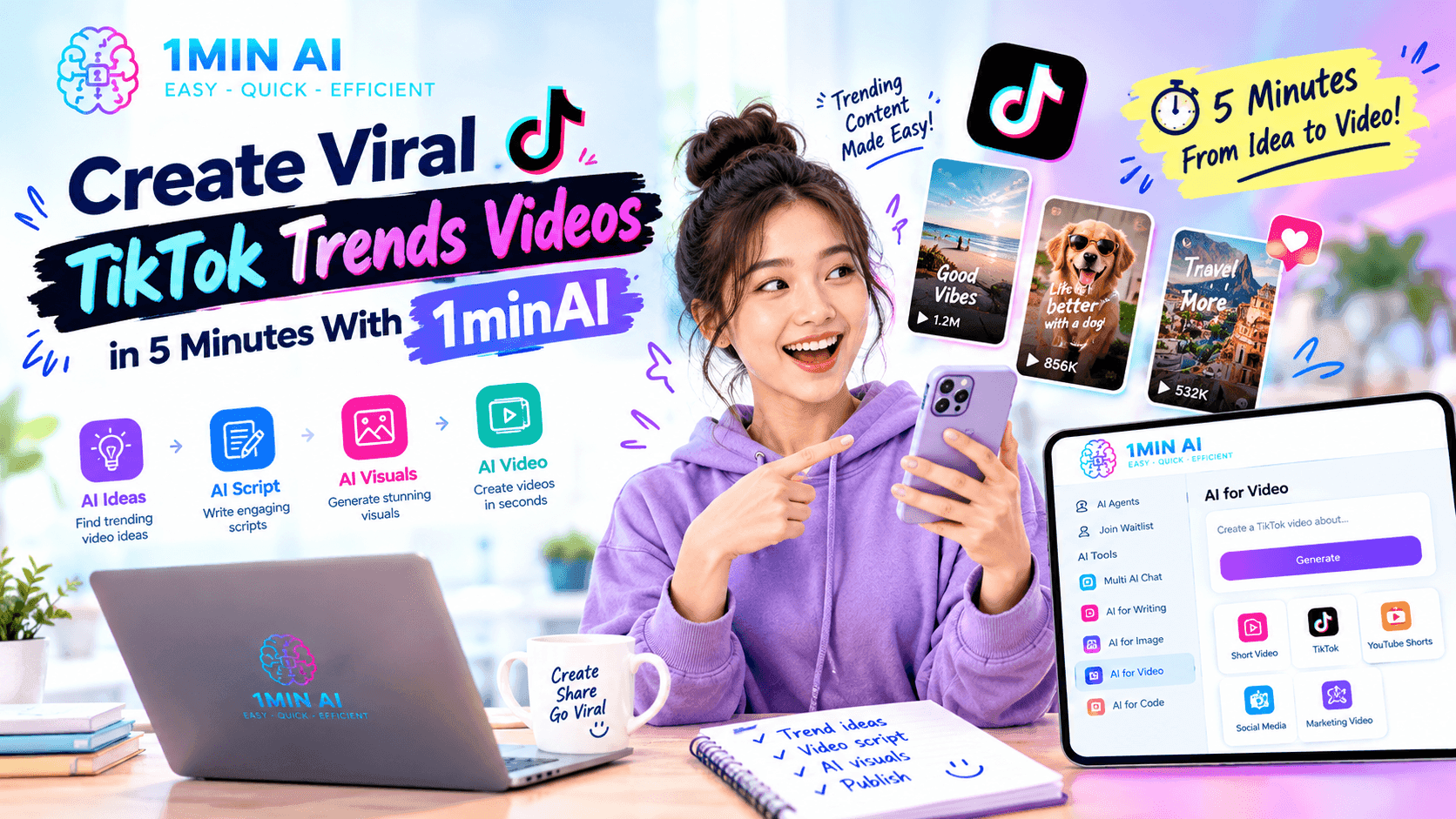
Discover how to create viral TikTok trends videos faster with 1minAI. Explore AI video tools, trending formats, copy-ready prompts, and practical tips.
Viral TikTok trends are video formats, sounds, challenges, editing styles, and creative ideas that spread as users make their own versions. A trend might involve a visual transformation, a relatable situation, a product reveal, a dance, or a short story with an unexpected ending.
Creating trend-inspired content can also take time. You may need to research ideas, write a hook, prepare visuals, generate footage, and edit the final clip.
1minAI can help shorten parts of this process by bringing AI-powered video creation and content tools into one workspace. With Text to Video, Image to Video, Video Face Swap, and other AI capabilities, you can experiment with different concepts without filming every scene from scratch.
How to Create Viral TikTok Trends Videos in 5 Minutes With 1minAI
Five minutes is a practical target for preparing a simple concept and starting video generation—not a guarantee that every finished video will be ready to publish in that time. Generation, revisions, and editing can take longer depending on the tool and the result you want.
Here is a streamlined workflow.
Step 1: Choose a Trend and Add Your Own Angle
Start by exploring current TikTok videos in your niche. Look for repeated formats, opening hooks, visual effects, or storytelling structures rather than copying another creator's video exactly.
Choose one idea that fits your audience:
- Transformation: Show a dramatic before-and-after reveal.
- POV storytelling: Put viewers into a familiar or surprising situation.
- Product reveal: Introduce a product through a visually interesting scene.
- Mini-story: Build curiosity and deliver a quick payoff.
- Relatable humor: Turn a common problem into a short skit.
- AI visual experiment: Show an imaginative transformation or impossible scene.
For example, a skincare brand could adapt a transformation format to demonstrate a morning routine, while a travel creator could use a cinematic reveal to introduce a destination.
Trend popularity changes quickly, so verify that a format is still relevant before investing time in production.
Step 2: Write a Strong Hook
The opening seconds should communicate the idea quickly and make viewers curious about what happens next.
Instead of starting with a long introduction, try a visual surprise, a relatable problem, a bold question, or a clear promise.
Here are three examples:
- “I turned one ordinary photo into a cinematic scene.”
- “POV: Your five-minute break becomes a whole adventure.”
- “This product looks completely different under studio lighting.”
You can use 1minAI TikTok Hooks AI to explore AI-assisted hook and video concept creation.
A useful prompt is:
TikTok Hook Prompt
Generate five short opening hooks for a TikTok video about [topic] for [target audience]. Use different approaches: curiosity, surprise, relatable humor, a problem-solution opening, and a visual transformation. Keep each hook concise, natural, and suitable for a vertical video. Avoid exaggerated claims and generic clickbait.
Choose the hook that fits your actual video rather than making a promise the footage cannot deliver.
Step 3: Generate a Video With 1minAI
Once your concept is clear, choose a workflow based on the assets you have.
Option A: Text to Video
Use a written prompt when you want to create a scene from scratch.
- Open 1minAI and navigate to AI for Video.
- Choose Text to Video.
- Select an available video model that suits your goal.
- Describe the subject, action, camera movement, lighting, and visual style.
- Choose a vertical format if available and generate the clip.
- Review the result and refine the prompt if needed.
You can explore AI video generation with Veo 3.1 on 1minAI and the Wanx Text to Video API documentation.
Option B: Image to Video
Use Image to Video when you already have a photo or visual asset you want to animate.
- Prepare a clear image.
- Open the Image to Video tool.
- Upload your image.
- Describe the movement you want.
- Generate the clip and check whether the motion matches your idea.
For technical details, see the Luma AI Image to Video API documentation.
Option C: Video Face Swap
For a suitable creative trend involving a face replacement, you can explore 1minAI Video Face Swap. Use your own image or obtain the necessary permission from the person whose likeness you use. Avoid misleading edits that falsely imply someone said or did something.
Developers can refer to the Video Face Swap API documentation.
Step 4: Review, Refine, and Publish
AI-generated footage may need adjustments before it is ready for TikTok. Check the subject's appearance, movement, background details, and overall consistency.
Then:
- Trim unnecessary opening or ending frames.
- Add readable on-screen text where useful.
- Review audio and captions.
- Keep important visuals clear on a phone screen.
- Check that music and other assets are permitted for your intended use.
- Write a caption that adds context and invites genuine interaction.
Use TikTok's current publishing options to confirm the appropriate aspect ratio, sound, disclosure, and other requirements.
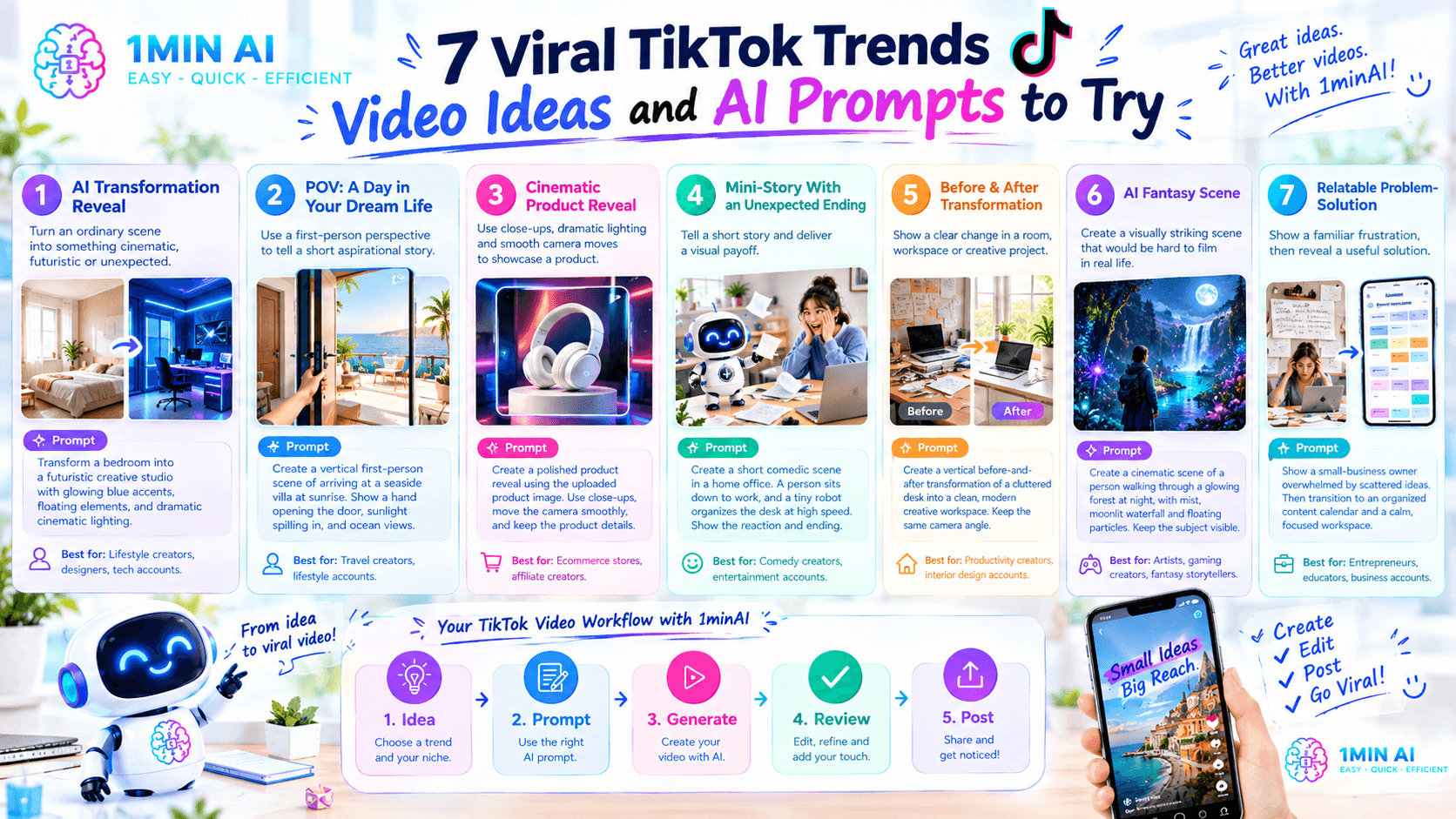
7 Viral TikTok Trends Video Ideas and AI Prompts to Try
These are trend-inspired concepts you can adapt to your niche. They are not claims that each format is currently trending or guaranteed to go viral.
1. AI Transformation Reveal
Concept: Start with an ordinary scene and transform it into something cinematic, futuristic, or unexpected.
Prompt:
Create a short vertical video that begins with an ordinary bedroom in soft natural light. Transform the room into a futuristic creative studio with glowing blue accents, floating visual elements, and dramatic cinematic lighting. Use a smooth camera push-in and a satisfying final reveal. Keep the room layout coherent and the transformation visually clear.
Best for: Lifestyle creators, designers, tech accounts, and AI experiment videos.
2. POV: A Day in Your Dream Life
Concept: Use a first-person perspective to tell a short aspirational story.
Prompt:
Create a vertical first-person cinematic scene of arriving at a beautiful seaside villa at sunrise. Show a hand opening the door, sunlight spilling across the room, and ocean views beyond the balcony. Use realistic movement, warm natural lighting, and an inviting atmosphere. Make the opening immediately immersive.
Best for: Travel creators, lifestyle accounts, and personal brands.
3. Cinematic Product Reveal
Concept: Introduce a product through close-ups, dramatic lighting, and a satisfying camera move.
Prompt:
Create a polished vertical product reveal using the uploaded product image as the visual reference. Begin with a close-up of subtle reflections, then move the camera smoothly to reveal the full product against a clean studio background. Use controlled lighting, realistic shadows, and premium commercial styling. Preserve the product's original shape, color, and visible details.
Best for: Ecommerce stores, affiliate creators, and small businesses.
4. Mini-Story With an Unexpected Ending
Concept: Create a tiny story that establishes a situation and delivers a visual payoff.
Prompt:
Create a short vertical comedic scene in a cozy home office. A person sits down to work, opens a laptop, and suddenly finds a tiny animated robot organizing the desk at incredible speed. Use clear actions, expressive reactions, smooth motion, and a playful ending. Keep the story understandable without dialogue.
Best for: Comedy creators, entertainment accounts, and storytelling channels.
5. Before-and-After Transformation
Concept: Show a clear change in a room, outfit, workspace, or creative project.
Prompt:
Create a vertical before-and-after transformation of a cluttered desk becoming a clean, modern creative workspace. Start with a static wide shot, transition smoothly as objects are organized and lighting improves, then finish with a polished final reveal. Keep the camera angle consistent so the change is easy to understand.
Best for: Productivity creators, interior design accounts, and DIY channels.
6. AI Fantasy Scene
Concept: Create a visually striking scene that would be difficult to film in real life.
Prompt:
Create a cinematic vertical video of a person walking through a glowing forest at night, with luminous plants, soft mist, floating particles, and a distant moonlit waterfall. Use a slow tracking shot, layered depth, realistic movement, and a magical but detailed visual style. Keep the main subject visible throughout the scene.
Best for: Artists, gaming creators, fantasy storytellers, and AI visual accounts.
7. Relatable Problem-Solution Video
Concept: Present a familiar frustration, then reveal a useful solution.
Prompt:
Create a short vertical video showing a small-business owner overwhelmed by scattered content ideas and unfinished notes. Transition to a neatly organized content calendar and a calm, focused workspace. Use a clear visual contrast between the two scenes, natural acting, and a positive ending. Do not include unreadable text or unsupported product claims.
Best for: Entrepreneurs, educators, productivity creators, and business accounts.
Why Use 1minAI for TikTok Trend Creation?
Creating short-form content often involves several separate tasks: brainstorming, writing hooks, generating visuals, animating images, and preparing the final video.
1minAI brings multiple AI capabilities into one workspace, allowing creators to experiment with different parts of this process.
- Explore video concepts: Use Text to Video to turn prompts into scenes.
- Animate existing assets: Use Image to Video to add motion to suitable still images.
- Experiment with creative effects: Explore Video Face Swap for appropriate, permission-based projects.
- Compare creative directions: Generate alternative concepts and refine the ones that best fit your audience.
- Develop a repeatable workflow: Build a process for planning, creating, reviewing, and publishing content.
For more workflow ideas, read 5 AI Tools Every TikTok Creator Should Use Daily.
The goal is not to automate creativity entirely. It is to reduce repetitive production work so you can spend more time developing original ideas, understanding your audience, and improving your content.
Frequently Asked Questions
Can I create a TikTok video in five minutes with AI?
You may be able to prepare a simple concept and start generating a short clip within five minutes. The full process can take longer depending on generation time, revisions, editing, and the complexity of the idea.
What is the best AI tool for creating TikTok trend videos?
The best tool depends on the format. Text to Video is useful for creating scenes from prompts, Image to Video animates still images, and Video Face Swap supports specific face-replacement workflows. 1minAI offers these video-related capabilities in one workspace.
Can AI-generated videos go viral on TikTok?
AI-generated videos can be part of a successful content strategy, but no tool or prompt guarantees virality. Audience relevance, originality, storytelling, presentation, and viewer response all influence performance.
Should I copy an existing TikTok trend exactly?
Use popular formats as inspiration rather than copying another creator's video wholesale. Develop your own concept, avoid unauthorized use of protected material, and respect the rights and likenesses of other people.
Can I use 1minAI-generated videos for business or advertising?
Potentially, depending on the applicable model, plan, and content terms. Review current usage rights and any platform-specific requirements before publishing commercial content.
Conclusion
Viral TikTok trends can offer inspiration for short-form videos, but successful execution takes more than copying a popular format. Start with a clear concept, write a strong hook, create focused visuals, and review the finished clip before publishing.
With 1minAI, you can explore AI-assisted video creation through Text to Video, Image to Video, and Video Face Swap, alongside tools for developing ideas and hooks. Use these capabilities to test creative directions faster while keeping originality, audience relevance, and quality at the center of your workflow.
For further information, explore 5 AI Tools Every TikTok Creator Should Use Daily.
Discover more AI features: https://1min.ai/features
Try 1minAI agent now: https://app.1min.ai/ai-agent-demo
- #Commerce
Alternatives
Discover the best alternatives to 1minAI and compare features, pricing, and use cases.

1min.AI vs OpenRouter
1min.AI vs. OpenRouter: Compare the ready-to-use AI creation product against the technical API tool. Find out if you need a zero-code creative studio or a coding infrastructure hub.
 Ngoc Hong
1min.AI vs Jarvis AI
Compare 1min.AI vs Jarvis AI to discover which AI platform is better for writing, research, automation, and content creation. Find the best AI assistant for your workflow.
Ngoc Hong
1min.AI vs Taskade
Compare 1min.AI vs Taskade for AI content creation, automation, agents, and creative workflows to find the right workspace.
Ngoc HongAI Tools
Discover the best AI tools to boost productivity, creativity, and everyday work.

Create Consistent Cartoon Content in Just a Few Steps
Create engaging cartoon videos for TikTok and Reels with 1min.AI. Research ideas, create characters, and turn images into animated videos in 3 simple steps.
 Lien Anh Vu
One Product, 10 UGC Creatives: How AI Makes Content Testing Easier
Create more authentic UGC with an AI UGC video generator, test more creative angles and scale affiliate content without filming every version.
Lien Anh Vu
Top 4 Affordable AI Tools for Startup Founders
Discover the top 4 affordable AI tools for startup founders to validate ideas, build products, create content, and launch faster without overspending.
 Tram Ta
AI Features
Comprehensive AI features that streamline workflows, improve efficiency, and empower teams to achieve more.
Create Consistent Cartoon Content in Just a Few Steps
Create engaging cartoon videos for TikTok and Reels with 1min.AI. Research ideas, create characters, and turn images into animated videos in 3 simple steps.
Lien Anh VuOne Product, 10 UGC Creatives: How AI Makes Content Testing Easier
Create more authentic UGC with an AI UGC video generator, test more creative angles and scale affiliate content without filming every version.
Lien Anh Vu
1minAI: Free AI Grammar Checker
Check grammar for free with 1minAI’s AI grammar checker. Find grammar, spelling, and writing mistakes, improve clarity, and polish your content in seconds.
Tram TaAI Use Cases
A curated collection of AI use cases for business, productivity, and industry-specific applications.
Create Consistent Cartoon Content in Just a Few Steps
Create engaging cartoon videos for TikTok and Reels with 1min.AI. Research ideas, create characters, and turn images into animated videos in 3 simple steps.
Lien Anh VuOne Product, 10 UGC Creatives: How AI Makes Content Testing Easier
Create more authentic UGC with an AI UGC video generator, test more creative angles and scale affiliate content without filming every version.
Lien Anh Vu
Best Time to Post on Instagram: A Practical Guide for Better Engagement
Discover the best time to post on Instagram, including the best days and times for different audiences, plus tips to find the ideal posting schedule for your account.
Tram TaAI Tutorials
Learn how to use AI with practical, step-by-step tutorials.

Black Friday AI Tool Deals in 2026
Discover what Black Friday AI tool deals 2026 has to offer. Find out how to secure the 1min.AI lifetime deal via AppSumo, Dealify, Stack Social, and verify on Trustpilot, Slashdot, and Software Advice.
 Hang Nguyen
Create Consistent Cartoon Content in Just a Few Steps
Create engaging cartoon videos for TikTok and Reels with 1min.AI. Research ideas, create characters, and turn images into animated videos in 3 simple steps.
Lien Anh Vu
[Seedance 2.5 New] Better AI Product Videos, Less Rework in 1min.AI
Use Seedance 2.5 image to video on 1min.AI to create more consistent AI product videos, reduce failed generations, save credits, and improve UGC workflows.
Lien Anh VuAI Guides
Learn AI faster with practical guides, real-world examples, and actionable best practices.

Safely Buy AI Tools Online: 2026 Black Friday Guide
Discover how to find and secure the best Black Friday AI deals online. Learn expert strategies to avoid scams, combat subscription fatigue, and verify software.
Hang NguyenCreate Consistent Cartoon Content in Just a Few Steps
Create engaging cartoon videos for TikTok and Reels with 1min.AI. Research ideas, create characters, and turn images into animated videos in 3 simple steps.
Lien Anh Vu[Seedance 2.5 New] Better AI Product Videos, Less Rework in 1min.AI
Use Seedance 2.5 image to video on 1min.AI to create more consistent AI product videos, reduce failed generations, save credits, and improve UGC workflows.
Lien Anh VuAI Solutions
Browse the best AI solutions for automation, coding, research, productivity, customer support, marketing, and business workflows.
Safely Buy AI Tools Online: 2026 Black Friday Guide
Discover how to find and secure the best Black Friday AI deals online. Learn expert strategies to avoid scams, combat subscription fatigue, and verify software.
Hang NguyenCreate Consistent Cartoon Content in Just a Few Steps
Create engaging cartoon videos for TikTok and Reels with 1min.AI. Research ideas, create characters, and turn images into animated videos in 3 simple steps.
Lien Anh VuOne Product, 10 UGC Creatives: How AI Makes Content Testing Easier
Create more authentic UGC with an AI UGC video generator, test more creative angles and scale affiliate content without filming every version.
Lien Anh VuAI Models
Explore the world's leading AI models in one place.
Create Consistent Cartoon Content in Just a Few Steps
Create engaging cartoon videos for TikTok and Reels with 1min.AI. Research ideas, create characters, and turn images into animated videos in 3 simple steps.
Lien Anh VuOne Product, 10 UGC Creatives: How AI Makes Content Testing Easier
Create more authentic UGC with an AI UGC video generator, test more creative angles and scale affiliate content without filming every version.
Lien Anh Vu[Seedance 2.5 New] Better AI Product Videos, Less Rework in 1min.AI
Use Seedance 2.5 image to video on 1min.AI to create more consistent AI product videos, reduce failed generations, save credits, and improve UGC workflows.
Lien Anh VuAI Comparisons
Compare AI tools, models, and platforms to find the best fit for your needs.

Kling AI Vs Veo 3: Which Model Wins?
Kling AI vs Veo 3: compare motion, native audio, pricing & free tiers to see which AI video generator wins for your project - try both on 1min.AI.
 Trang Tran
[Seedance 2.5 New] Better AI Product Videos, Less Rework in 1min.AI
Use Seedance 2.5 image to video on 1min.AI to create more consistent AI product videos, reduce failed generations, save credits, and improve UGC workflows.
Lien Anh Vu
DeepSeek V4 Pro vs Flash Comparison
Compare DeepSeek V4 Pro vs DeepSeek V4 Flash metrics. Optimize your agentic apps and improve AI fact checking on 1min.ai today.
Ngoc HongAI Integrations
Seamlessly integrate AI with the tools you already use to automate work and boost productivity.

POV: You Have 10+ Posts to Make Every Day
Learn how to build an AI content workflow that helps content creators produce 10+ social media posts a day faster with AI brainstorming, image generation, and content creation.
Lien Anh Vu
How to Use an AI Fashion Video Generator for Fashion Week 2026
Turn Fashion Week 2026 ideas into stunning fashion videos with AI. Learn how to brainstorm, create visuals, and transform images into videos with one simple workflow.
Lien Anh Vu
Stop Switching Between AI Apps: How AI Integration Transforms Employer Branding
Discover how AI integration helps HR teams streamline employer branding by combining AI writing, documents, images, video, and multiple AI models into one workspace.
Tram TaAI for Industries
Find the best AI tools and workflows for healthcare, finance, education, legal, manufacturing, retail, real estate, and more

Best Business Productivity Tools for Startups to Maximize Profits | 1minAI
Discover the best business productivity tools for startups to save time, streamline workflows, reduce repetitive tasks, and support profitable growth with AI.
Tram Ta
Best AI Tool for Content Marketing |1minAI
Looking for the best AI tool for content marketing? See how 1minAI helps marketers research, write, repurpose, create visuals, and scale content from one AI workspace.
Tram Ta
7 Low-Cost AI Business Ideas for Your Startup
Explore 7 low-cost AI business ideas you can start with a small budget, from content and video services to AI consulting, reselling, and automation.
Tram TaAI Agents
Discover and run AI agents to automate tasks across your work and daily life.
1minAI: Free AI Grammar Checker
Check grammar for free with 1minAI’s AI grammar checker. Find grammar, spelling, and writing mistakes, improve clarity, and polish your content in seconds.
Tram Ta
AI Agents for Facebook
Use an AI Agent for Facebook to create content, generate images, schedule posts, and publish from your documents and conversations.
Ngoc Hong
AI Agent vs AI Assistant: Which One Actually Saves Designers More Time?
Learn the difference between AI Agent vs AI Assistant and discover which solution helps designers automate repetitive work, reduce revisions, and save more time.
Lien Anh VuAI Workflows
Explore ready-to-use AI workflows for productivity, marketing, sales, support, and more.
Create Consistent Cartoon Content in Just a Few Steps
Create engaging cartoon videos for TikTok and Reels with 1min.AI. Research ideas, create characters, and turn images into animated videos in 3 simple steps.
Lien Anh VuOne Product, 10 UGC Creatives: How AI Makes Content Testing Easier
Create more authentic UGC with an AI UGC video generator, test more creative angles and scale affiliate content without filming every version.
Lien Anh VuPOV: You Have 10+ Posts to Make Every Day
Learn how to build an AI content workflow that helps content creators produce 10+ social media posts a day faster with AI brainstorming, image generation, and content creation.
Lien Anh VuNewsletter
Weekly AI Innovations with 1minAI

🔮 Weekly AI Innovations #141: Seedance 2.5 & Stable Audio 3: Next-Gen AI
Explore Seedance 2.0, 2.5, and StabilityAI's Stable Audio 3 on 1min.ai. Generate studio-grade audio and synchronized motion with next-gen generative AI.
Hang Nguyen
🔮 Weekly AI Innovations #140: Deepseek 4.1 Flash & Gemini Upgrades
Explore Deepseek 4.1 Flash and new Gemini models on 1min.ai. Plus, check our update on your Billing - Usage page for better clarity.
Hang Nguyen
🔮 Weekly AI Innovations #139: Dawn of the next-gen AI
Discover the immense power of GPT-6 Astra and Claude Fable 5.1. Unlock next-generation AI models on 1min.ai to solve complex tasks effortlessly.
Hang Nguyen