
Create Halloween Music with 1min.AI

Lien Anh Vu
October 8, 2026

Create spooky Halloween music with AI using simple prompts for horror videos, parties, games, TikTok, Reels, and more with 1min.AI.
Finding the right Halloween soundtrack can take longer than creating the video itself. A song may be spooky but too slow for a Reel, too intense for a costume video, or too generic for the atmosphere you want. With Music Generator on 1min.AI, you can describe the mood you need and generate music around your content instead of spending time searching for a track that is only close enough.
The biggest benefit is control. You decide whether the soundtrack should feel creepy, playful, cinematic, mysterious, or energetic, then guide the AI with the tempo, instruments, atmosphere, and progression you want.
Why Create Halloween Music with AI?
Traditional music libraries are useful when you already know exactly what you are looking for. Halloween content is different because the soundtrack often needs to match a very specific scene. A haunted-house walkthrough may need a slow tension build, while a costume transition needs a catchy rhythm within the first few seconds.
AI lets you start from the feeling of the content instead of searching by song title. You can create different versions quickly, adjust the mood, and generate music for specific uses such as TikTok, Reels, YouTube videos, Halloween parties, games, short films, or seasonal campaigns.
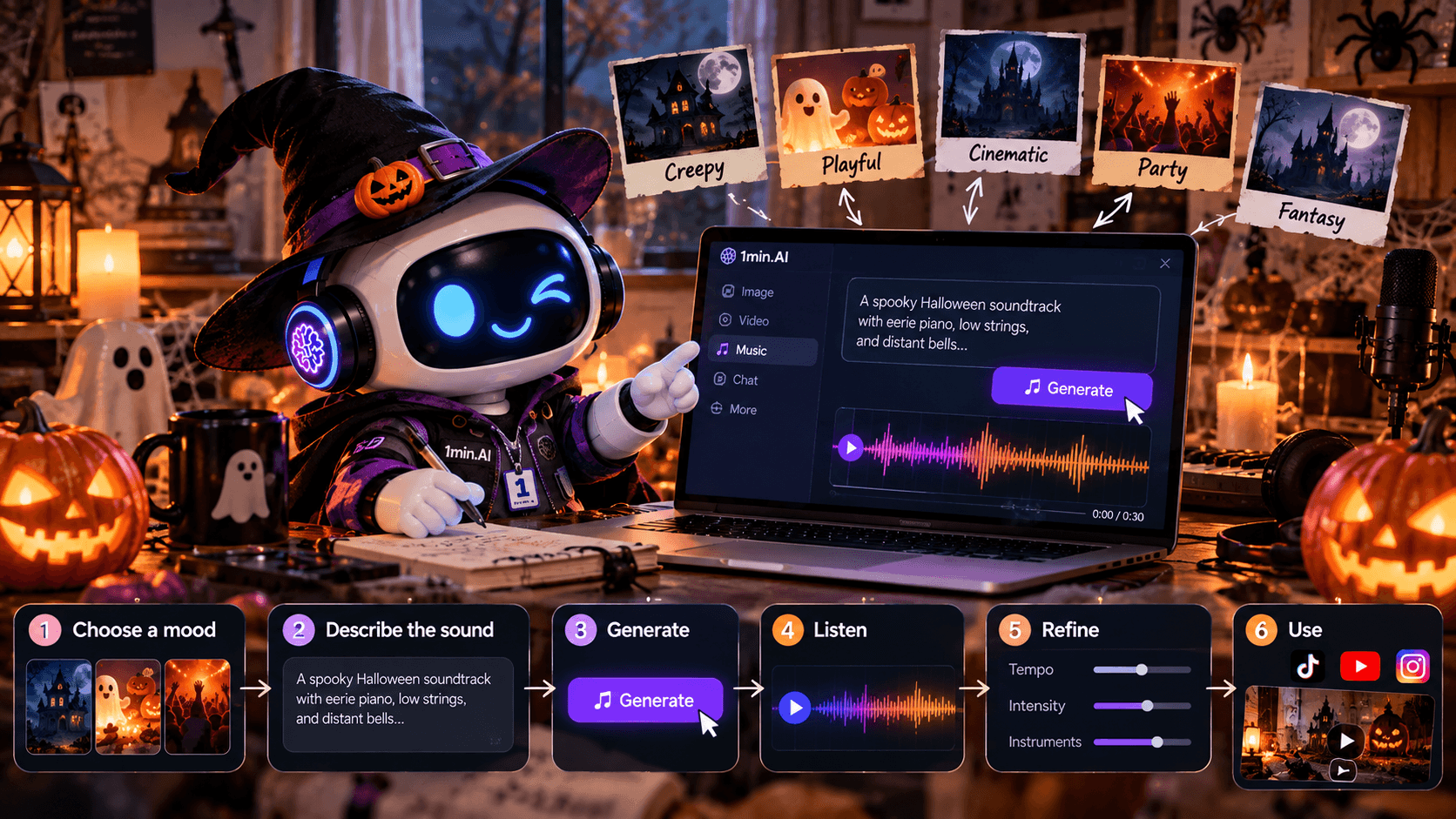
The workflow is simple:
Choose a mood → Describe the sound → Generate → Listen → Refine → Use
A Simple Formula for Halloween Music Prompts
You do not need to understand music theory to write a good AI music prompt. A clear structure is usually more useful than a long technical description.
Use this formula:
Mood + Use Case + Tempo + Instruments + Atmosphere + Structure
For example:
Creepy + haunted house video + slow tempo + piano, low strings and bells + dark atmosphere + gradual tension build
This becomes:
Create a slow, eerie Halloween soundtrack for a haunted house video. Use distant piano notes, low strings, old bells, and subtle wind ambience. Start quietly, gradually build tension, and keep the mood dark, mysterious, and cinematic.
The important part is telling the AI how the music should feel, what it is for, and how it should develop.
Haunted House Ambient
If your Halloween content relies on atmosphere rather than action, start with haunted-house ambience. This style leaves enough space for dialogue, footsteps, environmental sound, or narration while still making the scene feel uncomfortable and mysterious.
Prompt
Create an eerie Halloween ambient track with slow piano notes, distant bells, low strings, subtle wind, and faint unsettling textures. Keep the tempo slow and gradually build tension for a haunted house video.
Best for: haunted-house walkthroughs, horror backgrounds, creepy interiors, suspense intros, and atmospheric videos.
Cute Spooky Halloween
Halloween does not always need to be frightening. Costume videos, pumpkin carving, decorations, family content, and seasonal product posts usually work better with music that feels playful first and spooky second.
Think bouncing strings, bells, xylophone, and a memorable rhythm rather than heavy horror sound design.
Prompt
Create a playful Halloween track with pizzicato strings, xylophone, soft bells, light percussion, and a slightly spooky melody. Keep it upbeat, cute, catchy, and suitable for short social videos.
Best for: TikTok, Reels, costumes, Halloween crafts, family content, and seasonal product videos.
Dark Horror Cinematic
For horror trailers, suspense videos, game scenes, or darker Halloween content, the soundtrack should create anticipation before reaching its most intense moment.
Instead of making everything loud from the beginning, build the track around increasing tension.
Prompt
Create a dark cinematic horror soundtrack with low strings, deep drones, distant metallic sounds, heartbeat-like percussion, and rising tension. Start minimal and gradually become more intense without turning into an action soundtrack.
Best for: horror trailers, short films, scary game scenes, suspense edits, and cinematic Halloween content.
Halloween Party Beat
Party content needs something completely different. The rhythm has to work first; Halloween elements should support it rather than overwhelm it.
A strong beat, bass, and modern synths can carry the track, while bells, eerie accents, or unusual sound effects give it a Halloween identity.
Prompt
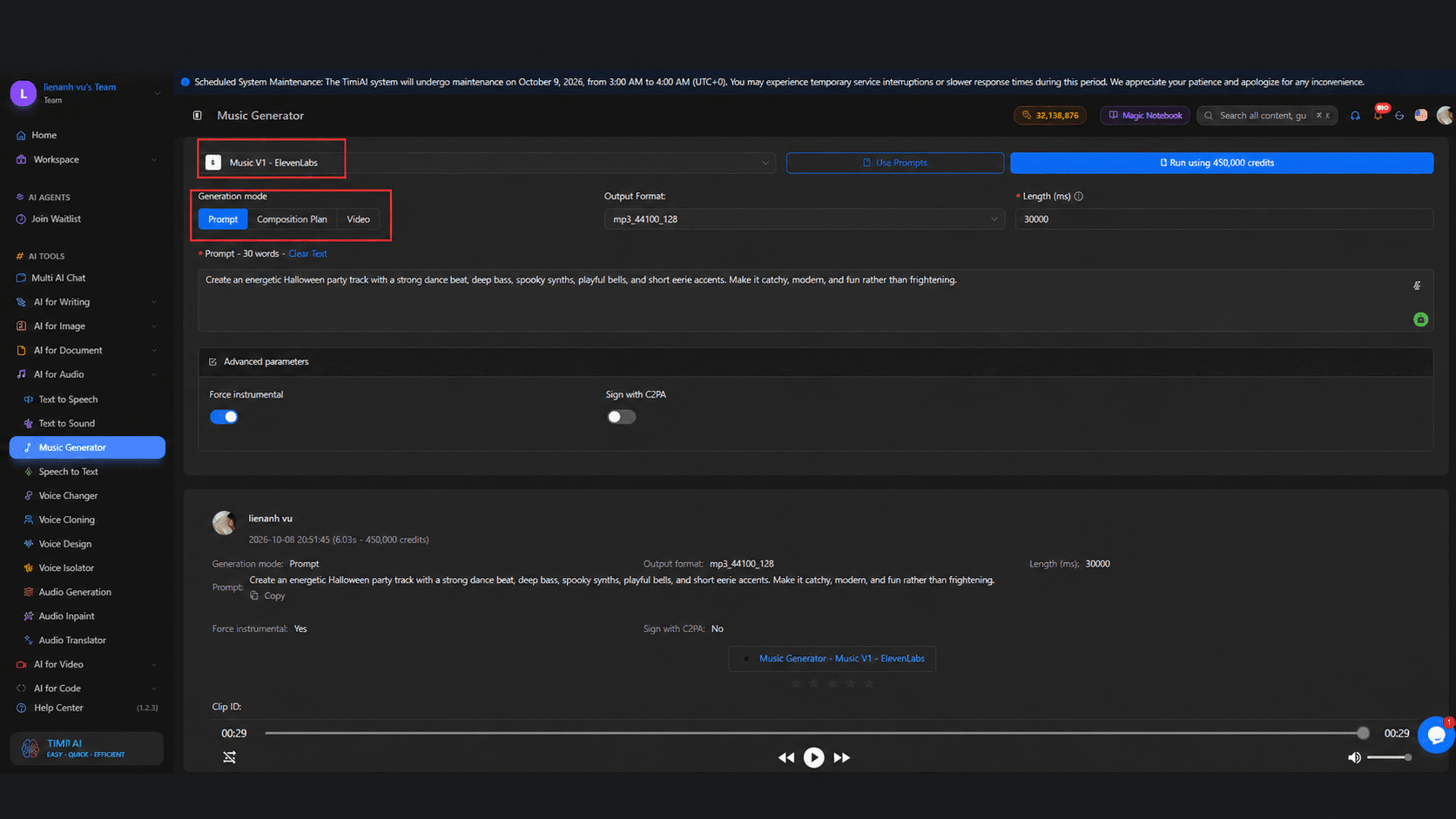
Create an energetic Halloween party track with a strong dance beat, deep bass, spooky synths, playful bells, and short eerie accents. Make it catchy, modern, and fun rather than frightening.
Best for: Halloween parties, costume transitions, event videos, fashion content, TikTok, and Reels.
Dark Fairytale Fantasy
Dark fairytale music works when traditional horror sounds too aggressive but normal fantasy music feels too cheerful. The result should feel beautiful, magical, and slightly unsettling at the same time.
Music boxes, soft choirs, strings, and distant bells work particularly well for this mood.
Prompt
Create a dark fairytale Halloween soundtrack with music box tones, soft choir, delicate strings, distant bells, and subtle mysterious ambience. Make it magical, elegant, slightly eerie, and cinematic.
Best for: witch-inspired visuals, fantasy costumes, enchanted forests, storybook scenes, and cinematic Halloween edits.
How to Create Halloween Music with 1min.AI
Open Music Generator on 1min.AI, choose the Halloween mood you want, and describe it using the prompt formula above. Generate the first version and listen to how well it matches your content.
If the track is close but not right, change only the part that needs improvement. Ask for a faster tempo if the video feels more energetic, fewer percussion elements if the music is overpowering the scene, darker instruments if the atmosphere is not scary enough, or a stronger opening if you are creating short-form content.
You can think of the process as:
Idea → Prompt → Generate → Listen → Adjust → Final Track
This is useful because you do not need to start over every time the result is slightly different from what you imagined.
Match the Music to the Content
A better Halloween soundtrack is not necessarily the scariest one. It is the soundtrack that supports what is happening on screen.
For a haunted-house walkthrough, slower music and gradual tension can make the space feel larger and more unsettling. For a 10-second costume transition, a quick hook and stronger rhythm may matter more than a complex arrangement. A Halloween party video needs energy, while a dark fantasy portrait may work better with delicate and mysterious sounds.
Before writing your prompt, ask one question:
What should the viewer feel during this scene?
Then build the music around that feeling.
How to Get Better AI Music Results
Keep your prompt focused rather than filling it with unrelated music styles. Define the main mood, purpose, tempo, instruments, atmosphere, and how the track should progress.
For example, instead of writing:
Make scary Halloween music.
Try:
Create a slow cinematic Halloween track for a haunted-house walkthrough with distant piano, low strings, old bells, subtle wind ambience, and gradually increasing tension.
The second version gives the AI a much clearer creative direction.
If you are not sure how to describe a sound, you can also use Multi AI Chat on 1min.AI to turn a simple idea into a more structured music prompt before generating.
FAQ
Can AI create Halloween background music?
Yes. You can describe the mood, instruments, tempo, atmosphere, and purpose of the soundtrack, then use an AI music generator to create a track around those requirements.
What should I include in a Halloween music prompt?
A useful formula is Mood + Use Case + Tempo + Instruments + Atmosphere + Structure.
What kind of Halloween music can I create?
You can experiment with haunted ambience, playful spooky music, cinematic horror, party beats, dark fantasy, or other combinations based on your content.
How can I make AI horror music feel scarier?
Instead of simply asking for “scarier music,” describe deeper drones, lower strings, distant metallic sounds, slower pacing, uncomfortable silence, or gradually increasing tension.
Can I create Halloween music for TikTok and Reels?
Yes. For short-form content, ask for a strong opening, clear rhythm, memorable hook, and a mood that matches the visual quickly.
🚀 Create the exact Halloween soundtrack your content needs with Music Generator on 1min.AI.
Alternatives
Discover the best alternatives to 1minAI and compare features, pricing, and use cases.

1min.AI vs OpenRouter
1min.AI vs. OpenRouter: Compare the ready-to-use AI creation product against the technical API tool. Find out if you need a zero-code creative studio or a coding infrastructure hub.
 Ngoc Hong
1min.AI vs Lovart
Compare 1min.AI vs Lovart across features, pricing, credits, brand tools, and use cases to find the right AI platform for your workflow.
Ngoc Hong
1min. AI vs Dola AI
Looking for a Dola AI alternative? Compare 1min.AI vs Dola AI on video generation, free plans, pricing and privacy to pick the right AI app.
Ngoc HongAI Tools
Discover the best AI tools to boost productivity, creativity, and everyday work.

Create Consistent Cartoon Content in Just a Few Steps
Create engaging cartoon videos for TikTok and Reels with 1min.AI. Research ideas, create characters, and turn images into animated videos in 3 simple steps.
 Lien Anh Vu
One Product, 10 UGC Creatives: How AI Makes Content Testing Easier
Create more authentic UGC with an AI UGC video generator, test more creative angles and scale affiliate content without filming every version.
Lien Anh Vu
Top 4 Affordable AI Tools for Startup Founders
Discover the top 4 affordable AI tools for startup founders to validate ideas, build products, create content, and launch faster without overspending.
 Tram Ta
AI Features
Comprehensive AI features that streamline workflows, improve efficiency, and empower teams to achieve more.
Create Consistent Cartoon Content in Just a Few Steps
Create engaging cartoon videos for TikTok and Reels with 1min.AI. Research ideas, create characters, and turn images into animated videos in 3 simple steps.
Lien Anh VuOne Product, 10 UGC Creatives: How AI Makes Content Testing Easier
Create more authentic UGC with an AI UGC video generator, test more creative angles and scale affiliate content without filming every version.
Lien Anh Vu
1minAI: Free AI Grammar Checker
Check grammar for free with 1minAI’s AI grammar checker. Find grammar, spelling, and writing mistakes, improve clarity, and polish your content in seconds.
Tram TaAI Use Cases
A curated collection of AI use cases for business, productivity, and industry-specific applications.
Create Consistent Cartoon Content in Just a Few Steps
Create engaging cartoon videos for TikTok and Reels with 1min.AI. Research ideas, create characters, and turn images into animated videos in 3 simple steps.
Lien Anh VuOne Product, 10 UGC Creatives: How AI Makes Content Testing Easier
Create more authentic UGC with an AI UGC video generator, test more creative angles and scale affiliate content without filming every version.
Lien Anh Vu
Best Time to Post on Instagram: A Practical Guide for Better Engagement
Discover the best time to post on Instagram, including the best days and times for different audiences, plus tips to find the ideal posting schedule for your account.
Tram TaAI Tutorials
Learn how to use AI with practical, step-by-step tutorials.

Black Friday AI Tool Deals in 2026
Discover what Black Friday AI tool deals 2026 has to offer. Find out how to secure the 1min.AI lifetime deal via AppSumo, Dealify, Stack Social, and verify on Trustpilot, Slashdot, and Software Advice.
 Hang Nguyen
Create Consistent Cartoon Content in Just a Few Steps
Create engaging cartoon videos for TikTok and Reels with 1min.AI. Research ideas, create characters, and turn images into animated videos in 3 simple steps.
Lien Anh Vu
[Seedance 2.5 New] Better AI Product Videos, Less Rework in 1min.AI
Use Seedance 2.5 image to video on 1min.AI to create more consistent AI product videos, reduce failed generations, save credits, and improve UGC workflows.
Lien Anh VuAI Guides
Learn AI faster with practical guides, real-world examples, and actionable best practices.

Safely Buy AI Tools Online: 2026 Black Friday Guide
Discover how to find and secure the best Black Friday AI deals online. Learn expert strategies to avoid scams, combat subscription fatigue, and verify software.
Hang NguyenCreate Consistent Cartoon Content in Just a Few Steps
Create engaging cartoon videos for TikTok and Reels with 1min.AI. Research ideas, create characters, and turn images into animated videos in 3 simple steps.
Lien Anh Vu[Seedance 2.5 New] Better AI Product Videos, Less Rework in 1min.AI
Use Seedance 2.5 image to video on 1min.AI to create more consistent AI product videos, reduce failed generations, save credits, and improve UGC workflows.
Lien Anh VuAI Solutions
Browse the best AI solutions for automation, coding, research, productivity, customer support, marketing, and business workflows.
Safely Buy AI Tools Online: 2026 Black Friday Guide
Discover how to find and secure the best Black Friday AI deals online. Learn expert strategies to avoid scams, combat subscription fatigue, and verify software.
Hang NguyenCreate Consistent Cartoon Content in Just a Few Steps
Create engaging cartoon videos for TikTok and Reels with 1min.AI. Research ideas, create characters, and turn images into animated videos in 3 simple steps.
Lien Anh VuOne Product, 10 UGC Creatives: How AI Makes Content Testing Easier
Create more authentic UGC with an AI UGC video generator, test more creative angles and scale affiliate content without filming every version.
Lien Anh VuAI Models
Explore the world's leading AI models in one place.
Create Consistent Cartoon Content in Just a Few Steps
Create engaging cartoon videos for TikTok and Reels with 1min.AI. Research ideas, create characters, and turn images into animated videos in 3 simple steps.
Lien Anh VuOne Product, 10 UGC Creatives: How AI Makes Content Testing Easier
Create more authentic UGC with an AI UGC video generator, test more creative angles and scale affiliate content without filming every version.
Lien Anh Vu[Seedance 2.5 New] Better AI Product Videos, Less Rework in 1min.AI
Use Seedance 2.5 image to video on 1min.AI to create more consistent AI product videos, reduce failed generations, save credits, and improve UGC workflows.
Lien Anh VuAI Comparisons
Compare AI tools, models, and platforms to find the best fit for your needs.

Kling AI Vs Veo 3: Which Model Wins?
Kling AI vs Veo 3: compare motion, native audio, pricing & free tiers to see which AI video generator wins for your project - try both on 1min.AI.
 Trang Tran
[Seedance 2.5 New] Better AI Product Videos, Less Rework in 1min.AI
Use Seedance 2.5 image to video on 1min.AI to create more consistent AI product videos, reduce failed generations, save credits, and improve UGC workflows.
Lien Anh Vu
DeepSeek V4 Pro vs Flash Comparison
Compare DeepSeek V4 Pro vs DeepSeek V4 Flash metrics. Optimize your agentic apps and improve AI fact checking on 1min.ai today.
Ngoc HongAI Integrations
Seamlessly integrate AI with the tools you already use to automate work and boost productivity.

POV: You Have 10+ Posts to Make Every Day
Learn how to build an AI content workflow that helps content creators produce 10+ social media posts a day faster with AI brainstorming, image generation, and content creation.
Lien Anh Vu
How to Use an AI Fashion Video Generator for Fashion Week 2026
Turn Fashion Week 2026 ideas into stunning fashion videos with AI. Learn how to brainstorm, create visuals, and transform images into videos with one simple workflow.
Lien Anh Vu
Stop Switching Between AI Apps: How AI Integration Transforms Employer Branding
Discover how AI integration helps HR teams streamline employer branding by combining AI writing, documents, images, video, and multiple AI models into one workspace.
Tram TaAI for Industries
Find the best AI tools and workflows for healthcare, finance, education, legal, manufacturing, retail, real estate, and more

7 Low-Cost AI Business Ideas for Your Startup
Explore 7 low-cost AI business ideas you can start with a small budget, from content and video services to AI consulting, reselling, and automation.
Tram Ta
How to Start a One-Person AI Business: 7 Models You Can Run Solo
Learn how to start a one-person AI business with 7 practical models, from AI consulting and content services to automation and software reselling.
Tram Ta
Free AI Image Generator For Ecommerce
Turn phone photos into studio, white-background, and lifestyle product images. Try the best AI image generator for ecommerce online free with 1min.AI.
Trang TranAI Agents
Discover and run AI agents to automate tasks across your work and daily life.
1minAI: Free AI Grammar Checker
Check grammar for free with 1minAI’s AI grammar checker. Find grammar, spelling, and writing mistakes, improve clarity, and polish your content in seconds.
Tram Ta
AI Agents for Facebook
Use an AI Agent for Facebook to create content, generate images, schedule posts, and publish from your documents and conversations.
Ngoc Hong
AI Agent vs AI Assistant: Which One Actually Saves Designers More Time?
Learn the difference between AI Agent vs AI Assistant and discover which solution helps designers automate repetitive work, reduce revisions, and save more time.
Lien Anh VuAI Workflows
Explore ready-to-use AI workflows for productivity, marketing, sales, support, and more.
Create Consistent Cartoon Content in Just a Few Steps
Create engaging cartoon videos for TikTok and Reels with 1min.AI. Research ideas, create characters, and turn images into animated videos in 3 simple steps.
Lien Anh VuOne Product, 10 UGC Creatives: How AI Makes Content Testing Easier
Create more authentic UGC with an AI UGC video generator, test more creative angles and scale affiliate content without filming every version.
Lien Anh VuPOV: You Have 10+ Posts to Make Every Day
Learn how to build an AI content workflow that helps content creators produce 10+ social media posts a day faster with AI brainstorming, image generation, and content creation.
Lien Anh VuNewsletter
Weekly AI Innovations with 1minAI

🔮 Weekly AI Innovations #140: Deepseek 4.1 Flash & Gemini Upgrades
Explore Deepseek 4.1 Flash and new Gemini models on 1min.ai. Plus, check our update on your Billing - Usage page for better clarity.
Hang Nguyen
🔮 Weekly AI Innovations #136: Grok 4.6 and Smart Data Retention
Discover the latest 1min.ai updates! Upgrade to Grok 4.6 for blazing-fast AI, and check our new Data Retention policies to secure your files today.
Hang Nguyen
🔮 Weekly AI Innovations #139: Dawn of the next-gen AI
Discover the immense power of GPT-6 Astra and Claude Fable 5.1. Unlock next-generation AI models on 1min.ai to solve complex tasks effortlessly.
Hang Nguyen