
ChatGPT Astra 6 vs Sol 6.1: Which GPT-6 Model Should You Choose?

Tram Ta
November 9, 2026
Compare GPT-6 Astra vs GPT-6.1 Sol in reasoning, coding, speed, context, and API pricing. Discover which AI model fits your workflow with 1minAI.
OpenAI's GPT-6 model family offers different options for users who need advanced reasoning, coding assistance, research, and professional productivity. Two models worth comparing are GPT-6 Astra and GPT-6.1 Sol.
Both are designed for demanding tasks, but they serve slightly different priorities. GPT-6 Astra is positioned as the flagship model for the most challenging work, while GPT-6.1 Sol aims to deliver near-Astra performance at a lower cost.
So, which one should you use?
In this guide, we'll compare ChatGPT Astra 6 vs Sol 6.1 across their capabilities, performance, pricing, and practical use cases. We'll also show how you can explore GPT-6.1 Sol and compare AI models through 1minAI.
What Is GPT-6 Astra?
GPT-6 Astra is OpenAI's flagship model in the GPT-6 family. It is designed for tasks that require advanced reasoning, careful judgment, and the ability to handle complex workflows.
Rather than focusing only on answering individual questions, Astra is built to support more demanding professional tasks involving multiple steps, information sources, and tools.
Key Features of GPT-6 Astra
1. Advanced reasoning
Astra is intended for problems that require deeper analysis, complex decisions, and the evaluation of multiple possibilities.
For example, you can use it to:
- Analyze a complicated business problem.
- Compare competing strategies.
- Evaluate scientific or technical information.
- Identify assumptions and gaps in an argument.
- Develop structured recommendations from multiple sources.
- . Advanced coding and software engineering
Astra is positioned for demanding software engineering work. It can help developers reason through complex codebases, plan architectural changes, debug difficult issues, and work through multi-step development tasks.
3. Computer use and browsing
Astra also emphasizes computer-use capabilities. With supported tools and permissions, it can interact with software environments, navigate interfaces, and carry out multi-step workflows.
This makes it relevant to tasks such as researching information, working with documents, and completing operations across supported applications.
4. Professional research and document creation
Astra can support work that involves analyzing information and producing structured outputs, such as reports, technical documents, and research summaries.
For users who need a model to handle difficult tasks with fewer rounds of manual guidance, these capabilities make Astra an attractive option.
OpenAI highlights Astra's performance in computer use, browsing, software engineering, science, and professional work in its GPT-6 Astra announcement.
What Is GPT-6.1 Sol?
GPT-6.1 Sol is another advanced model in the GPT-6 family. Its main goal is to balance intelligence, performance, and cost.
Instead of positioning Sol as the option for only the simplest tasks, OpenAI describes it as delivering near-Astra performance for complex coding, computer use, and professional work at a lower price.
This makes it a practical choice for people who need capable AI assistance regularly.
Key Features of GPT-6.1 Sol
1. Strong performance for coding tasks
Sol is designed to support software development workflows, including:
- Writing functions and scripts.
- Explaining unfamiliar code.
- Debugging errors.
- Drafting and reviewing tests.
- Working through multi-step programming requests.
For developers who need help with regular coding work, Sol can be a cost-efficient starting point.
- . Support for complex workflows
Sol is not limited to simple question-and-answer interactions. It can help with professional tasks that involve several steps, such as organizing information, analyzing requirements, and developing structured outputs.
3. Adjustable reasoning effort
GPT-6.1 Sol supports different reasoning effort levels: low, medium, high, xhigh, and max.
This gives developers more control over how much reasoning effort to apply to a task. More demanding requests can use higher effort, while straightforward requests may not need it.
4. Lower API cost
One of Sol's biggest advantages is its API pricing.
Its standard input and output token rates are significantly lower than Astra's. For applications that make frequent model requests, this difference can matter when managing operating costs.
For more details about the model, visit 1minAI's GPT-6.1 Sol page.
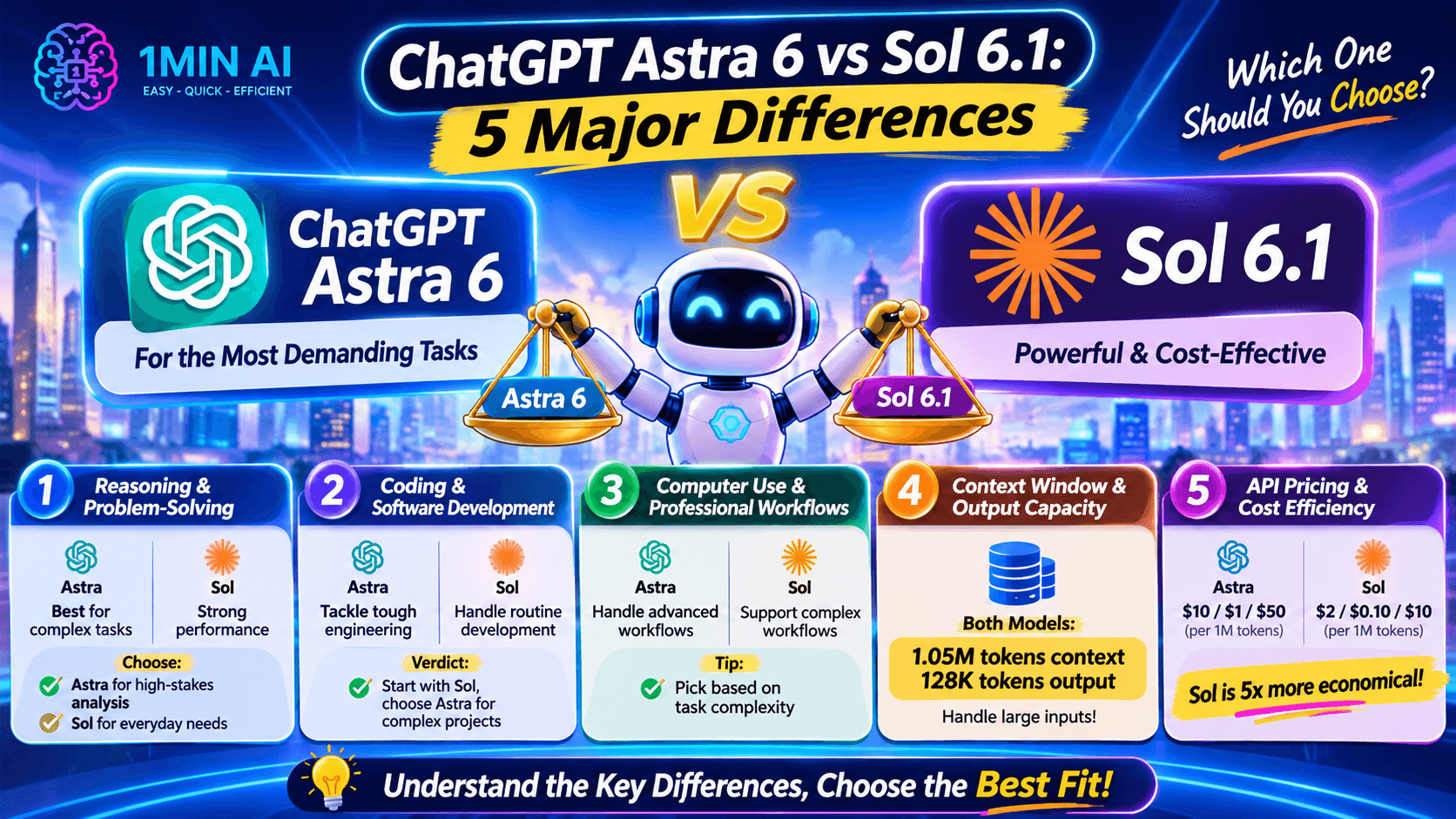
ChatGPT Astra 6 vs Sol 6.1: 5 Major Differences
Now let's look at the differences that matter when choosing a model for real work.
1. Reasoning and Problem-Solving
Both models support advanced reasoning, but their intended roles are different.
GPT-6 Astra is the stronger starting point when a task demands the highest level of reasoning and judgment. It is designed for particularly challenging research, complex technical problems, and professional work where mistakes can have significant consequences.
GPT-6.1 Sol, meanwhile, offers near-Astra performance at a lower cost. It is suitable for many complex tasks without requiring the most expensive model for every request.
Choose Astra when:
- You need to evaluate complicated technical or scientific problems.
- Your task involves multiple conflicting sources.
- You need careful analysis and detailed recommendations.
Choose Sol when:
- You need regular help with coding and problem-solving.
- You work with structured professional tasks.
- You want strong reasoning without paying flagship API rates for every request.
. Coding and Software Development
Both models can help with programming, but Astra is positioned for the most demanding software engineering work.
For example, consider a developer building a new application.
They might need AI assistance with:
- Planning the application architecture.
- Writing and reviewing code.
- Debugging unexpected behavior.
- Testing different implementation approaches.
- Identifying potential problems before deployment.
Astra is a strong candidate for particularly difficult engineering challenges.
Sol is a practical option for everyday development work, such as writing functions, explaining code, fixing common errors, and drafting tests.
Verdict: Start with Sol for routine development. Consider Astra when the problem becomes unusually complex or requires deeper reasoning.
3. Computer Use and Professional Workflows
Computer use is another important area for both models.
Astra is designed to handle demanding workflows involving supported browsers and professional software. It can help with tasks that require navigating interfaces, gathering information, and coordinating multiple actions.
Sol also supports complex computer-use and professional workflows, but with a lower-cost positioning.
Imagine you need to organize information from several business documents and turn it into a structured report.
You could use either model, depending on the complexity of the work and your budget. For a straightforward workflow, Sol may be sufficient. For a more challenging task involving complicated decisions and multiple steps, Astra may be worth considering.
Remember that actual computer actions depend on the tools, permissions, and environment available to the model.
4. Context Window and Output Capacity
One interesting point is that the two models share the same published context window and maximum output capacity.
| Specification | GPT-6 Astra | GPT-6.1 Sol |
|---|---|---|
| Context window | 1.05M tokens | 1.05M tokens |
| Maximum output | 128K tokens | 128K tokens |
This means Sol is not simply a smaller-context alternative.
Both models can work with substantial amounts of input and produce long outputs within their published limits.
For users who regularly analyze long documents, code, or research materials, this shared capacity is useful. However, a large context window does not guarantee that every detail will be interpreted correctly. The model's reasoning quality and the structure of your prompt still matter.
5. API Pricing and Cost Efficiency
Pricing is one of the clearest differences between Astra and Sol.
According to OpenAI's published standard API pricing:
| API pricing per 1M tokens | GPT-6 Astra | GPT-6.1 Sol |
|---|---|---|
| Input tokens | $10 | $2 |
| Cached input tokens | $1 | $0.10 |
| Output tokens | $50 | $10 |
At these standard rates, Sol costs one-fifth as much as Astra for both standard input and output tokens.
For example, consider an application that processes 1 million input tokens and generates 1 million output tokens.
- GPT-6 Astra: $10 + $50 = $60.
- GPT-6.1 Sol: $2 + $10 = $12.
That is a $48 difference for this illustrative workload, before any applicable tool fees or other charges.
This example uses standard API token pricing only. Actual costs depend on token usage, caching, tools, and any additional pricing rules.
Verdict: Sol is the more economical option for high-volume usage. Astra may justify its higher cost when its additional capabilities materially improve the outcome.
GPT-6 Astra vs GPT-6.1 Sol: Which Model Is Better for Different Tasks?
The best model depends on what you want to accomplish.
| Task | Recommended Starting Point | Why |
|---|---|---|
| Complex scientific research | GPT-6 Astra | Designed for the most demanding reasoning and research |
| Advanced software engineering | GPT-6 Astra | Strong flagship positioning for difficult engineering work |
| Everyday coding | GPT-6.1 Sol | Strong coding assistance at a lower API cost |
| Document analysis | Either | Choose based on complexity and budget |
| Professional workflows | Either | Astra for the hardest tasks; Sol for cost-efficient execution |
| High-volume API applications | GPT-6.1 Sol | Lower standard token prices |
| Multi-step reasoning | Either | Match reasoning effort and model capability to task difficulty |
A useful strategy is to start with Sol and move to Astra when the task requires more advanced reasoning, stronger judgment, or additional problem-solving capability.
This avoids using a flagship model for every request when a more economical model can already do the job.
How to Try GPT-6.1 Sol with 1minAI
If you want to explore GPT-6.1 Sol without building an API integration yourself, you can start with its dedicated page on 1minAI.
Step 1: Open GPT-6.1 Sol on 1minAI
Visit Free AI Chat with GPT-6.1 Sol on 1minAI.
This gives you a starting point to explore the model through 1minAI's AI chat experience.
Step 2: Enter Your Task
Think of a real task you want the model to handle.
For example:
- Explain a complicated programming concept.
- Review a piece of code.
- Create a project plan.
- Summarize a long document.
- Compare two business strategies.
Use a clear prompt that explains your goal and the expected output.
Step 3: Review the Response
Don't judge a model only by whether its answer sounds convincing.
Check whether it:
- Understands your instructions.
- Provides accurate and relevant information.
- Follows your requested format.
- Explains its reasoning clearly.
- Produces an output you can actually use.
Step 4: Compare with Other AI Models
One response does not always tell you which model is best.
You can explore 1minAI's 100 AI Chat and Multi AI Chat & AI Agent to discover different AI models and workflows.
With a multi-model approach, you can test the same prompt across available models, compare their answers, and choose the response that best fits your needs.
For a broader look at the differences between Sol releases, read GPT-6.1 Sol vs GPT-6.1 Terra on 1minAI.
Frequently Asked Questions
1. Is GPT-6 Astra better than GPT-6.1 Sol?
GPT-6 Astra is positioned as OpenAI's most capable model for the most demanding reasoning, coding, research, and professional work. GPT-6.1 Sol offers near-Astra performance at a lower cost. Astra is the stronger starting point for the hardest tasks, while Sol may be the better value for many regular workflows.
2. What is the main difference between ChatGPT Astra 6 and Sol 6.1?
The main difference is their positioning. GPT-6 Astra prioritizes maximum capability, while GPT-6.1 Sol balances strong performance with lower API costs. Both have a published 1.05-million-token context window and 128,000-token maximum output.
3. Is GPT-6.1 Sol cheaper than GPT-6 Astra?
Yes. OpenAI's published standard API rates are $2 per million input tokens and $10 per million output tokens for Sol, compared with $10 and $50 respectively for Astra. Actual platform pricing and usage limits may differ.
4. Can GPT-6.1 Sol handle complex coding?
Yes. GPT-6.1 Sol is designed for complex coding, computer use, and professional work. It supports several reasoning effort levels, allowing developers to adjust the amount of reasoning applied to a task.
5. Does GPT-6 Astra have a larger context window than Sol?
No. The published specifications list a 1.05-million-token context window and 128,000-token maximum output for both models.
Final: GPT-6 Astra or GPT-6.1 Sol?
There is no single winner for every task.
Choose GPT-6 Astra when you need the strongest available reasoning for demanding research, difficult software engineering, and complex professional workflows.
Choose GPT-6.1 Sol when you want capable AI assistance for coding, computer use, and regular professional tasks while keeping API costs lower.
For many users and developers, the smartest approach is not to rely on one model for everything. Start with a cost-efficient option, evaluate the results, and use a more capable model when the task genuinely requires it.
With 1minAI, you can explore GPT-6.1 Sol and discover multi-model AI chat experiences that make it easier to test different approaches and find the right AI assistant for your workflow.
- #Commerce
- #Information
Alternatives
Discover the best alternatives to 1minAI and compare features, pricing, and use cases.

1min.AI vs OpenRouter
1min.AI vs. OpenRouter: Compare the ready-to-use AI creation product against the technical API tool. Find out if you need a zero-code creative studio or a coding infrastructure hub.
 Ngoc Hong

1min.AI vs. Metricool: Which Platform Does More for Your Marketing Workflow?
Compare 1min.AI vs. Metricool across content creation, visual production, scheduling, analytics, MCP, and pricing to find the right platform for your marketing workflow.

1min.AI vs. Hootsuite: Which Social Media Tool Fits Your Workflow?
Compare 1min.AI vs. Hootsuite to explore their AI content creation, social media publishing, analytics, pricing, and collaboration features. Find the right tool for your workflow.
AI Tools
Discover the best AI tools to boost productivity, creativity, and everyday work.

Create Consistent Cartoon Content in Just a Few Steps
Create engaging cartoon videos for TikTok and Reels with 1min.AI. Research ideas, create characters, and turn images into animated videos in 3 simple steps.
 Lien Anh Vu

One Product, 10 UGC Creatives: How AI Makes Content Testing Easier
Create more authentic UGC with an AI UGC video generator, test more creative angles and scale affiliate content without filming every version.
Lien Anh Vu
Top 4 Affordable AI Tools for Startup Founders
Discover the top 4 affordable AI tools for startup founders to validate ideas, build products, create content, and launch faster without overspending.
 Tram Ta
AI Features
Comprehensive AI features that streamline workflows, improve efficiency, and empower teams to achieve more.
Create Consistent Cartoon Content in Just a Few Steps
Create engaging cartoon videos for TikTok and Reels with 1min.AI. Research ideas, create characters, and turn images into animated videos in 3 simple steps.
Lien Anh VuOne Product, 10 UGC Creatives: How AI Makes Content Testing Easier
Create more authentic UGC with an AI UGC video generator, test more creative angles and scale affiliate content without filming every version.
Lien Anh Vu
1minAI: Free AI Grammar Checker
Check grammar for free with 1minAI’s AI grammar checker. Find grammar, spelling, and writing mistakes, improve clarity, and polish your content in seconds.
Tram TaAI Use Cases
A curated collection of AI use cases for business, productivity, and industry-specific applications.
Create Consistent Cartoon Content in Just a Few Steps
Create engaging cartoon videos for TikTok and Reels with 1min.AI. Research ideas, create characters, and turn images into animated videos in 3 simple steps.
Lien Anh VuOne Product, 10 UGC Creatives: How AI Makes Content Testing Easier
Create more authentic UGC with an AI UGC video generator, test more creative angles and scale affiliate content without filming every version.
Lien Anh Vu
Best Time to Post on Instagram: A Practical Guide for Better Engagement
Discover the best time to post on Instagram, including the best days and times for different audiences, plus tips to find the ideal posting schedule for your account.
Tram TaAI Tutorials
Learn how to use AI with practical, step-by-step tutorials.

Black Friday AI Tool Deals in 2026
Discover what Black Friday AI tool deals 2026 has to offer. Find out how to secure the 1min.AI lifetime deal via AppSumo, Dealify, Stack Social, and verify on Trustpilot, Slashdot, and Software Advice.
 Hang Nguyen
Create Consistent Cartoon Content in Just a Few Steps
Create engaging cartoon videos for TikTok and Reels with 1min.AI. Research ideas, create characters, and turn images into animated videos in 3 simple steps.
Lien Anh Vu
[Seedance 2.5 New] Better AI Product Videos, Less Rework in 1min.AI
Use Seedance 2.5 image to video on 1min.AI to create more consistent AI product videos, reduce failed generations, save credits, and improve UGC workflows.
Lien Anh VuAI Guides
Learn AI faster with practical guides, real-world examples, and actionable best practices.

Safely Buy AI Tools Online: 2026 Black Friday Guide
Discover how to find and secure the best Black Friday AI deals online. Learn expert strategies to avoid scams, combat subscription fatigue, and verify software.
Hang NguyenCreate Consistent Cartoon Content in Just a Few Steps
Create engaging cartoon videos for TikTok and Reels with 1min.AI. Research ideas, create characters, and turn images into animated videos in 3 simple steps.
Lien Anh Vu[Seedance 2.5 New] Better AI Product Videos, Less Rework in 1min.AI
Use Seedance 2.5 image to video on 1min.AI to create more consistent AI product videos, reduce failed generations, save credits, and improve UGC workflows.
Lien Anh VuAI Solutions
Browse the best AI solutions for automation, coding, research, productivity, customer support, marketing, and business workflows.
Safely Buy AI Tools Online: 2026 Black Friday Guide
Discover how to find and secure the best Black Friday AI deals online. Learn expert strategies to avoid scams, combat subscription fatigue, and verify software.
Hang NguyenCreate Consistent Cartoon Content in Just a Few Steps
Create engaging cartoon videos for TikTok and Reels with 1min.AI. Research ideas, create characters, and turn images into animated videos in 3 simple steps.
Lien Anh VuOne Product, 10 UGC Creatives: How AI Makes Content Testing Easier
Create more authentic UGC with an AI UGC video generator, test more creative angles and scale affiliate content without filming every version.
Lien Anh VuAI Models
Explore the world's leading AI models in one place.
Create Consistent Cartoon Content in Just a Few Steps
Create engaging cartoon videos for TikTok and Reels with 1min.AI. Research ideas, create characters, and turn images into animated videos in 3 simple steps.
Lien Anh VuOne Product, 10 UGC Creatives: How AI Makes Content Testing Easier
Create more authentic UGC with an AI UGC video generator, test more creative angles and scale affiliate content without filming every version.
Lien Anh Vu[Seedance 2.5 New] Better AI Product Videos, Less Rework in 1min.AI
Use Seedance 2.5 image to video on 1min.AI to create more consistent AI product videos, reduce failed generations, save credits, and improve UGC workflows.
Lien Anh VuAI Comparisons
Compare AI tools, models, and platforms to find the best fit for your needs.

Kling AI Vs Veo 3: Which Model Wins?
Kling AI vs Veo 3: compare motion, native audio, pricing & free tiers to see which AI video generator wins for your project - try both on 1min.AI.
 Trang Tran
[Seedance 2.5 New] Better AI Product Videos, Less Rework in 1min.AI
Use Seedance 2.5 image to video on 1min.AI to create more consistent AI product videos, reduce failed generations, save credits, and improve UGC workflows.
Lien Anh Vu
DeepSeek V4 Pro vs Flash Comparison
Compare DeepSeek V4 Pro vs DeepSeek V4 Flash metrics. Optimize your agentic apps and improve AI fact checking on 1min.ai today.
Ngoc HongAI Integrations
Seamlessly integrate AI with the tools you already use to automate work and boost productivity.

POV: You Have 10+ Posts to Make Every Day
Learn how to build an AI content workflow that helps content creators produce 10+ social media posts a day faster with AI brainstorming, image generation, and content creation.
Lien Anh Vu
How to Use an AI Fashion Video Generator for Fashion Week 2026
Turn Fashion Week 2026 ideas into stunning fashion videos with AI. Learn how to brainstorm, create visuals, and transform images into videos with one simple workflow.
Lien Anh Vu
Stop Switching Between AI Apps: How AI Integration Transforms Employer Branding
Discover how AI integration helps HR teams streamline employer branding by combining AI writing, documents, images, video, and multiple AI models into one workspace.
Tram TaAI for Industries
Find the best AI tools and workflows for healthcare, finance, education, legal, manufacturing, retail, real estate, and more
Try Image To Video AI With Prompt Online Free
Try image to video AI with prompt online free, no login and no watermark. Upload a photo, type the motion you want, and get a short video in minutes.
Trang Tran
No Photoshoot? Create AI Fashion Videos With Seedance 2.5
No photoshoot needed! Create stunning AI fashion videos with Seedance 2.5 on 1min.AI using outfit references, cinematic prompts, and surreal scenes.
Lien Anh Vu
Voice Cloning AI Free: How to Clone Any Voice Online in Minutes
Try voice cloning AI free with 1min.AI. Upload a 5-second clip, pick an ElevenLabs model, choose from 32 languages, and turn text to speech in your own voice.
Trang TranAI Agents
Discover and run AI agents to automate tasks across your work and daily life.
1minAI: Free AI Grammar Checker
Check grammar for free with 1minAI’s AI grammar checker. Find grammar, spelling, and writing mistakes, improve clarity, and polish your content in seconds.
Tram Ta
AI Agents for Facebook
Use an AI Agent for Facebook to create content, generate images, schedule posts, and publish from your documents and conversations.
Ngoc Hong
AI Agent vs AI Assistant: Which One Actually Saves Designers More Time?
Learn the difference between AI Agent vs AI Assistant and discover which solution helps designers automate repetitive work, reduce revisions, and save more time.
Lien Anh VuAI Workflows
Explore ready-to-use AI workflows for productivity, marketing, sales, support, and more.
Create Consistent Cartoon Content in Just a Few Steps
Create engaging cartoon videos for TikTok and Reels with 1min.AI. Research ideas, create characters, and turn images into animated videos in 3 simple steps.
Lien Anh VuOne Product, 10 UGC Creatives: How AI Makes Content Testing Easier
Create more authentic UGC with an AI UGC video generator, test more creative angles and scale affiliate content without filming every version.
Lien Anh VuPOV: You Have 10+ Posts to Make Every Day
Learn how to build an AI content workflow that helps content creators produce 10+ social media posts a day faster with AI brainstorming, image generation, and content creation.
Lien Anh VuNewsletter
Weekly AI Innovations with 1minAI

🔮 Weekly AI Innovations #146: Mistral 3.5, Qwen Image & Cohere A+ are ready on 1min.ai
Deploy Mistral Large 3, Qwen Image 3.0, and Cohere Command A+ on 1min.ai. Boost RAG accuracy and cut visual generation latency in one unified AI workspace.
Hang Nguyen
🔮 Weekly AI Innovations #145: X Content Agent & GPT 6.1 Terra on 1min.ai
Scale viral reach with the X Content Agent on 1min.ai. Discover an end-to-end 4-stage pipeline with zero token burn, plus the launch of GPT 6.1 Terra.
Hang Nguyen
🔮 Weekly AI Innovations #144: LinkedIn Content Agent: Complete B2B Publishing Pipeline
Scale B2B influence with the LinkedIn Content Agent on 1min.ai. Discover an end-to-end 4-stage pipeline with zero redundant token burn and 1-click publishing.
Hang Nguyen