
DeepSeek Super Agent: 4 Tips for Businesses to Make Use of It

Tram Ta
November 19, 2026
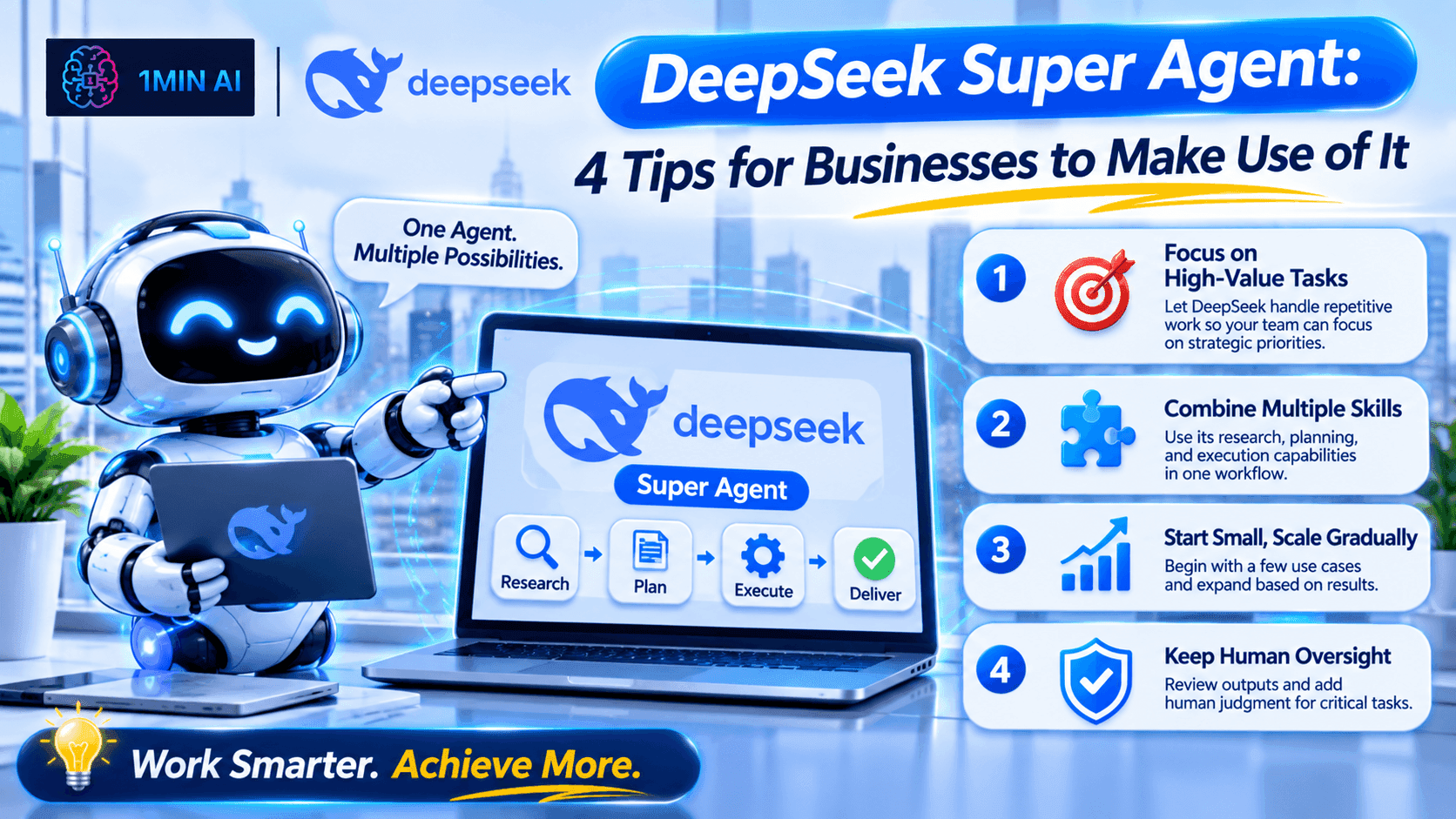
Discover what DeepSeek Super Agent does and 4 practical ways businesses can use its multi-agent coding workflow to improve software development.
DeepSeek Super Agent, imagine having several AI workers helping your development team at the same time.
As businesses look for ways to use AI beyond basic chatbots, multi-agent systems are becoming an interesting approach to automating complex work. Rather than asking one AI model to handle everything in a single conversation, a super-agent architecture can coordinate multiple specialized agents working on separate tasks.
But what exactly is DeepSeek Super Agent? Is it ready for business use, and how can companies benefit from its approach?
In this guide, we'll explain how it works and share four practical tips for businesses to make use of DeepSeek Super Agent, along with ways to explore DeepSeek models and developer resources through 1minAI.
What Is DeepSeek Super Agent?
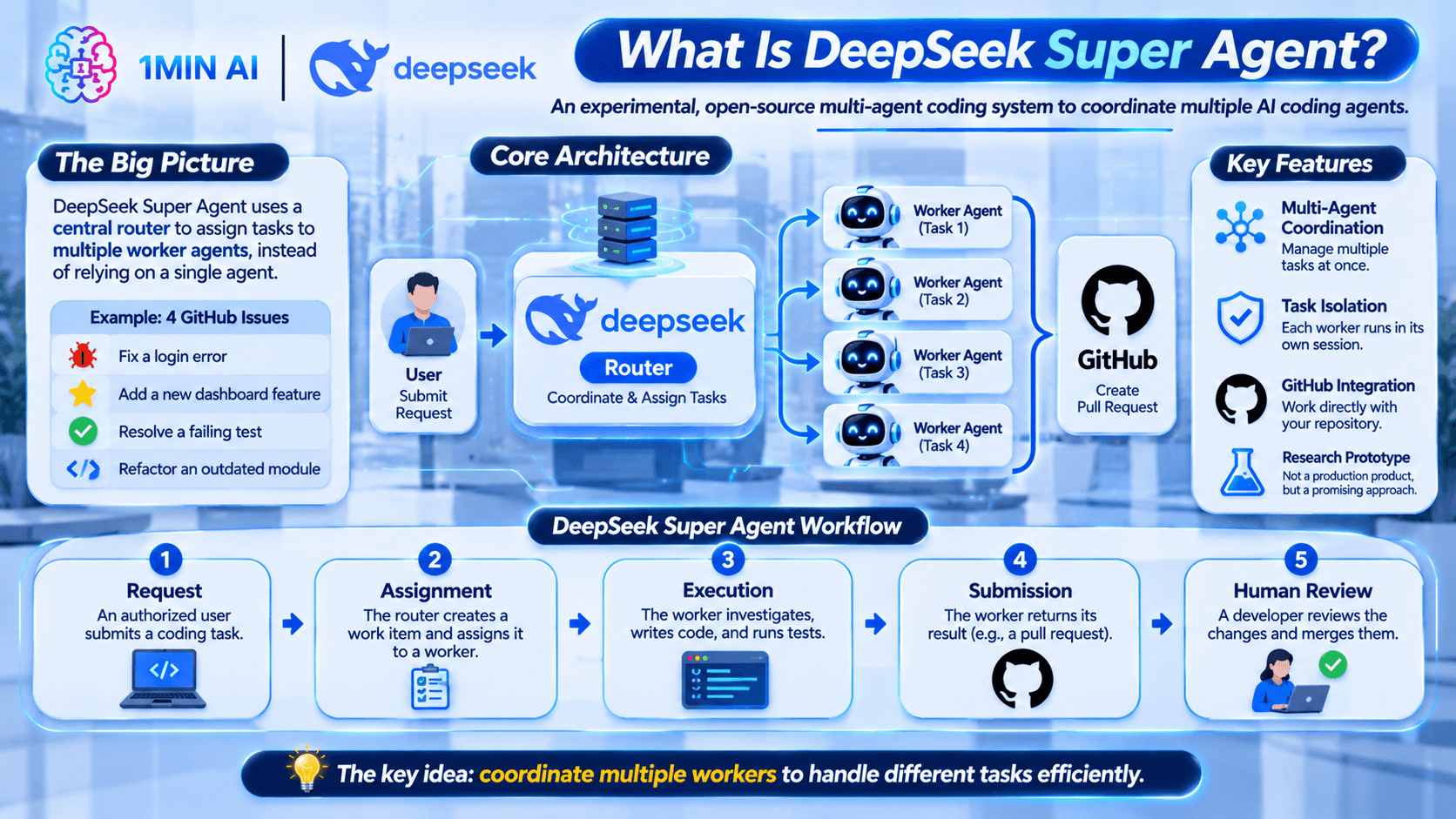
DeepSeek Super Agent is an experimental, open-source multi-agent coding system developed by the DeepSeek Harness team.
It is designed to coordinate multiple AI coding agents instead of relying on a single agent to manage every task.
The system uses a central router to communicate with users, organize incoming requests, and assign work to separate worker agents. Each worker handles an individual task in its own session and working directory.
For example, imagine a software company receives several GitHub issues:
- A user reports a login error.
- Another customer requests a new dashboard feature.
- The development team identifies a failing automated test.
- A developer needs help refactoring an outdated module.
Instead of asking one AI agent to handle all four requests in a long conversation, a coordinating system can assign separate tasks to different workers.
This makes it easier to manage multiple development activities without mixing their context.
Important: DeepSeek Super Agent is a research prototype, not a production-ready commercial product or a new standalone AI model. Its public implementation focuses on coding tasks connected to a GitHub repository. Businesses should evaluate its maturity, security, and deployment requirements before using it in real projects.
How Does DeepSeek Super Agent Work?
The system is built around two main components.
1. Router: The Task Coordinator
The router communicates with users, receives requests, tracks work, and decides which worker should handle each task.
It acts as the coordination layer rather than doing all the coding itself.
For example, when a developer submits a bug report, the router can organize the request and assign it to an available worker.
2. Worker Agents: The Task Executors
Worker agents handle the actual work.
Each worker operates in a separate session and directory, allowing it to focus on a specific task without unnecessarily mixing information from other tasks.
A worker may:
- Read the assigned development instructions.
- Inspect relevant code.
- Write or modify code.
- Run tests.
- Prepare a proposed change.
- Return its result for human review.
The system can connect this process to GitHub, where a worker may create a pull request after completing its task.
DeepSeek Super Agent Workflow
A simplified workflow looks like this:
- Request: An authorized user submits a coding task through the supported workflow.
- Assignment: The router creates a work item and assigns it to a worker.
- Execution: The worker investigates the task, writes code, and runs tests.
- Submission: The worker returns its result, typically through a pull request.
- Human review: A developer reviews the changes and decides whether to merge them.
The important idea is task coordination. Multiple workers can handle separate tasks while the router helps organize communication and progress.
Why Should Businesses Pay Attention to DeepSeek Super Agent?
Businesses often have more development work than their engineering teams can complete immediately.
Developers need to fix bugs, maintain existing systems, review code, write tests, and build new features. These activities are necessary, but many involve repetitive steps that can consume valuable time.
A multi-agent coding workflow offers another way to organize this work.
Instead of treating every request as a separate manual interaction with an AI assistant, a business can explore how tasks might be assigned, executed, and reviewed through a coordinated system.
Potential benefits include:
- Better task organization: Separate agents can focus on individual work items.
- Less context switching: Developers may spend less time manually managing multiple AI sessions.
- Parallel task execution: Independent tasks can potentially progress at the same time.
- More structured development: Work can follow a process from issue to proposed code change.
- Human-controlled delivery: Developers retain responsibility for reviewing and approving changes.
However, these are potential workflow benefits, not guaranteed productivity improvements. Actual results depend on task complexity, code quality, infrastructure, and human review.
DeepSeek Super Agent: 4 Tips for Businesses to Make Use of It
The most practical business applications are connected to software development and technical operations.
Here are four ways businesses can explore the multi-agent approach.
1. Automate Repetitive Bug Investigation and Fixes
Every software product eventually encounters bugs.
A customer might report that a login page does not work, a payment form returns an error, or a dashboard displays incorrect information.
Developers must investigate the issue, identify its cause, modify the code, and test the solution.
A coding agent can assist with these steps.
With a coordinated multi-agent approach, a business could organize incoming bug reports and assign suitable issues to individual workers.
Example workflow:
- A developer or support team submits a bug report through GitHub.
- The router organizes the issue and assigns it to a worker.
- The worker inspects the relevant code and investigates the reported behavior.
- It proposes a fix and runs available tests.
- A developer reviews the changes before merging them.
Example task prompt:
"Investigate the reported login error in this repository. Identify the likely root cause, inspect the relevant authentication code, and propose a minimal fix. Run the available tests and explain any remaining risks. Do not merge changes without human approval."
Business benefit:
Your development team can use AI to assist with repetitive investigation and initial fixes, leaving developers more time for architecture, complex problems, and product improvements.
Best suited for: SaaS companies, software startups, web development agencies, and businesses maintaining internal applications.
2. Manage Small Feature Requests More Efficiently
Businesses receive feature requests from customers, employees, and internal stakeholders.
For example:
- Add an export button to a dashboard.
- Improve the search filter.
- Add a new field to a customer form.
- Update a report layout.
- Introduce a small configuration option.
Although these requests may appear simple, developers still need to understand the existing code, identify affected components, implement changes, and test the result.
A multi-agent workflow can help organize these tasks.
For example, a business could separate a feature request into independent activities:
- One worker investigates the relevant code and identifies where changes are needed.
- Another worker prepares a proposed implementation plan.
- A separate task can focus on test coverage or documentation.
These activities should only run independently when their work does not create conflicting changes. Shared files and dependent tasks still need coordination.
Example task prompt:
"Review this feature request: add a CSV export option to the sales dashboard. Identify the affected components, explain the implementation steps, and propose the required code changes. Include tests for successful exports and invalid data. Prepare the result for developer review."
Business benefit:
AI can help shorten the early stages of feature development, from understanding a request to preparing an implementation proposal.
This is particularly useful for companies that need to improve existing products while managing limited engineering resources.
Best suited for: SaaS businesses, product teams, e-commerce platforms, and companies with internal software.
3. Improve Automated Testing and Fix CI Failures
A software project needs testing to catch problems before new code reaches customers.
However, developers may spend considerable time investigating failed tests, understanding error messages, and identifying which changes caused a problem.
A coding agent can help investigate these failures.
For example, when a GitHub workflow reports a failed test, an AI worker could be assigned to:
- Read the failure logs.
- Identify the affected test and code.
- Investigate possible causes.
- Suggest a correction.
- Run the relevant tests again.
- Prepare a proposed change for review.
A coordinated system can make this process easier to organize when several independent failures or development tasks appear at the same time.
Example task prompt:
"Investigate the failing automated tests in this repository. Read the test output, identify the likely cause, and determine whether the issue comes from the application code or the test itself. Suggest the smallest safe correction and run the relevant tests again. Report any tests that remain unresolved."
Business benefit:
Your developers can use AI assistance to investigate routine test failures and prepare potential fixes, helping them focus on more complicated engineering work.
Best suited for: Development teams maintaining large codebases, software agencies, and businesses with continuous integration workflows.
Important: Passing automated tests does not guarantee that a change is correct or secure. Developers should review the code, test important user journeys, and use appropriate security checks before deployment.
4. Support Code Maintenance and Refactoring
As a business grows, its software becomes more complex.
Older code may contain duplicated logic, outdated dependencies, inconsistent naming, or modules that are difficult to maintain.
Refactoring helps improve code structure without changing the intended behavior.
This is another area where AI coding agents can provide assistance.
A business could organize maintenance tasks into separate work items, such as:
- Identify duplicated functions.
- Review outdated modules.
- Improve documentation.
- Suggest simpler implementations.
- Prepare unit tests before refactoring.
- Explain complex sections of the codebase.
For example, a worker could inspect a particular module and prepare a refactoring proposal while another task handles documentation improvements in a separate area.
Example task prompt:
"Review the customer management module and identify opportunities to improve code readability and maintainability. Look for duplicated logic, unclear function names, and unnecessary complexity. Recommend changes in priority order, explain the potential risks, and prepare a small refactoring proposal with relevant tests."
Business benefit:
AI-assisted maintenance can help teams understand unfamiliar code and prepare incremental improvements without requiring developers to manually investigate every small issue from scratch.
Best suited for: Growing software companies, businesses with legacy applications, and development teams responsible for long-term product maintenance.
How to Explore DeepSeek Models for Business Workflows with 1minAI
Understanding the DeepSeek Super Agent architecture is useful, but businesses may want to experiment with DeepSeek models before investing time in a more complex development environment.
This is where 1minAI can help you explore DeepSeek-related AI capabilities.
1minAI offers an AI workspace with model access and tools for different tasks. Its DeepSeek-focused resources can help users explore coding assistance, AI workflows, and developer options.
1. Explore DeepSeek Super Agent on 1minAI
Start with the 1minAI DeepSeek Super Agent page.
It explains the router-worker architecture, how the experimental coding workflow operates, and what developers should consider before using the prototype.
You can also explore the available DeepSeek-related coding tools through the page.
One important distinction: 1minAI provides access to DeepSeek models and coding tools, but it does not run the experimental DeepSeek Super Agent prototype itself.
2. Try DeepSeek V4 Pro for More Demanding Tasks
When working with complicated coding questions, architecture decisions, or technical analysis, you may want to evaluate a more capable reasoning model.
Explore Free DeepSeek V4 Pro on 1minAI to learn about its intended use cases and how to try DeepSeek-powered coding assistance.
For example, you could ask it to:
- Explain an unfamiliar codebase.
- Review a software architecture.
- Identify potential performance problems.
- Suggest ways to refactor a module.
- Prepare test cases for a new feature.
Model availability and access conditions can change, so check the current page for details.
3. Explore the DeepSeek API for Custom Applications
If your company has developers who want to build its own AI-powered application, the DeepSeek API is another option.
An API allows software to send requests to an AI model programmatically rather than requiring a person to enter every prompt manually.
For example, a business could build:
- An internal coding assistant.
- A customer support application.
- A document analysis tool.
- An AI-powered research assistant.
- A custom application that connects a model to external functions.
DeepSeek supports tool calling, which allows an application to connect model responses with external functions. Your application is responsible for executing those functions and returning their results to the model.
For a practical introduction, read the DeepSeek API Guide on 1minAI.
It covers API access, model selection, API keys, development workflows, and important security considerations.
DeepSeek Super Agent vs. DeepSeek V4 Pro vs. DeepSeek API
These terms are related, but they do not describe the same thing.
| Technology | What it is | Main purpose |
|---|---|---|
| DeepSeek Super Agent | Experimental multi-agent coding system | Coordinate coding tasks across router and worker agents |
| DeepSeek V4 Pro | AI model | Provide reasoning, coding, and other model capabilities |
| DeepSeek API | Developer interface | Connect DeepSeek models to software applications |
Think of it this way:
- The model provides AI capabilities.
- The API allows software to communicate with the model.
- The agent system organizes tasks and uses models and tools to complete a workflow.
A business building its own agent may need all three elements, but it does not necessarily need to use the experimental Super Agent prototype.
Important Things Businesses Should Consider Before Using DeepSeek Super Agent
Multi-agent systems can make complex workflows easier to organize, but they also introduce additional technical and operational considerations.
Before using DeepSeek Super Agent in a business environment, consider the following.
1. It Is Still Experimental
The public DeepSeek Super Agent implementation is a research prototype.
It is useful for understanding multi-agent coordination, but businesses should not assume it has the reliability, support, or operational maturity of a production-ready enterprise platform.
Test it in a controlled environment before considering real business workloads.
2. Review Security and Permissions
The prototype's deployment guidance warns that its process runs with the operating-system permissions of the user who operates it.
Separate worker directories do not automatically provide security isolation.
Businesses should consider:
- Using a dedicated operating-system account.
- Limiting access to approved repositories.
- Restricting who can submit tasks.
- Protecting API keys and other credentials.
- Reviewing changes before merging.
- Enforcing GitHub branch protection and approval rules.
Never give an experimental agent unrestricted access to production systems or sensitive company data.
3. Human Review Is Still Necessary
An AI agent may generate incorrect code, misunderstand a requirement, or overlook an important edge case.
A pull request should be treated as a proposed change, not an automatically approved solution.
Developers should review code quality, tests, security implications, and compatibility before merging.
4. Measure the Actual Business Value
Before expanding an AI workflow, run a small pilot.
Track useful indicators such as:
- Time spent investigating issues.
- Time required to prepare a pull request.
- Percentage of proposed changes accepted after review.
- Number of test failures resolved.
- Time spent correcting AI-generated code.
- Additional model and infrastructure costs.
The goal is not simply to use more AI agents. It is to determine whether the workflow improves the way your team works.
Frequently Asked Questions About DeepSeek Super Agent
1. What is DeepSeek Super Agent?
DeepSeek Super Agent is an experimental, open-source multi-agent coding system developed by the DeepSeek Harness team. It uses a router to coordinate requests and separate worker agents to handle coding tasks.
2. Is DeepSeek Super Agent an official DeepSeek model?
No. It is a system built around agent coordination, not a new standalone AI model. It is a research prototype from the DeepSeek Harness team.
3. What can businesses use DeepSeek Super Agent for?
Its current public workflow focuses on software development. Businesses can explore its architecture for tasks such as bug investigation, feature implementation, automated test troubleshooting, and code maintenance.
These are coding-oriented applications, not general-purpose marketing or customer service automation features.
4. Can I use DeepSeek models through 1minAI?
Yes. You can explore DeepSeek-related models and coding tools through 1minAI. Visit the DeepSeek V4 Pro page to learn more about trying the model.
5. Can I build my own AI agent using the DeepSeek API?
Yes. Developers can use the DeepSeek API to connect supported models to applications and external tools. You still need to build the surrounding application logic, task management, tool execution, permissions, and error handling.
For more details, see the DeepSeek API Guide.
Conclusion
DeepSeek Super Agent introduces an interesting approach to AI-powered software development: instead of relying on one coding agent to handle every request, it coordinates multiple workers through a central router.
For businesses with technical teams, this architecture offers four practical areas to explore: bug investigation, feature requests, automated testing, and code maintenance.
However, it is important to understand its current limitations. The public DeepSeek Super Agent is an experimental coding prototype, not a ready-made business automation platform. Companies should evaluate its security, reliability, and real productivity benefits before adopting it.
If you want to start exploring DeepSeek capabilities without building an entire multi-agent system, 1minAI provides a convenient starting point. Try DeepSeek-powered coding assistance, explore DeepSeek V4 Pro, or learn how to connect AI models to your own applications through the API.
For more AI capabilities, visit 1minAI Features and try the 1minAI Agent.
- #Navigation
- #Commerce
Alternatives
Discover the best alternatives to 1minAI and compare features, pricing, and use cases.

1min.AI vs OpenRouter
1min.AI vs. OpenRouter: Compare the ready-to-use AI creation product against the technical API tool. Find out if you need a zero-code creative studio or a coding infrastructure hub.
 Ngoc Hong

1min.AI vs. Metricool: Which Platform Does More for Your Marketing Workflow?
Compare 1min.AI vs. Metricool across content creation, visual production, scheduling, analytics, MCP, and pricing to find the right platform for your marketing workflow.

1min.AI vs. Hootsuite: Which Social Media Tool Fits Your Workflow?
Compare 1min.AI vs. Hootsuite to explore their AI content creation, social media publishing, analytics, pricing, and collaboration features. Find the right tool for your workflow.
AI Tools
Discover the best AI tools to boost productivity, creativity, and everyday work.

Create Consistent Cartoon Content in Just a Few Steps
Create engaging cartoon videos for TikTok and Reels with 1min.AI. Research ideas, create characters, and turn images into animated videos in 3 simple steps.
 Lien Anh Vu

One Product, 10 UGC Creatives: How AI Makes Content Testing Easier
Create more authentic UGC with an AI UGC video generator, test more creative angles and scale affiliate content without filming every version.
Lien Anh Vu
Top 4 Affordable AI Tools for Startup Founders
Discover the top 4 affordable AI tools for startup founders to validate ideas, build products, create content, and launch faster without overspending.
 Tram Ta
AI Features
Comprehensive AI features that streamline workflows, improve efficiency, and empower teams to achieve more.
Create Consistent Cartoon Content in Just a Few Steps
Create engaging cartoon videos for TikTok and Reels with 1min.AI. Research ideas, create characters, and turn images into animated videos in 3 simple steps.
Lien Anh VuOne Product, 10 UGC Creatives: How AI Makes Content Testing Easier
Create more authentic UGC with an AI UGC video generator, test more creative angles and scale affiliate content without filming every version.
Lien Anh Vu
1minAI: Free AI Grammar Checker
Check grammar for free with 1minAI’s AI grammar checker. Find grammar, spelling, and writing mistakes, improve clarity, and polish your content in seconds.
Tram TaAI Use Cases
A curated collection of AI use cases for business, productivity, and industry-specific applications.
Create Consistent Cartoon Content in Just a Few Steps
Create engaging cartoon videos for TikTok and Reels with 1min.AI. Research ideas, create characters, and turn images into animated videos in 3 simple steps.
Lien Anh VuOne Product, 10 UGC Creatives: How AI Makes Content Testing Easier
Create more authentic UGC with an AI UGC video generator, test more creative angles and scale affiliate content without filming every version.
Lien Anh Vu
Best Time to Post on Instagram: A Practical Guide for Better Engagement
Discover the best time to post on Instagram, including the best days and times for different audiences, plus tips to find the ideal posting schedule for your account.
Tram TaAI Tutorials
Learn how to use AI with practical, step-by-step tutorials.

Black Friday AI Tool Deals in 2026
Discover what Black Friday AI tool deals 2026 has to offer. Find out how to secure the 1min.AI lifetime deal via AppSumo, Dealify, Stack Social, and verify on Trustpilot, Slashdot, and Software Advice.
 Hang Nguyen
Create Consistent Cartoon Content in Just a Few Steps
Create engaging cartoon videos for TikTok and Reels with 1min.AI. Research ideas, create characters, and turn images into animated videos in 3 simple steps.
Lien Anh Vu
[Seedance 2.5 New] Better AI Product Videos, Less Rework in 1min.AI
Use Seedance 2.5 image to video on 1min.AI to create more consistent AI product videos, reduce failed generations, save credits, and improve UGC workflows.
Lien Anh VuAI Guides
Learn AI faster with practical guides, real-world examples, and actionable best practices.

Safely Buy AI Tools Online: 2026 Black Friday Guide
Discover how to find and secure the best Black Friday AI deals online. Learn expert strategies to avoid scams, combat subscription fatigue, and verify software.
Hang NguyenCreate Consistent Cartoon Content in Just a Few Steps
Create engaging cartoon videos for TikTok and Reels with 1min.AI. Research ideas, create characters, and turn images into animated videos in 3 simple steps.
Lien Anh Vu[Seedance 2.5 New] Better AI Product Videos, Less Rework in 1min.AI
Use Seedance 2.5 image to video on 1min.AI to create more consistent AI product videos, reduce failed generations, save credits, and improve UGC workflows.
Lien Anh VuAI Solutions
Browse the best AI solutions for automation, coding, research, productivity, customer support, marketing, and business workflows.
Safely Buy AI Tools Online: 2026 Black Friday Guide
Discover how to find and secure the best Black Friday AI deals online. Learn expert strategies to avoid scams, combat subscription fatigue, and verify software.
Hang NguyenCreate Consistent Cartoon Content in Just a Few Steps
Create engaging cartoon videos for TikTok and Reels with 1min.AI. Research ideas, create characters, and turn images into animated videos in 3 simple steps.
Lien Anh VuOne Product, 10 UGC Creatives: How AI Makes Content Testing Easier
Create more authentic UGC with an AI UGC video generator, test more creative angles and scale affiliate content without filming every version.
Lien Anh VuAI Models
Explore the world's leading AI models in one place.
Create Consistent Cartoon Content in Just a Few Steps
Create engaging cartoon videos for TikTok and Reels with 1min.AI. Research ideas, create characters, and turn images into animated videos in 3 simple steps.
Lien Anh VuOne Product, 10 UGC Creatives: How AI Makes Content Testing Easier
Create more authentic UGC with an AI UGC video generator, test more creative angles and scale affiliate content without filming every version.
Lien Anh Vu[Seedance 2.5 New] Better AI Product Videos, Less Rework in 1min.AI
Use Seedance 2.5 image to video on 1min.AI to create more consistent AI product videos, reduce failed generations, save credits, and improve UGC workflows.
Lien Anh VuAI Comparisons
Compare AI tools, models, and platforms to find the best fit for your needs.

Kling AI Vs Veo 3: Which Model Wins?
Kling AI vs Veo 3: compare motion, native audio, pricing & free tiers to see which AI video generator wins for your project - try both on 1min.AI.
 Trang Tran
[Seedance 2.5 New] Better AI Product Videos, Less Rework in 1min.AI
Use Seedance 2.5 image to video on 1min.AI to create more consistent AI product videos, reduce failed generations, save credits, and improve UGC workflows.
Lien Anh Vu
DeepSeek V4 Pro vs Flash Comparison
Compare DeepSeek V4 Pro vs DeepSeek V4 Flash metrics. Optimize your agentic apps and improve AI fact checking on 1min.ai today.
Ngoc HongAI Integrations
Seamlessly integrate AI with the tools you already use to automate work and boost productivity.

POV: You Have 10+ Posts to Make Every Day
Learn how to build an AI content workflow that helps content creators produce 10+ social media posts a day faster with AI brainstorming, image generation, and content creation.
Lien Anh Vu
How to Use an AI Fashion Video Generator for Fashion Week 2026
Turn Fashion Week 2026 ideas into stunning fashion videos with AI. Learn how to brainstorm, create visuals, and transform images into videos with one simple workflow.
Lien Anh Vu
Stop Switching Between AI Apps: How AI Integration Transforms Employer Branding
Discover how AI integration helps HR teams streamline employer branding by combining AI writing, documents, images, video, and multiple AI models into one workspace.
Tram TaAI for Industries
Find the best AI tools and workflows for healthcare, finance, education, legal, manufacturing, retail, real estate, and more

No Photoshoot? Create AI Fashion Videos With Seedance 2.5
No photoshoot needed! Create stunning AI fashion videos with Seedance 2.5 on 1min.AI using outfit references, cinematic prompts, and surreal scenes.
Lien Anh Vu
Voice Cloning AI Free: How to Clone Any Voice Online in Minutes
Try voice cloning AI free with 1min.AI. Upload a 5-second clip, pick an ElevenLabs model, choose from 32 languages, and turn text to speech in your own voice.
Trang Tran
Text To Video AI Free Without Watermark Online
Create text to video AI free without watermark online with 1min.AI. Pick top models, turn prompts into HD clips, and download clean videos fast. Try it free.
Trang TranAI Agents
Discover and run AI agents to automate tasks across your work and daily life.
1minAI: Free AI Grammar Checker
Check grammar for free with 1minAI’s AI grammar checker. Find grammar, spelling, and writing mistakes, improve clarity, and polish your content in seconds.
Tram Ta
AI Agents for Facebook
Use an AI Agent for Facebook to create content, generate images, schedule posts, and publish from your documents and conversations.
Ngoc Hong
AI Agent vs AI Assistant: Which One Actually Saves Designers More Time?
Learn the difference between AI Agent vs AI Assistant and discover which solution helps designers automate repetitive work, reduce revisions, and save more time.
Lien Anh VuAI Workflows
Explore ready-to-use AI workflows for productivity, marketing, sales, support, and more.
Create Consistent Cartoon Content in Just a Few Steps
Create engaging cartoon videos for TikTok and Reels with 1min.AI. Research ideas, create characters, and turn images into animated videos in 3 simple steps.
Lien Anh VuOne Product, 10 UGC Creatives: How AI Makes Content Testing Easier
Create more authentic UGC with an AI UGC video generator, test more creative angles and scale affiliate content without filming every version.
Lien Anh VuPOV: You Have 10+ Posts to Make Every Day
Learn how to build an AI content workflow that helps content creators produce 10+ social media posts a day faster with AI brainstorming, image generation, and content creation.
Lien Anh VuNewsletter
Weekly AI Innovations with 1minAI

🔮 Weekly AI Innovations #146: Mistral 3.5, Qwen Image & Cohere A+ are ready on 1min.ai
Deploy Mistral Large 3, Qwen Image 3.0, and Cohere Command A+ on 1min.ai. Boost RAG accuracy and cut visual generation latency in one unified AI workspace.
Hang Nguyen
🔮 Weekly AI Innovations #145: X Content Agent & GPT 6.1 Terra on 1min.ai
Scale viral reach with the X Content Agent on 1min.ai. Discover an end-to-end 4-stage pipeline with zero token burn, plus the launch of GPT 6.1 Terra.
Hang Nguyen
🔮 Weekly AI Innovations #144: LinkedIn Content Agent: Complete B2B Publishing Pipeline
Scale B2B influence with the LinkedIn Content Agent on 1min.ai. Discover an end-to-end 4-stage pipeline with zero redundant token burn and 1-click publishing.
Hang Nguyen