
What Is an AI Agent and How to Build Your Own on 1minAI

Tram Ta
November 19, 2026
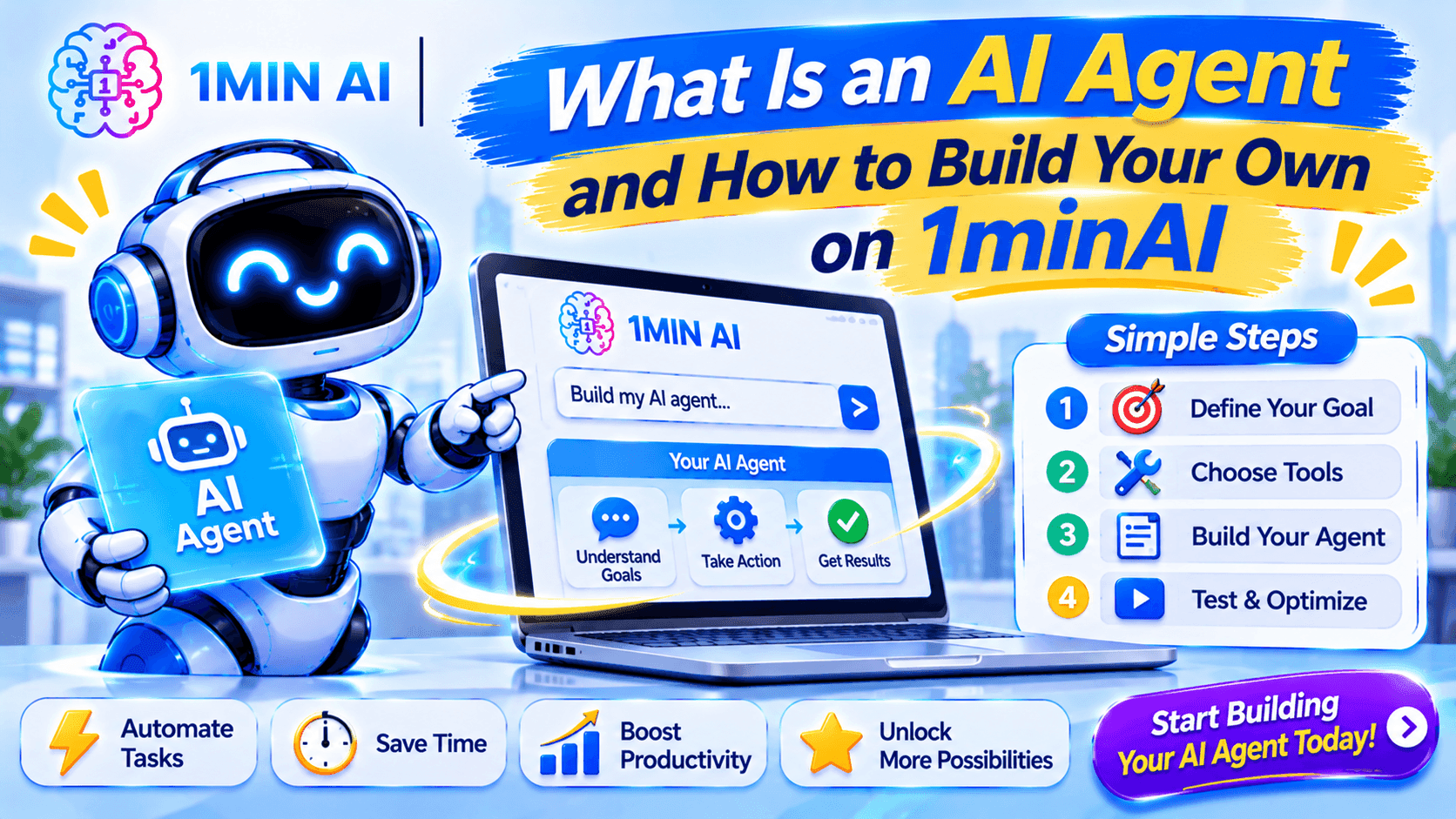
Learn what an AI agent is, how it works, and how to build your own AI workflow on 1minAI for content creation, research, marketing, and coding.
AI agents - artificial intelligence is moving beyond answering questions. Instead of simply generating text when you enter a prompt, modern AI systems can plan tasks, use tools, process information, and complete multiple steps toward a specific goal.
In this guide, you'll learn what an AI agent is, how it works, the different types of AI agents, and how to build your own practical AI workflow with 1minAI. Whether you're a marketer, business owner, developer, or content creator, you can start turning repetitive tasks into structured AI-powered processes.
What Is an AI Agent?
An AI agent is an AI-powered system that works toward a defined goal by interpreting information, making decisions, and carrying out tasks through one or more steps.
Unlike a traditional chatbot that mainly responds to individual prompts, an AI agent can manage a sequence of actions. Depending on its tools and permissions, it may gather information, analyze data, generate content, use external services, check results, and decide what to do next.
For example, consider these two requests:
- Traditional chatbot: "Write a LinkedIn post about AI marketing."
- AI agent: "Research recent AI marketing trends, identify three useful angles for small business owners, draft LinkedIn posts, create supporting visuals, and prepare a publishing schedule."
The first request asks AI to generate one piece of content. The second describes a goal that requires multiple connected tasks.
An AI agent is designed to manage that larger process.
AI Agent vs. Chatbot vs. AI Assistant
These terms are sometimes used interchangeably, but they describe different levels of capability.
| Category | Main purpose | Typical example |
|---|---|---|
| AI chatbot | Answer questions and respond to prompts | Explain a marketing concept |
| AI assistant | Help users complete individual tasks | Rewrite an email or summarize a document |
| AI agent | Work toward a goal through a multi-step process | Research, write, create visuals, and prepare a campaign |
The distinction is not always absolute. An AI assistant can include agent-like capabilities, and a chatbot can become part of an agent workflow. The important question is whether the system can manage and execute a sequence of tasks rather than only generate a response.
How Does an AI Agent Work?
An AI agent combines an AI model with instructions, relevant information, and tools. It uses these components to understand a goal and determine how to complete it.
A typical AI agent workflow follows five stages.
1. Receive a Goal
First, the user provides an objective.
For example:
"Create a one-week social media content plan for a small business selling sustainable skincare products."
The agent needs to understand the desired outcome, audience, topic, and any requirements before beginning.
A specific goal produces a more useful result than a vague instruction such as "Help me with marketing."
2. Understand and Plan the Task
The AI model interprets the request and breaks it into smaller steps.
For the skincare example, the plan might include:
- Identify the target audience.
- Research relevant skincare topics.
- Select weekly content themes.
- Develop post ideas for each platform.
- Draft captions and calls to action.
- Suggest suitable visuals.
- Organize the content into a weekly calendar.
Planning helps the agent manage a larger task without treating everything as one enormous prompt.
3. Use Tools and Information
An AI model provides reasoning and language capabilities, but tools allow an agent to interact with information and systems.
Depending on its configuration, an agent may use:
- Web search to research current information.
- Document tools to read PDFs and reports.
- Image generators to create visuals.
- Code execution tools to test software.
- APIs to communicate with external applications.
- Databases or memory to retrieve relevant context.
For example, a research agent may search the web and analyze uploaded documents before preparing a report.
Not every AI agent has access to every tool. Its actual capabilities depend on the tools, integrations, and permissions available to it.
4. Execute and Evaluate
After planning, the agent carries out the required steps.
It may generate a draft, review the result against the user's instructions, identify missing information, and revise its output.
Some agents can repeat this process when a task fails or produces an incomplete result. Others may need the user to provide feedback before continuing.
5. Deliver the Result
Finally, the agent produces the requested outcome.
This could be a report, content calendar, code changes, research summary, or prepared social media posts.
For actions that affect other people or external systems, such as publishing content or sending messages, human review and approval are important safeguards.
What Are the Different Types of AI Agents?
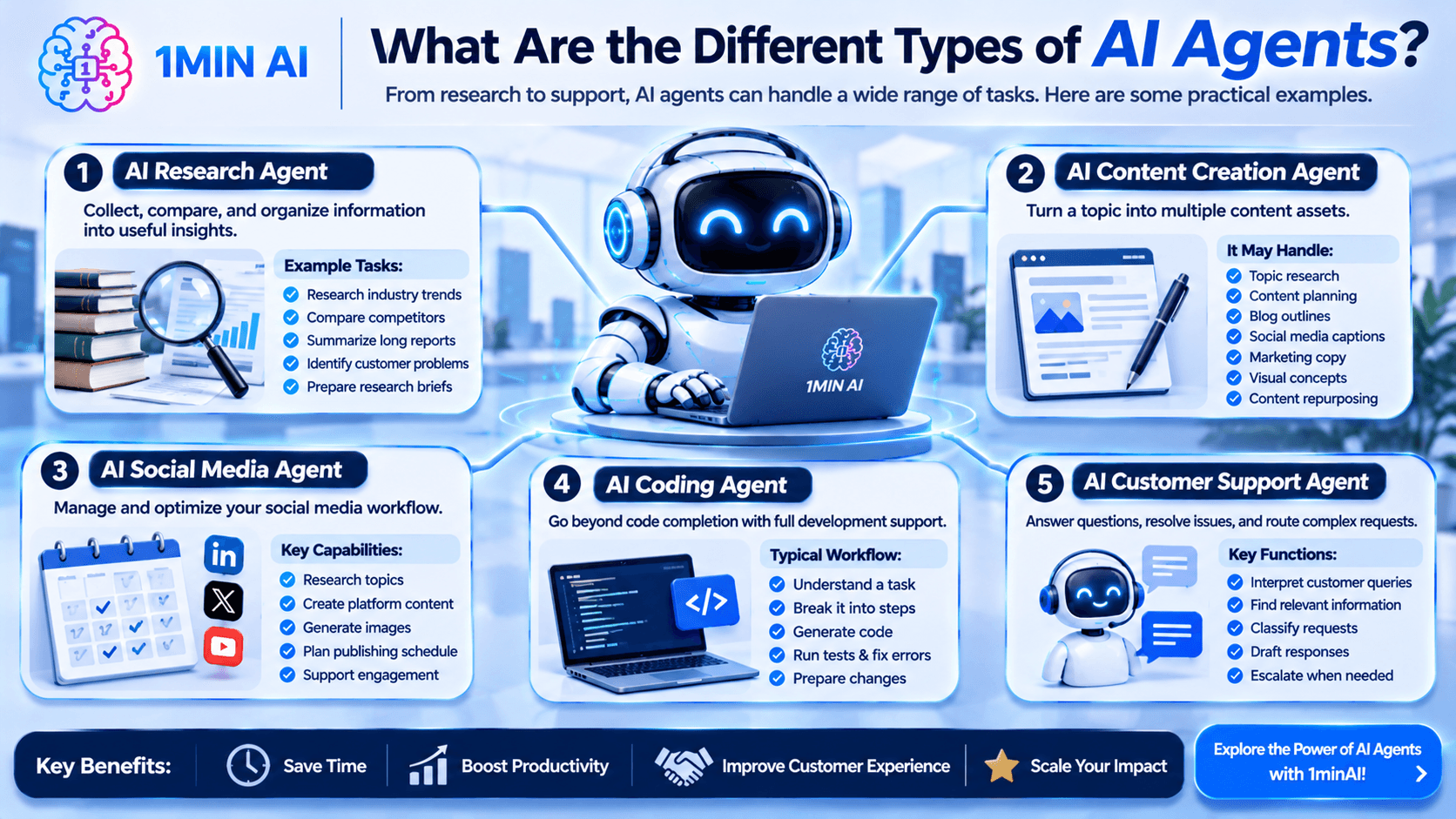
AI agents can be designed for many different industries and tasks. Here are some practical examples.
1. AI Research Agent
An AI research agent collects information from relevant sources, compares findings, and organizes the results into a useful report.
Example tasks:
- Research industry trends.
- Compare competitors.
- Summarize long reports.
- Identify common customer problems.
- Prepare research briefs.
This type of agent is useful for marketers, business founders, students, and researchers who regularly work with large amounts of information.
2. AI Content Creation Agent
A content creation agent helps turn a topic or campaign objective into multiple content assets.
It may handle:
- Topic research.
- Content planning.
- Blog outlines.
- Social media captions.
- Marketing copy.
- Visual concepts.
- Content repurposing.
For example, a single webinar could become a blog outline, several LinkedIn posts, short video scripts, and an email newsletter.
3. AI Social Media Agent
An AI social media agent helps manage repetitive social media tasks through a connected workflow.
Depending on its capabilities, it can research topics, create platform-specific content, generate images, organize publishing schedules, and support engagement workflows.
1minAI's AI Agent for Social Media Management explores how these capabilities can be brought together to reduce the work involved in managing multiple social channels.
4. AI Coding Agent
An AI coding agent supports software development beyond simple code completion.
A more advanced coding workflow can:
- Understand a development task.
- Break it into smaller steps.
- Generate code across relevant files.
- Run tests.
- Identify errors.
- Suggest fixes.
- Prepare changes for human review.
Explore 1minAI's AI Agent for Software Development to learn more about agent-based development workflows.
5. AI Customer Support Agent
A customer support agent can help interpret customer questions, retrieve relevant information, classify requests, and prepare responses.
For example, it may identify whether a customer needs help with an order, product information, or a technical issue.
For sensitive requests, refunds, account changes, or unusual complaints, the agent should follow clear escalation rules and involve a human when necessary.
How to Build Your Own AI Agent on 1minAI
You don't always need to write code to start designing an AI agent. You can begin by defining a specific task, creating clear instructions, and using AI tools to organize the workflow.
1minAI provides a multi-model AI workspace and agent-focused features that can help you build and run practical AI-powered workflows.
Here is a beginner-friendly way to get started.
Step 1. Choose One Problem to Solve
Start with a repetitive task that takes too much time.
Avoid building an agent that tries to do everything at once. A focused workflow is easier to design, test, and improve.
Here are some examples:
| Your role | Repetitive task | Possible AI agent |
|---|---|---|
| Marketer | Researching and writing social posts | Social media content agent |
| Business owner | Analyzing customer feedback | Customer insight agent |
| Student | Researching and summarizing sources | Research agent |
| Developer | Debugging and reviewing code | Coding agent |
| Content creator | Repurposing long-form content | Content repurposing agent |
Beginner tip: Choose a task with a clear beginning and end. For example, "Turn one blog article into five LinkedIn post drafts" is easier to manage than "Run my entire marketing department."
Step 2. Define Your Agent's Role and Goal
Next, write down what your agent is responsible for.
A useful agent brief includes:
- Name: What should you call the agent?
- Role: What kind of specialist should it act as?
- Goal: What outcome should it produce?
- Audience: Who will use or receive the output?
- Inputs: What information will it need?
- Output: What should the final result look like?
For example, you might create a LinkedIn Content Agent with the following brief:
Agent name: LinkedIn Content Strategist
Role: B2B social media content strategist.
Goal: Turn business topics into useful LinkedIn content that attracts the right audience.
Audience: Startup founders, business owners, and marketing professionals.
Inputs: Topic, company information, target audience, brand voice, and campaign objective.
Output: A research summary, post angle, LinkedIn draft, suggested visual, and call to action.
This brief gives your AI workflow a clear direction.
Step 3. Write Clear Agent Instructions
Instructions are one of the most important parts of an AI agent. They tell the model how to approach a task and what a successful result should look like.
You can use the following template as a starting point.
Copy-and-use AI agent instruction prompt:
You are an AI agent specializing in [YOUR TASK].
Your primary goal is to [DESCRIBE THE DESIRED OUTCOME].
Target audience: [DESCRIBE YOUR AUDIENCE].
Follow this workflow:
- Review the information and instructions provided by the user.
- Identify the main objective and break the task into smaller steps.
- Research or analyze the available information when needed.
- Complete each step using the appropriate AI capabilities.
- Review the output for accuracy, relevance, and completeness.
- Present the final result in the requested format.
Follow these rules:
- Use clear, practical, and natural language.
- Do not invent facts, statistics, or sources.
- Ask questions when essential information is missing.
- Follow the user's brand voice and formatting requirements.
- Explain any limitations or uncertain information.
- Request human approval before taking external or irreversible actions.
Final output: [DESCRIBE THE FORMAT YOU EXPECT].
You can adapt this prompt for content creation, research, customer support, business analysis, or software development.
Step 4. Choose the Right AI Model
Not every task needs the same AI model.
For example:
- A reasoning-focused model may be useful for complex research and analysis.
- A writing-focused model may be suitable for creating natural marketing content.
- A coding-focused model may be better for debugging and software development.
- A multimodal model may help interpret documents and images.
With 1minAI Multi AI Chat, you can compare responses from multiple AI models using the same prompt.
A practical approach is to test your agent instructions with different models, compare the results, and select the one that best meets your requirements.
This is especially useful when you are unsure which model is most suitable for a particular workflow.
Step 5. Connect the Required Tools and Information
An agent can only perform actions supported by its available tools.
For example, a content workflow may require:
- Web research for current topics.
- Document chat for analyzing existing reports.
- AI writing tools for drafting and editing.
- Image generation for visual assets.
- A supported publishing integration for posting content.
On 1minAI, you can explore different AI capabilities in one workspace. Its features include Multi AI Chat, document-related tools, image capabilities, and AI agents for specific workflows.
You can explore the broader 1minAI AI Agents collection to discover available agent-focused tools.
Remember that using several AI tools in one workflow does not automatically make the workflow a fully autonomous agent. The available integrations and execution capabilities determine how much of the process can run automatically.
Step 6. Test Your Agent With a Real Task
Before relying on an agent, test it with a small and realistic task.
For example, if you are building a LinkedIn content agent, give it:
- One topic.
- A short description of your business.
- Your target audience.
- Your preferred tone.
- One example of a successful post.
Then evaluate the result.
Ask yourself:
- Did it understand the objective?
- Did it follow the requested tone?
- Was the information accurate?
- Was the output relevant to the audience?
- Did it follow the required structure?
- Did it identify missing information instead of making assumptions?
If the output is too generic, improve the instructions. If it misses important details, provide better context. If it produces incorrect information, add source requirements and verification steps.
Step 7. Add Human Review and Improve the Workflow
A good AI agent should not be judged only by how quickly it completes a task. The quality and reliability of its output matter just as much.
For your first version, keep a human involved in important decisions.
For example, a social media agent might prepare a post and visual, but a person should review the content before it is published.
As you test the workflow, improve it by:
- Removing unnecessary steps.
- Adding missing context.
- Refining the agent's instructions.
- Improving output templates.
- Defining when the agent should ask for help.
- Tracking errors and recurring weaknesses.
Once the workflow becomes reliable, you can explore supported automation and scheduling options.
How to Build a Social Media Agent on 1minAI: A Practical Example
Let's put the concepts together.
Imagine you run a small business and want to publish consistently on LinkedIn without spending hours researching topics, writing posts, and creating images.
You can design a social media workflow with four main stages.
Stage 1. Gather Business Information
Start by preparing the information your agent needs:
- Company description.
- Products or services.
- Target audience.
- Main marketing goals.
- Brand voice.
- Topics you want to discuss.
You can also provide relevant website links, reports, or existing content when the workflow supports those inputs.
The more useful context you provide, the easier it is to produce content that reflects your business.
Stage 2. Research and Develop Content Ideas
Ask your AI workflow to identify relevant topics and develop several content angles.
For example:
"Research common challenges faced by small business owners when adopting AI. Suggest five LinkedIn post ideas, each with a different angle and a practical takeaway."
You can use Multi AI Chat to compare how different models approach the research and content strategy.
Stage 3. Write Posts and Create Visuals
Once you choose a content angle, generate the post.
A useful instruction might be:
"Write a LinkedIn post for startup founders about using AI to reduce repetitive marketing work. Start with a relatable hook, explain three practical applications, and finish with a question that encourages discussion. Use a professional but conversational tone."
Then prepare a suitable image or visual concept to support the post.
Review both the copy and the visual before moving to publication.
Stage 4. Organize and Publish Your Content
Finally, arrange the posts into a weekly schedule.
For example:
| Day | Content idea | Goal |
|---|---|---|
| Monday | Common AI marketing challenges | Awareness |
| Tuesday | Practical AI workflow | Education |
| Wednesday | Business use case | Trust |
| Thursday | Productivity tips | Engagement |
| Friday | Lessons and insights | Community |
For a more connected social publishing workflow, explore the [1minAI Social Agents workspace](https://app.1min.ai/social-agents?_gl=1*jbgrp1*_ga*Nzk1MzIxMDY4LjE3OTE0Mjg4NDk.*_ga_QHZ46LYRLP*czE3OTQ5NzA2MDgkbzI4JGcwJHQxNzk0OTcwNjA4JGo2MCRsMCRoMA..).
1minAI's social agent workflow brings together information gathering, content writing, visual creation, and publishing options. Depending on the available agent and account setup, you can use controls such as running a task immediately, running it once, or setting a recurring schedule.
Always review brand-facing content and confirm publishing permissions before allowing an agent to distribute it.
Why Build AI Agent Workflows With 1minAI?
Building an effective AI workflow often requires more than one AI capability. You may need one model for research, another for writing, and a separate tool for generating images or analyzing documents.
Switching between different platforms can make the process slower and harder to manage.
1minAI brings multiple AI capabilities into one workspace, making it easier to explore and combine tools for different tasks.
Here are some useful advantages:
1. Compare Multiple AI Models
Use Multi AI Chat to send a prompt to multiple models and compare their answers. This is helpful when you want to evaluate different ideas, writing styles, or approaches before choosing an output.
2. Access Different AI Capabilities
Explore writing, document, image, and other AI tools in one platform. This can help you organize workflows that involve multiple types of content.
3. Explore Ready-Made AI Agents
Instead of designing every workflow from scratch, you can explore agent-focused tools for areas such as social media management and software development.
4. Build a More Structured Workflow
Think in terms of objectives, inputs, steps, tools, and final outputs. Combining these elements helps you move from isolated AI prompts toward repeatable processes.
To get started, visit 1minAI AI Agents and explore the Multi AI Chat workspace.
Frequently Asked Questions About AI Agents
1. What is an AI agent in simple terms?
An AI agent is a system that uses artificial intelligence to work toward a goal by understanding instructions, making decisions, and completing multiple tasks. Unlike a basic chatbot, it can use tools and manage a sequence of actions.
2. What is the difference between an AI agent and ChatGPT?
ChatGPT is an AI product that can answer questions, generate content, and support many tasks. An AI agent is a system designed to manage a goal through a workflow, potentially using tools and taking actions. ChatGPT can also be used as part of an agent workflow.
3. Can I build an AI agent without coding?
Yes. You can begin by designing an agent's role, instructions, workflow, and expected outputs using natural language. No-code platforms and ready-made agent tools can help you create practical workflows without writing code. More advanced integrations or custom tools may still require technical skills.
4. Can I build an AI agent on 1minAI?
You can use 1minAI's Multi AI Chat and available AI capabilities to design and run structured AI workflows. You can also explore its agent-focused tools, including social media agents. The exact level of customization and automation depends on the specific feature and available integrations.
Conclusion
AI agents represent an important step forward in how people use artificial intelligence. Instead of generating one response at a time, they can work toward a goal through a sequence of connected tasks, using models, tools, instructions, and relevant context.
You don't need to start with a complicated technical project. Choose one repetitive task, define a clear objective, write useful instructions, select the right AI capabilities, and test the workflow with real examples.
With 1minAI, you can explore multiple AI models through Multi AI Chat, combine different AI capabilities, and discover ready-made agent workflows for areas such as social media management and software development.
Start with one useful workflow, improve it through testing, and gradually build a more productive way of working with AI.
For more AI capabilities, visit 1minAI Features and try the 1minAI Agent.
- #Commerce
- #Navigation
Alternatives
Discover the best alternatives to 1minAI and compare features, pricing, and use cases.

1min.AI vs OpenRouter
1min.AI vs. OpenRouter: Compare the ready-to-use AI creation product against the technical API tool. Find out if you need a zero-code creative studio or a coding infrastructure hub.
 Ngoc Hong

1min.AI vs. Metricool: Which Platform Does More for Your Marketing Workflow?
Compare 1min.AI vs. Metricool across content creation, visual production, scheduling, analytics, MCP, and pricing to find the right platform for your marketing workflow.

1min.AI vs. Hootsuite: Which Social Media Tool Fits Your Workflow?
Compare 1min.AI vs. Hootsuite to explore their AI content creation, social media publishing, analytics, pricing, and collaboration features. Find the right tool for your workflow.
AI Tools
Discover the best AI tools to boost productivity, creativity, and everyday work.

Create Consistent Cartoon Content in Just a Few Steps
Create engaging cartoon videos for TikTok and Reels with 1min.AI. Research ideas, create characters, and turn images into animated videos in 3 simple steps.
 Lien Anh Vu

One Product, 10 UGC Creatives: How AI Makes Content Testing Easier
Create more authentic UGC with an AI UGC video generator, test more creative angles and scale affiliate content without filming every version.
Lien Anh Vu
Top 4 Affordable AI Tools for Startup Founders
Discover the top 4 affordable AI tools for startup founders to validate ideas, build products, create content, and launch faster without overspending.
 Tram Ta
AI Features
Comprehensive AI features that streamline workflows, improve efficiency, and empower teams to achieve more.
Create Consistent Cartoon Content in Just a Few Steps
Create engaging cartoon videos for TikTok and Reels with 1min.AI. Research ideas, create characters, and turn images into animated videos in 3 simple steps.
Lien Anh VuOne Product, 10 UGC Creatives: How AI Makes Content Testing Easier
Create more authentic UGC with an AI UGC video generator, test more creative angles and scale affiliate content without filming every version.
Lien Anh Vu
1minAI: Free AI Grammar Checker
Check grammar for free with 1minAI’s AI grammar checker. Find grammar, spelling, and writing mistakes, improve clarity, and polish your content in seconds.
Tram TaAI Use Cases
A curated collection of AI use cases for business, productivity, and industry-specific applications.
Create Consistent Cartoon Content in Just a Few Steps
Create engaging cartoon videos for TikTok and Reels with 1min.AI. Research ideas, create characters, and turn images into animated videos in 3 simple steps.
Lien Anh VuOne Product, 10 UGC Creatives: How AI Makes Content Testing Easier
Create more authentic UGC with an AI UGC video generator, test more creative angles and scale affiliate content without filming every version.
Lien Anh Vu
Best Time to Post on Instagram: A Practical Guide for Better Engagement
Discover the best time to post on Instagram, including the best days and times for different audiences, plus tips to find the ideal posting schedule for your account.
Tram TaAI Tutorials
Learn how to use AI with practical, step-by-step tutorials.

Black Friday AI Tool Deals in 2026
Discover what Black Friday AI tool deals 2026 has to offer. Find out how to secure the 1min.AI lifetime deal via AppSumo, Dealify, Stack Social, and verify on Trustpilot, Slashdot, and Software Advice.
 Hang Nguyen
Create Consistent Cartoon Content in Just a Few Steps
Create engaging cartoon videos for TikTok and Reels with 1min.AI. Research ideas, create characters, and turn images into animated videos in 3 simple steps.
Lien Anh Vu
[Seedance 2.5 New] Better AI Product Videos, Less Rework in 1min.AI
Use Seedance 2.5 image to video on 1min.AI to create more consistent AI product videos, reduce failed generations, save credits, and improve UGC workflows.
Lien Anh VuAI Guides
Learn AI faster with practical guides, real-world examples, and actionable best practices.

Safely Buy AI Tools Online: 2026 Black Friday Guide
Discover how to find and secure the best Black Friday AI deals online. Learn expert strategies to avoid scams, combat subscription fatigue, and verify software.
Hang NguyenCreate Consistent Cartoon Content in Just a Few Steps
Create engaging cartoon videos for TikTok and Reels with 1min.AI. Research ideas, create characters, and turn images into animated videos in 3 simple steps.
Lien Anh Vu[Seedance 2.5 New] Better AI Product Videos, Less Rework in 1min.AI
Use Seedance 2.5 image to video on 1min.AI to create more consistent AI product videos, reduce failed generations, save credits, and improve UGC workflows.
Lien Anh VuAI Solutions
Browse the best AI solutions for automation, coding, research, productivity, customer support, marketing, and business workflows.
Safely Buy AI Tools Online: 2026 Black Friday Guide
Discover how to find and secure the best Black Friday AI deals online. Learn expert strategies to avoid scams, combat subscription fatigue, and verify software.
Hang NguyenCreate Consistent Cartoon Content in Just a Few Steps
Create engaging cartoon videos for TikTok and Reels with 1min.AI. Research ideas, create characters, and turn images into animated videos in 3 simple steps.
Lien Anh VuOne Product, 10 UGC Creatives: How AI Makes Content Testing Easier
Create more authentic UGC with an AI UGC video generator, test more creative angles and scale affiliate content without filming every version.
Lien Anh VuAI Models
Explore the world's leading AI models in one place.
Create Consistent Cartoon Content in Just a Few Steps
Create engaging cartoon videos for TikTok and Reels with 1min.AI. Research ideas, create characters, and turn images into animated videos in 3 simple steps.
Lien Anh VuOne Product, 10 UGC Creatives: How AI Makes Content Testing Easier
Create more authentic UGC with an AI UGC video generator, test more creative angles and scale affiliate content without filming every version.
Lien Anh Vu[Seedance 2.5 New] Better AI Product Videos, Less Rework in 1min.AI
Use Seedance 2.5 image to video on 1min.AI to create more consistent AI product videos, reduce failed generations, save credits, and improve UGC workflows.
Lien Anh VuAI Comparisons
Compare AI tools, models, and platforms to find the best fit for your needs.

Kling AI Vs Veo 3: Which Model Wins?
Kling AI vs Veo 3: compare motion, native audio, pricing & free tiers to see which AI video generator wins for your project - try both on 1min.AI.
 Trang Tran
[Seedance 2.5 New] Better AI Product Videos, Less Rework in 1min.AI
Use Seedance 2.5 image to video on 1min.AI to create more consistent AI product videos, reduce failed generations, save credits, and improve UGC workflows.
Lien Anh Vu
DeepSeek V4 Pro vs Flash Comparison
Compare DeepSeek V4 Pro vs DeepSeek V4 Flash metrics. Optimize your agentic apps and improve AI fact checking on 1min.ai today.
Ngoc HongAI Integrations
Seamlessly integrate AI with the tools you already use to automate work and boost productivity.

POV: You Have 10+ Posts to Make Every Day
Learn how to build an AI content workflow that helps content creators produce 10+ social media posts a day faster with AI brainstorming, image generation, and content creation.
Lien Anh Vu
How to Use an AI Fashion Video Generator for Fashion Week 2026
Turn Fashion Week 2026 ideas into stunning fashion videos with AI. Learn how to brainstorm, create visuals, and transform images into videos with one simple workflow.
Lien Anh Vu
Stop Switching Between AI Apps: How AI Integration Transforms Employer Branding
Discover how AI integration helps HR teams streamline employer branding by combining AI writing, documents, images, video, and multiple AI models into one workspace.
Tram TaAI for Industries
Find the best AI tools and workflows for healthcare, finance, education, legal, manufacturing, retail, real estate, and more

No Photoshoot? Create AI Fashion Videos With Seedance 2.5
No photoshoot needed! Create stunning AI fashion videos with Seedance 2.5 on 1min.AI using outfit references, cinematic prompts, and surreal scenes.
Lien Anh Vu
Voice Cloning AI Free: How to Clone Any Voice Online in Minutes
Try voice cloning AI free with 1min.AI. Upload a 5-second clip, pick an ElevenLabs model, choose from 32 languages, and turn text to speech in your own voice.
Trang Tran
Text To Video AI Free Without Watermark Online
Create text to video AI free without watermark online with 1min.AI. Pick top models, turn prompts into HD clips, and download clean videos fast. Try it free.
Trang TranAI Agents
Discover and run AI agents to automate tasks across your work and daily life.
1minAI: Free AI Grammar Checker
Check grammar for free with 1minAI’s AI grammar checker. Find grammar, spelling, and writing mistakes, improve clarity, and polish your content in seconds.
Tram Ta
AI Agents for Facebook
Use an AI Agent for Facebook to create content, generate images, schedule posts, and publish from your documents and conversations.
Ngoc Hong
AI Agent vs AI Assistant: Which One Actually Saves Designers More Time?
Learn the difference between AI Agent vs AI Assistant and discover which solution helps designers automate repetitive work, reduce revisions, and save more time.
Lien Anh VuAI Workflows
Explore ready-to-use AI workflows for productivity, marketing, sales, support, and more.
Create Consistent Cartoon Content in Just a Few Steps
Create engaging cartoon videos for TikTok and Reels with 1min.AI. Research ideas, create characters, and turn images into animated videos in 3 simple steps.
Lien Anh VuOne Product, 10 UGC Creatives: How AI Makes Content Testing Easier
Create more authentic UGC with an AI UGC video generator, test more creative angles and scale affiliate content without filming every version.
Lien Anh VuPOV: You Have 10+ Posts to Make Every Day
Learn how to build an AI content workflow that helps content creators produce 10+ social media posts a day faster with AI brainstorming, image generation, and content creation.
Lien Anh VuNewsletter
Weekly AI Innovations with 1minAI

🔮 Weekly AI Innovations #146: Mistral 3.5, Qwen Image & Cohere A+ are ready on 1min.ai
Deploy Mistral Large 3, Qwen Image 3.0, and Cohere Command A+ on 1min.ai. Boost RAG accuracy and cut visual generation latency in one unified AI workspace.
Hang Nguyen
🔮 Weekly AI Innovations #145: X Content Agent & GPT 6.1 Terra on 1min.ai
Scale viral reach with the X Content Agent on 1min.ai. Discover an end-to-end 4-stage pipeline with zero token burn, plus the launch of GPT 6.1 Terra.
Hang Nguyen
🔮 Weekly AI Innovations #144: LinkedIn Content Agent: Complete B2B Publishing Pipeline
Scale B2B influence with the LinkedIn Content Agent on 1min.ai. Discover an end-to-end 4-stage pipeline with zero redundant token burn and 1-click publishing.
Hang Nguyen