
Ceiling Fan Transition Trend with 5 Halloween AI Cosplay Looks

Lien Anh Vu
October 15, 2026

Try the ceiling fan transition trend with 5 Halloween AI cosplay looks. Learn how to create outfit photos and AI transition videos using 1min.AI.
What if one spinning ceiling fan could transform you into five different Halloween characters?
The ceiling fan transition trend turns a simple outfit change into a satisfying visual effect. Every time a fan blade passes across the screen, a completely new look appears.
Now imagine giving this viral trend a Halloween twist. Instead of changing between everyday outfits, you transform into characters inspired by gothic movies, mystical fantasy, and spooky circus fashion.
The best part? You don't need five actual costumes, hours of makeup, or a complicated filming setup.
With 1min.AI, you can create Halloween cosplay images using your own photo and turn them into an AI outfit transition video.
Here's how to bring five Halloween looks together in one creative video.
What Is the Ceiling Fan Transition Trend?
The ceiling fan transition trend uses a spinning fan blade to create seamless outfit changes. With a fixed overhead camera, each passing blade reveals a new look.
Instead of filming multiple outfit changes, creators can use AI to generate different costumes and transitions from a single photo.
For Halloween 2026, it's a fun way to showcase multiple costumes on TikTok, Instagram Reels, and YouTube Shorts.
5 Halloween AI Cosplay Looks to Try
Before creating your AI ceiling fan transition, you'll need a collection of Halloween cosplay images.
Here are five looks that work particularly well for dramatic outfit transformations.
1. The Mandalorian and Grogu
A recognizable sci-fi costume featuring metallic armor, dark fabric layers, and a cute Grogu-inspired companion. The detailed armor creates a striking opening transformation.
2. Clowncore
A playful yet slightly creepy aesthetic with colorful ruffles, oversized bows, vintage circus fashion, and expressive clown makeup. Its bright colors create a noticeable contrast with darker outfits.
3. Edward Scissorhands
A gothic-inspired costume featuring black leather, metallic accessories, dramatic hairstyles, and pale makeup. Perfect for an edgy, mysterious transformation.
4. Mystic Siren
An elegant fantasy look with flowing fabrics, pearl accessories, shimmering ocean-inspired makeup, and soft silver-blue tones.
5. Dark Enchantress
A mysterious gothic costume featuring black velvet, distressed lace, silver jewelry, and a crescent moon headpiece. Its dramatic silhouette makes it an excellent final reveal.
You don't need to write each costume prompt from scratch.
We've already prepared five detailed, ready-to-use prompts that you can copy directly into an AI image generator.
Explore 5 Halloween AI Costume Prompts for 2026
Choose your favorite looks, grab the prompts, and follow the steps below to create your own Halloween ceiling fan transition video.

How to Create the Ceiling Fan Transition Trend with 1min.AI
Creating this Halloween transformation involves two main stages: generating cosplay images and turning them into an AI video.
Step 1. Generate Halloween Cosplay Images with FLUX.2 Max
First, create Halloween costume images featuring your own face.
- Open 1min.AI: Visit 1min.AI and navigate to AI for Image → Image Generator.
- Choose your AI model: Select FLUX.2 Max by Black Forest Labs.
- Upload your personal image: Choose a clear photo of yourself with visible facial features and natural lighting.
- Copy a Halloween prompt: Open our 5 Halloween AI Costume Prompts article and copy the prompt for your preferred costume.
- Paste the prompt: Enter the copied prompt into the Image Generator.
- Click Run: Let FLUX.2 Max generate your Halloween cosplay image.
- Save your result: Review the generated image and download it if you're happy with the costume and facial details.
- Repeat for other costumes: Follow the same process to create the remaining Halloween looks.
Tip: Use the same personal image for all five generations to help maintain facial consistency. Because the original cosplay prompts use different backgrounds and poses, try to keep your selected final images as similar as possible in camera angle, body position, and lighting before creating the video.
Once you've prepared your Halloween cosplay images, you're ready to turn them into a video.

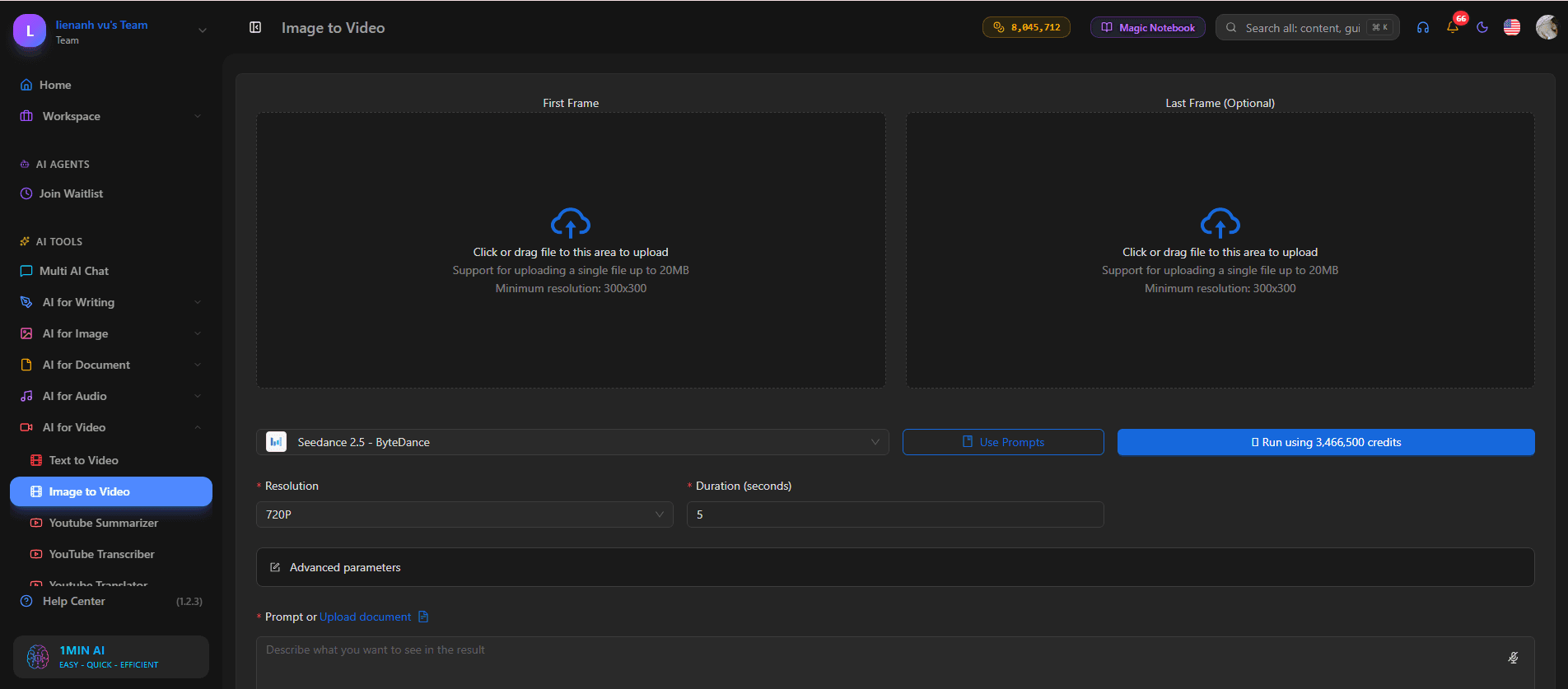
Step 2. Create the Ceiling Fan Transition with Image to Video
Next, use AI video generation to connect your Halloween looks through the spinning ceiling fan effect.
- Open Image to Video: Return to 1min.AI and navigate to AI for Video → Image to Video.
- Select a video model: Choose an available AI video model suitable for image-to-video generation.
- Upload your Halloween images: If your chosen model supports multiple image references, upload the five cosplay images in the order you want them to appear.
- Enter the video prompt: Copy the prompt below and paste it into the prompt field.
- Set your video format: Select a vertical 9:16 aspect ratio and a supported duration, where these options are available.
- Click Run: Generate your Halloween ceiling fan transition video.
- Review the result: Check the costume order, character consistency, fan movement, and timing of each transformation.
Copy-Ready Halloween Ceiling Fan Transition Video Prompt
Create an ultra-realistic 15-second vertical 9:16 Halloween ceiling fan outfit transition video. Use the five provided Halloween cosplay reference images in their exact order. The main character must remain the same person throughout the entire video.
CAMERA AND SETTING
A fixed smartphone camera is mounted directly overhead, pointing straight down at a 90-degree angle. The same woman lies on her back on a dark circular rug inside a modern Halloween-decorated apartment. Glowing pumpkins, subtle cobwebs, warm orange lighting, and soft purple shadows create a realistic Halloween atmosphere.
Keep the camera perfectly still, with no zooming, panning, rotation, or changes to the background.
CEILING FAN MOVEMENT
A large black ceiling fan rotates slowly between the camera and the character. Each blade moves smoothly across the frame, briefly blocking the character from view.
Every outfit transformation must happen only while the fan blade covers the character, creating a seamless visual wipe transition.
HALLOWEEN TRANSFORMATION TIMELINE
0–3 seconds: The character appears wearing the Mandalorian-inspired Halloween costume, with realistic metallic armor and a small Grogu-inspired accessory.
3–5 seconds: The first fan blade passes across the screen, instantly changing the outfit into the colorful Clowncore costume.
5–8 seconds: The second fan blade passes, revealing an Edward Scissorhands-inspired gothic costume with black leather and dramatic makeup.
8–11 seconds: The third fan blade passes, transforming the character into a mystical siren with flowing silver-blue fabrics and pearl accessories.
11–13 seconds: The fourth fan blade passes, revealing the final Dark Enchantress costume with black velvet, silver jewelry, and a crescent moon headpiece.
13–15 seconds: Hold the final Dark Enchantress look while the character gazes confidently toward the camera.
CHARACTER CONSISTENCY
Preserve the same facial identity, facial structure, skin tone, body proportions, and recognizable features throughout the video. Only the clothing, makeup, hairstyle, and accessories should change.
TRANSITION RULES
Exactly five Halloween costumes and four outfit transformations. Every transformation must occur during a fan-blade pass. No visible outfit morphing, random flashes, abrupt cuts, or background changes.
VISUAL QUALITY
Authentic smartphone footage, natural skin texture, realistic costume materials, believable shadows, smooth fan movement, and subtle motion blur. No plastic skin, CGI appearance, distorted anatomy, duplicated characters, text, logos, or watermarks.
Important: Not every Image to Video model supports five reference images or a full 15-second sequence. If your selected model has fewer image inputs or a shorter duration limit, generate smaller transitions between individual outfits and combine the clips afterward.
This can also make it easier to control exactly when each costume change happens.
Step 3. Refine and Share Your Halloween Video
Once your AI video is generated, review it before publishing.
- Check facial consistency: Make sure the character still looks like the same person after every transformation.
- Review the fan transitions: Each outfit change should happen while the blade blocks the character, rather than through visible morphing.
- Match the music: Add Halloween-inspired audio and synchronize each outfit reveal with the beat.
- Keep the pacing fast: Avoid unnecessary pauses between transformations.
- Add an engaging hook: Use a short opening line to capture attention.
For example:
Opening Hook: "5 Halloween Looks. 1 Ceiling Fan. 🎃"
Ending CTA: "Which Halloween look wins? 👀"
You can finish your video in an editor like CapCut, then share it on TikTok, Instagram Reels, or YouTube Shorts.
Need more Halloween outfit inspiration? Explore our 5 Halloween Costume AI Prompts for 2026 to discover creative costume ideas and generate your own Halloween looks with 1min.AI.
Tips for Smoother AI Ceiling Fan Transitions
Even with detailed prompts, AI video generation may require a few attempts to achieve convincing results.
Here are some ways to improve your Halloween transformation.
- Use consistent character references. Generate all five costumes using the same personal photo and check that facial features remain recognizable.
- Keep the camera angle fixed. A stable overhead camera makes each outfit change easier to follow.
- Avoid excessive motion. Sudden character movements or camera shifts may make the transitions less natural.
- Make fan blades clearly visible. The blade should conceal enough of the subject to hide the outfit change.
- Prioritize realistic costume details. Realistic fabric folds, makeup textures, and shadows help the video resemble authentic footage.
- Start with shorter clips if needed. If the model struggles with five transformations, test two outfits first and gradually build the full sequence.
The goal isn't to add more effects. It's to make every outfit transformation feel smooth and believable.
Frequently Asked Questions
What is the ceiling fan transition trend on TikTok?
It's a short-form outfit-change effect where a spinning ceiling fan hides transitions between different looks. When a fan blade passes across the camera, the person appears in a new outfit.
Can I make a ceiling fan transition using AI?
Yes. You can generate outfit images with an AI image generator and animate them with a suitable Image to Video model. Results depend on the model's reference-image support and its ability to follow transition instructions.
Can I use my own face for Halloween AI cosplay?
Yes. Upload a clear personal image to FLUX.2 Max on 1min.AI, then paste one of the Halloween cosplay prompts to create a customized costume image.
Do I need to wear real Halloween costumes?
No. AI image generation allows you to experiment with digital Halloween costumes without physically wearing each outfit.
What makes a good ceiling fan transition prompt?
A good prompt describes the fixed overhead camera, fan movement, outfit sequence, timing, and character consistency. It should clearly instruct the AI to change outfits only when a fan blade hides the subject.
Create Your Own Halloween Ceiling Fan Transition
The ceiling fan transition trend is a creative way to bring multiple Halloween costumes together in one short video.
Instead of spending hours preparing different outfits, you can use AI to experiment with five distinct cosplay styles and explore how they look on your own character.
Start by generating your Halloween images with FLUX.2 Max, then use Image to Video on 1min.AI to bring the transformations to life.
With the right reference images, clear prompts, and careful transition timing, you can create Halloween content that's fun to watch and easy to personalize.
🚀 Create your Halloween ceiling fan transition with 1min.AI!
- #Informational
Alternatives
Discover the best alternatives to 1minAI and compare features, pricing, and use cases.

1min.AI vs OpenRouter
1min.AI vs. OpenRouter: Compare the ready-to-use AI creation product against the technical API tool. Find out if you need a zero-code creative studio or a coding infrastructure hub.
 Ngoc Hong
1min.AI vs Jarvis AI
Compare 1min.AI vs Jarvis AI to discover which AI platform is better for writing, research, automation, and content creation. Find the best AI assistant for your workflow.
Ngoc Hong
1min.AI vs Taskade
Compare 1min.AI vs Taskade for AI content creation, automation, agents, and creative workflows to find the right workspace.
Ngoc HongAI Tools
Discover the best AI tools to boost productivity, creativity, and everyday work.

Create Consistent Cartoon Content in Just a Few Steps
Create engaging cartoon videos for TikTok and Reels with 1min.AI. Research ideas, create characters, and turn images into animated videos in 3 simple steps.
 Lien Anh Vu
One Product, 10 UGC Creatives: How AI Makes Content Testing Easier
Create more authentic UGC with an AI UGC video generator, test more creative angles and scale affiliate content without filming every version.
Lien Anh Vu
Top 4 Affordable AI Tools for Startup Founders
Discover the top 4 affordable AI tools for startup founders to validate ideas, build products, create content, and launch faster without overspending.
 Tram Ta
AI Features
Comprehensive AI features that streamline workflows, improve efficiency, and empower teams to achieve more.
Create Consistent Cartoon Content in Just a Few Steps
Create engaging cartoon videos for TikTok and Reels with 1min.AI. Research ideas, create characters, and turn images into animated videos in 3 simple steps.
Lien Anh VuOne Product, 10 UGC Creatives: How AI Makes Content Testing Easier
Create more authentic UGC with an AI UGC video generator, test more creative angles and scale affiliate content without filming every version.
Lien Anh Vu
1minAI: Free AI Grammar Checker
Check grammar for free with 1minAI’s AI grammar checker. Find grammar, spelling, and writing mistakes, improve clarity, and polish your content in seconds.
Tram TaAI Use Cases
A curated collection of AI use cases for business, productivity, and industry-specific applications.
Create Consistent Cartoon Content in Just a Few Steps
Create engaging cartoon videos for TikTok and Reels with 1min.AI. Research ideas, create characters, and turn images into animated videos in 3 simple steps.
Lien Anh VuOne Product, 10 UGC Creatives: How AI Makes Content Testing Easier
Create more authentic UGC with an AI UGC video generator, test more creative angles and scale affiliate content without filming every version.
Lien Anh Vu
Best Time to Post on Instagram: A Practical Guide for Better Engagement
Discover the best time to post on Instagram, including the best days and times for different audiences, plus tips to find the ideal posting schedule for your account.
Tram TaAI Tutorials
Learn how to use AI with practical, step-by-step tutorials.

Black Friday AI Tool Deals in 2026
Discover what Black Friday AI tool deals 2026 has to offer. Find out how to secure the 1min.AI lifetime deal via AppSumo, Dealify, Stack Social, and verify on Trustpilot, Slashdot, and Software Advice.
 Hang Nguyen
Create Consistent Cartoon Content in Just a Few Steps
Create engaging cartoon videos for TikTok and Reels with 1min.AI. Research ideas, create characters, and turn images into animated videos in 3 simple steps.
Lien Anh Vu
[Seedance 2.5 New] Better AI Product Videos, Less Rework in 1min.AI
Use Seedance 2.5 image to video on 1min.AI to create more consistent AI product videos, reduce failed generations, save credits, and improve UGC workflows.
Lien Anh VuAI Guides
Learn AI faster with practical guides, real-world examples, and actionable best practices.

Safely Buy AI Tools Online: 2026 Black Friday Guide
Discover how to find and secure the best Black Friday AI deals online. Learn expert strategies to avoid scams, combat subscription fatigue, and verify software.
Hang NguyenCreate Consistent Cartoon Content in Just a Few Steps
Create engaging cartoon videos for TikTok and Reels with 1min.AI. Research ideas, create characters, and turn images into animated videos in 3 simple steps.
Lien Anh Vu[Seedance 2.5 New] Better AI Product Videos, Less Rework in 1min.AI
Use Seedance 2.5 image to video on 1min.AI to create more consistent AI product videos, reduce failed generations, save credits, and improve UGC workflows.
Lien Anh VuAI Solutions
Browse the best AI solutions for automation, coding, research, productivity, customer support, marketing, and business workflows.
Safely Buy AI Tools Online: 2026 Black Friday Guide
Discover how to find and secure the best Black Friday AI deals online. Learn expert strategies to avoid scams, combat subscription fatigue, and verify software.
Hang NguyenCreate Consistent Cartoon Content in Just a Few Steps
Create engaging cartoon videos for TikTok and Reels with 1min.AI. Research ideas, create characters, and turn images into animated videos in 3 simple steps.
Lien Anh VuOne Product, 10 UGC Creatives: How AI Makes Content Testing Easier
Create more authentic UGC with an AI UGC video generator, test more creative angles and scale affiliate content without filming every version.
Lien Anh VuAI Models
Explore the world's leading AI models in one place.
Create Consistent Cartoon Content in Just a Few Steps
Create engaging cartoon videos for TikTok and Reels with 1min.AI. Research ideas, create characters, and turn images into animated videos in 3 simple steps.
Lien Anh VuOne Product, 10 UGC Creatives: How AI Makes Content Testing Easier
Create more authentic UGC with an AI UGC video generator, test more creative angles and scale affiliate content without filming every version.
Lien Anh Vu[Seedance 2.5 New] Better AI Product Videos, Less Rework in 1min.AI
Use Seedance 2.5 image to video on 1min.AI to create more consistent AI product videos, reduce failed generations, save credits, and improve UGC workflows.
Lien Anh VuAI Comparisons
Compare AI tools, models, and platforms to find the best fit for your needs.

Kling AI Vs Veo 3: Which Model Wins?
Kling AI vs Veo 3: compare motion, native audio, pricing & free tiers to see which AI video generator wins for your project - try both on 1min.AI.
 Trang Tran
[Seedance 2.5 New] Better AI Product Videos, Less Rework in 1min.AI
Use Seedance 2.5 image to video on 1min.AI to create more consistent AI product videos, reduce failed generations, save credits, and improve UGC workflows.
Lien Anh Vu
DeepSeek V4 Pro vs Flash Comparison
Compare DeepSeek V4 Pro vs DeepSeek V4 Flash metrics. Optimize your agentic apps and improve AI fact checking on 1min.ai today.
Ngoc HongAI Integrations
Seamlessly integrate AI with the tools you already use to automate work and boost productivity.

POV: You Have 10+ Posts to Make Every Day
Learn how to build an AI content workflow that helps content creators produce 10+ social media posts a day faster with AI brainstorming, image generation, and content creation.
Lien Anh Vu
How to Use an AI Fashion Video Generator for Fashion Week 2026
Turn Fashion Week 2026 ideas into stunning fashion videos with AI. Learn how to brainstorm, create visuals, and transform images into videos with one simple workflow.
Lien Anh Vu
Stop Switching Between AI Apps: How AI Integration Transforms Employer Branding
Discover how AI integration helps HR teams streamline employer branding by combining AI writing, documents, images, video, and multiple AI models into one workspace.
Tram TaAI for Industries
Find the best AI tools and workflows for healthcare, finance, education, legal, manufacturing, retail, real estate, and more

Free AI Product Description Generator
Write product descriptions that sell in minutes. Use this free AI product description generator to turn details or a photo into on-brand copy. Try 1min.AI.
Trang Tran
Best Business Productivity Tools for Startups to Maximize Profits | 1minAI
Discover the best business productivity tools for startups to save time, streamline workflows, reduce repetitive tasks, and support profitable growth with AI.
Tram Ta
Best AI Tool for Content Marketing |1minAI
Looking for the best AI tool for content marketing? See how 1minAI helps marketers research, write, repurpose, create visuals, and scale content from one AI workspace.
Tram TaAI Agents
Discover and run AI agents to automate tasks across your work and daily life.
1minAI: Free AI Grammar Checker
Check grammar for free with 1minAI’s AI grammar checker. Find grammar, spelling, and writing mistakes, improve clarity, and polish your content in seconds.
Tram Ta
AI Agents for Facebook
Use an AI Agent for Facebook to create content, generate images, schedule posts, and publish from your documents and conversations.
Ngoc Hong
AI Agent vs AI Assistant: Which One Actually Saves Designers More Time?
Learn the difference between AI Agent vs AI Assistant and discover which solution helps designers automate repetitive work, reduce revisions, and save more time.
Lien Anh VuAI Workflows
Explore ready-to-use AI workflows for productivity, marketing, sales, support, and more.
Create Consistent Cartoon Content in Just a Few Steps
Create engaging cartoon videos for TikTok and Reels with 1min.AI. Research ideas, create characters, and turn images into animated videos in 3 simple steps.
Lien Anh VuOne Product, 10 UGC Creatives: How AI Makes Content Testing Easier
Create more authentic UGC with an AI UGC video generator, test more creative angles and scale affiliate content without filming every version.
Lien Anh VuPOV: You Have 10+ Posts to Make Every Day
Learn how to build an AI content workflow that helps content creators produce 10+ social media posts a day faster with AI brainstorming, image generation, and content creation.
Lien Anh VuNewsletter
Weekly AI Innovations with 1minAI

🔮 Weekly AI Innovations #141: Seedance 2.5 & Stable Audio 3: Next-Gen AI
Explore Seedance 2.0, 2.5, and StabilityAI's Stable Audio 3 on 1min.ai. Generate studio-grade audio and synchronized motion with next-gen generative AI.
Hang Nguyen
🔮 Weekly AI Innovations #140: Deepseek 4.1 Flash & Gemini Upgrades
Explore Deepseek 4.1 Flash and new Gemini models on 1min.ai. Plus, check our update on your Billing - Usage page for better clarity.
Hang Nguyen
🔮 Weekly AI Innovations #139: Dawn of the next-gen AI
Discover the immense power of GPT-6 Astra and Claude Fable 5.1. Unlock next-generation AI models on 1min.ai to solve complex tasks effortlessly.
Hang Nguyen