
AI Face Expression Changer to Create 9 Emotions

Lien Anh Vu
October 13, 2026

Learn how to use an AI face expression changer to create 9 emotions for one character with FLUX.2 Max on 1min.AI while keeping its design consistent.
Creating an AI character is easy. Keeping that character consistent across different emotions? That's the real challenge.
An AI face expression changer helps you create different facial expressions while preserving the original appearance of a person, virtual avatar, or illustrated character.
In this guide, you'll learn how to use 1min.AI to create 9 unique emotions for the same character using FLUX.2 Max, a reference image, and reusable prompts.
One Character. Nine Emotions. Same Identity.
What Is an AI Face Expression Changer?
An AI face expression changer is an AI-powered image tool that modifies facial expressions in an existing image or generates new versions of the same subject with different emotions.
For example, you can transform a neutral portrait into a smiling, surprised, angry, or crying version without intentionally changing the person's identity.
The same approach works for realistic AI people, virtual influencers, cartoon characters, 3D avatars, and brand mascots.
Traditional photo editing often requires manually adjusting facial features. AI-powered editing offers a more accessible alternative: describe the emotion you want, provide a reference image, and let the model generate a new expression.
This makes an AI facial expression changer useful for creating reaction images, character expression sheets, social media visuals, and digital storytelling assets.
However, changing someone's expression is only part of the process. The real challenge is keeping the original subject recognizable.
Why AI Characters Sometimes Look Different
AI image models don't automatically know which details you want to preserve.
A simple instruction such as "make this person angry" can produce the right emotion while unintentionally changing the hairstyle, facial proportions, clothing, or other identifying features.
The problem applies to both realistic AI portraits and fictional characters.
For example, an AI-generated woman might have slightly different eyes or facial structure in every new image. A cartoon character might suddenly appear with different colors or accessories.
These inconsistencies become especially noticeable when the same subject appears across multiple social media posts.
To maintain AI character consistency, separate the features that should remain fixed from the details that express emotion.
| Keep Consistent | Change for Each Emotion |
|---|---|
| Facial structure and identity | Eyebrow position |
| Eye shape and natural eye color | Eye openness and gaze |
| Hairstyle and hair color | Mouth expression |
| Skin tone or character color palette | Tears and blush |
| Clothing and accessories | Subtle facial muscle movements |
| Original visual style | Emotional intensity |
For human characters, preserving recognizable facial proportions and natural skin texture is particularly important.
For cartoon characters and mascots, signature shapes, colors, and accessories help maintain visual identity.
The best starting point is a clear reference image combined with specific instructions about what the AI should change and what it should leave untouched.
Why Different Expressions Matter for Content Creators
A single recognizable character can communicate different messages simply by changing its expression.
Imagine creating content with the same AI-generated person across an entire campaign.
A happy expression can celebrate a product launch. A surprised face can introduce an unexpected announcement. A confused expression can represent a common customer problem.
The same idea works for animated characters and branded mascots.
Different emotional variations are especially useful for:
- Content creators: Create recognizable characters for storytelling, thumbnails, and recurring social media posts.
- Social media managers: Develop emotional reactions for different campaigns while maintaining consistent visuals.
- UGC creators: Create expressive virtual personalities for product demonstrations and creative concepts.
- Digital marketers: Reuse the same character across advertisements and branded content.
- Small businesses: Build reusable visual assets without redesigning characters for every post.
Rather than generating a completely new subject whenever the message changes, you can build a collection of expressions for one recognizable identity.
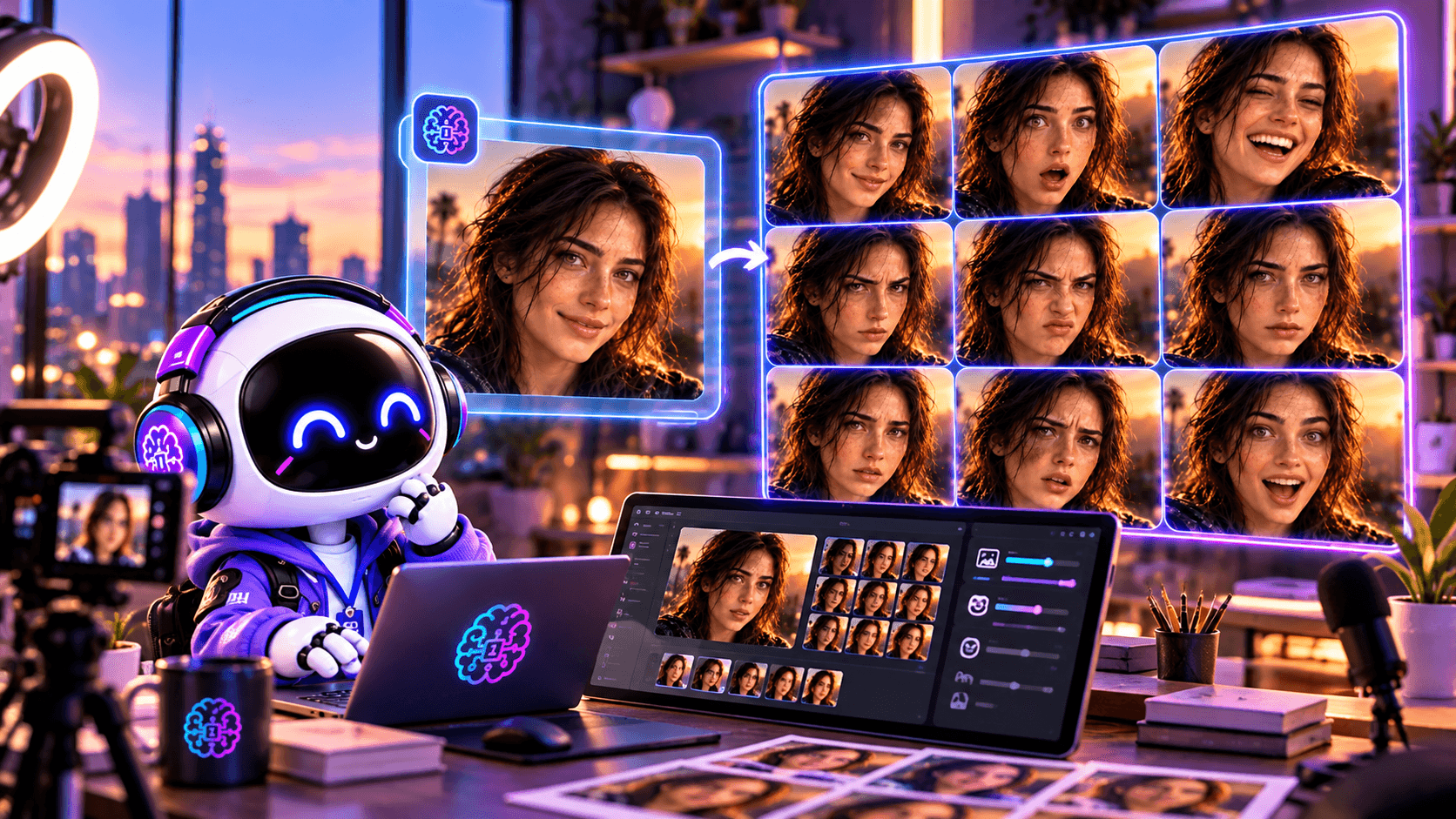
How to Create 9 AI Character Expressions with 1min.AI
You don't need advanced illustration skills or a custom-trained AI model to begin creating consistent character expressions.
A practical workflow is to upload an original image, use AI to modify the facial expression, and review the results against the reference.
For this tutorial, we'll use FLUX.2 Max by Black Forest Labs through the Image Generator on 1min.AI.
We'll start with one character and create nine different emotional variations.
The workflow is:
Original Image → FLUX.2 Max → Expression Prompts → 9 Emotions → Final Expression Sheet
Step 1: Prepare Your Original Character Image
Start with an image of the person or character whose expressions you want to change.
Your reference could be:
- A photorealistic AI-generated person.
- A virtual influencer or digital avatar.
- A 3D animated character.
- A cartoon illustration.
- A recognizable brand mascot.
Choose an image where the subject's face is clearly visible.
For realistic portraits, a front-facing or slightly angled head-and-shoulders image is usually a practical starting point. Look for clear lighting, natural facial details, and an expression that doesn't hide important features.
For cartoon characters, choose a reference that clearly shows the original colors, face shape, and distinctive design elements.
Try to avoid images with heavy motion blur, extreme lighting, or objects covering the face.
Save your chosen image as the Master Character Reference.
You'll use this same original image for all nine expressions rather than relying on previously modified versions.
Suggested visual: Show a realistic AI portrait beside an illustrated character, both with neutral expressions, demonstrating that the workflow works across different character styles.
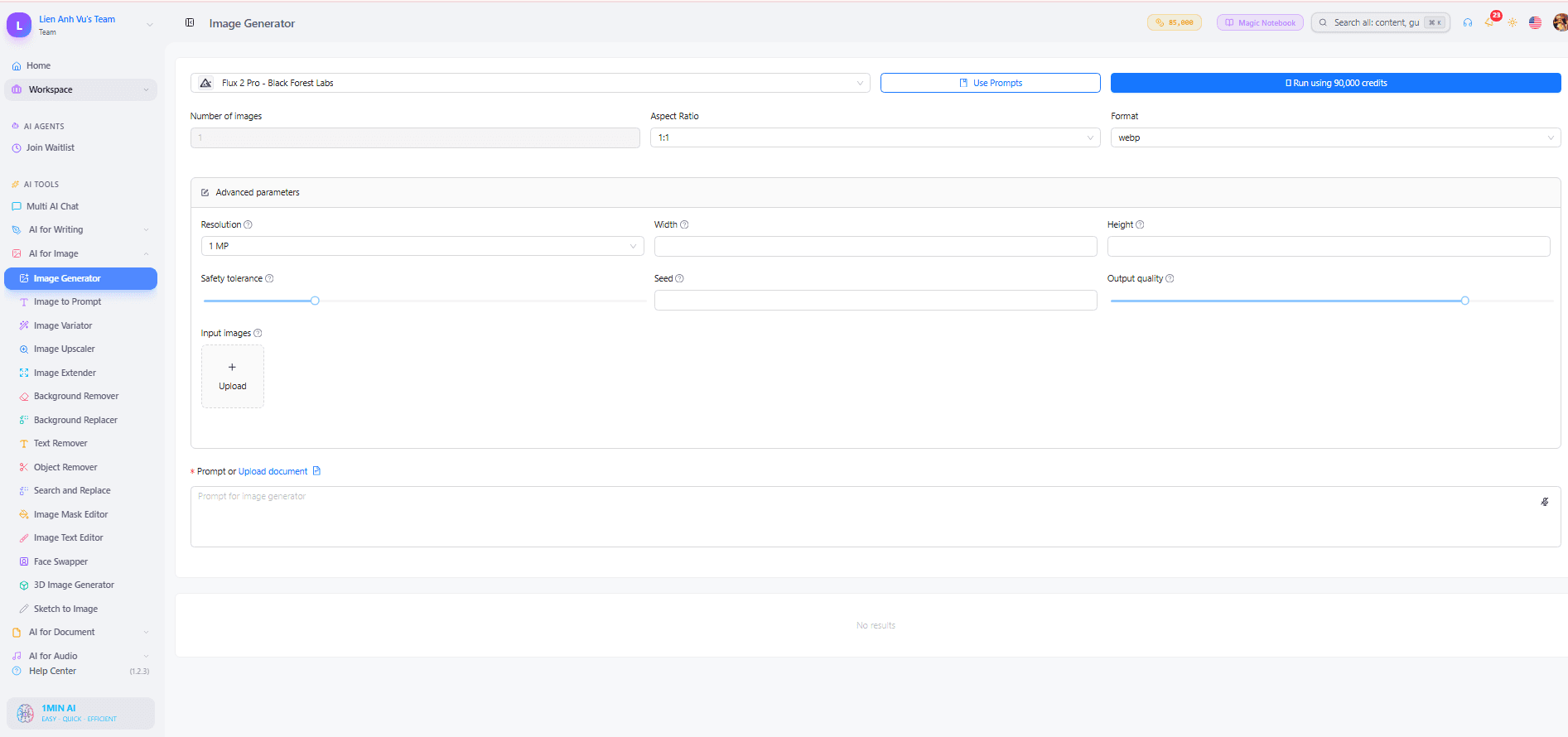
Step 2: Open FLUX.2 Max on 1min.AI
Visit 1min.AI and navigate to:
AI for Image → Image Generator
Select FLUX.2 Max by Black Forest Labs from the available models.
Upload your Master Character Reference.
The reference image provides visual information about the character's facial structure, appearance, colors, clothing, and overall style.
Next, you'll use a prompt to request a new facial expression while instructing the model to preserve those features.
Keep the original reference available throughout the process.
Tip: Generate one expression first and compare it with the source image before creating the complete set. This helps you identify whether your prompt needs adjustment.
Step 3: Create a Reusable Facial Expression Prompt
The key to a consistent expression workflow is separating the character's identity from the emotion you want to generate.
Instead of writing an entirely new description for every image, use the same foundational prompt and change only the emotional instructions.
A useful structure is:
Reference Image + Identity Preservation + Target Emotion + Facial Details + Visual Constraints
Copy this reusable prompt:
Master Expression Prompt
Use the uploaded image as the primary visual reference. Preserve the subject's recognizable identity, facial structure, eye shape, hairstyle, skin tone or character colors, clothing, accessories, and original visual style.
Change the facial expression to [EMOTION], with [SPECIFIC FACIAL DETAILS].
Keep the same camera angle, facial proportions, framing, background, and lighting.
The result should clearly represent the same person or character with a different emotional expression.
Avoid changing identity, redesigning the face, adding accessories, altering the outfit, or introducing exaggerated facial distortion.
Replace [EMOTION] and [SPECIFIC FACIAL DETAILS] with the expression you want.
For example, to create happiness:
Change the facial expression to happiness, with a warm natural smile, gently raised cheeks, and relaxed smiling eyes.
For surprise:
Change the facial expression to surprise, with raised eyebrows, widened eyes, and a slightly open mouth.
These descriptions work for realistic human faces. If you're using a cartoon or robot character, adapt the facial details to its visual design.
For example, a robot with a digital face might express happiness using curved glowing eyes instead of realistic facial muscles.
Optional Prompt Assistance
You can also use Multi AI Chat on 1min.AI to help prepare expression prompts.
Mention that you're using FLUX.2 Max, describe your reference character, and request nine emotional variations with consistent identity-preservation instructions.
This step is optional. You can skip it and use the prompts below directly.
Step 4: Generate 9 Different AI Facial Expressions
Now create the expression variations one at a time.
For every generation, upload or retain the same original reference image and combine the Master Expression Prompt with one of the following emotional instructions.
The descriptions below are written to work well with realistic human characters, but they can also be adapted for cartoon characters and mascots.
1. Happy 😊
Give the subject a genuine happy expression with a warm natural smile, softly raised cheeks, and relaxed smiling eyes. Preserve the original facial identity and proportions.
2. Sad 😢
Create a subtle sad expression with slightly lowered eyebrows, softened eyes, and gently downturned lips. Maintain natural facial details and the original appearance.
3. Angry 😠
Show a convincing angry expression with lowered eyebrows, slightly narrowed eyes, and a tense mouth. Keep the facial structure unchanged and avoid excessive distortion.
4. Surprised 😮
Create a surprised expression with widened eyes, raised eyebrows, and a naturally open mouth. Preserve the original facial proportions and recognizable features.
5. Confused 🤔
Give the subject a confused expression with one slightly raised eyebrow, subtly narrowed eyes, and a questioning mouth. Keep the expression natural and believable.
6. Excited 🤩
Create an excited expression with bright eyes, raised cheeks, and a broad enthusiastic smile. Maintain the original identity, hairstyle, and overall appearance.
7. Sleepy 😴
Show a sleepy expression with heavy eyelids, relaxed eyebrows, and a gently softened mouth. Avoid changing the character's facial structure.
8. In Love 😍
Create a warm affectionate expression with soft eyes, a gentle smile, and a subtle emotional glow. Keep the appearance realistic and preserve the subject's identity.
9. Crying 😭
Give the subject a convincing crying expression with watery eyes, visible tears, slightly furrowed eyebrows, and a trembling mouth. Preserve the original face and natural skin texture.
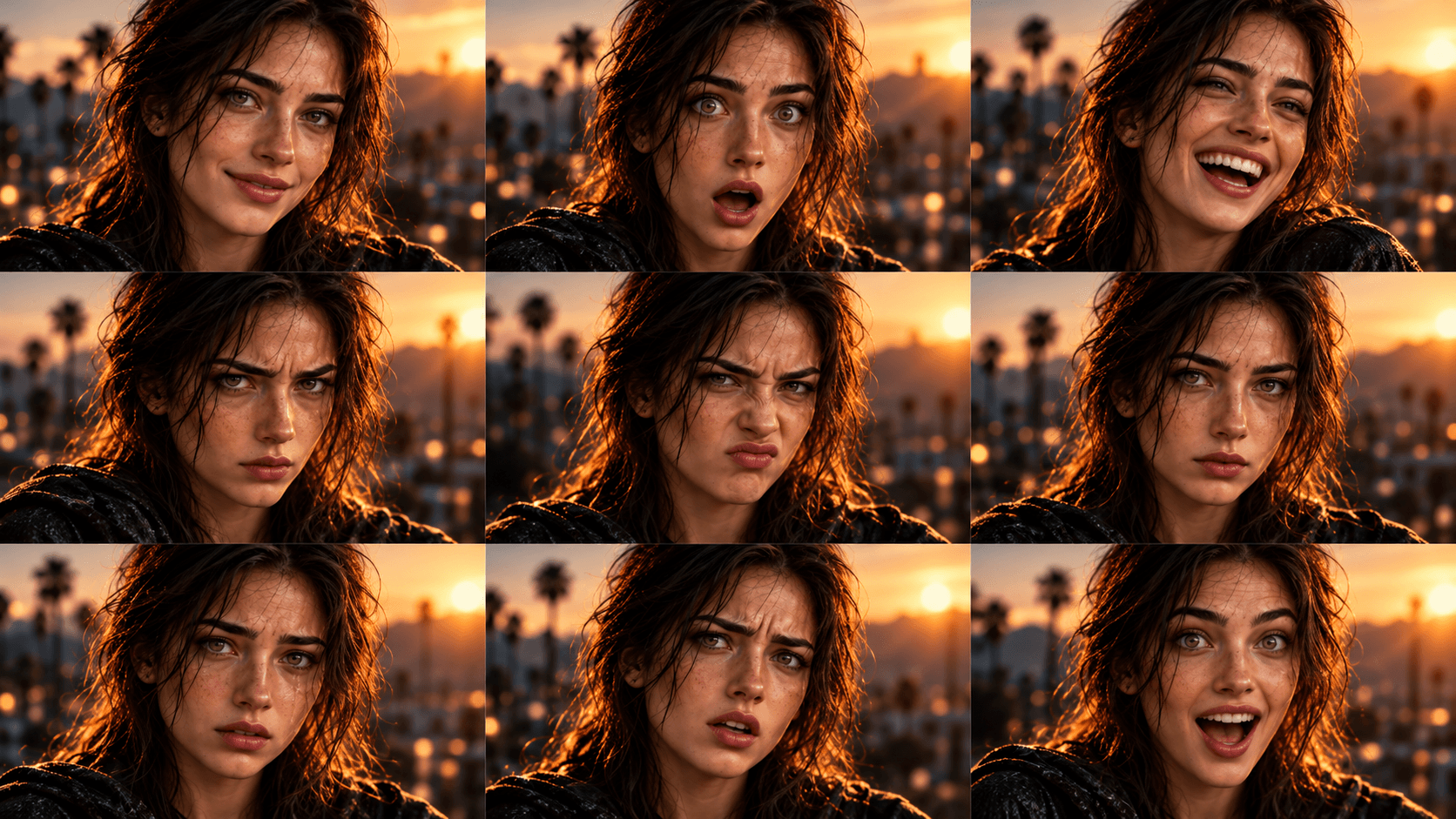
For stylized characters, you can make these expressions more exaggerated if that matches the original art style.
For photorealistic people, subtle facial movements often look more convincing than extreme expressions.
Generate each image separately, then compare it with your Master Character Reference.
If one result changes the subject's appearance, adjust the preservation instructions before regenerating it.
Suggested visual: A cinematic 3×3 portrait grid showing the same AI-generated person with nine distinct emotions, identical clothing, consistent lighting, and recognizable facial features.
Step 5: Review the Results and Create an Expression Sheet
After generating all nine expressions, review them as a complete collection.
Don't judge each image only by how realistic or attractive it looks. The most important question is whether every image still represents the same subject.
Compare the results using five criteria.
Facial Identity
Check whether the face shape, eye placement, nose, lips, and other recognizable features remain consistent.
Hair and Appearance
Look for unexpected hairstyle changes, missing accessories, altered clothing, or inconsistent colors.
Expression Accuracy
Make sure each expression communicates the intended emotion.
For example, a sad face should not look almost identical to a confused one.
Visual Consistency
Keep the same framing, camera perspective, lighting, and background wherever possible.
Natural Results
For photorealistic characters, look closely at skin texture, eye details, teeth, and facial proportions. Avoid accepting distorted or unnaturally exaggerated features.
If a result doesn't match the reference, regenerate that specific expression.
A useful correction prompt is:
Preserve the exact identity and facial proportions from the uploaded reference image. Keep the hairstyle, clothing, lighting, and framing unchanged. Modify only the facial muscles necessary to express [EMOTION].
Once you've selected the best nine images, arrange them into a 3×3 character expression sheet.
| Happy | Sad | Angry |
|---|---|---|
| Surprised | Confused | Excited |
| Sleepy | In Love | Crying |
Use consistent image sizes and spacing so viewers can easily compare the expressions.
You can also save each result individually for future content creation.
The finished sheet gives you a reusable library of emotional variations built around the same character identity.
Tips and Creative Uses for AI Character Expressions
Creating an expression sheet is only the beginning.
Once you have nine recognizable emotional variations, you can reuse them across different content formats without creating a completely new person or character each time.
Tips for More Realistic and Consistent Expressions
1. Start With a Neutral Reference
A neutral facial expression gives the model a clear starting point.
If the original image already shows extreme anger or laughter, converting it into another emotion may require larger changes.
2. Describe Facial Movements Precisely
Words like "happy" and "sad" can be interpreted broadly.
For more control, describe the specific muscles or facial features involved.
Instead of simply writing "make her happy," request a subtle smile, raised cheeks, and gently narrowed eyes.
For anger, describe lowered eyebrows, tightened lips, and focused eyes.
3. Match the Expression to the Character Style
Realistic people and animated characters communicate emotions differently.
A human portrait typically benefits from natural facial movements and realistic skin details.
A cartoon or digital mascot may use simplified eye shapes, exaggerated eyebrows, or stylized mouth movements.
Adapt your prompts to the original style instead of forcing every subject to use the same expression technique.
4. Keep Lighting and Camera Angles Consistent
Even when facial identity is preserved, changes in lighting or perspective can make the subject look different.
Using consistent framing makes it easier to compare emotions and create a professional expression sheet.
5. Avoid Unnecessary Changes
When generating facial expressions, avoid simultaneously changing the outfit, hairstyle, environment, and body pose.
Focus on one variable at a time.
You can introduce new clothing, backgrounds, and poses after establishing a reliable expression library.
6. Save Your Best Prompts
Once you've found a prompt that produces a convincing expression, save it.
You can reuse the same emotional instructions with different reference characters.
Over time, this creates a practical prompt library for future creative projects.
Creative Ways to Use AI Facial Expressions
Social Media Content
Use different expressions to match the message of each post.
A surprised AI character can introduce breaking news, while a happy expression can celebrate a milestone.
A confused expression is useful for educational posts that begin with a common problem.
Virtual Influencers and UGC Content
Recurring AI-generated people can benefit from a wider range of emotional expressions.
Instead of using nearly identical smiling portraits in every image, creators can develop expressive visual personalities for storytelling, lifestyle concepts, and fictional campaigns.
If the content depicts a real person, make sure you have appropriate permission to use their likeness.
Marketing and Advertising
Expression variations can help communicate different stages of a customer's experience.
For example, a confused expression can represent a problem, a curious expression can introduce a solution, and an excited expression can communicate a positive outcome.
Using one consistent subject can help connect those scenes visually.
Digital Stickers and Reaction Images
Turn individual expressions into stickers, profile graphics, or reaction images.
These are particularly useful for communities, messaging platforms, and branded social media content.
Storytelling and AI Videos
A set of expressions can also serve as a visual reference when planning animated scenes.
Imagine one AI character moving from confusion to curiosity, surprise, and excitement during a short story.
Each expression provides a reference for the emotional progression.
Keep in mind that consistent still images don't automatically guarantee consistent facial animation. Video outputs need separate review.
Frequently Asked Questions
1. Can an AI face expression changer preserve the same face?
Yes. AI image editing models can create different facial expressions while attempting to preserve the original identity. A clear reference image and specific prompts improve the chances of consistent results, although some variations may still require refinement.
2. How do I change facial expressions with AI online?
Upload an existing image to an AI image editor that supports reference images, describe the emotion you want, and generate a new version. On 1min.AI, you can use a compatible image model such as FLUX.2 Max for this workflow.
3. Can I use an AI facial expression changer for realistic people?
Yes. The workflow can be used for photorealistic AI-generated people and stylized characters. For realistic portraits, focus on subtle facial movements, natural skin texture, and recognizable facial proportions.
4. What is the best prompt for consistent AI character expressions?
Use a prompt that clearly separates identity preservation from emotional changes.
For example:
Keep the same person's facial identity, hairstyle, skin tone, and clothing. Change only the facial expression to surprise, with raised eyebrows, widened eyes, and a slightly open mouth.
5. Do I need to train a LoRA to generate different expressions?
No. LoRA training can be useful for advanced character-consistency projects, but it's not necessary for this beginner-friendly workflow.
You can begin with a reference image, clear expression prompts, and an AI image model that supports image input.
Final Thoughts
Creating different facial expressions with AI doesn't have to mean creating a different character every time.
With a clear reference image, detailed emotional prompts, and careful review, you can turn one recognizable subject into a collection of expressive visuals.
Whether you're working with a realistic AI person, a virtual influencer, a cartoon character, or a brand mascot, the principle remains the same:
Change the emotion, not the identity.
Start with one character, experiment with nine emotions, and build a reusable visual library for your next creative project.
- #Informational
Alternatives
Discover the best alternatives to 1minAI and compare features, pricing, and use cases.

1min.AI vs OpenRouter
1min.AI vs. OpenRouter: Compare the ready-to-use AI creation product against the technical API tool. Find out if you need a zero-code creative studio or a coding infrastructure hub.
 Ngoc Hong
1min.AI vs Jarvis AI
Compare 1min.AI vs Jarvis AI to discover which AI platform is better for writing, research, automation, and content creation. Find the best AI assistant for your workflow.
Ngoc Hong
1min.AI vs Taskade
Compare 1min.AI vs Taskade for AI content creation, automation, agents, and creative workflows to find the right workspace.
Ngoc HongAI Tools
Discover the best AI tools to boost productivity, creativity, and everyday work.

Create Consistent Cartoon Content in Just a Few Steps
Create engaging cartoon videos for TikTok and Reels with 1min.AI. Research ideas, create characters, and turn images into animated videos in 3 simple steps.
 Lien Anh Vu
One Product, 10 UGC Creatives: How AI Makes Content Testing Easier
Create more authentic UGC with an AI UGC video generator, test more creative angles and scale affiliate content without filming every version.
Lien Anh Vu
Top 4 Affordable AI Tools for Startup Founders
Discover the top 4 affordable AI tools for startup founders to validate ideas, build products, create content, and launch faster without overspending.
 Tram Ta
AI Features
Comprehensive AI features that streamline workflows, improve efficiency, and empower teams to achieve more.
Create Consistent Cartoon Content in Just a Few Steps
Create engaging cartoon videos for TikTok and Reels with 1min.AI. Research ideas, create characters, and turn images into animated videos in 3 simple steps.
Lien Anh VuOne Product, 10 UGC Creatives: How AI Makes Content Testing Easier
Create more authentic UGC with an AI UGC video generator, test more creative angles and scale affiliate content without filming every version.
Lien Anh Vu
1minAI: Free AI Grammar Checker
Check grammar for free with 1minAI’s AI grammar checker. Find grammar, spelling, and writing mistakes, improve clarity, and polish your content in seconds.
Tram TaAI Use Cases
A curated collection of AI use cases for business, productivity, and industry-specific applications.
Create Consistent Cartoon Content in Just a Few Steps
Create engaging cartoon videos for TikTok and Reels with 1min.AI. Research ideas, create characters, and turn images into animated videos in 3 simple steps.
Lien Anh VuOne Product, 10 UGC Creatives: How AI Makes Content Testing Easier
Create more authentic UGC with an AI UGC video generator, test more creative angles and scale affiliate content without filming every version.
Lien Anh Vu
Best Time to Post on Instagram: A Practical Guide for Better Engagement
Discover the best time to post on Instagram, including the best days and times for different audiences, plus tips to find the ideal posting schedule for your account.
Tram TaAI Tutorials
Learn how to use AI with practical, step-by-step tutorials.

Black Friday AI Tool Deals in 2026
Discover what Black Friday AI tool deals 2026 has to offer. Find out how to secure the 1min.AI lifetime deal via AppSumo, Dealify, Stack Social, and verify on Trustpilot, Slashdot, and Software Advice.
 Hang Nguyen
Create Consistent Cartoon Content in Just a Few Steps
Create engaging cartoon videos for TikTok and Reels with 1min.AI. Research ideas, create characters, and turn images into animated videos in 3 simple steps.
Lien Anh Vu
[Seedance 2.5 New] Better AI Product Videos, Less Rework in 1min.AI
Use Seedance 2.5 image to video on 1min.AI to create more consistent AI product videos, reduce failed generations, save credits, and improve UGC workflows.
Lien Anh VuAI Guides
Learn AI faster with practical guides, real-world examples, and actionable best practices.

Safely Buy AI Tools Online: 2026 Black Friday Guide
Discover how to find and secure the best Black Friday AI deals online. Learn expert strategies to avoid scams, combat subscription fatigue, and verify software.
Hang NguyenCreate Consistent Cartoon Content in Just a Few Steps
Create engaging cartoon videos for TikTok and Reels with 1min.AI. Research ideas, create characters, and turn images into animated videos in 3 simple steps.
Lien Anh Vu[Seedance 2.5 New] Better AI Product Videos, Less Rework in 1min.AI
Use Seedance 2.5 image to video on 1min.AI to create more consistent AI product videos, reduce failed generations, save credits, and improve UGC workflows.
Lien Anh VuAI Solutions
Browse the best AI solutions for automation, coding, research, productivity, customer support, marketing, and business workflows.
Safely Buy AI Tools Online: 2026 Black Friday Guide
Discover how to find and secure the best Black Friday AI deals online. Learn expert strategies to avoid scams, combat subscription fatigue, and verify software.
Hang NguyenCreate Consistent Cartoon Content in Just a Few Steps
Create engaging cartoon videos for TikTok and Reels with 1min.AI. Research ideas, create characters, and turn images into animated videos in 3 simple steps.
Lien Anh VuOne Product, 10 UGC Creatives: How AI Makes Content Testing Easier
Create more authentic UGC with an AI UGC video generator, test more creative angles and scale affiliate content without filming every version.
Lien Anh VuAI Models
Explore the world's leading AI models in one place.
Create Consistent Cartoon Content in Just a Few Steps
Create engaging cartoon videos for TikTok and Reels with 1min.AI. Research ideas, create characters, and turn images into animated videos in 3 simple steps.
Lien Anh VuOne Product, 10 UGC Creatives: How AI Makes Content Testing Easier
Create more authentic UGC with an AI UGC video generator, test more creative angles and scale affiliate content without filming every version.
Lien Anh Vu[Seedance 2.5 New] Better AI Product Videos, Less Rework in 1min.AI
Use Seedance 2.5 image to video on 1min.AI to create more consistent AI product videos, reduce failed generations, save credits, and improve UGC workflows.
Lien Anh VuAI Comparisons
Compare AI tools, models, and platforms to find the best fit for your needs.

Kling AI Vs Veo 3: Which Model Wins?
Kling AI vs Veo 3: compare motion, native audio, pricing & free tiers to see which AI video generator wins for your project - try both on 1min.AI.
 Trang Tran
[Seedance 2.5 New] Better AI Product Videos, Less Rework in 1min.AI
Use Seedance 2.5 image to video on 1min.AI to create more consistent AI product videos, reduce failed generations, save credits, and improve UGC workflows.
Lien Anh Vu
DeepSeek V4 Pro vs Flash Comparison
Compare DeepSeek V4 Pro vs DeepSeek V4 Flash metrics. Optimize your agentic apps and improve AI fact checking on 1min.ai today.
Ngoc HongAI Integrations
Seamlessly integrate AI with the tools you already use to automate work and boost productivity.

POV: You Have 10+ Posts to Make Every Day
Learn how to build an AI content workflow that helps content creators produce 10+ social media posts a day faster with AI brainstorming, image generation, and content creation.
Lien Anh Vu
How to Use an AI Fashion Video Generator for Fashion Week 2026
Turn Fashion Week 2026 ideas into stunning fashion videos with AI. Learn how to brainstorm, create visuals, and transform images into videos with one simple workflow.
Lien Anh Vu
Stop Switching Between AI Apps: How AI Integration Transforms Employer Branding
Discover how AI integration helps HR teams streamline employer branding by combining AI writing, documents, images, video, and multiple AI models into one workspace.
Tram TaAI for Industries
Find the best AI tools and workflows for healthcare, finance, education, legal, manufacturing, retail, real estate, and more

Best Business Productivity Tools for Startups to Maximize Profits | 1minAI
Discover the best business productivity tools for startups to save time, streamline workflows, reduce repetitive tasks, and support profitable growth with AI.
Tram Ta
Best AI Tool for Content Marketing |1minAI
Looking for the best AI tool for content marketing? See how 1minAI helps marketers research, write, repurpose, create visuals, and scale content from one AI workspace.
Tram Ta
7 Low-Cost AI Business Ideas for Your Startup
Explore 7 low-cost AI business ideas you can start with a small budget, from content and video services to AI consulting, reselling, and automation.
Tram TaAI Agents
Discover and run AI agents to automate tasks across your work and daily life.
1minAI: Free AI Grammar Checker
Check grammar for free with 1minAI’s AI grammar checker. Find grammar, spelling, and writing mistakes, improve clarity, and polish your content in seconds.
Tram Ta
AI Agents for Facebook
Use an AI Agent for Facebook to create content, generate images, schedule posts, and publish from your documents and conversations.
Ngoc Hong
AI Agent vs AI Assistant: Which One Actually Saves Designers More Time?
Learn the difference between AI Agent vs AI Assistant and discover which solution helps designers automate repetitive work, reduce revisions, and save more time.
Lien Anh VuAI Workflows
Explore ready-to-use AI workflows for productivity, marketing, sales, support, and more.
Create Consistent Cartoon Content in Just a Few Steps
Create engaging cartoon videos for TikTok and Reels with 1min.AI. Research ideas, create characters, and turn images into animated videos in 3 simple steps.
Lien Anh VuOne Product, 10 UGC Creatives: How AI Makes Content Testing Easier
Create more authentic UGC with an AI UGC video generator, test more creative angles and scale affiliate content without filming every version.
Lien Anh VuPOV: You Have 10+ Posts to Make Every Day
Learn how to build an AI content workflow that helps content creators produce 10+ social media posts a day faster with AI brainstorming, image generation, and content creation.
Lien Anh VuNewsletter
Weekly AI Innovations with 1minAI

🔮 Weekly AI Innovations #141: Seedance 2.5 & Stable Audio 3: Next-Gen AI
Explore Seedance 2.0, 2.5, and StabilityAI's Stable Audio 3 on 1min.ai. Generate studio-grade audio and synchronized motion with next-gen generative AI.
Hang Nguyen
🔮 Weekly AI Innovations #140: Deepseek 4.1 Flash & Gemini Upgrades
Explore Deepseek 4.1 Flash and new Gemini models on 1min.ai. Plus, check our update on your Billing - Usage page for better clarity.
Hang Nguyen
🔮 Weekly AI Innovations #139: Dawn of the next-gen AI
Discover the immense power of GPT-6 Astra and Claude Fable 5.1. Unlock next-generation AI models on 1min.ai to solve complex tasks effortlessly.
Hang Nguyen