
Vibe Coding vs. Agentic Coding: Updated Guide for Beginners

Tram Ta
October 20, 2026
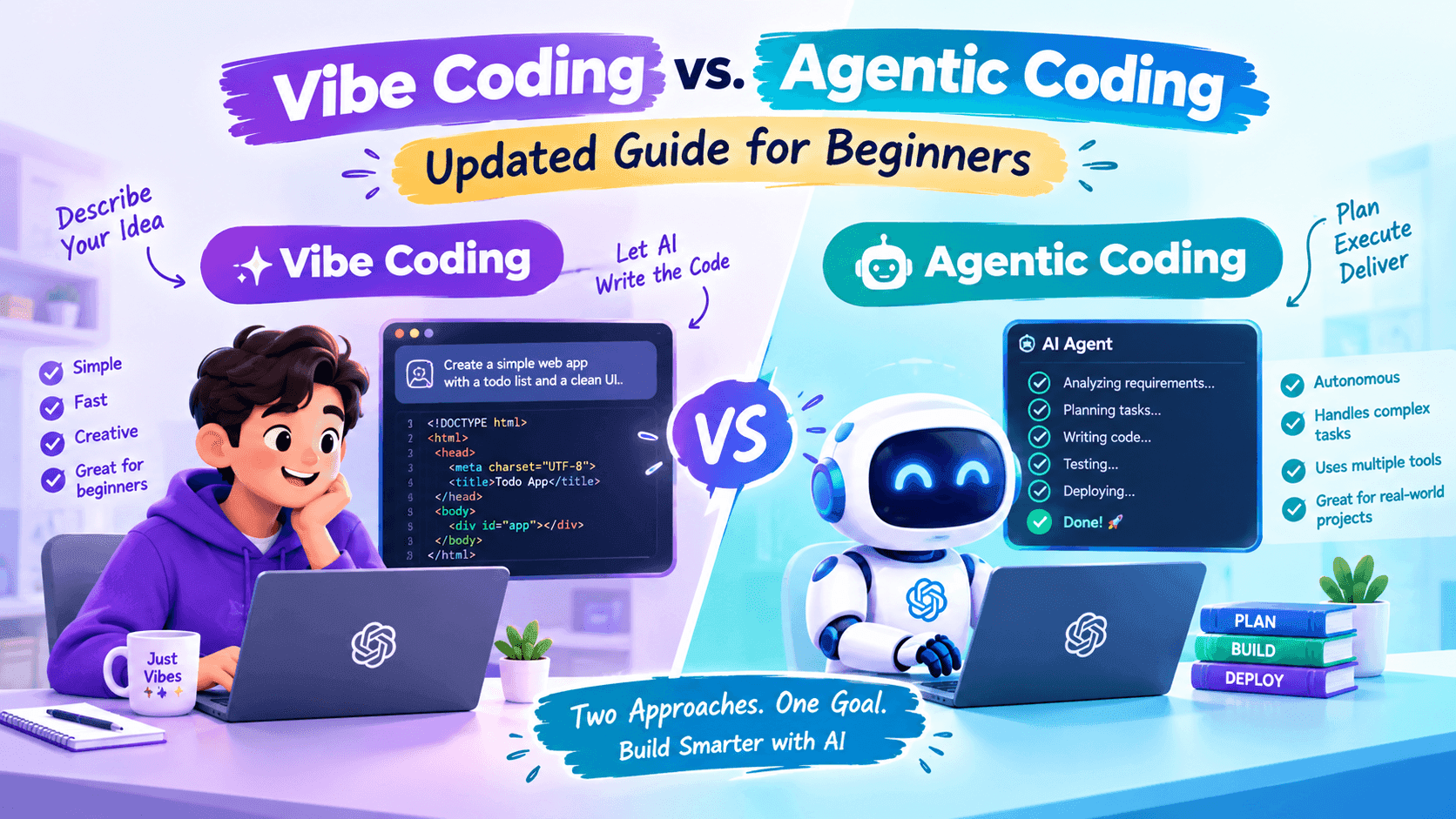
Learn the difference between vibe coding and agentic coding, compare their workflows, explore practical examples, and discover how to code smarter with AI.
You no longer need to write every line of code manually to build a website, test an idea, or create a simple application. With AI coding tools, you can describe what you want in natural language and let AI help turn your ideas into working software.
Two approaches have become especially relevant: vibe coding and agentic coding. Both use AI to make software development more accessible, but they differ in how tasks are handled and how much control you give the AI.
Vibe coding focuses on describing an idea, reviewing the result, and refining it through conversation. Agentic coding takes a more goal-oriented approach: you give an AI agent a task, and it can plan steps, modify code, run tests, and iterate within its available tools and permissions.
So, which approach should beginners learn first? This guide explains the differences, shows practical examples, and helps you decide when to use each method.
What Is Vibe Coding?
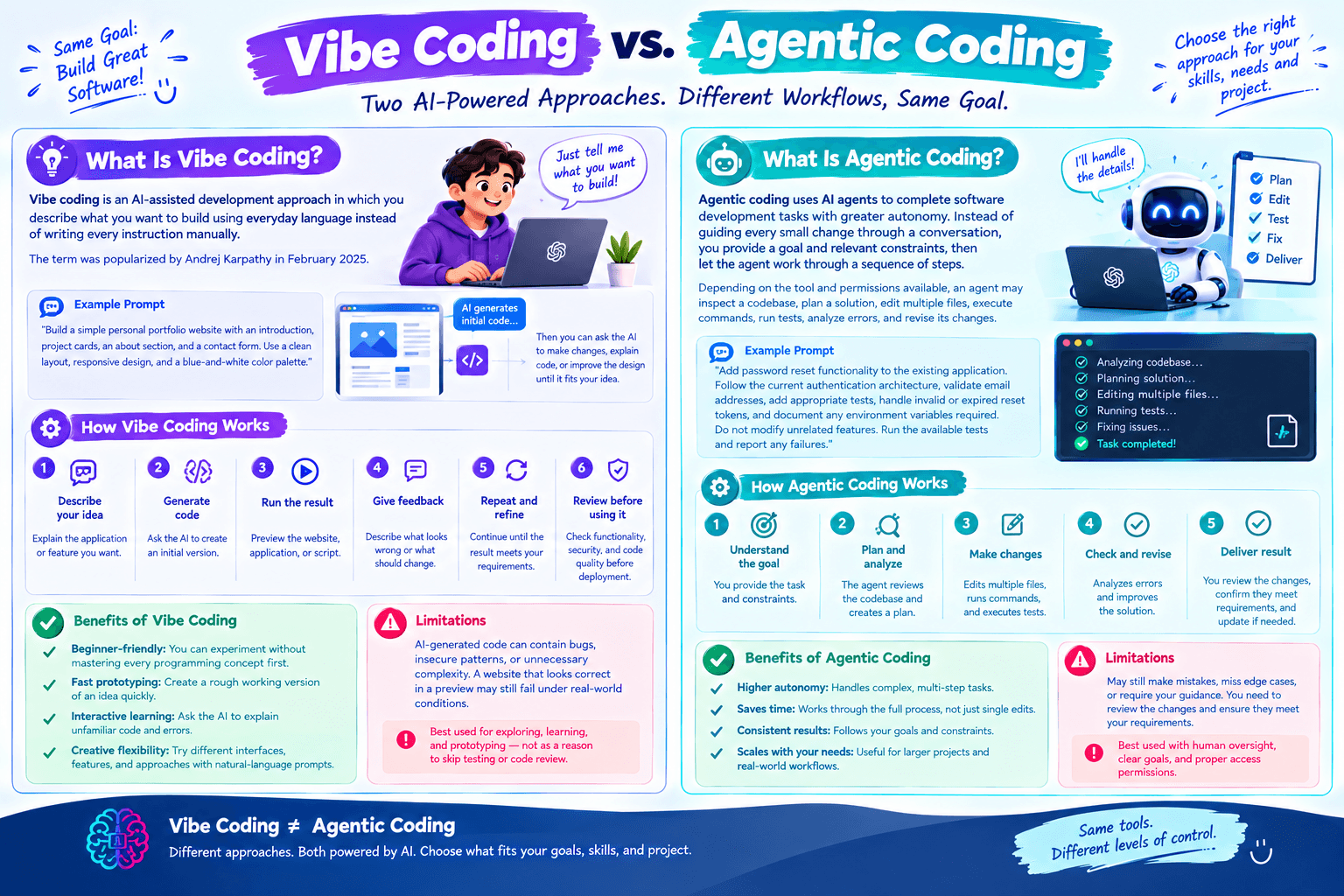
Vibe coding is an AI-assisted development approach in which you describe what you want to build using everyday language instead of writing every instruction manually.
The term was popularized by Andrej Karpathy in February 2025. In a typical workflow, you ask an AI tool to generate code, run the result, observe what happens, and request changes until the application better matches your idea.
For example, you might prompt an AI coding assistant:
Build a simple personal portfolio website with an introduction, project cards, an about section, and a contact form. Use a clean layout, responsive design, and a blue-and-white color palette.
The AI can generate an initial implementation. You can then ask it to change the typography, add a navigation bar, improve mobile spacing, or explain how a particular component works.
How Vibe Coding Works
A typical vibe coding workflow looks like this:
- Describe your idea: Explain the application or feature you want.
- Generate code: Ask the AI to create an initial version.
- Run the result: Preview the website, application, or script.
- Give feedback: Describe what looks wrong or what should change.
- Repeat and refine: Continue until the result meets your requirements.
- Review before using it: Check functionality, security, and code quality before deployment.
Benefits of Vibe Coding
- Beginner-friendly: You can experiment without mastering every programming concept first.
- Fast prototyping: Create a rough working version of an idea quickly.
- Interactive learning: Ask the AI to explain unfamiliar code and errors.
- Creative flexibility: Try different interfaces, features, and approaches with natural-language prompts.
However, vibe coding has limitations. AI-generated code can contain bugs, insecure patterns, or unnecessary complexity. A website that looks correct in a preview may still fail under real-world conditions.
Vibe coding is therefore best treated as a way to explore, learn, and prototype—not as a reason to skip testing or code review.
What Is Agentic Coding?
Agentic coding uses AI agents to complete software development tasks with greater autonomy. Instead of guiding every small change through a conversation, you provide a goal and relevant constraints, then let the agent work through a sequence of steps.
Depending on the tool and permissions available, an agent may inspect a codebase, plan a solution, edit multiple files, execute commands, run tests, analyze errors, and revise its changes.
For example, instead of asking an AI to add a single button, you could give an agent this task:
Add password reset functionality to the existing application. Follow the current authentication architecture, validate email addresses, add appropriate tests, handle invalid or expired reset tokens, and document any environment variables required. Do not modify unrelated features. Run the available tests and report any failures.
The agent can break this request into smaller tasks and work through them. You still need to inspect the changes and confirm that the implementation meets the requirements.
How Agentic Coding Works
A typical agentic coding workflow includes:
- Define the goal: Describe the desired outcome and acceptance criteria.
- Provide context: Give the agent access to the relevant repository, documentation, and tools.
- Let the agent plan: It identifies the steps needed to complete the task.
- Execute and iterate: It modifies files, runs available tools, and responds to errors.
- Review the results: Inspect the code changes, test results, and any unresolved issues.
- Approve or revise: Make corrections and approve changes only when they meet your standards.
Benefits of Agentic Coding
- Multi-step execution: An agent can handle related tasks across multiple files.
- Reduced repetitive work: It can assist with test creation, documentation, and routine maintenance.
- Structured problem-solving: Clear goals and acceptance criteria help organize complex tasks.
- Potential workflow efficiency: Developers can spend more time reviewing solutions and making architectural decisions.
Agentic coding also introduces risks. An agent may misunderstand requirements, modify the wrong files, execute unsafe commands, or report success without adequately validating the result. Its autonomy makes permissions, checkpoints, testing, and human oversight especially important.
Vibe Coding vs. Agentic Coding: Key Differences
The main difference is not simply which AI model you use. It is how you structure the task and how much responsibility you delegate to the AI.
| Comparison | Vibe Coding | Agentic Coding |
|---|---|---|
| Main approach | Conversational, iterative coding | Goal-driven, multi-step execution |
| Initial instruction | Describe what you want to create | Define an outcome and acceptance criteria |
| AI workflow | Generates code in response to feedback | Plans and executes a sequence of tasks |
| Human role | Guides each iteration | Sets boundaries, supervises, and reviews |
| Best suited for | Prototypes, experiments, simple features | Multi-file tasks, testing, maintenance, refactoring |
| Beginner experience | Easier to start with | Requires clearer task definition and oversight |
| Common risk | Accepting code without understanding it | Allowing an agent to make broad or unsafe changes |
| Quality control | Review each iteration | Review plans, diffs, test results, and final output |
These approaches are not mutually exclusive. Many developers can combine them: use vibe coding to explore an idea, then use an agent to implement well-defined tasks, add tests, or improve the codebase.
Which Is Better for Beginners?
There is no universal winner. The right approach depends on your experience, the task, and how much control you need.
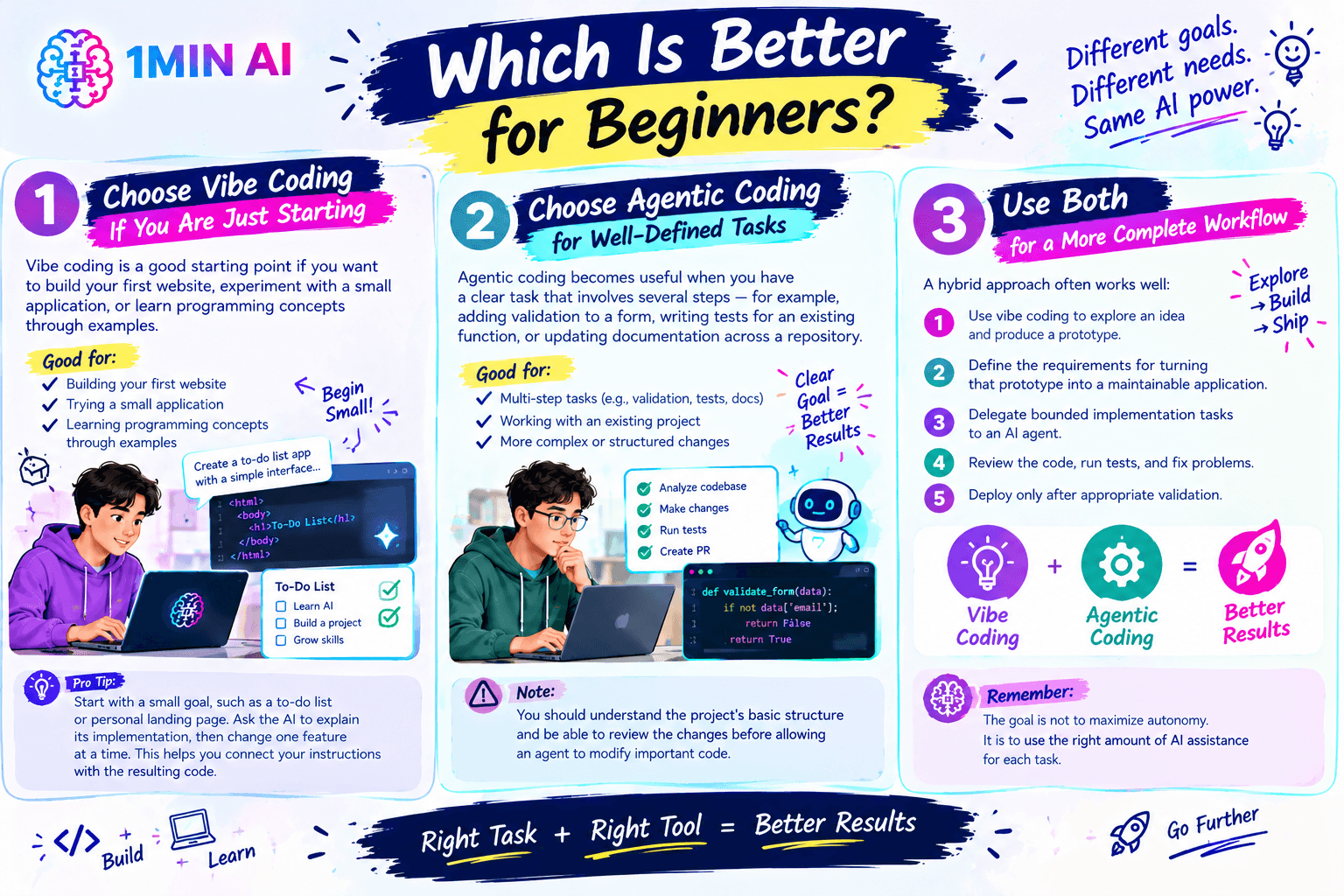
Choose Vibe Coding If You Are Just Starting
Vibe coding is a good starting point if you want to build your first website, experiment with a small application, or learn programming concepts through examples.
Start with a small goal, such as creating a to-do list or personal landing page. Ask the AI to explain its implementation, then change one feature at a time. This helps you connect your instructions with the resulting code.
Choose Agentic Coding for Well-Defined Tasks
Agentic coding becomes useful when you have a clear task that involves several steps—for example, adding validation to a form, writing tests for an existing function, or updating documentation across a repository.
You should understand the project's basic structure and be able to review the changes before allowing an agent to modify important code.
Use Both for a More Complete Workflow
A hybrid approach often works well:
- Use vibe coding to explore an idea and produce a prototype.
- Define the requirements for turning that prototype into a maintainable application.
- Delegate bounded implementation tasks to an AI agent.
- Review the code, run tests, and fix problems.
- Deploy only after appropriate validation.
The goal is not to maximize autonomy. It is to use the right amount of AI assistance for each task.
How to Start Vibe Coding With AI
You can start with a small project and improve it gradually.
Step 1: Choose a Simple Project
Pick something with a clear purpose, such as a personal portfolio, expense tracker, habit tracker, or basic calculator.
Avoid starting with a complex application that requires payments, sensitive data, or complicated authentication.
Step 2: Write a Specific Prompt
Instead of asking, “Build me an app,” describe the audience, features, design, and technical constraints.
Example prompt:
Create a responsive habit tracker for beginners. Users should be able to add habits, mark them complete for the day, and see a simple weekly progress summary. Use a clean interface, accessible buttons, and clear empty states. Keep the initial version simple and explain how to run it locally. List any limitations before suggesting additional features.
Step 3: Build in Small Iterations
After the first version works, ask for one change at a time. For example:
- Add the ability to edit and delete habits.
- Improve the mobile layout.
- Save progress between sessions.
- Add tests for marking a habit complete.
- Explain how the data is stored and what happens if it is lost.
Small, testable changes make it easier to spot mistakes.
Step 4: Review and Test the Code
Ask the AI to explain important functions, identify edge cases, and suggest tests. Then run the application and verify the behavior yourself.
For real projects, use version control, review dependencies, protect credentials, and test security-sensitive features before deployment.
How 1minAI Can Help With AI Coding
You don't always need to settle on one AI model for every programming task. Different models can produce different approaches to debugging, implementation, explanation, and code review.
1minAI offers AI coding resources and access to multiple AI capabilities that can support different stages of a development workflow.
Explore an AI Coding Assistant
Use the 1minAI AI Coding Assistant to explore AI-assisted coding workflows. It can be a useful starting point when you want help generating code, understanding a programming problem, or working through an implementation idea.
For better results, provide the relevant programming language, framework, expected behavior, and error messages rather than asking the AI to solve a vague problem.
Compare Claude and Gemini for Coding
Different models may approach the same coding task differently. Our guide, Claude vs. Gemini for Coding, explores how their coding strengths compare.
You can use model comparisons to investigate alternative implementations, ask for different debugging strategies, or review whether a proposed solution meets your requirements. Always test the resulting code instead of treating a model's answer as proof that the solution works.
Explore Devstral 2 for Local AI Coding
For developers interested in local coding workflows, read Free Local AI Coding with Devstral 2.
Local AI coding can be relevant when you want more control over where code is processed. However, privacy and cost depend on the actual setup: verify the execution environment, hardware requirements, software configuration, and whether any connected tools send data externally.
These resources can help you explore different approaches rather than relying on one workflow for every development problem.
Common Mistakes to Avoid
Whether you choose vibe coding or agentic coding, a few practices can help you avoid preventable problems.
- Giving vague instructions: Define what success looks like and include relevant constraints.
- Accepting code you don't understand: Ask for explanations and review important logic.
- Skipping tests: Check normal behavior, edge cases, and failure conditions.
- Giving excessive permissions: Limit agents to the files, commands, and resources needed for the task.
- Sharing secrets: Do not paste passwords, API keys, or confidential code into tools without understanding their data-handling policies.
- Deploying too early: Test the application and review security-sensitive changes before release.
- Trusting success messages blindly: Verify that tests actually ran and that their results support the agent's claims.
AI can accelerate development, but the developer remains responsible for deciding whether the software is correct, secure, and appropriate to release.
Frequently Asked Questions
Is vibe coding the same as agentic coding?
No. Vibe coding generally emphasizes conversational prompting and iterative feedback. Agentic coding gives an AI agent a defined goal and allows it to carry out more of the planning and execution process. Both can involve code generation and human review.
Can beginners use agentic coding?
Yes, but beginners should start with small, bounded tasks and use tools that make changes easy to inspect or reverse. Learning basic programming concepts, testing, and version control helps you supervise an agent more effectively.
Does agentic coding replace developers?
No. Agents can automate parts of development, but they can still misunderstand requirements or introduce bugs. Human judgment remains important for architecture, security, product decisions, and quality assurance.
Which is better for building an MVP?
Vibe coding can be useful for exploring an MVP idea quickly. Agentic coding can help with defined implementation and testing tasks as the project becomes more complex. A hybrid workflow may be more practical than choosing only one.
Is AI-generated code safe to use?
Not automatically. Review the code, test it, inspect dependencies, and check for security problems. Be especially careful with authentication, payments, personal information, database access, and production infrastructure.
Conclusion
Vibe coding and agentic coding represent two useful ways to work with AI during software development. Vibe coding makes it easier to turn ideas into prototypes through natural-language feedback, while agentic coding lets you delegate more structured, multi-step tasks to AI agents.
For beginners, start with vibe coding, learn to evaluate the output, and gradually experiment with agentic workflows as your projects grow. Whatever approach you choose, clear requirements, limited permissions, testing, and human review remain essential.
Explore the 1minAI AI Coding Assistant, compare Claude and Gemini for coding, and learn about local AI coding with Devstral 2 to find a workflow that fits your needs.
For further information, explore AI Coding Assistant.
Discover more AI features: https://1min.ai/features
Try 1minAI agent now: https://app.1min.ai/ai-agent-demo
- #Commerce
- #Information
Alternatives
Discover the best alternatives to 1minAI and compare features, pricing, and use cases.

1min.AI vs OpenRouter
1min.AI vs. OpenRouter: Compare the ready-to-use AI creation product against the technical API tool. Find out if you need a zero-code creative studio or a coding infrastructure hub.
 Ngoc Hong
1min.AI vs Jarvis AI
Compare 1min.AI vs Jarvis AI to discover which AI platform is better for writing, research, automation, and content creation. Find the best AI assistant for your workflow.
Ngoc Hong
1min.AI vs Taskade
Compare 1min.AI vs Taskade for AI content creation, automation, agents, and creative workflows to find the right workspace.
Ngoc HongAI Tools
Discover the best AI tools to boost productivity, creativity, and everyday work.

Create Consistent Cartoon Content in Just a Few Steps
Create engaging cartoon videos for TikTok and Reels with 1min.AI. Research ideas, create characters, and turn images into animated videos in 3 simple steps.
 Lien Anh Vu
One Product, 10 UGC Creatives: How AI Makes Content Testing Easier
Create more authentic UGC with an AI UGC video generator, test more creative angles and scale affiliate content without filming every version.
Lien Anh Vu
Top 4 Affordable AI Tools for Startup Founders
Discover the top 4 affordable AI tools for startup founders to validate ideas, build products, create content, and launch faster without overspending.
 Tram Ta
AI Features
Comprehensive AI features that streamline workflows, improve efficiency, and empower teams to achieve more.
Create Consistent Cartoon Content in Just a Few Steps
Create engaging cartoon videos for TikTok and Reels with 1min.AI. Research ideas, create characters, and turn images into animated videos in 3 simple steps.
Lien Anh VuOne Product, 10 UGC Creatives: How AI Makes Content Testing Easier
Create more authentic UGC with an AI UGC video generator, test more creative angles and scale affiliate content without filming every version.
Lien Anh Vu
1minAI: Free AI Grammar Checker
Check grammar for free with 1minAI’s AI grammar checker. Find grammar, spelling, and writing mistakes, improve clarity, and polish your content in seconds.
Tram TaAI Use Cases
A curated collection of AI use cases for business, productivity, and industry-specific applications.
Create Consistent Cartoon Content in Just a Few Steps
Create engaging cartoon videos for TikTok and Reels with 1min.AI. Research ideas, create characters, and turn images into animated videos in 3 simple steps.
Lien Anh VuOne Product, 10 UGC Creatives: How AI Makes Content Testing Easier
Create more authentic UGC with an AI UGC video generator, test more creative angles and scale affiliate content without filming every version.
Lien Anh Vu
Best Time to Post on Instagram: A Practical Guide for Better Engagement
Discover the best time to post on Instagram, including the best days and times for different audiences, plus tips to find the ideal posting schedule for your account.
Tram TaAI Tutorials
Learn how to use AI with practical, step-by-step tutorials.

Black Friday AI Tool Deals in 2026
Discover what Black Friday AI tool deals 2026 has to offer. Find out how to secure the 1min.AI lifetime deal via AppSumo, Dealify, Stack Social, and verify on Trustpilot, Slashdot, and Software Advice.
 Hang Nguyen
Create Consistent Cartoon Content in Just a Few Steps
Create engaging cartoon videos for TikTok and Reels with 1min.AI. Research ideas, create characters, and turn images into animated videos in 3 simple steps.
Lien Anh Vu
[Seedance 2.5 New] Better AI Product Videos, Less Rework in 1min.AI
Use Seedance 2.5 image to video on 1min.AI to create more consistent AI product videos, reduce failed generations, save credits, and improve UGC workflows.
Lien Anh VuAI Guides
Learn AI faster with practical guides, real-world examples, and actionable best practices.

Safely Buy AI Tools Online: 2026 Black Friday Guide
Discover how to find and secure the best Black Friday AI deals online. Learn expert strategies to avoid scams, combat subscription fatigue, and verify software.
Hang NguyenCreate Consistent Cartoon Content in Just a Few Steps
Create engaging cartoon videos for TikTok and Reels with 1min.AI. Research ideas, create characters, and turn images into animated videos in 3 simple steps.
Lien Anh Vu[Seedance 2.5 New] Better AI Product Videos, Less Rework in 1min.AI
Use Seedance 2.5 image to video on 1min.AI to create more consistent AI product videos, reduce failed generations, save credits, and improve UGC workflows.
Lien Anh VuAI Solutions
Browse the best AI solutions for automation, coding, research, productivity, customer support, marketing, and business workflows.
Safely Buy AI Tools Online: 2026 Black Friday Guide
Discover how to find and secure the best Black Friday AI deals online. Learn expert strategies to avoid scams, combat subscription fatigue, and verify software.
Hang NguyenCreate Consistent Cartoon Content in Just a Few Steps
Create engaging cartoon videos for TikTok and Reels with 1min.AI. Research ideas, create characters, and turn images into animated videos in 3 simple steps.
Lien Anh VuOne Product, 10 UGC Creatives: How AI Makes Content Testing Easier
Create more authentic UGC with an AI UGC video generator, test more creative angles and scale affiliate content without filming every version.
Lien Anh VuAI Models
Explore the world's leading AI models in one place.
Create Consistent Cartoon Content in Just a Few Steps
Create engaging cartoon videos for TikTok and Reels with 1min.AI. Research ideas, create characters, and turn images into animated videos in 3 simple steps.
Lien Anh VuOne Product, 10 UGC Creatives: How AI Makes Content Testing Easier
Create more authentic UGC with an AI UGC video generator, test more creative angles and scale affiliate content without filming every version.
Lien Anh Vu[Seedance 2.5 New] Better AI Product Videos, Less Rework in 1min.AI
Use Seedance 2.5 image to video on 1min.AI to create more consistent AI product videos, reduce failed generations, save credits, and improve UGC workflows.
Lien Anh VuAI Comparisons
Compare AI tools, models, and platforms to find the best fit for your needs.

Kling AI Vs Veo 3: Which Model Wins?
Kling AI vs Veo 3: compare motion, native audio, pricing & free tiers to see which AI video generator wins for your project - try both on 1min.AI.
 Trang Tran
[Seedance 2.5 New] Better AI Product Videos, Less Rework in 1min.AI
Use Seedance 2.5 image to video on 1min.AI to create more consistent AI product videos, reduce failed generations, save credits, and improve UGC workflows.
Lien Anh Vu
DeepSeek V4 Pro vs Flash Comparison
Compare DeepSeek V4 Pro vs DeepSeek V4 Flash metrics. Optimize your agentic apps and improve AI fact checking on 1min.ai today.
Ngoc HongAI Integrations
Seamlessly integrate AI with the tools you already use to automate work and boost productivity.

POV: You Have 10+ Posts to Make Every Day
Learn how to build an AI content workflow that helps content creators produce 10+ social media posts a day faster with AI brainstorming, image generation, and content creation.
Lien Anh Vu
How to Use an AI Fashion Video Generator for Fashion Week 2026
Turn Fashion Week 2026 ideas into stunning fashion videos with AI. Learn how to brainstorm, create visuals, and transform images into videos with one simple workflow.
Lien Anh Vu
Stop Switching Between AI Apps: How AI Integration Transforms Employer Branding
Discover how AI integration helps HR teams streamline employer branding by combining AI writing, documents, images, video, and multiple AI models into one workspace.
Tram TaAI for Industries
Find the best AI tools and workflows for healthcare, finance, education, legal, manufacturing, retail, real estate, and more

Free AI Product Description Generator
Write product descriptions that sell in minutes. Use this free AI product description generator to turn details or a photo into on-brand copy. Try 1min.AI.
Trang Tran
Best Business Productivity Tools for Startups to Maximize Profits | 1minAI
Discover the best business productivity tools for startups to save time, streamline workflows, reduce repetitive tasks, and support profitable growth with AI.
Tram Ta
Best AI Tool for Content Marketing |1minAI
Looking for the best AI tool for content marketing? See how 1minAI helps marketers research, write, repurpose, create visuals, and scale content from one AI workspace.
Tram TaAI Agents
Discover and run AI agents to automate tasks across your work and daily life.
1minAI: Free AI Grammar Checker
Check grammar for free with 1minAI’s AI grammar checker. Find grammar, spelling, and writing mistakes, improve clarity, and polish your content in seconds.
Tram Ta
AI Agents for Facebook
Use an AI Agent for Facebook to create content, generate images, schedule posts, and publish from your documents and conversations.
Ngoc Hong
AI Agent vs AI Assistant: Which One Actually Saves Designers More Time?
Learn the difference between AI Agent vs AI Assistant and discover which solution helps designers automate repetitive work, reduce revisions, and save more time.
Lien Anh VuAI Workflows
Explore ready-to-use AI workflows for productivity, marketing, sales, support, and more.
Create Consistent Cartoon Content in Just a Few Steps
Create engaging cartoon videos for TikTok and Reels with 1min.AI. Research ideas, create characters, and turn images into animated videos in 3 simple steps.
Lien Anh VuOne Product, 10 UGC Creatives: How AI Makes Content Testing Easier
Create more authentic UGC with an AI UGC video generator, test more creative angles and scale affiliate content without filming every version.
Lien Anh VuPOV: You Have 10+ Posts to Make Every Day
Learn how to build an AI content workflow that helps content creators produce 10+ social media posts a day faster with AI brainstorming, image generation, and content creation.
Lien Anh VuNewsletter
Weekly AI Innovations with 1minAI

🔮 Weekly AI Innovations #142: Grok 4.7, Opus 5.5 & Sonnet 5.5 on 1min.ai
Access Grok 4.7, Claude Opus 5.5, and Sonnet 5.5 on 1min.ai. Cut subscription costs by up to 70% and process millions tokens in a single unified workspace.
Hang Nguyen
🔮 Weekly AI Innovations #141: Seedance 2.5 & Stable Audio 3: Next-Gen AI
Explore Seedance 2.0, 2.5, and StabilityAI's Stable Audio 3 on 1min.ai. Generate studio-grade audio and synchronized motion with next-gen generative AI.
Hang Nguyen
🔮 Weekly AI Innovations #140: Deepseek 4.1 Flash & Gemini Upgrades
Explore Deepseek 4.1 Flash and new Gemini models on 1min.ai. Plus, check our update on your Billing - Usage page for better clarity.
Hang Nguyen